

What Is an Audit Trail?
An audit trail is a time-ordered record of who did what, to which item, and when, kept so that someone can check the history later.
What an Audit Trail Records
Finance teams use audit trails to follow a payment from request to bank statement. IT teams use them to see who changed a system. Compliance teams use them to show that a policy was approved and reached the right people. The setting changes, but each entry answers the same four questions:
- Who acted?
- What did they do?
- What did they do it to?
- When did it happen?
Read in order, the entries show a piece of work from start to finish, without relying on anyone's memory.
What an Audit Trail Is Used For
When an auditor, a customer, or a lawyer asks what happened, an audit trail lets you answer from a record instead of from memory. For a policy, the questions are usually plain ones. Was this version approved, and by whom? When did it go out? Who confirmed they had read it?
What a Useful Audit Trail Includes
- It is written as the work happens, because a record rebuilt afterward from emails and memory leaves gaps.
- It names the person behind every action.
- It keeps entries in order, so you can see the sequence of events.
- It can be read by an outsider who has never seen your tools.
- It can be given to the person asking, in a form they can keep.
Audit Trails in AllyMatter
AllyMatter records each action as it happens. Every document has its own log, open to the document's Editor and to Admins, and it reads as sentences:
- Margaret Fuller saved version V1.1 of document Remote Work Policy.
- Josiah Royce approved document Remote Work Policy.
- Margaret Fuller sent an acknowledgement request for document Remote Work Policy to 9 people.
- Iris Murdoch acknowledged document Remote Work Policy.
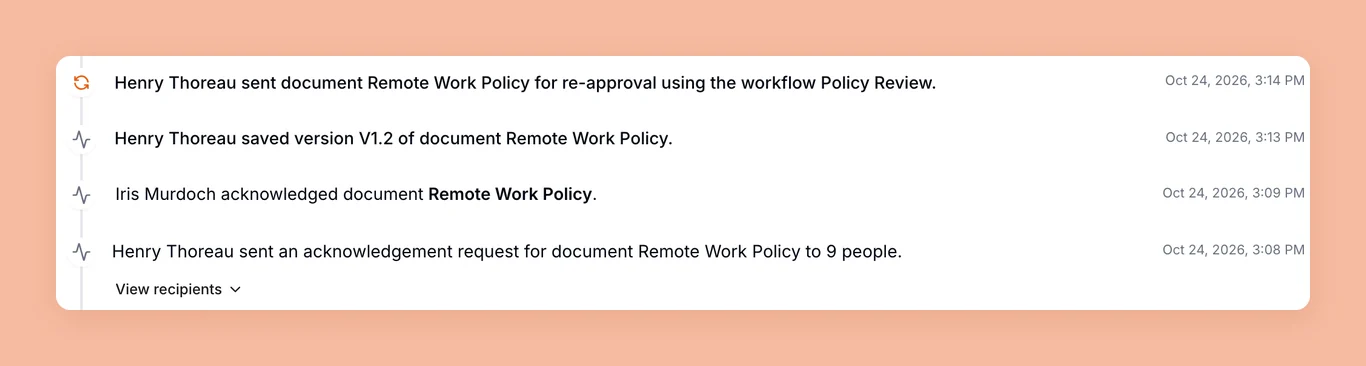
The log covers creation, versions, restores, approvals and rejections, distributions with their recipients, each acknowledgment by name, tag edits, folder moves, deletion and restore, who viewed the document, evidence uploads, and e-sign requests sent, completed, and declined. Deleting a document is logged, and its history is kept.
Admins also have the workspace Audit Log, which shows events from all documents. Both views filter by date range and person, and both export to PDF or CSV, so you can give an auditor the entries they ask for.
Common Questions
Is an audit trail the same as an audit log?
In everyday use the two mean nearly the same thing. A log is the stored list of entries, and a trail is the history you can follow through them. In AllyMatter, each document's page is titled Audit Trail and the workspace page is titled Audit Log.
Does an audit trail make us compliant?
An audit trail shows that your process was followed. What a particular standard or auditor expects is a separate question, and a compliance consultant can help you answer it.
Next Steps
- View a Document's Log: read the history of one policy.
- Use the Workspace Audit Log: see events across every document.
- Export Logs and Records: give the record to someone outside AllyMatter.
- Answer an Auditor's Request: use the log, records and exports when an auditor asks.
New to AllyMatter? Start a 30-day trial. No credit card required.