

Invite Your Team
Bring people into your workspace with the right role and tags from the start.
Who can do this: Admins.
Before You Start
- Have each person's first name, last name and work email ready.
- Create your tags first, because tags decide what each person sees. See Create and Manage Tags.
- The Startup plan includes up to 20 Editors. For more, upgrade to Scale, which has unlimited Editors. Viewers are free on both plans. See Plans, Storage, and Billing.
Invite a Person
In the left navigation, click Users.
Click Invite at the top right. Invite a person opens.
Enter the First Name, Last Name and Email.
Click Select Role and choose Admin, Editor or Viewer. To compare roles, see Roles and Permissions.
Click Select tags and choose the person's tags. What This Grants lists the documents those tags give them. If a document you expected is missing from the list, check the tags you picked.
Click Send invite.
Check That It Worked
The person appears on the Users page with the status Invited, the role and the tags you chose. A person new to AllyMatter gets an email with a temporary password and a sign-in link. Someone on your Google or Microsoft sign-in domain, or who already has an AllyMatter login, gets an invitation with no password. Send them Your First Login.
Change Someone's Tags Later
On the Users page, click the pencil on the person's row. Edit User opens.
Under Assign Tags, add or remove tags.
Click Save Changes.
The person gets an email headed "Access added" or "Access removed" that names the tags.
Resend or Withdraw an Invite
On the Users page, click the three dots on a row marked Invited.
Choose Resend invitation to send the invitation again, or Withdraw invitation to cancel it.
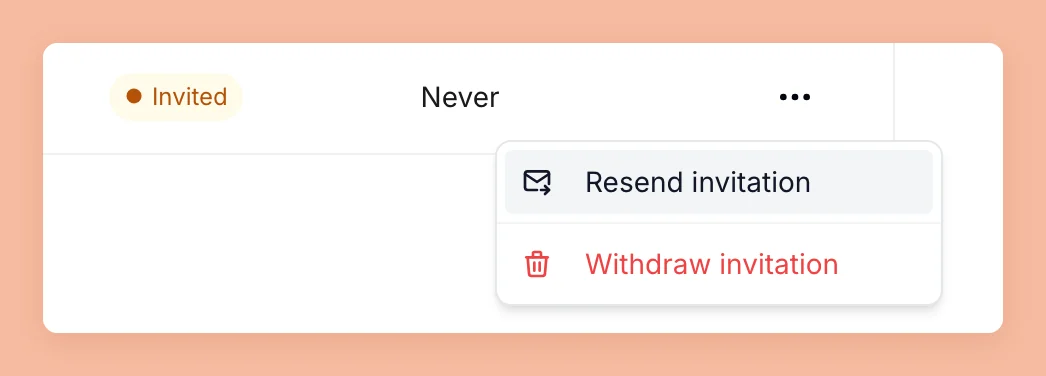
To fix a wrong address, withdraw the invite and send a new one.
Common Questions
Can I Invite Someone with a Personal Email Address?
Yes. They sign in with email and password. See Choose How People Sign In.
Can I Invite Someone Who Already Uses AllyMatter at Another Company?
Yes. One login works across several workspaces. They use their existing login.
How Do I Add an Outside Lawyer as an Approver?
Invite them as a normal workspace user. See Add an Outside Approver.
Next Steps
- Give a New Hire the Right Policies on Day One: the steps for each new hire.
- Manage Users: change roles and remove people.
New to AllyMatter? Start a 30-day trial. No credit card required.