

How Tags Combine
Put several tags on a document and the audience narrows to the people who hold all of them.
Every Tag Must Match
Your London office has its own leave rules for supervisors, so you tag that policy London and Managers. To open it, a person needs both tags.
| Person | Holds | Can open it? |
|---|---|---|
| Margaret Fuller | London, Managers, Finance | Yes. She holds both, and her extra tag makes no difference. |
| Josiah Royce | Tokyo, Managers | No. He is missing London. |
| Anne Conway | London | No. She is missing Managers. |
Admins can see what each person holds in the Tags column on the Users page.
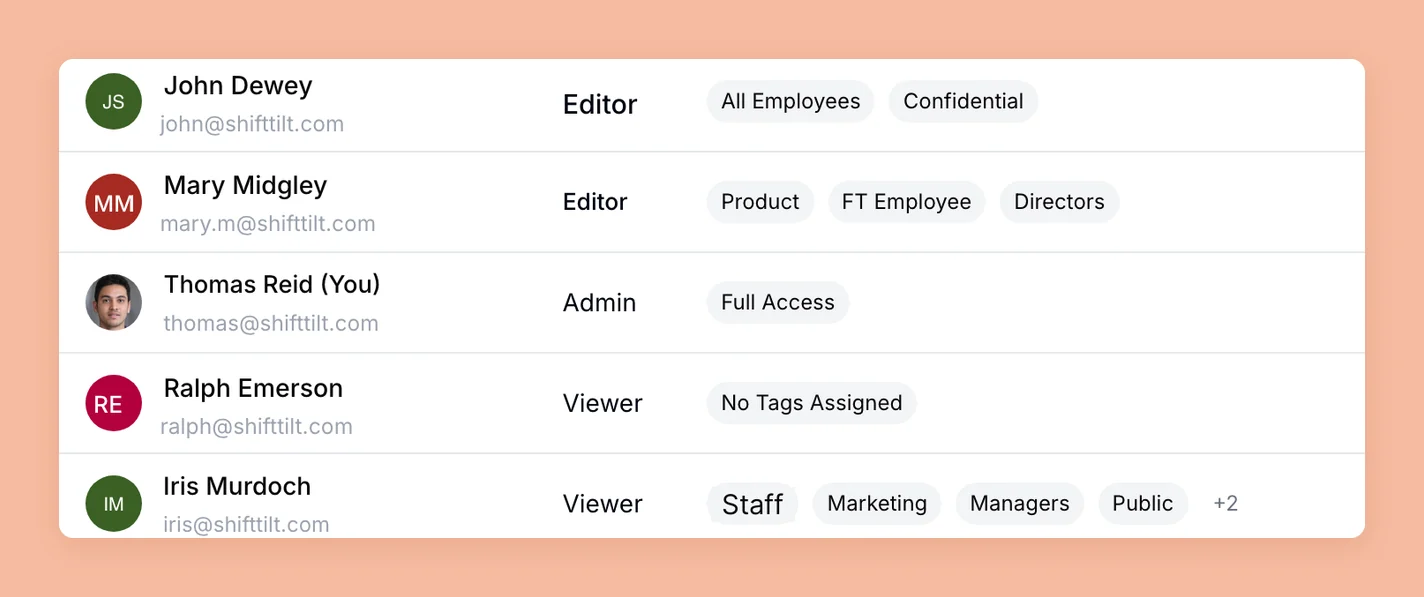
The same list is your audience when you distribute, so the people who can open the policy are the people who receive it.
Build Reusable Tags
Some tags are teams, like Finance and Engineering. Some are locations, like London and Tokyo. Some are roles, like Managers, and some are products. Each tag names one thing, and you stack them to reach a specific audience, which saves you from keeping a separate tag such as London Managers for every combination. Twelve tags across teams, locations, and roles can combine into more than a hundred audiences.
Example: Product Tags and a Role Tag
ShiftTilt builds two products, Atlas and Beacon, and each has its own team of designers, engineers, and marketers. Each product gets a tag, so everything about Atlas reaches the whole Atlas team, wherever they sit.
The Atlas pricing strategy should reach only the leads. Instead of creating a tag called Atlas Leads, you create one reusable tag, Product Leads, and put Atlas and Product Leads on that document.
| Person | Holds | Atlas pricing strategy |
|---|---|---|
| Iris Murdoch, leads Atlas | Atlas, Product Leads | Opens it. |
| William James, designs for Atlas | Atlas | Hidden. He is missing Product Leads. |
| Philippa Foot, leads Beacon | Beacon, Product Leads | Hidden. She is missing Atlas. |
Next quarter, Beacon's pricing document gets Beacon and Product Leads, so the same Product Leads tag works for both products.
Folder Tags and Document Tags
A document in a tagged folder inherits the folder's tags. They show in Document Settings under From parent folder, each with a lock, and they stay on the document while it is in that folder. When you create a document in a tagged folder, the New Document dialog lists them under Inherited Tags.
A document can add its own tags on top of the ones it inherits, which narrows its audience further. If the Atlas pricing strategy sits in a folder tagged Atlas, it inherits Atlas and you add Product Leads to the document, so only people with both tags can open it.
A document at the root has only the tags you add to it, because the root passes no tags down. An Internal document with no tags is visible only to Admins and its Editor.
Changing the tags on an approved document leaves it Approved, and the document page offers re-approval. Re-approve it before you distribute again.
One Tag Across Several Folders
Folder tags cascade, so a tag on a folder narrows everything inside it. That works well when a folder is its own audience. When a set of documents spans several subjects, leave those folders untagged and tag each document.
Your manager handbook lives in HR, the spending limits live in Finance, and the incident escalation guide lives in Security. Each one carries the Managers tag, and the folders carry none. When Henry Thoreau is promoted, you give him that one tag, and he can open all three documents, along with an email reading "Access added: Managers".
If those folders carried tags of their own, each document would ask for that tag as well, and Henry would need all of them.
Common Questions
Does adding a tag to a document reach more people?
No. Each extra tag narrows the audience. To reach more people, add them to the tag the document already carries.
How do I reach London employees and Tokyo employees with one document?
Use one tag that both sets of people hold, such as All Employees, or create a tag for that audience and add them to it. Two location tags on the same document would reach only people holding both.
Next Steps
- Plan Your Folders and Tags: choose your tags before you invite anyone.
- Organize a Multi-Location Company with Tags: the London and Tokyo pattern in full.
- What Happens When Tags Change: how promotions and moves affect access.
New to AllyMatter? Start a 30-day trial. No credit card required.