

Answer an Auditor's Request
Answer an auditor's request with the approved policy, its approval history, named acknowledgments, and any supporting evidence.
When You Need This
An auditor or a customer's assessor asks for a policy, who approved it, and who acknowledged it in a period, such as your Anti-Bribery Policy between January and June. AllyMatter keeps each of these records on the policy, so you collect them and send them.
Before You Start
- You need to be an Admin or the policy's Editor. Both can open and export a document's log.
- Write down the policy, the period, and which people the request covers. Auditors often ask about a sample of names, so answer only for the people they named.
Download the Policy
Open the policy from Docs in the left navigation.
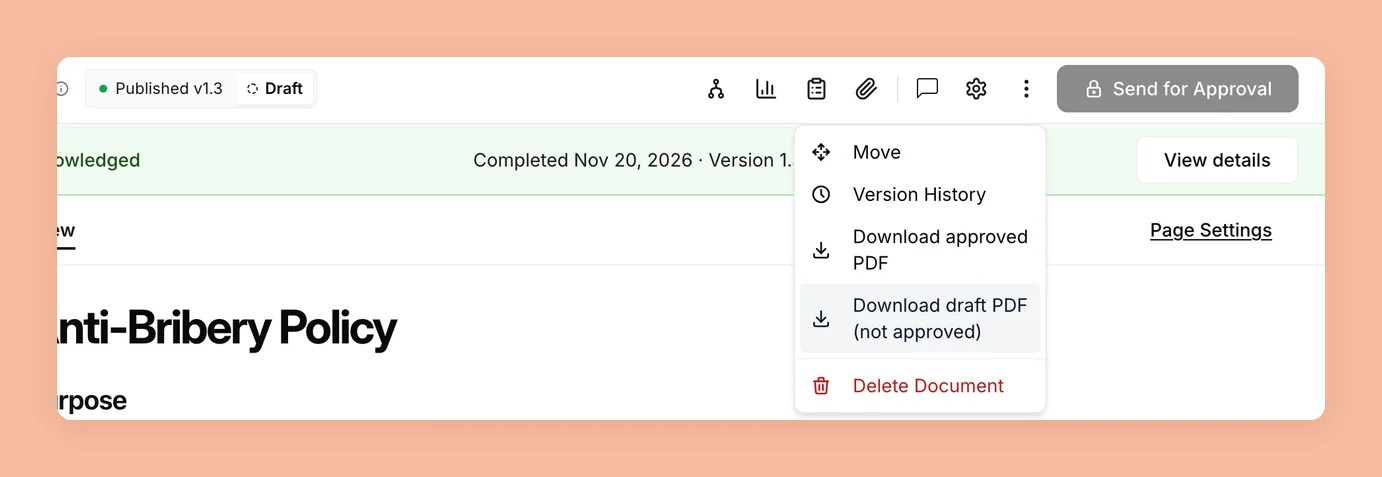
Click the three dots on the top bar.
Choose Download approved PDF. The file is named after the policy, such as Anti-Bribery Policy.pdf.
If a newer draft is in progress, the menu also offers Download draft PDF (not approved). Send the auditor the approved PDF.
Uploaded PDFs inside the policy are not in the download. If the auditor needs one, send it as well.
If the auditor asks how the policy changed during the period, choose Version History from the same menu. See Work with Versions.
Show Who Approved It
On the policy's top bar, click the Audit Logs icon, the clipboard. The Audit Trail page opens, newest event first.
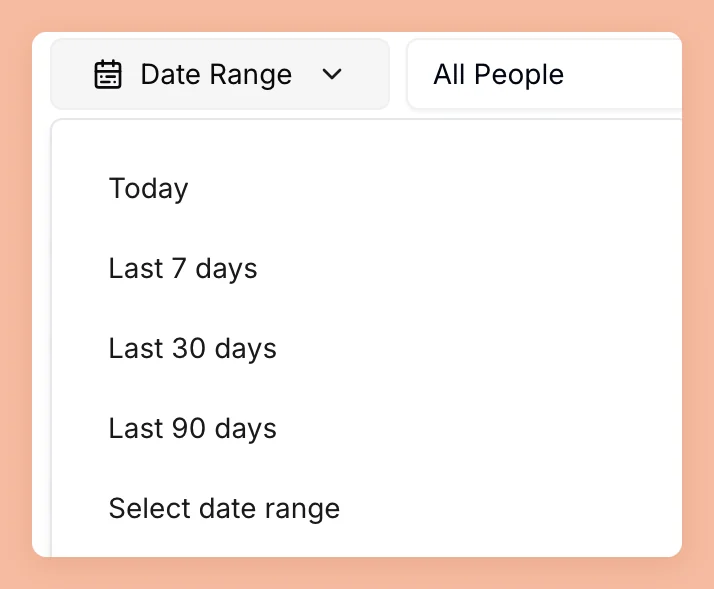
Click Date Range.
Choose the auditor's period, or Select date range to set your own dates.
To narrow the log to one person, choose them in the All People filter.
Read the lines for the period, such as "Iris Murdoch approved document Anti-Bribery Policy", each with its date and time.
If a line you expect is missing, widen Date Range first, since it may fall outside the period. To learn what each kind of line means, see View a Document's Log.
Show Who Received and Acknowledged It
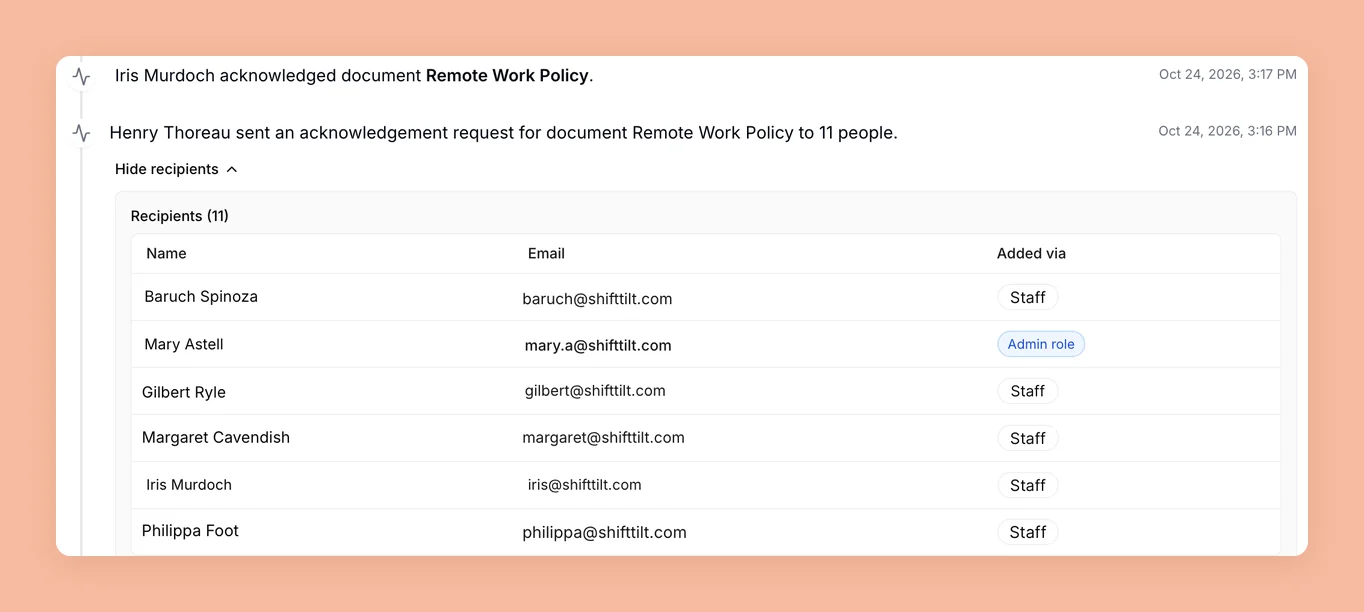
Find the line that says the policy was sent, which names the number of people it went to.
Expand that line. Each person it went to is listed with their name, email and the tag they were added through.
Find each acknowledgment line, such as "Iris Murdoch acknowledged document Anti-Bribery Policy".
To check one person's status, click the Document Analytics icon on the top bar.
Open the Requests tab. Each person shows Pending or Completed.
If a named person is not among the recipients, they did not hold the policy's tags when it was sent, or they were excluded before sending. People who have left the company still appear for the older part of the period. See Understand Acknowledgment Records.
Export the Log
Keep Date Range and All People set to what the auditor asked for.
Click Export.
Choose PDF to send as it is, or CSV to open in a spreadsheet.
For a request that covers many documents, an Admin can use the workspace Audit Log under Admin, which filters and exports the same way. See Use the Workspace Audit Log.
Add Supporting Evidence
On the policy's top bar, click the Attachments icon, the paperclip.
Under Uploaded evidence, download each file the auditor asked for.
See Keep Evidence with the Policy.
Check That You Have Everything
| File | What it answers |
|---|---|
| The policy PDF | What the policy says |
| The log export for the period | Who approved it, who it went to, and who acknowledged it, with dates |
| Evidence files, if asked | That the policy is followed in practice |
For help preparing, a compliance consultant can work through the standard with you.
Common Questions
The auditor wants to look in AllyMatter directly. What do I do?
An Admin can invite the auditor as a Viewer with only the tags for the documents they should see. Viewers are free on both plans. See Invite Your Team.
Next Steps
- See a Person's Activity: look at one person's activity across documents.
- What Is an Audit Trail?: how the record fits together.
New to AllyMatter? Start a 30-day trial. No credit card required.