

Slash Menu and Embed Providers
What you can insert with the slash menu, how to embed each of the 17 providers, and which files upload into a document.
Use the Slash Menu
Type / in a document you can edit. An empty document prompts you with Type '/' for commands.
- The menu opens at your cursor. Keep typing to filter it, in upper or lower case.
- Click an item, or use the arrow keys and press Enter.
- Press Escape or click elsewhere to close the menu without inserting anything.
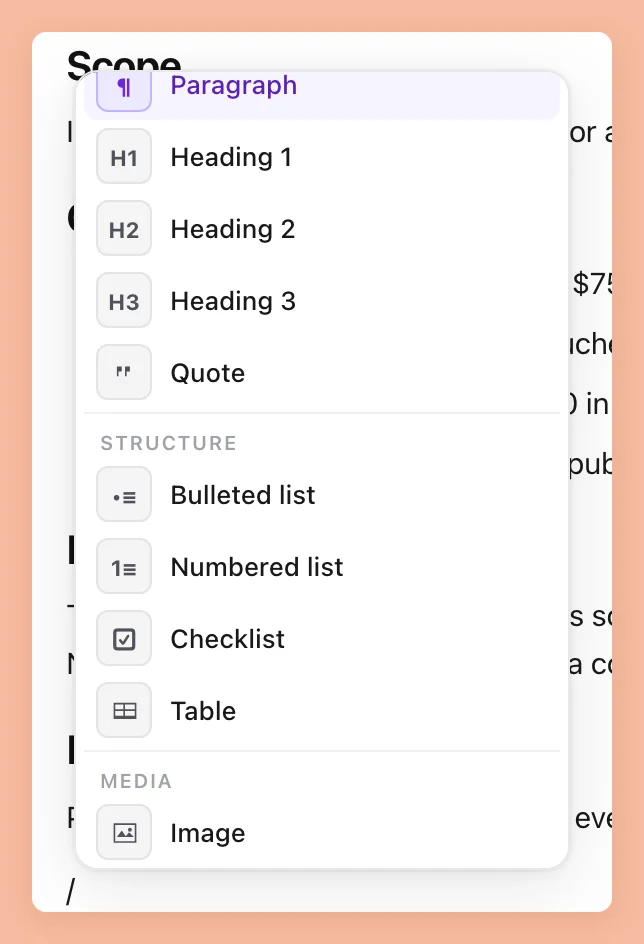
The slash menu works in documents open for editing, so it stays closed on a document locked for approval.
Inserts
| Item | What It Adds |
|---|---|
| Paragraph | A plain text block |
| Heading 1, Heading 2, Heading 3 | Section headings |
| Quote | A quote |
| Bulleted list | A bulleted list |
| Numbered list | A numbered list |
| Checklist | A checklist |
| Table | A table at your cursor |
| Callout, Info, Warning, Success, Error | A highlighted block. Each is its own item in the menu. |
| Code block | A block of code |
| Divider | A horizontal line |
| Image | An image, from the Media section. Text starts on a new line after it, and you can also paste an image or drag one in. |
Embed Providers
Type / where you want the embed and choose the provider.
Under Paste URL, paste a shareable link to the item, then click Embed.
The embed displays in the document for everyone who can open it. An invalid or private link shows a message or placeholder, and the rest of the document is unchanged.
| Provider | Use It For |
|---|---|
| Google Docs | Documents |
| Google Sheets | Spreadsheets |
| Google Slides | Presentations |
| Google Forms | Forms |
| Excel Online | Spreadsheets |
| Airtable | Bases and tables |
| Typeform | Forms |
| Calendly | Booking pages |
| Figma | Designs |
| Canva | Designs |
| Miro | Whiteboards |
| Lucidchart | Diagrams |
| Draw.io | Diagrams |
| Loom | Videos |
| YouTube | Videos |
| Vimeo | Videos |
| CodePen | Code samples |
The slash menu also has PDF. Its Upload PDF tab puts a PDF inside the document.
Keep Forms on Their Own Page
Put a Google Form or Typeform on its own page and link to it from the policy. A document with an embedded form is treated as an information page. People acknowledge or sign documents that have no form in them.
Uploads Inside a Document
A document can hold uploaded images and PDFs, and a PDF is viewable in place. Videos go in as embeds from Loom, YouTube or Vimeo. Word files go in Attachments.
Common Questions
Can people fill in an embedded form?
Yes, Viewers can fill it in. Keep it on its own page so the policy can still be acknowledged.
What if my tool is not on the list?
Add a link to it in the text of the document.
Next Steps
- Write and Format a Document: the editor, the floating toolbar and callouts.
- Embed Files and Apps: add embeds and uploads step by step.
- Add Attachments to a Policy: keep Word files and evidence with the policy.
New to AllyMatter? Start a 30-day trial. No credit card required.