
SOPs · 15 min read
How to Write an SOP: 10 Steps to Creating SOPs People Follow
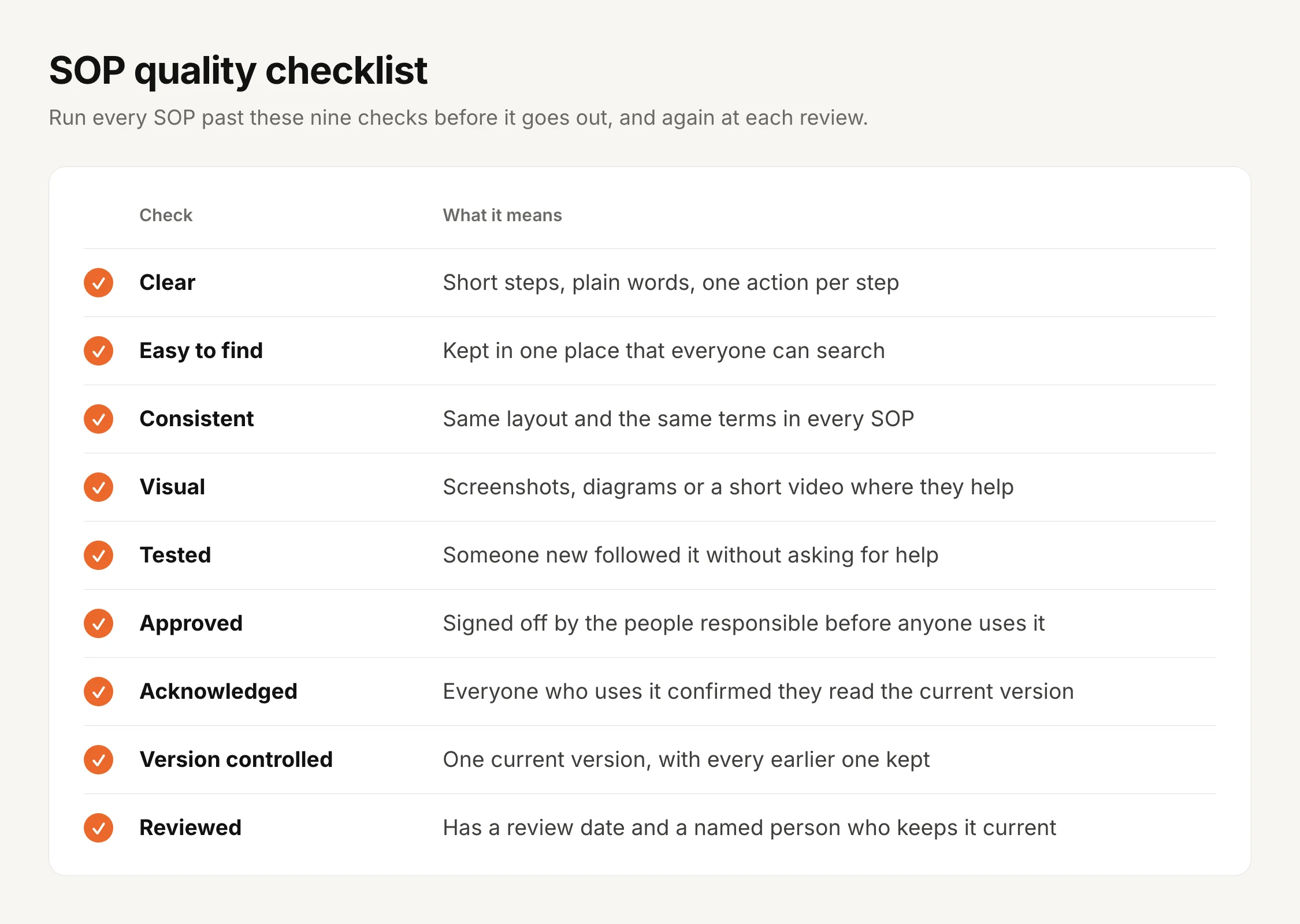
To write an SOP, pick one routine process, decide where it starts and ends, and write the steps in the order the work happens, one action per step, in words the person doing it would use. Then have someone new follow it, fix what confused them, get it approved, send it to the people who do the task, and set a date to review it. Those are the ten steps this guide walks through.
Writing is the easy half. The trouble usually starts later, when the process changes and half the team is still working from the old version, so this guide also covers how to organize SOPs, keep them updated as the team grows, and get each change to every department that uses it.
I built AllyMatter for that second half: getting an SOP approved, into the hands of the right people, read and kept current, the same way policy management software handles policies.
Four signs your SOPs need work:
- A key task stops when one person is on leave.
- Two people do the same task two different ways, and both think they’re right.
- Someone asks “is this the latest version?” and nobody is sure.
- An auditor or customer asks who was trained on a change, and the answer is a search through old emails.
Key takeaways
- An SOP is a written, step-by-step way to do a routine task the same way every time.
- Writing it is seven steps. Approving it, sending it out and reviewing it are the three that keep it useful.
- Every change should be approved again and sent back out, so people never work from an old version.
- Keep the record of who approved and who read each version. That record is what an audit asks for.
What is an SOP?
An SOP, or standard operating procedure, is a written set of steps for doing a routine task the same way every time, which turns what one person knows into instructions anyone on the team can follow.
SOPs started in places like the military, labs and factories, and today every team uses them, from finance to customer support. Where a policy says what the rule is, an SOP says how the work actually gets done.
Why SOPs matter as a team grows
SOPs keep work consistent as more people start doing it, and here’s what they change.
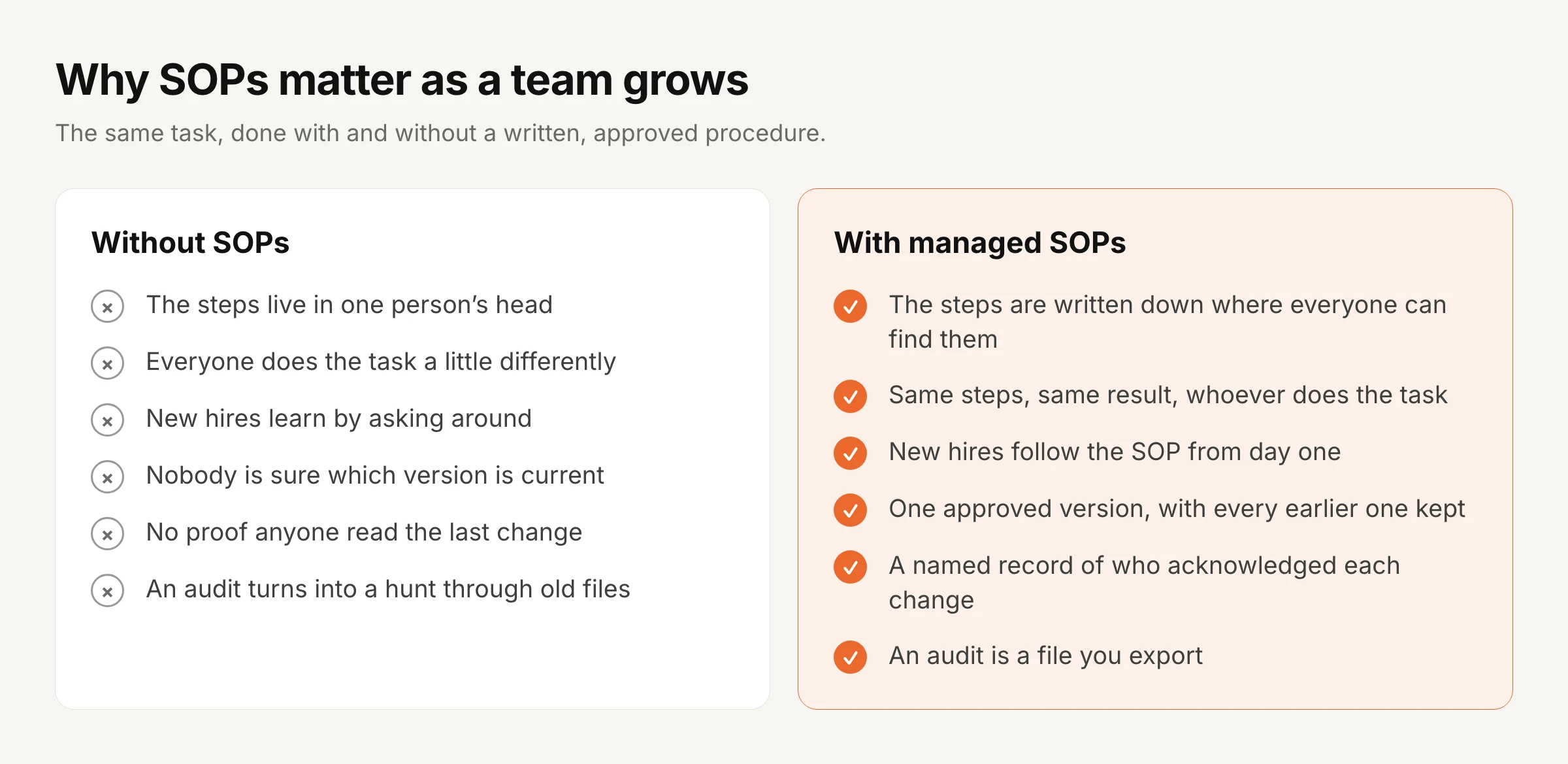
Consistency. The same task is done the same way, whoever does it. Fewer errors, fewer surprises.
Knowledge that stays. When someone leaves, their know-how doesn’t leave with them. A good test is to ask whether anyone else could do a person’s job if they left tomorrow, and if the answer is no, that process needs an SOP. Our guide to keeping what your team knows goes deeper on this.
Faster onboarding. New hires follow the steps instead of asking around, so they work on their own sooner.
Compliance. In regulated work written procedures are expected rather than optional, and an SOP with an approval and an audit trail shows how the work is done and who signed off on it.
A baseline to improve from. You can’t fix a process that nobody has written down, but once it’s on paper the slow or confusing steps are easy to spot.
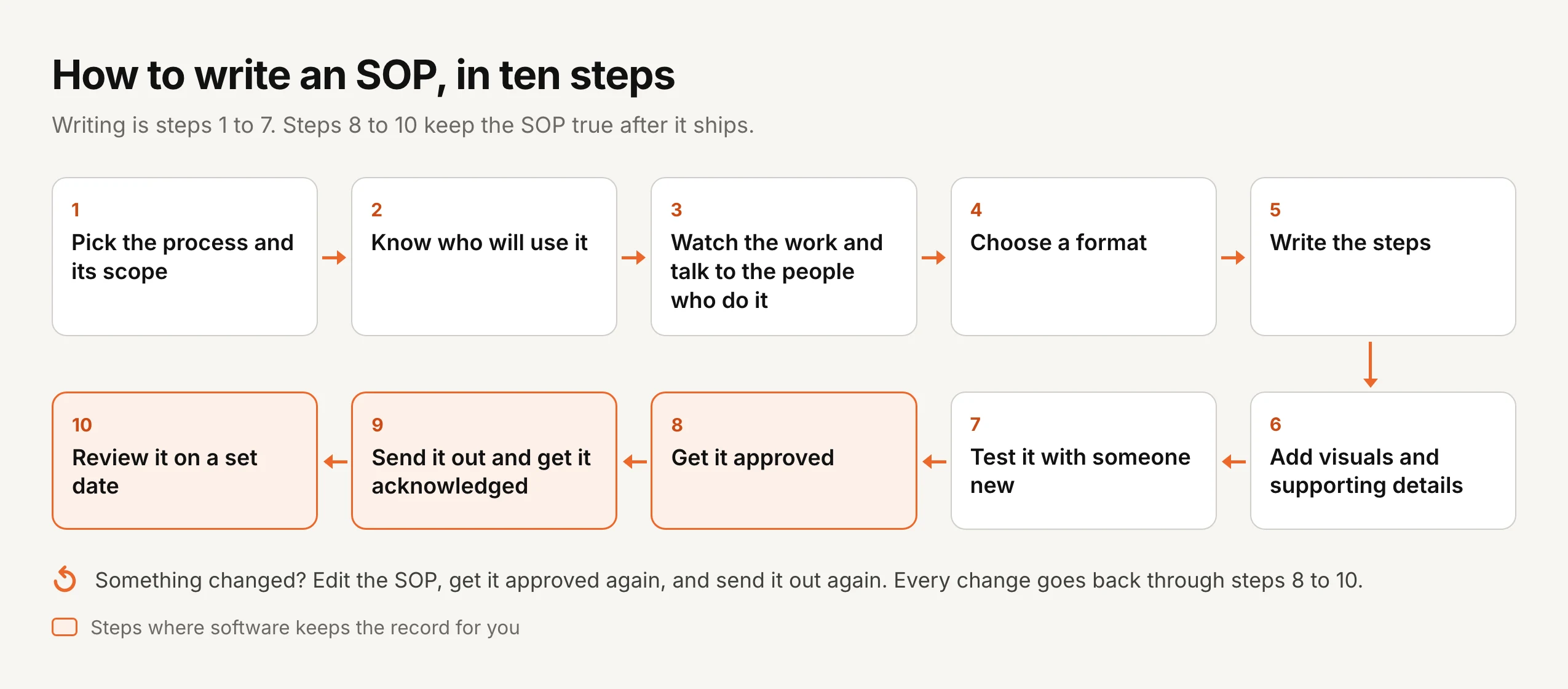
How to write an SOP in 10 steps
Steps 1 to 7 are about writing a good SOP. Steps 8 to 10 keep it true after it ships, and they’re the ones most teams skip.
Step 1: Pick the process and its scope
Choose one process, decide where it starts and where it ends, and write one sentence on why the SOP exists, because if you can’t say what problem it solves, it isn’t ready to write.
For example, a finance team might start with client onboarding because it keeps getting delayed and missing compliance checks. The purpose of that SOP would be the same checks, in the same order, for every client.
Step 2: Know who will use it
Write for the person doing the task rather than for the expert, since a new admin needs far more context than a ten-year veteran. Decide whether the SOP is for training, for quick reference, or both, and pitch the detail to match.
Step 3: Watch the work and talk to the people who do it
No one person knows every step, so watch the task being done, talk to two or three people who do it, and read any notes that already exist. Look for the places where people do it differently and where it usually goes wrong, and you’ll often find a shortcut one person uses that everyone should be using.
Step 4: Choose a format
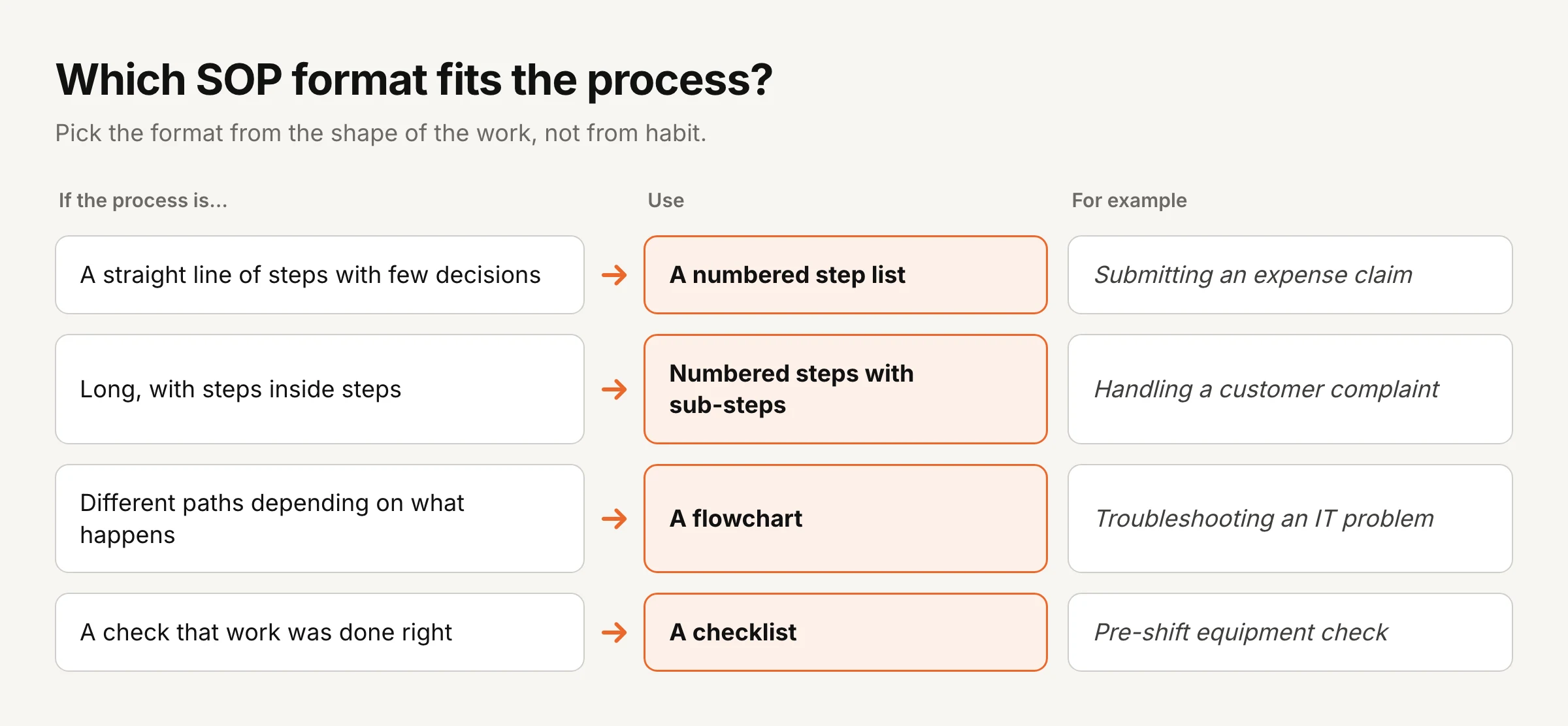
Pick the format from the shape of the work rather than from habit.
Step 5: Write the steps
Use plain words and start each step with a verb, so it reads “Enter the customer’s details” rather than “The customer’s details should be entered.” Put one action in each step, use the same terms throughout, and don’t leave room for two readings of the same line.
Step 6: Add visuals and supporting details
Pictures cut mistakes, and one widely cited estimate puts about 65% of people as visual learners. Add screenshots for software steps, diagrams for physical work and a flowchart where the path splits, because a short screen recording often explains more than a paragraph can.
Then add what the reader needs around the steps: the tools or access they’ll need, key terms, any rule the SOP helps meet, links to related SOPs, and who to ask when something doesn’t fit.
Step 7: Test it with someone new
Hand the SOP to someone who has never done the task and watch them follow it, because every question they ask is a gap in the document that you should fix before anyone approves it.
Step 8: Get it approved
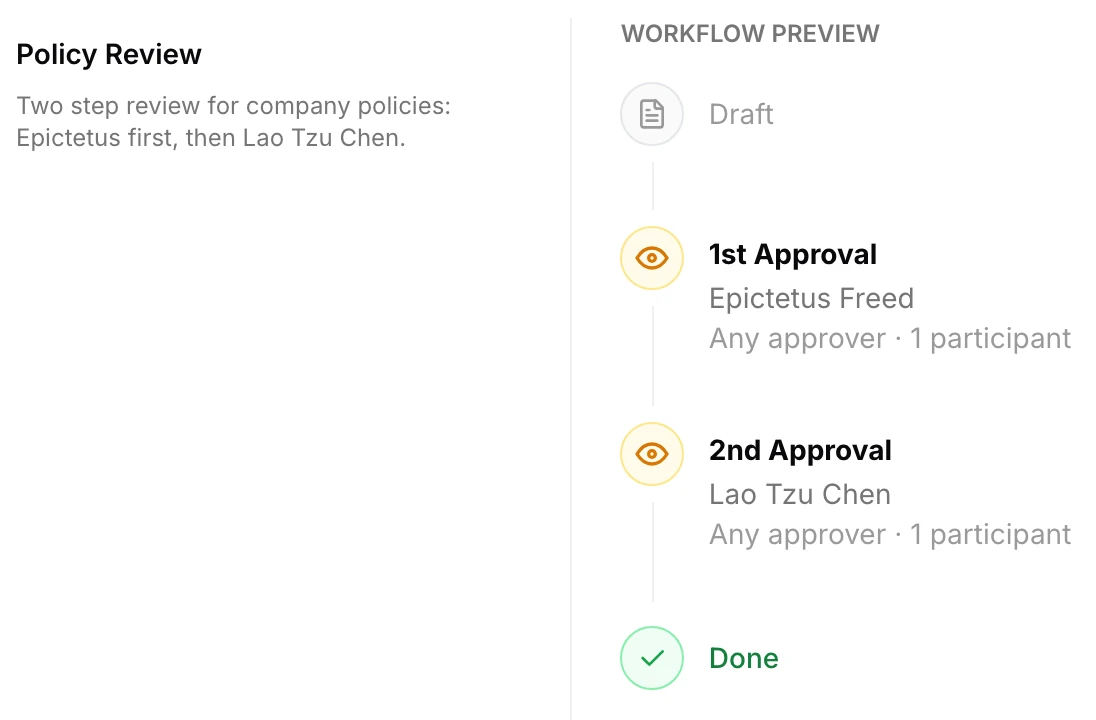
An SOP that nobody signed off on is just one person’s opinion, so have the people responsible approve it before anyone uses it: usually a subject expert, then the process owner, and for some SOPs compliance or legal too.
This is where a shared folder starts to fail, because approvals end up in email threads and nobody can show later who approved which version. In AllyMatter, approval workflows run in order, up to four steps, and each step can need any one approver or all of them. The SOP is locked while it’s being reviewed, a rejection has to come with a reason, and the team keeps seeing the last approved version until the new one is signed off. Build a workflow once and reuse it for every SOP in a folder.
Step 9: Send it out and get it acknowledged
Even a good SOP is useless if people don’t know it exists, so send it to the people who do the task, and ask each of them to confirm they’ve read it.
In AllyMatter, tags decide who sees each SOP, so the warehouse team gets warehouse SOPs and nobody else’s. When you send an SOP out, you choose whether people just get notified or have to acknowledge it, and you set automatic reminders in the same step. Each person acknowledges on the SOP itself, while signed in. The record shows their name, email, the date and time, and which version they acknowledged. The audit trail lists everyone it went to, and each acknowledgment is recorded by name, which is the list you actually work from.
Step 10: Review it on a set date
Processes change and SOPs go stale, so give every SOP a review date and a named person who keeps it current, reviewing critical SOPs every quarter and stable ones once a year.
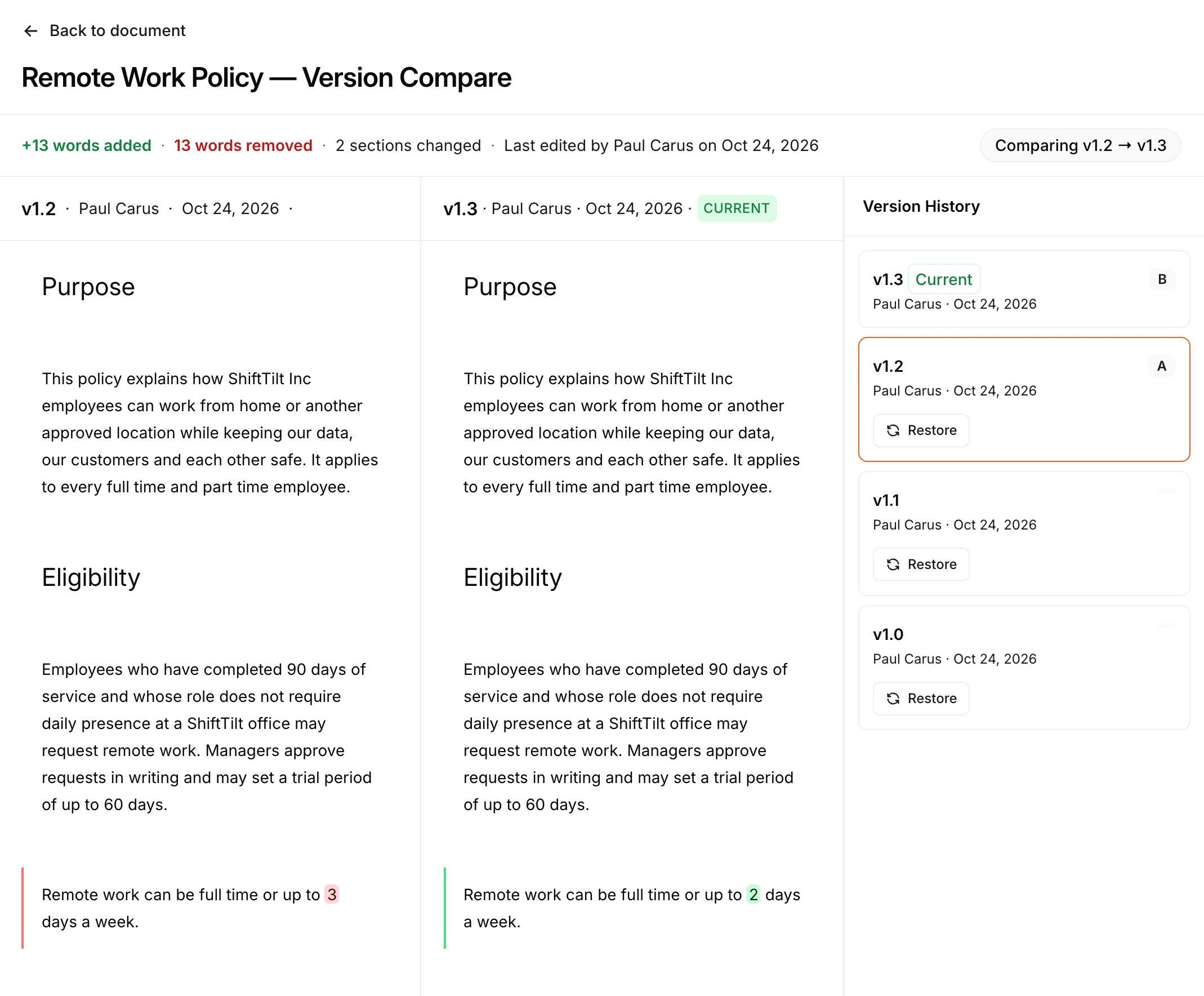
In AllyMatter you set a review date on each SOP, either a fixed date or a repeating cycle, and the SOP shows when it’s due. When something does change, every edit goes back through approval and back out for acknowledgment. There’s no “minor edit” shortcut, because a small word can change what people do. Version history keeps every earlier version, and compare shows every word removed and added, so a re-read takes minutes, not an hour.
Common mistakes when creating SOPs
Most SOPs fail for one of these reasons.
Too much detail. An SOP that tries to cover every case gets skipped, so cover the normal case well and add a short note for the exceptions.
No “why.” Steps without a reason get worked around, and a single line explaining the purpose goes a long way.
Hard to find. An SOP buried in a shared drive might as well not exist, and if you’re on SharePoint, our post on why SharePoint struggles with SOP management covers the usual problems.
Written, then forgotten. Nobody checks that people read it, and nobody updates it. The document and the real process drift apart, and that gap is where mistakes happen.
How to tell if your SOPs are working
Watch for fewer errors and less rework, faster onboarding, the same result whoever does the task, and fewer “how do I…” questions. For SOPs that matter for compliance, also check two things: is every SOP approved and within its review date, and has everyone who uses it acknowledged the current version? Teams that share knowledge well tend to be more productive overall.
SOPs for different teams
Every team has work worth writing down, and these are the SOPs most teams start with.
| Team | SOPs worth writing first |
|---|---|
| Operations | Inventory counts and reorders, equipment maintenance, quality checks, supplier onboarding |
| Customer success | New customer onboarding, ticket handling, escalations, account health checks |
| Sales | Lead qualification, follow-up sequences, discount approvals, proposals |
| Marketing | Content approval, social posting, campaign launch checklists, monthly reporting |
| HR and finance | New hire onboarding, leave requests, expense claims, month-end close |
Operations SOPs usually change the most, so give them the shortest review cycle. Sales and customer success SOPs work best with real examples and scripts that have worked before.
How to keep SOPs current
Writing SOPs is the start. Keeping them true needs a few simple rules, sometimes called SOP governance.
One owner per SOP. One named person is responsible for keeping each SOP accurate, and in AllyMatter that person is the SOP’s editor.
Review cycles that match the risk. Quarterly for high-risk or fast-changing processes, yearly for stable ones, and an extra review whenever a rule, a system or the team changes.
Approval levels that match the risk. A safety SOP might need a department head and compliance, while a routine admin SOP might need only one manager, because too many approvers on a low-risk SOP just slows everything down.
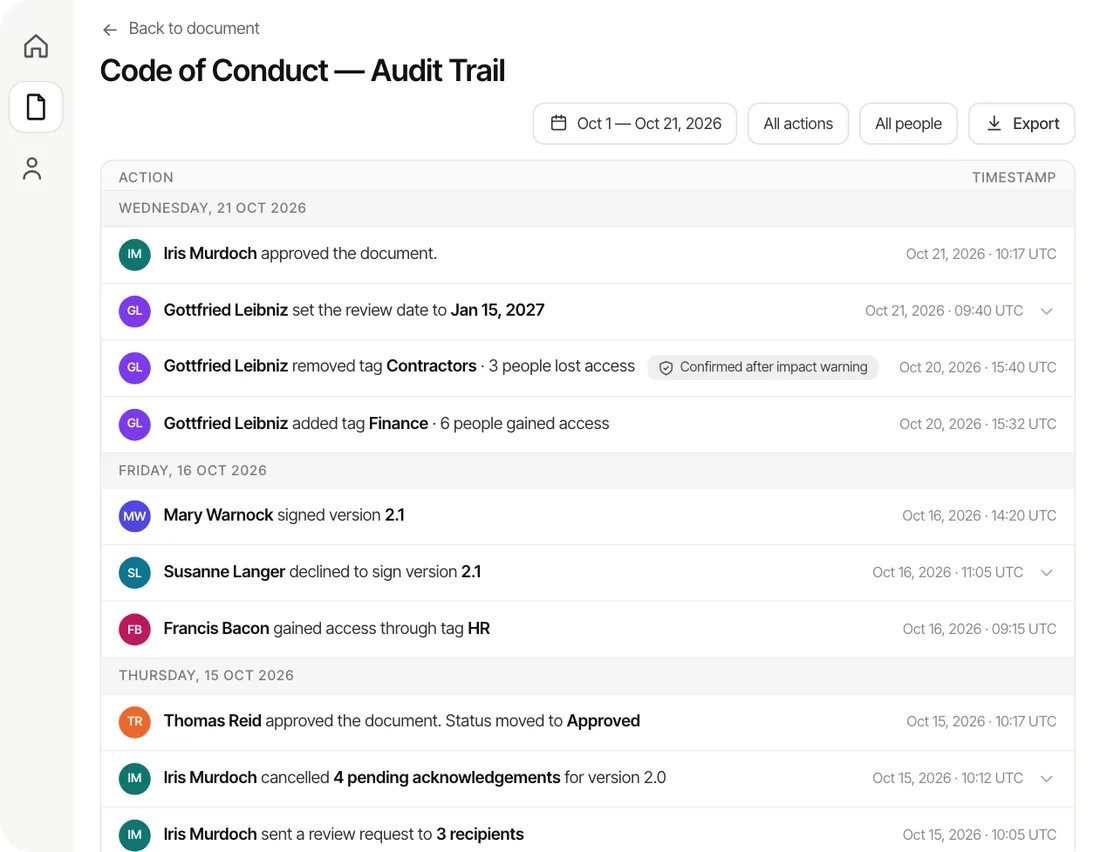
A full history. For every version you should be able to show what changed, who approved it and when it took effect, which is exactly what an auditor asks for. AllyMatter’s audit trail records versions, approvals and rejections with their reasons, and each acknowledgment by name, and exports as a PDF or CSV.
Every change goes back out. When an SOP changes, the people who use it should acknowledge the new version, because otherwise you can’t say who is working from what. Our guide to acknowledgment tracking covers how to do this well.
SOPs for remote and distributed teams
Remote teams lean on SOPs even more, because nobody can lean over a desk and ask, and three things help. Keep every SOP in one searchable place, so time zones don’t block anyone. Use short videos and screenshots, since nobody can show the task in person. And when an SOP differs by region, keep one core SOP and note the local differences inside it, rather than running separate copies that drift apart.
AllyMatter lets you embed Loom recordings, Lucidchart and Draw.io diagrams, Miro boards and more right inside an SOP, so the visual sits next to the step it explains.
Where automation and AI fit
AI can now draft a first version of an SOP in seconds, which is genuinely useful. Process mining tools can show how work really flows through your systems, which helps you write steps that match reality. But a draft isn’t a procedure, and someone still has to check it against how the work is actually done, approve it, send it out and keep it current. The faster SOPs get written, the more those last steps matter.
Where written procedures are required
Many SOPs exist because the work needs consistency, but in some industries the law asks for written procedures outright, and auditors read them against what people actually do.
| Rule or standard | What it asks for |
|---|---|
| FDA drug manufacturing (21 CFR 211.100) | Written procedures for production and process control, drafted, reviewed and approved, including any changes, and followed |
| FDA food safety (21 CFR 117.126) | A written food safety plan, prepared or overseen by a qualified person |
| OSHA process safety (29 CFR 1910.119) | Written operating procedures that give clear instructions for safely running covered processes |
| CLIA laboratories (42 CFR 493.1251) | A written procedure manual for every test, followed by staff, with procedures and changes approved, signed and dated by the director before use |
| HIPAA Security Rule | Policies and procedures for the security standards, kept in writing, reviewed and updated |
| FINRA Rule 3110 | Written supervisory procedures for every broker-dealer |
| ISO 9001:2015 | Documented information to the extent needed to be confident that processes are carried out as planned |
| EPA guidance (QA/G-6) | Not a law, but the clearest public guide to writing SOPs for routine, repeated work |
Sources: 21 CFR 211.100(a), 21 CFR 117.126(a), 29 CFR 1910.119(f), 42 CFR 493.1251(a) and (d), 45 CFR 164.316, FINRA Rule 3110(b), ISO 9001:2015 clause 4.4, EPA QA/G-6
What auditors look for in an SOP
It was approved before use
The version on the floor has to be the approved one, and changes need the same approval.
Only the current version is in use
Printed copies and old files are where most findings come from, so the controlled version has to be the easiest one to reach.
People were trained on it
An auditor will ask the person doing the work to describe it, and then compare the answer with the SOP. A record that they confirmed it helps.
It reflects the real work
An SOP that describes how the task was done three years ago creates a finding, so review dates matter as much as the first draft.
What an SOP header should carry
A short control block at the top of each SOP answers most audit questions before they are asked.
| Field | What to put in it |
|---|---|
| Title and ID | A clear name and a unique number |
| Version | The current version, with major and minor changes told apart |
| Owner | The person who keeps it current |
| Approver and approval date | Who approved this version and when; often the effective date too |
| Review date | When it will next be checked |
| Scope | The process, site and people it covers |
| Related documents | The policy it supports and the forms it produces |
| Change summary | What changed in this version and why |
In a system that records approvals and versions for you, most of this block fills itself in, and the block in the document becomes a summary of the record rather than a second copy to maintain. For how SOPs relate to policies and procedures, see our guide to policy vs procedure vs SOP, and for keeping the whole set under control, our document control procedure.
How to run SOPs in AllyMatter
AllyMatter is SOP management software for the part after the writing, and this is how a team usually sets it up.
- Bring your SOPs in. Write them in the editor, or upload the PDFs you already have and get them approved and acknowledged the same way. Setup takes about half an hour.
- Organize and tag. Put SOPs in folders by team or site, where tags decide who sees what and folder tags flow down to every SOP inside.
- Set up approval once. Build an approval workflow for each folder, and every new SOP in it follows the same sign-off.
- Send and track. Send each SOP for acknowledgment with automatic reminders, and check the recipient list and each named acknowledgment on its audit trail.
- Review and prove. Set review dates, compare versions word by word, and export the audit trail when someone asks.
Search finds any SOP by keyword, so the warehouse lead on night shift doesn’t have to message anyone to find the right procedure.
Start your 30-day free trial of AllyMatter. No credit card to start, and a 30-day money-back guarantee if you subscribe and change your mind. Free migration.
Quick check. Answer yes or no:
- Do you have more than ten SOPs?
- Do some of them need a manager’s sign-off before use?
- Have you changed an SOP in the last six months?
- Would you struggle to show who read the current version?
- Does anyone outside the company, like an auditor or a big customer, ever ask about your procedures?
Three or more yes answers means it’s worth moving your SOPs into a tool built for this.
Three scenarios
An honest read on whether you need SOP software yet:
If you’re under 30 people with a handful of SOPs that rarely change, a shared folder and a sign-off sheet will hold for a while, because the overhead of a new tool won’t pay off yet.
If you’re 30 to 200 people and the four signs at the top of this post are showing up, this is the moment. AllyMatter is what I built for exactly this.
If you’re larger, work across several sites, or answer to an auditor or regulator, managed SOPs aren’t optional. We’d start with AllyMatter.
More on SOPs
- Document Control Procedure: What to Include and How to Write One
- Document Control Software for Manufacturing: What It Does and How to Choose It
- Policy vs Procedure vs SOP: What Is the Difference?
- SOP Management Software: Controlled Procedures Without a Full QMS
- Scaling Your Business Using SOP Documentation
- The Benefits of Automating Your SOP Document Management
- The How-to That Lives in Someone’s Head
- The Process That Breaks Every Time Someone’s Out
- Why SharePoint Struggles with SOP Management
Frequently asked questions about creating SOPs
Are SOPs legally required?
In some industries, yes. FDA drug and food rules, OSHA process safety, CLIA laboratory rules and FINRA supervision rules all require written procedures. Elsewhere they are good practice, and customers and certification auditors often expect them.
Who should approve an SOP?
The person accountable for the process, often a team lead or quality lead, and in regulated work the role the rule names, such as a quality control unit or a laboratory director.
How do I write an SOP?
Pick one process and decide where it starts and ends. Watch the people who do it and write the steps in the order they happen, one action per step. Add screenshots or a diagram where words aren’t enough. Have someone new follow it, fix what confused them, get it approved, and send it to the people who use it.
Which processes should we document first?
Start with the ones done often, done by several people, tied to a compliance rule, or costly when done wrong. Ten to fifteen SOPs usually cover most of a growing company’s risk.
What’s the difference between an SOP, a policy and a work instruction?
A policy says what the rule is. An SOP says how the work gets done, step by step. A work instruction goes one level deeper, covering a single task inside an SOP. A checklist confirms the work was done.
Who should write an SOP?
The person who does the process most often should write the first draft. A manager or subject expert reviews it, and someone new tests it before it’s approved.
How detailed should an SOP be?
Detailed enough that someone new can finish the task without asking for help. Short enough that people actually read it. Cover the normal case well and give a short note on exceptions.
How often should SOPs be reviewed?
Critical or fast-changing SOPs every three months, stable ones once a year. Review sooner when a rule, a system or the team changes.
How do we know people read the latest version?
Ask them to acknowledge it. With AllyMatter, each person confirms the SOP while signed in, and the record shows who acknowledged which version and when. Every change goes out again, so the record always matches the current version.
How should we organize SOPs?
Group them the way people look for them, usually by team or site, with one folder per area and one document per process. Give each SOP a clear name that starts with the task, an owner and a review date, and keep a single list of every SOP so you can see what exists and what is due. Our guide to documenting business processes shows how to map them first.
How do we keep SOPs updated as the team grows?
Give every SOP a named owner and a review date, and review it sooner whenever the tool, the team or a rule changes. Each change goes through approval again and goes back out to the people who use it, so nobody keeps working from an old copy. Fast-changing SOPs usually need a review every quarter.
How do we make SOPs easy to update and share across departments?
Keep one copy of each SOP in one place, rather than files in every team’s folder, and control who sees it by team or role. When you update it, people open the same document and see the new version, and the ones it affects are asked to confirm they have read it.
What should an SOP system include?
Clear steps, an owner and checkpoints for each process, a single current version that everyone works from, approval before an SOP is used, a record of who has read each version, and review dates. Long background documents and several versions of the same process are the things to leave out.
Can we just keep SOPs in Google Drive or SharePoint?
Yes, for a while. If you have a handful of SOPs and a small team, a shared folder works. It starts to break when you need sign-off before use, proof that people read a change, or a clear answer to which version was in force on a given date.
SOPs that live in scattered folders get ignored. One place, one approved version, and a record of who read it is what keeps them working. For more on growing with SOPs, read scaling your business using SOP documentation.
Start your 30-day free trial of AllyMatter. No credit card to start, and a 30-day money-back guarantee if you subscribe and change your mind. Free migration.
Not ready for a trial? On yearly plans, migration is on us. We’ll move your SOPs over from SharePoint, Google Drive, Confluence or Notion, usually within a week and often sooner.