

SOPs · 15 min read
Document Control Procedure: What to Include and How to Write One
A document control procedure is the written set of rules for how your company creates, approves, issues, changes, reviews and withdraws its controlled documents, so that everyone works from the current approved version and you can prove it. In an ISO 9001 quality system it is how you meet the documented information requirements of clause 7.5, and in any growing company it is what stops two “final” versions of the same procedure from living side by side. It sits under every standard operating procedure you write, because a procedure is only as good as the control that keeps it current.
This guide explains what a document control procedure has to cover, maps each ISO 9001 requirement to what your procedure should say, gives you a section-by-section outline you can adapt, and shows how to run it without a full-time document controller.
Key takeaways
- A document control procedure sets how documents are identified, approved, distributed, changed, reviewed and withdrawn, and how external documents are kept current.
- ISO 9001:2015 no longer requires it to be a written procedure, but most certified companies keep one because it is the clearest way to show an auditor how control works.
- The two failures auditors find most are an old version in use at the point of work and a change the people affected were never told about.
- A short procedure that matches how you really work beats a long one copied from a template that nobody follows.
What is a document control procedure?
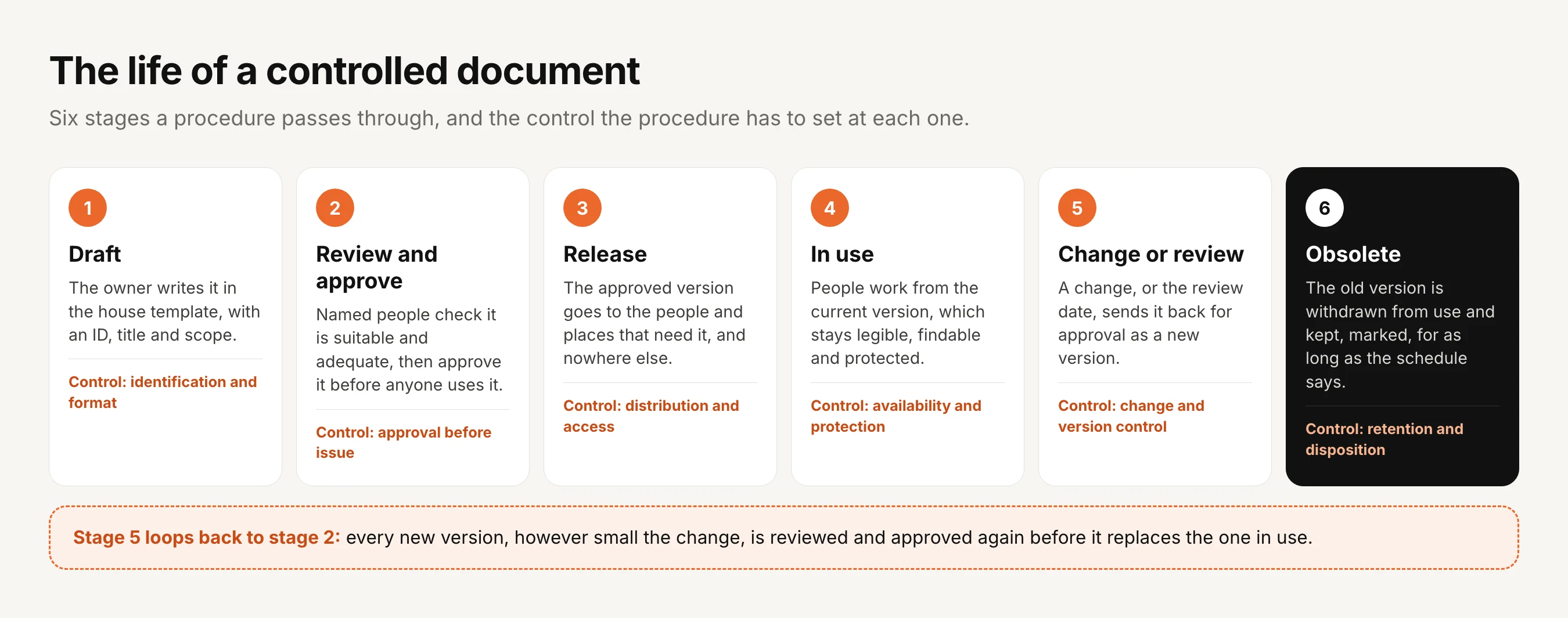
Every company has documents that tell people how to do their work, and a controlled document is one where it matters which version people use: a policy, a procedure, a work instruction, a form, a drawing or a customer specification. The document control procedure is the procedure about those documents, setting out who writes them, who approves them, how they reach people, how they change and when they retire.
It is a close cousin of a policy on policies, which sets the same rules for company policies, and in a small company one document often covers both. Together they are the practical heart of policy governance: the rules that keep every other document honest.
It is worth separating documents from records at the start, because the procedure treats them differently. Documents tell people what to do and change over time, so they need approval and version control, while records show what was done, such as a completed inspection form or a training log, and once complete they shouldn’t change at all.
Do you need a written document control procedure for ISO 9001?
ISO 9001:2008 required a documented procedure for the control of documents, and it spelled out that obsolete documents had to be kept from unintended use. The 2015 edition dropped the six mandatory procedures and replaced them with the broader idea of documented information, which you have to control in a way that suits the size and complexity of your company, but which doesn’t have to be written as a procedure.
In practice almost every certified small and mid-sized company keeps one anyway. Having been through ISO 9001 audits more than ten times, I know document control is never optional, and a two or three page procedure is the quickest way to show an auditor how you meet every part of clause 7.5 instead of explaining it from memory. ISO 9001:2026, published in September 2026, keeps the documented information requirements in the same shared structure that all ISO management system standards now follow, so a procedure written to the 2015 edition carries over.
Sources: ISO 9001:2008, clause 4.2.3 Control of documents, ISO 9001:2015, clause 7.5 Documented information, ISO 9001:2026, published 16 September 2026
What ISO 9001 clause 7.5 expects, and what your procedure should say
Clause 7.5 has two halves. The first covers creating and updating documents, which means identifying them, choosing a format and having them reviewed and approved, and the second covers controlling them once they exist, which means keeping them available, protected, distributed, stored, changed under control, retained and disposed of properly, including documents that come from outside the company. This table maps each of those to what your procedure should say and the evidence an auditor will look for.
| What ISO 9001 expects | What your procedure should say | Evidence an auditor will look for |
|---|---|---|
| Identification and description | How documents are titled, numbered and versioned, and what every document shows on its first page | Consistent IDs, titles, version numbers and dates |
| Format and media | Which templates you use, and whether documents live on paper, in a shared drive or in software | Documents that follow the house template |
| Review and approval | Who reviews and approves each type of document before it is issued, and again after every change | A named approval, with a date, for the version in use |
| Availability | How people find the current version where and when they need it | The current version at the point of work, and staff who know where to find it |
| Protection | Who may edit, who may only read, and how confidential documents are restricted | Access limited to the right people, and records that can’t be quietly changed |
| Distribution and access | Who receives each document, and how they are told about a new version | A record of who received, and who acknowledged, each version |
| Storage and preservation | Where documents are kept and how they stay legible and backed up | A single home for controlled documents, not copies in inboxes |
| Control of changes | How a change is requested, made, approved and recorded as a new version | Version history showing what changed, when and who approved it |
| Retention and disposition | How long superseded versions and records are kept, and how obsolete documents are withdrawn | Obsolete versions out of use but still retrievable |
| External documents | How customer specifications, standards and supplier manuals are listed and kept current | A list of external documents with their current revision |
The last two rows are the ones small companies most often leave out. Obsolete documents are no longer named in the 2015 text, but auditors still check them under change control and retention, and external documents, such as a customer’s drawing at revision C or the standard your product is tested to, need the same care as your own.
A document control procedure outline you can adapt
Here is a section-by-section outline in plain words, with an example for a fictional manufacturer, ShiftTilt Inc. Keep each section as short as it can be while still telling a new employee what to do, because a procedure people actually read beats a thorough one they don’t.
| Section | What to write | Example for ShiftTilt Inc |
|---|---|---|
| 1. Purpose | One or two sentences on why the procedure exists | To make sure everyone works from current, approved documents |
| 2. Scope | Which documents are controlled, including external ones, and which aren’t | Policies, procedures, work instructions, forms and external specifications in the quality system |
| 3. Definitions | Document, record, controlled copy, uncontrolled copy, obsolete document | A printed copy is uncontrolled unless stamped and logged |
| 4. Roles | Who owns, writes, approves and coordinates documents | Each document has one owner (its Editor) and a named approver |
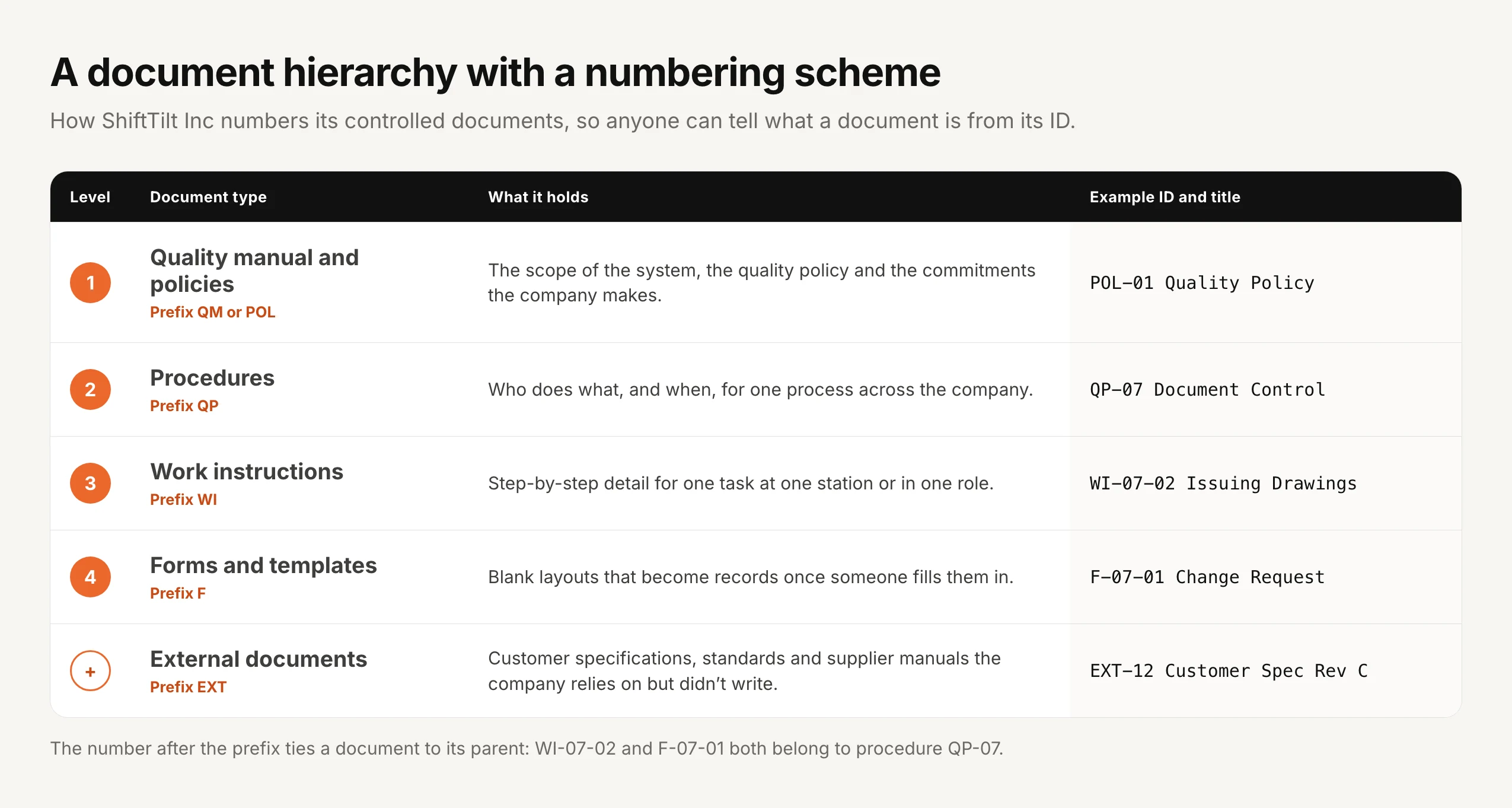
| 5. Hierarchy and numbering | Document levels and the ID scheme | POL, QP, WI, F and EXT prefixes, as in the diagram below |
| 6. Format | The template and what every document shows up front | ID, title, version, effective date, owner, approver, next review |
| 7. Review and approval | Who approves each level, in what order | Procedures: owner, then the operations lead |
| 8. Release and distribution | How approved documents reach people and how they confirm receipt | Sent to the teams it covers, acknowledged by name |
| 9. Changes | How changes are requested, approved and versioned | Every change, however small, is re-approved as a new version |
| 10. Periodic review | How often each level is reviewed, even without a change | Every 12 months for procedures, every 24 for work instructions |
| 11. Obsolete documents | How superseded versions are withdrawn and retained | Withdrawn from use the day the new version is released, kept for the retention period |
| 12. External documents | How they are listed, owned and kept at the current revision | Each customer specification has an owner who checks for new revisions |
| 13. Printed copies | Whether printing is allowed, and how printed copies are controlled | Printed copies are for one day’s use only |
| 14. Records and retention | How long records and old versions are kept | As set in the records retention schedule |
| 15. Related documents | Links to the policy on policies, the retention schedule and forms | F-07-01 Change Request, records retention schedule |
Hierarchy and numbering. A numbering scheme that tells people what a document is from its ID saves a surprising amount of confusion, and it makes the master list easy to sort. Keep the scheme simple, never reuse an ID, and let child documents carry their parent’s number.
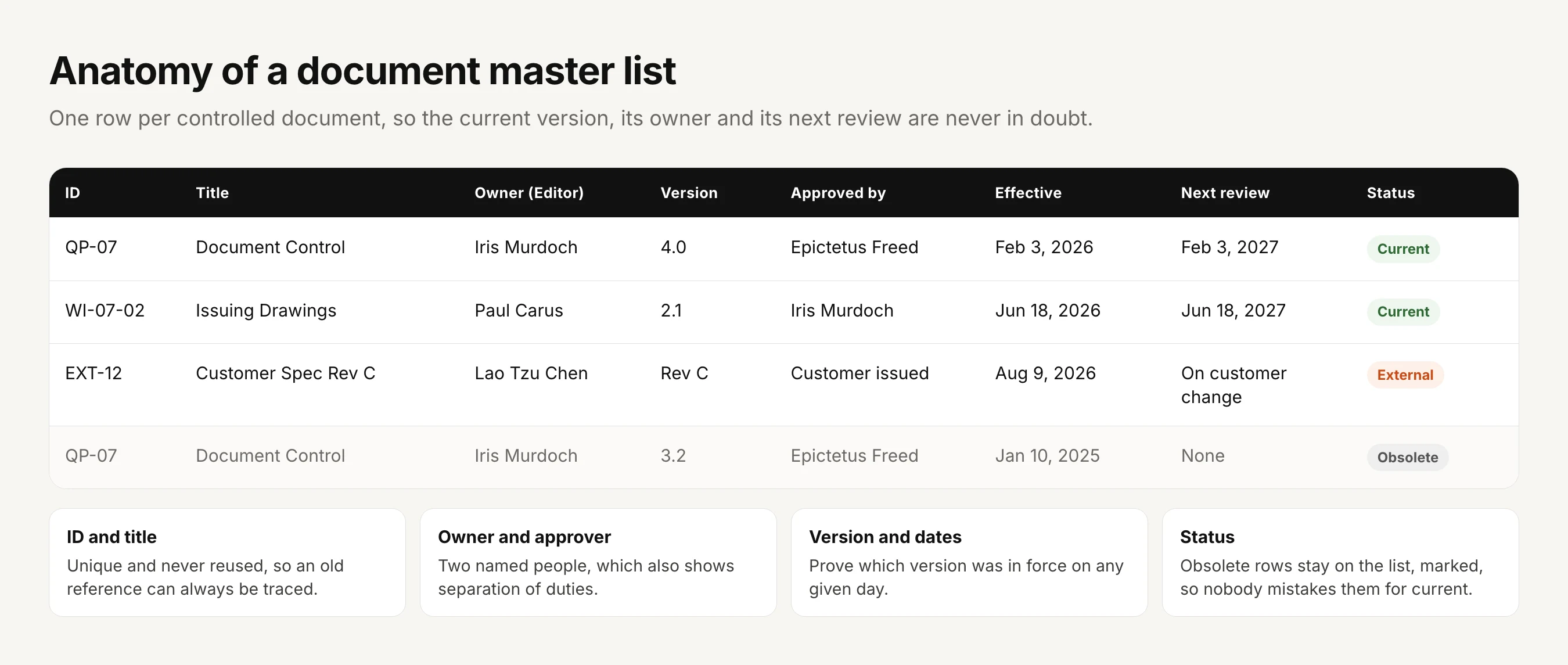
The master list. Whatever tool you use, keep one list of every controlled document with its ID, title, owner, current version, approver, effective date, next review date and status. It is the first thing many auditors ask for, and it is how you notice a review that has slipped before they do.
Obsolete and external documents: the two sections most procedures get wrong
Obsolete documents. The moment a new version is approved, the old one becomes a risk, because any copy still in circulation can be followed by mistake. Your procedure should say who withdraws superseded versions, from where, and on what day, and it should say how long the obsolete version is kept and where, because you will need it to show what was in force at an earlier date. Printed copies are the hardest part, so many companies simply treat every printout as uncontrolled and valid for that day only.
External documents. Customer specifications, drawings, industry standards and supplier manuals change without telling you. Give each one an owner whose job is to check for new revisions, keep them on the master list with their current revision, and withdraw old revisions the same way you would your own documents.
How long you keep obsolete versions and the records your documents produce is a retention question, so link this section to your records retention schedule rather than setting periods in two places.
How to write your document control procedure in a week
Day 1: list what you have. Pull every policy, procedure, work instruction, form and external document into one list, and note where each one lives today and who looks after it.
Day 2: agree the structure. Decide the document levels, the numbering scheme and the template, keeping each as simple as your company allows.
Day 3: set the approvals. Decide who approves each level and in what order, and make sure the owner and the approver are different people wherever you can.
Day 4: write the procedure. Work through the outline above in plain words, describing how you will really work rather than how a template says you should.
Day 5: approve it and release it. Put the procedure through its own approval, send it to everyone who owns or approves documents, and ask them to acknowledge it, then start bringing existing documents into line one by one, beginning with the ones auditors sample most.
Common document control findings
An old version at the point of work. The office holds version 4, the printout beside the machine is version 3, and the operator follows version 3.
Approval you can’t show. Someone approved the change in an email or a meeting, and nobody can now say who approved which version or when.
A change nobody heard about. The procedure was updated, but the people who use it can’t say what changed and there is no record they received it.
Reviews that never happened. The procedure promises a yearly review and half the documents are past their date.
External documents at the wrong revision. The customer issued revision D months ago, and the team is still building to revision C.
A procedure nobody follows. The document control procedure itself was copied from a template, describes a process the company doesn’t run, and becomes the first finding of the audit.
Paper, a shared drive or software?
A team of a dozen people with a handful of procedures can run document control in a shared drive, with a naming convention, a master list in a spreadsheet and some discipline, and plenty do. It starts to break as the company grows, because a shared drive stores files but doesn’t know which version is approved, can’t stop people opening last year’s copy, and can’t show who has read the latest change. Our post on why SharePoint struggles with SOP management covers that gap in more detail.
We built AllyMatter so a small quality or operations team can run document control without a full-time document controller.
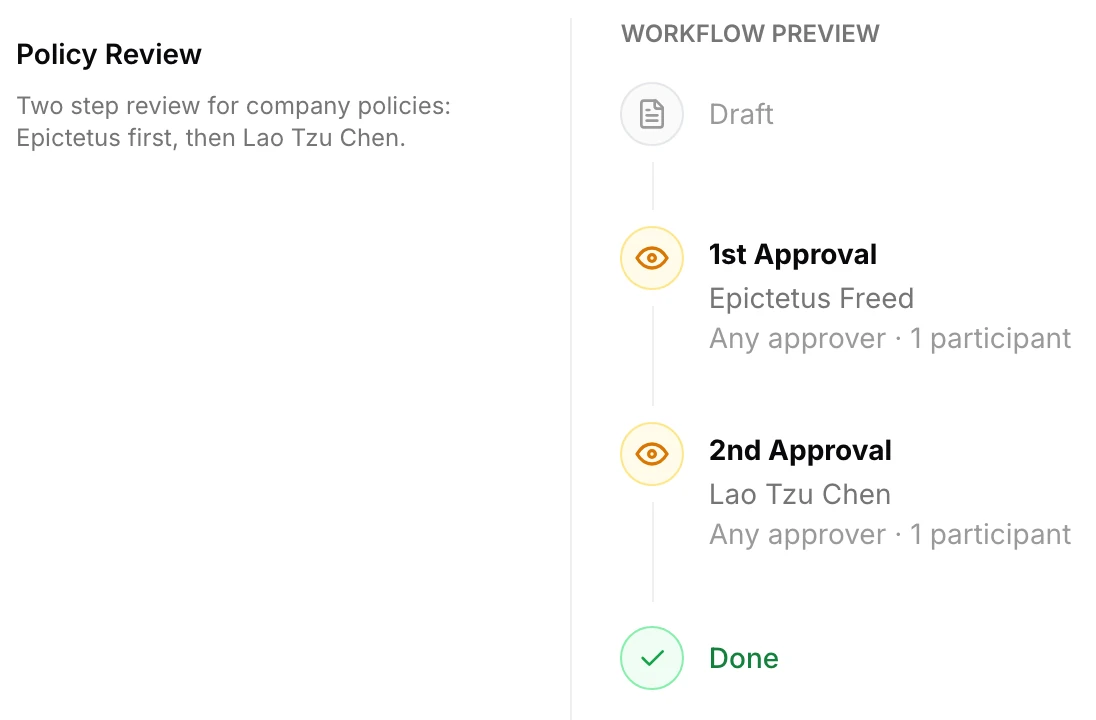
Approval before issue. Every document goes through an approval workflow with up to four steps in order before anyone can use it, the document is locked while it is under review, and a rejection has to come with a reason.
One current version, every old one kept. Only the approved version reaches the people who use it, every earlier version is kept with a word-by-word comparison between any two, and restoring an old version sends it back through approval as a new one.
Distribution with proof. Tags for teams, sites and roles decide who sees each document, and each person acknowledges the current version by name while signed in, with automatic reminders for anyone who hasn’t.
Reviews and withdrawal. Each document carries a review date, fixed or repeating, and a review alert appears on it when the date arrives, while an expiry date takes a document out of view for everyone except its Editor and Admins, which is a clean way to withdraw something that is no longer in force. A document that needs no changes at its review is still re-approved, which is the record that it was reviewed and judged still valid, and that approved version can then go to anyone who joined since.
External documents. A customer’s specification or a supplier’s manual can be uploaded as a PDF and acknowledged by name, so the people who build to it confirm they have the current revision.
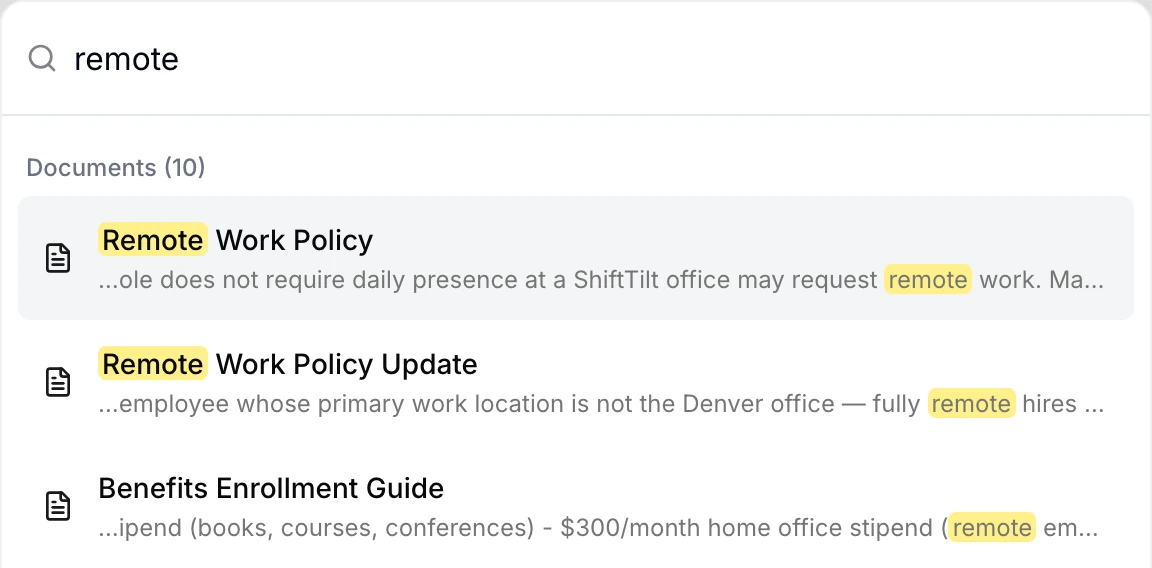
Finding the right document. Search looks through the text of every document as well as its title, so a keyword finds the right procedure even when nobody remembers its number.
Evidence. Each document’s audit trail records approvals, rejections, versions, sends and acknowledgments by name, and exports as a PDF or CSV, so your master list of what was approved, and when, is a file rather than a project. For a screen-by-screen walk-through against ISO 9001, see our post on running ISO 9001 document control in AllyMatter, and before your next certification visit our guide to the ISO 9001 surveillance audit covers what the auditor will sample.
On yearly plans, migration is on us: we’ll move your procedures from SharePoint, Google Drive, Confluence or Notion, usually within a week and often sooner.
Start your 30-day free trial of AllyMatter. No credit card to start, and a 30-day money-back guarantee if you subscribe and change your mind. Free migration.
Three scenarios
If you are a small team working towards your first ISO 9001 certificate, write a short procedure that matches how you really work, keep the master list honest, and spend your effort on approval and on withdrawing old versions, because those are what the first audit will test.
If you are already certified and the procedure was copied from a template years ago, rewrite it to describe what you actually do, since an auditor who finds the procedure doesn’t match practice will raise that before anything else.
If you have grown past the point where a shared drive and a spreadsheet keep up, which usually shows up as reviews slipping and old copies on the floor, move document control into a tool that enforces approval, versions and acknowledgment, and let the procedure describe the tool. For the policies that sit above your procedures, our guide to policy management software for small and growing businesses covers the same ground.
Questions about document control procedures
What is a document control procedure?
It is a written procedure that sets how a company creates, approves, issues, changes, reviews and withdraws its controlled documents, such as policies, procedures, work instructions and forms, so that everyone works from the current approved version and the company can prove it.
Is a document control procedure mandatory for ISO 9001?
Not as a written procedure since the 2015 edition, which dropped the six mandatory procedures of ISO 9001:2008. You still have to control your documented information, and most certified small and mid-sized companies keep a short written procedure because it is the simplest way to show an auditor how that control works.
What is the difference between document control and records control?
Documents tell people what to do, so they change and need approval and version control, while records are evidence of what was done, so they shouldn’t change at all once they are complete. ISO 9001 calls both documented information, but most companies control them with different rules.
Who is responsible for document control?
Each document has an owner who keeps it accurate, and a named approver who signs it off. In a small or mid-sized company, a quality or operations lead usually coordinates the system as a whole, keeping the master list, chasing reviews and checking that new documents follow the procedure.
How do you control obsolete documents?
Withdraw the old version from every place people can reach it on the day the new version is released, keep a copy marked as obsolete for as long as your retention schedule says, and make sure nobody can mistake it for the current one.
How do you control external documents?
List each one with its source, current revision and an owner who checks for new revisions, keep the current revision where people use it, and withdraw superseded revisions the same way you would your own documents.
How often should controlled documents be reviewed?
Set a review interval for each level, commonly every 12 months for policies and procedures and every one to two years for work instructions, and review immediately whenever a law, process, product or audit finding makes a document out of date.
Document control is unglamorous, but it is the part of a quality system that everything else depends on, because a procedure only helps when the right version is in front of the right person and you can prove it was.
Start your 30-day free trial of AllyMatter. No credit card to start, and a 30-day money-back guarantee if you subscribe and change your mind. Free migration.