
SOPs · 13 min read
Document Control Software for Manufacturing: What It Does and How to Choose It
Document control software for manufacturing keeps every controlled document in one approved current version: the procedures, work instructions, specifications, forms and drawings people work from. It shows who approved each change, keeps older versions out of use, and proves that the people who need a document have read the current one. For many small and mid-sized manufacturers, that core job is the same as policy management: approve, version, send, acknowledge, review and keep the record. This guide explains what document control means on a plant floor, what the software should do, how drawings, parts lists and older versions are handled in AllyMatter, and how to choose. SOPs usually live alongside policies in a policy management system, under the same approval and review rules.
This post is part of our guide to creating SOPs, which covers how to write, approve and keep procedures current.
We built AllyMatter around that loop, and it suits the controlled procedures and work instructions that an ISO 9001 auditor samples first. If you want the written side in detail, our guide to the document control procedure covers what to put in it, and this guide covers the software that runs it.
What document control means in a manufacturing plant
In an ISO 9001 quality system, document control is how a company meets the documented information requirements of clause 7.5. The clause has two halves. The first covers creating and updating documents, which means identifying them, choosing a format and having them reviewed and approved. The second covers controlling them once they exist, which means keeping them available where they are used, protected, distributed, stored, changed under control, retained and disposed of properly, including documents that come from outside the company.
The standard does not say you need software, and plenty of small plants run document control on paper or a shared drive. Software earns its place when the number of documents and people grows past what one person can keep straight. ISO 9001:2026, published in September 2026, keeps the documented information requirements in the same shared structure that ISO management system standards use.
Sources: ISO 9001:2015, clause 7.5 Documented information, ISO 9001:2026, published 16 September 2026
What a manufacturer puts under control
Document control is wider than procedures. A plant usually controls seven kinds of document, and the ones closest to the floor carry the most risk when a revision goes wrong.
| Type of document | Examples | Why control matters |
|---|---|---|
| Policies and manuals | Quality policy, safety policy, quality manual | They set the commitments an auditor reads first |
| Procedures | Document control, internal audit, supplier approval, corrective action | They say who does what across the company |
| Work instructions | Machine setup, assembly steps, inspection steps | The wrong revision at a station produces scrap or a defect |
| Forms and templates | Inspection checklists, traveler templates, request forms | A blank form has to be current before anyone fills it in |
| Specifications and drawings | Customer specifications, part drawings | The revision decides what gets made |
| Parts lists | Bills of materials, approved supplier lists | They have to match the current drawing revision |
| External documents | Customer requirements, standards, supplier manuals | You did not write them, but you control which copy you work from |
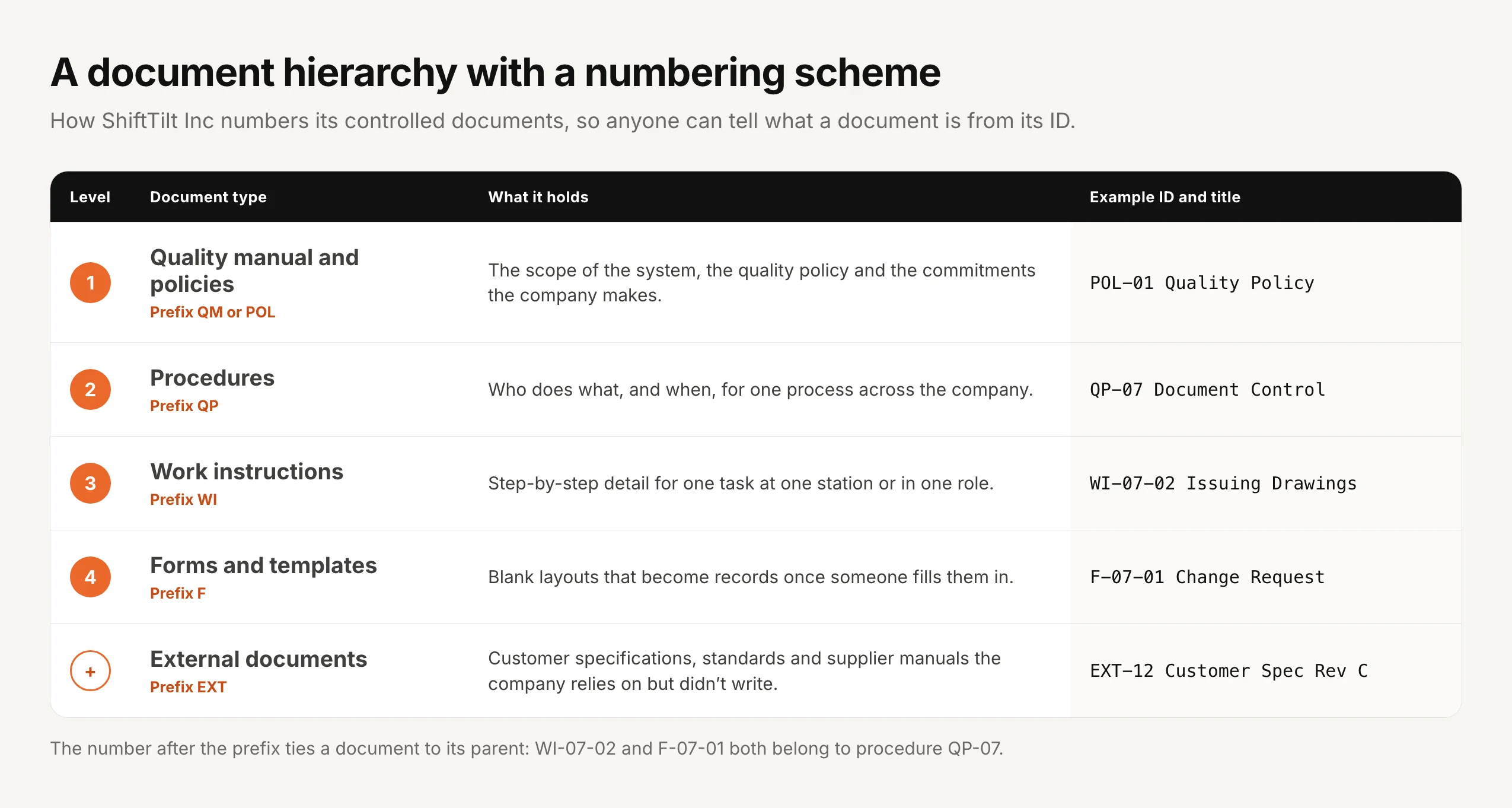
Completed forms are records rather than controlled documents, so they are retained instead of revised. Many plants number their documents in a hierarchy so that an ID tells you what a document is and where it belongs.
Document control and document management are different jobs
A document management system stores, organizes and finds files. Document control decides which version is the one in use, who approved it, who has to read it and what happens to the old one. Many software pages blur the two, and the difference matters when you buy. Storage alone leaves the question of which version is current to the people using the files, and that is the question an auditor and a defect report both come back to.
What document control software should do
Whatever you evaluate, these are the jobs to check. Each one is a place where a plant can go wrong without it.
| What it should do | What to look for | Why it matters on the floor |
|---|---|---|
| One approved version | Only the approved version reaches the people who use it, and drafts stay out of sight | An operator never meets a draft |
| Approval before issue | Named approvers in a set order, the document locked while it is under review, a reason for any rejection | The right people reviewed it before it was used |
| Version history and comparison | Every version kept, and a word-by-word view of what changed | Approvers and auditors see exactly what moved |
| Controlled access | Who sees a document set by site, line or role | The right station gets the right instruction |
| Read and acknowledge by version | Each person confirms the current version by name, with reminders | You can show who was told, and which version |
| Review and expiry dates | An alert when a review is due, and withdrawn documents removed from use | Nothing goes stale quietly |
| Obsolete handling | Older versions kept out of operators’ hands but available to the people who need them | You keep the evidence without risking use of an old copy |
| Files kept with the document | Drawings, parts lists and certificates stored with the document they belong to | The source file and the instruction stay together |
| Audit trail and export | Who did what and when, filtered by date or person, exportable | It answers the auditor’s first questions |
| Search | Keyword search through document text | A work instruction is found in seconds |
How document control works in AllyMatter
Take a work instruction for a machine setup. This is the path it takes in AllyMatter, and the same path applies to a procedure, a form or a specification.
One approved version reaches the floor
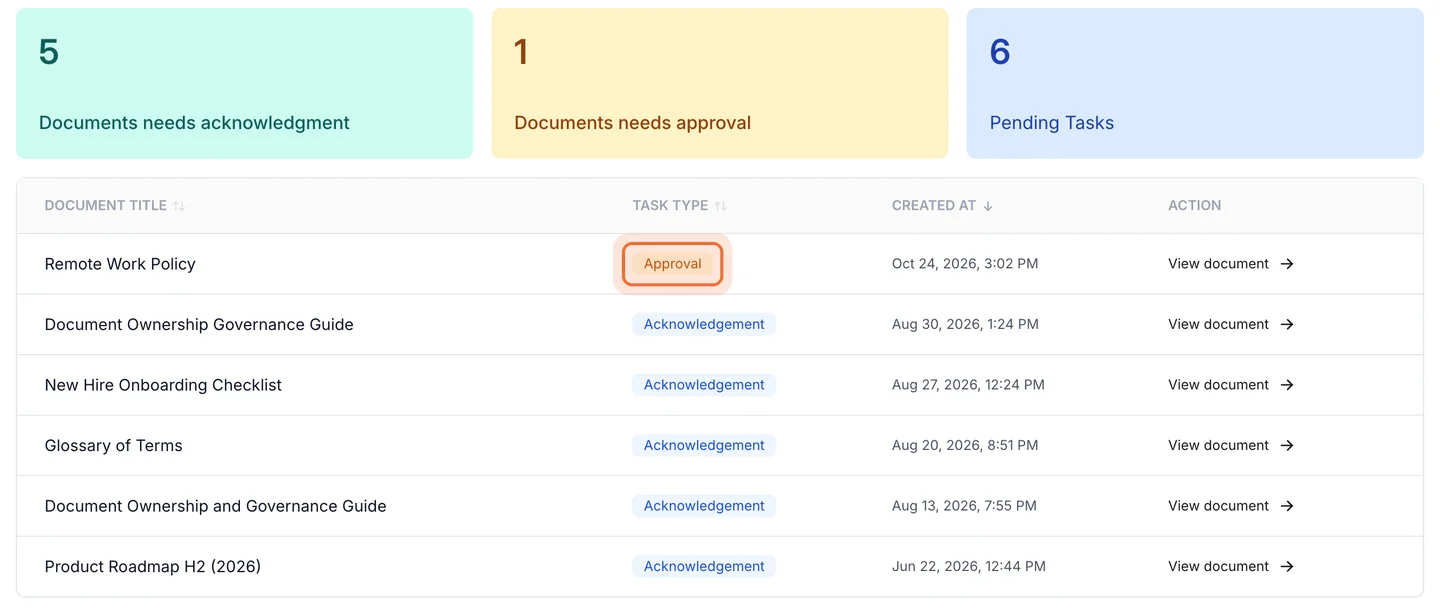
An Editor, usually the process owner in that department, writes the work instruction or uploads an existing PDF and gets it acknowledged by name. Every document goes through an approval workflow before anyone can use it. A workflow can have up to four steps in order, the document is locked while it is under review, and a rejection has to come with a reason. Only the approved version reaches the people who use it, and tags for teams, sites, lines and roles decide who sees each document.
Drawings, parts lists and other files
Drawings and parts lists stay with the work instruction as attachments, in their original format, so the file an engineer maintains is the file that is kept. Attachments accept any file type, and you can give the operators who need them permission to open them. A drawing revision then moves with the work instruction it belongs to. Supplier certificates, calibration certificates and inspection reports can sit in the same place, and an upload or a removal is recorded in the document’s log.
Changes, effective dates and older versions
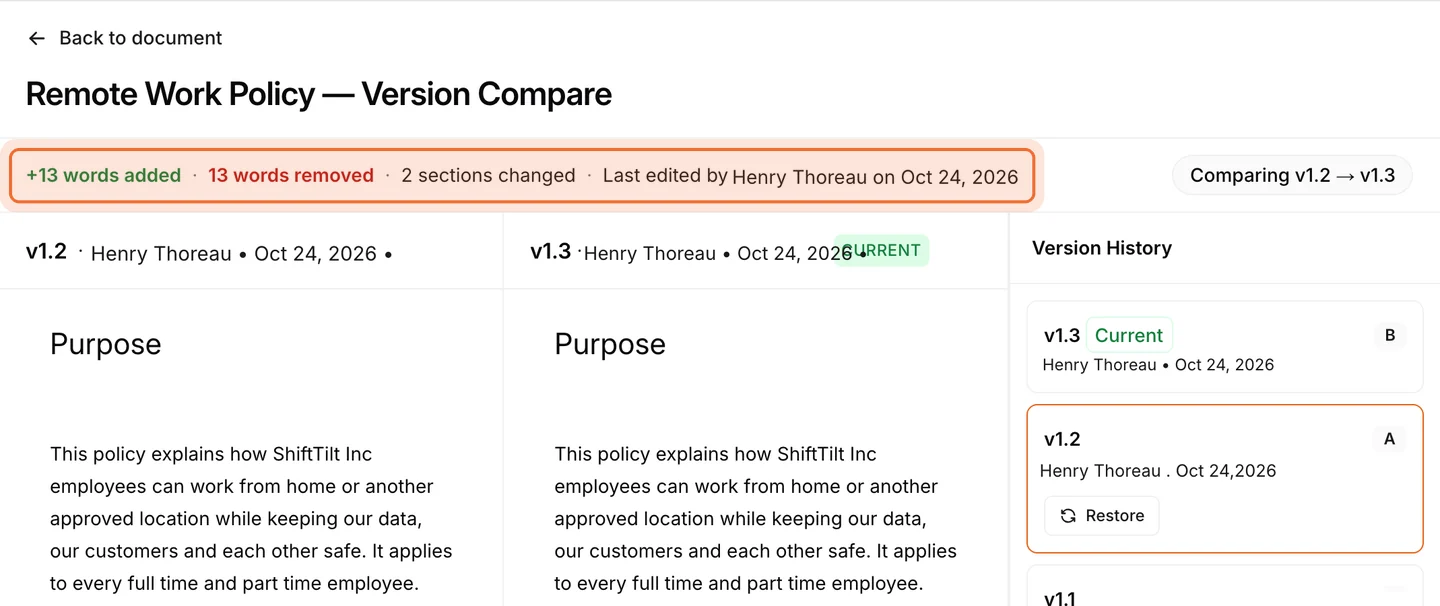
Every change is an edit followed by approval. Approvers can compare the new version with the old one word by word, and nothing reaches the floor until the new version is approved. A version takes effect when it is approved, so the approval date is the effective date, and you approve the change on the day you want it to start. Admins and the policy’s Editor can open any older version, while the people who work from the document see only the current approved one. When a document is withdrawn, an expiry date removes it from the people it covers, and Editors and Admins keep it.
Each document can also carry a review date, fixed or repeating, and an alert shows on the document when it is due. A document you review without changing is re-approved, which records that someone judged it still valid on that date, and nobody is asked to acknowledge it again unless the text changed. Our page on versions and reviews covers how that works.
Proof that operators read it
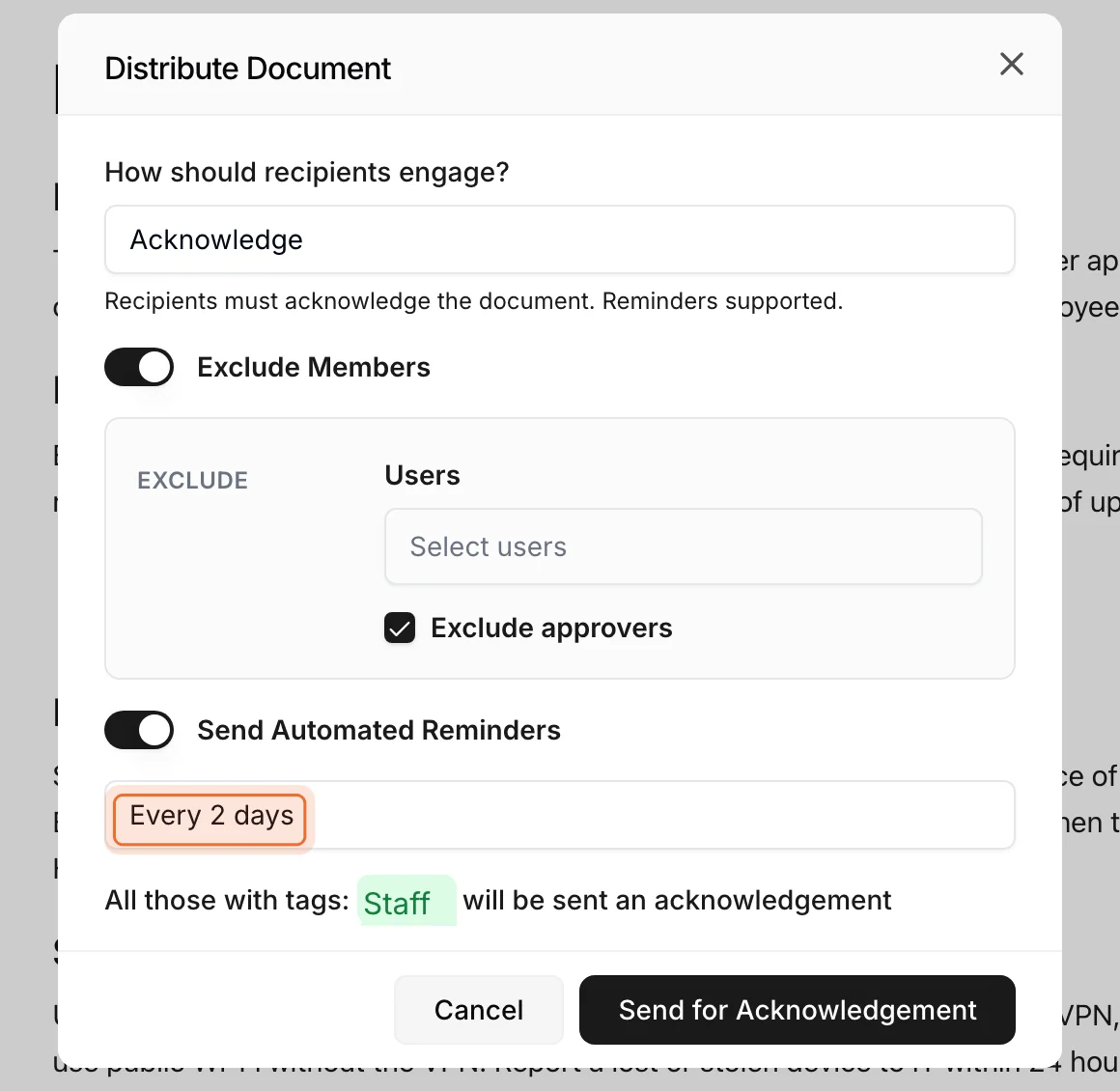
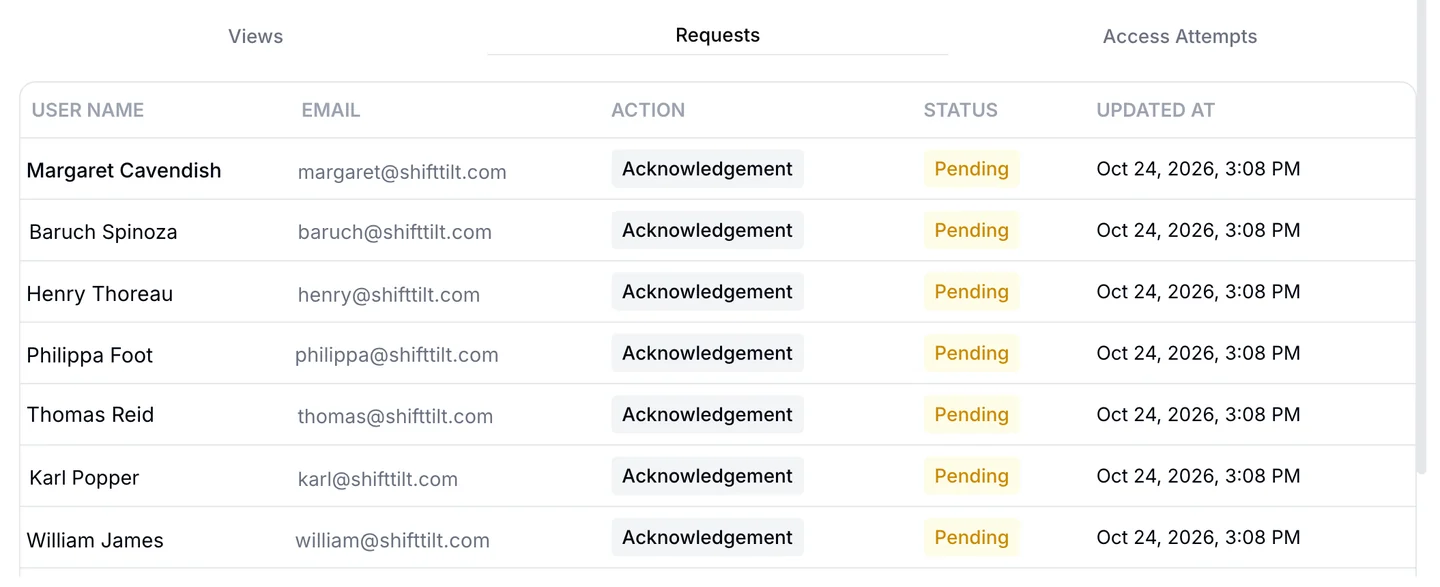
When a new version goes out, everyone who holds its tags is asked to acknowledge it. Each person signs in with their own email address and confirms by name, and a pending request on the old version is replaced when the new one goes out, so nobody is chased for a version that no longer applies. Reminders run on a cadence you set. The record shows who acknowledged which version and when, which is your evidence that the people at a station were told about the change, and the document’s analytics show who has opened it and where each person’s request stands.
Paper copies
If your floor works from paper, a policy can be printed from AllyMatter. Whether people read on a screen or on paper, the approved version in AllyMatter is the one that counts, and the audit trail records who approved each version and who acknowledged it. Write your own rule for printed copies in your document control procedure, for example that a printout is current only until the next approval.
The audit trail
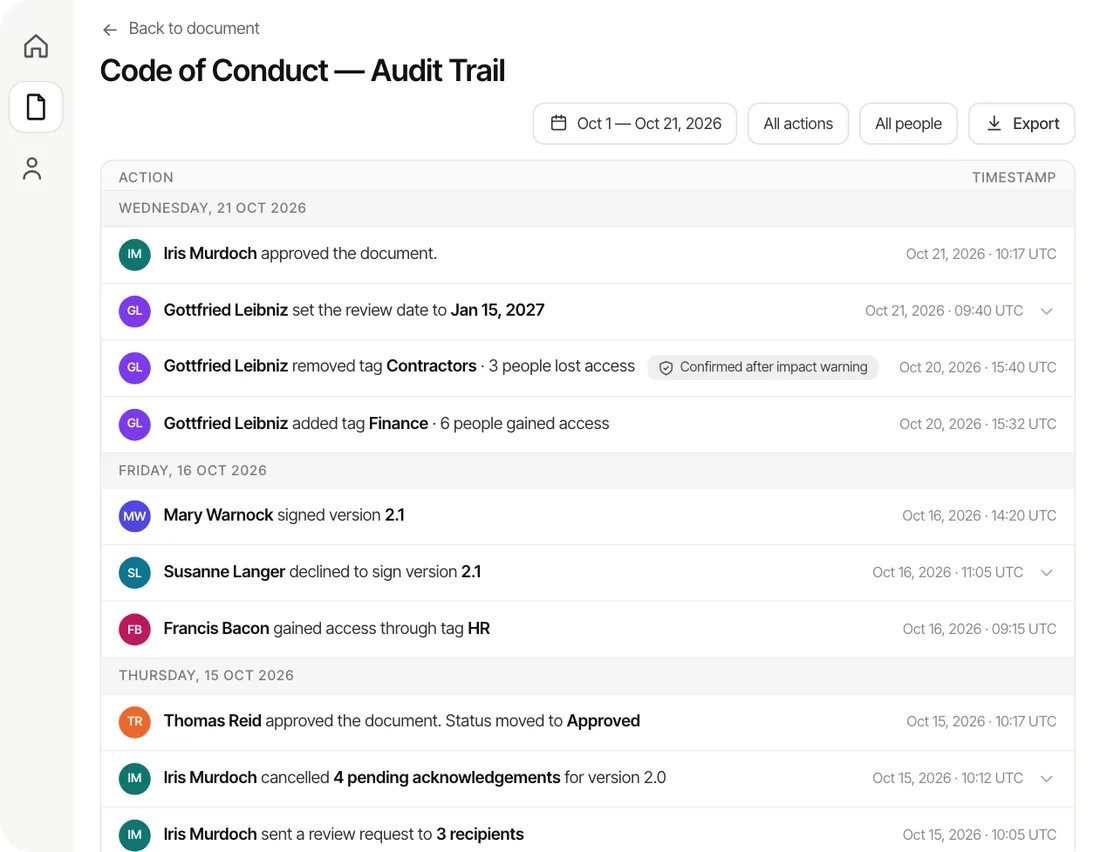
Every approval, rejection, version, send, acknowledgment and attachment upload is written to the document’s audit trail. You can filter it by date range or by person and export it as a PDF or CSV, and you can give an auditor Viewer access so they see only what their tags allow. If you keep your own list of ISO 9001 requirements, Packages let you list them as line items, link the procedures that answer each one, mark an item not applicable with a reason, and see which items are still gaps.
Document control inside a larger quality system
Some manufacturers run a full quality management platform that bundles document control with nonconformance reports, corrective actions, supplier management, calibration and training matrices. Others keep their controlled documents and acknowledgments in a focused tool and run corrective actions in a log. Neither is wrong. The question is which of those jobs your auditor and your customers expect you to show, and how many people will use each one. Our guide to compliance management software explains how the wider category fits together.
Who it suits
AllyMatter suits small and mid-sized manufacturers, certified or working toward certification, where each department edits its own procedures and work instructions and a small quality team, often one person, keeps the system together. It is built to keep the record as a side effect of the work, so the quality lead is not the only person holding the picture, and it pairs with whatever you already use for the rest of your quality system. Our guide to an ISO 9001 surveillance audit shows what auditors ask for between certifications.
How to choose document control software
Ask every vendor the same questions and write down the answers. They separate a tool that fits the floor from one that fits its own feature list.
| Ask the vendor | Why it matters |
|---|---|
| Which version can an operator see? | It should be the current approved one and nothing else |
| Where do drawings and parts lists live, and who can open them? | They should stay with the document they belong to, and you decide who opens them |
| What happens to an older version, and who can open it? | You need it for traceability, and you do not want it in use |
| How does an effective date work? | Some systems have a separate field and some use the approval date, so know which one you are buying |
| How are printed copies handled? | Ask how a printout is identified and replaced, and write your own rule for it either way |
| How is a read-and-acknowledge recorded? | It should name the person, the version and the time |
| Can you export the evidence yourself? | An export you can run is what you hand an auditor on the day |
| How long until you are live, and who moves your documents? | Setup time is real cost, and it often decides whether the tool gets used |
| What does it cost, and per what? | Per-reader pricing grows with every hire on the floor |
Be honest about which jobs matter most to you today. If your first need is controlled procedures and proof that operators read them, start there. You can add the rest of a quality system as you grow, and you can move your documents between tools if you choose a system that lets you export the record.
What to expect
Setting up AllyMatter takes about half an hour, and moving your documents in yourself takes about a day. On yearly plans our migration service moves a large library for you, usually within a week and often sooner, and it is free on those plans. You can try the whole workflow first with a 30-day free trial that needs no credit card. Our plans are published, and you pay for the people who write documents, not for every operator who reads them.
Questions about document control software
What is document control software?
Document control software manages the documents a company works from, such as procedures, work instructions, forms, specifications and drawings. It makes sure everyone uses the current approved version, records who approved each change and who has read it, keeps older versions out of use, and gives you an audit trail to show an auditor.
What is the difference between document control and document management?
Document management stores, organizes and finds files. Document control decides which version is the one in use, who approved it, who has to read it and what happens to the old one. A system can do the first without the second, which is why many shared drives still leave the question of which version is current to the people using them.
Does ISO 9001 require document control software?
No. ISO 9001 requires documented information to be controlled, and it does not say how. Plenty of small plants meet clause 7.5 with a shared drive, a master list and discipline, and software helps once the number of documents and people outgrows that.
How do you handle obsolete documents in document control software?
The people who work from a document see only its current approved version, so an old copy is not in their hands. In AllyMatter, Admins and the policy’s Editor can open any older version, and when a document is withdrawn an expiry date removes it from the people it covers while Editors and Admins keep it.
Can drawings and parts lists be controlled in AllyMatter?
Yes. They stay with the work instruction they belong to as attachments, in their original format, and attachments accept any file type. You can give the operators who need them permission to open them.
Can documents be printed?
Yes, a policy can be printed. The approved version in AllyMatter is the one that counts, and the audit trail records who approved each version and who acknowledged it, so write your own rule for how long a printout stays current.
What is the difference between document control software and a quality management system?
Document control is one part of a quality management system. A full quality platform usually adds modules for nonconformances, corrective actions, supplier management, calibration and training records, so the right choice depends on which of those jobs your auditor and your customers expect you to show.
How long does it take to set up?
Setting up AllyMatter takes about half an hour, and moving your documents in yourself takes about a day. The section on what to expect, above, covers the migration service.
Document control works when the current version is obvious, the old ones are out of use but not lost, and the proof that people read the change builds up as part of normal work. Start with the documents your auditor samples first, and bring the rest in as you go.
Start your 30-day free trial of AllyMatter. No credit card to start, and a 30-day money-back guarantee if you subscribe and change your mind. Free migration.