

Acknowledgments · 10 min read
Prove Every Employee Saw the Policy
At the last company I started, the weeks before an audit had a ritual. Someone from HR would appear with a list of documents that still needed signatures. Mine was usually on it.
Some policies were Word files with a signature line at the bottom. Some lived in an online attestation tool we had half rolled out. Nobody could say with confidence who had signed what, so we rebuilt the picture by hand, one person at a time.
We took compliance seriously. We still ended up doing archaeology twice a year.
That ritual is what policy acknowledgment tracking exists to kill. This post covers what acknowledgment proof actually requires, why the usual methods fail quietly, and how we built AllyMatter to produce the proof automatically.
Four signals this is your problem now:
- An audit or client review is on the calendar and you cannot say, today, who has signed the current version of the handbook.
- Policy sign-offs live in three places at once: reply-all emails, a spreadsheet, and a folder of scanned PDFs.
- People sign at onboarding and never again, no matter how many times the policy changes.
- You have chased the same person for the same signature more than once this quarter.
Key takeaways
- An acknowledgment is an evidence record. If it does not capture the person, the exact version, the time, and the statement they agreed to, it will not survive scrutiny.
- Read receipts and “got it” replies prove delivery at best. Auditors ask for more.
- Tag-based audiences plus automatic reminders remove the chasing. The right people inherit the requirement, and laggards get reminded without you.
- Records must outlive turnover and tool changes, and export cleanly (PDF or CSV) the day someone asks.
What is policy acknowledgment tracking?
Policy acknowledgment tracking is the practice of recording, for every policy, exactly who was required to read it, who confirmed it, which version they confirmed, and when. Done right, it produces evidence you can hand to an auditor, a client, or a lawyer without any reconstruction work.
Not every document needs the same weight. A parking memo needs people to be informed. A code of conduct needs a recorded agreement. An NDA needs a signature that would stand up in a dispute. Treating those three the same way is how teams end up either under-protected or drowning in signature requests.
Why read receipts and “got it” replies don’t count
A read receipt proves that an email client rendered a message. It says nothing about which version of the policy was attached, whether the person opened the attachment, or what exactly they agreed to. A “got it” reply is slightly better and still fails the same test: no version, no statement, no structure. Six months later it is one email among thousands.
I’ve sat through more than ten ISO 9001 audits in my career, plus SOC 2, ISO 27001 twice, and HIPAA reviews. The question is never whether you sent the policy. It is always some form of: show me who has acknowledged the version that was in force.
If your evidence lives in an inbox, answering that question is a project. It should be a click.
The five things a provable acknowledgment must capture
Hold whatever you use today against this list.
1. A person, identified
A named individual with a stable identifier, their work email at minimum. “The all-staff alias received it” collapses the moment anyone asks about one specific employee, and audits are always about specific employees.
2. The exact version
That company I mentioned earlier had five different NDA versions in circulation, depending on when someone joined. A few people had signed IP assignment agreements. Most had not. Whenever a question came up, the first task was working out which document a given person had actually agreed to, and the honest answer was often a guess.
So the bar is higher than “did they sign.” It is “which version did they sign, and is that the version currently in force.” An acknowledgment that is not bound to a specific version answers neither.
3. The time
When did they acknowledge, was that before or after the policy took effect, and who has still not acknowledged right now. Without timestamps you have opinions, and an audit is a bad place for opinions.
4. The statement they saw
The record should store the actual attestation text the person agreed to (“I confirm that I have read…”), as it read at that moment. If the wording changes later, the old records must keep the old wording. What someone agreed to is the whole point of the exercise.
5. A record that outlives everyone
The employee leaves. The HR manager who ran the rollout leaves. The company switches tools. The record has to survive all of it and come back out in minutes. Evidence you cannot retrieve quickly is functionally evidence you do not have.
How policy acknowledgment tracking works in AllyMatter
We built this as one connected flow, because the proof falls apart at whichever step stays manual.
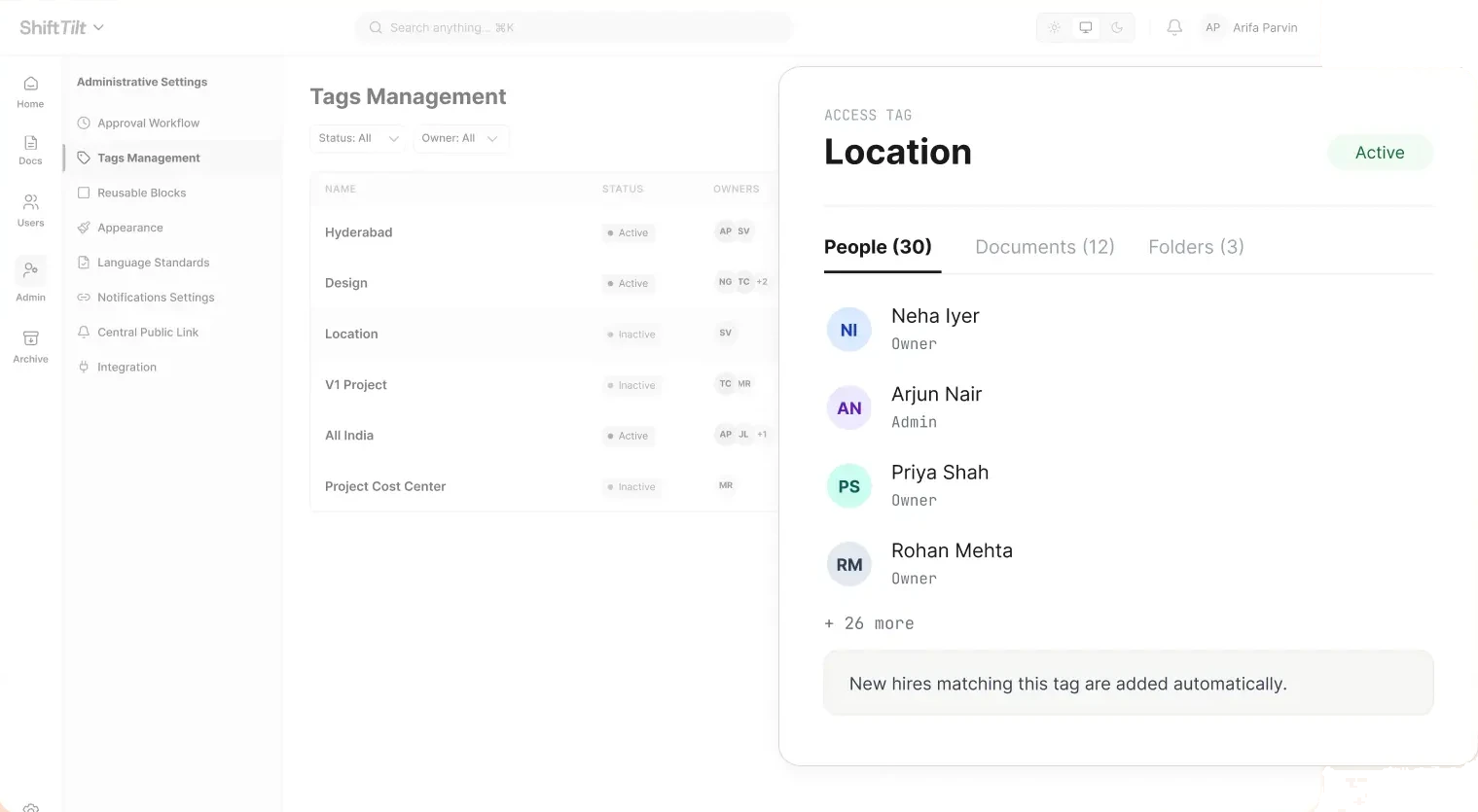
Tags decide who must acknowledge
An admin creates tags for whatever dimensions matter: department, location, role, any combination. A policy carries tags, and everyone whose profile matches sees the document and inherits its requirement. Tag a policy Warehouse and Ohio, and the Ohio warehouse team gets it. Nobody else does.
This is also how new hires stop slipping through. Tags decide which documents a person receives, so tagging a new employee into a group is how they are included in what that group must acknowledge. More on that pattern in the new-hire required-reads problem.
The document declares what it demands
Every document gets a type when it is created: notify, acknowledgment required, or e-signature. Informational memos notify. Policies collect acknowledgments. Documents with legal weight, the NDAs and IP assignments of the world, collect signatures. Whichever type a document carries, a change to it runs the requirement again. More on that in a moment.
Only the approved version goes out
A policy cannot be distributed for acknowledgment until it has cleared its approval workflow. That ordering matters: the acknowledgment binds to an approved version, so there is never a question about whether people signed a draft.
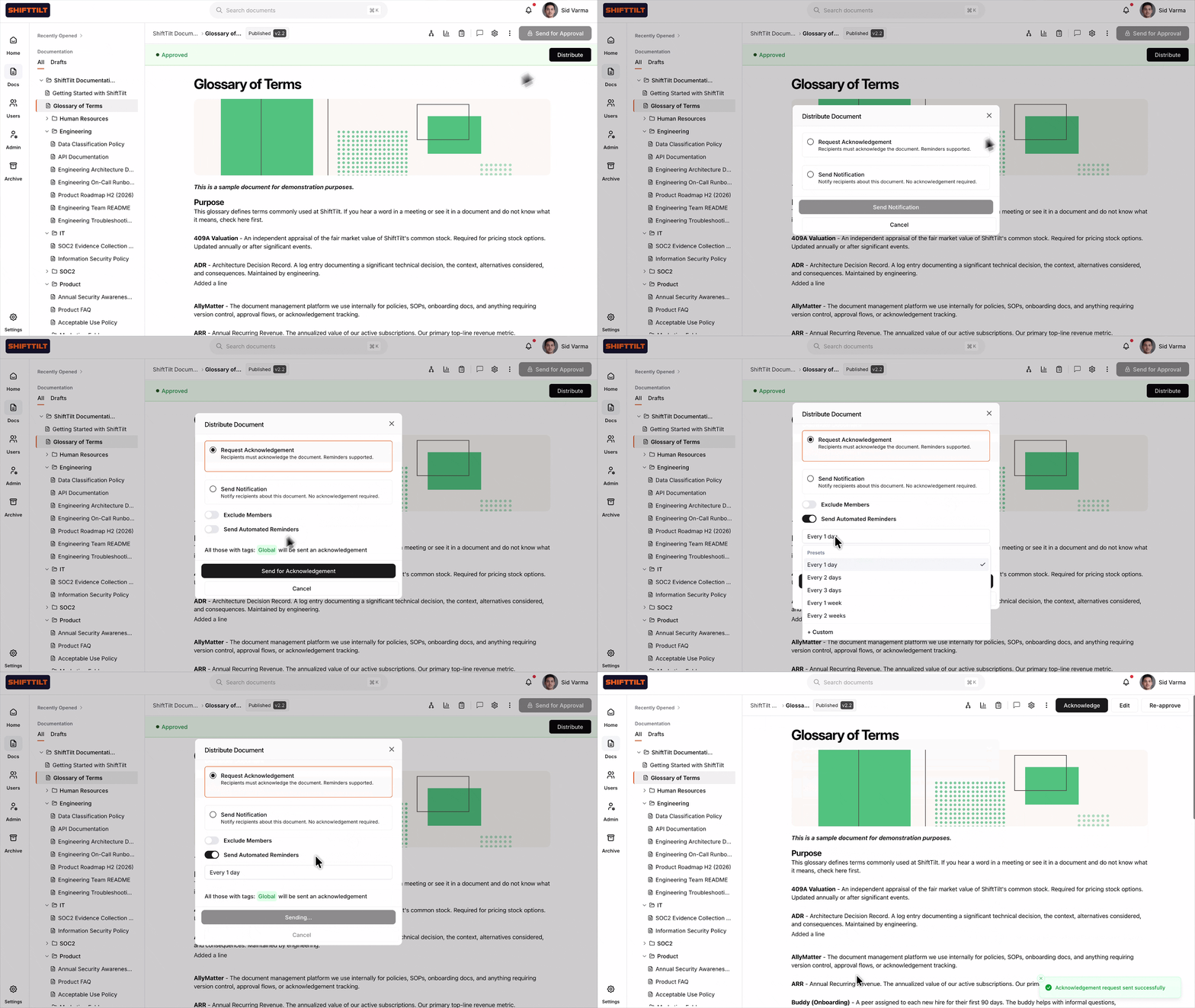
Reminders chase themselves
Pending people get automatic reminders on a cadence the sender chooses, and the reminders repeat until they act. Nobody walks the floor with a clipboard.
The record is the product
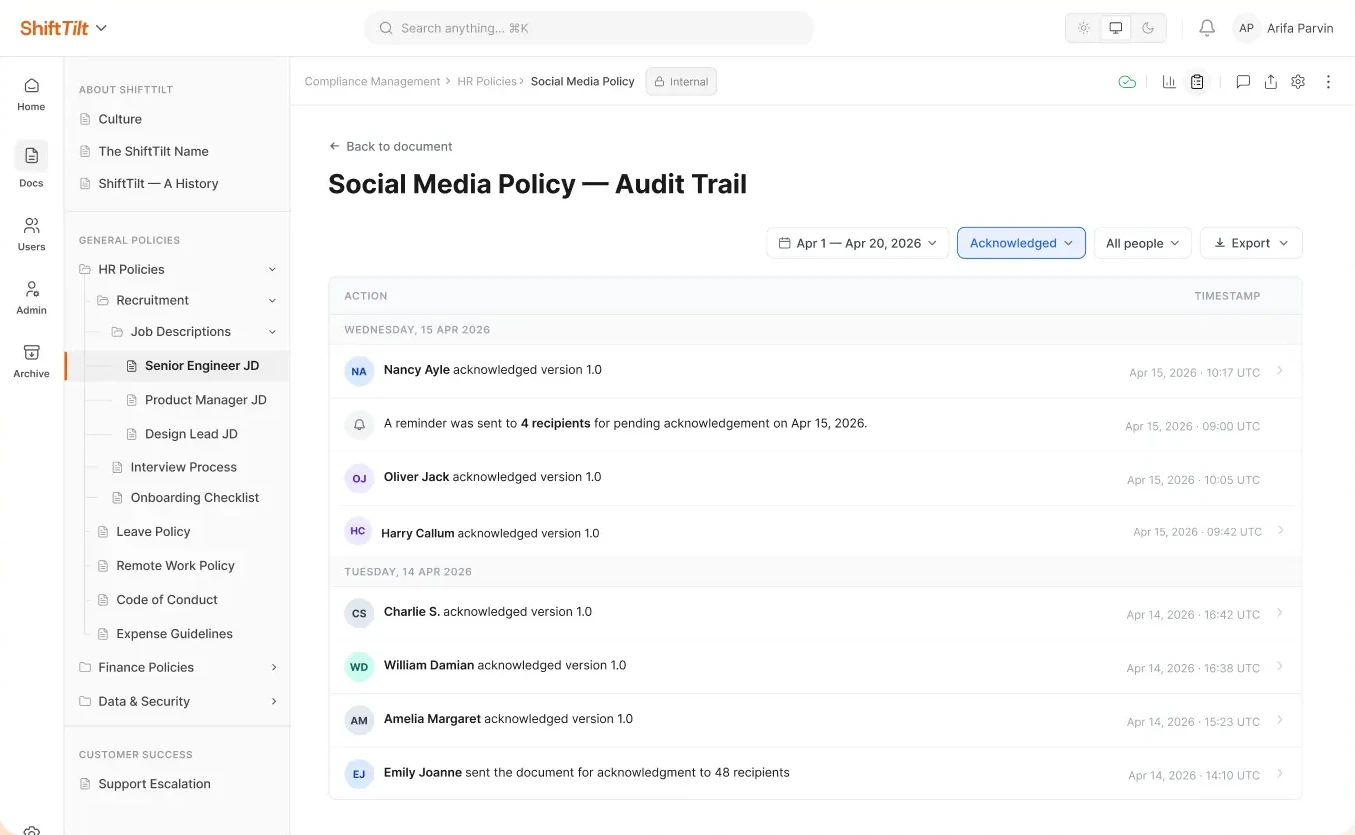
When someone acknowledges, the log captures the person with their email, the exact version, the timestamp, and the attestation text they saw. That record is permanent. If an employee leaves and their account is removed, completed acknowledgments stay. Someone leaving the company does not take your evidence with them.
The report you open when someone asks
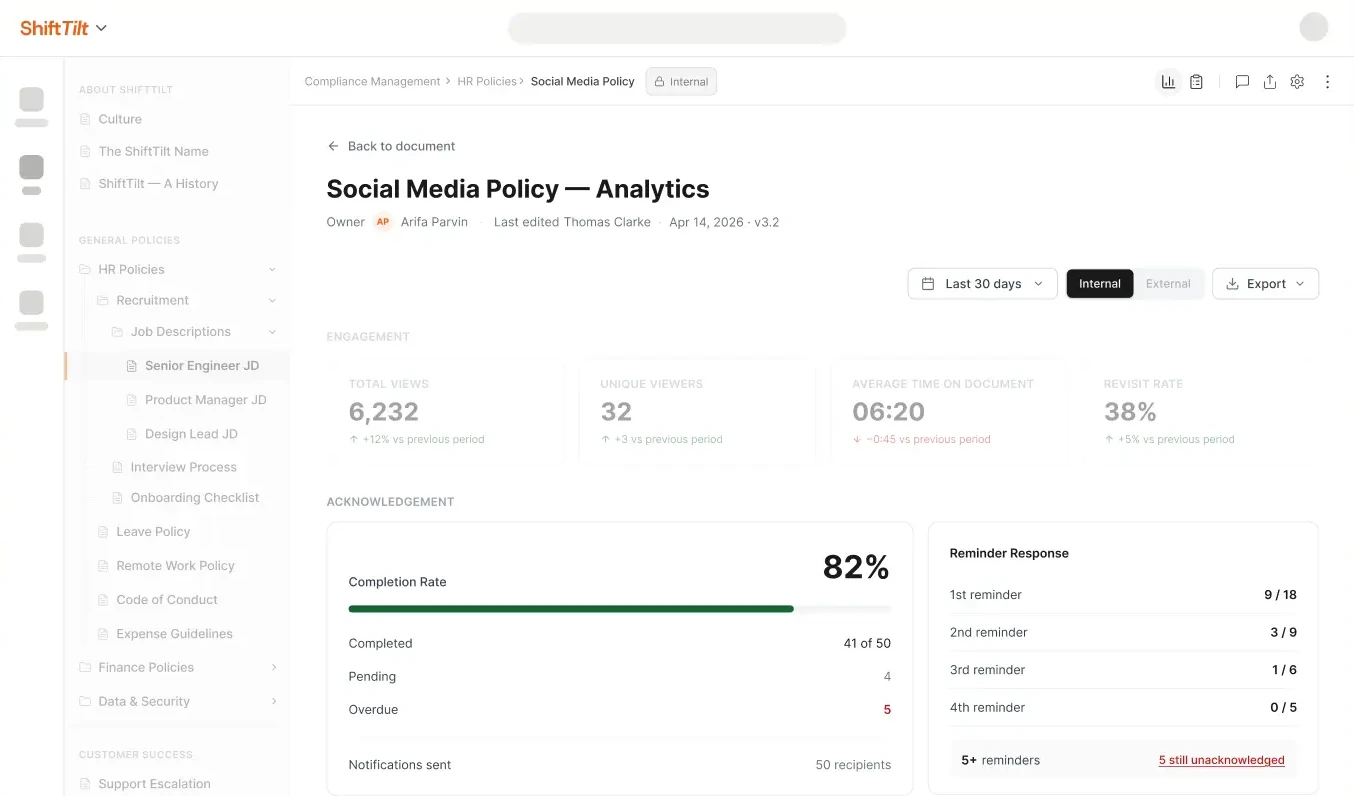
Per policy, one view: who has seen it, who approved it, who has acknowledged it, who is still pending. Document analytics sit alongside, with aggregates like time spent on the document. Time spent will not prove comprehension, but it will tell you which policies get read and which get thirty seconds of scrolling.
Exports an auditor will accept
Two formats, both current: a PDF for handing to an auditor or client, and a CSV for your own reconciliation. The two-day scramble becomes an export button.
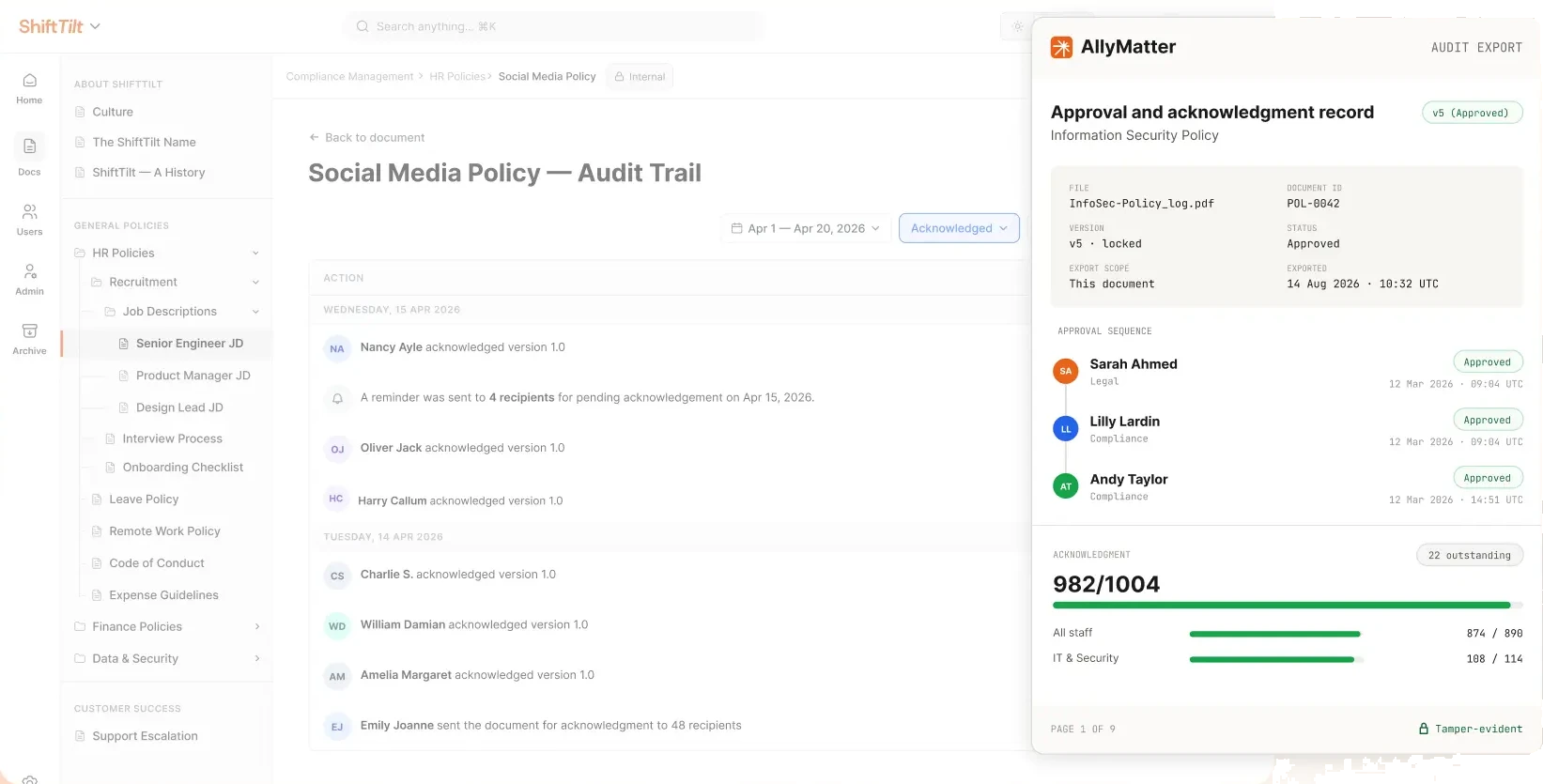
Want to poke at this with your own policies? Start your 30-day free trial. No credit card to start, and a 30-day money-back guarantee if you convert and change your mind. If you’d rather look before you commit, the sandbox is open.
What happens when the policy changes?
This is where most systems quietly rot. People sign the handbook at onboarding, the handbook changes six times, and nobody can say who agreed to what.
In AllyMatter, every change runs the full cycle again. The new version goes back through approval, and once it clears, the whole audience acknowledges it again. E-signature documents collect a fresh signature the same way. There is no setting where an Editor decides an edit was small enough to skip the process.
We built it this way deliberately. A comma looks like a formatting fix until it changes the meaning of the clause it sits in. The moment someone can wave an edit through as cosmetic, your records start showing people agreeing to text they never saw. So every version gets approved and every version gets acknowledged. The log captures all of it.
That is a stricter default than some tools choose, and we accept the tradeoff. Records that only mostly match what people agreed to are worth very little in the meeting where they matter. If you want the fuller story on shipping policy updates quickly without losing this rigor, that’s its own post.
Staying provable at scale
The failure modes at 200 people are different from the ones at 40, and they are all versions of drift.
Turnover: records survive departures by design, so five years of staff churn does not thin your evidence. New hires: tags assign obligations automatically, so day-one coverage does not depend on anyone’s memory. Updates: every change re-runs approval and re-collects acknowledgment, so the records never lag the text.
For years I delivered services to one of the largest healthcare companies in the world. Their rule was blunt: nobody starts work until the client’s policies are signed, approved, and proof is on file with them. We managed that proof by hand, and it consumed real hours at even modest headcount. The teams facing that kind of gate today, vendor onboarding, client audits, franchise reviews, are exactly who this automation pays off for fastest.
And if your policies currently live in SharePoint, the tracking gap there has its own dedicated post.
Three scenarios
An honest read on whether you need this:
If you are under 30 people with a handful of stable policies, a signed PDF at onboarding and a tidy folder will hold for a while. Revisit when the versions start multiplying or an audit lands on the calendar.
If you are 30 to 500 people and the four signals at the top of this post are showing up, this is the moment. We built AllyMatter for exactly this transition, and HR compliance without the legal bottlenecks is where it shows up first.
If you are regulated, multi-site, or client-audited, provable acknowledgment is already table stakes for you. The only question is whether you produce it manually or automatically. We’d start with AllyMatter.
Questions people ask about policy acknowledgment tracking
Is an email read receipt enough to prove policy compliance?
No. A read receipt proves a message was opened. It does not capture which version of the policy was involved, what the person agreed to, or their identity beyond inbox access. Auditors ask for acknowledgment records, and read receipts are not that.
Do acknowledgment records survive after an employee leaves?
Yes, by design. Removing a user clears their pending requests only. Completed acknowledgments are permanent records and stay retrievable, because the audit questions about a departed employee are the ones you least want to answer from memory.
Does every policy edit force everyone to re-acknowledge?
Yes. Every change goes back through approval and back out to the audience, and e-signature documents collect a fresh signature. We chose rigor over convenience here: a one-word edit can change what a clause means, and an acknowledgment only counts if it matches the exact text the person saw.
Can I track policy acknowledgments in a spreadsheet?
At a small scale, for a while. The spreadsheet fails on the details that matter later: version binding, timestamps you can defend, new hires nobody added, and reminders nobody sent. If you are past 30 people or facing any external review, the spreadsheet is the risk.
You should not need two days and a hallway campaign to answer “who signed this.” Start your 30-day free trial. No credit card to start, and a 30-day money-back guarantee if you convert and change your mind.
Not ready for a trial? On yearly plans, migration from SharePoint, Google Drive, Confluence, or Notion is on us. We’ll move your docs, usually within a week and often sooner.