Rachel, a compliance lead at a 280-person healthcare company in Chicago, spent three weeks getting sign-off on an updated HIPAA data handling policy. Legal reviewed it in week one. HR gave a verbal okay in week two. The CHRO approved it over email in week three.
The policy went live.
Six months later, an external audit asked for documentation of who reviewed it, who approved it, and which employees had confirmed reading the current version. Rachel had an email thread, a Slack message, and two versions of the document in a shared drive – no dates on either, no indication of which was current.
The approval had genuinely happened. Three people had genuinely cleared it. None of that was visible anywhere a system could verify.
This is the gap that catches growing companies off guard. Not that policies go unreviewed, but that the review leaves no record anyone can point to when it matters.
When I was building my previous startup, I assumed that if the right people had said yes, we were covered. That assumption didn’t hold. The moment we needed to show who had cleared something and when, we were reconstructing a paper trail from memory.
Why informal policy approvals stop working as companies scale
Most teams confuse habit with process. Emailing a few people before hitting publish doesn’t make something a document approval workflow. That works at 15 people. At 100, it starts creating gaps. At 300, those gaps are compliance exposure.
The failure repeats itself in a recognizable pattern. A document owner emails one or two stakeholders. One responds within the day. The other is heads-down on something else and doesn’t reply for a week. A follow-up goes out. Eventually, clearance comes through in a meeting or a chat message. The document gets published. The sign-off lives in a thread that will be impossible to locate in six months.
There’s a secondary problem that goes unnoticed in the moment: if someone edits the document between the first review and final publication, the version the approver saw and the version that went live may not be the same. No system flags it. The approval was real, what it covered may not have been.
Honestly, the version drift issue is the one I see most often dismissed until it’s too late. “We can trust our team not to make big changes during review” is not a compliance posture.
This is where policy management documentation breaks down in growing companies, not from carelessness, but from a process that has no infrastructure to hold it together.
Do you need a structured document approval workflow?
Not every document does. A quick internal FAQ, a team-level reference guide, a one-pager someone drafted for a single meeting – these don’t need a formal sign-off chain. Running every document through a multi-step approval process creates overhead that slows teams down for no real gain.
The cleaner test is this:
If a document affects more than one team, touches employee rights or obligations, has legal or regulatory implications, or would create liability if it were wrong, it needs a structured document approval workflow, not an email chain.
If it’s a working draft, an internal reference, or something one person owns and one person uses, informal is fine.
The problem isn’t that growing companies use informal approvals. It’s that they use them for everything, including the documents where a verifiable record isn’t optional.
What breaks in an unstructured policy approval process
Three things go wrong consistently, and they tend to compound.
Version integrity. Without document locking during review, a document owner can save edits while an approver is mid-review. What gets approved is not necessarily what gets published. In regulated industries, this isn’t a technicality. It’s the kind of discrepancy that turns a routine audit into a serious problem.
Visibility. When approvals happen across email threads and messaging apps, nobody has a clean view of where a document stands. HR managers chasing sign-offs have to manually track who’s responded and who hasn’t. There’s no status view. There’s no record of how long each step took.
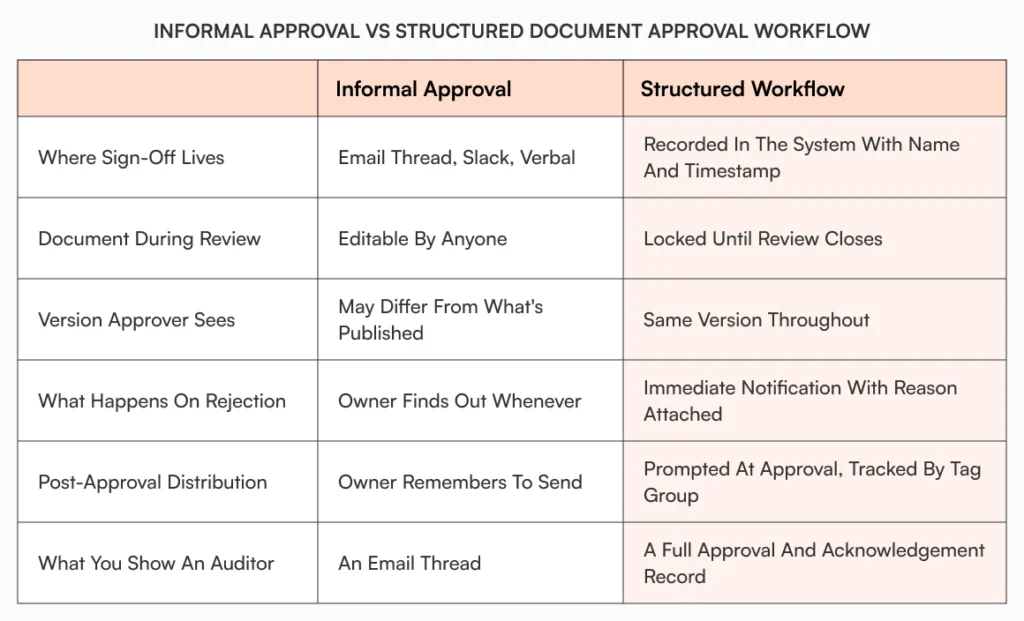
Distribution proof. Even when a policy gets approved cleanly, “I sent everyone the updated SOP” is not evidence that anyone read it. Knowledge silos form not because people aren’t told about updates, but because there’s no confirmation loop. The policy changed. Whether the team is working from the current version is a different question entirely.
How a document approval workflow for policy management should work
The mechanics matter here, so it’s worth being specific about what a real workflow covers versus what most teams think it covers.
An admin sets up a named approval workflow template tied to a document category: regulatory policies, HR SOPs, financial guidelines. The sequence of approvers, the order, and the requirements are defined once and reused. No one reconstructs the list from scratch each time a new policy goes for review.
When a document is ready, the owner submits it for approval. The document status changes immediately. It’s locked; editing, moving, renaming, and deletion are all blocked while review is active. Every approver sees the same version. The first approver gets a notification with the document name, what’s needed, and a direct link. Not a forwarded thread.
If that approver approves, the document moves to the next step. The owner is notified. If they reject, the document returns to draft with the reason attached. The owner revises and resubmits. The whole chain is visible in the system at every point.
Once every approver has signed off, the status moves to Approved. The owner is then prompted to choose how to distribute it: send for acknowledgement, send as a notification, or route for signature.
That last step is where most teams stop thinking about the workflow. Which is exactly where the real gap is.
Before: A VP of People at a 170-person fintech updates the expense reimbursement policy. It clears sign-off over email across three stakeholders. A Slack message goes out with the link. Two months later, an employee submits a non-compliant expense. When the VP follows up, the employee says they’re not sure which version of the policy they read. There’s no way to confirm.
After: Same policy update, same three approvers. Each one gets notified when it’s their turn. The document is locked during review. All three sign off in the system. The document goes out for acknowledgement to the relevant tag group. Automated reminders go out to anyone who hasn’t confirmed. The analytics panel shows who’s confirmed, how many reminders have gone out, and who’s still pending. When the expense dispute comes up, the acknowledgement record is right there, a clear answer in under a minute.
Same policy. Same team. Completely different audit position.
How AllyMatter handles document approval workflows for growing companies
AllyMatter gives admins and HR managers the ability to create named approval workflow templates from the admin settings. A three-step compliance approval (HRBP, legal, CHRO) gets built once and assigned to the relevant document category. From then on, any document in that category already has the sequence attached. No rebuilding the list for each new policy.
When an owner submits a document, AllyMatter locks it immediately. Edits, moves, renames, and deletions are all blocked until the review closes. Each approver gets a clear email notification: the document name, the action required, a direct link. No inbox archaeology needed. If an approver rejects, the document returns to draft with the reason visible, and the owner gets notified. The status display in the editor matches the workflow panel, so there’s no ambiguity about where things stand.
After approval, the owner chooses the distribution action: acknowledgement, notification, or signature. For acknowledgement, recipients are selected by tag group. Reminders run at a configured interval (daily, weekly, whatever the admin sets) until each person confirms or the deadline passes. The analytics panel shows acknowledgement rate, pending responses, and notifications sent, all tied to that specific document.
The audit trail records every significant action across the document’s lifecycle: who created it, who submitted it for review, who approved each step, and when. That history lives in the system, searchable and verifiable, not buried in someone’s inbox.
For compliance leads preparing for an external review, or HR managers who need to demonstrate that an updated SOP reached their teams, that’s the difference between “we think we sent this” and “here’s the record.”
You can see how this fits into the broader document workflows in AllyMatter and specifically how acknowledgement tracking works once a document has been approved and distributed.

Approved isn’t the same as acted on
A policy that’s been approved but not confirmed with employees is only halfway done. The approval gate ensures the right people reviewed it and that the version is stable. What happens after is where the process either holds up or doesn’t: who gets notified, who has to confirm, and whether any of it is on record.
Growing companies that build this into their process early tend to find audits less stressful, onboarding faster, and policy disputes easier to resolve. The ones that don’t keep running the same reconstruction exercise every time something gets questioned.
Start your 30-day trial of AllyMatter and give your document approval workflow a home that isn’t someone’s inbox.
Frequently asked questions
What is a document approval workflow and why does it matter for policy management?
A document approval workflow is a defined sequence of reviewers a document must pass through before it can be published. For HR managers and compliance leads, it matters because informal sign-offs (over email, chat, or verbally) leave no verifiable record in the system. When an audit asks who approved a policy and when, an email thread isn’t a defensible answer. A structured workflow locks the document during review, records every action with a name and timestamp, and creates an approval history that exists in the documentation system rather than scattered across inboxes.
What’s the difference between approving a document and distributing it?
Approval confirms the document cleared the right reviewers and is ready to publish. Distribution is what makes it actionable. For SOPs and compliance policies, distribution typically means sending for employee acknowledgement, a formal confirmation that the right people have read the current version, not just that a link was shared in Slack. Without structured distribution and a confirmation record, a policy can be fully approved and still leave a company exposed if employees are working from an older version or can’t confirm they saw the update.
Why does document locking during approval matter?
If a document can be edited while it’s in review, the version an approver signs off on and the version that eventually gets published can differ. Nobody flags it because there’s no system to flag it. For regulated industries, that gap between “what was approved” and “what went live” is exactly the kind of discrepancy that creates compliance problems. Locking the document the moment it enters the approval workflow means the record is reliable. Every approver reviewed the same version, and what they approved is what was published.
How do notifications fit into a document approval workflow?
Notifications are what keep the workflow moving without the document owner having to chase anyone. In a structured workflow, each approver gets notified automatically when it’s their turn. Not a forwarded email. A direct alert with the document name and a link. After approval, notification also applies to distribution: employees receive acknowledgement requests, automated reminders go out to non-respondents at set intervals, and the admin has a live view of who’s confirmed and who hasn’t. Without that layer, even a well-run approval process ends with a policy that people may or may not have read.
At what point should a growing company formalize its document approval workflow?
The honest answer: earlier than most teams do. Informal approvals work fine below around 50 employees, where context travels naturally and everyone knows what’s in review. Above that threshold, especially between 80 and 300 employees, the combination of more documents, more stakeholders, and less shared context makes unstructured approvals a real compliance risk. If your company is in that range and a policy audit would currently require reconstructing sign-offs from email threads, that’s the sign to formalize. Setting up workflow templates takes far less effort than reconstructing a failed compliance review.

Founder of AllyMatter I’m founder of AllyMatter, an operations-first knowledge base for growing companies. Before AllyMatter, I co-founded Syren Cloud and helped scale it into a 300-person organization across two countries, leading marketing, operations, and HR. We moved fast, served demanding customers, and learned the hard way that internal knowledge systems built for help docs or IT don’t solve day-to-day operations. AllyMatter is my answer—tools that turn tribal knowledge into trusted, searchable processes. This blog shares the playbooks, checklists, and lessons I wish I’d had while scaling.