
Policy Software · 8 min read
How to Choose Policy Management Software: A Checklist
Say you’ve reached the shortlist stage: five tabs open, five vendors, and every page says the same three words. Secure. Configurable. Audit-ready. The feature lists have converged so completely that reading them tells you almost nothing, and the demos are choreographed to the strengths. So how to choose policy management software when every option sounds identical? Stop evaluating features and start evaluating records: test what each product produces as evidence, what it does when a policy changes, what its seat model costs at your headcount, and what its vendor refuses to promise. This page is that instrument: a ten-point checklist ordered by what weak products fake best, eight demo questions worth asking in writing, and the boundaries that separate honest tools from optimistic ones.
If you’re still working out what the category does or whether you need it at all, start with the complete guide to policy management software and come back with a shortlist.
Key takeaways
- Choose on records, never on feature lists: the evidence a product produces is the product.
- Read the checklist in order: the first three items are where weak products look best in demos.
- Ask the eight demo questions in writing. Written answers age better than demo impressions.
- Distrust every verdict a dashboard offers. Compliance scores are promises no software can keep.
- Know the seat model before comparing anything else; it decides your real cost more than the sticker.
How do you choose policy management software?
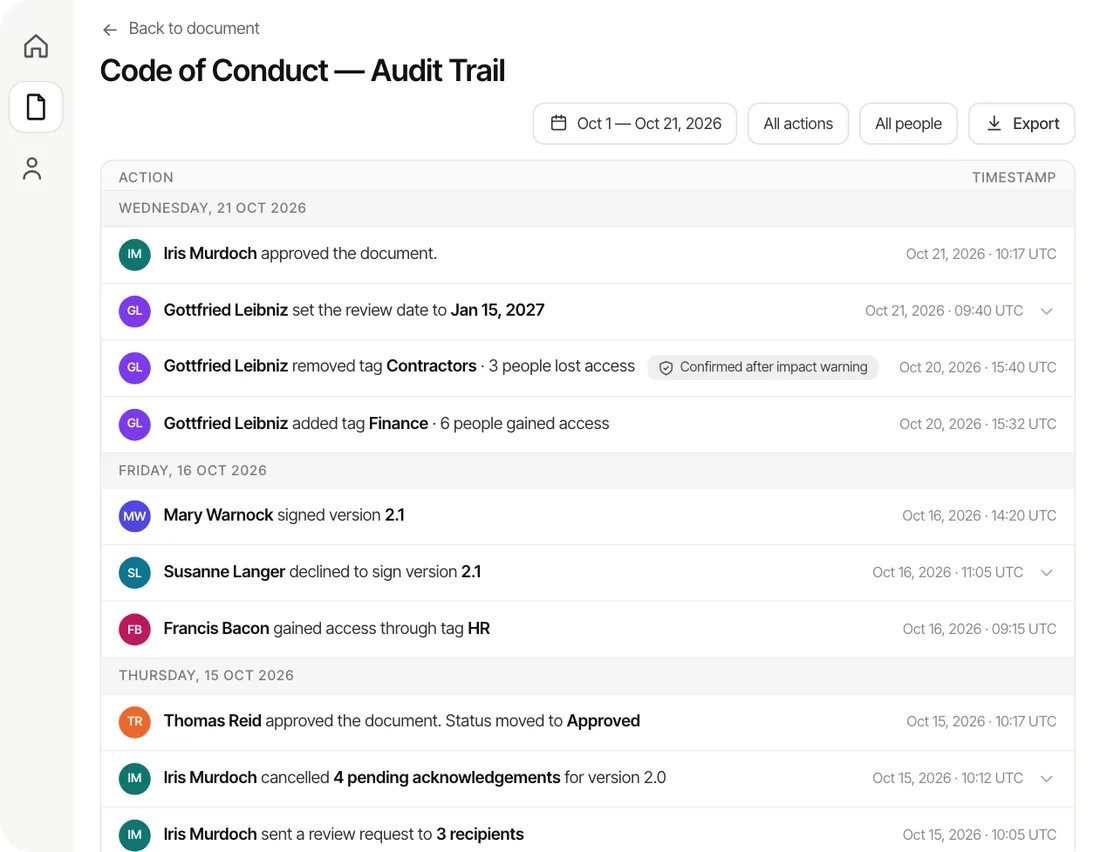
Choose it the way an auditor will eventually test it. An auditor never asks whether your software has approval workflows; they ask who approved version 3, when the warehouse team acknowledged it, and whether you can hand that over as a file. Evaluation should run the same direction: make each vendor produce the records, not describe the features.
Practically, that is a three-part method. First, screen the shortlist against the ten-point checklist below; it is pass or fail, and most tools fail early. Second, put the eight demo questions to the survivors in writing. Third, listen for boundaries: what the vendor says their product deliberately does not do tells you more than anything it does.
Before you evaluate: confirm which job you’re hiring for
Half of bad software choices in this category are category errors, because five different products all get called “policy management” in sales conversations. One honest orientation before the checklist:
| If your dominant job is… | You are shopping for… |
| Keeping policies approved, distributed, acknowledged, and provable | Policy management software (this checklist applies) |
| Risk registers, whistleblower channels, board reporting | A GRC platform, priced and scoped for enterprises |
| CAPA, nonconformance, calibration | An eQMS; your policy tool should feed it, never imitate it |
| Automated technical-control evidence for SOC 2 | Compliance automation (Vanta, Drata); a complement, since it proves your systems while you still prove your people |
| One signed handbook at onboarding, nothing more | Your HRIS may already do it |
And if nobody external demands proof from you yet, the honest answer may be no software at all; we wrote the self-qualification for small teams separately.
The ten-point evaluation checklist
Ordered by fakeability: the early items are the ones weak products imitate most convincingly in a demo.
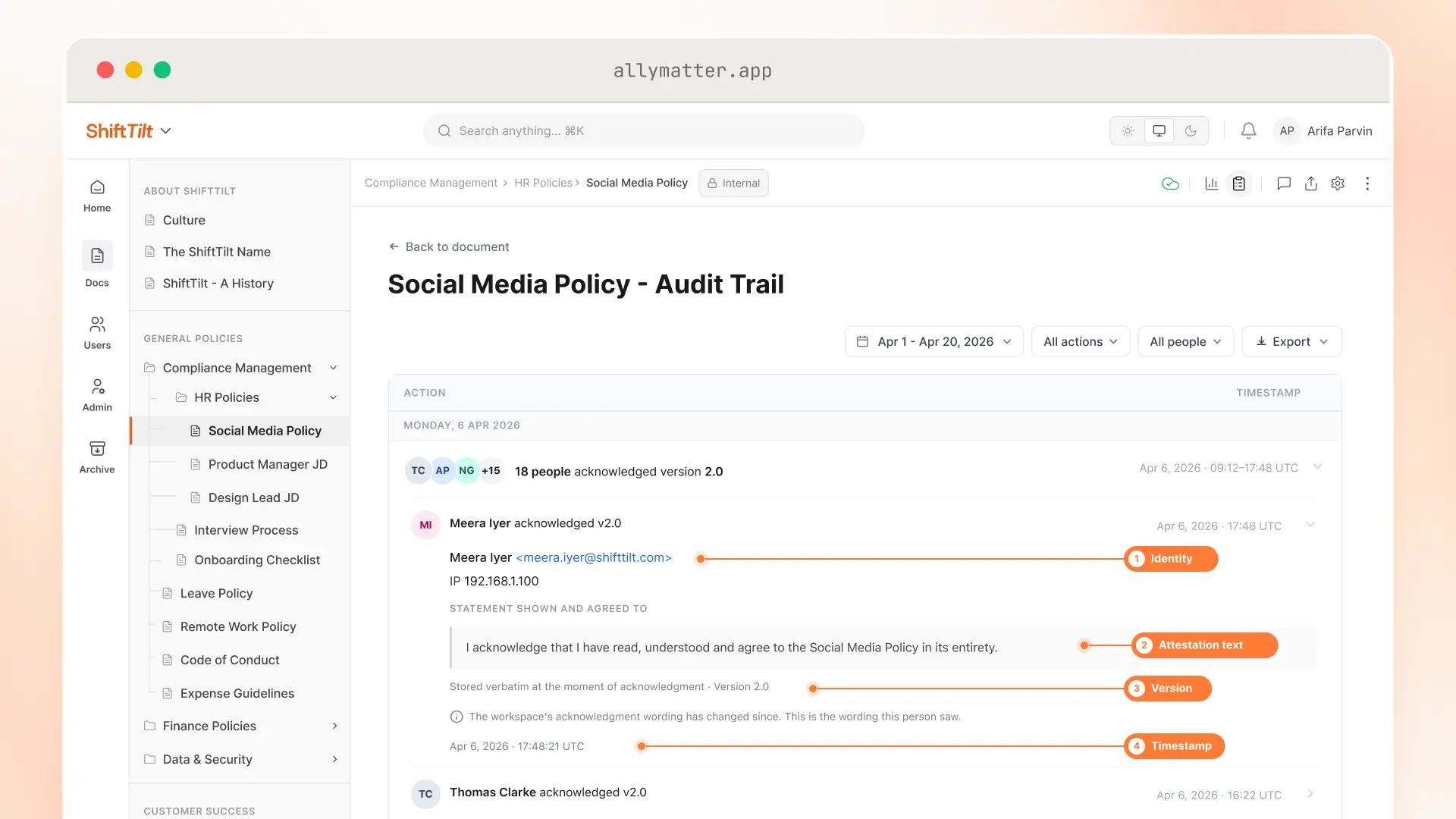
- Version-bound attestation. The record must name the exact version and store the statement the person saw. A checkmark next to a document title is a courtroom liability, and courts have already graded those.
- Re-collection on change. Ask precisely what happens when an acknowledged policy is edited. If the answer involves editor discretion or silence, the records will drift from the truth the moment someone is busy.
- Approval as a gate, not a note. Unapproved versions should be unable to reach an audience. A workflow that records intentions without enforcing them is a diary.
- Attribute-based audiences with inheritance. Distribution lists are where coverage dies. Tags should decide which documents a new joiner receives.
- System-owned chasing. Reminders on a cadence, with the chasing itself on the record.
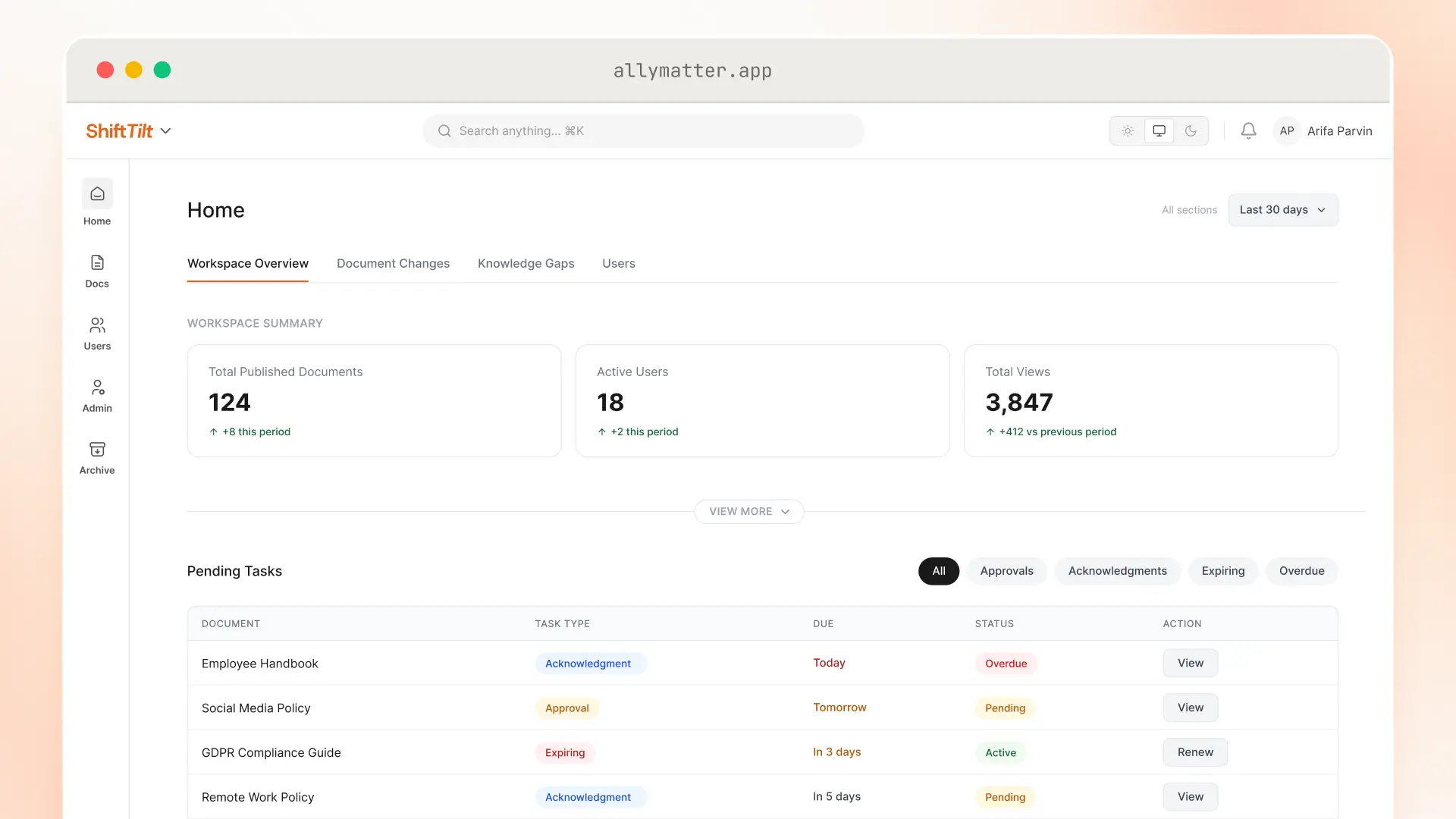
- A single source of in-force truth. One screen answering “what is current, who is covered, what is aging,” drawn from records rather than compiled for the meeting.
- Records that outlive people and documents. Acknowledgments must survive account deletion, document retirement, and retention cleanup, by design.
- Point-in-time answers. Auditors and lawyers ask about the past. “Show me last September” should be a screen, not a project.
- Exports a third party accepts, and access your IT will approve. CSV for you, fixed formats like PDF for them; SSO for your team, controlled links for the outside reviewer who needs to read without joining.
- A pricing model that survives your headcount. In much of the category, everyone who must read or acknowledge a policy is a billable seat, so the price scales with the whole company even though six people do the work. Ask what readers, acknowledgers, and approvers cost; the answer restructures most shortlists. The full cost breakdown of the category has its own guide, and our numbers are public.
The eight demo questions that expose weak products
Feature tours are rehearsed; these are not. Ask them in writing where possible, because written answers commit the vendor in a way a demo never does.
- Show me the program as of a date six months ago: versions in force and who had acknowledged them by then.
- Edit an acknowledged policy in front of me. What happens to the existing acknowledgments, automatically?
- Open one completed acknowledgment. Does it show the exact statement the person saw, and the version?
- What does an approver cost? A reader? The 300th employee who only acknowledges?
- Delete a test user who has acknowledged documents. What survives?
- Export everything about one document, and everything about one person. What formats, and could an auditor navigate them unassisted?
- What is the all-in year-one cost including implementation, and what does year-three renewal look like?
- What does your product deliberately not do?
Strong products answer all eight quickly, and the eighth is the tell: vendors with real boundaries name them without flinching.
What should a vendor refuse to promise?
The category’s failure mode is selling verdicts, so the most useful evaluation signal is what a vendor will not say. Three refusals worth demanding:
No compliance scores. A dashboard announcing “87% compliant” is a verdict no software has standing to give: whether a policy addresses a requirement well is your judgment, your consultant’s, and finally your auditor’s. Demand facts with names attached (acknowledged by 214 of 214 required, 26 excluded with reasons) and keep the verdicts human.
No supplied regulatory content. Standards bodies license their text; templates that “make you compliant” are a sales claim wearing a document. The honest architecture is bring-your-own-standard: your framework, your interpretation, mapped in your own words.
No pretending the boundary away. Every serious product borders the categories in the table above. A vendor who claims to also be your GRC platform, your eQMS, and your training system will discover the boundary for you after the invoice.
How AllyMatter measures up
We built AllyMatter to pass this exact evaluation, which is worth disclosing rather than boasting about: the checklist is our architecture written as questions, and that is precisely why you should make every vendor answer it, including us.
The short version: version-bound records with the attestation text stored, re-collection on every change with no minor-edit exception, approval as a hard gate, tag-based audiences with inheritance, system-owned reminders, records that survive departures and cleanup, an audit trail you can filter and export as a PDF or CSV as of any date, and per-editor pricing with readers and acknowledgers free without limit, and approvers free when they are Viewers.
The whole product, on real screens, is in the features guide, and the demo questions above work just as well on our trial as on anyone’s sales call.
Start your 30-day free trial. No credit card to start.
Three scenarios
If you are under about 30 people with no external proof demands, don’t choose policy management software at all yet; a tidy drive and discipline will hold, and the evaluation can wait until proof is demanded.
If you are 30 to 500 people with an audit scheduled, a certification required, or a client questionnaire on your desk, this is the moment the checklist exists for. We built AllyMatter for exactly this company, and we’d put it through the same eight questions.
If you are regulated, multi-site, or client-audited, you are choosing between systems, and the fastest filter is items 1, 2, and 8 of the checklist: version-bound records, re-collection on change, and point-in-time answers. Products that pass those three rarely fail the rest. We’d start with AllyMatter, and the boundaries table above tells you when we would not.
Questions people ask when choosing policy management software
How long should an evaluation take? Two to four weeks for most SMBs: one week to screen the shortlist against the checklist, one to run the demo questions on two or three survivors, and a trial period on the finalist with your own documents. Longer than that usually means the category error above, so recheck the table.
Is a demo or a free trial the better test? The trial, every time it’s available. A demo shows you the vendor’s best path; a trial with your own policies, your own approvers, and one real acknowledgment round shows you the product. Use the demo questions on whichever you get.
What is the single most important thing to check? The acknowledgment record itself. Open one and look for four things bound together: identity, exact version, timestamp, and the statement the person saw. Every other feature is scaffolding around that record, and products that get it wrong cannot be configured into getting it right.
Should regulated industries use a different checklist? Same checklist, stricter weighting. Items 7, 8, and 9 (records that outlive people, point-in-time answers, exports a third party accepts) move from important to disqualifying, because your examiner will test all three.
Start your 30-day free trial. No credit card to start, and a 30-day money-back guarantee if you convert and change your mind.
Not ready for a trial? Yearly plans include free migration help and chat handholding while you set up, so moving your docs from SharePoint, Google Drive, Confluence, or Notion is not a project you run alone.