
“Which version did we use last quarter?”
If your answer requires digging through email threads, Slack messages, and “Final-FINAL.pdf,” you don’t have version control. You have guesswork.
Auditors (and Legal) won’t accept guesswork. They want who changed what, when, and why, plus who approved it and who read it.
This guide shows exactly what an audit-ready policy trail looks like, how to make approvals and signoffs visible in one place, how to use version history and restore points to prove lineage, and how to package everything for auditors in minutes, not days.
You’ll also see how AllyMatter handles version history, approvals, acknowledgments, and exports by design.
For foundational context, keep these handy:
- HR Knowledge Bases – A Complete 2025 Guide
- Internal Knowledge Base 101
- Avoid HR Headaches: How a Knowledge Base Can Help You Stay Compliant (informational, not legal advice)
The Challenge: “Which version did we use last quarter?”
A California manager followed last year’s meal/rest rule. Your PTO accrual table changed mid-quarter. Legal tweaked harassment language in Slack.
Now you’re asked to prove which policy version was in force on March 15, who approved it, and whether employees acknowledged the update. Without a proper history, you’re hunting screenshots, email timestamps, and file metadata. That’s brittle and slow.
Version control isn’t optional when you’re managing internal documentation for policy management. It’s the foundation of defensible governance.
What you need instead: one system that shows the policy’s full lineage (versions, approvers, change notes, acknowledgments) and lets you export the entire trail for an audit packet.
Anatomy of an audit-ready trail: Who changed what, when, and why
Here’s the minimum viable set your system should capture on every policy update:
- Version ID: an immutable identifier (e.g., v12)
- Timestamp (UTC): when the version was created and published
- Editor: the person who made the change
- Version snapshot: the full content of each past version viewable in the system
- Approver lineage: names, roles, and timestamps for each approval step
- Applicability: who the version applies to (e.g., U.S. + CA addendum)
- Acknowledgment requirement: on/off for this version, with a due date
- Acknowledgment results: completion rates, including overdue readers
- Restore point: the ability to revert to a prior, known-good version (as a new version)
This structured approach is part of building a properly structured internal knowledge base from the ground up.
AllyMatter makes these fields first-class, not afterthoughts. Versions, approvers, and acknowledgments live with the content, not in a separate spreadsheet.
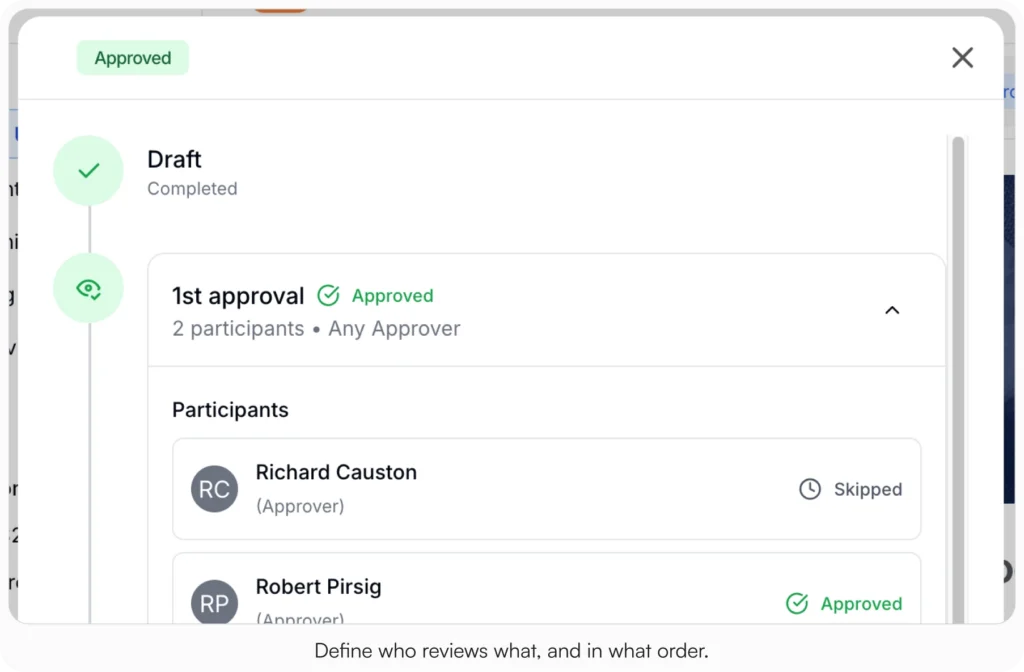
Approvals and signoffs: Visible in one place (not buried in email)
Email approvals don’t age well. People leave. Inboxes get archived. Screenshots aren’t lineage. Your tool should keep approvals where the policy lives:
- Configurable workflow: HRBP → Legal (if applicable) → CHRO for major changes
- Named approvers: not just “Legal”, show the person and their role
- Timestamps and status: pending, approved, rejected, returned with comments
- Change notes required: “Increased PTO accrual for year 3+, added CA sick leave note”
In AllyMatter, approvals are captured on the article itself, producing an immutable approver chain. No need to chase down email evidence.
Restore points and reviewing prior versions (practical comparison)
Even careful teams make edits they later reconsider. Two capabilities prevent small errors from becoming audit headaches:
Review prior versions (version history list)
Open any previous version’s full content to see exactly what the policy said at that time, alongside the change note explaining why it changed.
Useful for Legal sign-off and for audits that ask, “What language was in force on date X?”
Restore to previous
Roll back to a known-good version in one click.
Best practice: restoration creates a new version (no silent overwrites), preserving the chain of custody.
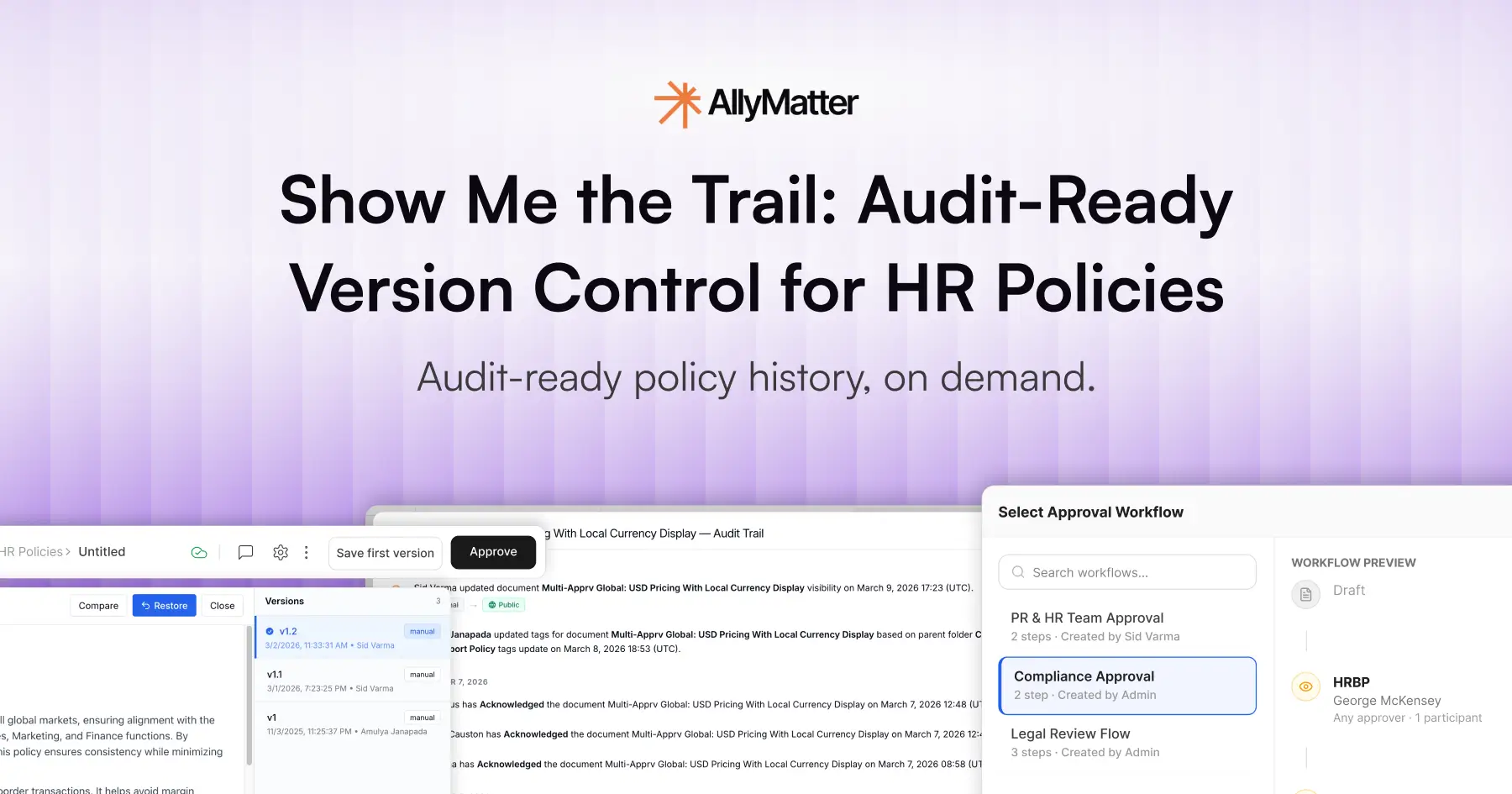
In AllyMatter, the Version History tab lists all previous versions with timestamps and editors. You can open any past version to review it, and restore from there, creating a fresh current version that keeps the lineage intact.
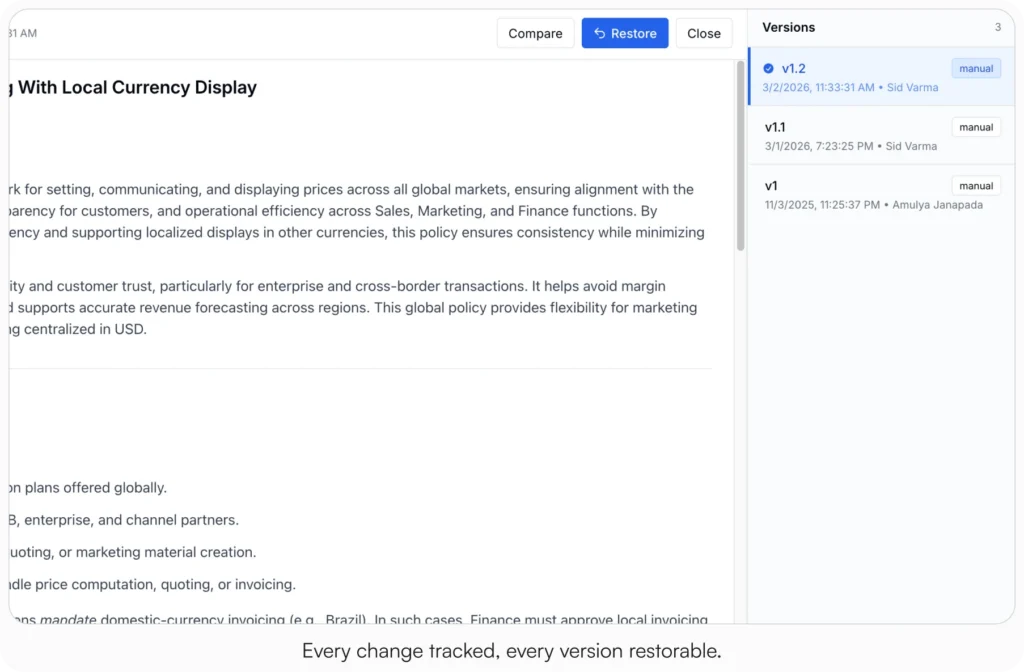
Open any past version to see exactly what changed, who changed it, and when.
Exporting the trail for auditors (and sleeping better)
When audit time comes, your goal is one export, multiple proofs:
- Policy packet (PDF): the current approved version, plus version header (ID, timestamp, owner, approvers, change note)
- Audit log (PDF): each version with editor, timestamps, approvers, change notes, and links back to version entries
- Acknowledgment report (CSV): targeted audience, due date, completion rate, overdue list (by org/role/location)
In AllyMatter, you’ll hand Legal a clear narrative: what changed, who approved, who read, and when, addressing core HR knowledge base use cases around compliance and audit readiness.
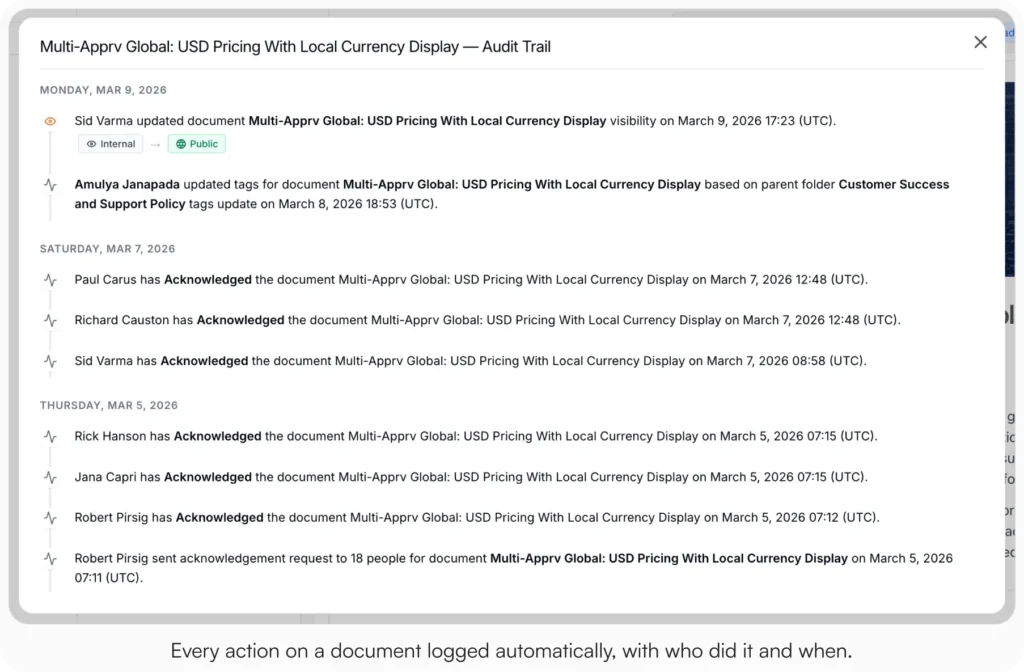
How AllyMatter implements version control for HR policies
Most wikis track “edits.” HR needs evidence. Here’s how AllyMatter maps to that need:
- Version history by default: every publish creates a new immutable version with a unique ID
- Structured approvals: approver names/roles/timestamps stored with the policy
- Version snapshots: open any prior version to see its full content
- Acknowledgments integrated: set due dates, reminders, and export completion
- Targeting intact: versions respect role/state/region scoping for audience accuracy
- Exports in clicks: audit log CSV, acknowledgment CSV/PDF, and a policy packet PDF
Implementation steps: Make your policy history audit-ready
You don’t need a reorg, just consistent habits and the right tool settings.
Step 1: Centralize policies into articles
Convert PDFs and long emails into structured policy pages (summary, applicability, details, exceptions, owner, last updated). Move state addenda to clearly linked child pages.
Step 2: Lock down ownership & permissions
Assign a named owner per policy. Restrict edits to HR Ops/Policy team. Require approval from HRBP/Legal/CHRO as appropriate.
Step 3: Enforce change notes & approvals
Make a change note mandatory on publish. Use a standard format, e.g.,
“2025-06-12: Increased parental leave (US) from 16→20 weeks; added adoption clause. Approved by HRBP East + Legal.”
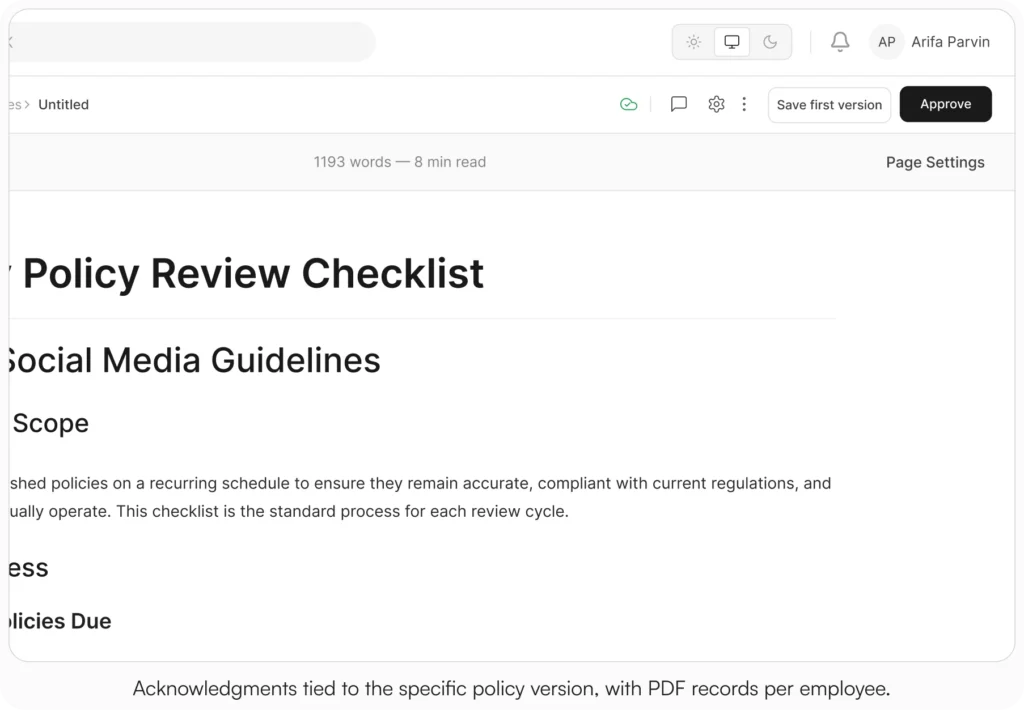
Step 4: Enable acknowledgments where needed
For Code of Conduct, Anti-Harassment/EEO, Security, CA meal/rest, turn on acknowledgement required, set due dates, and reminders.
Step 5: Practice reviewing & restoring
Publish a minor tweak; open the previous version to confirm content; practice a restore to verify lineage remains intact.
Step 6: Prepare an audit packet
Export the Audit Trail CSV and Acknowledgments CSV/PDF for a key policy (e.g., PTO & Sick Leave, with a California addendum). Share the packet internally to confirm it answers “who/what/when/why/read?”
Step 7: Schedule quarterly review
Set reminders for owners. Anything stale triggers a minor “touch” (reviewed and still valid) or an update (with approvals and a fresh version).
Governance patterns that prevent “version drift”
- Title conventions: [Policy] PTO & Sick Leave (U.S.) and [Policy] PTO & Sick Leave (California Addendum)
- Applicability banners: “Applies to: U.S. employees; CA addendum applies to those working in California.”
- Linked procedures & FAQs: keep the policy stable; link steps in Procedures; quick answers in FAQs.
- Single source of truth: no policy copies in shared drives; always link back to the policy article.
- No email approvals: all approvals must occur in-system (names/timestamps auto-captured).
Pitfalls & quick fixes
- Approvals in email/Slack → breaks the chain of custody
Fix: Route approvals in the KB; approvers are recorded to the article. - “Final” PDFs in multiple places → parallel versions
Fix: Migrate to articles; archive obsolete files; link policies, don’t attach them. - Missing change notes → you’ll forget why it changed
Fix: Make the “change note” field required on publish. - No state addenda → generic policy forces managers to guess
Fix: Create linked addenda (e.g., CA meal/rest) and target them to relevant audiences. - Acknowledgments in spreadsheets → error-prone
Fix: Track in-system; export CSV/PDF when asked.
Three scenarios
An honest read on whether to put this in place:
If you’re under 30 employees and policies rarely change, a Drive folder with strict version naming will hold for a while. The audit-ready trail pays off when policies change often or when an audit lands.
If you’re 30 to 200 employees and the four signals at the top of this post are showing up, this is the moment. AllyMatter is what we built for exactly this. Export-to-audit typically runs under 60 seconds once the system is set up.
If you’re 200+ employees, multi-state, or in a regulated industry (healthcare, finance, legal, government contracting), audit-ready version control is not optional. AllyMatter or another purpose-built KB makes sense here. We’d start with AllyMatter.
Building audit-ready policy trails
Version control isn’t about tracking changes for the sake of it. It’s about having defensible evidence when compliance, Legal, or an auditor asks the uncomfortable questions.
The difference between a good answer and a three-day reconstruction project comes down to whether your system treats policy history as a first-class concern. Approvers captured at the time of publish. Version snapshots you can open and review. Acknowledgments tied to specific versions. Audit logs you can export in minutes.
When someone asks “which version did we use last quarter?” you should be able to answer with a link, not a scavenger hunt.
Start your 30-day free trial. No credit card to start, and a 30-day money-back guarantee if you convert and change your mind. Or try the live demo to see version history, approvers, and exports in action.
Not ready for a trial? Migration from Confluence, Notion, SharePoint, or Drive is on us when you decide. We’ll move your existing HR docs over and have you running in about a week.
Compliance note: This article is informational, not legal advice. Consult your counsel for jurisdiction-specific requirements (e.g., CA meal/rest, state sick leave).
Frequently asked questions
Do we need approvals for every edit?
No. Minor grammar fixes can skip Legal, but every publish event still creates a version and logs the editor and change note. Material changes should trigger the full workflow.
Can we pin “current version” so people don’t wander into history?
Yes. The published version is what employees see by default. Version history lives in a separate tab, visible to policy owners and admins for audit purposes, but not the primary view for readers. This prevents confusion while preserving the complete lineage for governance.
What if Legal wants a copy in email anyway?
Export the Policy Packet PDF and Audit Trail CSV from AllyMatter. You’ll give them immutable artifacts and keep a single source of truth.
How do acknowledgments fit the trail?
They prove who read the current version within the window you set. AllyMatter ties results back to the version and lets you export by org, role, or location.
What happens if we need to prove a policy was in effect on a specific date?
Open your version history and find the version published before that date. You’ll see the full policy content, the approval chain, who it applied to, and whether acknowledgments were required. Export that version as a PDF with the metadata footer showing publish date and approvers. That’s your proof.
Related reading
- Avoid HR Headaches: Stay Compliant without Legal Bottlenecks
- Why HR Teams Can’t Track Policy Acknowledgments in SharePoint
- Notion vs AllyMatter for HR Policy Management
- Confluence vs AllyMatter for HR Operations
- HR Knowledge Base: Complete Guide for Scale-Ups

Founder of AllyMatter I’m founder of AllyMatter, an operations-first knowledge base for growing companies. Before AllyMatter, I co-founded Syren Cloud and helped scale it into a 300-person organization across two countries, leading marketing, operations, and HR. We moved fast, served demanding customers, and learned the hard way that internal knowledge systems built for help docs or IT don’t solve day-to-day operations. AllyMatter is my answer—tools that turn tribal knowledge into trusted, searchable processes. This blog shares the playbooks, checklists, and lessons I wish I’d had while scaling.