
Somewhere in your company right now, an employee is typing “how do I request PTO” into Slack instead of searching for the answer, and an HR teammate is typing the same reply they typed last Tuesday.
The fastest way to reduce repetitive HR questions is a small, well-built FAQ: the top ten questions, written in employee language, each answering in under thirty seconds, each linking to the one current policy behind it. Not a hundred articles. Ten good ones, maintained.
This guide is the whole system: what goes in, the template to copy, the publishing rules that stop it rotting, and the math that proves the hours you got back.
Four signals you need this now:
- HR answers the same five questions more than once a week, by hand, in chat.
- New hires generate the same question wave every single cohort.
- Answers people receive in chat contradict the current policy, because the policy moved.
- Nobody can say how much time question-answering actually costs.
Key takeaways
- Ten FAQs written in employee language deflect more questions than a hundred articles nobody maintains.
- Every FAQ links to exactly one source of truth, and that source has to be governed: current, approved, and owned, or the FAQ spreads stale answers faster.
- Publishing rules (owner, review date, one topic per FAQ) are what separate an FAQ that lasts from one that rots by Q3.
- Measure deflection with real numbers. A 300-person company deflecting 40% of questions saves about 24 HR hours a month.
The problem scene: Five questions, fifty times
The questions are never hard. When do paychecks hit. How much PTO do I have. How do I add my new baby to insurance. Who approves my expense report. What is the parental leave policy.
Each takes a few minutes to answer, which is exactly why they never get fixed: no single question is worth a project. But McKinsey found that employees spend nearly 20% of their workweek looking for internal information or tracking down colleagues for help, and research from Panopto shows 81% of employees get frustrated when they can’t access the information they need to do their jobs. The tax is real on both sides of the conversation. The fix is making the answer faster to find than to ask.
Identify what goes into your HR FAQ knowledge base
Start from evidence, not intuition. Pull last month’s Slack threads, HR inbox subjects, and help desk topics, and mark the questions that appear most. Create a single backlog with columns: Question, Source, Frequency (per week), Owner, Status, Last Updated, Link to Answer, Notes.
The top ten by frequency are your launch set. Almost everywhere, they cluster in the same territories: pay and timesheets, PTO and leave, benefits enrollment and changes, expenses, and onboarding logistics. Notice what most of those have in common: the answer depends on a policy. That matters in a moment.
Structure FAQs for instant answers
Each FAQ is one question, phrased the way employees actually ask it, with a featured answer of two to four lines that resolves the common case immediately. First actionable step in bold. No preamble about how important the policy is. Someone skimming on their phone between meetings should get their answer without scrolling.
Questions with genuinely different intents get split: “How does PTO accrue” and “How do I request PTO” are two FAQs, because the person asking each wants a different thing.
“Need more?” links that prevent rabbit holes
The featured answer handles the common case; the “Need more?” block handles everything else with three tight links: the procedure, the governing policy, and one or two related answers. That keeps every FAQ short while nothing gets lost, and it routes readers to the source of truth instead of duplicating it. The FAQ answers; the policy governs. Keeping those roles separate is what stops the FAQ from becoming a second, contradictory policy library.
Tagging and synonyms that match how employees ask
Tag each FAQ by topic, role, and location, and load the synonyms people really type: vacation for PTO, maternity leave for parental leave, paycheck for payroll. Search only works when it speaks employee, not HR. Test it with real phrasing after tagging; the misses tell you which synonyms are missing.
Make answers faster than asking a human
The FAQ wins on speed or it loses entirely. Three seconds to find, thirty seconds to read, resolved. That standard drives everything above: featured answers up top, bold first steps, synonyms that match real language, and search that respects permissions so people only see what applies to them. The moment asking a person is faster, people ask the person, and the spiral back to chat begins.
Publishing rules that prevent drift
Do this for every FAQ:
- Assign a named owner and review cadence (quarterly for core FAQs).
- Stamp “Last updated” and log change notes.
- Link to exactly one source of truth for policy or procedure.
- Avoid screenshots of policies; link the live article instead.
- Keep one FAQ per topic; split questions that have different intents.
The third rule is the load-bearing one, and it only works if the source of truth deserves the name. An FAQ pointing at a policy nobody governs just spreads stale answers more efficiently. The policies behind your FAQs need owners, approval before changes, and acknowledgment tracking where it matters, which is the governed core of an HR knowledge base rather than an FAQ concern, but the FAQ inherits its trustworthiness from it.
Measure deflection and iterate
Employees × avg HR questions/employee/month × minutes per answer × % deflected ÷ 60 = hours saved/month
Real numbers: a 300-person company where each employee asks HR 1.5 questions monthly, each taking 8 minutes to answer. If the FAQ deflects 40% of those questions:
300 × 1.5 × 8 × 0.40 ÷ 60 = 24 hours saved per month
Track it with two lines on one chart: FAQ views and HR pings, week by week. Views up and pings down means it is working. Views up and pings flat means people find the FAQ and do not trust the answers, which is a freshness problem, not a search problem.
HR FAQ template you can copy
Title (question): How do I request PTO?
Featured answer (2-4 lines): Go to HRIS → Time Off → Request PTO. Pick your dates, add a short note if needed, submit. Managers approve within 3 business days. See the PTO & Sick Leave policy for accrual and blackout dates.
Need more?
- Procedure: Request PTO
- Policy: PTO & Sick Leave (U.S.), California Addendum
- Related: Holiday calendar, Timesheet corrections
Who this applies to: All U.S. employees. State exceptions listed in policy addenda.
Owner & last updated: HR Ops, 2025-06-12
Tags and synonyms: Topic: PTO; Role: Individual Contributor; State: U.S.; Synonyms: vacation, sick time
Walkthrough: Building the first 10 FAQs in one afternoon
Pull sources
- Export last month’s searches, Slack threads, help desk topics, HR inbox subjects.
- Mark the top 25 by frequency.
Draft answers
- Write 10 featured answers using the template.
- Bold the first step, add “Need more?” links.
Use this checklist while drafting
- Question in employee language? (“When do paychecks hit?” not “Payroll disbursement schedule”)
- First step bolded and above the fold?
- Links to live policy, not PDF?
- Owner and date stamped?
- Synonyms added to tags?
Tag and test
- Add topic, role, state tags.
- Add synonyms and test real terms like “vacation” and “maternity leave.”
Publish and announce
- Post links in #all-company and #ask-hr.
- Ask managers to pin the FAQ in their team channels.
Measure and share
- After two weeks, chart FAQ views vs HR pings.
- Share the wins and add two FAQs for top zero-result terms.
Common pitfalls and quick fixes
Writing in HR language instead of employee language: fix by stealing the phrasing from the actual Slack questions. Answering everything in one mega-article: split by intent. Screenshotting policies into answers: link the live policy, screenshots freeze in time. Launching fifty FAQs at once: launch ten, keep them fresh, grow from the zero-result search terms. Skipping owners: Assign a named owner to every FAQ; without one, it’s a stale answer with a publish date.
Red flags your HR FAQ knowledge base isn’t working
Views climbing while chat questions stay flat (found but not trusted). Zero-result searches piling up (missing synonyms or missing answers). The same question arriving in chat with the FAQ link unclicked (answer too slow or too buried). “Last updated” dates aging past their review cadence (ownership failed). Each red flag maps to one fix above; none of them mean starting over.
Real-world examples that work
The patterns that survive contact with employees: a payroll FAQ that opens with the paycheck schedule as a table, not a paragraph. A benefits-enrollment FAQ that splits new-hire enrollment from life-event changes because the two groups search differently. A leave FAQ that answers the top three variants (vacation, sick, parental) in three separate entries, each linking the same governing policy. Boring, specific, fast: that is what deflection looks like.
How AllyMatter supports your HR FAQ strategy
We built the machinery this system needs to stay alive.
FAQs live beside the policies they cite, with tags controlling who sees what and search that respects those permissions, so answers surface only for the people they apply to. Every document carries a named owner and a review date, and the owner gets nudged when the date arrives, which is how “quarterly review cadence” becomes real instead of aspirational.
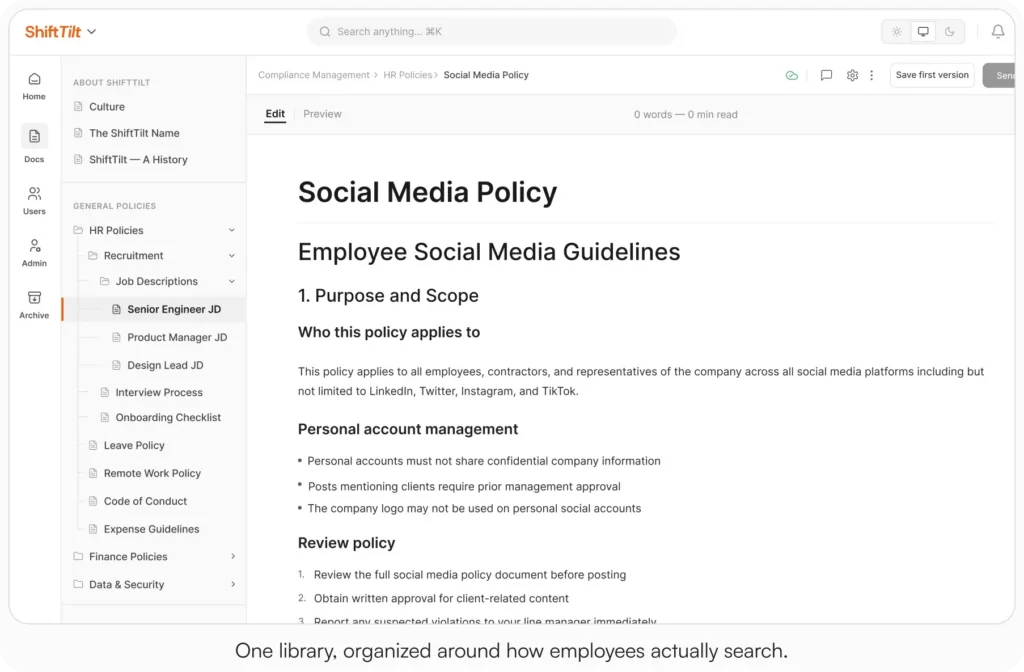
The “one source of truth” rule gets teeth: your FAQ links a policy that is version-controlled, approved by named people before changes publish, and tracked for acknowledgment where it matters. When the policy updates, the FAQ’s link still points at the one current version, because there is only one.
And deflection measurement comes built in: every document carries 30-day analytics showing total and unique viewers and time spent, so “chart FAQ views against HR pings” is a lookup, not a project.
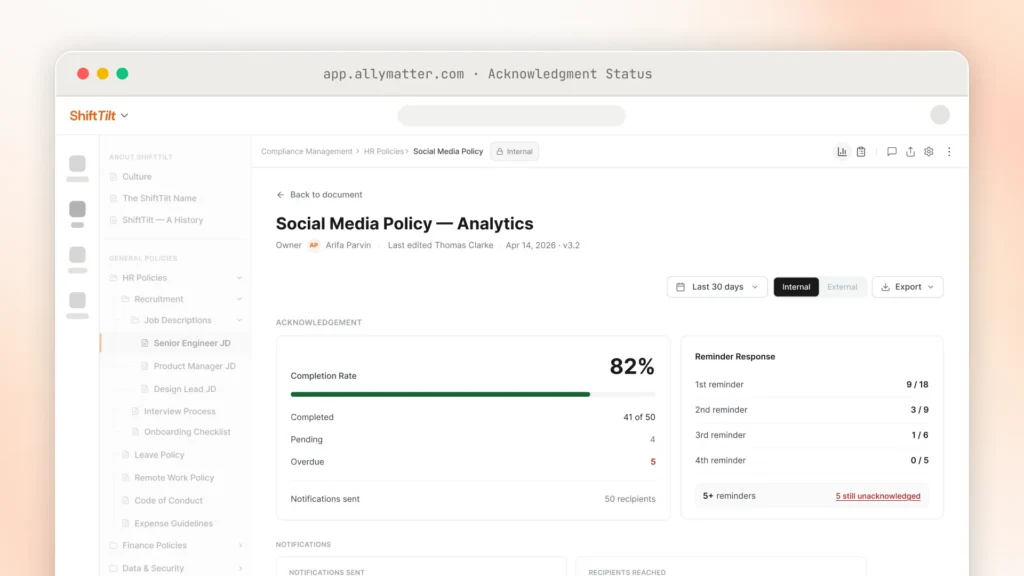
Per-document analytics show whether your HR FAQs are deflecting questions.
Start your 30-day free trial. No credit card to start, and a 30-day money-back guarantee if you convert and change your mind. The sandbox is open if you want to look first.
Three scenarios
An honest read:
If you are under 30 people, a pinned doc with ten good answers is a real FAQ system. Use the template above and skip the software for now.
If you are 30 to 500 people and HR is re-answering the same questions weekly, this is the moment: the interruptions already cost more than the fix. We built AllyMatter for exactly this, and the FAQ layer comes free with the governed policy layer you need anyway.
If you are regulated or multi-state, your FAQ answers change by jurisdiction and your policies change mid-year, which makes the one-source-of-truth rule mandatory rather than nice. We’d start with AllyMatter.
Start with ten FAQs and iterate from there
Ten questions, one afternoon, the template above. Watch the zero-result searches for two weeks, add what people looked for and did not find, and let the FAQ grow at the speed of real demand. The system that deflects hundreds of questions a year starts smaller than anyone expects.
Start your 30-day free trial. No credit card to start, and a 30-day money-back guarantee if you convert and change your mind.
Not ready for a trial? Migration from SharePoint, Google Drive, Confluence, or Notion is on us. We’ll move your docs and have you running in about a week.
Frequently asked questions
How many FAQs should we launch with?
Ten. Enough to cover the real question load, few enough to keep fresh. Grow from zero-result search terms, not from brainstorms.
How is an HR FAQ different from the employee handbook?
The FAQ answers questions fast and links to sources; the handbook and policies are the sources, with the approval and acknowledgment machinery that makes them trustworthy. Neither replaces the other.
How do we get employees to use it?
Answer every repeat question in chat with the FAQ link instead of the answer, for two weeks, without exceptions. Speed does the rest; if the FAQ resolves in thirty seconds, people come back.
Who should own the HR FAQ?
One named person in HR ops owns the system and the review calendar; each FAQ can have its own owner. Unowned FAQs are where stale answers come from.
Related reading

Vikas is a B2B marketing professional with over 14 years of experience in content strategy, messaging, and demand generation. He specializes in turning complex business challenges into clear, actionable stories to connect meaningfully with audiences.