Free Policy Acknowledgment and Signature Tracker
A ready-to-use template for Google Sheets and Excel. Track who acknowledged or signed which policy, which version, how they confirmed, and where the proof is kept. Free, with no email or sign-up needed.
Google Sheets opens a “Make a copy” prompt, so the copy is yours and private to you.
What is in the template
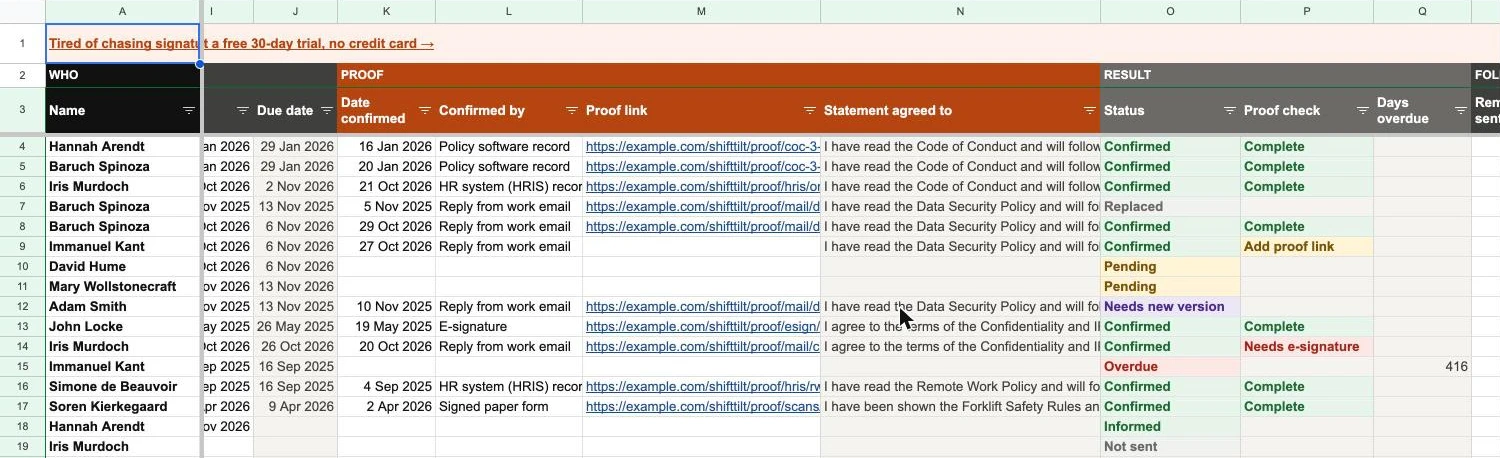
Six tabs, already linked together. You type in the white columns, and the grey ones work themselves out.
- TrackerOne row per person per policy version: how it was sent, the date they confirmed, how they confirmed, the proof link, and a status that updates itself.
- PoliciesEach policy with its current version, owner, the proof it needs, how you usually send it, the statement people agree to and the next review date.
- PeopleEveryone who has to confirm something. Pick a name in the Tracker and the email, employee ID and department fill in.
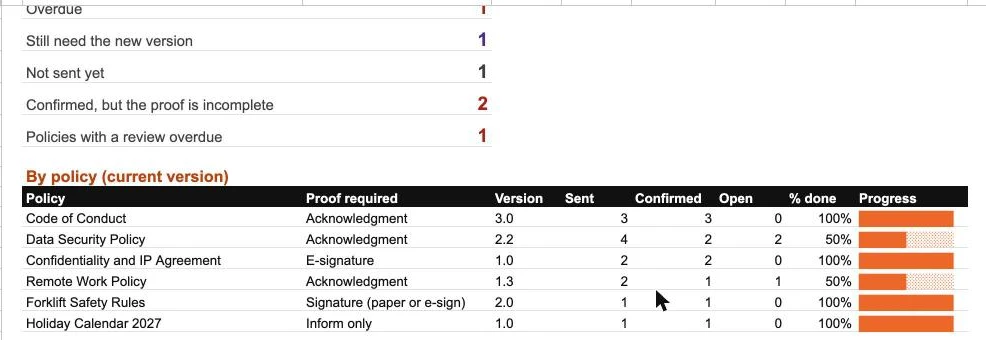
- SummaryWhat is confirmed, pending, overdue or missing proof, with % done and a progress bar for each policy.
- Start hereSetup in five steps, what every status means, and how to choose the proof each policy needs.
- ListsThe dropdown values for departments, how policies are sent and how people confirm, ready to edit.
Set the proof each policy needs
A code of conduct and a confidentiality agreement need different proof. Set it once per policy, and every row is checked against it.
- AcknowledgmentThe person confirms they have read the policy and will follow it. Right for most policies.
- E-signatureFor agreements, such as a confidentiality and IP agreement or an offer letter. A reply email is flagged as not enough.
- Signature, on paper or electronicFor rules handed over in person, such as safety rules on the shop floor. A signed form or an e-signature both count.
- Inform onlyFor notices that need no confirmation, such as a holiday calendar. Sending it is enough.
Send it however you already do
Record how each policy went out: email, your HR system, policy software, an e-signature tool, the intranet, a chat app or a printed copy. Then record how each person confirmed, which can be different. A policy sent through your HR system can come back as an e-signature, and the row still counts.
Link the proof, then let it check itself
Paste a link to the signed PDF, the e-signature certificate, the HR system record or the saved reply email. The Proof check column then says Complete, Add proof link, or Needs e-signature when the way someone confirmed falls short of what the policy asks for.
Start in five steps
About fifteen minutes for a team of twenty.
- 01
Make your copy
Make a copy in Google Sheets or download the Excel file, then delete the sample rows on People, Policies and Tracker.
- 02
Add your people and policies
List everyone who has to confirm something, then each policy with the version in force today and the proof it needs.
- 03
Log each send
When a policy goes out, add one row per person: the name, the policy, the version, how you sent it and the date. The due date fills in.
- 04
Record each confirmation
Type the date, pick how they confirmed and paste the proof link. The status turns green and the proof check tells you if anything is missing.
- 05
Re-send on every change
Update the version on the Policies tab and add rows for the new version. Anyone who still needs it shows as Needs new version.
See where things stand
The Summary tab counts what is confirmed, pending, overdue and missing proof, and shows progress for each policy’s current version.
When a spreadsheet stops being enough
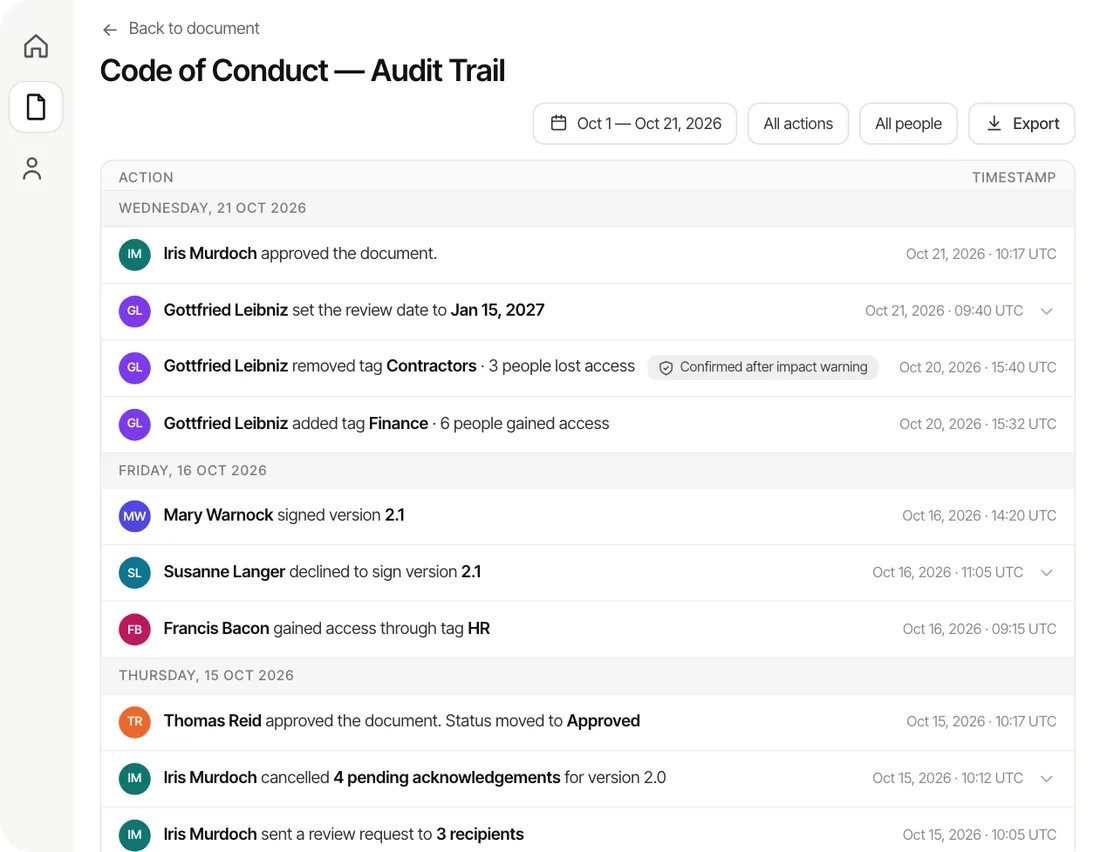
A tracker records proof. It does not send policies, chase people or collect the signatures, and anyone with edit access can change a cell later. It works well for a small team. As people and policies grow, keeping the rows, the versions and the proof in step becomes the hard part.
AllyMatter does that part for you. It sends each approved policy to the people it covers, collects acknowledgments and e-signatures by name and version, sends reminders, and asks again when a policy changes.
Questions
Is the tracker really free?
Yes. There is no email form and no sign-up. Make a copy in Google Sheets or download the Excel file and use it as you like.
Does it work in Excel and Google Sheets?
Yes. It uses only standard formulas, so it works in Google Sheets, in Excel and in most other spreadsheet apps, with no macros or add-ons.
Does it collect signatures?
No. It records them. Collect the acknowledgment or signature in your email, HR system, e-signature tool or policy software, then log it here with a link to the proof.
Is a reply email enough proof?
For most policies a reply from the person’s own work email that names the policy and version is a reasonable record, as long as you keep the email. Agreements are usually signed. This template is general information, not legal advice.
What happens when a policy changes?
Update its version on the Policies tab and send the new version. Rows for the old version then read Replaced once the person has a row for the new one, or Needs new version until they do. Old rows stay as part of your record.
Can I add my own policies, departments and methods?
Yes. Add policies on the Policies tab, people on the People tab, and edit the dropdown values on the Lists tab. Everything else updates from there.
Try  free for 30 days
- No credit card needed
- 30-day money-back guarantee
- Free migration on yearly plans