
SOPs · 13 min read
SOP Management Software: Controlled Procedures Without a Full QMS
SOP management software, often searched as SOP software, keeps your standard operating procedures under control after they are written. It holds one approved version of each SOP, sends every change through approval, delivers the procedure to the people who follow it, records who has read the current version, and reminds Editors to review. Most pages that rank for this search are roundups of writing and capture tools, so this guide covers the other half: the control around the procedure, and the point at which you need a full quality management system instead.
It is the software companion to our complete guide to creating SOPs, which covers how to write one. It is also written for any team that owns procedures, whether in operations, support, field service, a lab, a clinic or finance. If you are a manufacturer, our guide to document control software for manufacturing goes deeper on drawings, parts lists and floor-level work instructions.
Key takeaways
- SOP management software controls the procedure after it is written: one approved version, approval before use, a named acknowledgment of each version, review dates and an exportable record.
- Writing tools and capture tools are a different category, so check which half of the job a product does before you compare prices.
- A focused tool covers controlled SOPs well. You need an eQMS when SOPs sit inside nonconformances, corrective actions, calibration or validated records.
- The questions that separate products are simple: which version does a person see, who approved it, who read it, and can you export the proof yourself.
What is SOP management software?
A standard operating procedure tells people how to do a task the same way every time. Writing one is a craft, and the control around it is a separate job. SOP management software is the system for that second job. It decides which version is the current one, makes sure the right people approved it, delivers it to the right audience, records that each person confirmed the current version, and shows when it is due for another look.
That is different from a shared drive or a wiki, which store documents well and leave control to habit. It is also different from tools that record your screen to build steps, run a checklist from start to finish each time or deliver training with quizzes. Some teams use them alongside a controlled document system. If you are unsure where an SOP ends and a policy or work instruction begins, our guide to the difference between a policy, a procedure and an SOP sets out the three.
When do SOPs need software?
A handful of SOPs that rarely change can live in a shared folder with a sign-off sheet, and many teams run that way for years. The strain shows up when the same few things start happening. Two versions of a procedure circulate and nobody can say which one is current. A customer or auditor asks who approved a procedure and who has read it, and the answer takes a day to assemble.
Picture a field service team that updates its equipment safety SOP after an incident. Without control, the change lands in a chat message, some technicians read it, and nobody can show which ones. With control, the new version is approved, goes only to the technicians it covers, and each confirms it by name.
What should SOP management software do?
Whatever you evaluate, these are the jobs to check.
| What it should do | What to look for | Why it matters for an SOP |
|---|---|---|
| One approved version | Only the approved version reaches the people who use it, and drafts stay out of sight | Nobody follows a half-finished procedure |
| Approval before use | Named approvers in a set order, the document locked while it is under review, a reason recorded for any rejection | The right people checked it before anyone acted on it |
| Version history and comparison | Every version kept, and a word-by-word view of what changed | A one-line change takes a minute to review, not a full re-read |
| Audience by team, site and role | You decide who sees each SOP, and a new hire gets the right set on day one | Each person sees their own procedures, not everyone’s |
| Read and acknowledge by version | Each person confirms the current version by name, with reminders | You can show who was told, and which version |
| Review dates | A date on each SOP, fixed or repeating, with an alert when it arrives | Procedures do not age quietly |
| Withdrawal | A retired SOP leaves the people it covered while the owner keeps the record | Nobody works from a procedure that no longer applies |
| Files kept with the SOP | Forms, checklists and certificates stored with the procedure they belong to | The instruction and its supporting file stay together |
| Audit trail and export | Who did what and when, filtered by date or person, exportable by you | It answers the first questions a customer or auditor asks |
| Search | Keyword search through the text of every SOP | A procedure is found in seconds, mid-shift |
A tool that stores SOPs beautifully but skips the approval step or the named acknowledgment is a document store with a procedure label.
How SOP management works in AllyMatter
AllyMatter treats an SOP as a controlled document with an owner, and our page on SOP management has the short version. The steps below follow one SOP from first draft to a record you can show.
Write it, or bring the one you have
The policy owner, who is the document’s Editor, writes the SOP in the editor with images, tables and callouts, and can add a short video where a picture explains more than a paragraph. If you already have the procedure as a PDF, you can upload it and get it approved and acknowledged the same way. Each department can edit its own SOPs. Attachments keep supporting files with the SOP, such as forms and certificates.
Approval comes before anyone uses it
Every document goes through an approval workflow before it reaches anyone. You build a workflow once and pick it from the document, with up to four steps in order, and the document is locked while it is under review. A rejection has to come with a reason, and approvers are reminded on a cadence you set. Only the approved version reaches the people who use it, so a draft or a half-reviewed change never gets followed by accident. The date a version is approved is the date it takes effect, so approve a change on the day you want it to start.
Tags decide who sees each SOP
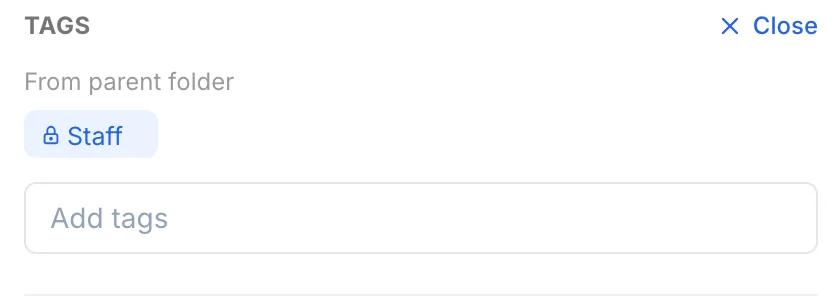
Each SOP carries tags, and the people who hold those tags see it. Tags work together, so an SOP carrying two tags reaches only the people who hold both. A folder’s tags flow down to every SOP inside it, so a new SOP is covered from the moment it arrives. When someone joins and is invited with the right tags, they receive the SOPs those tags carry, and the acknowledgment requests that come with them.
Send it out and get it acknowledged
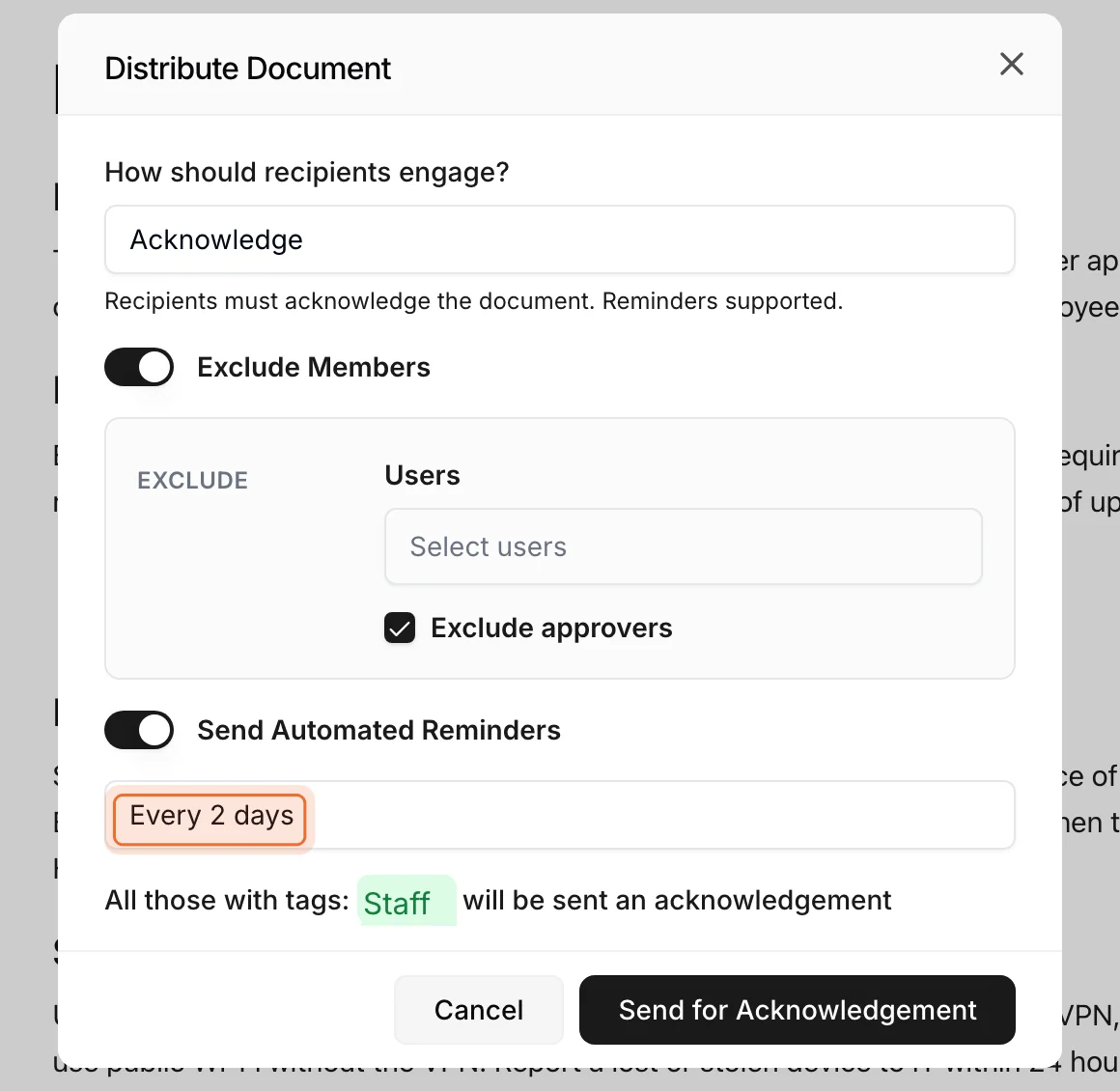
After a version is approved, nothing goes out on its own. The Editor presses Distribute and chooses how it goes out: to inform people, or to ask each of them to acknowledge it. Everyone who holds the document’s tags is asked. Each person signs in with their own email address and confirms by name, and reminders run on a cadence you pick. If a request for an older version is still pending when a new one goes out, it is replaced, so nobody is chased about a version that no longer applies.
Someone asked to acknowledge a changed SOP can see the changes with the compare view, and approvers use the same view before they sign off. It shows every word removed and every word added, which turns a two-line change into a one-minute read.
Review dates keep SOPs from aging
Each SOP can carry a review date, fixed or repeating, and an alert shows on the document when it arrives, with an email reminder as well. At the review, the owner either edits the SOP, which sends the new version through approval and back out, or confirms it is still accurate. An SOP you review without changing is re-approved, which records that someone judged it still valid on that date, and nobody is asked to acknowledge it again unless the text changed. When an SOP is retired, an expiry date removes it from the people it covered, while its Editor and Admins keep it. Admins and the Editor can open any older version.
The record builds as people work
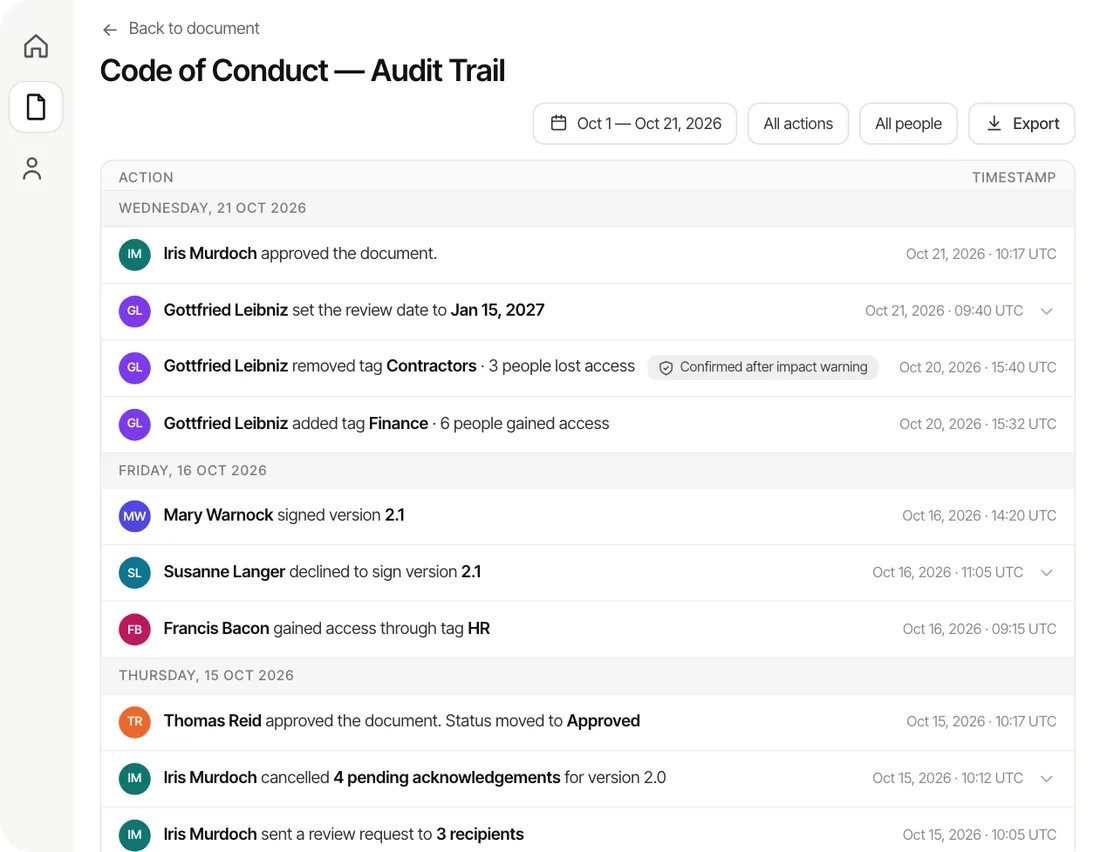
Every approval, rejection, version, send and acknowledgment is written to the document’s audit trail, which records who viewed the document as well. You can filter it by date range or by person and export it as a PDF or CSV. An auditor can be given Viewer access to see the SOPs their tags allow. The document’s analytics show who has opened it and where each person’s request stands, so you can see who still has not acknowledged.
Search is by keyword across the text of your SOPs, so the person on night shift can find the right procedure without messaging anyone. If you want to write the control rules themselves, our guide to the document control procedure covers what to put in one.
When do you need an eQMS instead of SOP management software?
A full electronic quality management system is the right tool when SOPs are one part of a larger quality system that has to run as connected records. Four signs point that way.
- You manage nonconformances and corrective actions as workflows with their own records, owners and closure steps, and an SOP change has to link to them.
- Your quality system includes supplier qualification, calibration schedules or training matrices tied to roles and to specific SOP revisions.
- You work in a regulated life sciences setting where electronic records and electronic signatures must meet FDA requirements, and you need a system built and validated for that.
- An auditor or customer expects the SOP system to connect to production, lab or equipment records.
Source: 21 CFR Part 11, Electronic Records; Electronic Signatures
Those are the jobs an eQMS exists for, and a purpose-built platform handles them better than a focused tool would. A focused tool fits the team that has outgrown the binder and the sign-off sheet but does not have an eQMS-sized problem: controlled documents, provable sign-off and an audit-ready record, priced so the whole team can be covered. Some companies run an eQMS for quality events and a lighter tool for the procedures everyone reads, and our guide to compliance management software explains how the wider category fits together. We built AllyMatter as the policy and acknowledgment layer, so it works alongside whatever else you use for the rest of your quality system.
How to choose SOP management software
Ask every vendor the same questions and write down the answers.
| Ask the vendor | Why it matters |
|---|---|
| Which version can a team member see? | It should be the current approved one and nothing else |
| How is a read-and-acknowledge recorded? | It should name the person, the version and the time |
| What happens to a pending request when a new version goes out? | People should only be asked about the version that applies now |
| How do review dates work? | You want fixed and repeating dates, and an alert the owner cannot miss |
| Can you export the evidence yourself? | An export you can run is what you hand over on the day |
| Who moves your existing SOPs in, and how long does it take? | Setup time is real cost, and it often decides whether the tool gets used |
| What does it cost, and per what? | Per-reader pricing grows with every hire, which matters when everyone needs access |
If your first need is approved SOPs and proof that people read them, start there and add the rest of a quality system as you grow.
What to expect
Setting up AllyMatter takes about half an hour, and moving your SOPs in yourself takes about a day. On yearly plans our migration service moves a large library for you, usually within a week and often sooner, and it is free on those plans. You can try the whole workflow first with a 30-day free trial that needs no credit card. Our plans are published, and you pay for the people who write documents, not for every person who reads them.
Questions about SOP management software
What is SOP management software?
SOP management software is a system for keeping standard operating procedures under control after they are written. It holds one approved version, routes each change through approval, sends the procedure to the people who follow it, records who read which version, reminds Editors to review, and keeps a trail you can show to a customer or an auditor.
What is the difference between SOP software and SOP management software?
The terms overlap, and most pages use them for the same thing. In practice “SOP software” often covers tools that help you write or capture a procedure, while SOP management software covers what happens afterward: approval, versions, distribution, acknowledgment and review. Check which half a product does before you buy it.
Does a team need an eQMS to manage SOPs?
Not usually. An eQMS makes sense when SOPs sit inside a larger quality system with nonconformances, corrective actions, calibration and validated records. If your need is controlled procedures and proof that people read them, a focused tool does that job at a lower cost and with far less setup.
Can SOPs be managed in SharePoint, Google Drive or a wiki?
You can store them there, and many teams do. Tools built mainly for storage leave the control to your own discipline: a mandatory approval step, one approved version that people see, a named acknowledgment of each version and an audit trail you can export. Our guide to SharePoint SOP management goes through where the gaps appear.
Can SOPs include photos, files and videos?
Yes. In AllyMatter you can write an SOP in the editor with images, tables and callouts, add a short video, or upload a PDF you already have and get it approved and acknowledged the same way. Attachments keep forms, checklists and certificates with the SOP they belong to, and they accept any file type.
How long does it take to set up?
Setting up AllyMatter takes about half an hour, and moving your SOPs in yourself takes about a day. On yearly plans our migration service moves a large library for you, usually within a week and often sooner, and it is free on those plans.
Three scenarios
If you have a handful of SOPs that rarely change and a small team, a shared folder and a sign-off sheet will hold for a while, because a new tool will not pay for itself yet. If your SOPs are changing, more than one person owns them and you have started to lose track of who has read what, this is the moment to move them into a system that controls them. If your SOPs sit inside nonconformances, calibration or validated records, you need an eQMS, and the question becomes whether a lighter tool should run beside it for the procedures everyone reads.
Start your 30-day free trial of AllyMatter. No credit card to start, and a 30-day money-back guarantee if you subscribe and change your mind. Free migration.