

Audits · 7 min read
10 Ways How AllyMatter Can Help Legal & Compliance Teams
Your General Counsel receives notice of an unscheduled regulatory audit arriving in 48 hours. The auditor needs three years of policy records and acknowledgment documentation. Without a centralized system, this triggers a company-wide emergency with legal teams scrambling through email archives and shared drives across departments. For organizations with proper policy management in place, the same scenario becomes a routine request rather than a crisis.
Legal and compliance teams rarely struggle because policies or contracts don’t exist. The problem is usually that nobody can quickly confirm which version is current, who approved it, or whether employees actually acknowledged the latest update.
As organizations grow, legal documentation spreads across shared drives, email threads, departmental folders, and disconnected workflows. During audits, investigations, or regulatory reviews, that fragmentation quickly becomes operational risk.
A centralized policy management system helps legal and compliance teams keep policies, contracts, approval records, and acknowledgment history searchable, governed, and defensible across the organization.
Here are ten practical ways AllyMatter helps legal teams reduce documentation chaos and maintain stronger compliance operations.
1. Centralizing scattered legal documentation
The reality for most legal departments is a fragmented documentation ecosystem. Critical contracts, compliance policies, and regulatory guidelines often exist across multiple systems including email threads, shared drives, departmental silos, and individual desktops.
When legal teams need to quickly locate a specific vendor contract or compliance record, the search often becomes a time-consuming hunt through disconnected repositories. AllyMatter brings all legal documentation into one searchable platform, so critical resources are accessible without the hunt.
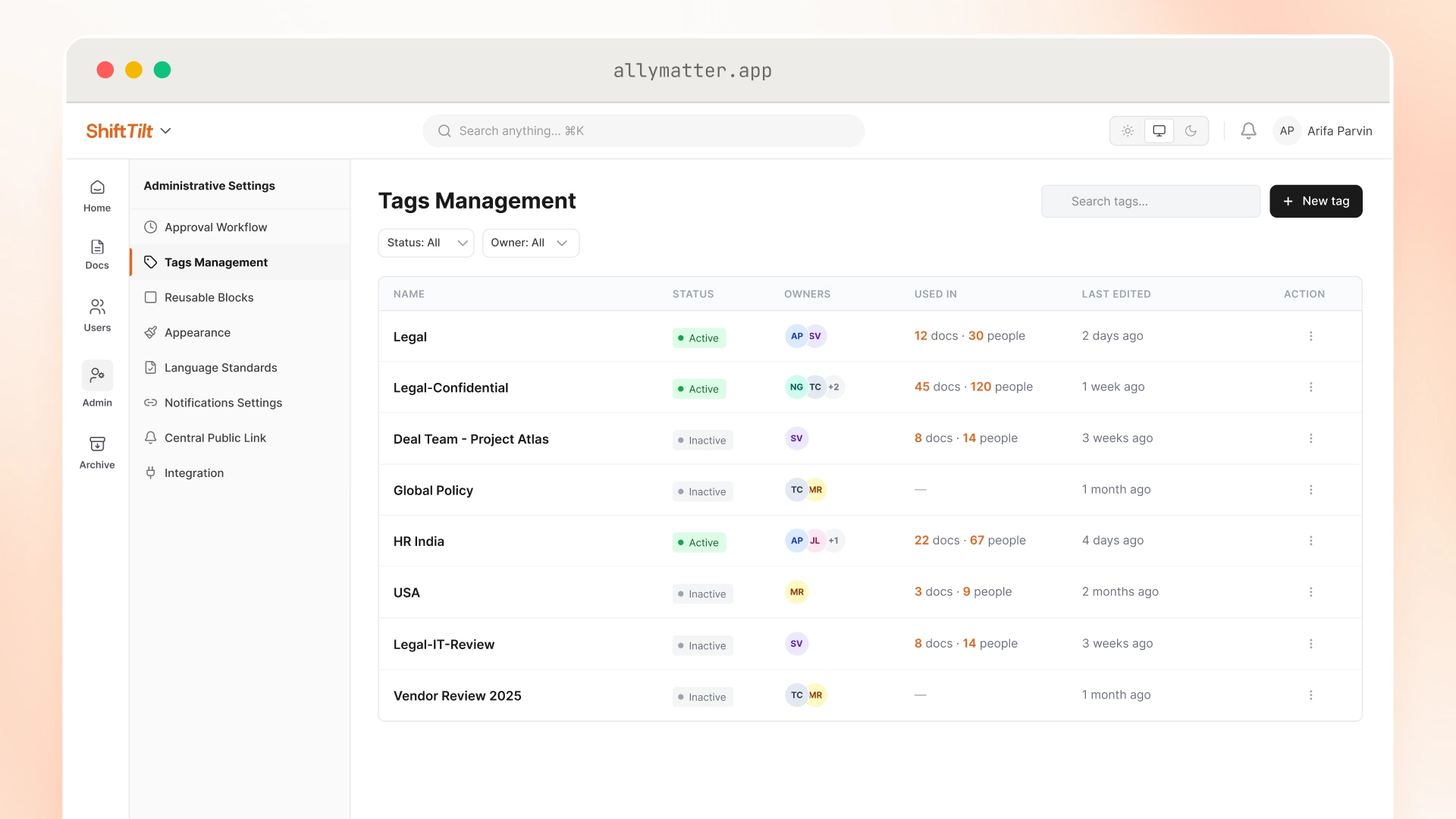
Legal teams managing vendor relationships can organize contract templates, active negotiations, and review documentation under separate tags, keeping sensitive materials away from general company-wide resources.
2. Implementing granular access control
Legal documentation often contains highly sensitive information that requires careful access management. Standard shared drives typically offer only basic folder-level permissions that don’t reflect how legal work actually operates.
AllyMatter allows legal teams to control document access based on role, department, project involvement, or operational need. Teams can restrict access to sensitive negotiations, investigations, HR matters, or acquisition-related documentation while still maintaining broader visibility into standard policies and compliance resources.
During an acquisition, for example, deal-related documents need to stay visible only to the deal team while general company policies remain accessible to everyone else. You can read more about how tag-based access control works in practice.
3. Maintaining comprehensive audit trails
When regulators or auditors request documentation verification, legal teams without proper systems often face a scramble to compile evidence. Proving exactly who approved a policy, when it was distributed, and who acknowledged it becomes nearly impossible without proper tracking.
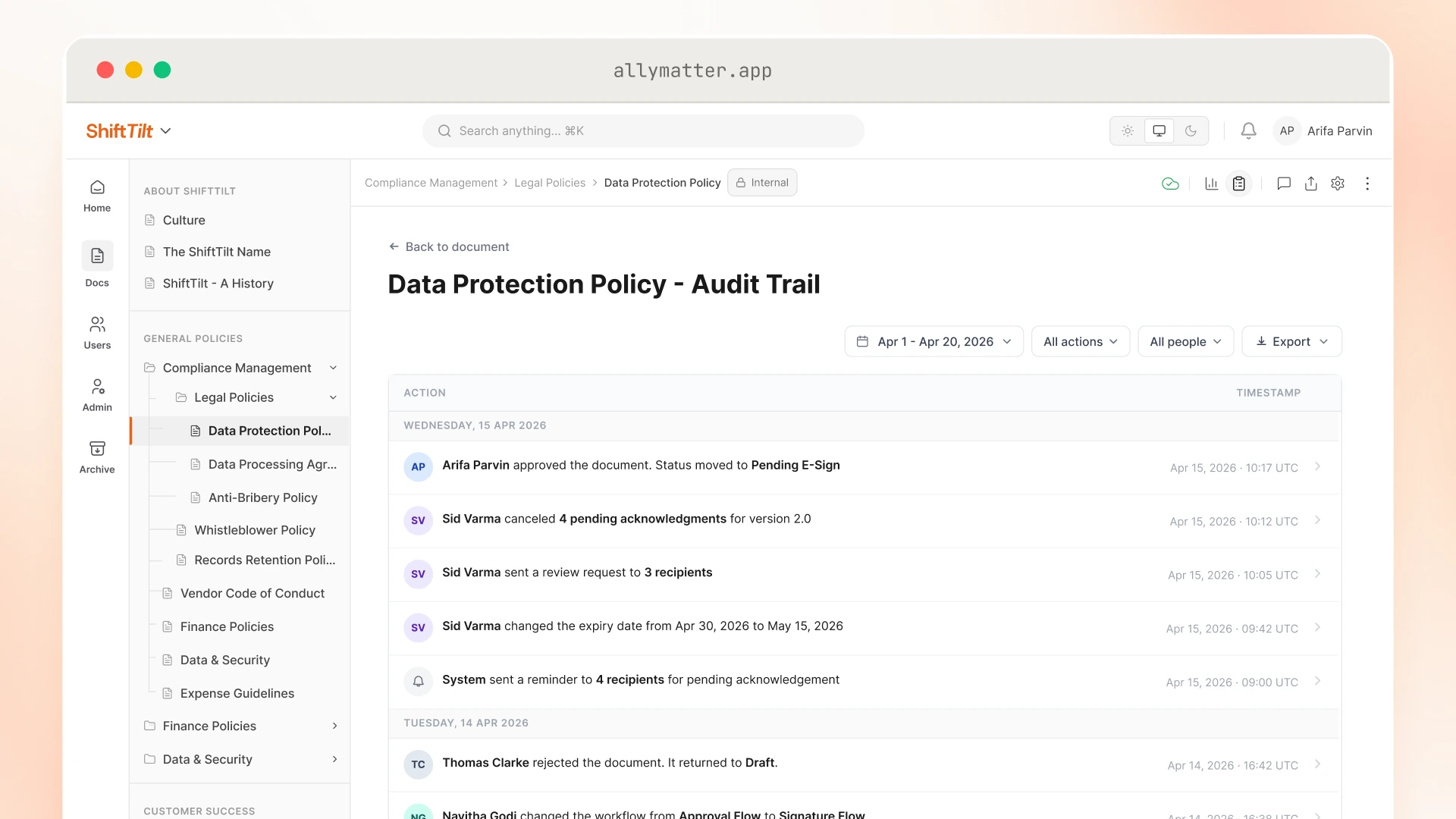
Teams can review document history, track approvals, and maintain visibility into who updated critical policies or compliance guidance over time. Every action is logged with the actor’s name, action type, and timestamp. During audits or legal disputes, that traceability is what lets teams demonstrate they followed the right process, not just claim they did.
4. Streamlining policy distribution and acknowledgment
Most legal teams have no reliable way to prove policy distribution and acknowledgment happened. Without proper systems, tracking who received, viewed, and acknowledged important policies becomes a manual, error-prone process.
AllyMatter gives legal teams multiple options for distributing approved documents and tracking responses:
- Notification emails with a direct link to the document
- In-platform acknowledgment with timestamp verification
- E-signature collection for agreements requiring formal sign-off
In compliance-heavy environments, that documented evidence matters. Acknowledgment tracking replaces email confirmations and manual spreadsheets with timestamped records that hold up during regulatory inspections.
5. Creating efficient approval workflows
Approval bottlenecks frequently plague legal teams, causing delays in critical document processing. Tracking down the right stakeholders for reviews and approvals through traditional email chains creates confusion and version control issues.
Approval workflows help legal teams maintain consistent review processes for contracts, policy updates, and compliance documentation without relying on long email chains or manual follow-ups to track stakeholder input.
Legal departments can configure multi-stage approval paths for different document types, routing contracts through legal, finance, and executive review in sequence, with each stage clearly visible and tracked.
6. Automating compliance tracking
Manual compliance tracking creates risk gaps as organizations grow. Legal teams often struggle to maintain visibility into policy acknowledgments and compliance activity across expanding teams.
AllyMatter helps legal teams maintain documented records of policy acknowledgments and compliance-related activity, without relying on manual tracking processes that don’t scale as the organization grows.
Legal and compliance teams can track acknowledgment status and review records associated with individual documents, making it easier to identify outstanding responses before an audit or compliance review.
7. Managing regulatory documentation effectively
Regulatory requirements change constantly, and legal teams are expected to keep documentation current across the entire organization. Outdated documentation or inconsistent distribution of regulatory updates creates operational risk.
AllyMatter lets legal departments organize regulatory resources so they’re easy to retrieve, keeps version history on compliance documents, and sends updates to relevant teams when something changes. Compliance documentation stays current with a clear history of what changed and when.
Organizations under GDPR or ISO frameworks tend to feel this most acutely. Version history and acknowledgment records together give auditors something concrete to review, not just an assertion that the right process was followed.
8. Simplifying document execution with secure signatures
Contract execution processes often involve cumbersome signing procedures, creating friction and delays. The problem is that most signing processes live outside the document itself, which breaks the record trail.
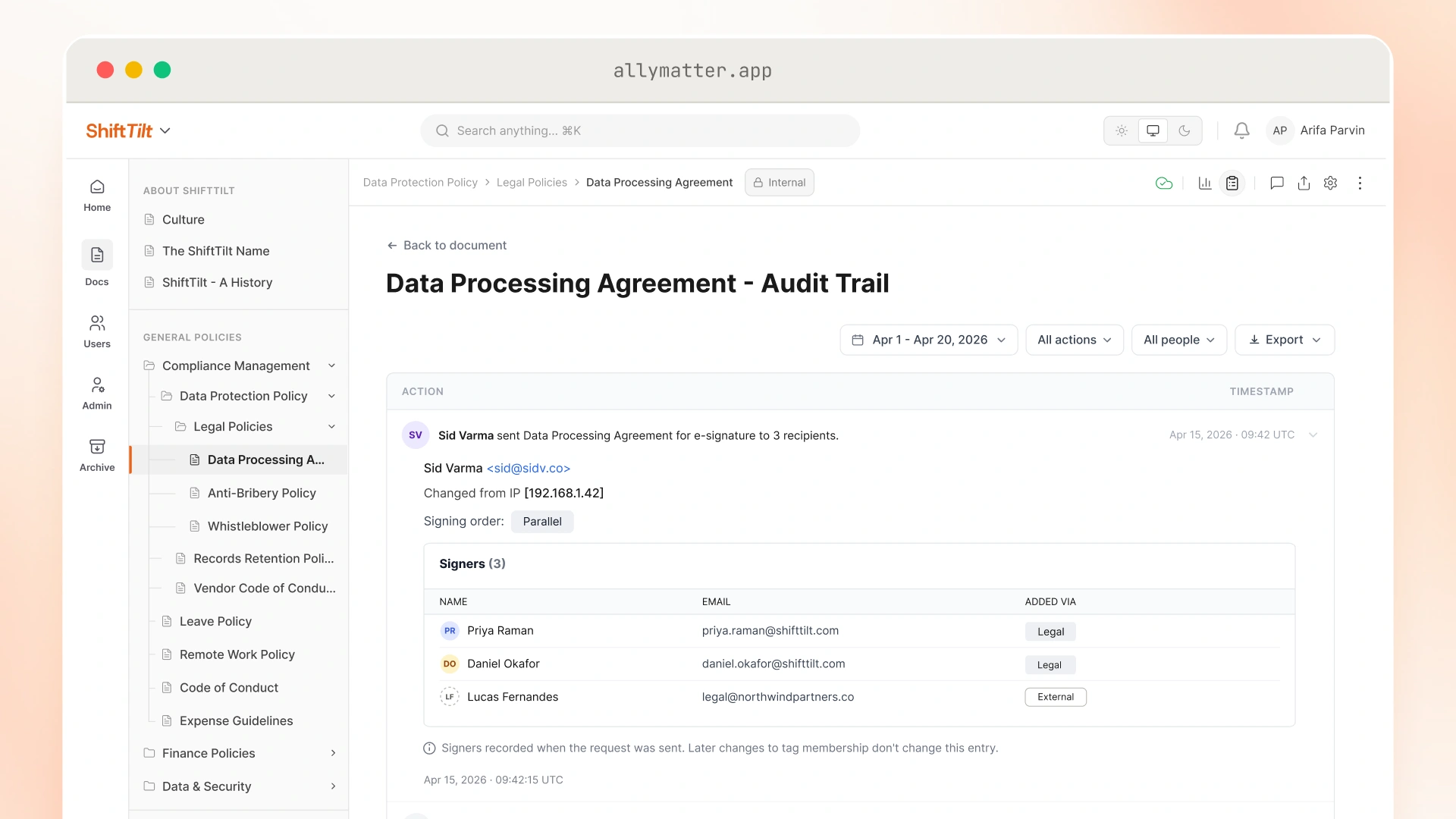
Once a document completes its approval workflow, owners can send it directly for e-signature without switching to a separate tool. Signing events are recorded in the audit trail alongside the approval history, keeping the full document lifecycle in one place.
9. Finding critical information instantly
Legal teams often need to retrieve a specific clause, approval record, or policy version quickly during audits, contract reviews, or compliance investigations. When documentation is poorly organized, those searches create delays and unnecessary risk.
AllyMatter’s search returns results based on each user’s assigned tags, so legal team members only see documents they’re permitted to access. Combined with custom tags and metadata, a compliance officer can search “GDPR” or “vendor agreement” and surface the right documents immediately, without sifting through unrelated content.
When legal is supporting deal teams, HR investigations, and compliance reviews at the same time, that speed is the difference between being a bottleneck and being useful.
10. Implementing custom tagging for specialized legal categories
Legal documents require specialized organization beyond basic folder structures. Standard document management approaches often lack the nuanced categorization legal teams need.
Tags help legal teams organize contracts, compliance policies, regulatory guidance, and department-specific documentation in ways that remain searchable and manageable as document libraries grow over time.
Designations like “Legal-Confidential” or “Legal-IT-Review” restrict access while keeping those documents searchable within the right audience. As the document library grows, tag-based organization scales without requiring a manual restructuring of folder hierarchies.
Getting legal documentation under control
Legal and compliance problems often start as documentation problems. A missing approval record, an outdated policy version, or incomplete acknowledgment history can create operational risk long before anyone notices the gap.
Most organizations already have the policies, contracts, and compliance procedures they need somewhere. The challenge is keeping those records searchable, current, and defensible as teams, regulations, and workflows become more complex over time.
AllyMatter gives legal and compliance teams a structured way to maintain policy governance, approval visibility, acknowledgment tracking, and audit readiness without relying on disconnected systems and manual follow-up.
Start your 30-day free trial. No credit card to start, and a 30-day money-back guarantee if you convert and change your mind.
Not ready for a trial? On yearly plans, migration from Confluence or Notion is on us when you decide. On yearly plans, we’ll move your existing docs over, usually within a week and often sooner.
Frequently asked questions
How long does it take to migrate existing legal documents to AllyMatter?
Migration timelines depend on document volume and current organization. Most teams find it practical to start with critical compliance documents and expand from there, maintaining full access to existing files throughout the process.
Can we maintain different permission levels for internal legal team members versus external counsel?
Yes. Tag-based access control allows you to create distinct access tiers. Internal legal team members can have broader access to routine policies and contracts, while external counsel receives access limited to specific project documentation only.
What happens if we need to retrieve documents during an emergency audit with no advance notice?
Centralized policy management with proper tagging enables immediate document retrieval. Instead of scrambling through multiple systems, you can locate required compliance records, policies, and audit trails within minutes using search and filter capabilities.
How do we ensure document version control when multiple legal team members are reviewing contracts?
Version tracking captures every edit with version number, timestamp, and the name of who made the change. You can review the full version history and restore a previous version if needed, which removes any ambiguity about which contract version is current.
Can the system handle complex legal workflows beyond basic document storage?
Yes. Approval workflows can accommodate multi-stage legal processes, including contract reviews requiring sign-off from legal, finance, or executive stakeholders.