
Most HR departments handle the same challenge: managing knowledge across onboarding, policy compliance, benefits administration, and employee engagement. The volume keeps growing, but the systems for managing it haven’t kept pace.
The result is scattered documents, outdated intranet pages, and email chains. Employees are confused, and HR teams are overwhelmed. Traditional storage methods aren’t keeping up.
Four signals you need this now:
- HR spends more time answering repeat questions than doing strategic work
- Different versions of the same policy circulate, and nobody knows which is current
- New hires can’t find basic information on day one
- An audit asks for a policy and producing it takes a day instead of a minute
The goal is a system where employees find answers instantly and HR focuses on strategic work rather than repetitive questions.
This article explores why your HR department needs a smarter approach to HR knowledge management (KM), the risks of sticking with outdated systems, and the roadmap for making the shift.
The problem with traditional HR knowledge management
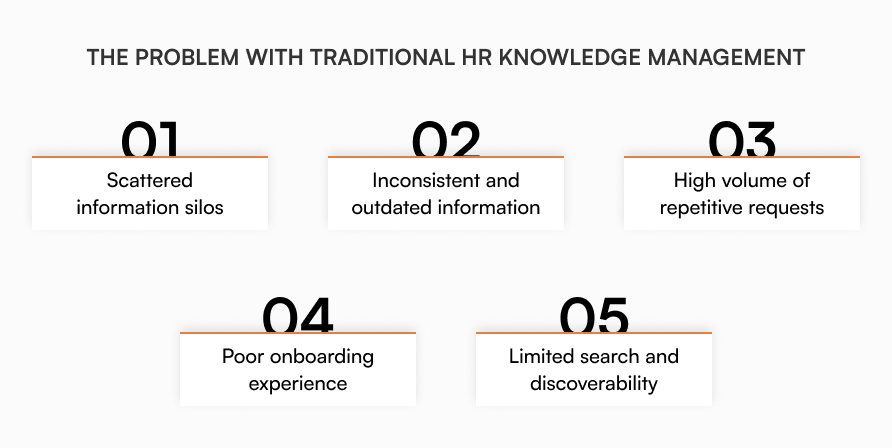
Scattered information silos
HR documents are often scattered across platforms: email attachments, spreadsheets, PDFs, outdated intranet pages, Slack threads. Employees don’t know where to look, and HR ends up answering the same questions repeatedly.
“Where can I find the latest leave policy?” “Who do I talk to about maternity benefits?”
Inconsistent and outdated information
Without centralized control, outdated documents keep circulating. This creates legal risk, misinformation, and employee frustration.
High volume of repetitive requests
HR teams spend too much time answering basic, repetitive employee questions that could be self-served with a well-designed knowledge system.
Poor onboarding experience
New employees often struggle to find essential information like benefits guides, IT policies, or vacation procedures. Without a centralized KM tool, onboarding becomes inconsistent and frustrating.
Limited search and discoverability
Most traditional HR content isn’t optimized for search. If employees can’t find what they’re looking for within 10 seconds, they ask HR, or worse, guess. Without metadata or contextual indexing, search returns noise instead of answers.
What is HR knowledge management?
HR knowledge management is the structured process of capturing, organizing, storing, sharing, and maintaining essential HR information. This includes:
- Policies and procedures
- Employee handbooks
- Benefits guides
- Onboarding and offboarding workflows
- Performance management guidelines
- Legal compliance documents
- FAQ answers (leave policies, holidays, etc.)
A proper KM solution is more than a shared Google Drive folder or SharePoint site. It’s a dynamic, searchable system that makes sure the right people access the right information, at the right time.
What makes a knowledge management solution “smart”?
A smarter HR KM system goes beyond storage. It brings structure, automation, and employee-centric design to how knowledge is created, accessed, and maintained.
Core features:
- Contextual search that handles synonyms and HR phrasing
- Structured, centralized knowledge base
- Version control and content lifecycle management
- Tagging, categorization, and access control
- Feedback and update workflows
- Analytics on usage, gaps, and performance
This kind of system doesn’t just store information. It actively improves how HR knowledge flows across the organization.
8 reasons HR needs a smarter knowledge management
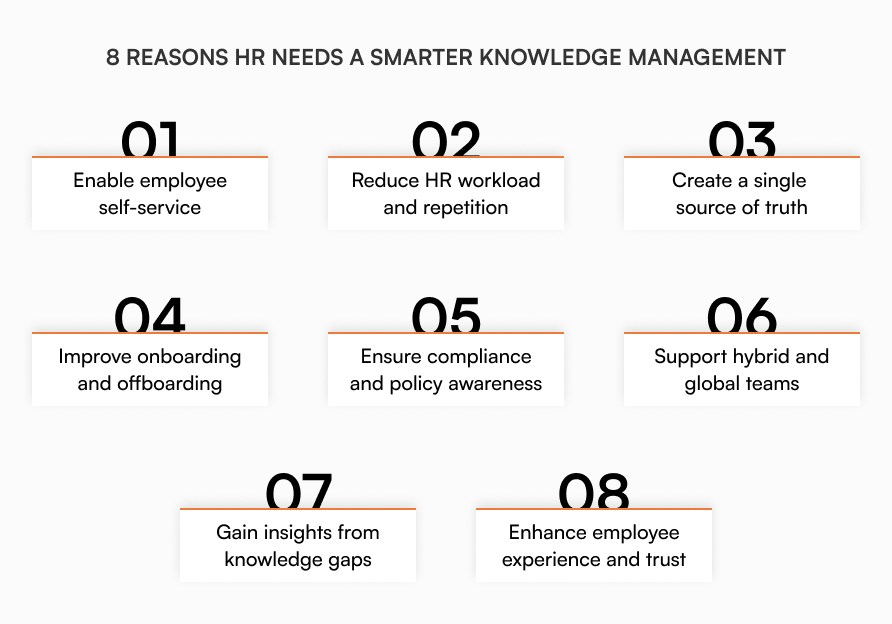
Enable employee self-service
When employees find answers quickly without submitting tickets, HR saves time and employees feel more empowered.
A teammate in operations needs clarity on the bereavement leave policy after a family emergency. Instead of waiting for HR’s email during a stressful time, they search “family leave” and find the complete policy, required documentation, and manager notification process in seconds.
A Paychex survey confirms the trend: 73% of workers expect self-service HR options from their employers.
Reduce HR workload and repetition
Automating repetitive queries and surfacing popular topics dramatically reduces time spent on low-impact tasks.
Instead of answering “how do I submit my timesheet?” fifteen times a week, your HR team sets up a searchable guide with step-by-step screenshots. Employees find the answer in seconds, and HR focuses on strategic work like retention planning.
Create a single source of truth
Your finance team references an outdated expense policy while HR unknowingly circulates a newer version, creating confusion during audit season.
A centralized, always-updated knowledge base eliminates duplication. HR, employees, and auditors trust what they’re reading. This is critical for compliance-heavy environments.
During performance review season, managers in different departments use three different evaluation forms they found in various folders. One is two years outdated, another is missing required compliance fields. A centralized knowledge system ensures everyone uses the current, approved template.
Improve onboarding and offboarding
A smart KM system offers structured onboarding workflows, guides, and checklists that new hires access on demand. Faster ramp-up, fewer errors, better first impressions.
The Society for Human Resource Management found that when organizations implement structured onboarding processes, new hires become 50% more productive compared to ad-hoc approaches.
A new marketing coordinator spends their first week tracking down information about expense policies, PTO accrual, and team communication tools. With structured onboarding documentation, new hires access everything they need from day one without interrupting colleagues.
Ensure compliance and policy awareness
Outdated or inconsistent policy documents create compliance violations. A smarter KM system ensures version control, mandatory acknowledgments, and proactive alerts when policies change.
Your harassment prevention policy updates to meet new state requirements, but the old version is still circulating via email attachments. Employees unknowingly reference outdated procedures during a critical incident. Version control prevents these compliance gaps.
Support hybrid and global teams
Whether employees are remote, in-office, or distributed across time zones, they need consistent access to HR knowledge around the clock. Smart KM tools offer mobile-friendly, always-on access.
When your London office needs to reference the same PTO policy as your Austin team but it’s 3 AM in Texas, employees need 24/7 access to HR information. Time zones shouldn’t determine when someone can find answers about benefits or procedures.
Gain insights from knowledge gaps
Modern KM platforms provide usage analytics: what people search for, which pages get traffic, where they get stuck. HR can use this data to proactively create new resources or improve existing ones.
Your search analytics show 200+ employees searched “work from home equipment” last month with zero results. This signals a missing remote work resource guide HR hadn’t considered creating.
Enhance employee experience and trust
When employees feel supported with transparent, accessible information, it builds trust in HR and lifts engagement.
A customer service teammate avoids asking about their stock option vesting schedule because they feel embarrassed about not understanding it. When they find a clear, searchable explanation in the knowledge base, they feel more confident about their benefits and more connected to the company.
Key criteria for choosing the right HR knowledge management solution

Powerful search functionality
Most employees won’t browse through folders. They’ll type what they need into a search bar. Your platform needs to deliver relevant, fast, and accurate results, even if users use different phrasing.
A user types “paternity leave” and sees results for “parental leave policy” even if that exact phrase isn’t in the content.
Easy content creation and management
HR teams need to update and publish content quickly, without relying on IT or technical skills.
Look for:
- A rich text editor with images, links, tables
- Easy drag-and-drop organization
- Templates for consistency (policy format, how-to format)
- Version control and edit history
- Content ownership and roles (assign updates to specific authors)
Non-technical HR specialists should be able to publish an updated expense policy in under 10 minutes.
Smart automation features
Smart knowledge platforms use automation to streamline maintenance and reduce manual overhead.
Essential automation capabilities:
- Automated approval workflows that route policy updates through the right stakeholders without email chains or manual tracking
- Content lifecycle management with automatic alerts when policies need review or updates
- Smart document organization that automatically categorizes and tags content based on type and department
- Workflow automation for document requests, approvals, and publishing that keeps sensitive HR information moving through proper channels
When HR updates the remote work policy, the system automatically routes it to legal for review, then to department heads for approval, and finally publishes it with employee notifications, all without manual coordination.
Structured, centralized knowledge hub
Information should be well-organized and accessible from a single location. No scattered PDFs or outdated intranet links.
Look for:
- Intuitive categories (Time Off, Benefits, Policies, How-Tos)
- Tagging system for better discovery
- Quick links or top topics on the homepage
- Mobile- and tablet-friendly design
An employee onboarding checklist should be 2-3 clicks away for a new hire or their manager.
Seamless integration with HR tools
Your knowledge management system shouldn’t live in a silo. It should integrate with the tools your team already uses.
Look for integrations with:
- Slack and Microsoft Teams
- Document storage (Google Drive, SharePoint)
- Identity management (SSO, SCIM)
Access controls and permissions
HR content often includes sensitive or role-specific information. You need granular control over who can see and edit what.
Look for:
- Role-based access (only managers can see performance review SOPs)
- Private vs public pages
- Audit trails and read receipts
- Employee acknowledgment tracking for policies
Track which employees have reviewed the new hybrid work policy and send reminders to those who haven’t.
Analytics and reporting
Understanding how your content is performing helps you maintain relevance and spot gaps.
Look for:
- Top search terms and zero-result searches
- Most viewed and least viewed articles
- Broken link or outdated content alerts
- Feedback buttons (“was this article helpful?”)
If 30% of users search “reimbursement policy” and find no result, that’s your next article to write.
Scalability and performance
As your organization grows, so will your documentation. Your platform should scale across teams, languages, and locations.
Look for:
- Multi-language support
- Custom branding and theming
- Support for multiple departments or business units
- Cloud-based performance with uptime guarantees
The same system can support HR, IT, and Legal documentation as your team expands globally.
Collaboration and feedback features
Good knowledge systems don’t just distribute content. They help you maintain and improve it through feedback and collaboration.
Look for:
- In-line comments or suggestions from readers
- Content review and expiration workflows
- Approvals or publishing gates for sensitive content
- Team notifications for content updates
Managers get notified when a new performance review guide is published. HR sees feedback suggesting clarification.
Cost and ROI consideration
Finally, the solution should align with your budget and provide measurable return on investment.
Evaluate:
- Per-user pricing vs flat rate
- Tiered feature sets (Enterprise vs Team plan)
- Support and onboarding fees
- Hidden costs (custom integrations, storage limits)
Choose a platform that reduces ticket volume or onboarding time, making it cost-neutral (or cost-saving) over time.
How to make the transition to smarter knowledge management
Audit your existing HR knowledge
- Identify what’s currently documented
- Flag duplicates, outdated policies, and gaps
- Prioritize what employees need most
Choose a scalable platform
- Make sure it supports your current team size and future growth
- Pick a user-friendly interface for both HR and employees
Centralize and structure content
- Use categories (“Benefits”, “Time Off”, “Compliance”)
- Implement a tagging system for better discoverability
- Set up authorship and ownership for ongoing updates
Launch with training and support
- Announce the new system organization-wide
- Provide training guides or short videos
- Encourage feedback and continuously improve
Monitor and iterate
- Review analytics monthly
- Sunset unused content and update high-traffic pages
- Keep HR documentation aligned with policy changes
How AllyMatter approaches HR knowledge management
AllyMatter addresses the specific challenges in this article through features designed for growing companies:
- Smart search that finds relevant policies even when employees use different terminology than what appears in your documents
- Granular access control that protects sensitive HR information while enabling employee self-service for general policies and procedures
- Complete audit trails that track policy acknowledgments and document access, supporting compliance requirements without manual tracking overhead
- Simple user management that scales with your team growth, handling role changes and access permissions from one centralized dashboard
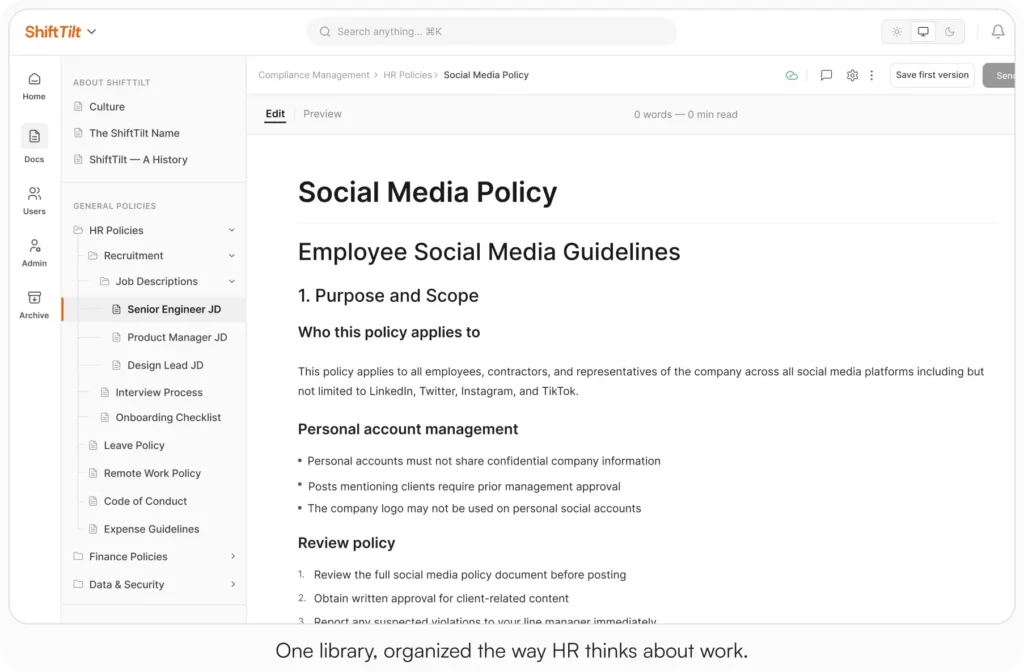
These capabilities directly address the knowledge silos, repetitive requests, and compliance challenges that create bottlenecks for HR teams. Start your 30-day free trial. No credit card to start, and a 30-day money-back guarantee if you convert and change your mind. Or try the live demo to see search, tag-based access, and acknowledgment tracking with realistic HR content already populated.
Three scenarios
An honest read on whether this is right for your team:
If you’re under 30 employees and HR is mostly one person who can hold the policies in their head, a clean Drive folder with strict naming rules will hold for a while. Smart KM pays off when the team grows past the size where one person knows everything.
If you’re 30 to 200 employees and the four signals at the top of this post are showing up in your week, this is the moment. AllyMatter is what we built for this transition.
If you’re 200+ employees, multi-location, or in a regulated industry, smart HR knowledge management with version control, acknowledgments, and audit-ready exports is not optional. AllyMatter or another purpose-built KB makes sense here. We’d start with AllyMatter.
Not ready for a trial? Migration from Confluence, Notion, SharePoint, or Drive is on us when you decide. We’ll move your existing HR docs over and have you running in about a week.
Frequently asked questions
What’s the difference between HR knowledge management and regular document storage?
Document storage just holds files. HR knowledge management creates searchable systems where employees find specific policy answers instantly, reducing the constant stream of basic questions to your team.
How does knowledge management reduce HR’s repetitive workload?
When someone searches “sick leave policy” and finds complete, current information immediately, they don’t submit a ticket. Your team handles strategic work instead of answering the same policy questions repeatedly.
What should growing companies prioritize in HR knowledge systems?
Focus on your highest-volume requests first: leave policies, benefits information, and onboarding materials. Make sure the search function understands natural language, not just exact keyword matches.
How do you maintain accurate information without constant manual updates?
Choose systems with version control, content ownership workflows, and automatic alerts for policy reviews. This ensures compliance while reducing the manual overhead of keeping everything current.
Related reading
- HR Knowledge Base: Complete Guide for Scale-Ups
- How to Build a Knowledge Base for HR Teams
- Notion vs AllyMatter for HR Policy Management
- Avoid HR Headaches: Stay Compliant without Legal Bottlenecks
- Internal Knowledge Base – HR Department Use Cases

Founder of AllyMatter I’m founder of AllyMatter, an operations-first knowledge base for growing companies. Before AllyMatter, I co-founded Syren Cloud and helped scale it into a 300-person organization across two countries, leading marketing, operations, and HR. We moved fast, served demanding customers, and learned the hard way that internal knowledge systems built for help docs or IT don’t solve day-to-day operations. AllyMatter is my answer—tools that turn tribal knowledge into trusted, searchable processes. This blog shares the playbooks, checklists, and lessons I wish I’d had while scaling.