

Acknowledgments · 6 min read
How Small Teams Track Acknowledgments Without HR Software
This question is the whole reason acknowledgment tracking became a product category. At companies under about a hundred people there is no compliance team and usually no HR software worth the name, and yet the auditor, the insurer, or the biggest client still asks the same question: can you show me that your people saw this policy?
The direct answer: you track policy acknowledgments with a spreadsheet and email, and that can genuinely work for a while. It only works if every row captures four things: who acknowledged, which version of the policy, the exact statement they agreed to, and when. Run it that way and you have a defensible manual system. Miss one of the four and you have a to-do list wearing a compliance costume.
I have lived the failure mode. At one of my companies, our internal champion once marked an important policy as signed for an employee who had never signed it. An accident, one cell, clicked in good faith. We caught it in our own pre-audit check; if the auditor had found it first, it would have been one more minor nonconformity, and we were already carrying enough of those that one more could have sunk the certification. Nobody lied. Somebody clicked. That is the real failure mode of manual tracking: not laziness, a typo with a certificate attached.
So this is not a post telling you a spreadsheet is beneath you. It is the honest version of how to run one, and the exact points where I stopped trusting it. Here is how I would run it today if software were off the table.
1. Set up one tracker everyone can find
One spreadsheet, one owner, shared with a manager so people know where it lives, and named so nobody ever wonders what it is: “Policy Acknowledgment Tracker.” It lists every policy the company is responsible for tracking, not just the handbook, with one row per person per policy version: name, work email, employee number, the policy, the version sent, the date sent, and the date confirmed.
The sheet links the current version of every policy, and only the current version. Older versions retire into an archive future-you can actually navigate: a folder per policy, a folder per version inside it, and that version’s signed copies inside that. Name every signed file with the employee’s name and employee number, because eighteen months from now you will be looking for exactly one person’s exactly one signature.
Honest sizing: on paper this holds to fifty people. In practice it starts fraying past ten, and what frays it is churn. Every joiner inherits obligations nobody remembers to assign; every leaver takes certainty with them.
2. Capture the four fields that turn a row into evidence
This is the part most manual systems miss, and it is the first thing I check when someone shows me their tracking sheet. An acknowledgment record has to establish identity, version, text, and time.
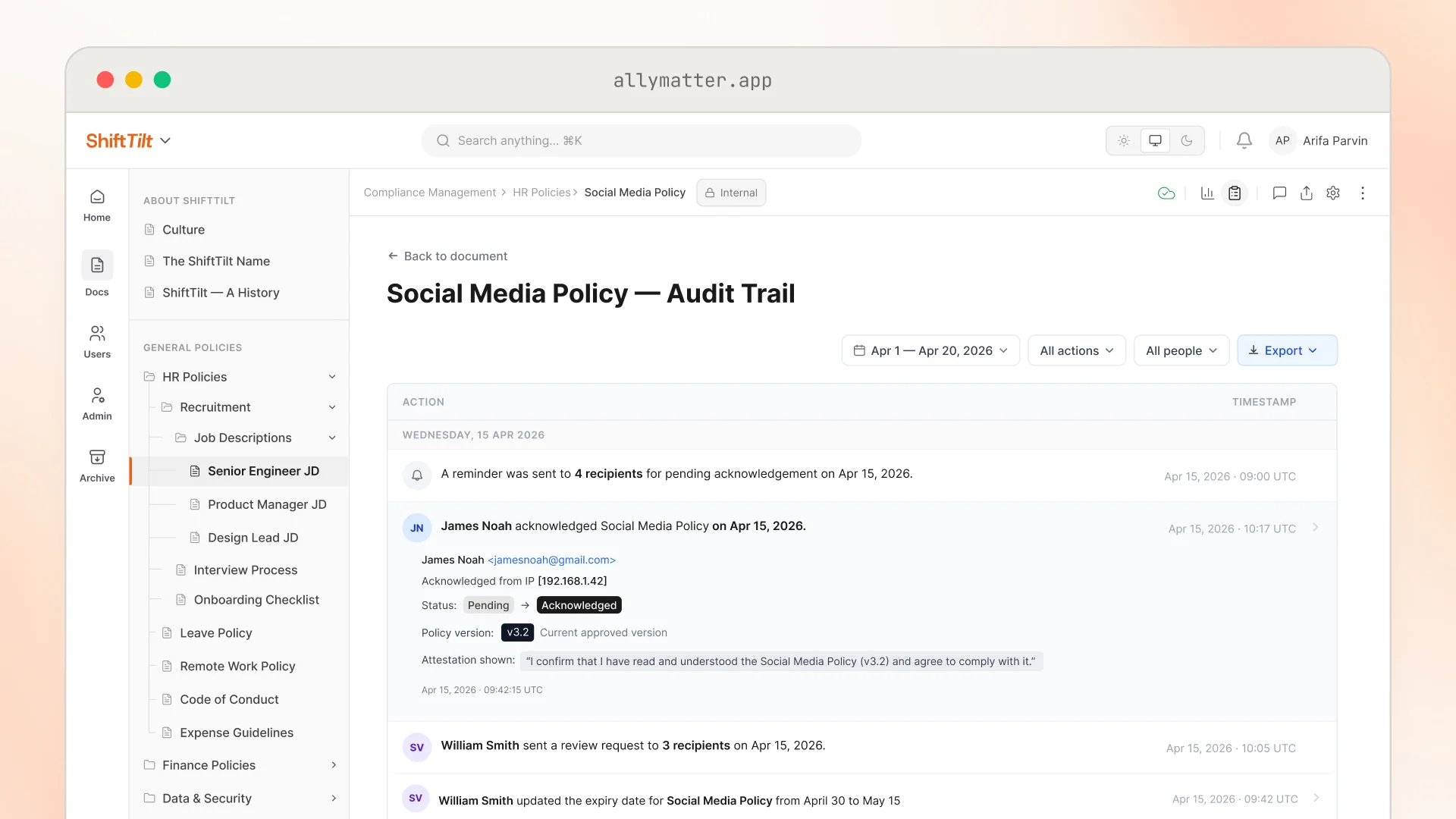
Identity means the confirmation came from the person’s own account, so ask for a reply from their work email rather than ticking the cell yourself after a hallway “yep, read it.” Version means the row names the exact revision, not just “Security Policy.” Text means you keep the actual sentence they agreed to, so put the statement in the email itself: “I confirm I have read and will follow the Data Security Policy v3, dated March 4.” Time comes free with email, as long as you keep the emails.
That last habit is the load-bearing one. The spreadsheet is your index, but the saved reply emails are your evidence. A sheet cell can be edited eighteen months later, or mistyped once, as mine was; a mailbox full of dated replies is much harder to argue with.
3. Re-collect every time the policy changes
The instinct is to collect signatures once a year and treat edits in between as too small to bother anyone about. Audits do not see it that way, and honestly, neither do courts. A record that says someone agreed to version 2 proves nothing about version 3, and a “minor” edit is a judgment you will be asked to defend later. A changed sentence in a clause can shift what an employee actually agreed to.
So the rule in a manual system is uncomfortable but simple: any change means a fresh round of emails and a fresh set of rows. This is also where you should be honest with yourself about workload, because at ten policies and forty people, one policy revision cycle is four hundred potential follow-ups. That number is why annual-only attestation is so common, and why it keeps failing audits at companies that otherwise did everything right.
4. Know your ceiling, and it is not one number
Two questions set it, and headcount is only the second one.
First, how stable are you? A steady company with low turnover and no external reviewers can run the sheet well to about thirty people with a disciplined HR owner. A dynamic company, hiring fast, churning, restructuring, hits the wall far sooner, because every join and leave is a row someone has to remember.
Second, who checks your homework? If you are in a regulated industry, or your clients audit you, buy a tool at fifteen or so people. The stakes flip from “tidiness” to “evidence,” and my one wrong cell nearly proved the difference.
Whatever your numbers, the crossing shows up as observable events: a client security questionnaire lands with a deadline. A policy changes mid-year and re-collecting means restarting the whole chase. Someone leaves and their reply email is nowhere. Or you open the sheet before an audit and realize you cannot prove a cell was typed the day it claims. Below that line, run the sheet well and do not buy anything, including from us.
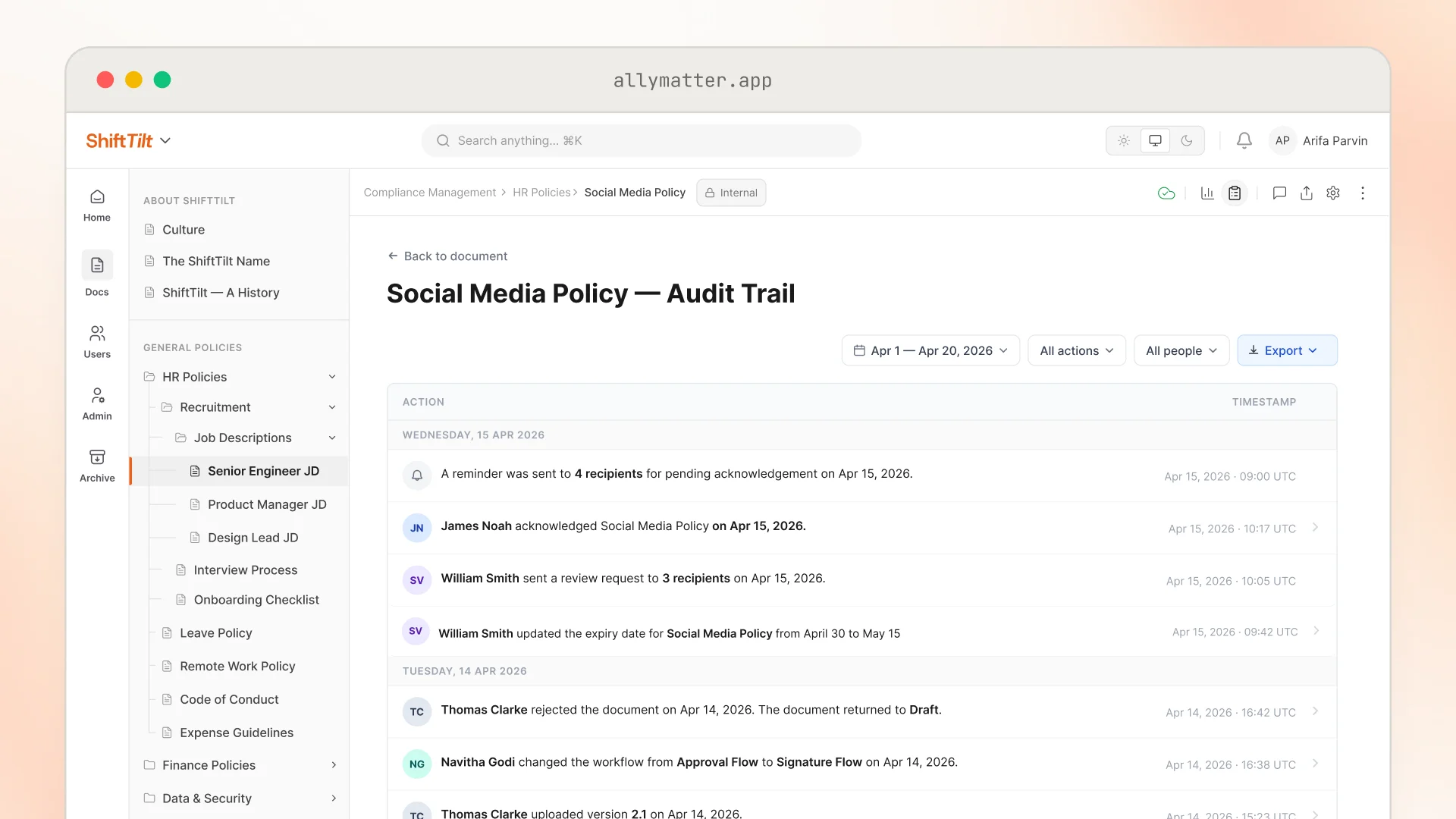
Past it, the chase itself becomes the job, and this is where policy acknowledgment tracking as a category exists. We built AllyMatter so the four fields from tactic 2 are captured without anyone maintaining them: the acknowledgment is tied to the person’s login identity, bound to the exact version and the statement they saw on screen, and timestamped. Reminders repeat automatically on a cadence you choose until people act, and the record survives even if the person’s account is later deleted. When someone asks for proof, the export is a PDF or a CSV, not a screenshot of a spreadsheet. And because pricing is per editor, the people who only read and acknowledge policies cost you nothing, which matters at exactly the company size we are talking about.
5. If you switch, move the documents, not just the list
The migration that fails is the one where the new system starts empty and the old spreadsheet lingers as the real record for another year. Move the policies in first, set up your audiences so the right people see the right policies, and run your next acknowledgment round entirely in the new system, so there is one place the truth lives from that day forward. Then attach the history to the policies themselves: the old spreadsheet, even the scanned sign-off sheets, live in AllyMatter next to the records that replace them, so an auditor sees one unbroken story instead of a before-and-after.
6. What is worth buying at this size, and what is not
Two honest calls from someone who sells software.
An e-signature tool is worth it absurdly early. Unless everyone works in one physical location and can genuinely sign on paper, I would get one at two employees: digital copies from day one, named and filed, prevent an entire genre of future hassle.
An LMS is the opposite: under thirty people you do not need one. When you need training evidence, run a webinar and keep the attendance list. It is real evidence, it is dated, and it costs you nothing.
Start your 30-day free trial. No credit card to start, and a 30-day money-back guarantee if you convert and change your mind.
Not ready for a trial? On yearly plans, migration help is included: we’ll help you move your docs from SharePoint, Google Drive, Confluence, or Notion, with chat handholding, usually within a week and often sooner.