

Audits and Evidence · 8 min read
How to Run ISO 9001 Document Control in AllyMatter
Picture the second morning of a surveillance audit. The auditor stops at a work instruction posted next to a machine and asks two things. Which revision is this? And who has read it?
This post is part of our guide to the document audit trail, which covers what an auditor expects to see and how to produce it without a week of digging.
I’ve sat through more than ten ISO 9001 audits. Those two questions are what ISO 9001 document control comes down to, and they’re where a shared drive starts to hurt.
Four signals this is your problem now:
- Ask two people which copy of a procedure is current and you might get two different answers.
- Your proof that someone read a procedure is a paper sign-off sheet or an email reply.
- Your last audit raised a document control finding, or came close.
- Audit prep starts with someone copying documents into a folder by hand.
Key takeaways
- Auditors test document control with two questions: which version is approved, and who has read it.
- In AllyMatter, your team only ever sees approved versions, and every change becomes a new version you can compare word by word.
- People acknowledge the exact version they read, and the record stays after they leave.
- Packages lay out the clauses you’re audited against and link each one to its evidence, so you spot the gaps first.
- Records like calibration certificates sit with the procedures they support, ready to show.
What ISO 9001 wants from your documents
ISO 9001 asks you to run a documented quality management system and show that it works. For your documents, that means approving them before anyone uses them and making sure nobody works from an old version. The current edition, ISO 9001:2026, was published on September 16, 2026, and certified companies have until September 30, 2029 to move to it. The full requirements, and what the transition means for you, are on the ISO 9001 page at Policy & Compliance.
Here’s how that works in AllyMatter.
Approval before anyone reads it
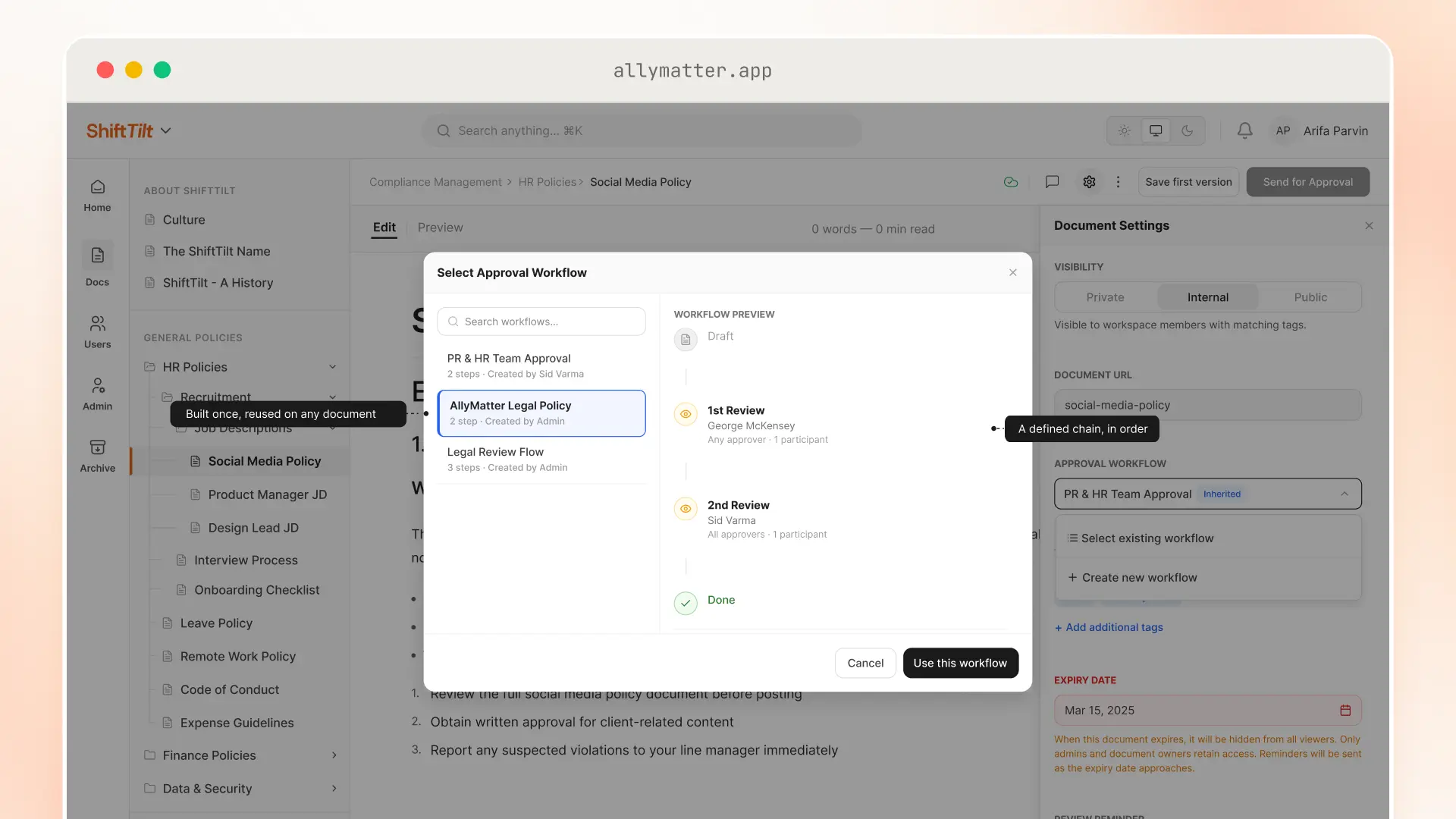
Every document in AllyMatter goes through an approval workflow before your team can see it. You build it in the document’s settings, one step at a time, and each step can need all of its approvers or just one of them. A quality policy might need the quality manager and the general manager together in one step. A work instruction might need a single supervisor.
Set a flow on a folder and every new document in that folder starts with it. Keep your work instructions in one folder and you only set their approvers once.
If an approver rejects a document, they have to write down why, and it goes back to draft. While a new version is in review, your team keeps reading the last approved one. Nobody works from a half-finished draft.
Which version is current?
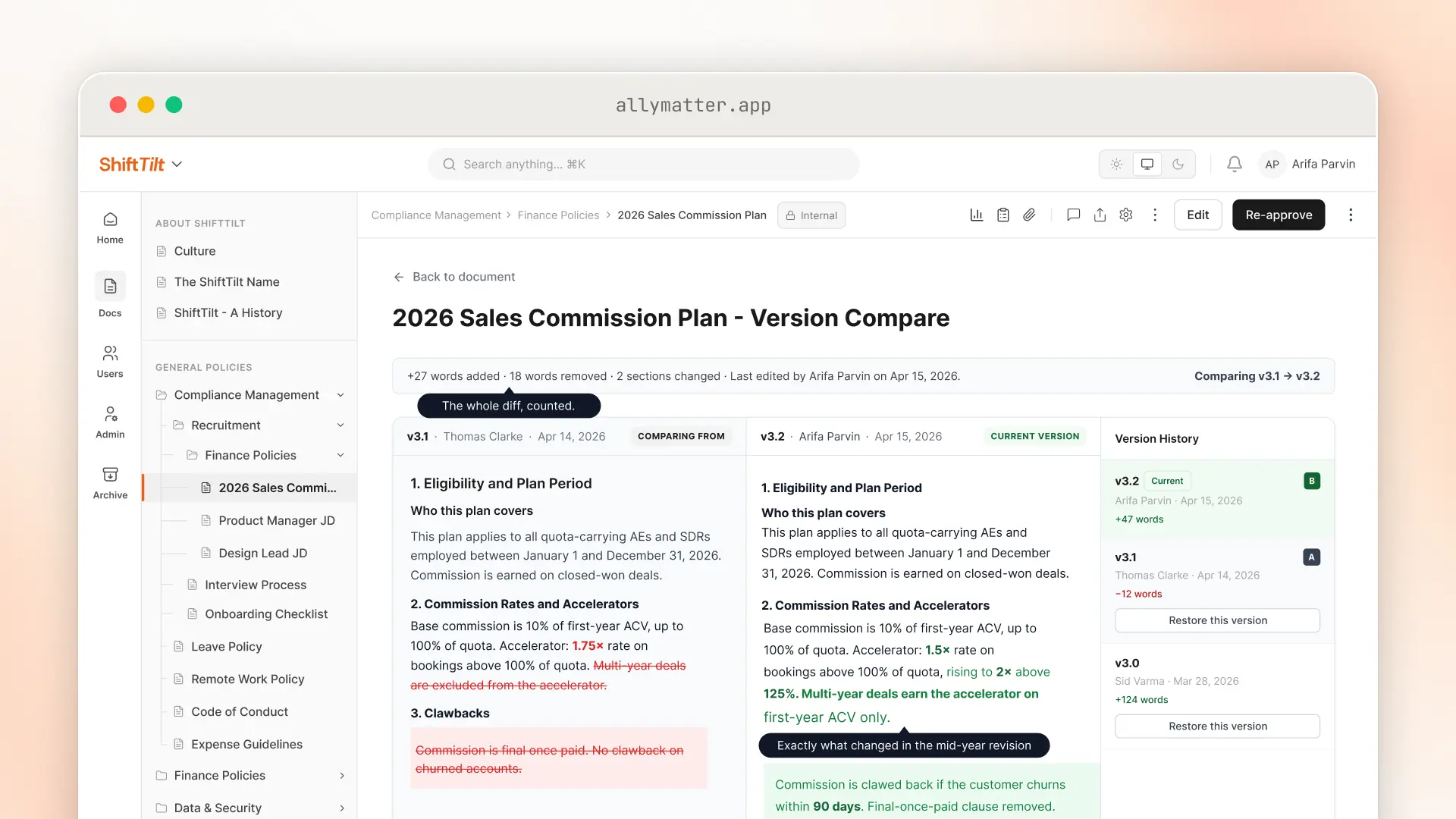
The one your team can see. Each time an approved document changes, the new text is saved as a new version, and the version history keeps every one. You can compare versions word by word, with additions in green and deletions in red.
Restoring an older version sends it back through approval, the same as any other change. So when an auditor asks what changed in a procedure since the last audit, you open the comparison and show them.
Getting it in front of the right people
Tags decide who sees a document, and acknowledgments show who has read it.
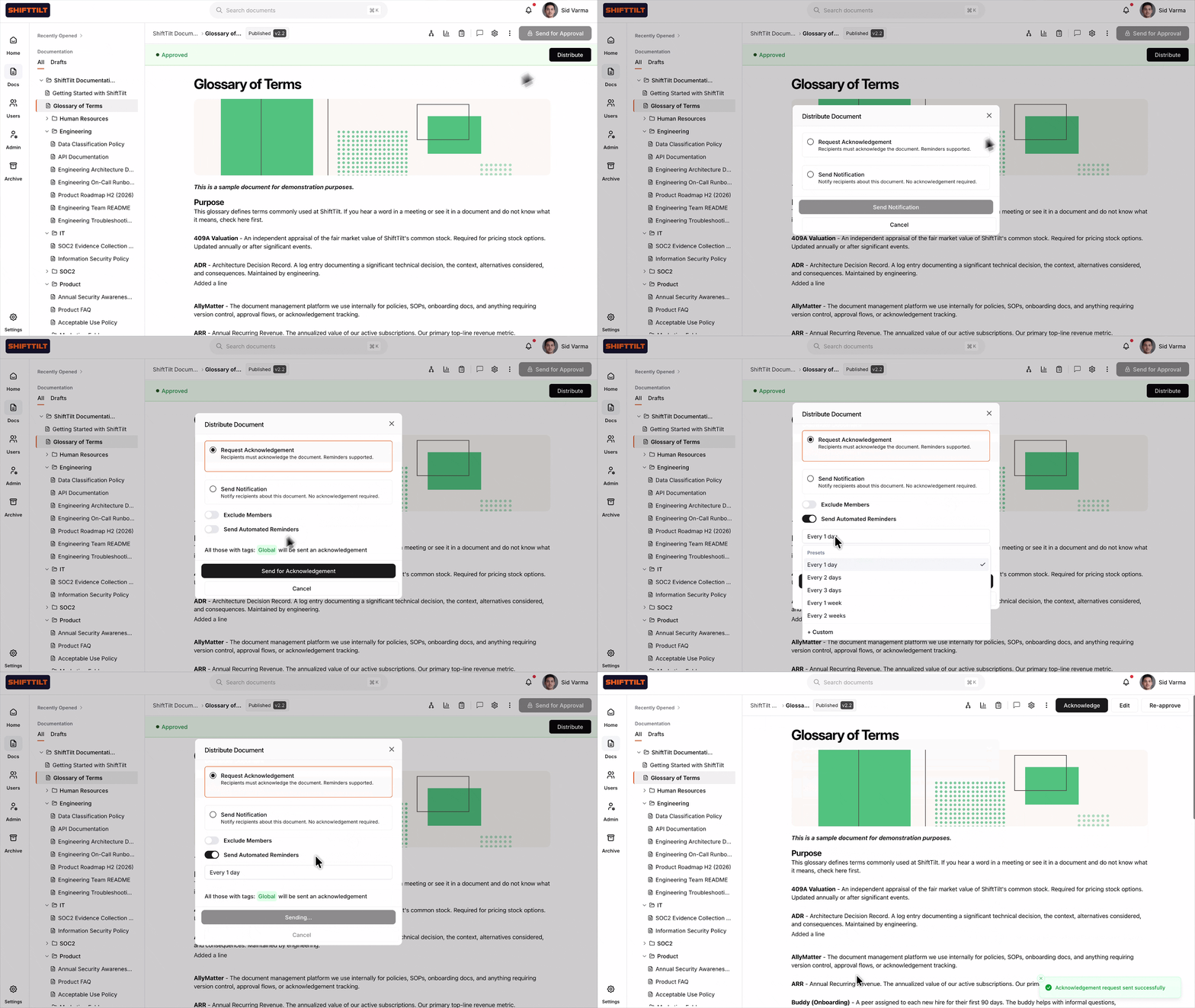
Tag a procedure for the receiving team and it reaches everyone who holds that tag. Once it’s approved, send it out with Distribute and choose Acknowledge. Each person opens the document, signed in, and clicks Acknowledge on the document itself. Nobody can acknowledge from their inbox, so an acknowledgment means they had the document open in front of them.
Each acknowledgment is timestamped and tied to the exact version the person saw. Set a reminder cadence when you send it and AllyMatter keeps reminding anyone who hasn’t acknowledged yet. When the procedure changes, the new version goes back out once it’s approved, and people acknowledge the new one. If someone leaves the company, their completed acknowledgments stay on the record.
Documents that need a signature
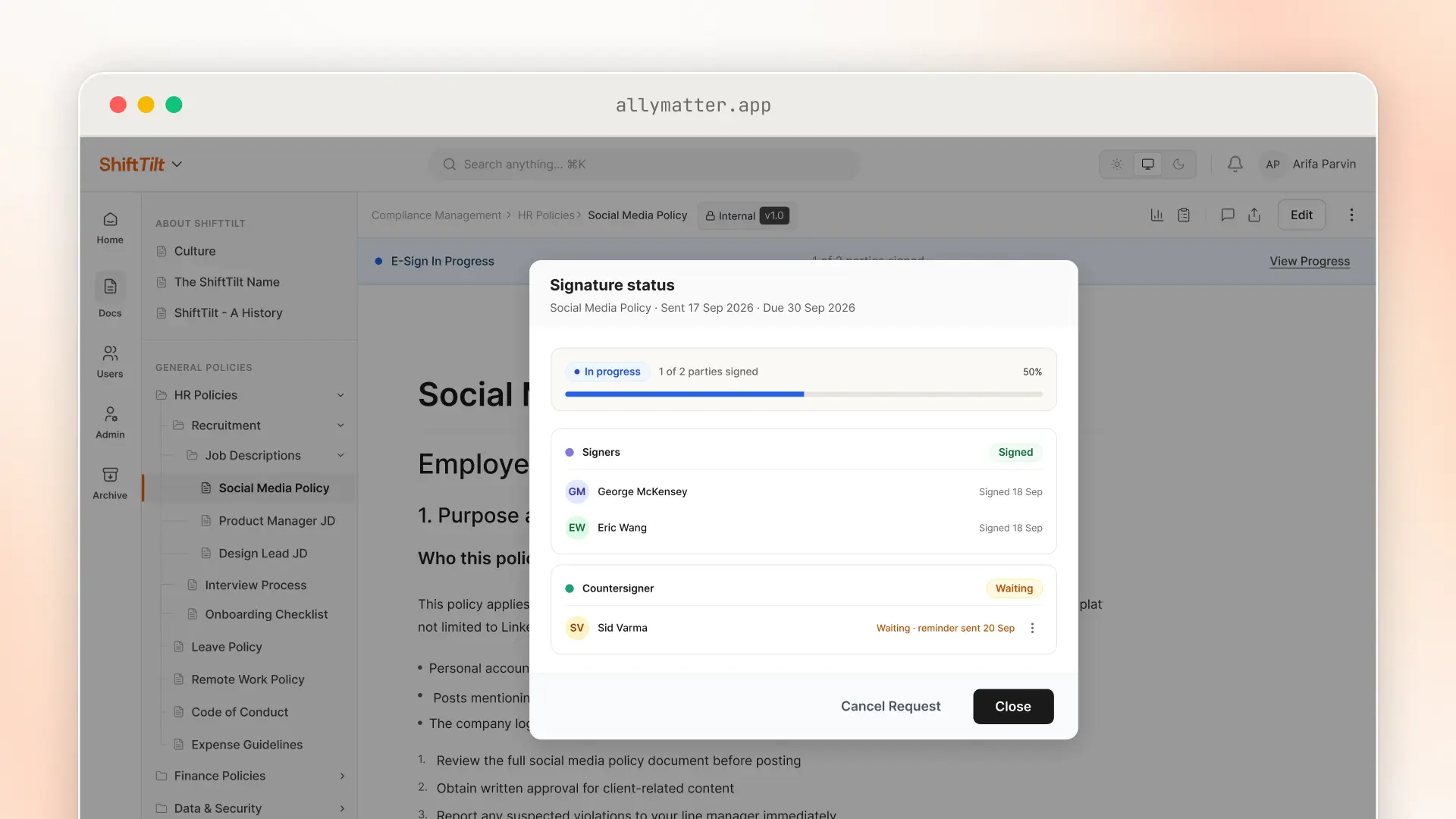
Most procedures only need an acknowledgment. A few are better signed. The quality policy is the usual one: top management owns it, and plenty of companies want that ownership on paper, or at least on a PDF.
For those, send the document for signature instead. People sign inside AllyMatter, one after another or all at the same time, and if each person needs their own signed copy, you can set it up that way. Once everyone has signed, the signed copy and its completion certificate are saved with the version that was signed.
Reviews that actually happen
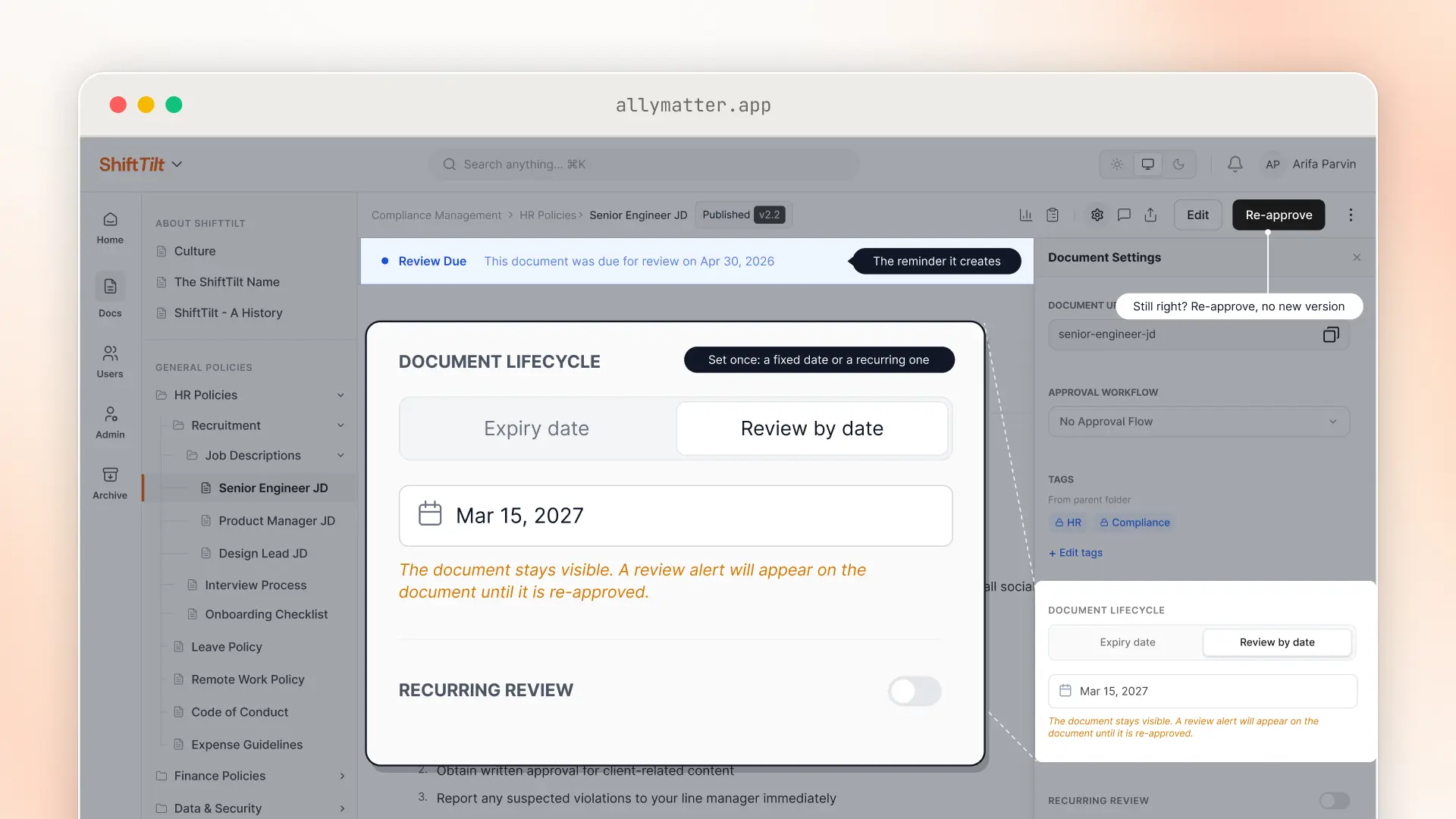
Put a review date on a document, a fixed date or a repeating one, and AllyMatter reminds the editor by email and in the app when it’s due. The reminder stays until someone updates the date or approves the document again.
If the procedure is still right, re-approve it as it is. No new version, no new round of acknowledgments.
For a document that shouldn’t be used past a certain date, set an expiry instead. On that date it drops out of everyone’s view until someone renews it, though editors and admins can still open it. ISO 9001 cares a lot about obsolete documents staying out of use, and an expiry date handles that without anyone having to remember.
Showing the evidence, clause by clause
Auditors work requirement by requirement. They pick one and ask you to show how you meet it.
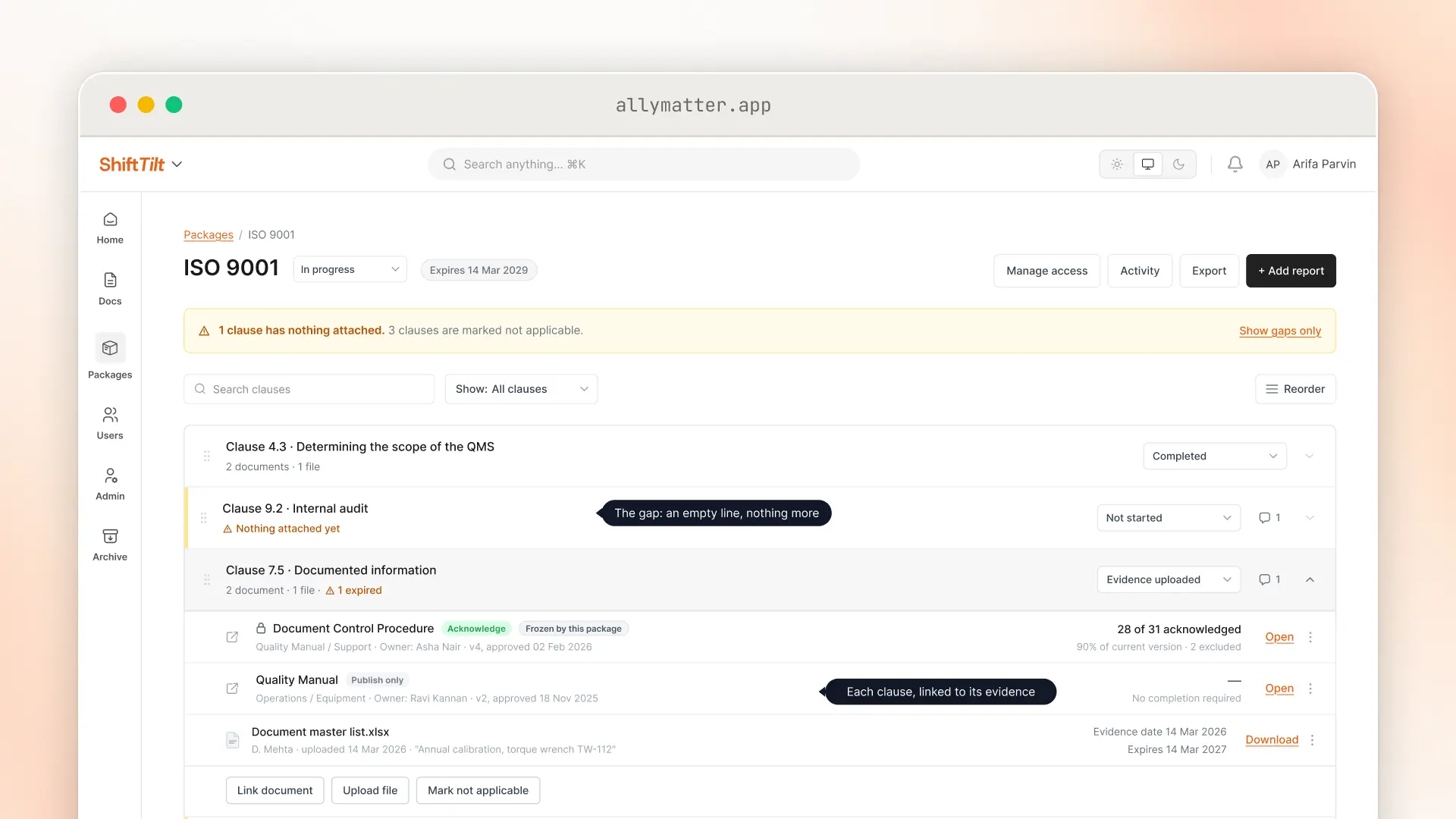
That’s what Packages are for. Set up a package for ISO 9001 with a line for each clause you’re audited against. Link each line to the documents that cover it, and upload any supporting files. A line with nothing linked shows up as a gap, so you find it before the auditor does.
If a requirement doesn’t apply to you, say design and development when you don’t design your own products, mark it Not Applicable. Not Applicable needs a reason, and ISO 9001 expects you to justify exclusions like that anyway, so the reason sits right next to the clause.
Give your internal auditor viewer access to the package and they can read everything linked to it, including documents outside their usual tags. For the certification audit, export the package: a section for each clause, with the gaps listed at the end.
Where the records go
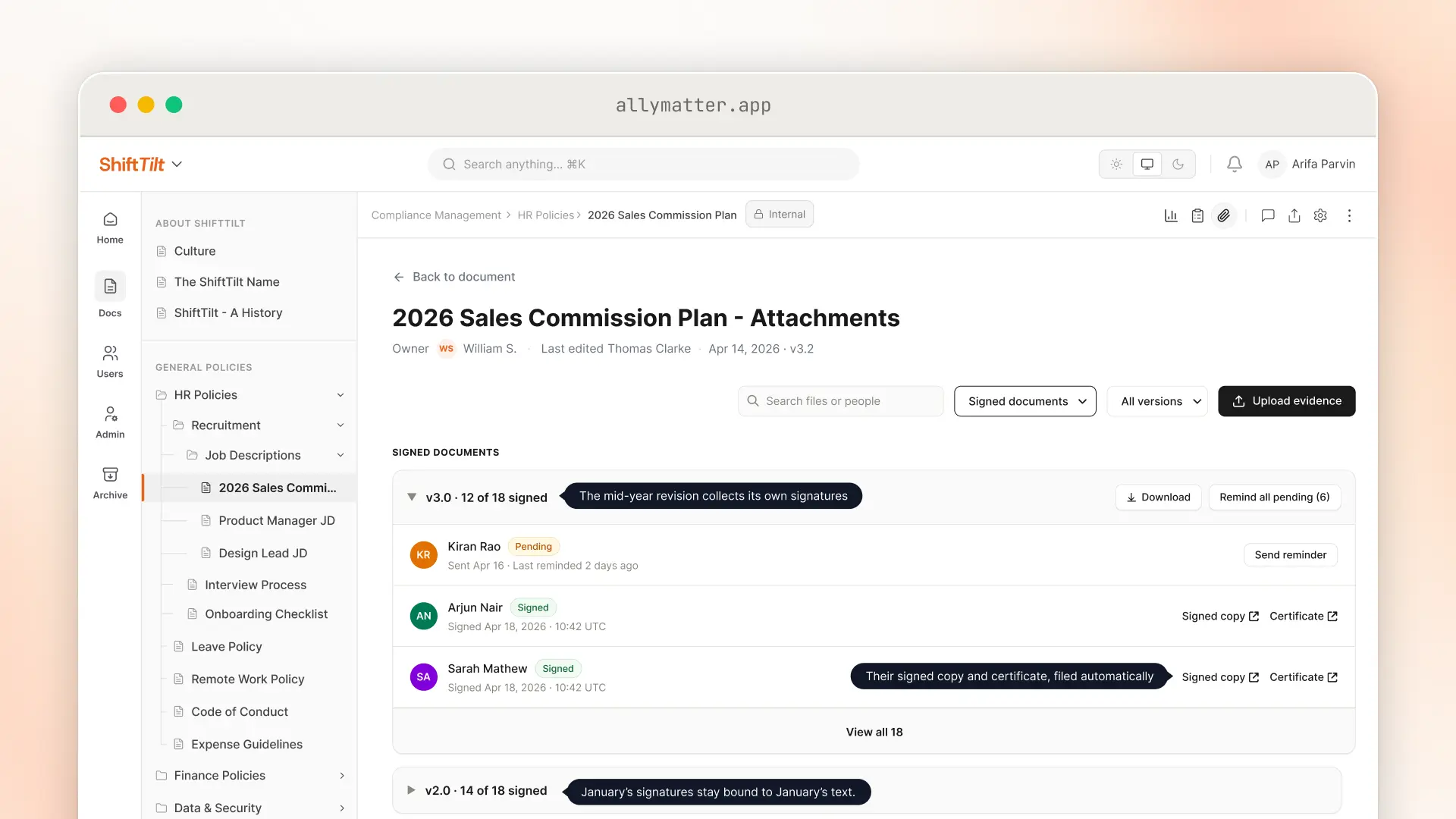
ISO 9001 also asks you to keep records, like calibration certificates and internal audit reports. Those go in the document’s Attachments tab, next to the procedure they support. Only the people managing the audit see the uploaded evidence. Everyone else who can read the procedure just sees the procedure.
Give a certificate an expiry date and AllyMatter flags it when it lapses. Signed copies from e-signature land in the same tab, grouped by the version that was signed.
On audit day
At the last company I started, the run-up to an audit meant chasing people for signatures, some of them mine, with the evidence spread across Word documents and online attestations.
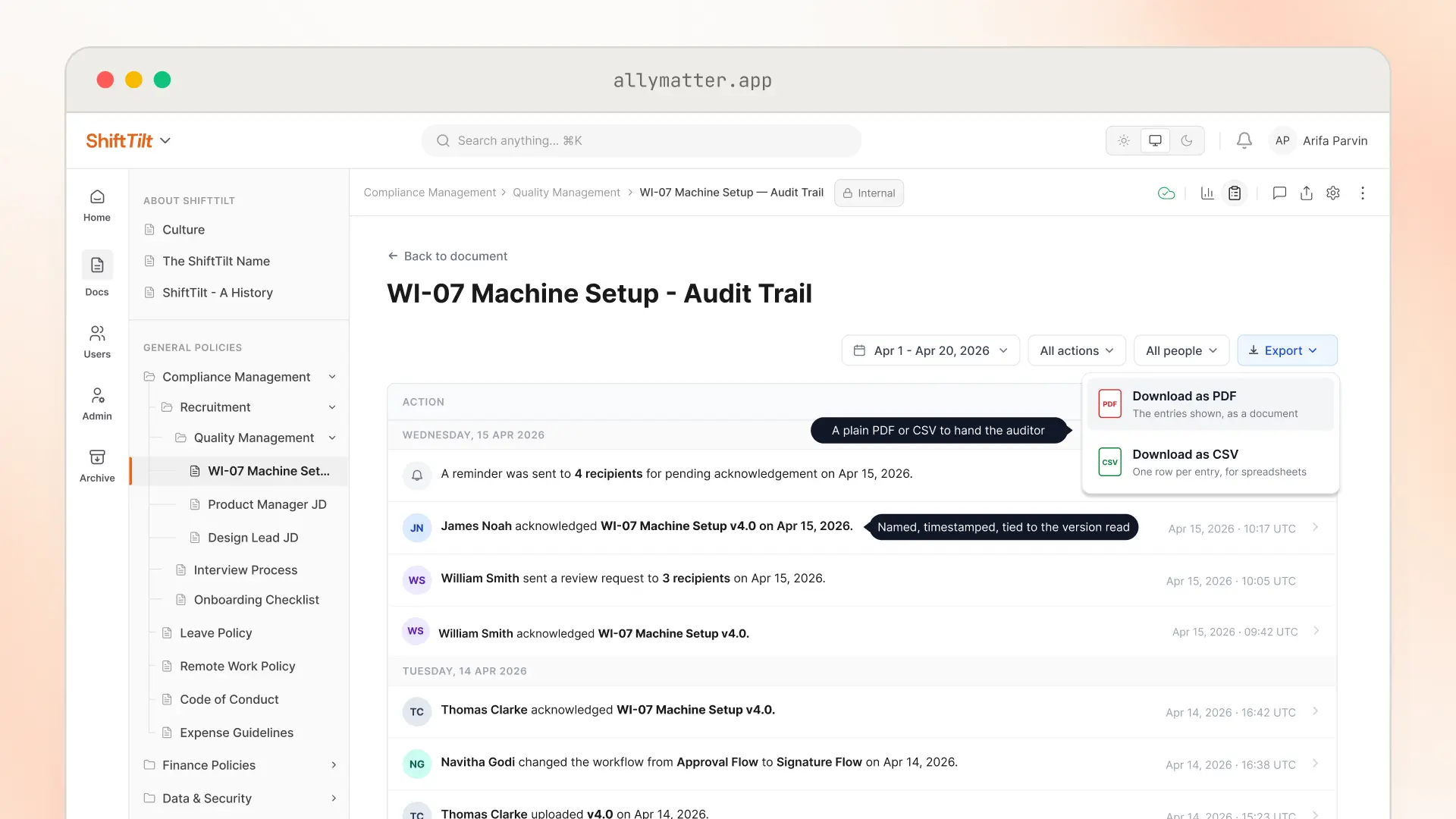
In AllyMatter, everything that happens to a document goes into its audit trail, from approvals to each person’s acknowledgment. Each entry reads as a plain sentence, so an auditor can read the log as it is. Export it as a PDF or CSV from the document, or from the workspace audit log if you’re an admin. When the auditor asks who has read a procedure, you export its log and hand it over.
Try it on your own quality manual. Start your 30-day free trial. No credit card to start.
Three scenarios
An honest read on whether this is right for you:
If you’re under 30 people and your procedures fit in one binder, a shared drive with a careful revision log will hold for now. A new tool won’t pay for itself until the documents and the people add up.
If you’re between 30 and 500 people and the four signals at the top sound familiar, this is the moment. AllyMatter is what we built for exactly this.
If you run more than one site, or your customers audit you on top of your registrar, one controlled version of every document across all of it is most of the job. We’d start with AllyMatter.
Common questions
Do I need software for ISO 9001 document control?
No. The standard doesn’t call for any particular tool, and plenty of small companies get certified with a shared drive and a disciplined revision log. It gets harder once the documents and headcount grow and you’re proving who read what by hand. That’s usually the point to move.
Who can help us build the quality system itself?
An ISO 9001 consultant. A consultant builds the system with you, and an accredited registrar certifies it. They’re always two separate firms. You can find an ISO 9001 consultant on Policy & Compliance, and once the system is built, its documents can live in AllyMatter.
Can we use AllyMatter for the move to ISO 9001:2026?
Yes. The transition will mean revising some of your documents. Each revised document goes through approval as a new version, and the comparison shows exactly what changed. Then it goes back out for acknowledgment, so by your transition audit you can show what changed and who has read it.
Do people who only read procedures need a paid seat?
No. Every plan includes unlimited readers, so everyone who needs a procedure can read and acknowledge it.
Start your 30-day free trial. No credit card to start, and a 30-day money-back guarantee if you convert and change your mind. Rather see it first? Book a demo.
Not ready for a trial? On annual plans, migration is on us: we’ll move your docs from SharePoint, Google Drive, Confluence, or Notion, usually within a week and often sooner.