A new operations manager joins your team. On her first week, she needs the expense approval policy before signing off on a vendor contract. She checks the shared Google Drive. There are three files with nearly identical names and no dates in the titles. She searches her inbox for something HR may have sent. She finds an attachment from fourteen months ago. She’s not sure if it’s current. She messages a colleague. The colleague isn’t sure either.
Most growing companies run into this. The policies exist. The problem is getting people to the right one reliably.
I’ve seen this pattern repeat across growing companies of every size and sector. The policies were written, approved, and distributed. But ask an employee where to find the current version of any given policy, and you’ll get a different answer depending on who you ask.
Why policies become unfindable as companies grow
When a company is small, informal systems work. There aren’t many documents, most people know where things live, and the person who wrote the policy is usually a Slack message away. But growth changes that equation quickly.
New hires join without the institutional memory of where things live. Departments start maintaining their own folders. Someone updates a policy and saves a new file rather than replacing the old one. Someone else emails an SOP directly to their team rather than updating the central location, assuming one exists. Within a year or two of meaningful growth, the same policy can exist in three places with three different edit dates, and no clear signal about which one is current. The internal question that follows is rarely answered cleanly: which version are we actually using?
Knowledge silos form through growth outpacing the systems meant to support it, not through carelessness. The real cost isn’t just the time employees burn searching. It’s the decisions teams make using the wrong version, the new hires who give up looking and ask a senior colleague instead, and the inconsistency that creeps into how different teams interpret and apply the same rules.
Understanding what’s actually breaking is the first step toward fixing it. A centralized knowledge base is the foundation, but only if you address the underlying problems alongside it.
What breaks in practice
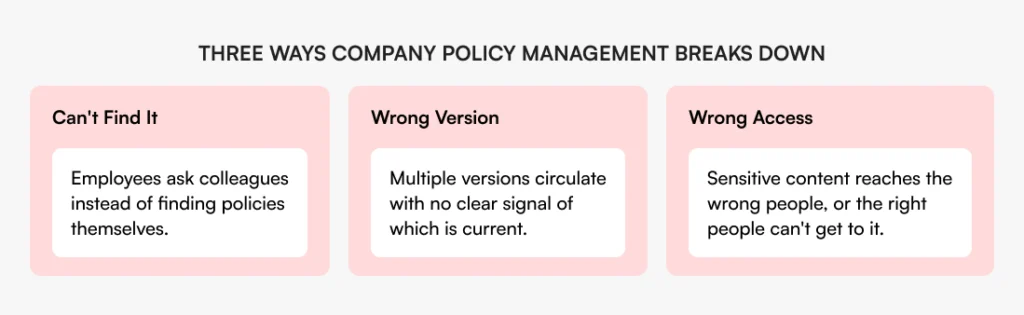
The findability problem is the most visible cost of poor company policy management. Employees either ask someone or make do without the information. Both outcomes carry a real cost. Experienced people field the same questions repeatedly, or teams make decisions on incomplete information.
The version problem is subtler but often more damaging. Without a clear system, policies quietly multiply. Someone updates the original and saves a new file, while a colleague who heard nothing about it keeps working from the old one. Now two versions are in circulation and neither filename tells you which is authoritative. For HR policies in particular, where inconsistent application creates real exposure, this isn’t a minor inconvenience.
The access problem sits underneath both of these. Sensitive documentation, whether compensation structures, disciplinary procedures, or legal policies, either sits behind access restrictions so tight that people who need it can’t reach it, or ends up in broadly shared folders where it reaches people who shouldn’t see it. Neither outcome is sustainable as teams grow. Document access control is what keeps centralization from becoming a security problem.
What good company policy management actually requires
Before any tool conversation, it’s worth being clear on what the goal actually is. The measure of whether your policy management is working is simple: can any employee find the right version of any policy they’re authorized to see, without asking anyone, in under a minute?
Three things have to work together: a single location for all documentation, controlled visibility so people see what’s relevant to their role, and search that works across whatever they’re looking for. Most organizations address one of these and wonder why the problem persists. Centralization without access control creates a different kind of chaos. Access control without search means people still can’t find things even when they technically have permission.
Take Jack, COO at a 300-person manufacturing company. His team centralized documentation into a shared drive two years ago. Findability improved initially. But as the team grew, department heads started creating subfolders with their own naming conventions. Finance locked their folder entirely. HR had two folders: one for general policies, one for “sensitive” content that only two people knew existed. When a new HR manager joined, she spent her first month asking colleagues for links because search returned too many results with no way to tell which was current or whether she had the right access. The documentation existed in one place, but employees still couldn’t navigate it without asking someone.
What the difference looks like
The gap between scattered and structured policy management usually shows up at the worst moments. A new hire can’t find the current expense policy. An updated SOP keeps circulating in its old form. An audit asks for proof that employees acknowledged a procedure and nobody can produce it quickly. Here’s how those same situations play out differently depending on how your documentation is set up.
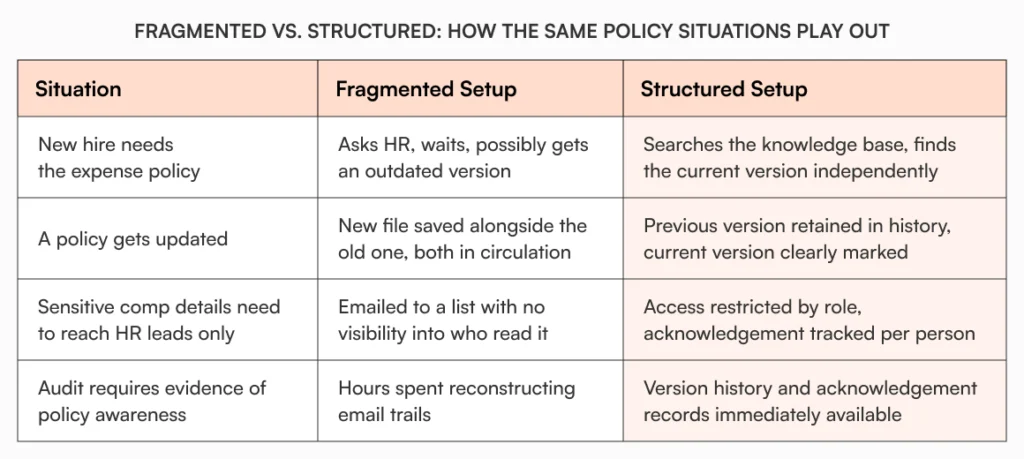
In every case, the fragmented setup puts the burden on people to compensate for what the system can’t do. A structured setup removes that burden entirely.
Why AllyMatter is built for this
Most document storage tools treat company policy management as a file organization problem. The real challenge is retrieval, access, and traceability, and a shared drive was not designed to handle any of those.
AllyMatter keeps all documentation in one knowledge base. Access is controlled through tags at both the folder and document level. Assign someone the ‘HR’ tag and they see HR documentation, nothing more. When someone joins a new department or moves from contractor to full-time, one tag update adjusts their access across the whole knowledge base. Child documents inherit their parent folder’s tags automatically, so access doesn’t need to be configured file by file.
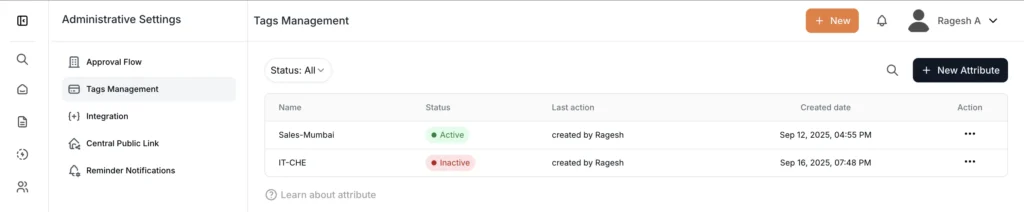
Search returns results scoped to each user’s permitted content. An employee finds the benefits policy they need without seeing the compensation benchmarking document sitting in the same folder. Version history captures every change with the author and timestamp, and earlier versions can be restored if needed. Policies that require sign-off go through approval workflows with reminders built in, so nothing stalls waiting on a reviewer. Once approved, a document can be sent for acknowledgement by tag group, giving you a clear record of who has confirmed they’ve read the current version. Every significant action is logged in the audit trail: creation, edits, approvals, acknowledgements.
For HR managers, ops leads, and finance teams, this isn’t about having fancier software. It’s about having a system where “did everyone get the right version?” has a verifiable answer.
Where to start
Audit where your policies currently live before reaching for a solution. Map every location: shared drives, Notion, Confluence, email threads, departmental folders. Then ask the questions that matter: who owns each document, who has access to it, which version is current, and when it was last reviewed.
That exercise alone surfaces more gaps than most teams expect. Outdated versions still in circulation, sensitive files sitting in broadly shared folders, and policies with no clear owner and no review date are common findings.
For most teams the answer is the same: one location, deliberate access by role, search that works, and acknowledgement built into distribution so ‘I sent it’ becomes ‘I know who read it.’
Policies that reach the people who need them
Good company policy management doesn’t end when a policy gets written and filed. The real measure is whether any employee can find the version they need, at the moment they need it, without asking anyone.
If that’s not happening reliably, the policies aren’t the problem. The infrastructure around them needs fixing.
Start your 30-day free trial of AllyMatter and see what it takes to make every policy findable, current, and confirmed.
Frequently asked questions
Why do company policies end up scattered across multiple tools?
It usually starts with convenience. A policy gets written in whatever tool someone is already using, a Google Doc, a Notion page, an email, and shared from there. No one establishes a system early enough, and by the time the problem is visible, documentation is spread across a dozen locations with no single source of truth. People default to convenience. The fix is making the right path easier than the workaround, not asking people to try harder.
How do you handle policies that differ by region or department?
The principle is to separate access by context, whether that’s geography, department, or employment type, so employees only encounter policies that apply to their situation. A US benefits policy and an EMEA benefits policy can coexist in the same knowledge base while remaining invisible to the wrong audience. When employees regularly find policies that don’t apply to them, it creates confusion and erodes trust in the documentation system overall.
How is tag-based access different from folder permissions?
Folder permissions tie access to where a document sits. Move the document and the permissions may not follow. A tag-based system ties visibility to the document itself regardless of where it lives. Users see everything matching their assigned tags. It’s simpler to manage as teams change, and easier to audit when questions come up about who had access to what.
How do you make sure employees actually read updated policies?
Sending a notification isn’t the same as confirming receipt. Acknowledgement tracking, where employees actively confirm they’ve read a document, gives you a record of who has seen the current version and who hasn’t. Combined with automated reminders for people who haven’t responded, it turns policy distribution from a broadcast into a verifiable process.
What should be in a policy knowledge base?
Start with the documents people ask about most: HR policies, expense guidelines, IT and security procedures, onboarding materials, and any SOPs that cut across teams. These are the documents that create the most friction when they’re hard to find. From there, expand to department-specific documentation as teams identify their own gaps.

Founder of AllyMatter I’m founder of AllyMatter, an operations-first knowledge base for growing companies. Before AllyMatter, I co-founded Syren Cloud and helped scale it into a 300-person organization across two countries, leading marketing, operations, and HR. We moved fast, served demanding customers, and learned the hard way that internal knowledge systems built for help docs or IT don’t solve day-to-day operations. AllyMatter is my answer—tools that turn tribal knowledge into trusted, searchable processes. This blog shares the playbooks, checklists, and lessons I wish I’d had while scaling.