
Small Business Compliance · 19 min read
Compliance Management Software: What It Is, How It Works and What to Expect
Compliance management software is a system that keeps a company’s compliance work in one place: the rules that apply to it, the policies and procedures that answer them, the proof that people read and acknowledged them, and the dates when each one needs another look. It holds the record and moves the work, while you decide which rules apply, who owns each policy and how often it gets reviewed, because no software makes a company compliant on its own. This guide explains the kinds of tool, how one works from a first draft to an audit, what to expect in your first weeks, and how to choose.
I have been through SOC 2, ISO 9001 more than ten times, ISO 27001 twice and HIPAA, and the part that kept costing me time was showing, on the day, that the right people had read the current version. That is the gap compliance management software is meant to close, and it is the one we built AllyMatter around.
What compliance management software is
A company’s compliance work comes down to four jobs. You work out what applies to you, you write each requirement down as a policy or procedure someone owns, you get the current version in front of the people it covers, and you keep the proof that all of that happened. Compliance management software exists to run the routines inside those jobs so they do not depend on one person’s memory or on a folder nobody tidies.
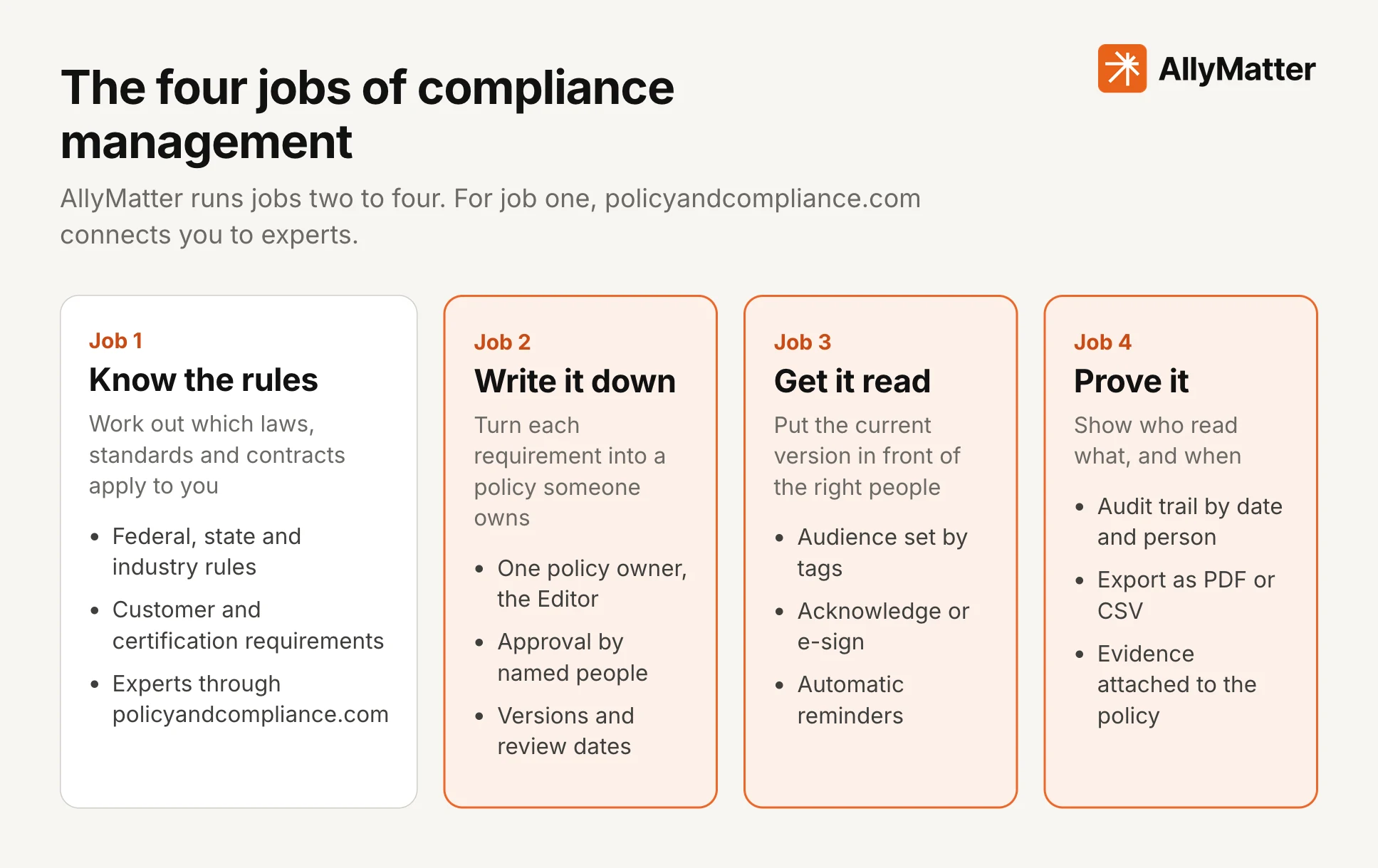
There is an international standard for the wider arrangement, ISO 37301, which describes what a compliance management system needs and applies to organizations of any size. A compliance management system is the whole setup of people, policies, processes and records a company uses to meet its obligations. Compliance management software is the tool that holds the records and runs the routines of that system. If you want the system side in detail, our guide to building a compliance program walks through the seven elements the US Sentencing Guidelines set out.
Sources: iso.org, ISO 37301:2021 Compliance management systems: Requirements with guidance for use, ussc.gov, Guidelines Manual §8B2.1 (2024)
Most vendors describe it in much the same way: software that tracks obligations, centralizes records, automates routine tasks and produces reports for auditors, with a feature list that nearly always includes policy management, regulatory monitoring, training, audit and risk assessment, incident reporting and record keeping. Where they differ is in which of those a given product actually does well, which is why the next section matters.
The kinds of compliance management software
“Compliance management software” is a label that covers several different products, and most vendors blend two or three. Knowing the kinds helps you read a feature list and see which jobs it covers.
| Kind of tool | What it does | Who usually operates it |
|---|---|---|
| Policy and acknowledgment tools | Write, approve and send policies and procedures, record who acknowledged which version, keep review dates and an audit trail | An HR manager, an operations or quality manager, or a compliance lead, with each department keeping its own policies |
| Compliance automation platforms | Connect to cloud accounts, code repositories, laptops and identity systems to collect technical evidence and check controls on a schedule, mostly for frameworks such as SOC 2 and ISO 27001 | A security or IT lead, or a founder who handles security, working with the engineers and the auditor |
| GRC platforms | Hold a risk register, a library of controls, vendor risk, audit management and board reporting in one system | A compliance officer, a risk manager or an internal audit team |
| Regulatory change tools | Watch laws and rules and flag what changed, and in some products open a task for the people affected | A compliance officer or in-house counsel |
| Industry bundles | Combine training, credentialing, incident reporting and policies for one sector, such as healthcare or workplace safety | A compliance, safety or practice manager in that sector |
| HR system modules | Handle handbook acknowledgment and basic policy distribution inside an HR platform | An HR generalist or people operations manager already working in that platform |
A single company often uses more than one. A small company preparing for SOC 2, for example, commonly runs a compliance automation tool for technical evidence and a policy tool for the written policies, because the first works from systems and the second works with people. Neither replaces the other.
We built AllyMatter for the policy and acknowledgment side of compliance, which is jobs two, three and four above. It runs the writing, approval, distribution, acknowledgment, review and proof for the policies a growing company has, from the code of conduct and the employee handbook to safety procedures and security policies. Our guides to policy management software, SOC 2 policies and small business compliance cover how that fits next to the rest of your program.
What compliance management software typically does
Read enough vendor pages and the same seven features come up. No single product does all of them equally well, so use the list to work out which ones you need first.
| Feature | What it covers |
|---|---|
| Policy and procedure management | Drafting, approval, distribution, acknowledgment, versions and review dates for the written commitments |
| Regulatory monitoring | Tracking the laws and rules that apply and flagging changes, with the depth and speed varying a lot between products |
| Training and awareness | Assigning courses or reading, and tracking completion |
| Audit and risk assessment | Planning audits, recording findings and tracking fixes, and in larger suites scoring and logging risks |
| Incident and case reporting | Logging incidents, complaints and whistleblower reports, and following them to a resolution |
| Records and evidence | Keeping a dated record of who did what, and exporting it for an auditor, a regulator or a customer |
| Reporting | Showing status to leadership, an auditor or a board |
The reasons companies buy it are just as consistent. There is less chasing by email and spreadsheet, one current version of each policy, a clear owner for each rule, fewer missed dates and a faster path to the proof when someone asks for it. Those benefits hold when the work behind the software is real, which is why the next section starts with how the work actually runs.
How the policy side works: one policy from draft to audit in AllyMatter
Here is the path one policy takes in AllyMatter, from the first draft to an audit. The same path applies to a handbook, a code of conduct, a safety procedure or a security policy, which is why a growing company can run all of them in one place.
Step 1: Write the policy or upload it
Every policy has an Editor, the person who creates it and owns it. Write it in the editor, with tables and images where they help, or upload an existing PDF and get it acknowledged by name. A policy needs one named owner because a rule nobody owns is the first one to go out of date.
Step 2: Approve it
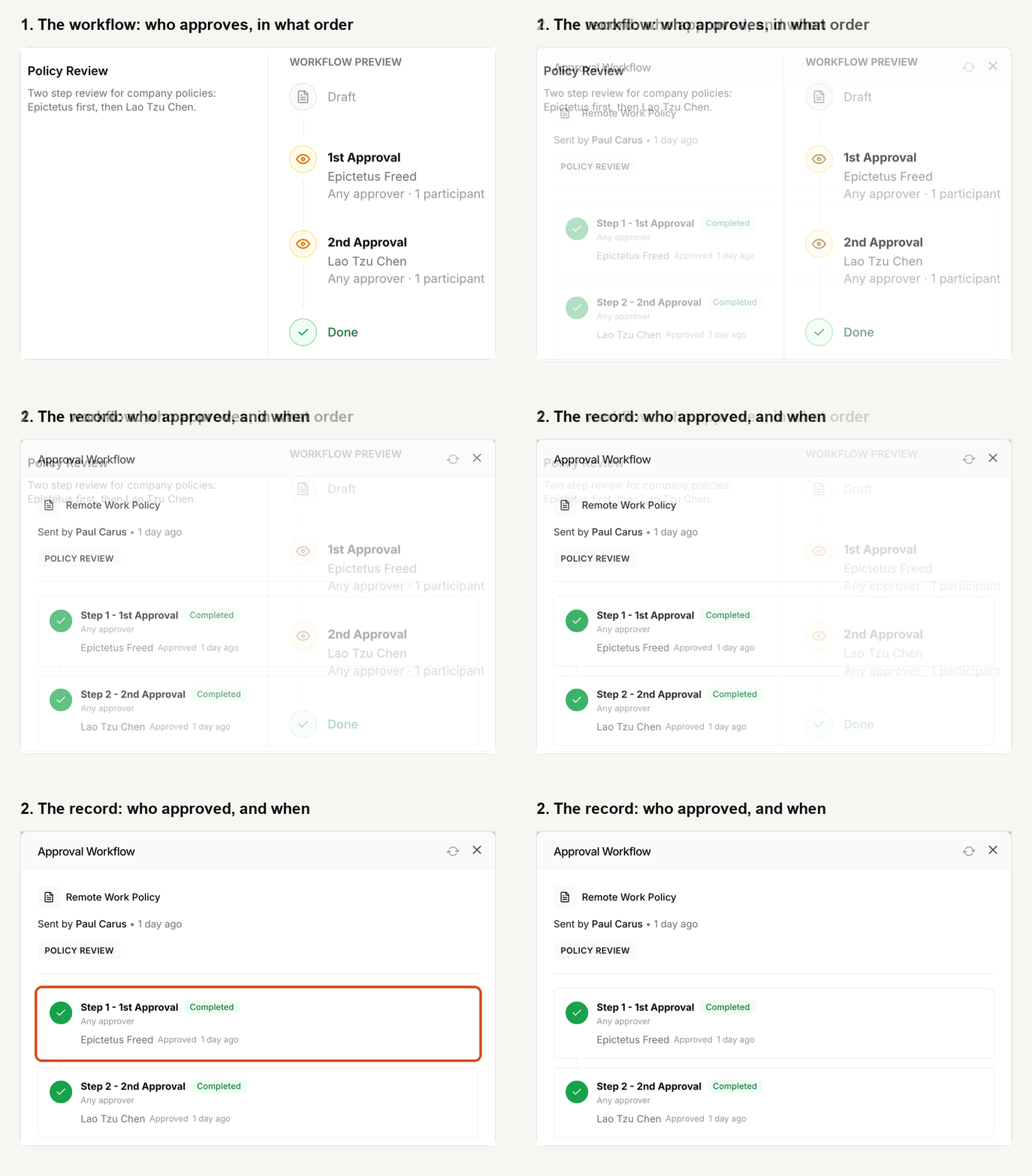
Nothing goes out unapproved. Approval is mandatory for every policy, and you set the workflow once and reuse it. A workflow can have up to four steps, up to six people in each step and twelve people in total, and each step can need everyone or any one of its approvers. An outside lawyer can be invited into your workspace as an approver, so your counsel signs off inside the same record. While a policy is in approval it is locked, and the people it covers keep seeing the last approved version.
An approver who rejects a policy has to say why, and the policy goes back to the Editor with that comment. Approvers can compare the new version with the old one word by word before they decide.
Step 3: Choose who reads it and send it out
Tags decide who can see an internal policy. Apart from Admins and the policy’s Editor, nobody sees it unless a tag says they should, so access is always a deliberate choice. A few tags such as team, role or location combine into any audience, and the people who hold a policy’s tags are its audience, which makes the list of people asked to acknowledge a policy the same list that proves who it applied to. When someone joins and is given a team’s tags, they receive the policies those tags carry and the acknowledgment requests that come with them.
When a policy is approved, its Editor presses Distribute and sends it to everyone who holds its tags, as a notice, as something to acknowledge or, with the e-sign add-on on the Scale plan, as something to sign. You can set optional automatic reminders in the same step, every day, two days, three days, a week, two weeks or an interval of your own.
Step 4: People acknowledge it
Each person signs in, opens the policy and presses Acknowledge. The record holds their name, their email, the date and time and the version they read. Completed acknowledgments stay on record if the person later leaves, and a pending request on an older version is replaced when a new version goes out, so people are only asked to acknowledge the current one. The policy’s Document Analytics shows who has viewed it, how long it was on screen, when they last opened it and where each person’s request stands.
Step 5: Change it and review it
Policies change, and the rule that matters is that every new version goes back through approval and, when its Editor distributes it, back out to the people it covers, however small the edit, because even a comma can change a meaning. Version history keeps your versions (three months on the Startup plan and three years on Scale), shows every word added and removed between versions, and lets you restore an earlier one, which creates a new version that needs approval before anyone sees it.
Review dates cover the other half. Each policy can carry a review date, fixed or repeating, as described on our page for versions and reviews, and an alert shows on the policy when it is due. If you review an unchanged policy, you re-approve it, which records that someone judged it still valid on that date, and nobody is asked to acknowledge it again unless the text changed. Our guides to annual policy attestation and the compliance calendar go deeper on running that rhythm.
Step 6: Prove it
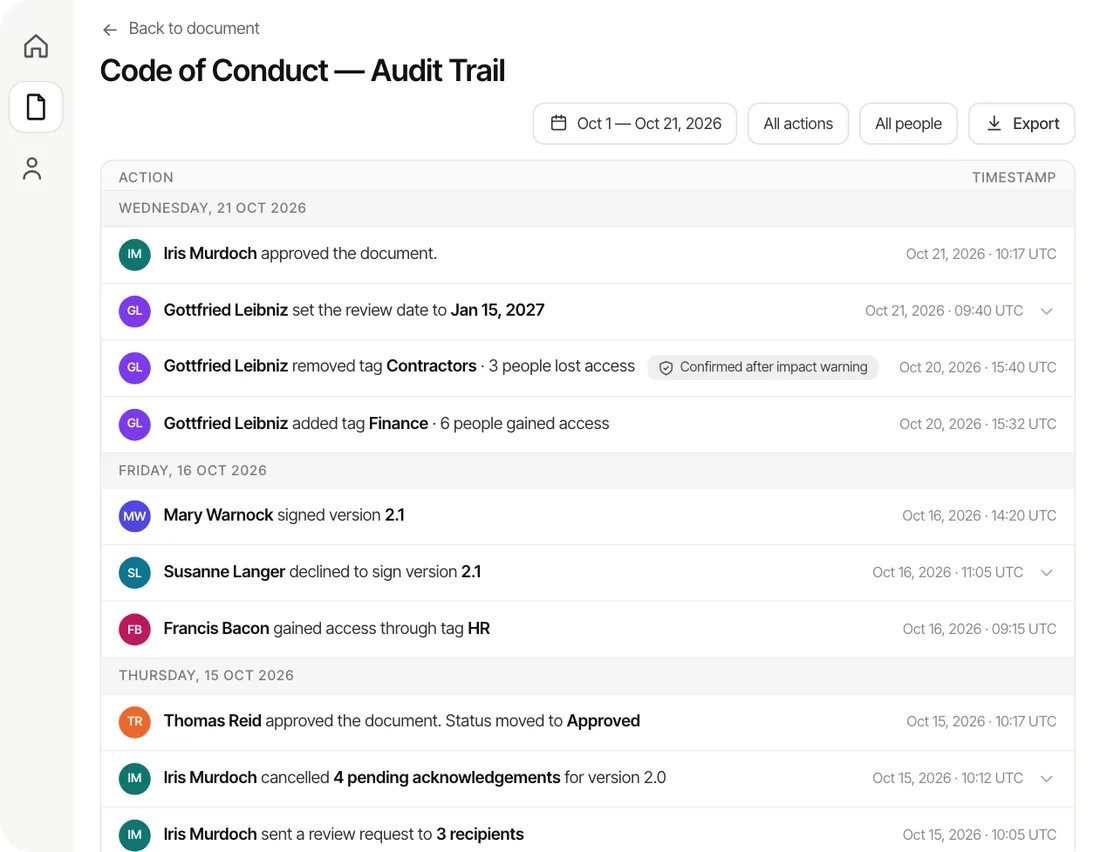
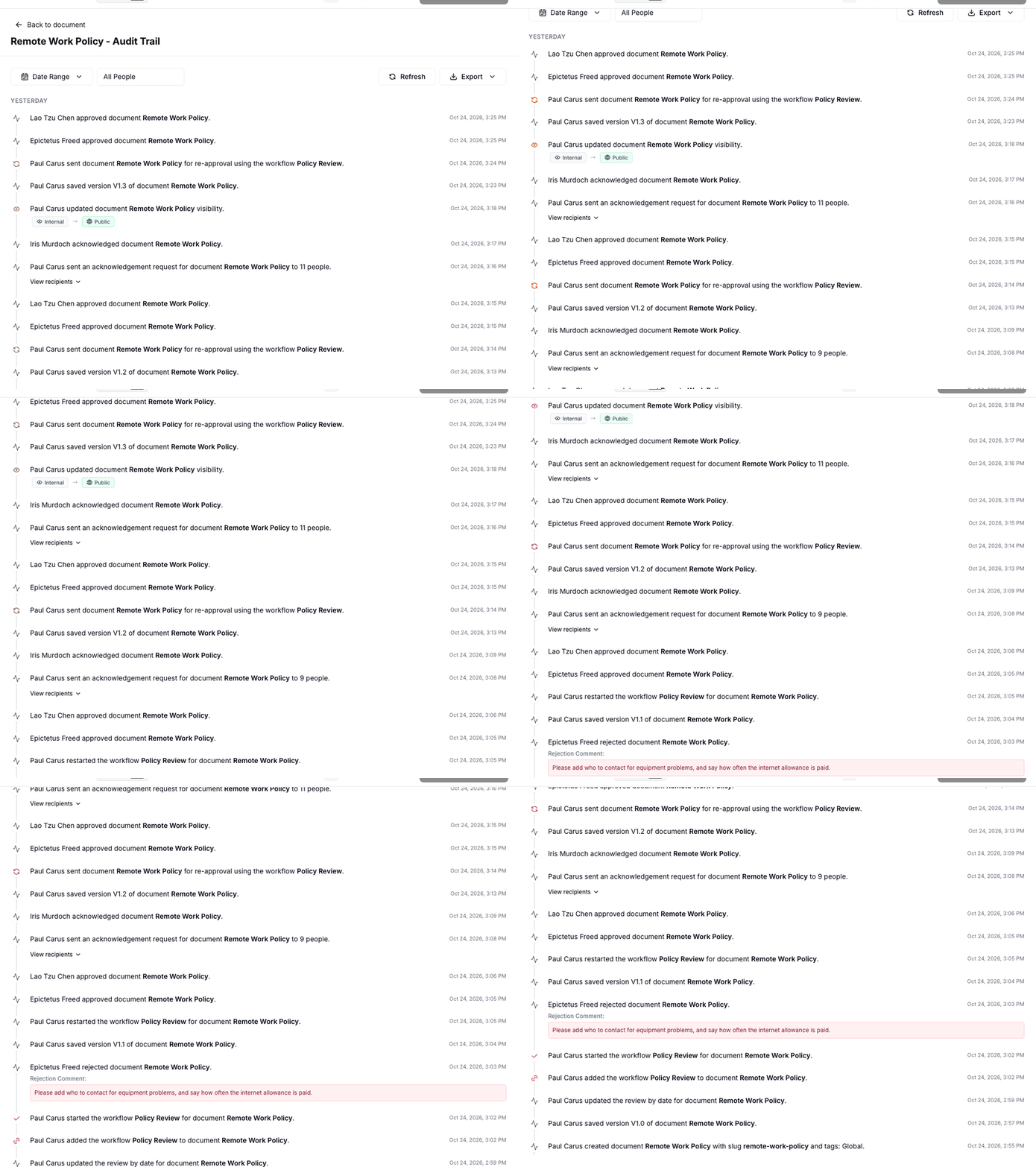
Every approval, rejection, version, send and acknowledgment is written to the policy’s audit trail, and each policy’s trail and the workspace log can be filtered by date range or by person and exported as a PDF or CSV. When an auditor or a customer asks for the proof, you export the record instead of rebuilding it from emails, and our guides to the document audit trail and preparing for a compliance audit show what to do with it.
Evidence files can be attached to a policy, for example each forklift operator’s certification kept with the safety rules, and signed copies and their completion certificates sit in the policy’s attachments. If an auditor needs to look for themselves, you can give them Viewer access, and they see only what their tags allow. Packages go one step further for a standard, a law or a customer contract you have to answer to. You list its requirements as line items, link the policies that answer each one, mark an item not applicable with a reason, see which items are still gaps, and export the result.
The last company I started had five versions of the NDA, depending on when someone joined, and IP assignment for only some people. In one audit, an auditor sampled an employee who had not signed the NDA yet, because they had joined while it was being rewritten. Nothing in a shared folder could have told us that beforehand. An acknowledgment recorded against a version, with a list of who was asked, would have.
Knowing the rules: experts first, then the reference
Many compliance management software pages list regulatory monitoring as a feature, with updates and alerts when a rule changes. An alert can tell you a rule changed, but it cannot tell you whether the rule applies to you, and that is a judgment call a feed leaves with you. We handle the first job differently, through our sister site, Policy&Compliance, which connects you with the experts who do this work.
The Get help form on Policy&Compliance is read by a person. You say what you need done, whether that is implementing a standard, writing the policies or running the program with you, and we point you to consultants, assessors or auditors who do that work. Nothing is shared with a firm until you choose one. The directory behind it is sourced, because each listing shows either a public register or the firm’s own website with the date we read it, and as of November 2026 it lists 663 consultants and 49 assessors and certification bodies on public registers. A listing is not a recommendation, and paid placements are labeled Sponsored and change nothing else on the page.
The same site is a free reference for the rules themselves, so you have something to check an expert’s advice against. It lists what a business has to have in writing, and each row names the document, the trigger and the agency that enforces it. As of November 2026, it covers a federal layer of 70 rows filtered by headcount and industry, 51 jurisdictions (the 50 states and the District of Columbia) across 14 categories, 43 required documents explained, and 134 frameworks. Every obligation row links to the authority that enforces it, and the links are machine-checked monthly.
To follow changes, you can subscribe by type of business, standard or state, and you get a digest when something you follow changes. We promise nothing on speed, and the site says plainly that it is not legal advice, so read the source on each row and ask an expert before you act on it. When a rule does change, the change reaches your people in AllyMatter the way any other edit does: you update the policy, it goes through approval, and when you distribute it, everyone it covers is asked to acknowledge the new version.
What to expect from compliance management software
Pages that explain this software tend to promise speed and certainty. A more useful picture is honest about what you will do, what the software will do and what stays with you.
You decide the program first
Software holds your program, and it does not decide it. You still choose which obligations apply to you, who owns each policy and how often each one is reviewed. Buying a tool before you have those answers is a common and expensive way to start, and if you are unsure which rules apply, that is a question for an expert, which is what Get help on Policy&Compliance is for. Our guides to small business compliance, the HR compliance checklist and policy governance help you draw that list.
Setup takes about half an hour, and moving your documents takes about a day
Setting up AllyMatter takes about half an hour. Moving your documents in yourself takes about a day. On yearly plans our migration service moves a large library for you, usually within a week and often sooner, and it is free on those plans. You can try the whole workflow first with a 30-day free trial that needs no credit card.
The first honest count is usually lower than the folder suggested
A folder of policies never counted anyone, so the first acknowledgment round is often the first time you see who has read the current version. Expect that number to look worse than your assumption, and expect it to improve as reminders do their work. That moment is the system doing its job, and it is better to see it before an auditor does.
What you will have after the first round
After your first round of policies you should have approved versions with their history, a list of who acknowledged which version, review dates set on each policy, and an audit trail you can export. You will also have a clear list of the people who have not acknowledged yet, which is the work left to do.
Four things worth measuring
You do not need a dashboard of scores. Four plain measures tell you whether the program is working.
| What to measure | Why it tells you something |
|---|---|
| How long it takes to produce the proof for one policy | The best test of any system is whether you can show the current version, who approved it and who read it without a week of searching |
| Policies past their review date | A review date nobody acts on is a promise you are about to break in front of an auditor |
| People who have not acknowledged the current version | It is the gap an auditor samples first, and the one a shared folder cannot show |
| Days from approval to everyone acknowledging | It shows how long a changed rule sits in the company before the people it covers have read it |
What stays with you
The obligations stay with your company, and an auditor or a regulator still forms its own view. The software keeps the record honest and the work moving, and it does not replace the judgment of the people who own each policy. A policy that nobody follows will produce a clean audit trail and a poor audit, so the quality of what you write still matters most.
Do you need compliance management software?
A team of five with three policies can manage with a shared folder and a spreadsheet, and there is no shame in that. The signs that you have outgrown it are practical: policies need review dates or expire, more than one location or team follows different rules, and acknowledgments have to be tied to a version.
The other signs are an audit or customer review that takes weeks to prepare, and one person who holds the whole picture in their head, so that a holiday or a resignation would leave the rest of the company guessing. If two or three of those are true, you are probably spending more time keeping the spreadsheet honest than the work deserves.
How to choose compliance management software
Whatever you evaluate, ask each vendor the same questions and write down the answers. They are the ones that separate a tool that fits your company from one that fits its own feature list.
| Ask the vendor | Why it matters |
|---|---|
| Which of the four jobs does it run, and which does it leave to you? | Most products are strong at one or two, and you want to know the gaps before you buy, not after |
| Does it come with content, or do you bring your own policies and standards? | Included content saves drafting time and ties you to the vendor’s version of the rules, while your own keeps the program yours |
| How is an acknowledgment recorded? | It should name the person, the date and time and the exact version, and it should survive that person leaving the company |
| What happens when a policy changes? | Look for a new approved version, a new request to the people it covers, and no way to quietly edit the old one |
| Can you get your evidence out without asking the vendor? | An export you can run yourself is what you hand an auditor on the day |
| Is the pricing public, and what is it per? | Per-reader pricing grows with every hire, while pricing set by the people who write policies stays flat as you grow |
| How long until you are live, and who moves your documents? | Setup time is real cost, and it often decides whether the tool gets adopted at all |
| Who sees what? | A policy about executive pay should not reach the whole company, and a safety procedure should reach everyone it covers |
Be honest about which jobs matter most to you today. If your first need is evidence from cloud systems for a SOC 2 report, you will want a tool built for that, and a policy tool alongside it. If your first need is getting every employee to acknowledge the handbook and proving it, start with the policy side. You can add the rest as you grow.
What it costs and how to try it
Our plans are published, so you can read the price and the limits without a sales call, and you pay for the people who write policies, not for everyone who reads them. Staff, contractors and consultants can read and acknowledge for free. The trial is 30 days with full access and no credit card, and a 30-day money-back guarantee follows if you subscribe.
Questions about compliance management software
What is compliance management software?
Compliance management software keeps a company’s compliance records and routines in one system: which rules apply, the policies written to meet them, who has read and acknowledged each one, and when each is due for review. The company still decides which rules apply and who owns each policy.
What does compliance management software do?
It runs the routines compliance depends on. It holds the drafting and approval of policies, sends the current version to the right people, records who acknowledged which version, reminds anyone who has not, keeps review dates, and produces an audit trail you can show an auditor. Some products add technical evidence collection, risk registers, training and incident reporting.
What is the difference between compliance management software and GRC software?
GRC software (governance, risk and compliance) is the broader category, and usually adds a risk register, a control library, vendor risk and board reporting for larger organizations. Compliance management software is the everyday term, and for a small or growing company it often means the policy, acknowledgment and evidence side of compliance.
Does compliance management software make a company compliant?
No. It makes the work visible and keeps the record, but the obligations stay with the company, and an auditor or regulator still forms its own view. Software is most useful once you have decided which rules apply, who owns each policy and how often it is reviewed.
What is the difference between policy management software and compliance management software?
Policy management software covers the written commitments: drafting, approval, distribution, acknowledgment and review. Compliance management software is a broader label that includes that work and sometimes adds regulatory tracking, risk, training and technical monitoring. Many small companies start with the policy side because it is where audits and customer reviews begin.
How long does it take to set up?
Setting up AllyMatter takes about half an hour, and moving your documents in yourself takes about a day. The section on what to expect, above, covers the migration service.
Will compliance management software tell me when laws change?
It depends on the product, so ask each vendor how it works, how fast it is and how it decides what applies to you. In our case, knowing the rules is the first job and it runs through policyandcompliance.com: experts you can ask for help, a free reference of obligations and a digest when something you follow changes. We promise nothing on speed, and each obligation row links to the authority that enforces it, so read the source before you act.
How much does compliance management software cost?
Prices run from published plans for small teams to quote-only contracts for enterprise suites, and they vary with the number of users, modules and frameworks. Our own plans are published on the pricing page.
Compliance management software earns its place when the record builds as people do their normal work, so that on the day an auditor or a customer asks, the proof already exists. Decide which rules apply, give each policy an owner, and let the software carry the routine. On yearly plans, migration is on us: we’ll move your policies from SharePoint, Google Drive, Confluence or Notion, usually within a week and often sooner.
Start your 30-day free trial of AllyMatter. No credit card to start, and a 30-day money-back guarantee if you subscribe and change your mind. Free migration.