
Every team that types “automated internal knowledge base” into a search bar is trying to solve the same problem: the wiki went stale, nobody trusts it, and the person who was supposed to keep it current has a full-time job that is not that.
The usual answer is to automate the content: auto-tagging, auto-archiving, suggested articles, smarter search. We think that answer fails, and after watching internal documentation fail at companies of every size, we built AllyMatter around a different one. The part of a knowledge base worth automating is the lifecycle: who approved this, who needs to see it, who confirmed they read it, and when it comes up for renewal. Automate that cycle and the content stays trustworthy. Automate everything else first and you get a beautifully organized library nobody believes. (The lifecycle itself, end to end, is the subject of the complete guide. [LINK WHEN LIVE: Policy management software: the complete guide, the H1 hub])
This guide covers both halves: the foundation any internal knowledge base needs, and the specific automation that keeps it alive.
Four signs your current system already needs this:
- The last “is this still current?” question in chat got three different answers
- A policy changed and re-collecting confirmations meant a spreadsheet and an email chase
- Nobody can say which documents are overdue for review without opening each one
- The person who maintains the wiki is the system, and they have another job
Key takeaways
- Automate the lifecycle (approval, distribution, acknowledgment, renewal), not the writing: that is the automation that keeps content trustworthy.
- The foundation comes first: clear goals, one named owner per document, and tag-based structure that automation can run on.
- Skip the automation theater: staleness timers, generated summaries, and scored dashboards demo well and mostly generate noise.
What should “automated” actually mean?
A useful distinction before the how-to: some of your documents are just information (how to book a meeting room), and some carry obligations (the security policy, the expense policy, the safety procedure, the employee handbook). Information needs to be findable. Obligations need to be approved, delivered to the right people, acknowledged, and provable later.
Automation earns its keep on the second category, because that is where the manual work actually hurts: routing drafts for sign-off, remembering who has not confirmed the new policy, chasing the last six people before an audit, noticing that a procedure has not been reviewed in two years. None of that is writing. All of it is what makes the writing trustworthy.
So the honest definition: an automated internal knowledge base is one where publishing, distribution, follow-up, and renewal run on rules instead of memory.
What foundation has to come first?
Automation multiplies whatever structure you give it, including bad structure. Three decisions come before any workflow:
Decide what the knowledge base is for. Pick the two or three jobs that matter: new hires find answers without asking, policies reach everyone with proof, procedures survive the departure of the person who wrote them. Write the goals down. Every structural decision below gets easier.
Give every document one owner. Not a team, a person. Ownerless documents are where staleness starts, and no amount of automation fixes a document nobody is responsible for.
Structure with tags, not just folders. Folders answer “where does this live.” Tags answer “who is this for,” and that second question is what automation runs on. Tag documents by department, location, and role, and you can express things like “everyone in Operations in the Austin facility” once, instead of maintaining distribution lists forever.
When you evaluate platforms, test for the lifecycle, not the editor: Can approvals be routed and enforced? Can audiences be defined by attributes? Are acknowledgments recorded in a way you could show a third party? What happens automatically when a document changes? A pleasant editor with none of that is a wiki, and you already know how the wiki story ends.
How do you automate the approval path?
The first workflow worth automating is publishing itself. In AllyMatter, approval workflows are named and reusable: build “Policy sign-off” or “Finance review” once, apply it to any document. A workflow supports up to four steps with up to six approvers per step (twelve people at most end to end), and each step can require everyone or any one of them, so “either legal counsel” and “both founders” are both expressible. The stuck approval chain is the problem this retires.
Two rules do the quiet work. While a document is in review it is locked, so the version being approved cannot drift under the approvers. And only approved versions can be distributed, so the version on the floor is never ahead of the version that got signed off. Approvers reject or approve with comments, and the whole trail is kept.
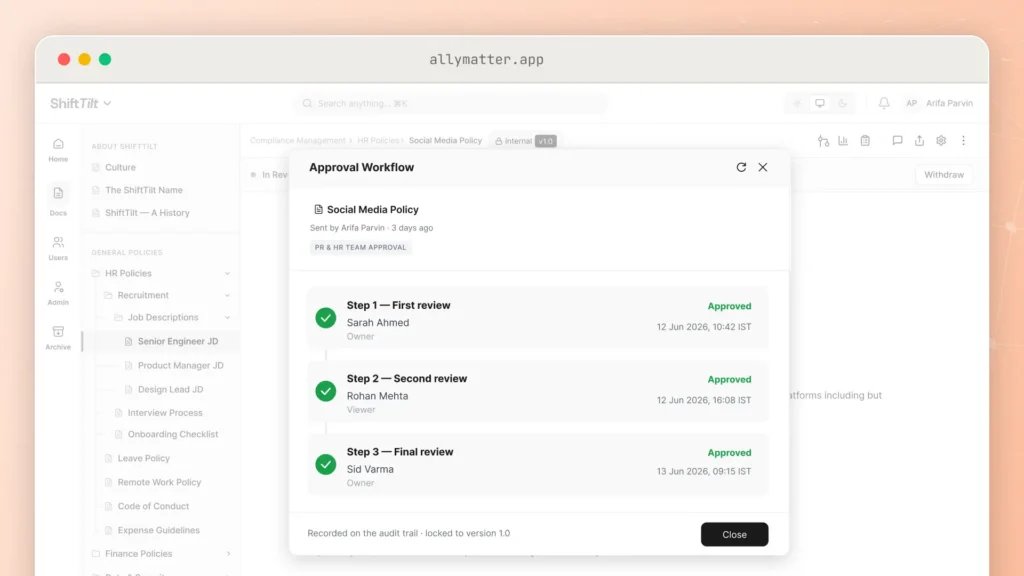
An automated internal knowledge base starts at the gate: a named approval workflow, reusable across documents.
How do you automate distribution and onboarding?
Distribution lists rot the day after you build them. Tag-based audiences replace them: a document is targeted at tags (department, location, role, any combination), and whoever matches sees it and inherits whatever it requires.
The payoff shows up on day one of every new hire. Someone joins Operations in Austin, gets tagged accordingly, and automatically inherits every document, and every acknowledgment obligation, those tags carry. Nobody remembers to send the safety procedure to the new technician. The system already did.
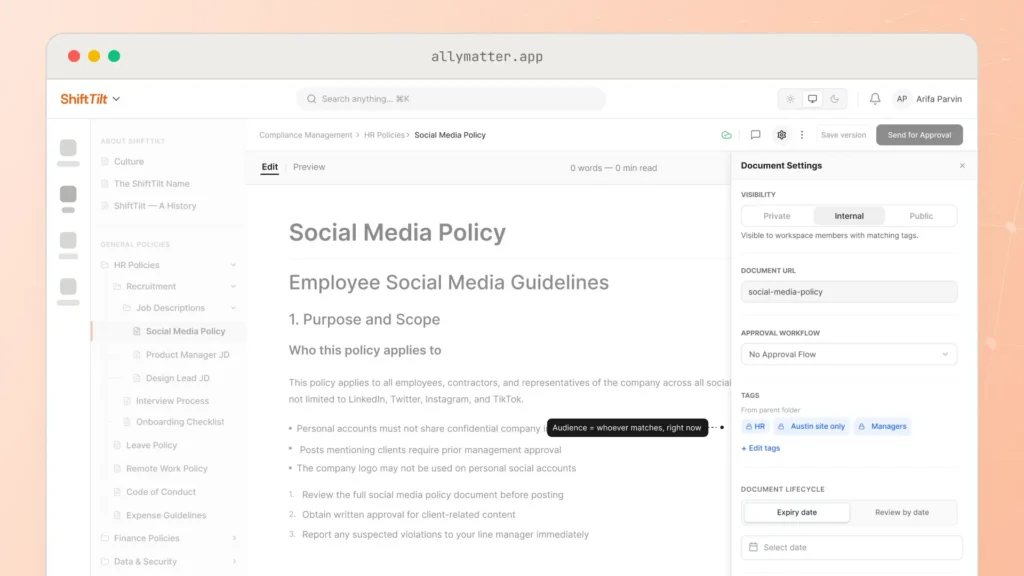
Distribution on tags instead of lists: who a document is for, expressed once.
How do you automate the follow-up nobody enjoys?
Here is the automation with the fastest payback. When a document requires acknowledgment, AllyMatter records exactly who has confirmed and who has not, sends reminders on an automatic cadence until each person does, and lets the owner fire a manual nudge when a deadline is close. Notifications arrive by email or Slack, with Microsoft Teams alongside them.
Each acknowledgment is recorded as evidence: the person’s identity, the attestation text they saw, and a timestamp, kept permanently. The chasing, the spreadsheet, and the “friendly reminder” emails stop being anyone’s job. For documents that are agreements rather than policies, an NDA, an IP assignment, the same flow runs with an e-signature instead of an acknowledgment.
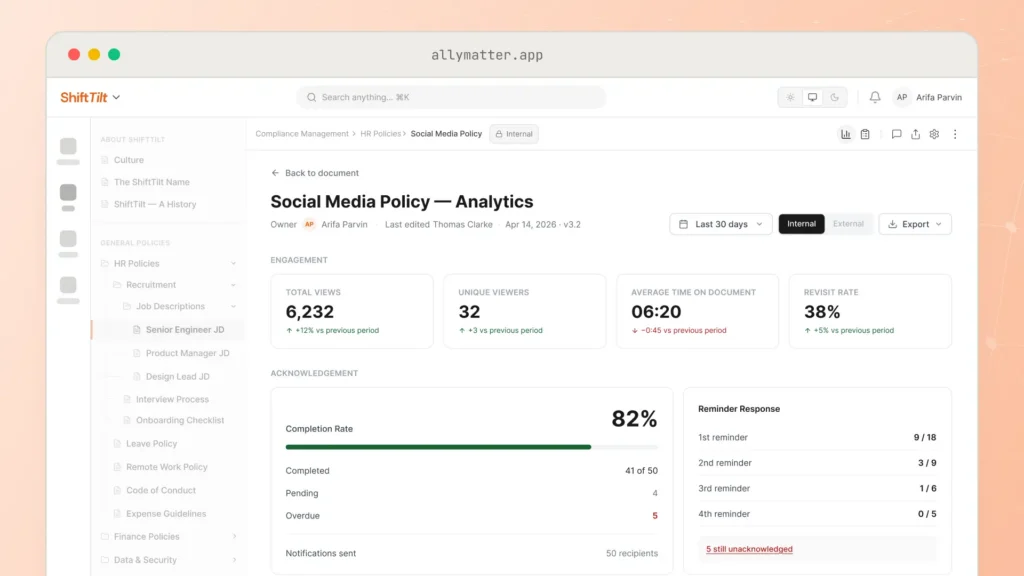
The follow-up, automated: outstanding names, the cadence already chasing them, and the record building itself.
What happens when a document changes?
Most systems go quiet at the exact moment accuracy matters most: the edit. In AllyMatter, every change to a distributed document re-runs the full cycle. The revision goes back through approval, and once approved, everyone in the audience is asked to acknowledge again.
There is deliberately no “minor change” shortcut where an owner decides a re-acknowledgment is not needed. A comma can change the meaning of a clause, so the system never guesses which edits matter. What keeps this from being burdensome is the version history: readers and approvers can compare any two versions word by word, with a count of what changed, so a two-word edit takes seconds to review rather than a full re-read.

Re-collection without the groan: the word-by-word diff shows exactly what changed before anyone re-acknowledges.
How do you automate renewal so nothing rots silently?
Stale content kills trust faster than missing content, because it lies with a straight face. Two mechanisms keep documents from rotting: a review date, which nudges the owner that a document is due for a look, and an expiry date, for documents that must not be relied on past a deadline. (Knowing when to archive is the same discipline pointed at the other end of a document’s life.)
Renewal is a real event, not a snooze button. The document goes back through approval, the owner certifies it is current, and it is re-distributed to its audience. An in-force dashboard shows what is active, what is due, and what has lapsed, so “when did anyone last look at the travel policy” has an answer that is not an archaeology project.
Which automation is not worth buying?
A candid section, because this page ranks for a promise the industry over-sells. Plenty of “automated knowledge base” features demo well and then mostly generate noise:
- Auto-archiving on staleness timers. Software cannot tell load-bearing from abandoned; only an owner can. Automate the reminder to the owner, not the archiving.
- Auto-generated content and summaries. The bottleneck in internal documentation is trust and follow-through, and generated text raises the volume without touching either.
- Threshold alerts and scored dashboards. A number like “engagement: 74” answers nothing. You want names: who has not acknowledged, which documents nobody opens. Facts, not verdicts.
If a feature does not reduce chasing, checking, or chasing-about-checking, it is decoration.
What does this look like end to end?
Run the whole loop for one document, the expense policy: written and tagged to Finance plus all managers; routed through the two-step “Policy sign-off” workflow; locked during review; distributed on approval; acknowledgments collected with automatic reminders; the March revision re-approved and re-acknowledged with a 14-word diff for reviewers; review date set for next January; every step of that history exportable as a CSV or a tamper-evident PDF when someone asks you to prove it.
That is an automated internal knowledge base. Not a robot writer, a system that does the following-up. A policy nobody can find is the failure it replaces.
Three scenarios
If you are under about 20 people with informational documents only, skip the software: a tidy drive, named owners, and dated filenames are your automation for now.
If you are 30 to 500 people and any document in the building carries an obligation, the lifecycle above is exactly the work that is quietly consuming someone’s week. We built AllyMatter for that team.
If you are regulated or client-audited, the acknowledgment, re-collection, and renewal records are what the examiner samples, and running them on memory is how findings happen. We’d start with AllyMatter.
Frequently asked questions
How long does implementation take?
The system itself is same-week. On annual plans we migrate your existing documents free. The real timeline is your content: most teams start with the 10 to 20 documents that carry obligations, run the approval and acknowledgment loop on those, and expand from there rather than migrating everything on day one.
What should we automate first?
Acknowledgment collection and reminders. It is the automation with a visible before-and-after inside a month, and it forces the tagging structure that everything else reuses.
How is this different from a shared drive with folders?
A drive stores files. It cannot route an approval, target an audience, collect an acknowledgment, re-collect after an edit, or tell you what is overdue for review. Those five verbs are the difference between storage and a system.
What happens when a policy changes?
The change goes through approval again, and every affected person is asked to acknowledge the new version. The word-by-word compare shows them exactly what moved, so re-acknowledgment takes seconds, and your records always point at the version each person actually confirmed.
Manual knowledge management does not scale, and neither does hoping people read things. Start your 30-day free trial: no credit card to start, and a 30-day money-back guarantee if you convert and change your mind.
Not ready for a trial? On annual plans, migration is on us: we’ll move your docs from SharePoint, Google Drive, Confluence, or Notion and have you running in about a week.
Related reading

Vikas is a B2B marketing professional with over 16 years of experience in content strategy, messaging, and demand generation. He specializes in turning complex business challenges into clear, actionable stories to connect meaningfully with audiences.