

Small Business Compliance · 12 min read
SOC 2 Policies: The Set a Small Company Needs and How to Keep Them Audit-Ready
SOC 2 policies are the written rules a company’s SOC 2 report relies on, such as the information security, access control, incident response and vendor management policies, each approved by management, communicated to the people it covers and reviewed on a schedule. For a small company the challenge isn’t writing them so much as keeping them current and provable for months at a time, which is why SOC 2 sits in our guide to compliance for small and growing businesses as one of the commitments that changes how a growing company runs.
This guide covers the policy set a 20 to 200 person company actually needs, how those policies map to the SOC 2 criteria, a checklist for getting them audit-ready, and the evidence a Type 2 report expects across its period. It is written for the founder, engineering lead or operations lead who has just been told a big customer wants a SOC 2 report.
Key takeaways
- SOC 2 doesn’t publish a list of required policies, but about eleven core policies cover the Security category that every SOC 2 report includes.
- Each policy needs an owner, an approval date, an audience that has acknowledged it, and a review date that is actually met.
- A Type 2 report tests a period of months, so the policy record has to be continuous, including new hires, changes and reviews during the period.
- Templates can start you off, but every policy should describe what you really do, because a promised control you don’t run becomes an exception.
What SOC 2 asks of your policies
SOC 2 reports are built on the AICPA’s 2017 Trust Services Criteria, which were given revised points of focus in 2022 without changing the criteria themselves. There are five categories, Security, Availability, Processing Integrity, Confidentiality and Privacy, and every SOC 2 report includes Security, which is made up of the 33 common criteria in nine groups, from CC1 to CC9.
Policies run through those criteria rather than sitting in one place. The control environment criteria expect standards of conduct and a check that people follow them, the communication criteria expect people to be told their responsibilities, and one of the control activities criteria expects controls to be put in place through policies that set out what is expected and procedures that put them into action, with those policies reassessed over time. In plain terms, the auditor will want to see that your policies exist, that management approved them, that the right people received them, and that someone looks at them again on a schedule.
It also helps to be precise about what SOC 2 is. It is an attestation report from an independent CPA firm rather than a certification, so the accurate way to describe it in a sales conversation is that you have a SOC 2 Type 1 or Type 2 report covering a stated period.
Sources: aicpa-cima.com (2017 Trust Services Criteria, with revised points of focus, 2022), coso.org (Internal Control: Integrated Framework, 2013)
The SOC 2 policies a small company needs
Lists online run to twenty or more policies, which is more than a 40-person company can write well or keep current. Eleven core policies cover the Security category, and the rest depend on which other categories you put in scope and on what you build.
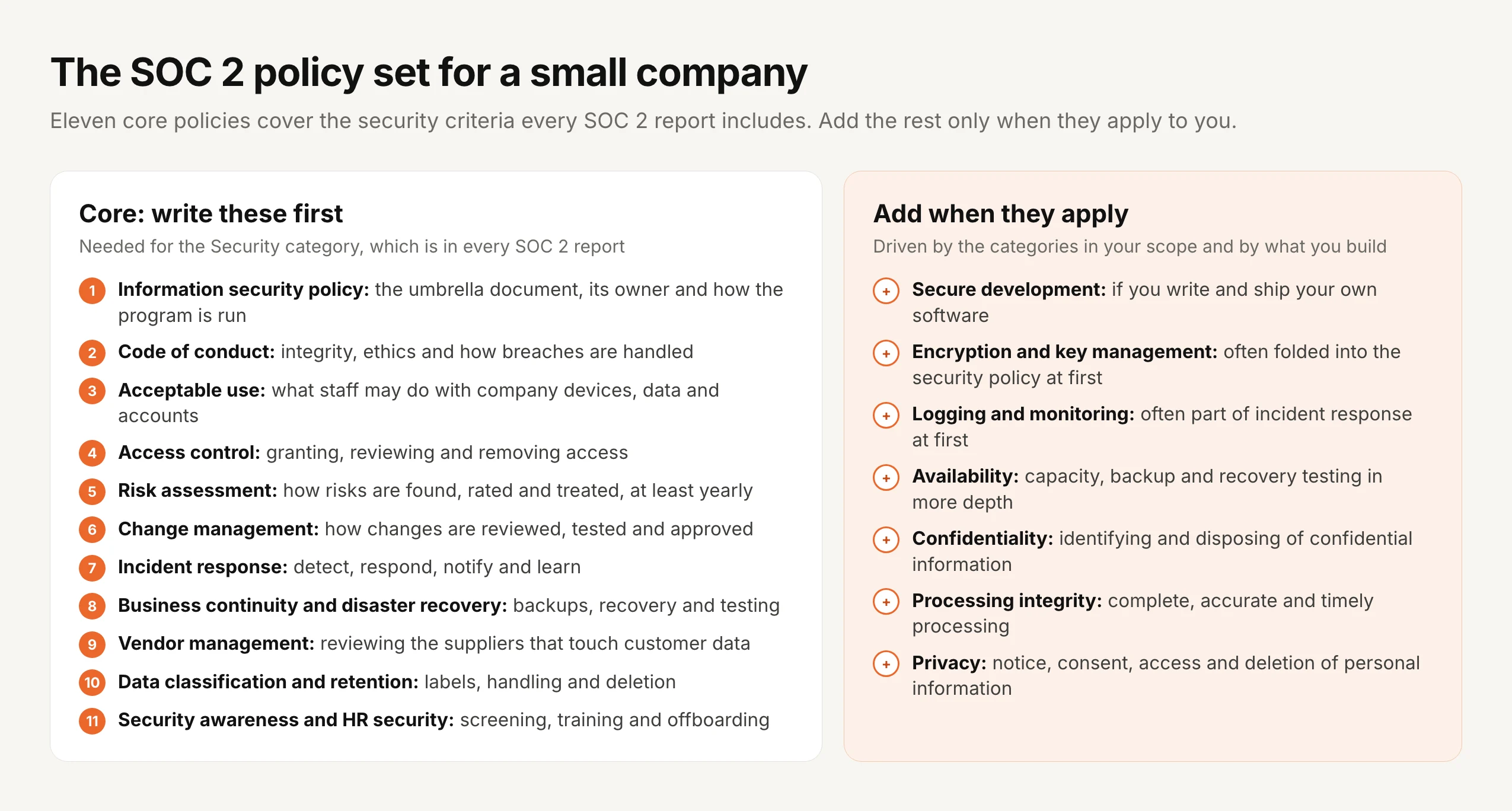
You don’t have to keep eleven separate documents. Some small companies fold encryption, logging and acceptable use into one information security policy with clear sections, and that is fine as long as each topic is covered, owned and approved. What auditors don’t accept is a topic nobody wrote down, or a policy that describes a process the company doesn’t follow.
Having been through SOC 2, and ISO 27001 twice, I’ve found that auditors spend far less time asking whether a policy exists than asking when it was last reviewed, who has seen the current version and, depending on the policy, whether people have agreed to it. That is where small companies lose time, because the policy was written in a rush before the audit and the record around it was never kept.
A SOC 2 compliance checklist for your policies
This checklist covers the policy side of SOC 2 readiness. The technical controls, such as access reviews and logging, run alongside it, but almost all of them point back to one of these policies.
1. Decide the scope. Agree which systems, services and categories the report will cover, because that decides which policies beyond the core set you need.
2. Name an owner for every policy. The policy owner keeps it accurate, routes it for approval and reviews it on schedule, and at a small company one person often owns several.
3. Write each policy from how you actually work. Start from a template if it helps, then rewrite it until every sentence describes something your company really does, and cut anything it doesn’t.
4. Get each policy approved. Management approval with a date is the first thing an auditor checks, so route every policy through the same approval and keep the record.
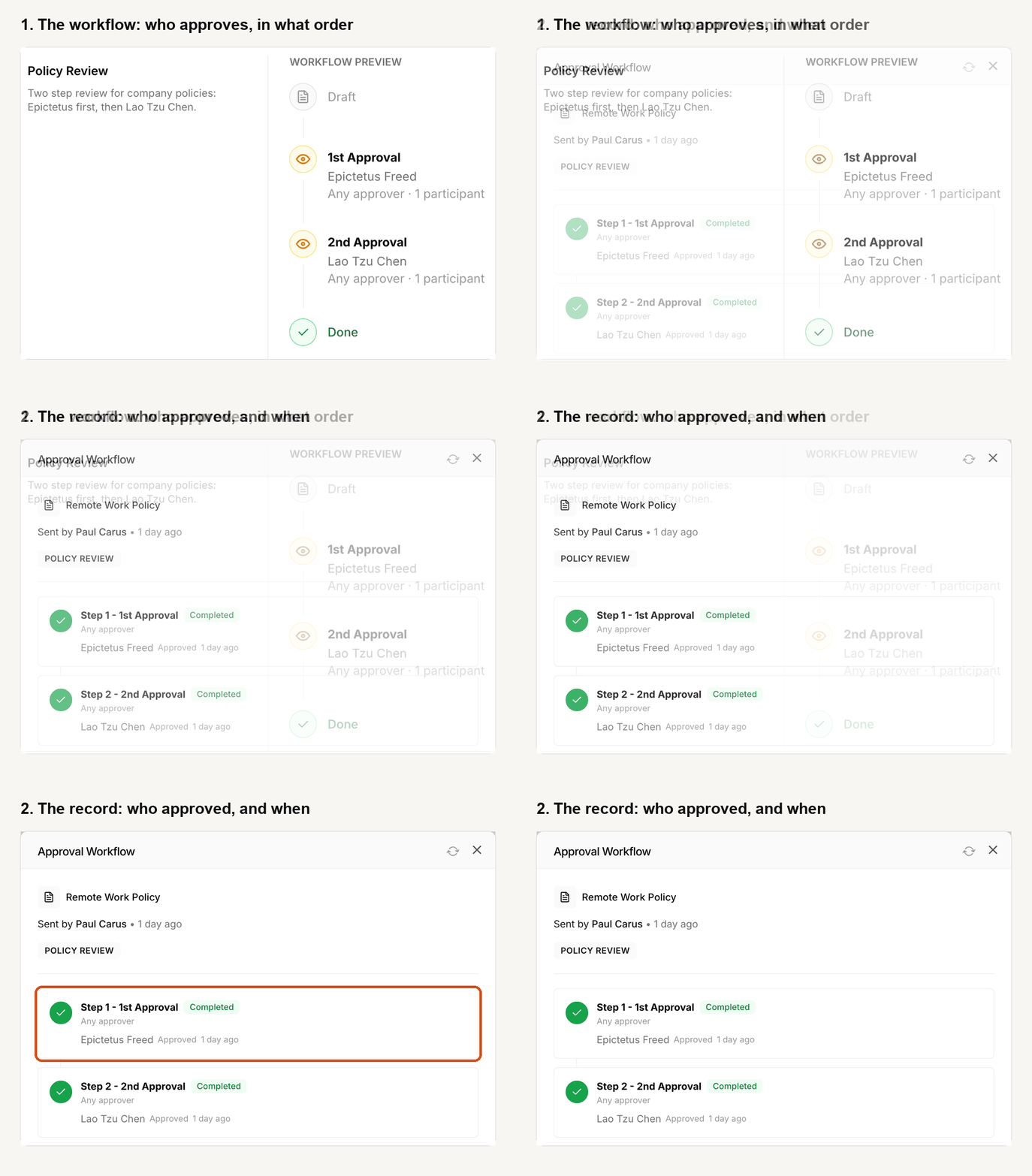
5. Send each policy to the people in scope and collect acknowledgments. Everyone covered should confirm the current version, and the record should show each person, the version and the date.
6. Set a review date on every policy. A yearly review is the usual expectation, with some policies, such as incident response and business continuity, also tested during the year.
7. Keep the record running. New hires acknowledge in their first days, changed policies go back through approval and out again, and reviews are recorded even when nothing changes.
8. Export the evidence when the auditor asks. Approvals, versions and acknowledgments for the audit period, filtered to the people and dates the auditor samples.
How each policy maps to the SOC 2 criteria
Auditors and readiness tools map controls to criteria in slightly different ways, so treat this as a guide rather than a rule. It shows why a small set of well-kept policies goes a long way: most of the nine groups lean on at least one of the core policies, and the communication and control activities groups lean on all of them.
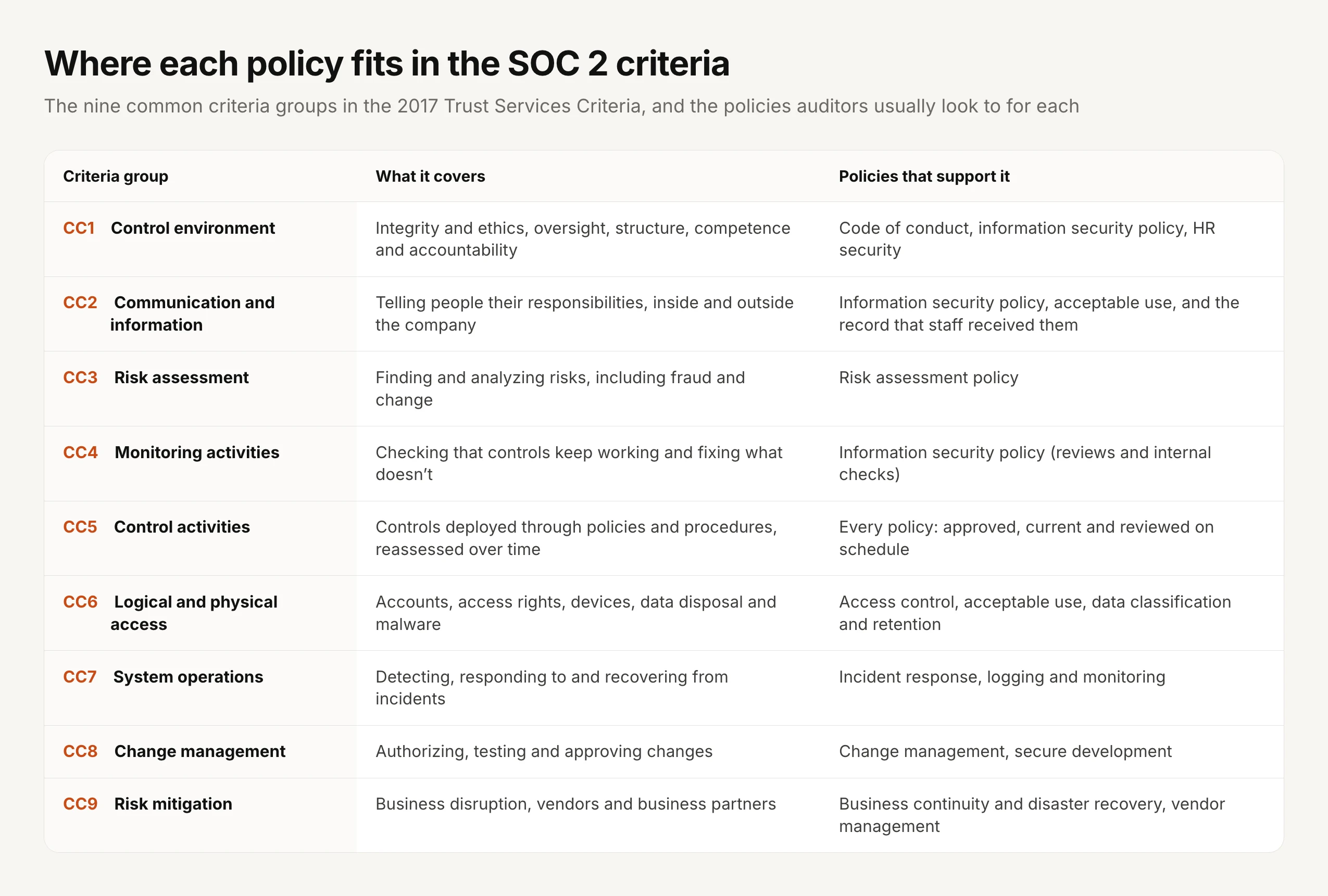
For what each criterion asks in detail, our sister site, Policy and Compliance, explains the standard itself, while this guide stays with the policies and the record around them.
SOC 2 Type 1 vs Type 2: what changes for your policies
The difference between the two report types matters more for policies than for almost anything else, because a Type 2 report turns a set of documents into a record that has to hold together for months.
| SOC 2 Type 1 | SOC 2 Type 2 | |
|---|---|---|
| What the auditor reports on | Whether your controls are suitably designed, at a single point in time | Whether your controls are suitably designed and operated effectively, across a period of time |
| Period | One date | A period you agree with the auditor, often six to twelve months |
| What your policies must show | That they exist, are approved, and match how you work on that date | All of that, plus a continuous record across the period: new hires acknowledging, changes re-approved and re-acknowledged, reviews done on time |
| Who asks for it | Buyers who need something quickly, often as a first step | Most enterprise buyers, and the report most questionnaires ask for |
Source: aicpa-cima.com (SOC 2, SOC for Service Organizations: Trust Services Criteria)
Many small companies start with a Type 1 report to unblock a deal, then move to Type 2 for the following year. If you do, start running the policy record properly from the Type 1 date, because the Type 2 period that follows will test exactly that record.
The policy evidence a Type 2 period needs
A Type 2 auditor doesn’t look at every record. They take samples from across the period and check that each one holds up, so a gap in month four counts as much as a gap the week before the audit.
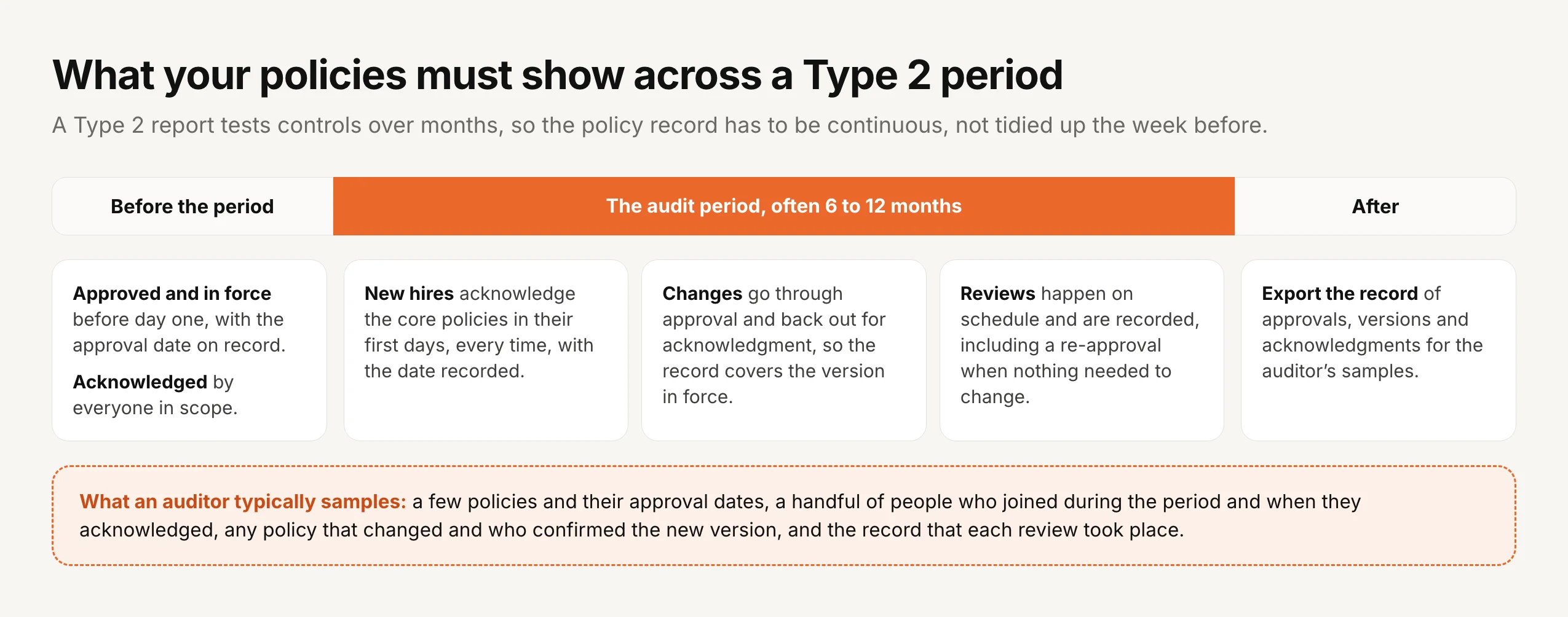
New hires. The most common gap at a growing company is someone who joined in month three and never acknowledged the information security policy. In AllyMatter tags describe your teams and roles, so a new person given their team’s tag can see that team’s policies straight away, which makes requesting their acknowledgment of the core policies a natural fixed step in onboarding, and anything waiting for them shows on their home screen until they confirm it.
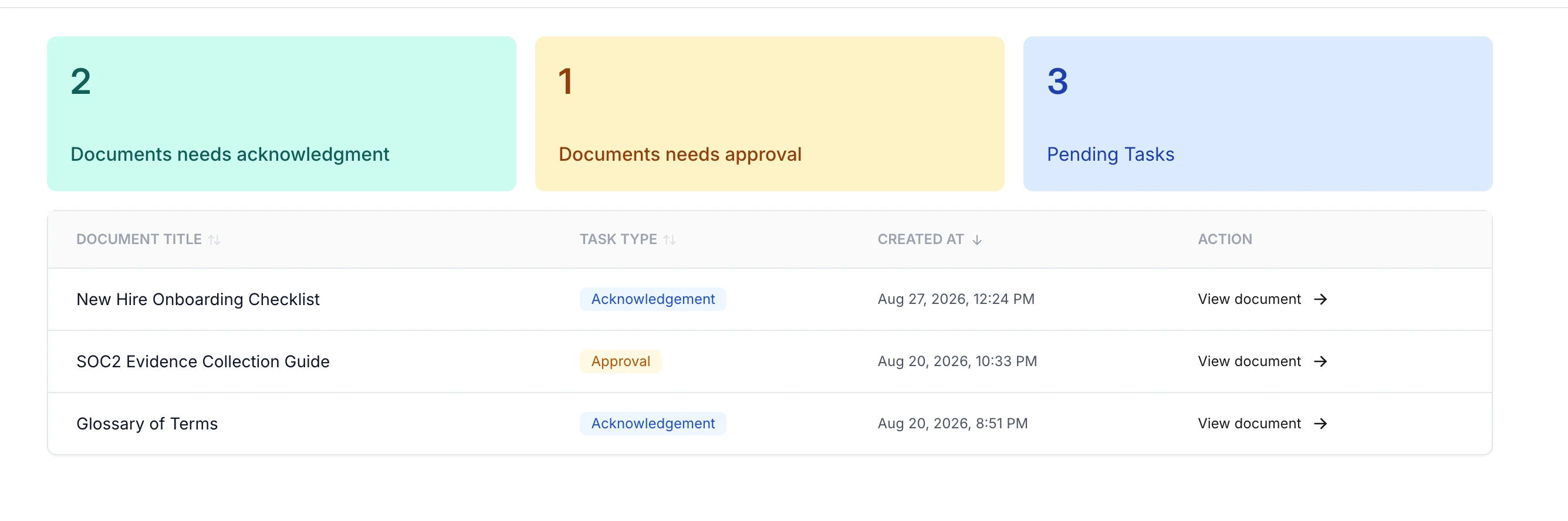
Changes. When a policy changes during the period, the new version needs the same approval and the same acknowledgment as the old one, or the record covers a version that is no longer in force. AllyMatter sends every change back through approval and out for acknowledgment, with no exception for small edits, and version compare shows reviewers and readers every word removed and added.
Reviews. Each policy carries a review date, either fixed or repeating every twelve months, and an alert appears on the policy when it is due. When a policy needs no changes it is still re-approved, because that re-approval is the record that someone reviewed it and judged it still valid, and the approved version can then go to anyone who joined or gained access since.
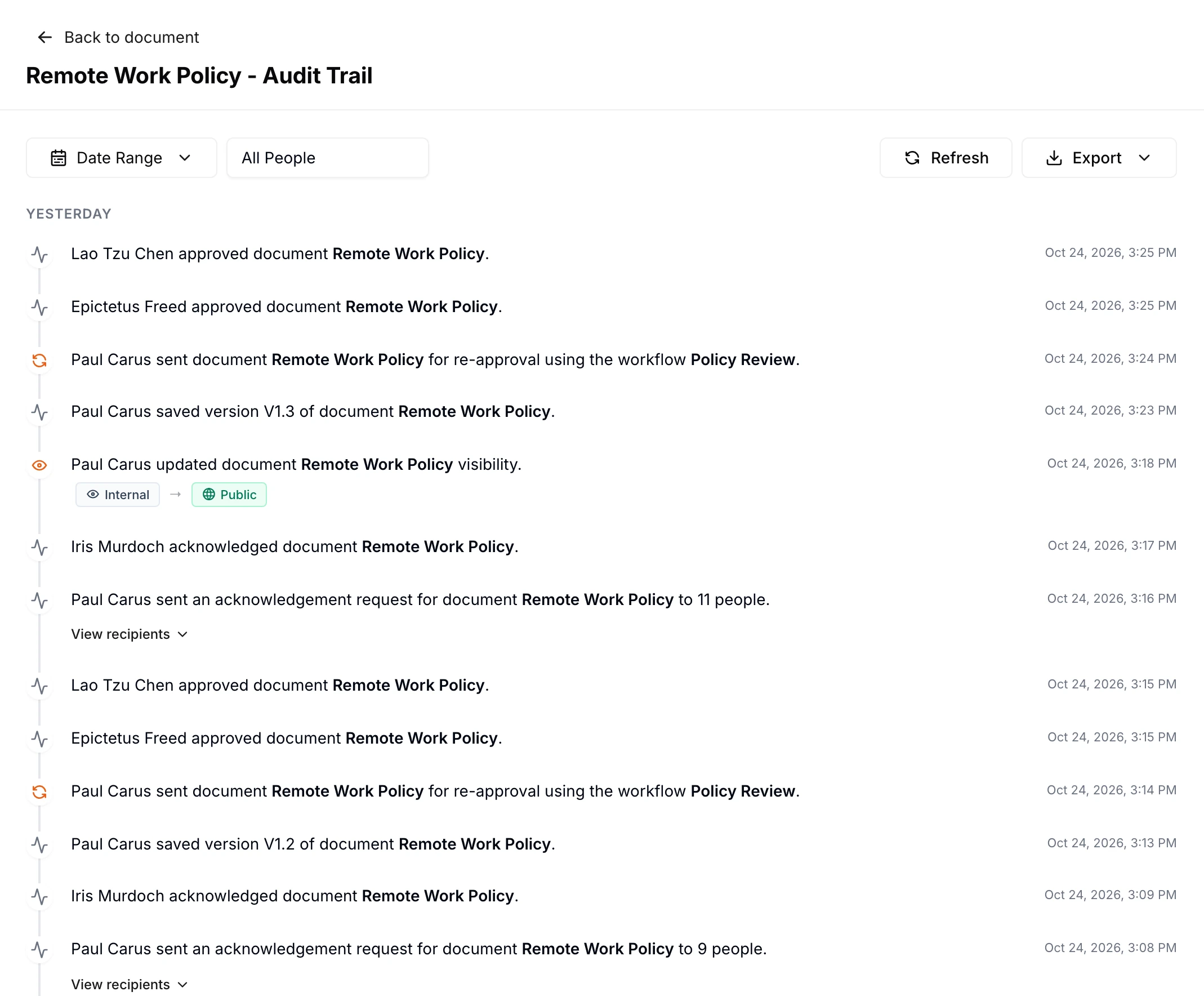
The export. At the end of the period, the auditor will ask for evidence against their samples. Each policy’s audit trail in AllyMatter can be filtered by date range and by person, which matches the way an auditor samples, and exported as a PDF or CSV.
SOC 2 policy templates: use them with care
Templates are a fine way to see what a policy usually covers, and readiness tools often ship a set. The risk is that a template written for a large company promises things a small one doesn’t do, such as quarterly access reviews, a security committee or annual tabletop exercises, and every promise in a policy is something the auditor can test.
So treat a template as a checklist of topics, not as your policy. Keep the structure, rewrite every rule to match what you do, cut what you don’t do, and add a date to anything you plan to start. A short policy you follow produces a clean report, while a long one you don’t produces exceptions that your customers will read.
Where a policy center fits next to a compliance automation tool
Many small companies preparing for SOC 2 use a compliance automation tool such as Vanta or Drata, which connects to cloud accounts, code repositories and laptops to collect technical evidence and track controls. That covers a lot of the report, but the policies themselves still need writing, approving, sending, acknowledging and reviewing, and that work happens with people rather than systems.
That is the job we built AllyMatter for. It runs the policy side of the program, with approval workflows, acknowledgment with reminders, versions, review dates and an exportable audit trail, and it does the same for the HR, safety and operations policies a growing company has outside SOC 2. Our guides to annual policy attestation, policy governance and building a compliance program go further, and if a customer has sent you a questionnaire before the report is ready, our guide to answering your first security questionnaire covers what to say in the meantime.
Start your 30-day free trial of AllyMatter. No credit card to start, and a 30-day money-back guarantee if you subscribe and change your mind. Free migration.
Questions about SOC 2 policies
What policies are required for SOC 2?
SOC 2 doesn’t publish a fixed list. The criteria expect controls to be set out in policies and procedures, and in practice a small company needs about eleven core policies for the Security category, including an information security policy, code of conduct, acceptable use, access control, risk assessment, change management, incident response, business continuity, vendor management, data classification and retention, and security awareness, plus more for any other categories in scope.
How many policies do you need for SOC 2?
There is no required number. Auditors care that each topic is covered, approved and followed, so some small companies combine topics into fewer, longer documents while others keep them separate. What matters is that every policy has an owner, an approval and a review date.
Do SOC 2 policies need to be reviewed every year?
The criteria ask that policies and procedures are reassessed periodically rather than naming a frequency, but a yearly review is what most auditors expect to see. Record each review, including a re-approval when a policy needed no changes, because the record is what the auditor tests.
Do employees need to acknowledge SOC 2 policies?
The criteria expect you to communicate responsibilities and standards of conduct to your people and to check they are followed, and an acknowledgment record is the usual evidence. Auditors typically sample people who joined during the period and check they acknowledged the core policies.
What is the difference between SOC 2 Type 1 and Type 2?
A Type 1 report covers the design of your controls at a single point in time. A Type 2 report covers both design and operating effectiveness across a period, often six to twelve months, so it needs a continuous record rather than a snapshot.
Can we use SOC 2 policy templates?
Templates are a reasonable starting point, but rewrite each one to describe what your company actually does. A policy that promises a control you don’t run becomes an exception in the report, which is worse than a shorter policy you follow.
Is SOC 2 a certification?
No. SOC 2 is an attestation report issued by an independent CPA firm under AICPA standards. Companies sometimes say “SOC 2 certified”, but the accurate wording is that you have a SOC 2 report, and naming the type and the period is better still.
SOC 2 rewards companies whose policies are boring in the best way: written to match how they work, approved, read by the people they cover, and reviewed when they said they would be. Get that record running before the period starts and the policy side of the audit becomes the easy part.
Start your 30-day free trial of AllyMatter. No credit card to start, and a 30-day money-back guarantee if you subscribe and change your mind. Free migration.