

Small Business Compliance · 14 min read
Compliance Calendar for Small and Growing Businesses: Federal Dates and Your Policy Rhythm
A compliance calendar is a single schedule of every recurring deadline your business has to meet, from payroll forms and safety postings to your own policy reviews, with an owner, a due date, a reminder and the proof each one should leave behind. It is one of the simplest tools in our guide to small business compliance, and for a growing company it is often the difference between meeting a deadline calmly and discovering it the week after it passed.
Most compliance calendars you can download hold tax dates and little else, and many sit behind a form. This guide gives you the federal dates that most small and growing US businesses share, the dates that are started by events rather than the calendar, and the internal rhythm of policy reviews, attestations and audits that nobody outside your company will ever remind you about.
Key takeaways
- A useful compliance calendar has three layers: fixed federal dates, dates started by events, and your own policy and audit rhythm.
- Your obligations grow with headcount, so the calendar for a 60-person company looks very different from one for 12 people.
- Every entry needs a task, a reason, one owner, a real due date, reminders with enough lead time, and the proof you would show an auditor.
- Policy reviews belong on the policy itself, so the review date, the re-approval and the acknowledgments stay together in one record.
What is a compliance calendar?
A compliance calendar is a working schedule of the obligations your business has to meet on a date, each with the person responsible and the evidence that shows it was done. It is different from a list of laws, because it turns each obligation into a task with a deadline, and it is different from a tax calendar, because it also covers safety, employment, benefits and your own internal commitments.
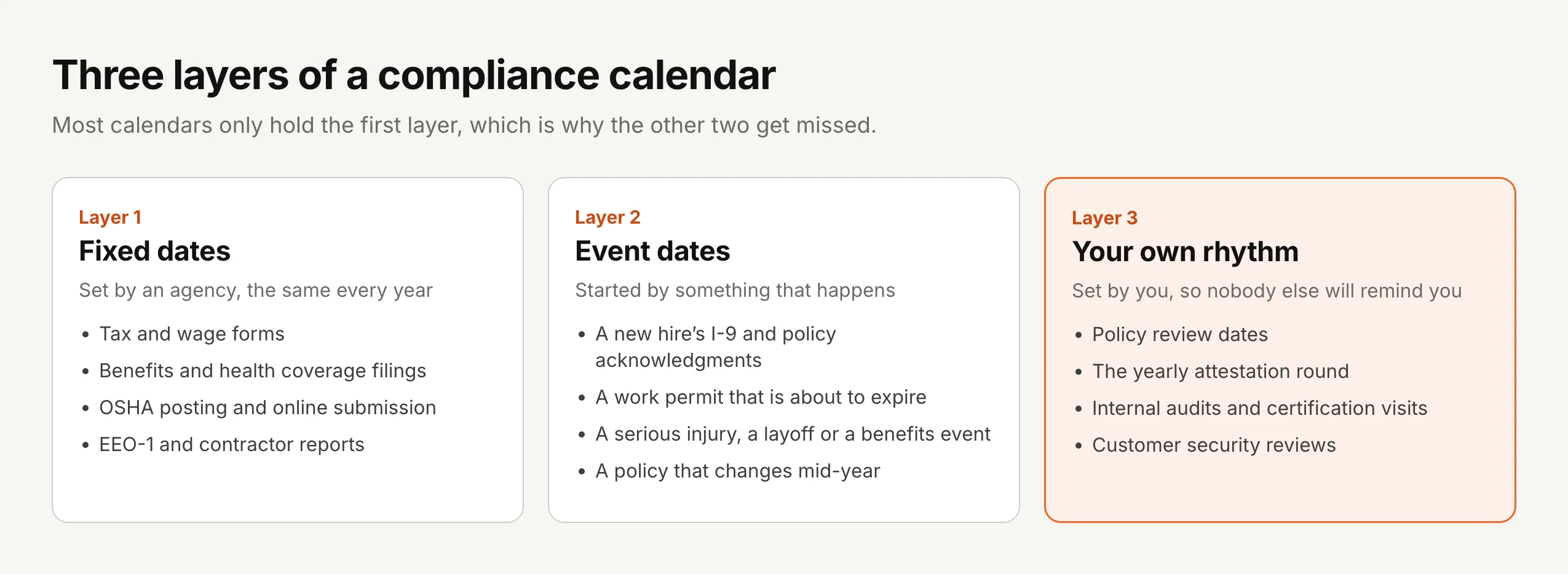
The obligations fall into three layers, and most calendars only hold the first one, which is why the other two are where small businesses usually slip.
Who needs a compliance calendar?
Every business with employees has a handful of fixed dates, so even a team of five benefits from writing them down in one place. The calendar becomes essential as you grow, because federal rules add obligations at certain headcounts: health coverage reporting applies to employers with 50 or more full-time employees including equivalents, EEO-1 reporting applies at 100 employees, and OSHA’s online submission applies to larger establishments and to smaller ones in listed industries.
It matters even more if someone outside your company checks your work. A certification body visits on a schedule, a large customer reviews your security policies every year, an insurer asks for evidence at renewal, and a regulator in health, finance or transportation expects documents to be current. Each of those adds dates to your own rhythm, and each one goes better when the evidence has been building all year rather than in the week before the visit.
The federal dates most growing businesses share
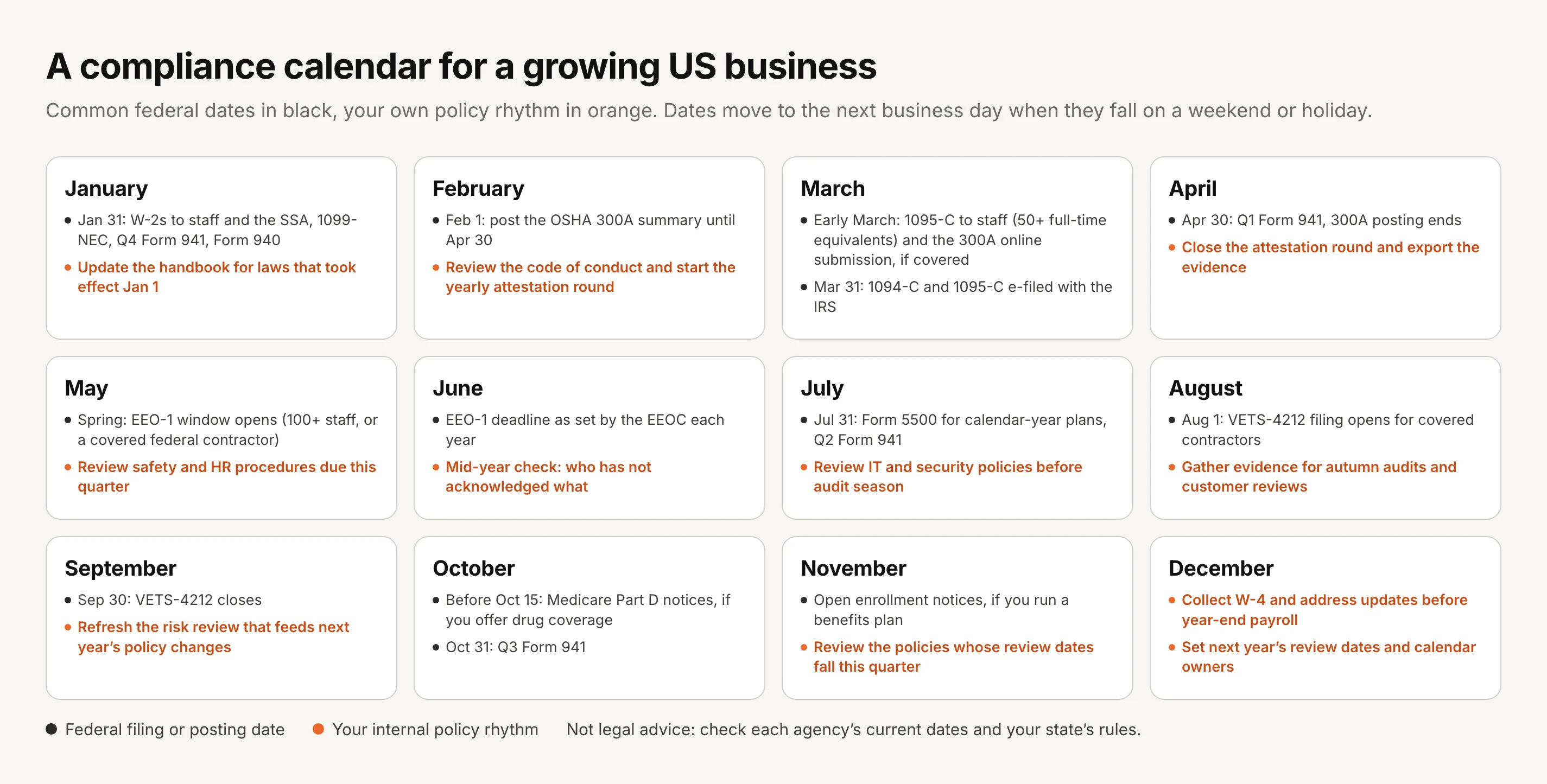
The table below lists common federal dates for private employers, with who each one applies to. Exact dates move to the next business day when they fall on a weekend or a federal holiday, and agencies sometimes set new dates for a given year, so treat this as a starting point and check each agency’s current guidance before you rely on it. This is general information rather than legal or tax advice.
| When | What | Who it applies to |
|---|---|---|
| January 31 | Form W-2 to employees and to the Social Security Administration, Form 1099-NEC to contractors, the fourth-quarter Form 941 and the annual Form 940 | Any business with employees, and any business that paid contractors |
| February 1 to April 30 | Post the OSHA Form 300A summary of last year’s work injuries and illnesses where workers can see it | Employers that must keep OSHA injury records, which excludes most employers with 10 or fewer staff and some low-hazard industries |
| Early March | Submit the Form 300A data online through OSHA’s Injury Tracking Application, usually by March 2 | Establishments with 250 or more employees, and those with 20 to 249 in industries OSHA lists |
| Early March | Form 1095-C to each full-time employee, and paper Forms 1094-C and 1095-C to the IRS | Applicable large employers, generally 50 or more full-time employees including equivalents |
| March 31 | Forms 1094-C and 1095-C filed electronically with the IRS | Applicable large employers filing electronically |
| April 30, July 31, October 31 | Quarterly Form 941 for the first three quarters | Any business that withholds payroll taxes |
| Spring, on dates the EEOC sets each year | EEO-1 Component 1 report of the workforce by job category, sex and race or ethnicity | Private employers with 100 or more employees, and federal contractors with 50 or more that meet the criteria |
| July 31 | Form 5500 for each employee benefit plan with a calendar plan year, due on the last day of the seventh month after the plan year ends, with an extension available on Form 5558 | Employers that sponsor a retirement or welfare plan that must file |
| August 1 to September 30 | VETS-4212 report on veterans in the workforce | Federal contractors and subcontractors above the reporting threshold |
| Before October 15 | Medicare Part D creditable coverage notice to Medicare-eligible people in the plan, plus a disclosure to CMS within 60 days of the plan year starting | Employers whose health plan includes prescription drug coverage |
Sources: irs.gov (General Instructions for Forms W-2 and W-3; Instructions for Forms 1094-C and 1095-C; Form 5500 Corner), osha.gov (29 CFR 1904.32 and 1904.41), eeoc.gov (EEO data collections), dol.gov (VETS-4212), cms.gov (creditable coverage disclosure)
States and some cities add their own filings, notices and training deadlines, so add a state layer for every state where you employ people and check it with your adviser.
Dates started by events, not the calendar
Some of the deadlines most likely to be missed don’t sit on a fixed date at all, because something has to happen first. A good compliance calendar keeps these as standing rules with a clock, so whoever sees the event knows what it starts and how long they have.
| Event | What it starts | Typical clock |
|---|---|---|
| Someone joins | Form I-9, payroll forms, and acknowledgment of the handbook and the policies for their role | I-9 Section 2 within three business days of starting work; policies in the first days |
| A work permit is about to expire | Reverification on Supplement B of Form I-9 | By the expiry date, with a reminder at least 90 days ahead as USCIS suggests |
| A serious work injury | Report to OSHA and record it on the log | A death within 8 hours, and an in-patient hospitalization, amputation or loss of an eye within 24 hours |
| A benefits event | COBRA election notices after events such as a termination or a reduction in hours | Set by the COBRA rules for your plan and administrator |
| A plant closing or mass layoff | Written notice under the WARN Act | 60 days ahead, for employers with 100 or more employees |
| A policy changes | Approval of the new version, then acknowledgment by everyone it covers | Before the change takes effect |
| A law, an audit finding or an incident | An early review of the policies it touches | As soon as practical, whatever the review date says |
Sources: uscis.gov (I-9 Central, Supplement B reverification), osha.gov (29 CFR 1904.39), dol.gov (WARN Act and COBRA guidance)
The last two rows are the ones that belong to your policies rather than to an agency. When a policy changes, the new version should be approved and then acknowledged by everyone it covers before it takes effect, and when a law changes, an audit finds a gap or something goes wrong, the policies it touches should be reviewed straight away rather than waiting for their next review date. Our post on re-acknowledgment after a policy update covers that second half in detail.
Your internal rhythm: policy reviews, attestation and audits
The third layer is the one only you can set, because it comes from your own policies, your certifications and your customers rather than from a federal agency. It is also the layer that auditors and large customers look at most closely, since a policy with last year’s review date tells them more about your program than any filing does.
The simplest way to build an annual policy review schedule is to give every policy a review date and spread those dates across the year, so the work arrives a few policies at a time instead of all at once in December. Many companies review each policy at least yearly, review high-risk ones such as information security and safety on a fixed yearly cycle, and pull a review forward whenever a law, an audit finding or an incident makes a policy out of date. Your policy on policies is the right place to write those cycles down, and each policy’s policy owner is the person who carries out the review.
| Quarter | Policy and audit rhythm |
|---|---|
| Q1 | Update the handbook for laws that took effect on January 1, review the code of conduct, and run the yearly attestation round for your core policies |
| Q2 | Review the safety, HR and operations procedures whose dates fall here, and check mid-year who has not acknowledged the current versions |
| Q3 | Review IT, security and privacy policies before the autumn audit and customer-review season, and gather the evidence those reviews ask for |
| Q4 | Review the remaining policies, refresh the risk review that drives next year’s changes, and set next year’s review dates and owners |
A review should end in a decision that leaves a record. If the policy needs changes, the new version goes through approval and then out for acknowledgment. If it doesn’t, it should still be re-approved, because re-approval is the record that someone reviewed it and judged it still valid, and that approved version can then go to anyone who joined or gained access since. Our guides to policy attestation and policy governance cover the yearly round and the wider program in more depth.
How to build your compliance calendar in an afternoon
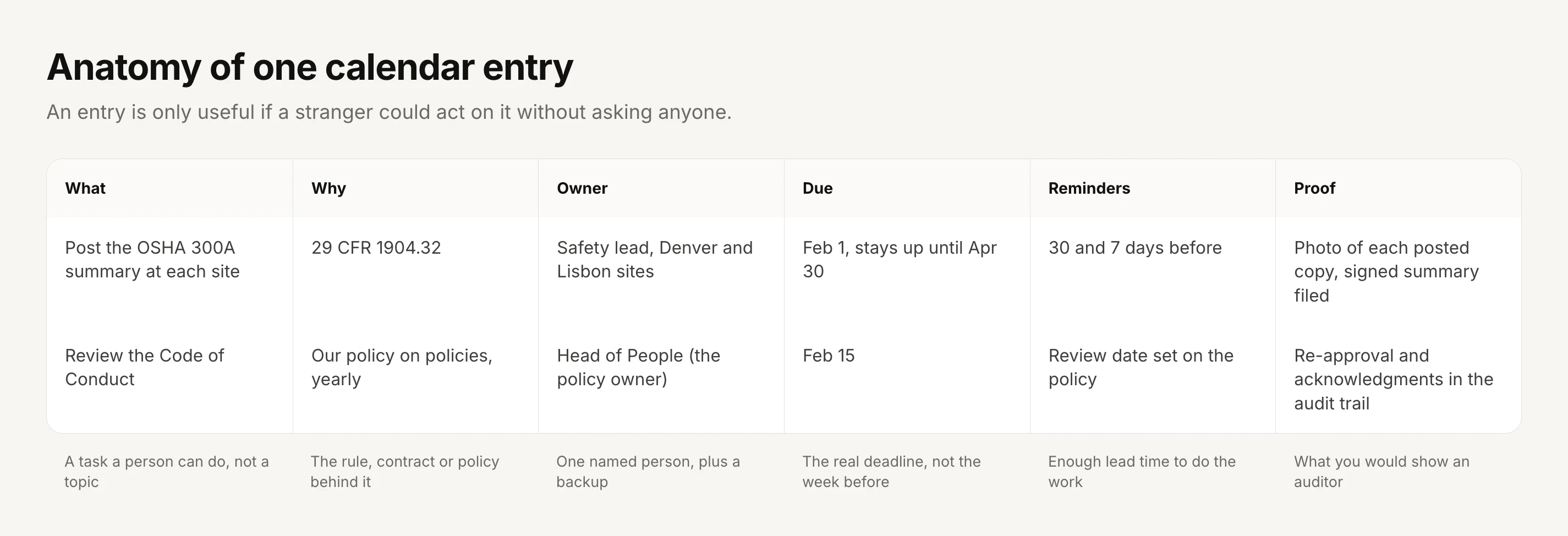
You don’t need special software to start, and a shared calendar or spreadsheet with named owners is enough for the fixed dates. What matters is that every entry carries the same six pieces of information, so anyone on the team could act on it without asking.
1. List what applies to you. Start from the federal table above, keep the rows that match your headcount, your benefits and your industry, and add your state and local layer with your adviser.
2. Add your certifications and customers. Write down your certification audit dates, the windows your auditors use, and the months when your largest customers send their security or supplier reviews.
3. Add the event rules. Keep the event table as standing instructions in the places people will see them, such as the onboarding checklist for I-9 timing and the incident procedure for OSHA reporting.
4. Give every policy a review date. Spread the dates across the year, set the cycle for each one, and name its owner.
5. Name one owner and one backup per entry. An entry owned by a team is an entry owned by nobody, and a backup matters when the owner is on leave in the week it falls due.
6. Set reminders with real lead time. A filing that needs data from payroll needs a reminder weeks ahead, while a posting needs only days, so set each reminder from how long the work takes rather than using one default.
7. Decide what proof each entry leaves. A filing confirmation, a photo of a posting, an exported audit trail or a list of acknowledgments, filed where you will find it next year.
8. Review the calendar itself. Once a year, and whenever headcount crosses 50 or 100 or you add a state, a certification or a benefits plan, check whether the calendar still matches the business.
Keeping the calendar honest
A compliance calendar fails quietly, usually because the person who built it moves on or the business grows past it. Three habits keep it working. First, the calendar owner checks each quarter that every entry still has an owner who works at the company. Second, nothing is marked done without its proof, because “done” without evidence is the first thing an auditor will question. Third, growth triggers a review, since crossing a headcount, opening a site in a new state or signing a large customer can add obligations overnight.
The policy half of the calendar is easier to keep honest when the dates live on the policies themselves. A review date in a separate spreadsheet drifts away from the policy it describes, while a review date on the policy stays attached to its versions, its approvals and its acknowledgments.
Where AllyMatter fits
We built AllyMatter for the policy layer of this calendar, so the reviews, approvals and acknowledgments that make up your internal rhythm run in one place and leave their own record.
Review dates on each policy. Each policy carries a review date, either a fixed date or a cycle such as every twelve months, and when it falls due an alert appears on the policy and in the sidebar, so the owner sees what is due without keeping a separate list.
Re-approval as the record of a review. A reviewed policy goes back through its approval workflow, with up to four steps in order, whether or not it changed, so you can show who judged it still valid and when.
New people get the right policies. Tags decide who receives each policy, so someone who joins a team can see that team’s approved policies once they are given its tag, and acknowledge them by name, with automatic reminders for anyone who hasn’t.
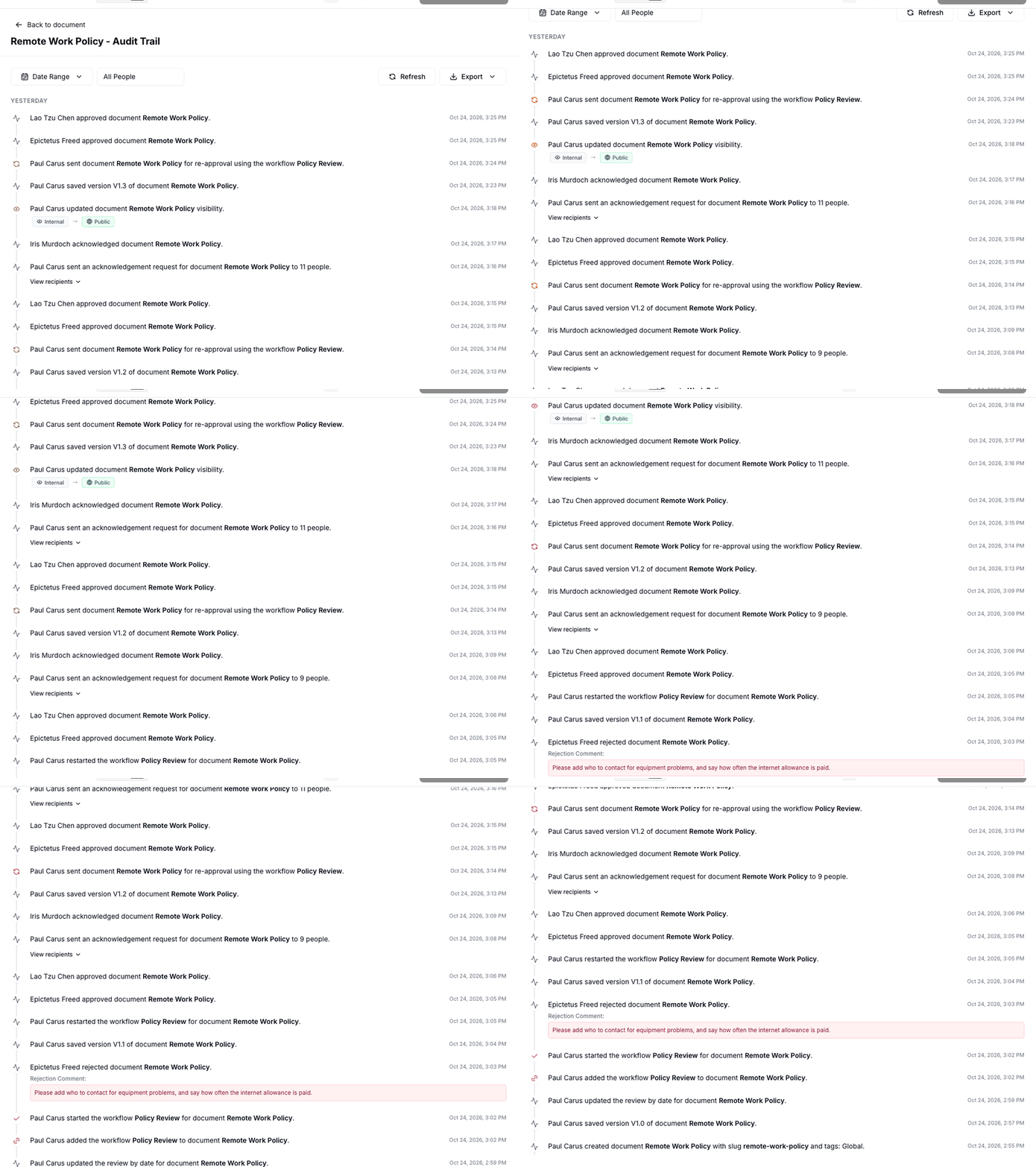
Proof on demand. Every approval, version, send and acknowledgment lands in the policy’s audit trail, which you can filter by date or person and export as a PDF or CSV when your calendar says an audit is coming.
Start your 30-day free trial of AllyMatter. No credit card to start, and a 30-day money-back guarantee if you subscribe and change your mind. Free migration.
Questions about compliance calendars
What is a compliance calendar?
A compliance calendar is a schedule of every recurring legal, regulatory and internal deadline a business has to meet, with an owner, a due date, a reminder and the proof each one leaves. For a small or growing business it usually holds tax and payroll forms, benefits filings, safety postings, reports that apply above certain headcounts, and the company’s own policy reviews and audits.
What should be on a compliance calendar for a small business?
Start with the federal dates that apply to almost every employer, such as wage statements, payroll tax returns and, if you keep injury records, the OSHA summary posting. Then add the dates that switch on as you grow, such as health coverage reporting at 50 full-time equivalents and EEO-1 at 100 employees, then the dates that follow events like hiring or a work permit expiring, and finally your own policy review and attestation dates.
How often should policies be reviewed?
Most companies review each policy at least once a year, and review sooner when a law changes, an audit finds a gap, an incident happens or the business changes shape. High-risk policies such as information security, safety and the code of conduct are usually on a yearly cycle, while slow-moving procedures can sit on a longer one if your standards allow it.
Who should own the compliance calendar?
One person should own the calendar itself, often an operations, HR or finance lead in a smaller company, while each entry has its own owner who does the work. The calendar owner’s job is to check that nothing is unowned, that reminders leave enough time, and that each finished entry leaves proof.
Is a spreadsheet good enough for a compliance calendar?
For the fixed federal dates, a shared calendar or a spreadsheet with named owners works well for a small team. It struggles with policy reviews, because the review date, the approval, the new version and the acknowledgments all need to stay together, which is where a policy tool that keeps the review date on each policy and records the rest in an audit trail saves real time.
Do state laws change the compliance calendar?
Yes. States and some cities add their own filings, notices and training deadlines, so add a state layer for every state where you have employees and check it with your adviser. This guide covers federal dates only.
A compliance calendar is only as good as the proof each entry leaves behind, and the businesses that handle audits calmly are the ones whose evidence built up all year as a side effect of normal work. On yearly plans, migration is on us: we’ll move your policies from SharePoint, Google Drive, Confluence or Notion, usually within a week and often sooner.
Start your 30-day free trial of AllyMatter. No credit card to start, and a 30-day money-back guarantee if you subscribe and change your mind. Free migration.