
Audits and Evidence · 13 min read
Common Controls Mapping: How to Map Your Policies Once and Use Them Across Standards
Controls mapping is the practice of writing down which of your policies, procedures and records satisfy each control in a standard or law, so you can answer an auditor control by control. Common controls mapping goes one step further. Instead of mapping every standard on its own, you define one shared set of controls, map each policy to it once, and then link that set to ISO 27001, SOC 2, HIPAA, NIST and whatever standard comes next. This guide explains the idea, shows one policy mapped to five standards, gives you a method that runs in a spreadsheet, and shows how to manage the written side in AllyMatter. An audit is also a good test of any policy management software, because most of what an auditor asks for should come from one record.
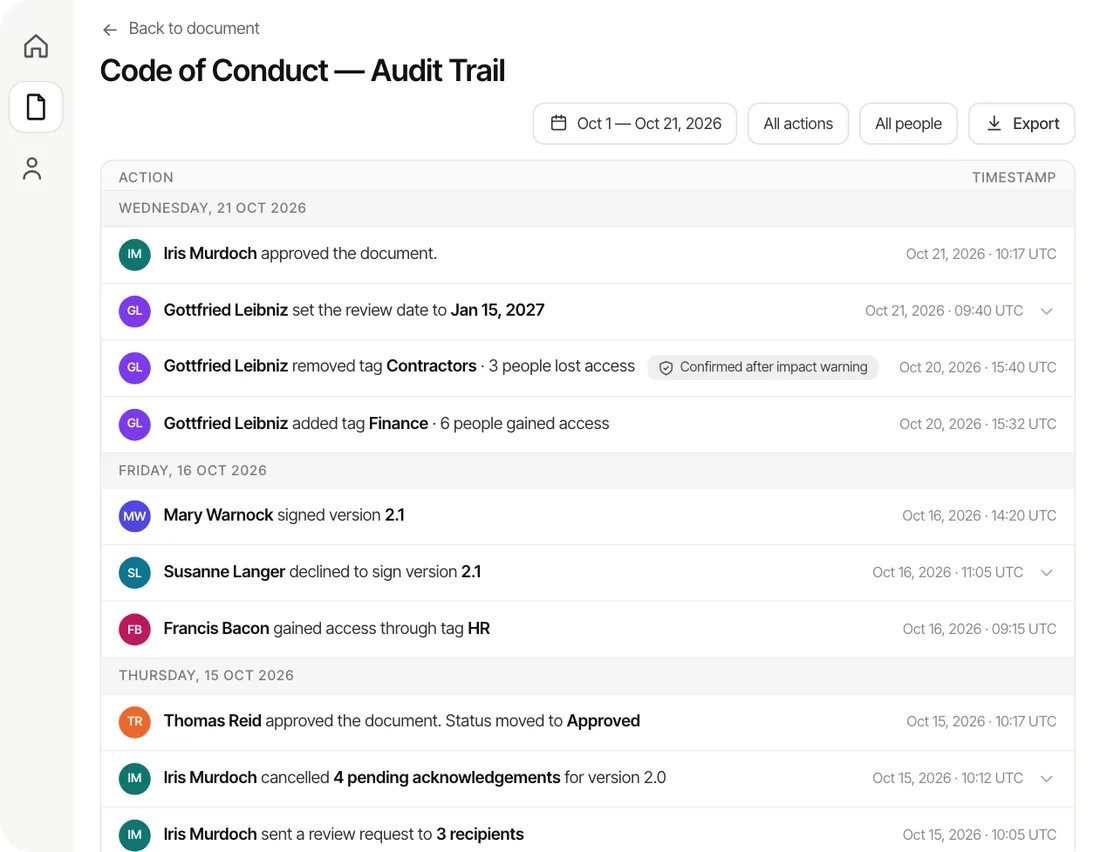
This post is part of our guide to the document audit trail, which covers what an auditor expects to see and how to produce it without a week of digging.
It is written for a team that has to answer to more than one standard and has no governance, risk and compliance (GRC) department. Most of what ranks for this topic is written for security teams who already run a compliance platform. The written layer is where a smaller company can get the most done with the least tooling, because the questions are about whether the policy exists, who approved it, and who read it.
What is controls mapping?
A standard is a long list of requirements, and each requirement is a control. The control “policies are approved, communicated and reviewed” appears in nearly every framework, with a different number and slightly different words in each. Mapping means writing down, for each control, which of your documents answers it and where the proof lives. The table below shows the five terms the rest of this guide uses.
| Term | What it means | Example |
|---|---|---|
| Standard or law | The source of the requirements you answer to | ISO/IEC 27001, SOC 2, HIPAA |
| Control | One specific requirement in it, usually with an ID | Policies are approved, communicated and reviewed |
| Policy or procedure | Your document that says how you meet the control | Your Information Security Policy |
| Evidence | The proof that the document exists and is followed | The approved version, and who acknowledged it |
| Mapping | The written link between a control, your document and your evidence | A row in a table, or a line in a package |
Assessors ask by control. They read a clause, then ask you to show how you meet it. If the map exists, you point to the policy and open the approval and acknowledgment records. If it doesn’t, you search a shared drive while they wait, which is how a simple question turns into a finding. Having been through both SOC 2 and ISO 27001, I can say the wording of the questions differs, but they come back to the same few documents and the same proof that people read them. That overlap is what common controls mapping uses.
What are common controls?
A common control is a single control that satisfies requirements in several standards at once. The control stays the same, and what changes is the clause number and wording each standard uses for it. If you map your policies to the common control, one piece of evidence answers all of those clauses.
Here is one policy, an Information Security Policy, mapped to five sources. The shared control is that the policy is approved, communicated and reviewed.
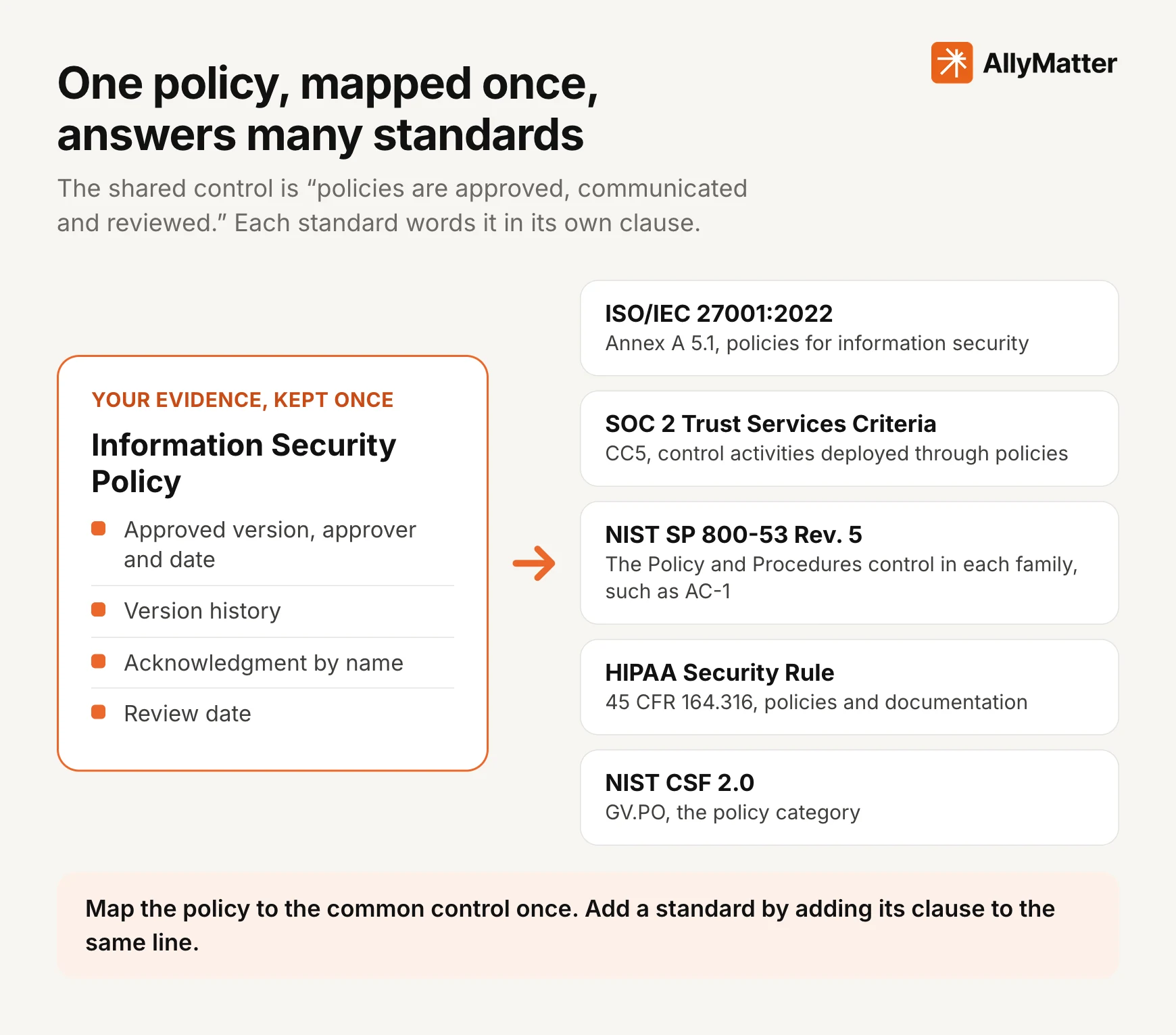
| Standard | Where the policy answers it | What the assessor looks for |
|---|---|---|
| ISO/IEC 27001:2022 | Annex A 5.1, policies for information security | A policy approved by management, communicated to the people it covers, and reviewed at planned intervals |
| SOC 2 | CC5, control activities | Control activities put into effect through written policies and procedures |
| NIST SP 800-53 Rev. 5 | The Policy and Procedures control in each family, such as AC-1 | A policy developed, documented and passed to named roles, then reviewed and updated at a set frequency and after defined events |
| HIPAA Security Rule | 45 CFR 164.316(a) and (b) | Written policies and procedures, kept for six years from when they were created or last in effect |
| NIST CSF 2.0 | GV.PO, the policy category | A cybersecurity policy that is established, communicated, enforced and reviewed |
Sources: ISO/IEC 27001:2022, Annex A 5.1, NIST SP 800-53 Rev. 5, AC-1, 45 CFR 164.316, NIST CSF 2.0, GV.PO
Look at the right-hand column. Four of the five rows ask for the same things in different words: a written policy, approval by someone with authority, communication to the people it covers, and review. That is the common control, and it is why mapping once saves work. Each standard also adds something of its own, such as the six-year retention in HIPAA, so the map keeps a place for the extra clause as well as the shared one.
Why map once instead of once per standard
There are three reasons, and they get stronger as the list of standards grows.
You do the work once. Without a shared set, each new standard starts a fresh exercise of finding the same policies and writing the same justifications. With one, a new standard adds a column to the table and a few clauses to check.
You find gaps before an assessor does. A control with nothing behind it shows up as an empty line. It is far cheaper to learn that you have no approved incident response policy from your own map than from an audit finding.
The proof stays consistent. If five spreadsheets each describe the same policy, they drift apart. A single map points all five clauses at the same document, so the approval date and the list of people who acknowledged it can’t disagree.
Common controls frameworks, and when you need one
A common controls framework is a published, harmonized control set that has already been mapped to many laws and standards. You adopt its controls as yours, and its authors maintain the links to the clauses. The names you will meet are in the table below.
| Option | What it is | Good fit when |
|---|---|---|
| Your own short list | Twenty to forty controls you write yourself, one per policy topic | You answer to one to three standards and want to start this week |
| Secure Controls Framework | A free, published control set mapped to a large number of laws and frameworks | You want a ready-made set and have someone who will read it |
| Unified Compliance Framework | A commercial control catalog mapped to hundreds of authority documents | You have a compliance team and many sources to track |
| CSA Cloud Controls Matrix | A cloud security control set of 197 objectives in 17 domains, with mappings to other standards | You run or buy cloud services and customers ask for it by name |
Sources: Secure Controls Framework, Cloud Security Alliance, Cloud Controls Matrix
NIST also publishes a machine-readable way to describe the relationships between controls from different catalogs. The OSCAL control mapping model records whether one control is equal to, part of, or overlaps another, which is useful for tools that exchange mappings and optional for a team working in a table.
Source: NIST OSCAL, control mapping model
For most small and mid-size companies the right start is the first row: a short list you write yourself, taken from the policies you already have. You can switch to a published framework later and keep the policy links you built, since the policies are the part that doesn’t change.
How to do common controls mapping in six steps
- List what you answer to. Write down every standard, law and customer contract that asks about your policies, and note which of them have a deadline. Our guide to small business compliance shows how to sort what is required from what is only requested.
- List your policies. For each, record the owner, the approved version, the date it was last reviewed and the date the next review is due. If a policy has no owner, give it one now, because the map will point to that person.
- Define your common controls. Start from policy topics: acceptable use, access, incident response, vendor management, change management, data retention, onboarding and offboarding, training. Write one control sentence for each, such as “access is granted on request and removed on departure.” Twenty to forty is a workable size for a company your size.
- Map each control to its policy and its proof. Name the policy, the owner and the evidence an assessor can open. For the written layer the evidence is usually the approved version, the version history and the list of people who acknowledged it.
- Add the clauses. For each standard you answer to, find the clause that matches the control and write its ID next to it. Take the IDs from the standard itself or from the authors’ published mapping, and check them against the version you are being assessed on.
- Mark gaps and exclusions, then keep it current. An empty line is a gap. A control that does not apply gets marked as such, with the reason written down. Reopen the map whenever a policy changes, a standard is revised, or at least once a year.
The table below is a starting layout. The rows are illustrations, so check each clause ID against the version of the standard you are assessed on before you rely on it.
| Common control | Policy | Owner | Evidence | ISO 27001 | SOC 2 | HIPAA | Status |
|---|---|---|---|---|---|---|---|
| Policies are approved before they are used | Information Security Policy | Head of IT | Approval record with approver and date | A 5.1 | CC5 | 164.316(b)(1) | Done |
| Policies are reviewed on a schedule | Information Security Policy | Head of IT | Review date and version history | A 5.1 | CC5 | 164.316(b)(2)(iii) | Done |
| People have read the policy | Information Security Policy | Head of IT | Acknowledgment by name and version | A 5.1 | CC5 | Add | Open |
| Old versions are kept | Records Retention Policy | Operations | Version history | Add | Add | 164.316(b)(2)(i) | Open |
The written layer and the technical layer
Most controls have two sides. The written side is the policy that states the rule, the approval that makes it official, and the record that people have read it. The technical side is how a system is actually set up and whether it stays that way. This guide is about the written side, because that is the part that every standard asks for and the part a small team can set up without new tooling. The technical side has its own evidence, such as system settings and logs, and it belongs on the same line in the map as a second row of proof.
Keeping the two apart makes the map clearer. A line can have a complete written side and an open technical side, and an assessor will see both. Our guide to SOC 2 policies covers the policies that framework expects, and our audit preparation guide shows how to run a sample check on the map before the real one.
Common mistakes
Mapping to the standard’s headings instead of its controls. A heading like “Organizational controls” is not a requirement. Map to the control inside it.
Copying someone else’s mapping without checking it. Published mappings are a good source for clause IDs. They are not a statement that your policy meets the control, and the version of the standard you are assessed on may differ from the one they used.
Mapping documents that don’t exist. A line that points to a draft, or to a policy nobody approved, is worse than an empty line, because it hides the gap. Link only approved documents.
Forgetting the proof. A policy alone answers half of most written controls. The other half is who approved it and who read it, and that has to be retrievable by version. Our guide to tracking acknowledgments covers how to keep it.
Letting it go stale. A map is accurate on the day it is made. Tie it to the policy review dates so that a changed policy sends someone back to its lines.
Starting too wide. Mapping every standard you might ever need makes the work feel endless. Map the ones you are asked about now, and add the next when it arrives.
How to manage controls mapping in AllyMatter
We built AllyMatter around the written side of a control: the approved policy, the version in force, and the record of who acknowledged it. Packages hold the map itself. You build it from lines that you write, one for each control you answer to, and link your policies under them.
- Set up a package for each standard or contract. For example, one for ISO 27001 and one for a customer’s security review.
- Add a line for each control you are asked about, named the way the standard names it, such as A.5.1 or CC5.
- Link the policies that answer each line. The policy stays in one place with one approval history, and the same policy can be linked under the lines of more than one package. That is how a common control works in practice.
- Read the proof from the policy itself. Each linked policy carries its approval, its version history and its acknowledgments, so the line shows how many people have acknowledged it without a second copy of the data.
- Mark what does not apply, with a reason. Lines with nothing linked are listed as gaps, so you see what is open before the assessor does.
- Give the assessor access and export. An internal auditor or assessor can be given viewer access to the package and read everything linked to it. For the audit, export the package: a section for each line, with the gaps listed at the end.
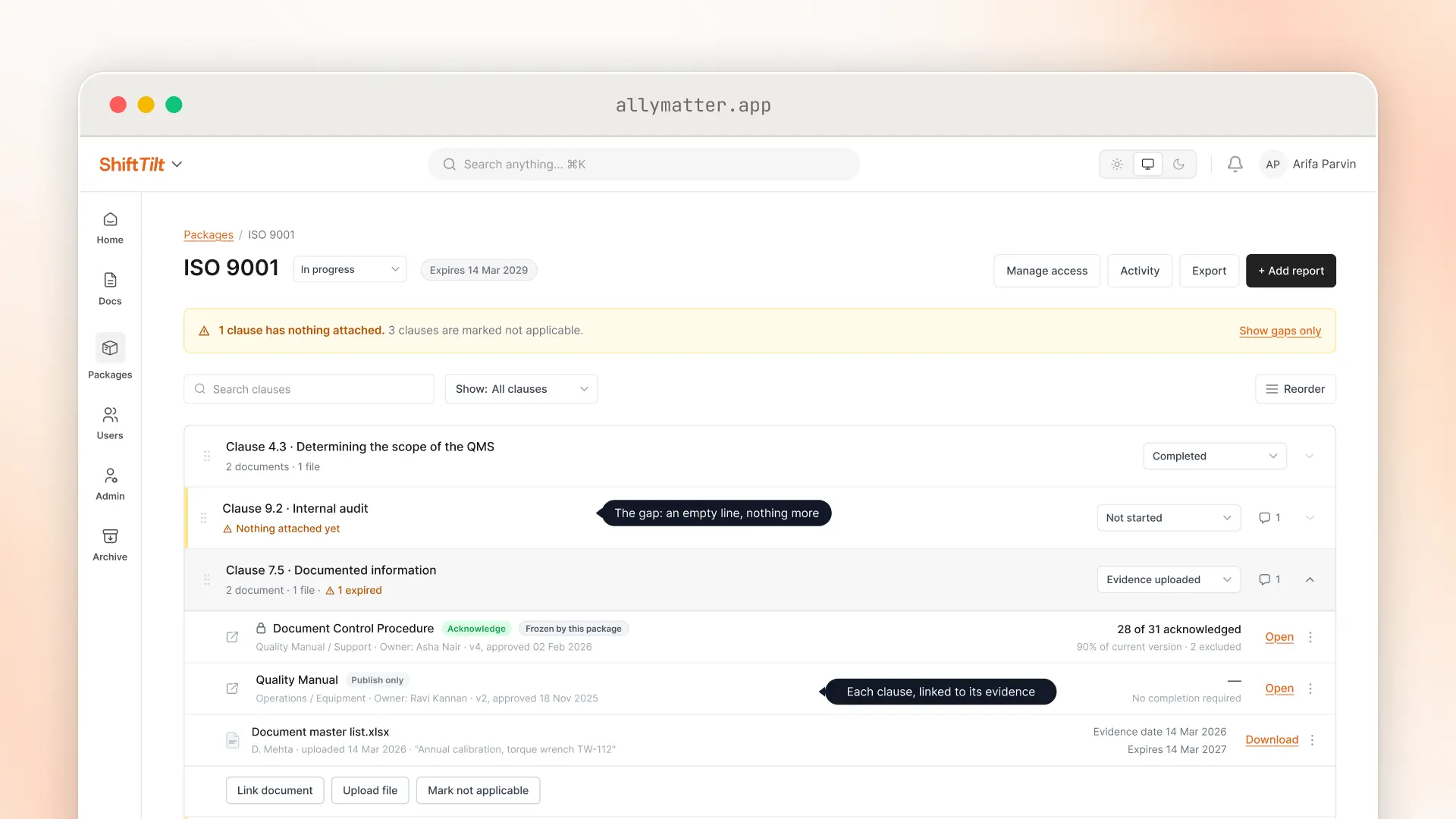
Two parts of this save the most time. The approval flow means every linked policy has a named approver and a date, and version history means you can show the version that was in force on the day of the audit. Our guide to policy governance covers how owners, reviews and approvals fit together, and our walkthrough of document control for ISO 9001 shows a package being built line by line.
Questions about controls mapping
What is controls mapping?
Controls mapping is writing down which of your policies, procedures and records satisfy each control in a standard or law. The result is usually a table, and it lets you answer an auditor control by control without searching for the document.
What is common controls mapping?
It is controls mapping done once against a shared set of controls rather than separately for every standard. You map each policy to the shared control, then link that control to the matching clause in each standard you answer to. Adding a new standard means adding a column, and the policy work is already done.
What is a common controls framework?
It is a harmonized set of controls that has been mapped to many laws, regulations and frameworks, so that one implemented control can be traced to many requirements. The Secure Controls Framework, the Unified Compliance Framework and the Cloud Controls Matrix are well-known examples.
What is the difference between controls mapping and a gap analysis?
Mapping records which of your documents answer each control. A gap analysis uses that map to find the controls with nothing behind them, or with evidence that is out of date. Mapping comes first, and the gaps are the empty lines.
Can one policy satisfy ISO 27001, SOC 2 and HIPAA at the same time?
One policy can answer the policy requirements in all three, as long as it covers what each of them asks for and you can show the same proof for each. The standards word their clauses differently, so the map records which clause the policy answers in each. Technical controls, such as how systems are configured, need their own evidence.
Does a small business need a common controls framework?
Not at the start. If you answer to one to three standards, a short list of your own controls, one per policy topic, is enough and is easier to keep current. A published framework starts to pay off when the list of standards grows and keeping the mappings consistent becomes the harder job.
How often should the mapping be reviewed?
Review it whenever a policy changes, whenever a standard you follow is revised, and at least once a year. A map that nobody has opened since the last audit usually points to documents that have been replaced.
Do I need special software to map controls?
No. A spreadsheet works for a small set, and the method in this guide runs in one. Software becomes useful when you want the link to the live document, its approval record and its acknowledgments kept next to each control without copying them by hand.
Start your 30-day free trial of AllyMatter. No credit card to start, and a 30-day money-back guarantee if you subscribe and change your mind. Free migration.