
Industries · 10 min read
How to Run Your RIA Compliance Manual in AllyMatter
Picture the first-day document request from an SEC examination. It asks for your RIA compliance manual as it stood during the exam period, your code of ethics, and the acknowledgments your supervised persons gave for it, and then it asks what your last annual review found. For the documents people have to follow, policy management software gives the work one home, with approvals, versions and acknowledgments in a single record.
At the last company I started, the run-up to an audit meant chasing people for signatures, with the evidence spread across Word documents and online attestations. An RIA compliance manual kept in Word, with the code of ethics acknowledgments in an email folder, leaves a firm in the same place, except that an examiner is the one asking the questions.
Four signals this is your problem now:
- Your compliance manual is a Word file, and the version that was in effect last year is somewhere in email.
- Code of ethics acknowledgments are PDFs in a folder, and you are not sure everyone’s is for the current code.
- The annual review happened, and the evidence is a calendar entry.
- Exam prep starts with someone assembling the document request list by hand.
Key takeaways
- Rule 206(4)-7 asks for written policies you implement, a review at least once a year, and a chief compliance officer to administer them.
- In AllyMatter the approved version of the manual is the one your firm sees, and every change becomes a new version you can compare word by word.
- Each code of ethics acknowledgment records the person, the date and time, and the exact version they acknowledged.
- A review date brings the annual review around each year, and a re-approval of the manual goes into the document’s log.
- Packages lay out the exam request list, link each item to the documents that answer it, and show the gaps.
What the SEC asks of your RIA compliance manual
Rule 206(4)-7 under the Advisers Act asks a registered adviser to adopt and implement written policies and procedures reasonably designed to prevent violations, review their adequacy and effectiveness no less frequently than annually, and designate a chief compliance officer to administer them. Rule 204A-1 adds a written code of ethics, with a written acknowledgment of receipt from each supervised person for the code and any amendments, and the books and records rule, Rule 204-2, asks you to keep the policies in effect at any time in the past five years. The full picture, including what examiners ask for, is on the SEC Rule 206(4)-7 page at Policy & Compliance.
Here is how that works in AllyMatter, and how it fits the setup for registered investment advisers.
How does approval work for an RIA compliance manual?
Every document in AllyMatter goes through an approval workflow before your firm can see it. An Admin builds workflows once in Administrative Settings, and each document picks one from a list. Steps run in order, up to four, and each step can need all of its approvers or just one of them. The compliance manual might need the chief compliance officer and the managing principal together in one step, while a desk procedure might need the chief compliance officer alone.
If an approver rejects a document they have to write down why, and it goes back to draft. While a new version is in review your firm keeps reading the last approved one, so nobody works from a half-finished draft. Our page on approval workflows has the detail.
Which version of the manual was in effect on a given date?
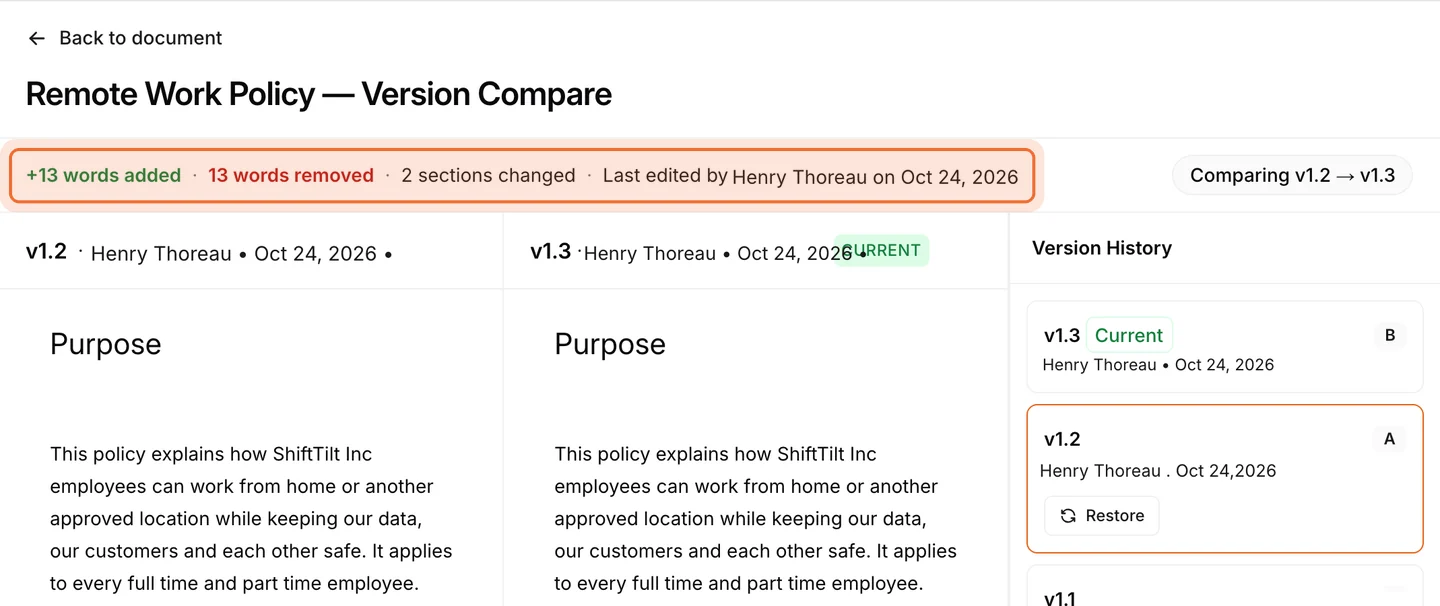
The one your firm could see on that date, and the audit log says who approved it and when. Each time an approved document changes, the new text is saved as a new version and the version history keeps them, with Admins and the document’s Editor able to open any older version. Approvers can compare two versions word by word, with a count of the words added and removed, so a revised chapter shows exactly what moved.
Restoring an older version puts its text back as a new version and sends it through approval like any other change. Rule 204-2 asks for the policies that were in effect over the past five years. We can extend how long a workspace keeps its version history on request, so tell us if you need that, and write your own retention rule for the manual as well.
How do you track code of ethics acknowledgments?
Tag the code of ethics for every supervised person and it reaches all of them, because tags decide who sees a document. Once the code is approved, press Distribute and choose Acknowledge. Each person opens the code, signed in, and clicks Acknowledge at the top right of the document itself. Nothing completes from an email, so an acknowledgment means the person had the code open in front of them.
Each acknowledgment records the person’s name and email, the date and time, and the exact version they acknowledged. Choose a reminder cadence in the Distribute window and AllyMatter reminds anyone who has not acknowledged yet on that cadence. When you amend the code, approve the new version and press Distribute again, and everyone is asked to acknowledge the amended text while a pending request on the old version is replaced and the completed acknowledgments for earlier versions stay on record. If someone leaves the firm, their completed acknowledgments stay too.
What if the code of ethics has to be signed?
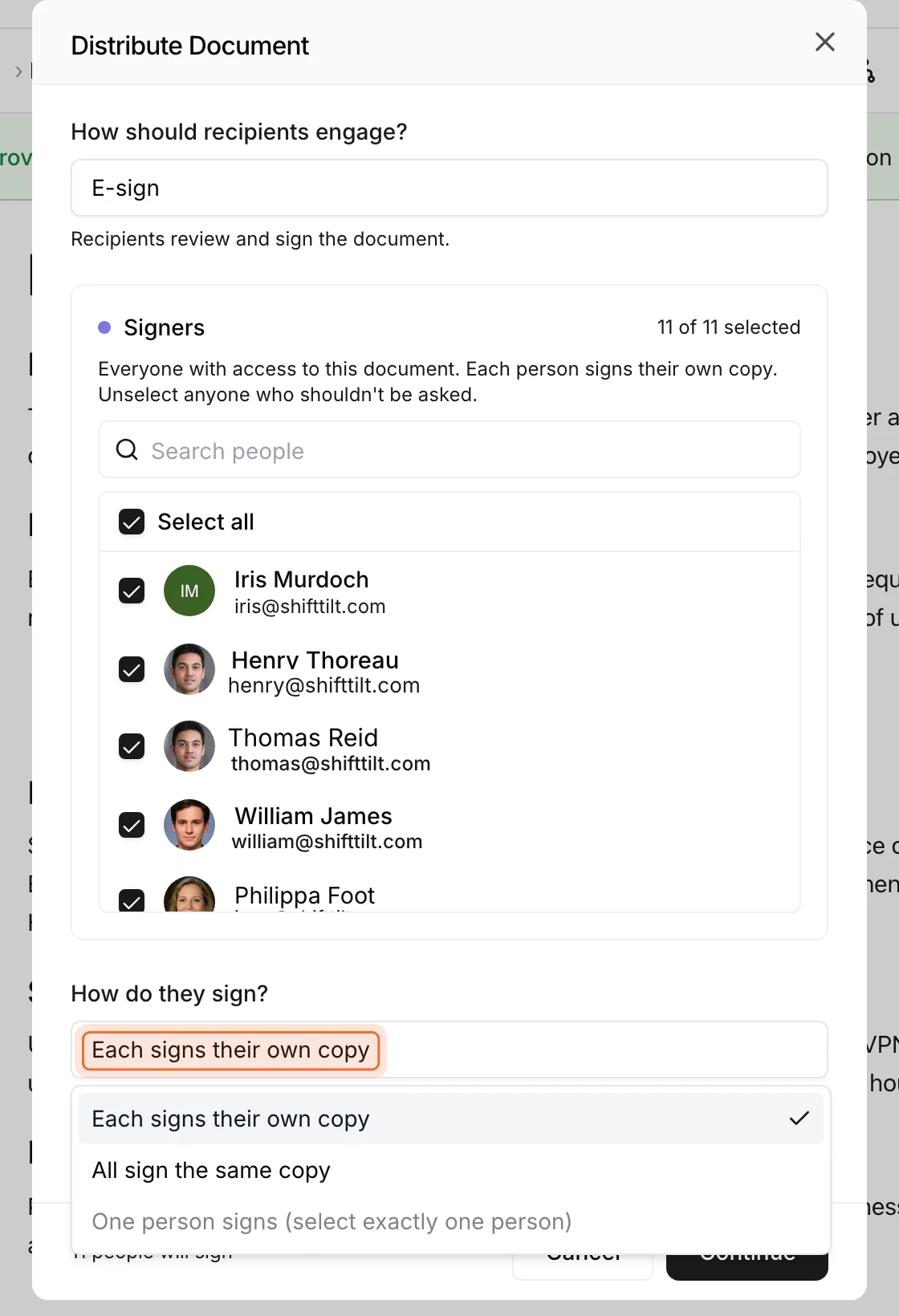
Some firms want the code of ethics signed rather than clicked, and some want the annual compliance certification signed too. For those, choose E-sign when you distribute, which is an optional add-on to your plan. The people who sign are people in your workspace, and you choose whether each signs their own copy, everyone signs the same copy, or one person signs. Once they have signed, the signed copy and its completion certificate are saved in the document’s Attachments tab. Our page on e-signature covers the options, and the guide to how e-signatures work explains the mechanics.
How does the annual review leave a record?
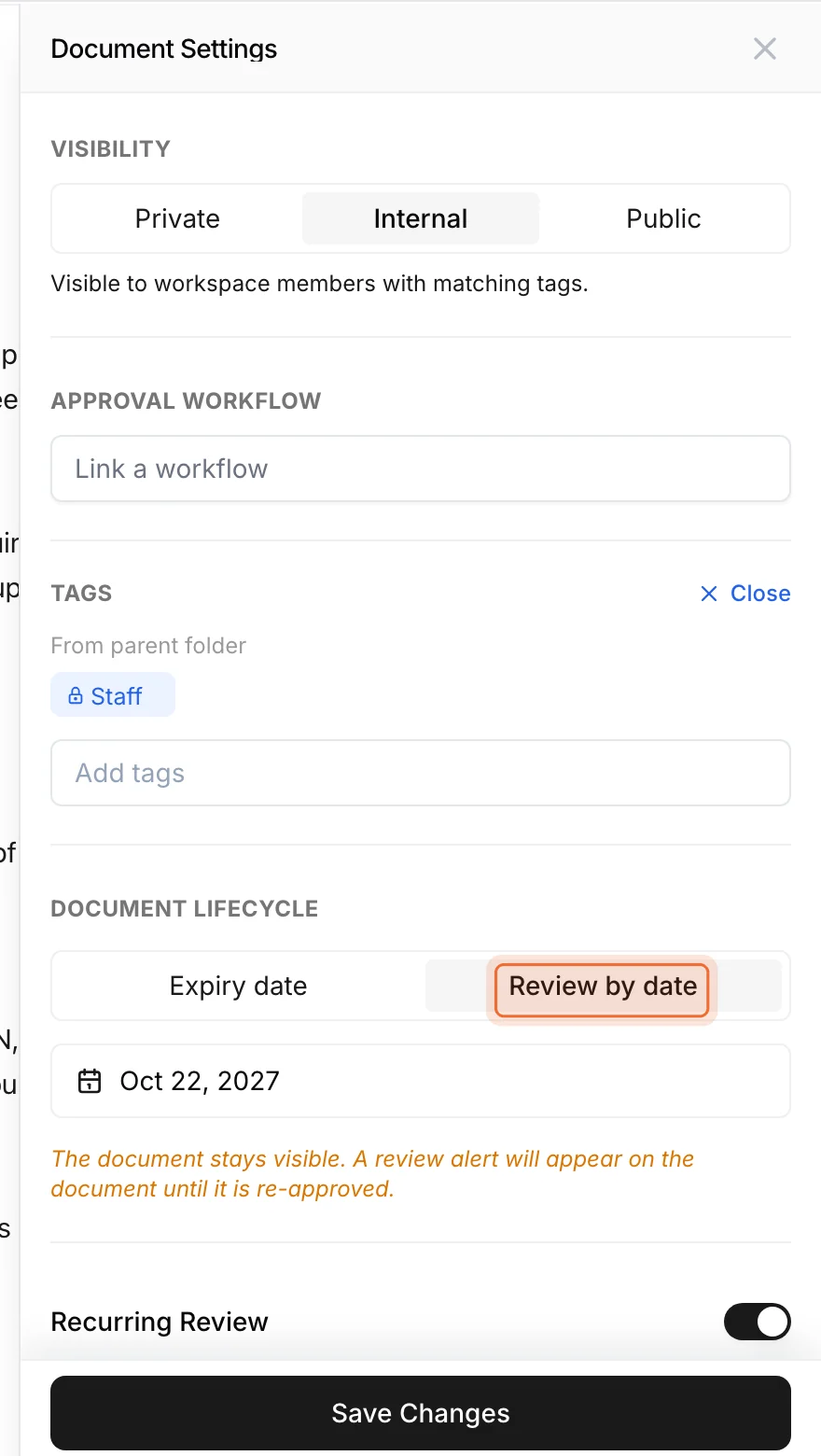
Put a yearly review date on the manual and an alert shows on the document when the review is due, with a reminder to its Editor, and it stays until someone updates the date or approves the manual again. If the manual is still right, re-approve it as it is. That keeps the same version and asks nobody to acknowledge it again, and the re-approval sits in the document’s log with who did it and when. If the review turns up changes, make them and the revised manual goes through approval as a new version, with the comparison showing exactly what the review changed.
Rule 206(4)-7 says the review has to happen, and examiners ask what it left behind, which is what a dated re-approval or a compared version gives you. For a procedure that must not be used past a certain date, set an expiry instead. On that date it drops out of everyone’s view until someone renews it, while Editors and Admins can still open it. Our page on versions and reviews covers both.
How do you show the evidence, request by request?
Examiners work from a request list, and for each item they want to see the document. That is what Packages are for. Set up a package for the exam with a line for each policy-related item on a typical request list: the compliance manual, the code of ethics, the business continuity plan, your cybersecurity policies and the personal trading policy. Link each line to the documents that cover it, and the package shows the gaps, so you find them before the examiner does. If an item does not apply to your firm, mark it not applicable and give the reason, which then sits next to the item when someone asks. When the exam comes, export the package.
Where do the annual review records go?
If you write a memo for the annual review, upload it to the manual’s Attachments tab. Rule 204-2 asks you to keep any records documenting the review, and this keeps them with the manual itself. Signed copies from e-signature land in the same tab.
What do you hand the examiner on exam day?
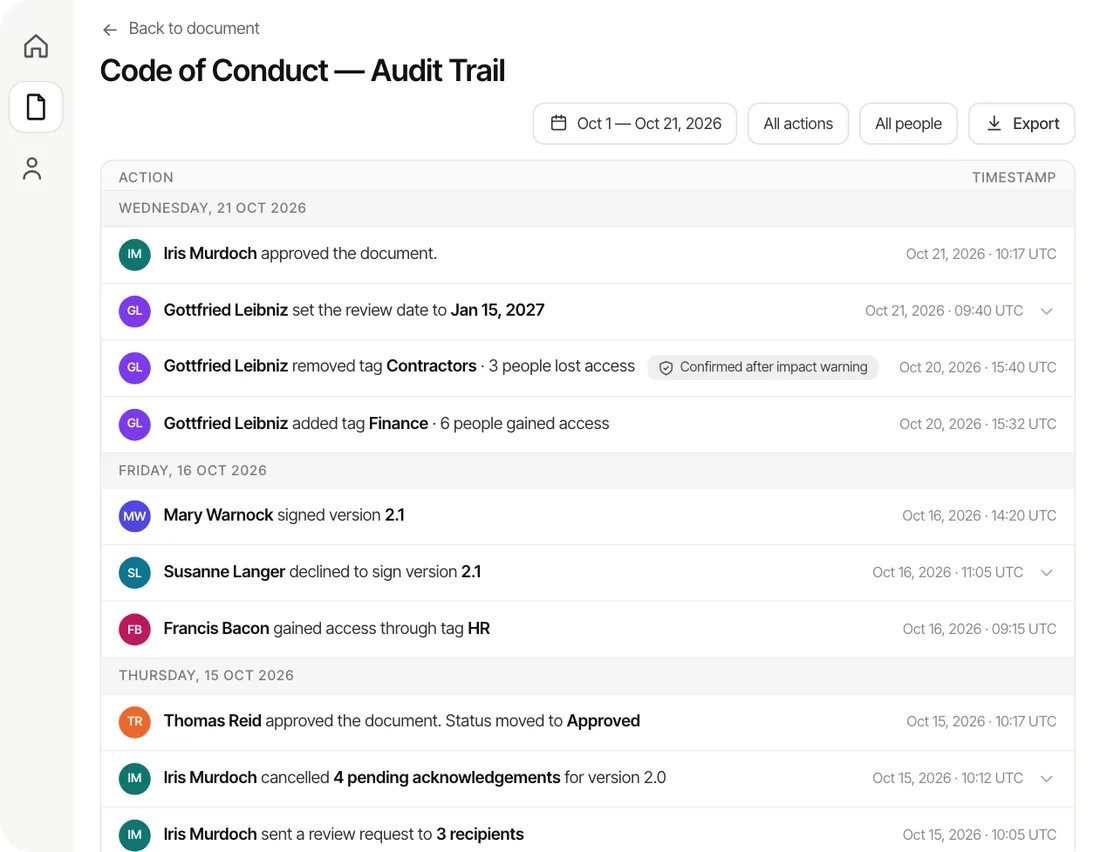
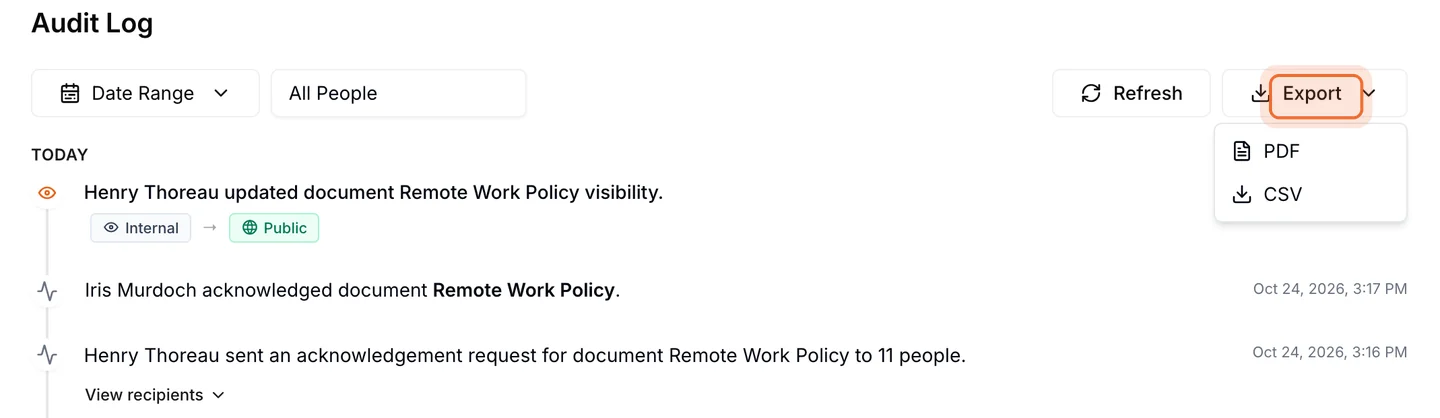
Approvals, rejections, versions, distributions and each person’s acknowledgment go into a document’s audit trail, and each line names the person, what they did and when. Filter by date range or by person and export it as a PDF or CSV, from the document or, if you are an Admin, from the workspace audit log. When the request asks who acknowledged the code of ethics and when, you export the log and hand it over.
Is AllyMatter the right fit for your firm?
If you are a two-person firm with one manual and a handful of acknowledgments a year, a shared drive and a careful folder will hold for now, and a new tool will not pay for itself until the documents and the people add up. If you have more than a handful of supervised persons and the four signals at the top sound familiar, this is the moment, and AllyMatter is what we built for exactly this. If you run more than one office, or your people work across several states, one controlled version of the manual across all of it is most of the job, and we would start with AllyMatter.
Common questions about running an RIA compliance manual
Do I need software to comply with Rule 206(4)-7?
No. The rule does not call for any particular tool, and plenty of small advisers run a Word manual and a folder of signed acknowledgments. It gets harder as the firm grows and you are proving by hand which version was in effect and who acknowledged it, and that is usually the point to move.
Does the annual review have to be written down?
Rule 206(4)-7 requires the review itself, at least once a year. A 2023 amendment that required documenting the review in writing took effect in November 2023, was vacated by a federal appeals court in June 2024 and was removed from the rule in November 2024, but Rule 204-2 still requires you to keep any records that document the review, and examiners ask for them. Read the current text on Cornell LII and the Federal Register notice, and ask your counsel how much to write down.
Who can help us write the compliance manual itself?
A compliance consultant who works with advisers. They write or review the manual and the code of ethics and run mock exams. You can find a compliance consultant on Policy & Compliance, and once the manual is written it can live in AllyMatter.
Does an acknowledgment in AllyMatter count as the written acknowledgment Rule 204A-1 asks for?
The rule asks for a written acknowledgment of receipt and does not prescribe a form. AllyMatter records who acknowledged, when, and which version. If your counsel wants a signature instead, send the code of ethics for signature. Ask your counsel which they prefer.
Do supervised persons who only read the manual need a paid seat?
No. AllyMatter’s plans include unlimited viewers, so everyone who needs the manual can read and acknowledge it, and you pay for the people who write documents.
Setting up AllyMatter takes about half an hour, and moving your documents in yourself takes about a day. On yearly plans our migration service moves a large library for you, usually within a week and often sooner, and it is free on those plans. Rather see it first? Book a demo.
Start your 30-day free trial of AllyMatter. No credit card to start, and a 30-day money-back guarantee if you subscribe and change your mind. Free migration.