

Policy Basics · 12 min read
HR Policy Management: Update Policies In Days, Not Weeks
Your policy changed last Tuesday. It’s still not live. Legal approved a sentence in email, HRBPs left comments in Slack, and a “FINAL_v6.pdf” is circulating again. Meanwhile, managers are guessing which version applies because the handbook PDF lags your real decisions. That’s not a content problem.It’s an HR policy management workflow problem.
Besides, this isn’t just about efficiency. When your company scales from 200 to 500 people, policy chaos becomes a compliance liability. Every scattered update is a potential audit flag.
This playbook shows how to move from weeks to days (or shorter) using a repeatable flow inside your HR knowledge base:
draft → approve → publish → target → notify → acknowledge → report/export
New to HR knowledge bases? Start with our comprehensive guide on everything you need to know about building a knowledge base for HR.
You’ll set sensible SLAs, target audiences with tags, add a short “What changed” note for returning readers, and track completion and pending follow-ups, all in one place.
And you’ll see where AllyMatter (purpose-built among knowledge bases for HR) streamlines approvals, version history, policy acknowledgments, targeting, and exports; so speed never becomes risk.
Slow updates, multiple versions, shaky proof
‘Didn’t Legal approve this last week?’
Yes, but finding that approval means digging through three email threads and a Slack conversation that happened while you were on vacation. When policy updates meander through email and shared drives, the business runs on tribal knowledge instead of your HR knowledge base:
- Legal says “approved,” but the policy page never reflects it.
- “Latest version” depends on which folder you opened.
- Managers paste old language because the new policy isn’t published.
- HR spends days clarifying “Which one is current?”
- There’s no acknowledgment trail that ties to a specific version.
This scattered approach has real costs. When policies live in email threads and shared drives, that search time multiplies across your entire organization.
During your next audit or compliance review, these gaps become expensive problems. Regulators want proof you delivered updated policies to the right people at the right time; email forwards and Slack messages don’t qualify as evidence.
Fix: Build a single flow inside your knowledge base where approvals live on the policy, new versions are recorded in version history, audiences are targeted with tags, and acknowledgment records prove the right people saw the right text. This approach to policy management eliminates the chaos entirely.
Need foundational knowledge base guidance? See our internal knowledge base 101 guide.
Consider a data privacy policy that needs urgent HIPAA updates. Without a system of record, working out who has seen which version takes weeks, and some departments keep operating under outdated guidelines. With approval chains and acknowledgment tracking in the knowledge base, you can see who has acknowledged the current version, and the audit trail keeps the history.
The outcome to aim for: Days (even hours), not weeks – without sacrificing proof
“Fast” updates only matter if you can also show:
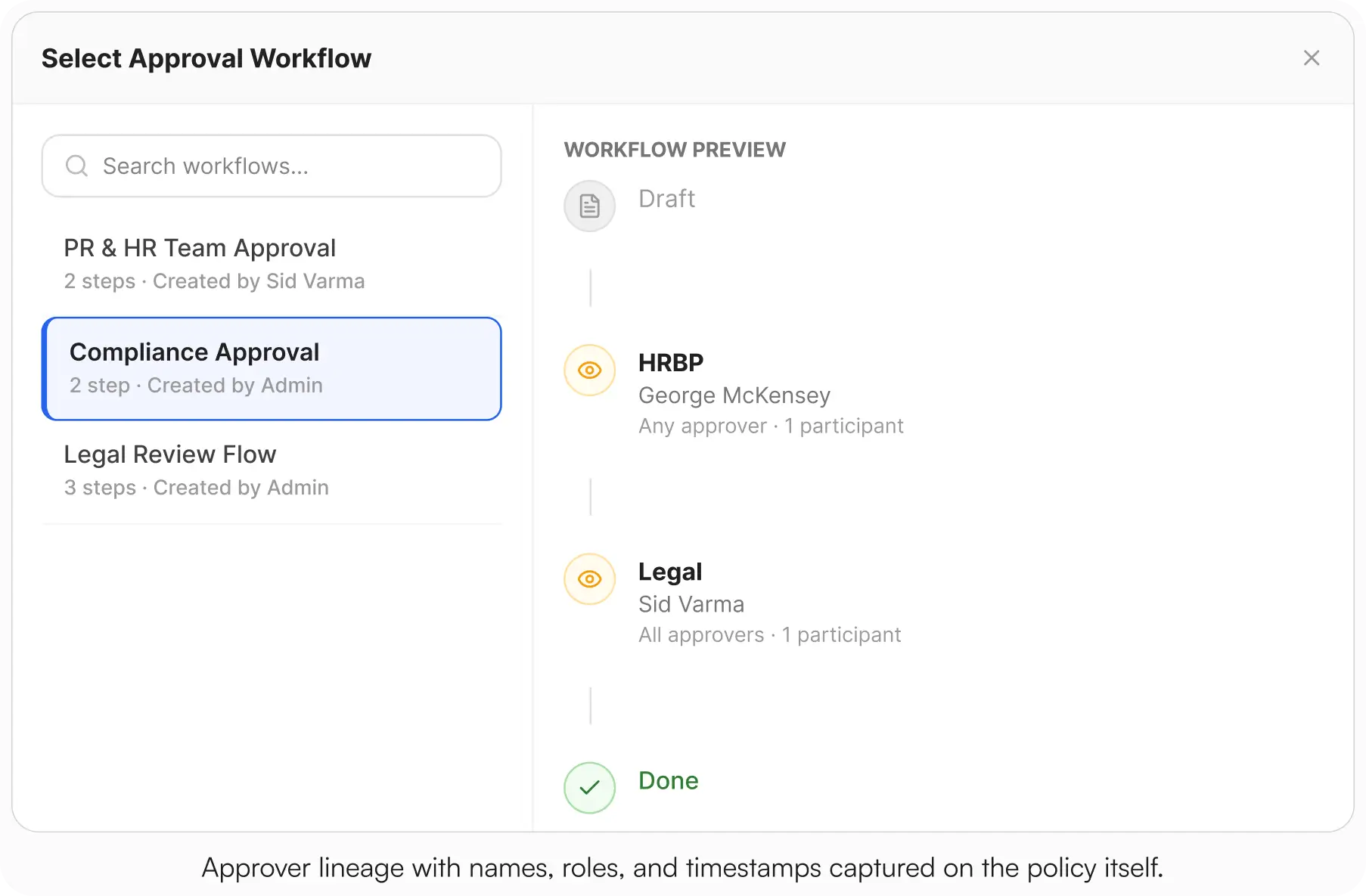
- Who approved (names, roles, timestamps)
- Which version is current (and which version applied last quarter)
- Who needed to read (the audience, by tag)
- Who actually read (acknowledgment completion, pending list)
A modern HR compliance knowledge base (like AllyMatter) bakes this into the policy page itself: draft, approval chain, publish (new version), target and notify, acknowledge, and exportable evidence – no spreadsheets, no inbox archaeology.
Define SLAs for each step (so work moves without chasing)
SLAs make expectations visible for HR, Legal, and managers. Calibrate them to your org; the power is in the clarity and repeatability.
Draft (Editor → HRBP review)
- SLA: within 1 business day (minor), up to 2 business days (material)
- Definition of done: clean Summary + Applicability, and a one-line summary of what changed and why
Legal review (if applicable)
- SLA: within 1 to 2 business days for material changes; skip minor wording
- Proof: approver name, role, and timestamp captured on the policy page (not in email)
HRBP/CHRO sign-off (material)
- SLA: within 1 business day after Legal
- Proof: approver lineage visible on the page
Publish (create new version)
- SLA: same day as final approval
- Proof: new version appears in Version History with timestamp and editor
Notify (targeted)
- SLA: same day as publish
- Scope: the tags that match the audience (e.g., CA non-exempt, U.S. managers)
Acknowledge (must-reads)
- SLA: 5 to 7 days to complete; reminders at T+3 and T+6
- Proof: acknowledgment record tied to the exact version, for each employee
Put these in your Policy Change Playbook and link it in the footer of each policy page in your knowledge base. Expectations that are visible get met.
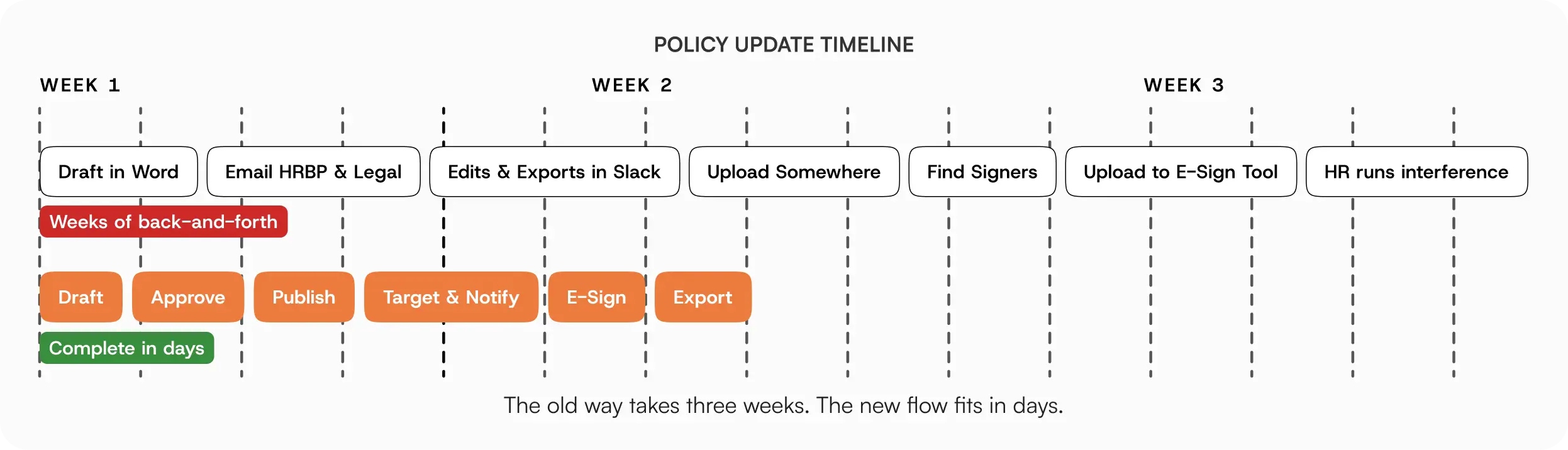
Once your SLAs are clear, implement them through a consistent workflow that eliminates guesswork.
One policy update workflow you run every time
Consistency is your throttle. Use one policy update workflow HR for everything, from PTO tweaks to CA meal/rest clarifications, inside your HR knowledge base.
Draft in the KB
Edit the policy article using your template (Summary, Applicability, Details, Exceptions).
Write a one-line summary of the change: “Clarified accrual table for Year 3+; added CA sick leave note.”
Route approvals in-system
HRBP → Legal (material) → CHRO (material).
Approver names/roles/timestamps captured on the policy itself (no screenshots, no email chains).
Publish = new version
The current page becomes a new version; older versions remain in Version History for audit support.
Target the audience
Deliver to exactly who must know, using tags for role, org, region, and employment type.
Notify with context
A short update with the “What changed” note and the policy link, and a request to acknowledge if required.
Acknowledge (as required)
Toggle Acknowledgment required; set the reminder cadence.
Employees complete both in one flow: read → acknowledge → timestamped record saved.
Report & export
Track acknowledgment completion and who is still pending.
Export the audit log, which carries approvals, distribution and acknowledgments, as a PDF or CSV.
In AllyMatter, all seven steps live on the policy. Approvals, version history, targeted delivery, acknowledgment, and exports are native.
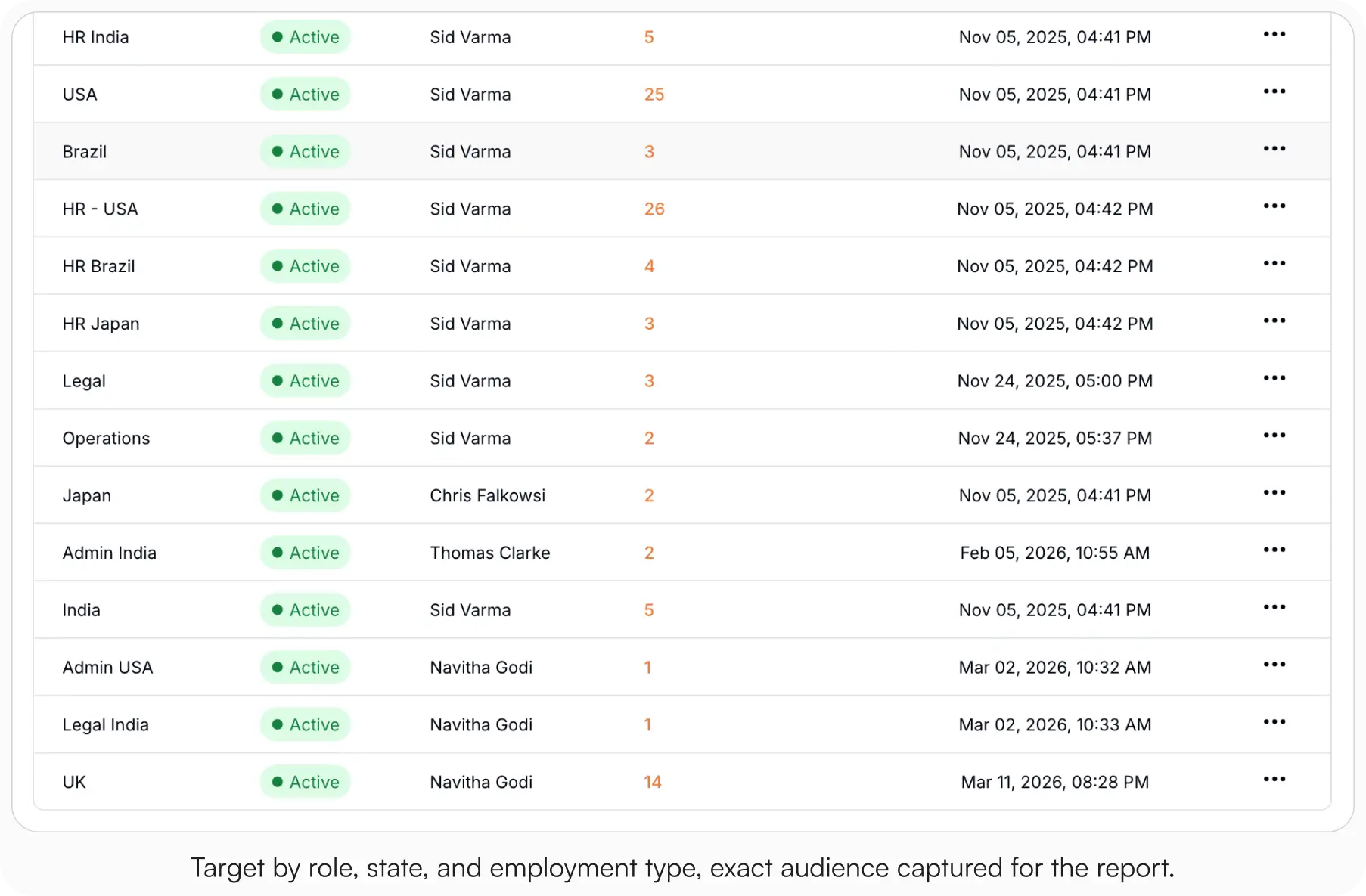
Target with tags: role, region, and employment type
Blanket blasts create noise and weak evidence. Targeting ensures the right people receive the relevant change and lets your reports match the exact audience.
- Role: managers vs ICs; department-specific (People Managers, Field Ops)
- Region/state: U.S. vs CA/NY/WA; country-specific rollouts; site-specific safety
- Employment type: exempt vs non-exempt; full-time vs part-time; contractors
- Org unit: teams impacted by a local process update
Examples:
- Timekeeping clarification to U.S. non-exempt employees + People Managers
- CA meal/rest update to California employees and California managers
- Security 101 refresh to all employees with a separate manager heads-up
In AllyMatter, tags decide who gets each policy. Your audit log export reflects the exact population you selected, which is clean evidence for audits.
Make “what changed?” obvious for returning readers
Don’t make people re-read an entire policy to spot a two-line edit. A short opening note plus a one-line change summary reduces confusion and repeat questions.
- Opening note (2 to 3 lines for 14 to 30 days): “What changed (Aug 12): Clarified PTO accrual for Year 3+; added CA sick leave note. Action: Review and acknowledge by Friday (CA employees: read addendum).”
- Change summary: A human, one-sentence summary kept alongside the policy, great for Legal and auditors.
- Link to action: If steps changed, link the Procedure (e.g., Request PTO) or Manager Guide.
In AllyMatter, you can write that summary at the top of the document itself, so repeat visitors see the update immediately.
Notifications that drive action
Your announcement should be short, scoped, and clearly request acknowledgment if required.
All-employee/manager targeted update
Policy update: PTO & Sick Leave (U.S.). What changed: accrual table for Year 3+; California sick leave note. Action: review and acknowledge by Friday. CA employees: also read the CA addendum.
Manager heads-up
Heads-up: Timekeeping (U.S., non-exempt). Clarified daily OT examples; no change to eligibility. Please link this in your team channel. Employees will acknowledge by Wednesday.
In AllyMatter, publishing lets you notify the targeted audience immediately and start the acknowledgment reminders. One click from the message opens the exact version flow in your knowledge base.
Reminders that get done (without sounding punitive)
Think of reminders as a service: concise prompts that keep your record clean.
- Window: 5 to 7 days to read
- Two automated reminders: day 3 and day 6
- Self-serve link: reminder clicks open the exact policy/version flow
Reminder: PTO & Sick Leave update is due for acknowledgment by Fri. Here’s the link. Thanks for helping us keep records current.
In AllyMatter: Reminders are automatic on the cadence you choose and repeat until people act. Acknowledgment tracking shows completion % and who is still pending.
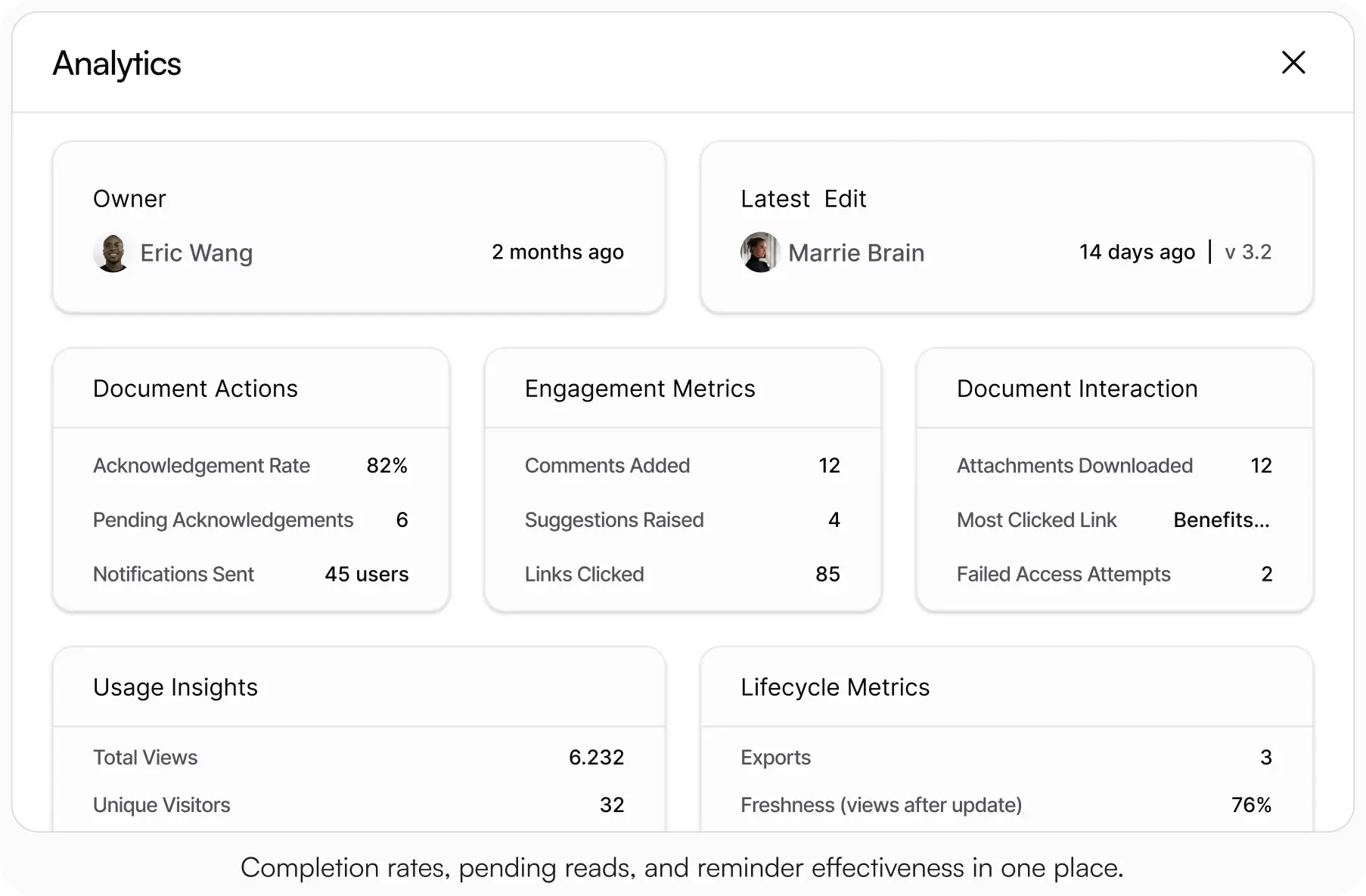
Reporting: Completion and pending follow-up
Executives and auditors want crisp evidence that lives with the policy in your HR knowledge base. Check each policy’s status monthly and export its audit log on demand.
Per-policy signals
- Completion rate (acknowledgment) per policy
- Pending readers
- Recent versions with approver lineage
Export artifacts
- Audit log (PDF or CSV): every approval, distribution and acknowledgment with the person and the time, filtered by date, person, or action
In AllyMatter, Editors and Admins export the audit log as a PDF or CSV. Legal gets the record in minutes.
Example SLAs and notes you can copy
Sample SLA Table
| Step | Minor wording | Material content |
| Draft (Editor) | 1 business day | Up to 2 business days |
| HRBP review | Same day | 1 business day |
| Legal review | , | 1–2 business days |
| CHRO (if req.) | , | 1 business day |
| Publish + notify | Same day | Same day |
| Acknowledgment window | 5–7 days | 5–7 days |
| Reminders | Day 3 & Day 6 | Day 3 & Day 6 |
“What changed” note (template)
What changed (date): [one-sentence change]. Applies to: [audience/region]. Action: [review by date]. (Optional: “No change to eligibility.”)
Manager heads-up (template)
Manager heads-up: [policy name]. [One-line substance]. Please link this in your team channel. Employees will acknowledge by [date].
Before Vs after: What “days, not weeks” looks like
Before (typical)
Word doc → email to HRBP → email to Legal → edits in Slack → someone exports a PDF → file uploaded somewhere → no one knows it’s live → three versions exist → find the right one → upload it to an e-sign provider → select all who need to sign it → double-check the list → HR runs interference for weeks.
After (target state)
Policy edited in your HR knowledge base → approvals captured on-page → publish creates a new version → targeted audience notified → acknowledgment in one flow → reports and exports ready for Legal and leadership in minutes.
Implementation checklist (drop into your project doc)
- Require approvals before publish (HRBP → Legal → CHRO where needed)
- Define SLAs per step; post the Policy Change Playbook in your knowledge base
- Pre-map audiences and their tags (role, region, employment) for your top 10 policies
- Open each updated policy with a short “what changed” note
- Turn on acknowledgment for must-reads; set the reminder cadence
- Check acknowledgment status per policy (completion, pending)
- Practice exports (the audit log as PDF and CSV)
- Pilot one policy (e.g., Timekeeping & Overtime, or PTO & Sick Leave + CA addendum)
- Run a retro: did we hit SLAs? Where did we wait? Tighten handoffs.
Three scenarios
An honest read on whether this is right for your team:
If you’re under 30 employees and policies rarely change, your current ad-hoc process is fine. The structured workflow pays off when material policies change quarterly or when an audit is on the horizon.
If you’re 30 to 200 employees and the four signals at the top of this post are showing up in your week, this is the moment. AllyMatter is what we built for exactly this transition.
If you’re 200+ employees, multi-state, or in a regulated industry, scattered policy updates are already costing you in audit risk and operational drag. AllyMatter or another purpose-built HR KB makes sense. We’d start with AllyMatter.
Why AllyMatter gets you days, not weeks
You can brute-force updates through a wiki and email, but you’ll still chase approvals, lose change notes, and spend nights assembling signature packets. AllyMatter turns the entire flow into a few reliable actions in your HR knowledge base:
- Approvals on the policy (names, roles, timestamps), not buried in email
- Version history by default (open prior versions; restoring creates a fresh version)
- Targeted delivery by tag, so the right people see the change
- Acknowledgments in one flow, with reminders and a record per employee
- Exports (the audit log as PDF or CSV), which is clean evidence delivered fast
When your auditor asks “how do you prove managers in California received the updated meal break policy?”, you export a clean report in minutes. No spreadsheet archaeology required. This is exactly what compliance teams need for regulatory reviews.
Policy change shouldn’t be a multi-week slog. With clear SLAs, in-tool approvals, targeted notifications, and acknowledgment tracking inside your HR knowledge base, you’ll ship updates in days, not weeks, with the audit trail to match.
Start your 30-day free trial. No credit card to start, and a 30-day money-back guarantee if you convert and change your mind. Or try the live demo to see the end-to-end policy flow with realistic HR content already populated.
Not ready for a trial? On yearly plans, migration from Confluence, Notion, SharePoint, or Drive is on us when you decide. We’ll move your existing HR docs over, usually within a week and often sooner.
Frequently asked questions
What is the best way to manage HR policies?
The most effective HR policy management approach uses integrated workflows within a knowledge base system, eliminating scattered approvals and ensuring proper audit trails.
Can employees see old versions?
Employees see the current version. Prior versions stay in version history, and Editors and Admins see a document’s full log.
How do we prove we notified the right people?
Target with tags. Your audit log export shows the acknowledgments for the exact audience you selected, with completion and pending detail.
What’s the compliance risk of our current email-based updates?
Email-based policy updates create several compliance vulnerabilities: no proof of delivery to specific roles, unclear acknowledgment trails, version confusion during audits, and difficulty demonstrating due diligence to regulators. When auditors ask “how do you know managers received the updated harassment policy?”, email threads and forwarded attachments don’t provide the clear evidence trail that purpose-built HR knowledge bases offer with targeted delivery and acknowledgment tracking.
How do we justify the investment in purpose-built HR documentation?
Calculate the hidden costs of your current process: HR time spent clarifying which policy is current, compliance risks from inconsistent implementation, and audit preparation time assembling evidence. Most growing companies find the productivity gains and risk reduction pay for the platform within quarters.