
Industries · 8 min read
How AllyMatter Helps Insurance Teams Manage Knowledge
For an insurance agency or carrier, most of the knowledge staff rely on every day is policy: underwriting guidelines, claims handling procedures, privacy and information security rules, producer licensing requirements and the employee handbook. A knowledge base for an insurance team is therefore mostly a knowledge base of policies, and that means it has to do more than store documents. Each one needs an approved current version, a named owner, a review date and a record of who has read it.
For how this works day to day in your sector, see our page on policy management for insurance companies.
That is the angle we built AllyMatter on. It is policy management software, and in practice it works as a knowledge base of policies, where every document is approved before anyone sees it, people only open the current version, and each person’s acknowledgment is recorded against the version they read.
What insurance teams keep in their knowledge base
McKinsey research found that employees spend nearly a fifth of their working week looking for internal information. In insurance the bigger risk is finding the wrong version, because so much of what people look up is a rule they are expected to follow. Here is what each team usually keeps, and why the version matters.
| Team | What they look up | Why the version matters |
|---|---|---|
| Claims | Claims handling procedures, settlement authority limits, fraud referral steps | A claim handled under a superseded procedure is hard to defend later |
| Underwriting | Underwriting guidelines, appetite and referral rules | Guidelines change whenever a carrier or product changes |
| Sales and producers | Licensing and continuing education rules, required disclosures, sales scripts | A disclosure read from an old script is still the agency’s responsibility |
| Customer service | Service standards, complaint handling steps, call guides | Complaints are often reviewed against the written process |
| Compliance and IT | Privacy policy, information security program, incident response, vendor management | These are the documents regulators, carriers and auditors usually ask for first |
| HR | Employee handbook, code of conduct, remote work and acceptable use policies | Every employee has to confirm the version that applies to them |
Almost everything in that table is a policy, a procedure or a guideline that someone has to approve and everyone else has to follow. That is why the knowledge base an insurance team needs looks more like a policy library than a wiki.
Why a wiki or a shared drive falls short for policies
Wikis and shared drives are built to make editing easy, and that is the problem with policies. Anyone with access can change a page, copies multiply across folders and inboxes, and there is no point where someone with authority says this version is the one we follow.
They also cannot answer the questions that come up in an audit or a dispute: which version was in force on a given date, who approved it, and whether a particular person read it. A shared drive can show when a file was last modified, but not that the claims team received and acknowledged the guideline that changed last month.
Finally, nothing reminds anyone to look at a policy again. Guidelines that were right two years ago stay in the folder, and staff keep finding them.
How AllyMatter works as a knowledge base of policies
One home, organized the way your teams work
Policies live in folders, usually one per department or line of business, and each document lives in exactly one place. Staff open the policy itself rather than a copy of it, so there is no question of which file is current.
Tags decide who sees what
Tags control access, so the claims manual reaches the claims team, underwriting guidelines reach underwriters and the handbook reaches everyone. Every document is Private while it is being written, Internal once it is shared with the people who hold its tags, or Public when it is meant for customers, such as a privacy notice published as a page. Our guide to access control with tags shows how to set this up.
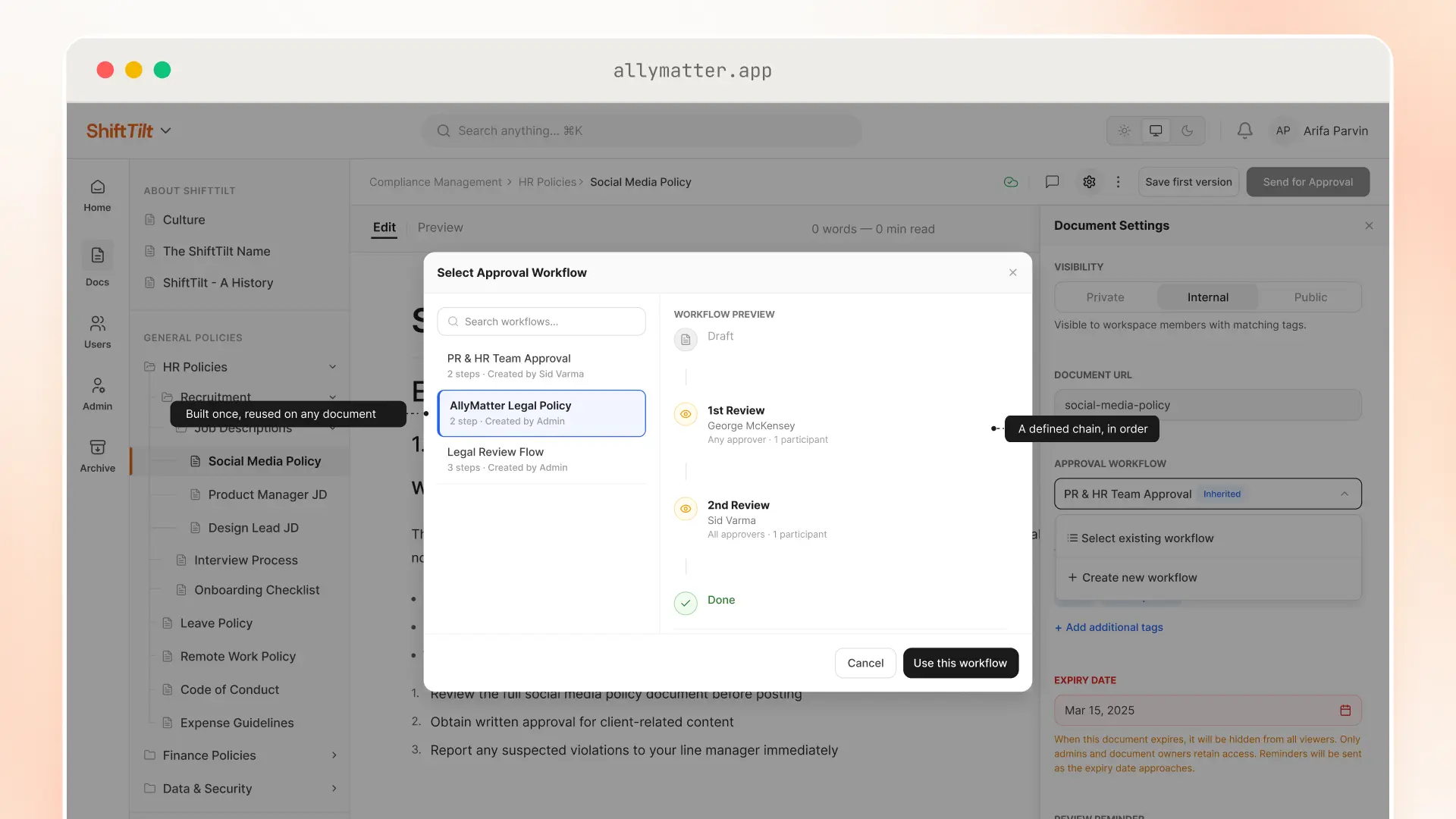
Every policy is approved before anyone sees it
Each document goes through an approval flow before it is published, with up to four steps in order, such as a department head, then compliance, then your outside counsel. While a new version is in review, staff keep seeing the last approved one, so nothing half-finished reaches them.
One current version, with the history behind it
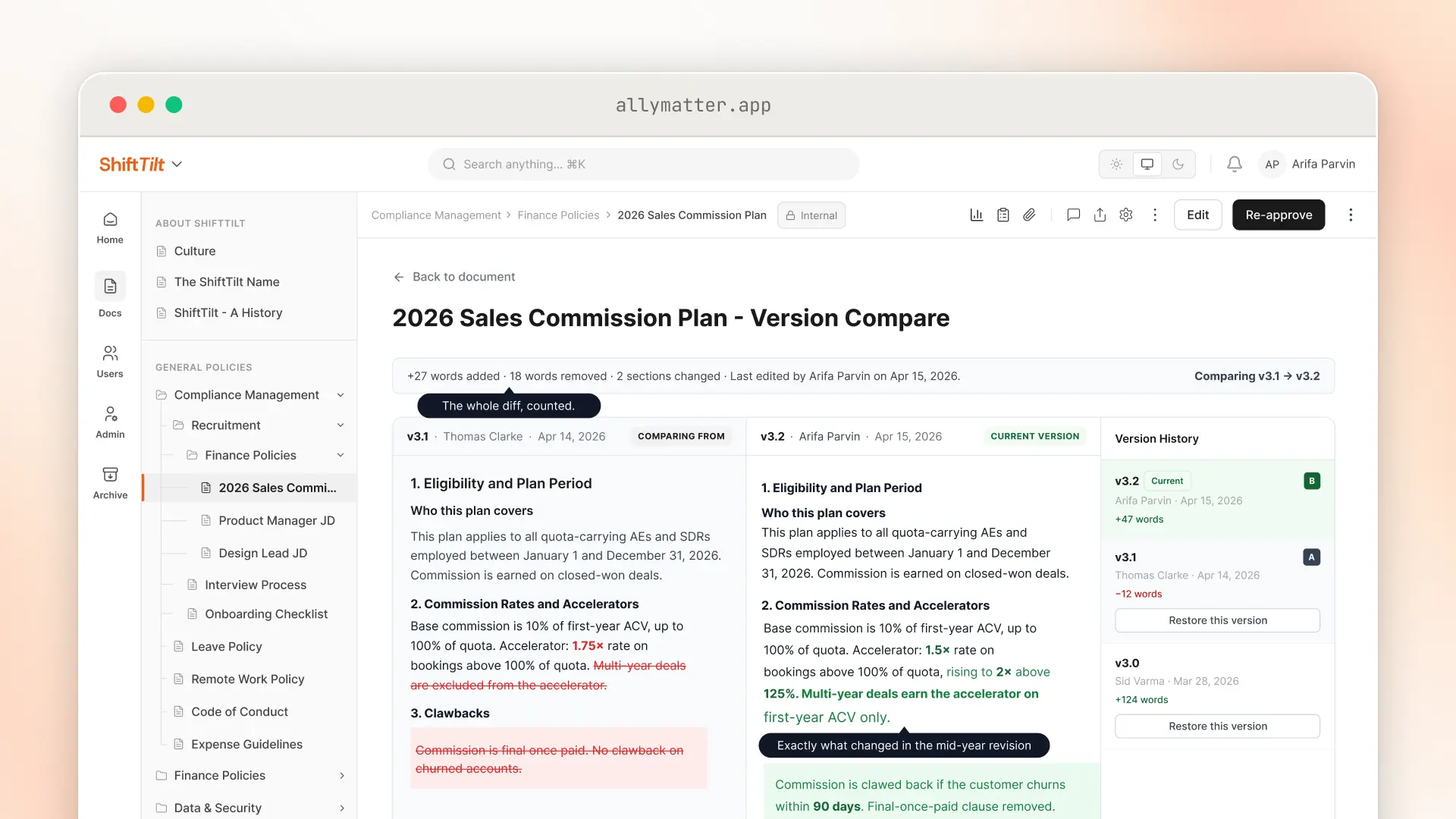
Every approved change creates a new version, and the version history keeps all of them. Compare any two to see exactly what was added and removed, which is the fastest way to tell an underwriter what changed in a guideline. Restoring an older version sends it back through approval.
Send it, and know who read it
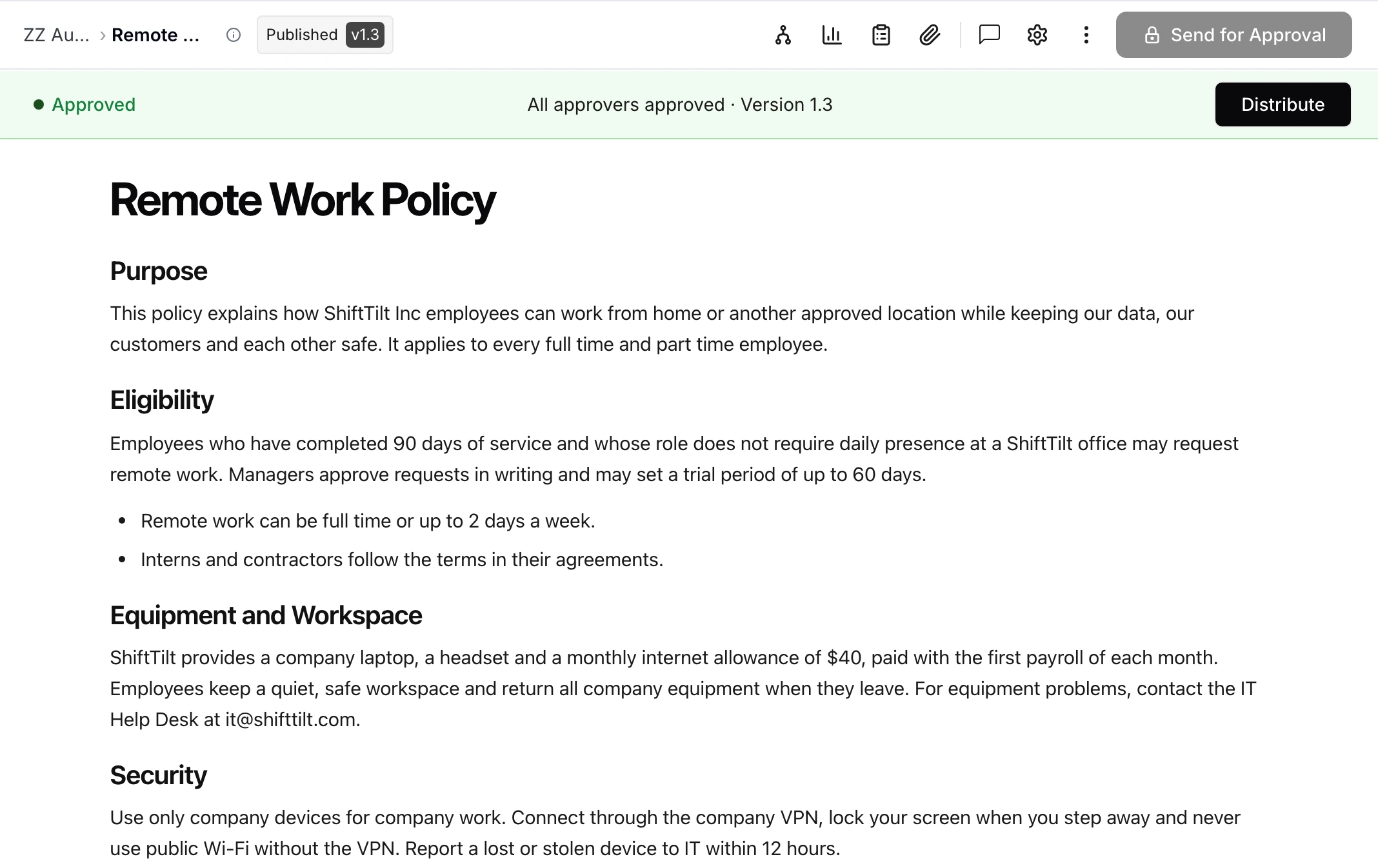
When a policy is approved, you choose how it goes out: notify people, or ask them to acknowledge or e-sign it. Each person opens the policy and acknowledges it there, and the record holds their name, email, the date and time, and the version. Reminders go out on the cadence you set, and you can see at a glance who has acknowledged and who has not. Our guide to acknowledgment tracking covers what that record needs to hold up.
Review dates keep it current
Give each policy a review date, either a fixed date or a repeating interval, and its owner is alerted in the app and by email when it comes due. A document can also be given an expiry date, after which it is hidden from the people it was sent to, so an outdated guideline stops being found.
The record is ready when someone asks
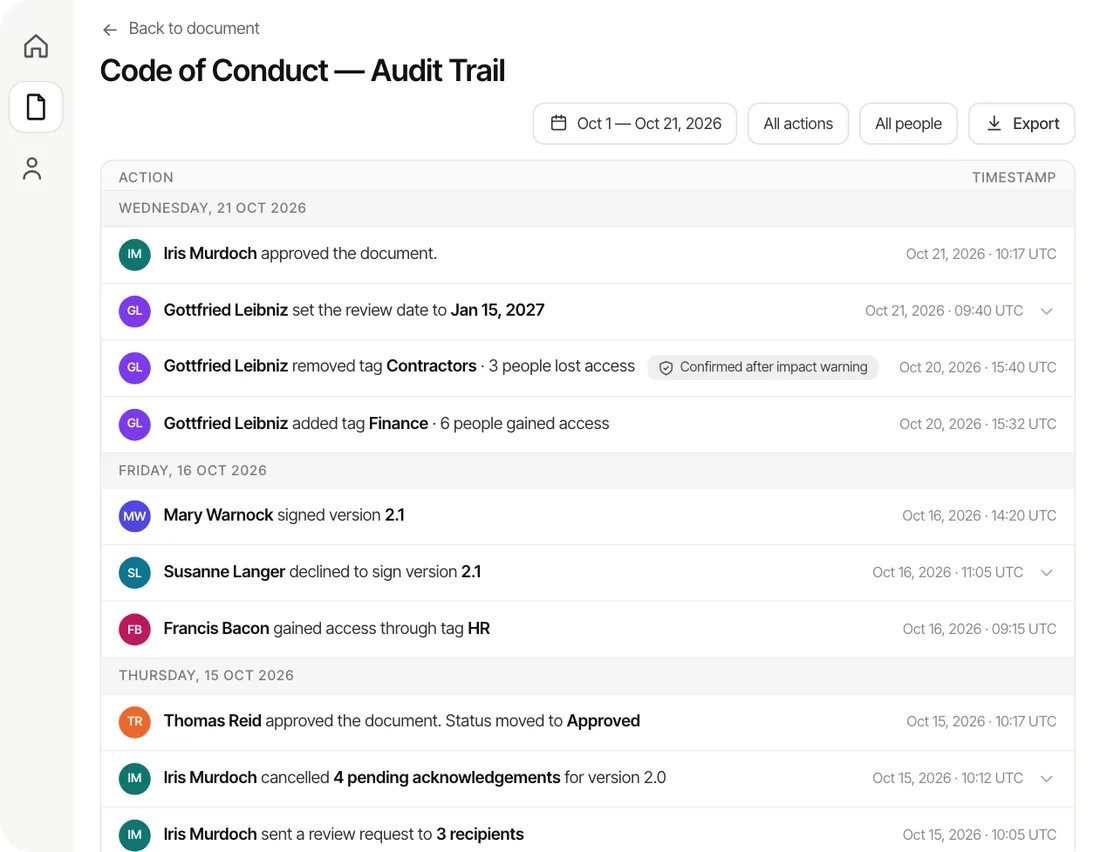
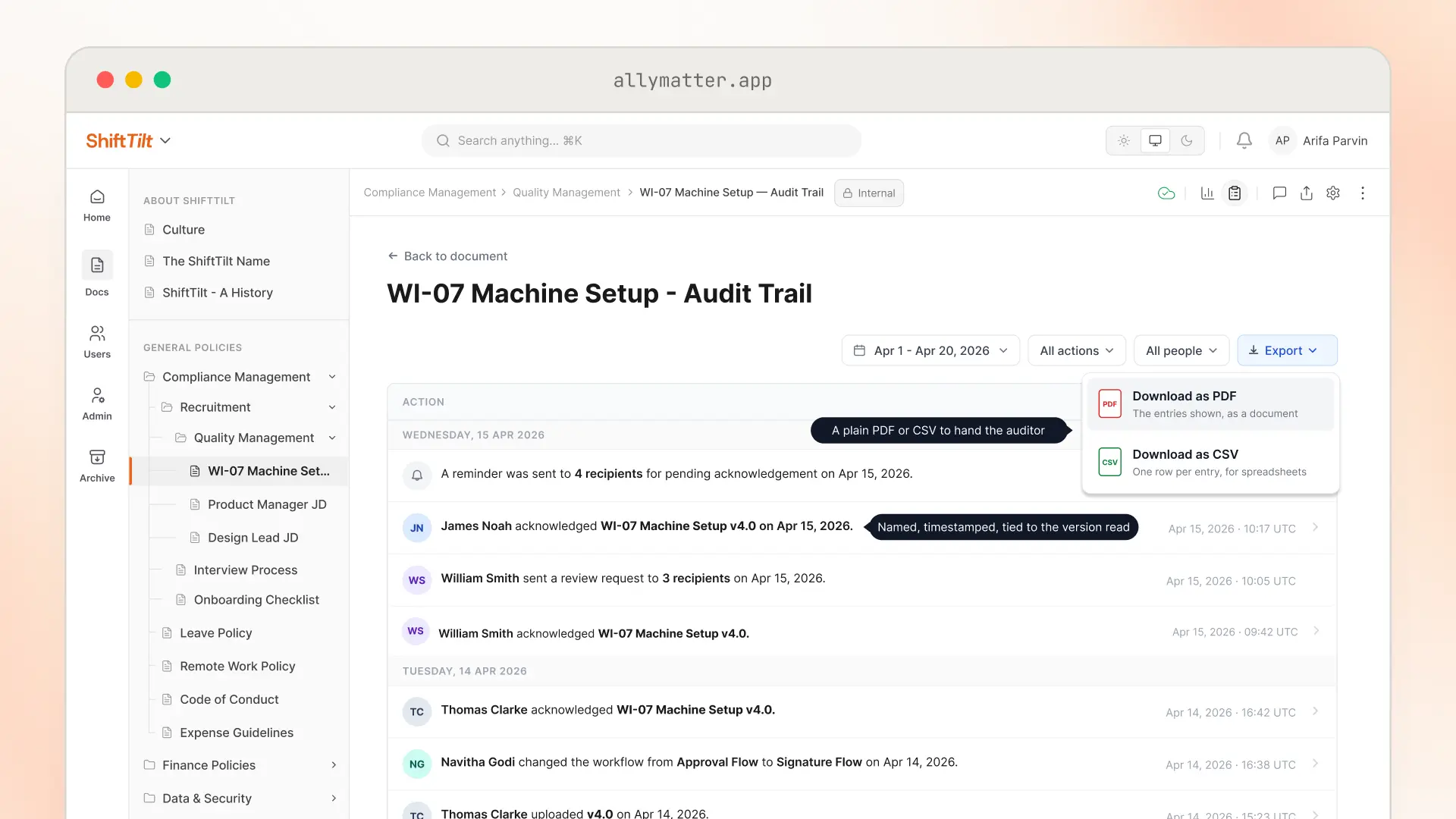
Every approval, version, distribution and acknowledgment is logged. When a carrier, a regulator or an auditor asks who approved a procedure and who has read it, export the log as a PDF or CSV.
What to look for in insurance knowledge management software
If most of your knowledge is policy, judge the software the way you would judge a policy system. These are the seven things worth checking.
- Approval before anything is published. A guideline should reach staff only after the right people have signed off, in a defined order.
- One current version, with the history kept. Staff should only ever open the approved version, while you can still see and compare every earlier one.
- Access by team. Claims, underwriting and HR each see what applies to them, and sensitive documents stay with the people who need them.
- Acknowledgment by name and version. You should be able to see who has read the current version, and the system should ask again whenever it changes.
- Review dates. Each policy gets a date when its owner has to confirm it is still right, with a reminder that does not depend on anyone’s memory.
- A record you can export. When a carrier, regulator or auditor asks, the approvals, versions and acknowledgments should come out as a file, not a week of searching.
- Pricing that does not charge for every reader. An agency’s whole staff has to read policies, but only a few people write them, so the price should follow the writers.
AllyMatter charges for the people who write and manage policies, and everyone who only reads and acknowledges them is free, however many there are. See pricing for the current plans.
Frequently asked questions
Is AllyMatter a knowledge base or policy management software?
Both, with policies first. AllyMatter is policy management software, and it works as a knowledge base of policies: one place where every guideline, procedure and policy lives as an approved, versioned document, sent to the people it covers, with a record of who has read it.
How does AllyMatter control who sees sensitive documents?
Tags decide who can see each document, and every document is set to Private, Internal or Public. A claims manual can sit with the claims team only, while the employee handbook goes to everyone. Every change to access is recorded in the audit trail.
How does AllyMatter fit alongside our insurance systems?
AllyMatter holds the documents your teams work from, such as claims guidelines, underwriting rules and training materials. Your claims, policy administration and customer relationship systems keep doing their jobs, while AllyMatter keeps the documents around them current, approved and acknowledged, with the record exportable as a PDF or CSV.
Can our outside counsel approve policies?
Yes. Invite your lawyer into the workspace and add them as an approver on the documents they need to review, so their sign-off is recorded with the version they approved.
What happens when a policy changes?
The new version goes through approval, and once it is approved, everyone it covers is asked to acknowledge it again. Until then, people keep seeing the last approved version, and the earlier versions stay in the history.
How long does it take to set up?
Setup takes about half an hour. Moving your documents in yourself takes about a day, and for a large volume of documents the migration service on yearly plans usually finishes within a week and often sooner.
Start your 30-day free trial of AllyMatter. No credit card to start, and a 30-day money-back guarantee if you subscribe and change your mind. Free migration.