

Product Updates · 5 min read
Document Workflows in AllyMatter: A Complete Guide
Let me walk you through how document workflows function in AllyMatter, from initial creation to final acknowledgment. I’ll explain each component in detail so you can understand how to effectively manage your document lifecycle.
Creating your initial workflow
When you first create a document in AllyMatter, you’ll need to establish who needs to be involved in its review and approval. This is more than just making a list – it’s about creating a structured process that ensures quality, compliance, and proper oversight.
The Editor and the review sequence
Every document has one Editor, the person who creates it. The Editor drafts the document and then sends it into review, where you specify the exact order in which reviewers should see it. This is particularly important when different departments need to contribute their expertise in a specific sequence.
For example, let’s say you’re creating a new customer refund policy. The Editor drafts it with process details from the Customer Success team, then you might set up the following review sequence:
- Finance team to review financial implications
- Legal team to ensure compliance and add necessary disclaimers
- Operations team to confirm process feasibility
Each reviewer is notified when it’s their turn. This prevents confusion and ensures each department’s input is properly incorporated.
Configuring the approval chain
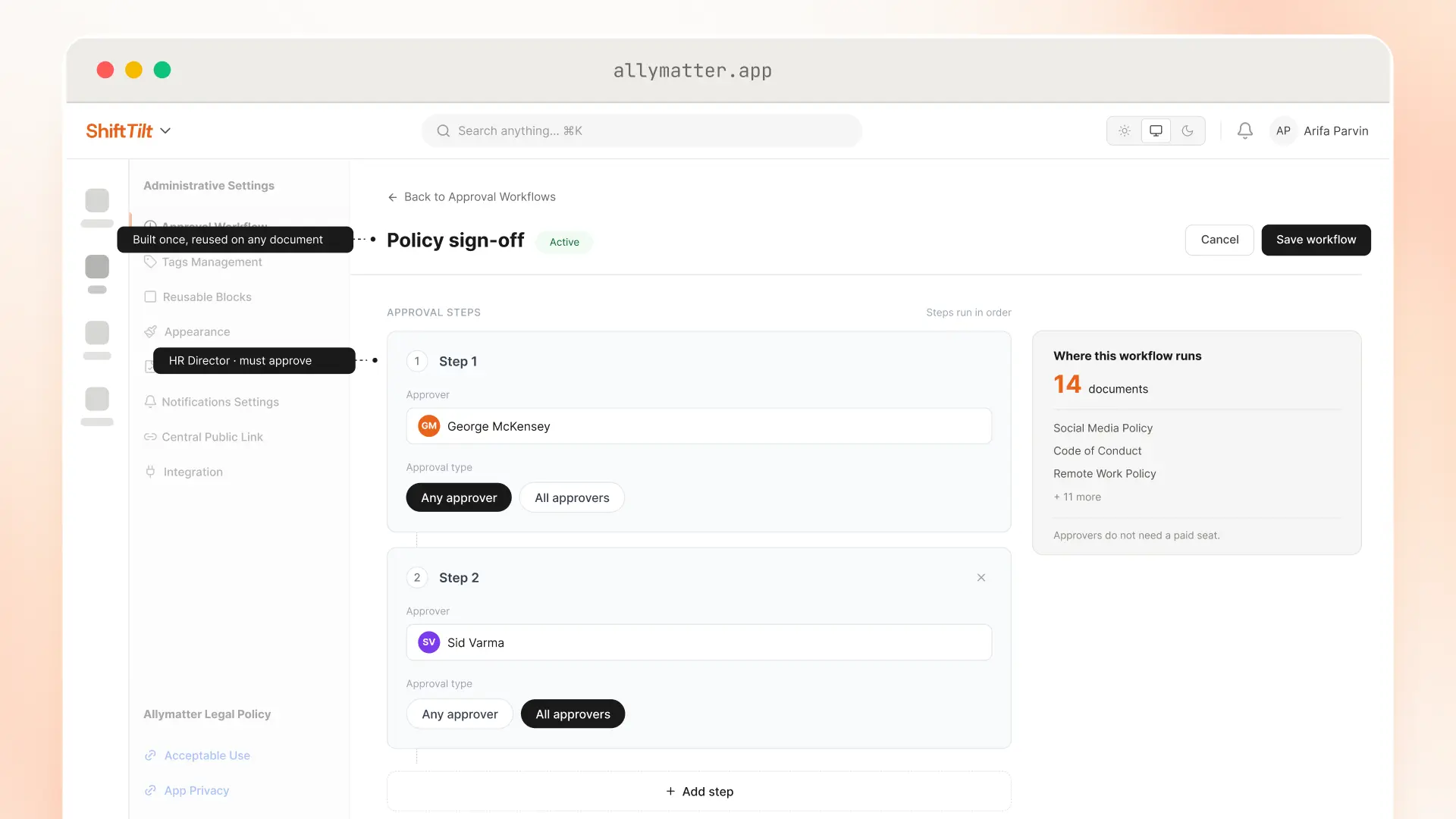
After drafting, you’ll need to set up your approval chain. This is where AllyMatter’s sequential approval system becomes crucial. You can include both internal and external approvers, and you can specify the exact order of approvals.
The approval chain might look something like this:
- Department head review and approval
- Compliance officer sign-off
- External legal counsel review
- Final executive approval
Each approver in the chain must complete their review before the document moves to the next person. This ensures nothing slips through the cracks and creates a clear audit trail of who approved what and when.
Document signatures and legal acknowledgment
When your document requires formal signatures, AllyMatter’s built-in e-signature, an add-on on the Scale plan, streamlines this process. You can specify which individuals need to provide signatures, set a signing deadline, and choose whether signers go in parallel or in sequence, and the system routes the document to each signer.
The signature process is particularly robust:
- The system tracks who has signed and who hasn’t
- Automated reminders are sent to those who haven’t completed their signatures
- The platform keeps a record of every signature in the audit trail
- You can monitor signature status in real-time
Managing document distribution and acknowledgment
Once your document has received all necessary approvals and signatures, you’ll need to ensure it reaches its intended audience and that they acknowledge receipt and understanding. AllyMatter provides several methods for this final phase.
Platform acknowledgment
The simplest method is using AllyMatter’s built-in acknowledgment system. Users acknowledge directly within the platform, and the system records their name, email, version, time and IP address.
Slack notifications
For broader distribution, you can turn on AllyMatter’s Slack notifications on the Scale plan, set up under Admin > Integrations. The system can automatically send notifications to your Slack workspace when new or updated documents require acknowledgment. This is particularly useful for company-wide policies or updates.
Email notifications
The platform also supports email notifications for those who might not regularly check Slack or the platform. These emails can include direct links to the document.
The notification and reminder system
AllyMatter’s notification system is both comprehensive and configurable. Here’s how it manages different types of notifications:
Immediate notifications
- Reviewers receive alerts when it’s their turn to review
- Approvers are notified when the document reaches them in the sequence
- Users get notifications when they need to acknowledge new or updated documents
Reminder system
You can configure reminder intervals for different types of actions:
- Review-date reminders to the document’s Editor
- Approval reminders for pending approvals
- Signature reminders for unsigned documents
- Acknowledgment reminders for users who haven’t confirmed receipt
These reminders can be sent through multiple channels (email, Slack on the Scale plan, or platform notifications) and can be set to repeat at specified intervals until the required action is completed.
Monitoring and managing the process
Throughout the workflow, you have full visibility into the document’s status. The system shows:
- Current stage in the workflow
- Who has completed their assigned tasks
- Who is currently responsible for action
- Any bottlenecks or delays
- Complete history of all actions taken
This transparency allows you to proactively manage the process and ensure documents move through the workflow efficiently.
Exception handling
Sometimes workflows don’t proceed as planned. AllyMatter accounts for this with several features:
- The ability to modify the workflow if someone is unavailable
- Options to add additional reviewers if needed
- Capability to revert to previous versions if necessary
- Flexibility to restart the approval process if significant changes are required
Record keeping and audit trails
Every action in the workflow is automatically recorded and stored. This includes:
- Who viewed the document and when
- All edits and changes made
- Approval timestamps and approver details
- Signature records
- Acknowledgment data
- All notification and reminder attempts
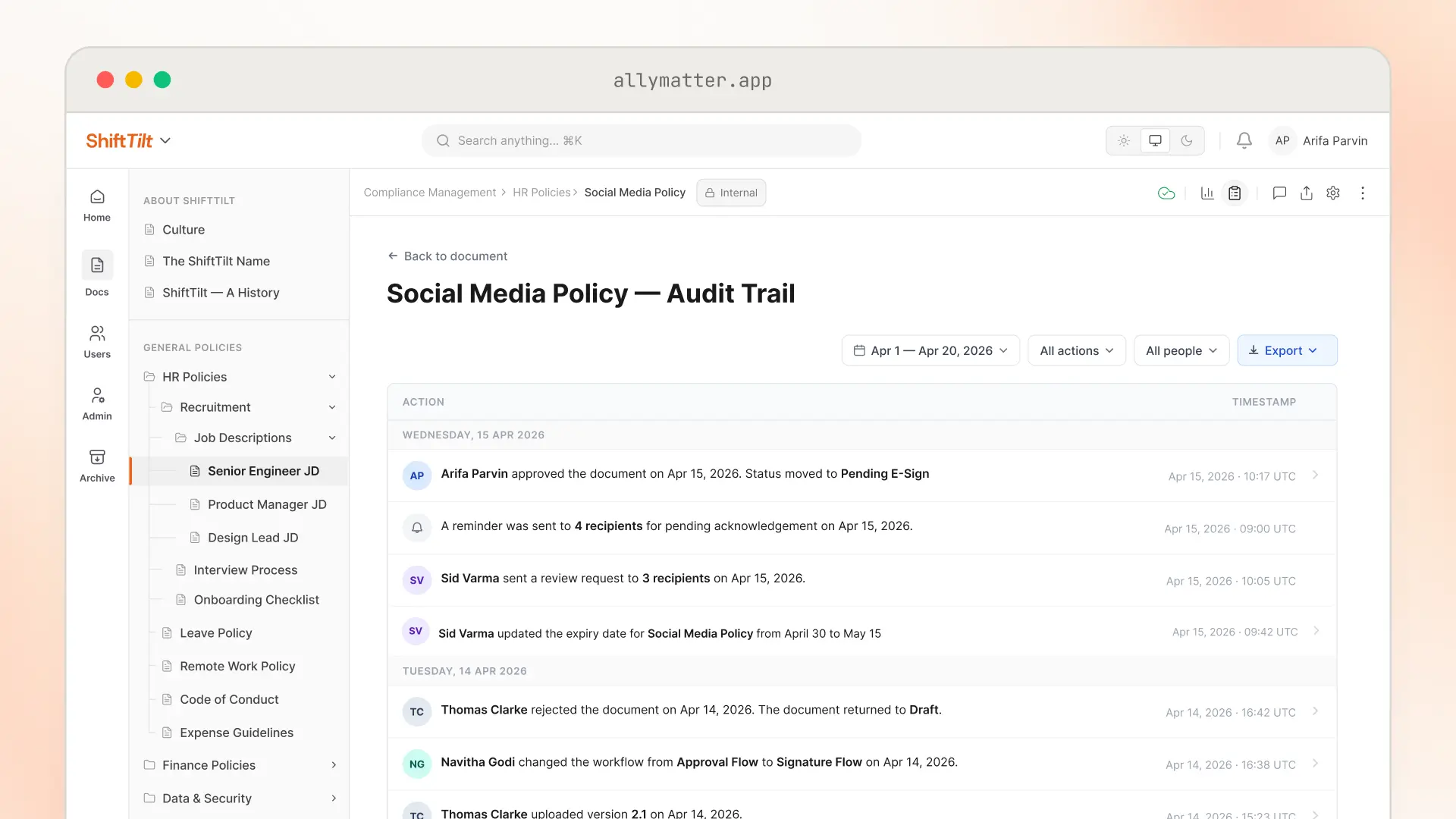
This comprehensive record-keeping ensures you have a complete audit trail for compliance purposes and can demonstrate proper document handling when needed.
Research from PwC shows that 35% of risk executives view compliance and regulatory risk as the top barrier to their company’s growth, highlighting why comprehensive audit trails are crucial for business continuity.
Using these workflow features effectively requires some initial setup, but once established, they significantly reduce the administrative burden of document management while ensuring proper oversight and compliance.
Ready to transform your document workflows? Start your 30-day trial and experience streamlined approval processes and automated workflow management.
Frequently asked questions
How does AllyMatter handle workflow bottlenecks when someone is unavailable?
AllyMatter provides flexibility to modify workflows on the fly. You can reassign tasks to available team members, add substitute reviewers, or temporarily skip steps while maintaining the audit trail. The system tracks every modification.
Can I set different reminder intervals for different types of workflow actions?
Yes, AllyMatter allows customizable reminder schedules for each workflow stage. You can set different intervals for approvals, signatures, and acknowledgments, and review-date reminders go to the document’s Editor. For example, approval reminders might be daily while signature reminders could be every three days.
What happens if significant changes are needed after the approval process begins?
When major revisions are required, you can restart the approval workflow while preserving the complete history. The system maintains version control and keeps the full history of every earlier round.
How detailed is the audit trail for compliance purposes?
AllyMatter captures every action with timestamps, user identification, and context. This includes document views, edits, approvals, signatures, and all notifications sent. The audit trail is searchable and can be exported for compliance reporting or legal requirements.