

E-sign · 10 min read
Faster Document Approval With AllyMatter E-Sign
Your legal team has just finalized an updated vendor payment policy. Now comes the challenge – collecting authorized signatures from five department heads scattered across different locations. Without integrated tools, this typically means exporting documents, sending multiple emails with attachments, dealing with printing and scanning from some executives, and manually tracking who has signed and who hasn’t. This fragmented process creates delays, version confusion, and compliance vulnerabilities.
For growing organizations with increasing documentation requirements, the e-signature process often becomes a bottleneck that delays critical operations and creates unnecessary friction. The solution isn’t adding yet another disconnected tool to your technology stack – it’s integration.
Why traditional e-signature workflows create friction
The typical document approval workflow in most growing companies resembles an obstacle course rather than a streamlined process. A document begins in a drafting system, then moves to email for review, gets exported to a separate e-signature platform, and finally returns to storage in yet another system.
This fragmented approach creates several problems:
Context switching costs: Recent research reveals the substantial productivity drain caused by app switching. According to a study published in Harvard Business Review, workers toggle between applications nearly 1,200 times daily, spending approximately four hours per week just reorienting themselves after switching contexts – that’s roughly 9% of their total work time.
Document ready for e-signature when:
- All required reviews are complete
- Document version is finalized and locked
- Appropriate signatories are identified
- Access permissions are properly set
Tracking complexity: When documents move between systems, maintaining visibility on their status becomes challenging. Has the CFO signed yet? Did the updated version get sent to everyone? Which version is final? These questions consume valuable time.
Security vulnerabilities: Each system transition creates potential security gaps. Documents exported to email or uploaded to separate signature platforms may not maintain the same security standards, creating compliance risks.
Disconnected audit trails: When documents move between platforms, maintaining a complete audit record becomes nearly impossible. This creates accountability gaps that can become problematic during compliance reviews.
Version control issues: Moving between systems frequently leads to version confusion – ensuring everyone is signing the most current document becomes a manual, error-prone task.
The market shift toward integrated e-signatures
The need for integrated signature solutions is reflected in the explosive growth of the digital signature market. According to MarketsandMarkets, the global digital signature market is projected to grow from $9.93 billion in 2024 to $70.24 billion by 2030, at a compound annual growth rate (CAGR) of 38.5%.
This growth is driven by several factors:
- Increasing regulatory acceptance of digital signatures across industries
- Growing need for efficient, remote document workflows
- Rising demand for security and compliance solutions
- Adoption of cloud-based services that enable seamless document processing
For knowledge management specifically, integration is becoming a critical differentiator. While standalone e-signature tools serve their purpose, the real productivity gains come from embedding signature capabilities directly into the systems where documents live.
Why integrated e-signatures transform document workflows
Integration fundamentally changes the document approval experience. Instead of fragmented processes across multiple systems, integrated e-signatures keep documents within your central knowledge management system throughout their lifecycle.
This integration delivers several key benefits:
Seamless workflows: Documents move naturally from drafting to review to signing without changing platforms. This continuity eliminates friction points that typically delay approvals.
Complete visibility: All stakeholders can see a document’s status in real-time – who has signed and what steps remain. This transparency eliminates confusion and reduces follow-up time.
Unbroken access control: Documents remain within a single system throughout the signature process, so the tags and visibility settings that decide who sees a document keep applying.
Continuous audit trails: Every action, from creation through signing, is captured in a single, comprehensive audit trail. This unbroken chain of documentation proves invaluable during compliance reviews.
Simplified user experience: Team members don’t need to learn multiple systems or remember different login credentials. The signature process becomes a natural extension of the document management experience.
AllyMatter’s built-in e-signature: Key features and benefits
AllyMatter’s approach to e-signatures focuses on seamless integration with your existing document workflows. The feature set includes:
Multiple signature options: The system supports different signatory requirements, from simple acknowledgments to legally binding e-signatures. This flexibility allows teams to match the right signature format to each document’s specific needs.
Signing order and deadlines: When you distribute the document and choose the e-sign option, pick parallel or sequential signing so the right people sign in the right order, set a signing deadline, and let reminders keep the request moving. A request can be cancelled if the document changes.
Signature status tracking: Real-time status shows which team members have signed and which signatures remain outstanding. This visibility makes follow-up targeted and efficient.
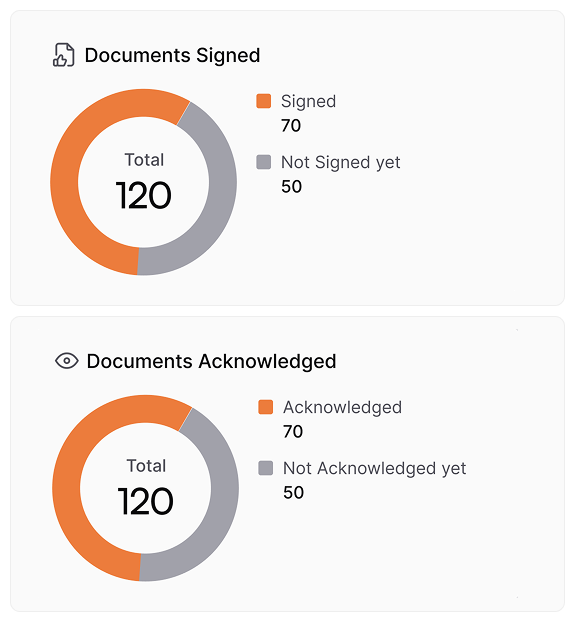
Document-centered approach: Unlike standalone signature tools that treat documents as separate entities, AllyMatter’s built-in signature capability keeps the document at the center of the process. This document-centric approach ensures context remains intact throughout the approval flow.
When to use different signature types:
- Simple acknowledgment: Policy updates, training completion
- Standard e-signature: Vendor agreements, internal contracts
- Multi-level approval: Financial authorizations, legal documents requiring executive oversight
Practical applications across departments
The integrated e-signature functionality addresses specific challenges across different organizational functions:
HR departments
HR teams frequently need signatures on policies, compliance documents, and onboarding materials. With integrated e-signatures, HR managers can:
- Send policy updates directly to relevant team members without leaving the document platform
- Track acknowledgment status for each policy in real time, or close to it
- Maintain audit trails showing when each policy was sent and who signed it
Consider this scenario: The HR department of a company implements a new parental leave policy, which needs signatures from 12 different department heads. With a traditional process, this would have taken weeks of follow-up. With integrated signatures, they can complete the entire process in a few days with almost no manual tracking.
Read more: How to Build a Knowledge Base for HR Teams
Legal and compliance teams
For legal departments, document signing often involves complex routing and strict compliance requirements. Integrated e-signatures enable legal teams to:
- Create standardized approval workflows for different document types
- Ensure proper versioning so signatures apply to current document versions
- Maintain defensible audit trails for regulatory compliance
- Implement proper access controls throughout the signature process
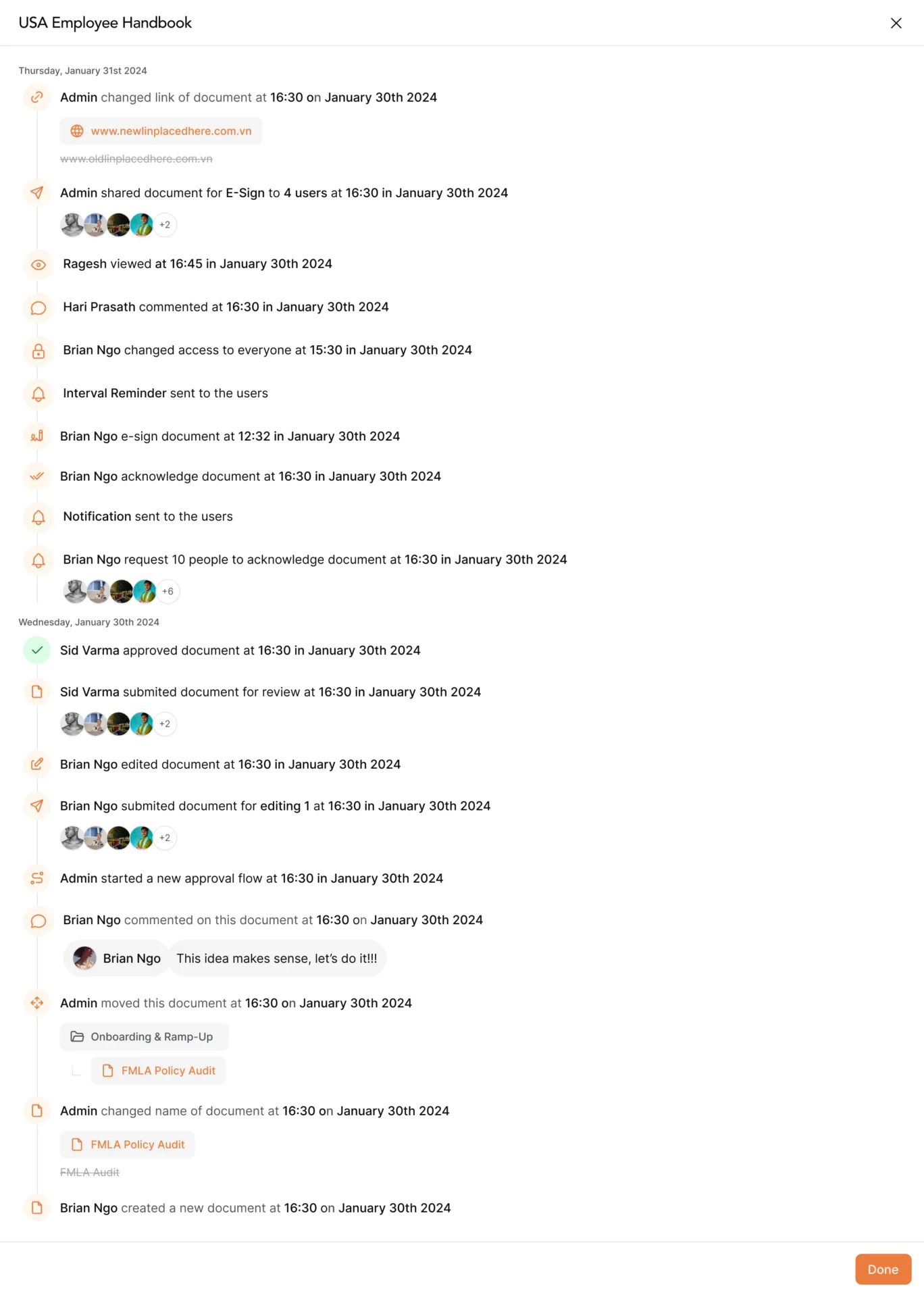
When facing audit situations, this seamless documentation becomes particularly valuable. Instead of scrambling to compile evidence from multiple systems, legal teams can quickly produce complete records showing the entire document lifecycle.
Finance departments
Finance teams deal with numerous approval workflows for vendor contracts, payment authorizations, and financial policies. Built-in signature tools help finance leaders:
- Standardize approval processes for different transaction types
- Implement proper controls with multi-level signatures when required
- Create clear accountability through permanent audit records
- Reduce delays in payment processing and vendor management
When payment approval thresholds change, the updated policy can go out for signature from the same document it was written in, so department heads and finance team members sign without a separate tool or an email back-and-forth.
Operations teams
For operations leaders, process documentation and standard operating procedures require regular updates and approvals. Integrated signatures allow operations teams to:
- Quickly collect approvals on updated operating procedures
- Ensure field teams acknowledge critical process changes
- Maintain clear records of who has approved each process version
- Streamline training verification and compliance documentation
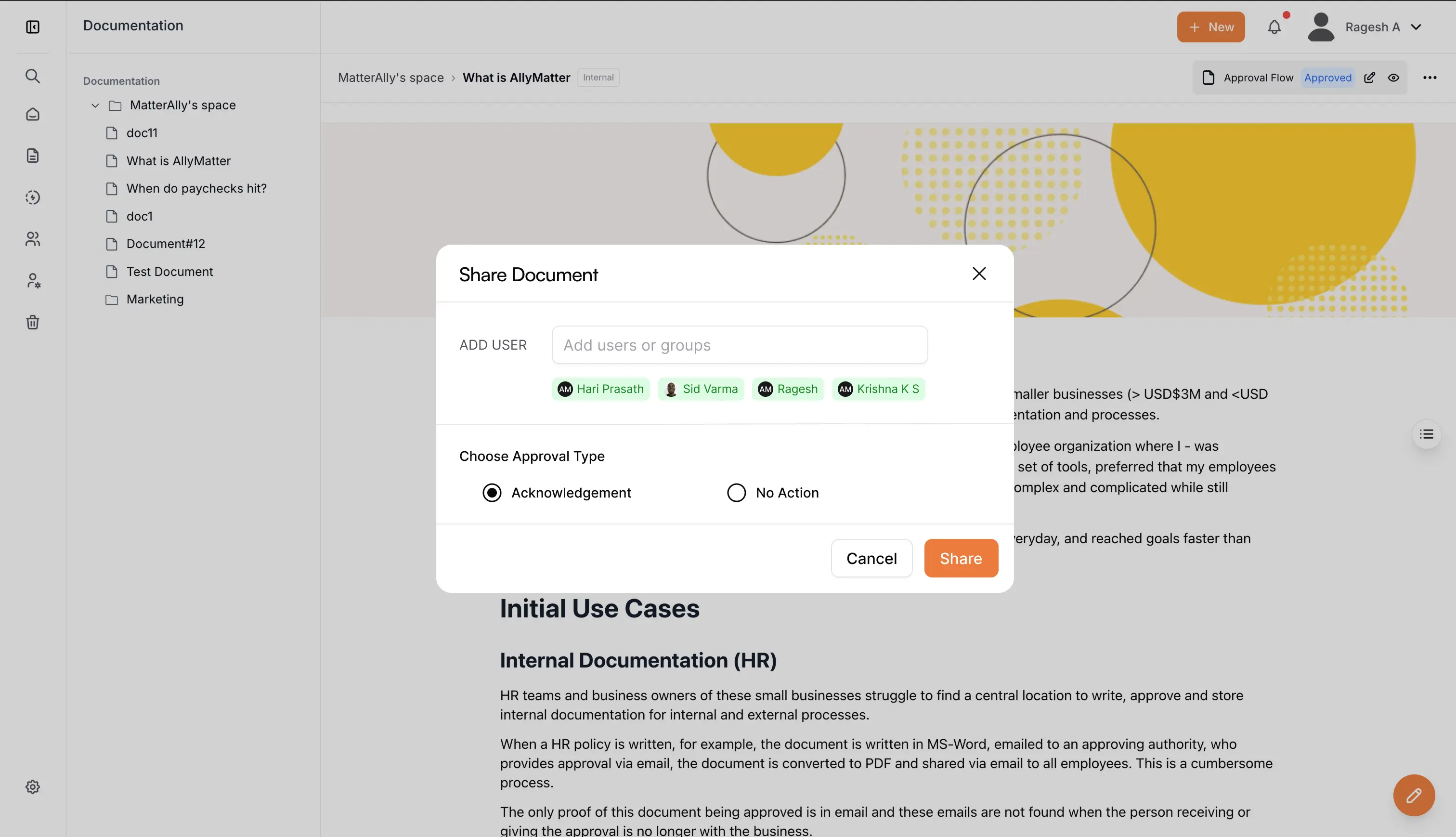
The unified approach helps ensure operational knowledge remains consistent even as teams grow or change. This consistency is critical for maintaining operational standards during growth periods.
Implementation considerations for success
When implementing integrated e-signature capabilities, consider these best practices:
Define signature requirements by document type: Not every document needs the same level of signature formality. Create clear guidelines for when to use simple acknowledgments versus full e-signatures.
Create clear signing workflows: Define standard processes for different document types, including who needs to sign, in what order, and what happens after signing is complete.
Train team members on proper verification: Ensure everyone understands how to verify that they’re signing the correct version and how to check signature status.
Establish proper documentation categories: Organize signed documents into logical categories with appropriate retention policies and access controls.
Implement regular audit reviews: Schedule periodic reviews of signature compliance to identify any gaps or process improvements.
Consider mobile access needs: Ensure your e-signature solution works well on mobile devices, as many approvals happen on-the-go.
Test with real-world scenarios: Before full implementation, test signature workflows with actual documents from various departments to identify any potential friction points.
The compliance advantage of integrated signatures
Beyond operational efficiency, integrated signatures create significant compliance advantages. When signature processes remain within your knowledge management system, you gain:
Documentation continuity: Every stage of a document’s lifecycle is recorded in a single system, eliminating gaps that often occur when transferring between platforms.
Access control consistency: Tags and visibility settings keep deciding who can see the document throughout the signature process, with no hand-off to a separate tool.
Version integrity: The system ensures signatures always apply to the correct version, eliminating confusion about which document version was actually approved.
Simplified audit responses: When auditors request documentation, you can quickly provide complete records showing the entire approval process from a single system.
Beyond basic signatures: Building a documentation culture
While e-signatures offer immediate practical benefits, their true value emerges when they become part of a broader documentation culture. Organizations that excel at knowledge management use integrated signatures to:
Standardize approval processes: Clear signing workflows create consistency in how documents move from draft to approved status.
Increase accountability: When signing occurs within the same system where documents live, it creates natural accountability for document content and approval.
Improve documentation quality: Formalized approval processes tend to improve document quality, as authors know their work will undergo structured review.
Strengthen institutional memory: Proper signature trails create clear records of who authorized specific decisions, preserving valuable context as organizations grow.
A study by Qatalog found that workers spend nearly one hour daily searching for information between collaboration, storage, and messaging apps, with 45% reporting that context-switching hampers productivity. By keeping signatures and documents together in one system, organizations eliminate this common productivity drain.
Moving forward with integrated signatures
For growing organizations, the shift to integrated e-signatures represents a significant step toward more mature documentation practices. Instead of treating document creation, approval, and storage as separate functions, this approach unifies the entire document lifecycle.
Because signing happens in the same place where documents live, the app switching goes away, and the signed document stays alongside its tags, version history, and audit trail.
By eliminating friction in the approval process, integrated e-signatures help teams focus on what matters – creating clear, well-structured documentation that supports organizational growth and compliance. Specifically for approval processes, this can accelerate document turnaround times and improve team satisfaction with documentation systems.
Documentation that moves at your company’s pace
Growing companies need documentation systems that enable speed rather than constrain it. When signature processes become bottlenecks, they create unnecessary friction that slows organizational momentum.
Integrated e-signatures remove this friction. By keeping documents within a single system from creation through signing, organizations can maintain both speed and compliance – ensuring documentation becomes an asset rather than an obligation.
Chasing signatures through email is a process problem with a straightforward fix. Start your 30-day trial and see how AllyMatter’s e-signature tool keeps approvals moving without the back and forth.
Frequently Asked Questions
What makes integrated signatures better for compliance audits?
Integrated signatures create comprehensive audit trails within a single system, showing document creation, revisions, approvals, and signatures. This eliminates the documentation gaps that occur when using separate signature platforms, providing auditors with complete visibility into your approval processes.
Are e-signatures created in knowledge management systems legally binding?
Yes, e-signatures created within AllyMatter meet the legal requirements established by major regulatory frameworks like eIDAS in Europe and ESIGN/UETA in the United States. The platform includes clear intent to sign, and comprehensive audit trails that meet legal standards for electronic signatures.
How do integrated e-signatures improve compliance?
Integrated e-signature tools improve compliance in two key ways: 1) They maintain unbroken audit trails from document creation through approval, and 2) They keep tags and visibility settings deciding who can see the document throughout the signature process.
Can integrated e-signatures be used for external parties who don’t have access to our system?
Yes. People outside your company can sign a document, and they receive the e-signed document by email.
How does AllyMatter’s approach differ from standalone e-signature tools like DocuSign?
AllyMatter’s e-signatures remain within your knowledge management system, eliminating document exports and keeping the document where it already lives. Unlike standalone tools that create workflow breaks, our integrated approach preserves document context and creates unbroken audit trails from creation through signature.
Can we set up different signature workflows for various document types?
Yes, AllyMatter supports parallel or sequential signing, chosen when you distribute the document, and approval workflows you build yourself. You can create different processes for HR policies, financial documents, vendor agreements, and other document types, and tags decide who receives each one.
How do signed documents fit with the rest of our documentation?
The document you send for signature stays the same document in AllyMatter, with its tags, version history, and audit trail around it, so it is easy to locate and reference later.