

Product Updates · 6 min read
Collaborative Feedback: AllyMatter Makes Better Documents
In growing organizations, document creation is rarely a solo endeavor. The best policies, procedures, and knowledge bases emerge through collaboration, incorporating diverse perspectives, expertise, and experiences. Yet traditional documentation tools often make this collaboration cumbersome, with feedback scattered across emails, chat messages, and meetings, leading to disconnected input and lost insights.
AllyMatter’s Comment & Feedback System transforms this fragmented approach into a streamlined, contextual collaboration process that enhances document quality while keeping the conversation next to the content it is about.
The foundation: Why document feedback matters
Poor collaboration processes create real business challenges:
- When critical expert feedback gets buried in lengthy email threads
- When reviewers provide contradictory suggestions without visibility to each other’s comments
- When document Editors struggle to track which feedback has been addressed
- When the reasoning behind important policy decisions is lost over time
For scaling enterprises, these issues compound as more stakeholders become involved in documentation processes. Effective feedback systems aren’t just about gathering input; they’re about facilitating meaningful dialogue that improves content quality and preserves decision context.
AllyMatter’s comment & feedback system: Core capabilities
1. Inline commenting
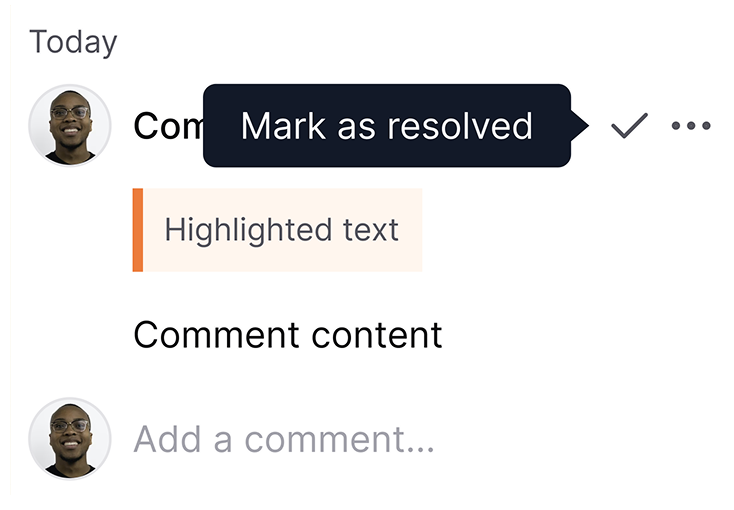
AllyMatter enables precise, in-context feedback:
- Inline comments that connect feedback directly to specific content
- Comments from the right people: Admins, the document’s Editor, and approvers can all comment inline
This contextual approach eliminates the ambiguity of general feedback. When your legal team suggests revising policy language, their comments appear directly alongside the relevant text, not in a separate document or email thread.
2. Resolving comments
Feedback gets closed out in the document itself:
- Comment resolution marks addressed feedback as resolved.
- Unresolved comments show what still needs attention.
This keeps feedback from simply accumulating. When your compliance team raises a concern about a procedure, the Editor can address it in the text and resolve the comment, so everyone can see what is still open.
Real-world feedback scenarios
Policy Development
When your HR team drafts a new remote work policy:
- Initial reviewers provide inline feedback on specific provisions.
- Legal, Finance, and Operations reviewers add inline comments about implementation challenges.
- The Editor addresses each comment and resolves it.
- Once every comment is resolved, the policy goes forward for approval.
This collaborative approach results in more robust policies that genuinely reflect cross-functional considerations rather than siloed perspectives.
Procedure optimization
When your customer service team updates support escalation procedures:
- Reviewers highlight specific pain points through inline comments.
- Team leads suggest alternative approaches based on their experience.
- Technical teams provide input on system capabilities and limitations.
- The Editor works through conflicting suggestions and resolves each comment.
- The final procedure incorporates diverse perspectives and practical realities.
- Implementation is smoother because stakeholders were involved throughout development.
This feedback-driven improvement cycle creates procedures that work in practice, not just in theory, by incorporating expertise from every level.
Knowledge base development
When building technical documentation for your product:
- Subject matter experts provide detailed technical comments.
- Customer-facing teams add insights about common user questions.
- Writers and editors suggest clarity improvements through inline comments.
- Developers and product managers discuss upcoming changes.
- The resulting documentation balances technical accuracy with usability.
- Continuous feedback keeps content current as the product evolves.
This collaborative knowledge development ensures documentation serves its actual users, not just its creators’ assumptions.
Best practices for feedback and commenting
To maximize the effectiveness of AllyMatter’s feedback capabilities:
- Establish clear feedback guidelines that explain what types of input are most helpful.
- Encourage specific, actionable comments rather than general observations.
- Implement review cycles with appropriate stakeholders at each stage.
- Explicitly close feedback loops by resolving comments once they are addressed.
By embedding these practices into your documentation culture, feedback becomes a powerful tool for continuous improvement rather than a bureaucratic hurdle.
The business impact of effective feedback systems
While document feedback may seem procedural in nature, its business impact is substantial:
- Higher-quality documentation that incorporates diverse expertise
- Faster review cycles through streamlined feedback processes
- Better cross-functional alignment on important policies and procedures
- Reduced risk from more thoroughly vetted content
For expanding teams, these benefits translate to more effective operations, smoother scaling, and greater resilience during team transitions and organizational changes.
Getting started with AllyMatter’s comment & feedback system
Implementing effective feedback processes is straightforward with AllyMatter:
- Identify key stakeholders for different document types
- Establish feedback workflows appropriate to document importance
- Train teams on constructive commenting practices
- Schedule regular review of feedback patterns to improve processes.
AllyMatter helps you start with simple commenting and gradually implement more sophisticated feedback workflows as your organization matures.
Conclusion: Feedback as a competitive advantage
In today’s complex business environment, no single individual holds all the knowledge needed to create truly effective documentation. AllyMatter’s Comment & Feedback System transforms document development from an isolated task into a collaborative process that captures your organization’s collective intelligence.
Whether you’re developing critical policies, refining operational procedures, or building comprehensive knowledge bases, AllyMatter’s feedback capabilities ensure every relevant perspective contributes to the final result. The outcome isn’t just better documentation; it’s a more aligned organization with a clear understanding of why things work the way they do.
Don’t settle for documents created in isolation. With AllyMatter, you can leverage your entire team’s expertise to create documentation that genuinely serves your organization’s needs.
Ready to experience contextual document collaboration? Start your 30-day trial and see how AllyMatter transforms team feedback workflows.
Frequently asked questions
How does AllyMatter’s commenting integrate with our existing document workflows?
AllyMatter’s comment system works within your documents rather than requiring separate review tools. Unlike email-based feedback or external annotation tools, all comments stay contextually tied to specific content. This means your existing stakeholders can provide input directly where it’s needed, without changing their fundamental review process but dramatically improving organization and tracking.
Who can comment on a document?
Admins, the document’s Editor, and the document’s approvers can add inline comments, so feedback comes from the people responsible for the document.
How do comments get closed out?
Once the feedback in an inline comment has been addressed, the comment can be marked resolved. Unresolved comments show the Editor what still needs attention.