

Small Business Compliance · 13 min read
AI Acceptable Use Policy: What to Include and How to Roll It Out
An AI acceptable use policy is the company policy that tells your employees and contractors which AI tools they may use for work, what information may and may never go into them, how to check what the tools produce, and when AI use has to be disclosed. It is one of the newest policies in our guide to small business compliance, and for most small and growing companies it is now one of the most urgent, because people are already using these tools whether or not a policy exists.
The problem it solves is simple to state. Someone pastes a customer list into a chatbot to tidy it up, someone else drafts a contract clause and sends it without checking, and a third person signs up for a new AI note-taker on a personal account and connects it to the team’s meetings. None of them meant any harm, and none of them broke a rule, because there wasn’t one.
Key takeaways
- An AI acceptable use policy sets the approved tools, the data rules, the duty to check output, and when AI use must be disclosed.
- A three-color data rule that people remember does more than a long list nobody reads.
- The person who uses AI output stays responsible for it, and decisions about people always need human review.
- AI tools change every few months, so the policy needs a named owner, frequent reviews, and a fresh acknowledgment each time it changes.
What is an AI acceptable use policy?
An AI acceptable use policy, also called a generative AI policy or an AI usage policy for employees, is a set of rules for how people at your company use artificial intelligence tools in their work. It covers the standalone chat assistants everyone knows, and also the AI features that now sit inside tools you already pay for, such as writing help in your documents, summaries in your meeting software and assistants in your code editor.
It sits alongside your existing acceptable use and information security policies rather than replacing them. Some companies add an AI section to the acceptable use policy, while others keep a separate AI policy, because the approved tools change so often that a separate document is easier to update without reopening everything else. Either way, it should follow the same process as your other policies, with an owner, an approval, a review date and a record of who has acknowledged it, which our guide to policy governance sets out.
Why small businesses need one now
Large companies wrote AI policies early because their legal and security teams insisted on it. Smaller companies often haven’t, which leaves three real risks sitting in day-to-day work.
Data leaving your control. Information typed into a tool on a personal account sits under that tool’s terms rather than yours, and customer contracts, privacy promises and health or financial rules may forbid sending it there at all.
Confident mistakes. Generative tools produce fluent text that can be wrong, out of date or invented, and a customer email, a policy draft or a piece of code that nobody checked carries those mistakes straight into your business.
Questions you can’t answer. Customers increasingly ask in security reviews how you control AI use, and “we trust our people” is not an answer that passes. A written, approved and acknowledged policy is.
The public guidance points the same way. The National Institute of Standards and Technology published its voluntary AI Risk Management Framework in January 2023 and a companion profile for generative AI in July 2024, both of which treat clear organizational policies and human oversight as basic controls, and the Future of Privacy Forum’s internal policy checklist for generative AI covers legal compliance, training, disclosure of use and checking outputs.
Sources: NIST AI 100-1, Artificial Intelligence Risk Management Framework (AI RMF 1.0), January 2023, NIST AI 600-1, Generative Artificial Intelligence Profile, July 2024, fpf.org (Generative AI for Organizational Use: Internal Policy Checklist, 2023)
What an AI acceptable use policy should include
Most published examples cover a handful of these sections and leave the rest to the reader. The outline below covers all twelve that a 20 to 500 person company needs, in plain language you can adapt, and it is our own outline rather than a copy of any template.
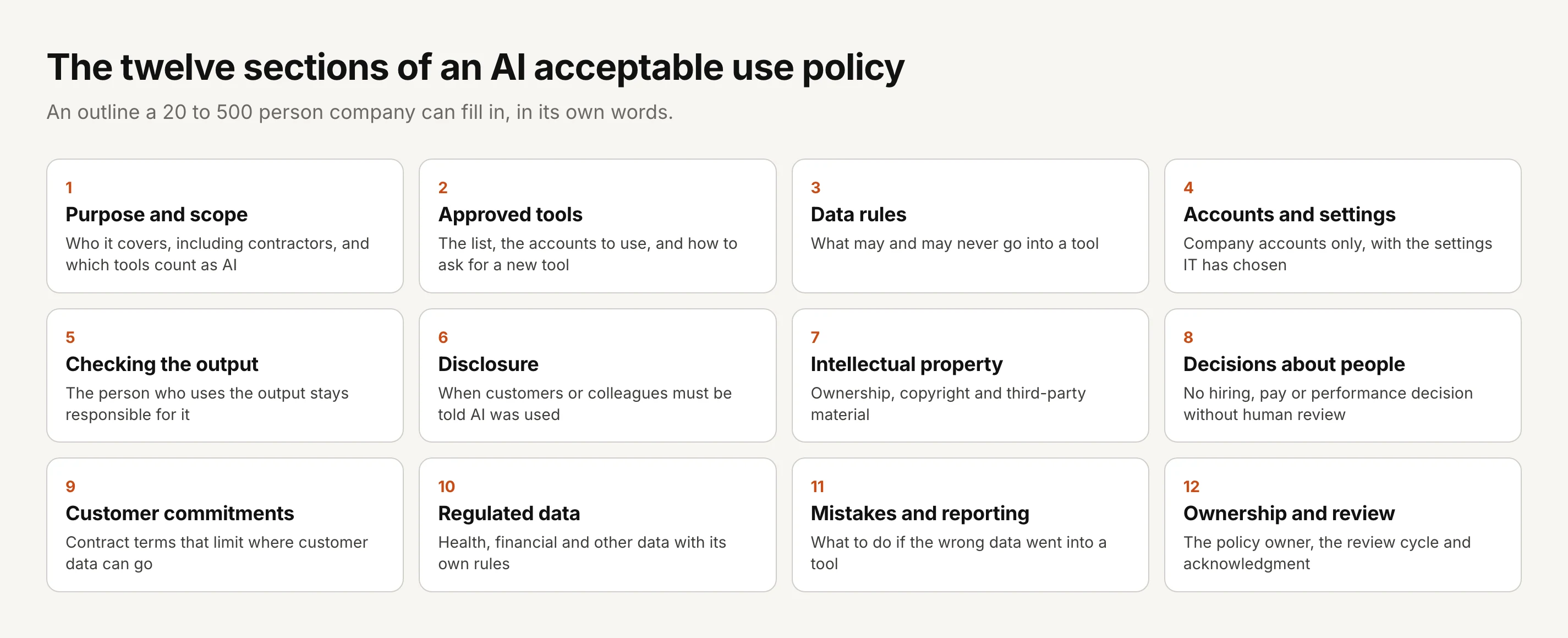
1. Purpose and scope. Say why the policy exists and who it covers, which should include contractors and temporary staff who use your systems, not only employees. Define AI tools broadly enough to include AI features inside existing software, because that is where most new use quietly arrives.
2. Approved tools. List the tools people may use, what each is approved for, and which account to use, then explain how someone asks for a new tool and who decides. Keeping the list in a short appendix makes it easy to update without rewriting the policy.
3. Data rules. This is the heart of the policy, so make it something people can remember at a glance, such as the three-color rule in the next section, rather than a long list of data types.
4. Accounts and settings. Require company accounts for work use, so the business controls access and the tool’s business terms apply, and say who chooses settings such as data retention or training preferences where a tool offers them.
5. Checking the output. Make it explicit that the person who uses AI output is responsible for it, which means checking facts, figures, sources and code before anything reaches a customer, a colleague or production.
6. Disclosure. Decide when AI use must be disclosed, for example in work delivered to customers who ask for it, in regulated communications, or in anything published under a person’s name, and when it doesn’t need to be, such as a first draft of an internal email.
7. Intellectual property. Explain who owns work produced with AI, warn people not to paste third-party material they don’t have rights to, and note that the US Copyright Office has said copyright protects human authorship, so purely AI-generated material may not be protected and should be disclosed when registering a work.
8. Decisions about people. Rule out using AI to make hiring, pay, promotion, discipline or termination decisions without a person reviewing the decision and being accountable for it, because these are the uses most likely to raise fairness and discrimination questions.
9. Customer commitments. Remind people that customer contracts and data processing agreements may limit where customer data can go, and that those limits apply to AI tools exactly as they do to any other vendor.
10. Regulated data. Name the data with its own rules in your business, such as health information, payment card data or financial records, and say plainly that it only goes into a tool approved for it, under the agreements it requires.
11. Mistakes and reporting. Tell people what to do if the wrong information goes into a tool, who to tell and how fast, and make it safe to report, because a mistake reported in an hour is far cheaper than one discovered in a month.
12. Ownership and review. Name the policy owner, usually an IT or operations lead in a smaller company, set the review cycle, and require acknowledgment from everyone in scope whenever the policy changes.
The data rule people will actually remember
The most common failure in AI policies is a data section so long that nobody can apply it in the moment, with a cursor blinking in a chat box. A three-color rule works better, because people can hold it in their heads and you can explain the reasons behind it in a single training session.
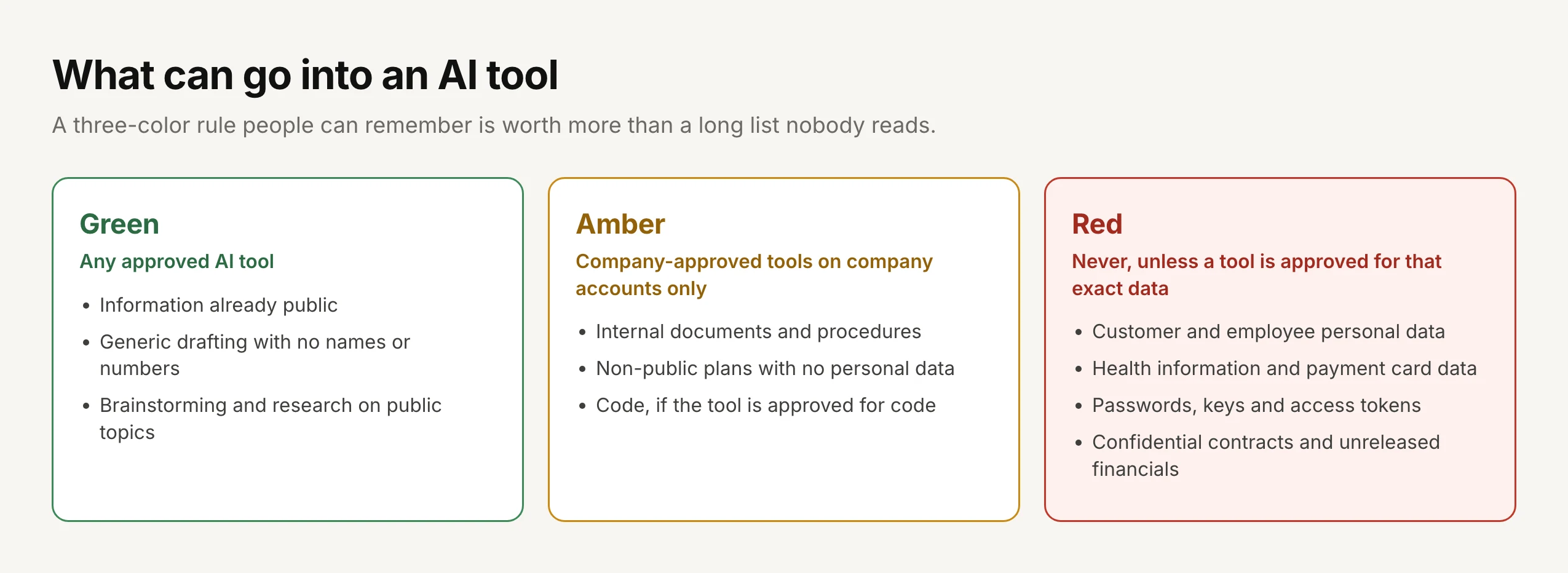
| Category | Examples | Rule |
|---|---|---|
| Green | Published information, generic drafting with no names or numbers, research on public topics | Any approved AI tool |
| Amber | Internal procedures, non-public plans without personal data, code where the tool is approved for code | Only company-approved tools, on company accounts, with the settings IT has chosen |
| Red | Customer and employee personal data, health information, payment card data, passwords and keys, confidential contracts, unreleased financials | Never, unless a specific tool has been approved for that exact data under the contracts that data needs |
The red row deserves particular care in regulated businesses. For health information, HHS has said that a cloud service that creates, receives, maintains or transmits protected health information on your behalf is a business associate, which means a business associate agreement must be in place before that data goes anywhere near it, and an AI tool is no exception. Other regulated data, such as payment card data or customer financial records, carries its own rules, which our sister site Policy and Compliance explains standard by standard.
Sources: hhs.gov (HIPAA and cloud computing guidance, 2016), US Copyright Office, Copyright Registration Guidance: Works Containing Material Generated by Artificial Intelligence, 88 FR 16190, March 16, 2023
This is general information rather than legal advice, and state privacy and employment laws can add their own rules about AI, so check the policy with your counsel before you approve it.
How to roll out the policy
A policy that appears in an inbox one morning with no explanation tends to be ignored, while one that starts from how people already work tends to stick. Five steps get you from nothing to a policy everyone has confirmed.
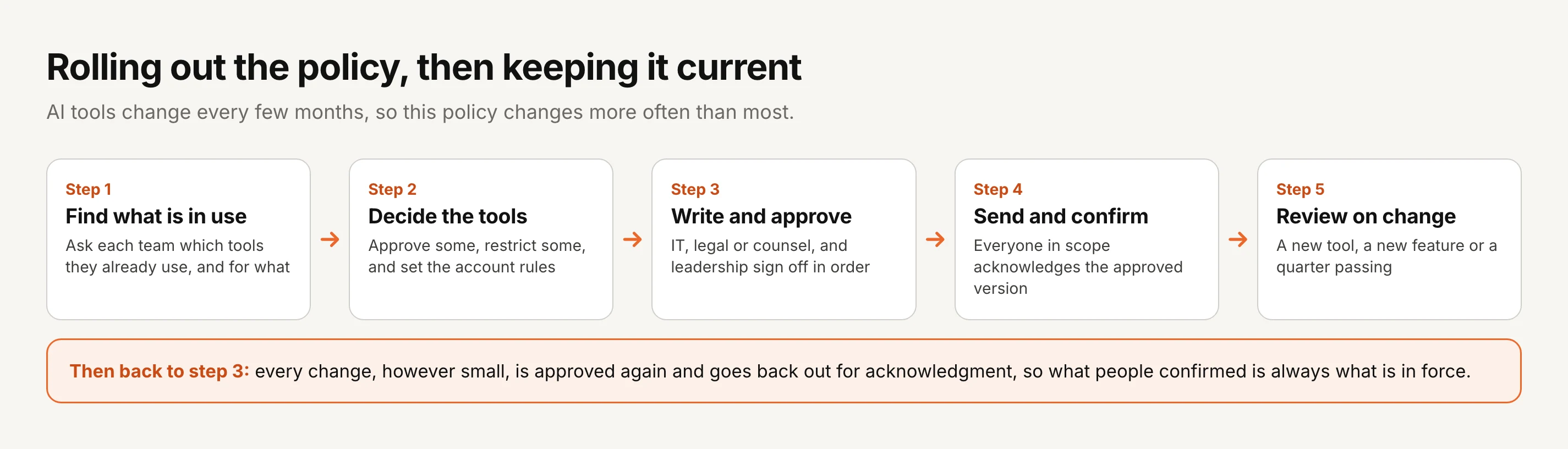
1. Find out what is already in use. Ask each team which AI tools they use and for what, and promise that the answers won’t get anyone in trouble, because the point is to bring existing use into the open where you can manage it.
2. Decide the tools. Approve a small set on company accounts for the uses people actually need, restrict the rest, and decide what data each approved tool may handle.
3. Write it and approve it. Draft the policy from the outline above, then route it through the people who should sign it off, typically IT or security, your counsel and a member of leadership, in that order.
4. Send it and collect acknowledgments. Send the approved version to everyone in scope, including contractors, and ask each person to confirm they have read it, with a short session or a one-page summary to explain the data rule.
5. Review it whenever the tools change. Put a review date on the policy, at least quarterly in the first year, and pull the review forward whenever you approve or retire a tool or a vendor adds a significant AI feature.
Keeping the policy current as tools change
Most policies change once a year at most, but an AI policy may change every few months, because the approved tools list grows, vendors switch on new features and customers add new contract terms. That pace is exactly why the policy needs a disciplined process rather than quiet edits to a shared document.
Every change, however small, should go back through approval and then out for acknowledgment again, because adding one tool to the approved list changes what people are allowed to do. It also helps to show people exactly what changed rather than asking them to re-read the whole policy, so an update to the tools appendix takes them a minute instead of twenty. Our posts on re-acknowledgment after a policy update and policy attestation cover how to run those rounds and what evidence they leave.
Anyone who has been through an ISO 27001 audit, as I have twice, knows the auditor’s first questions about a policy are who approved it, when it was last reviewed and who has seen the current version, and an AI policy will be asked the same questions in your next audit or customer review.
Where AllyMatter fits
We built AllyMatter to run the policy side of this work, from approval to acknowledgment to proof, and it works the same way for an AI policy as for any other. Your IT and security tools control the AI tools themselves, while AllyMatter makes sure the rules for using them are approved, current and confirmed by everyone they cover.
Approval in the right order. Build an approval workflow once, with up to four steps such as IT, counsel and leadership, and only the approved version can ever be sent to people.
Everyone in scope, including contractors. Tags decide who receives the policy, so employees and the contractors who use your systems both get it, and each person acknowledges by name, with automatic reminders for anyone who hasn’t.
Updates people can check in a minute. Every version is kept, and version compare shows every word removed and added, so a change to the approved tools list is easy to review and easy to explain.
A review date on the policy. Set a fixed or repeating review date, and an alert appears on the policy when it is due, so the quarterly review doesn’t depend on someone remembering.
For a wider view of how GRC and policy tools are using AI themselves, see our research on what 165 compliance tools actually do with AI, and for why AI-written policies still need people to approve and acknowledge them, read AI will write your policies.
Start your 30-day free trial of AllyMatter. No credit card to start, and a 30-day money-back guarantee if you subscribe and change your mind. Free migration.
Questions about AI acceptable use policies
What is an AI acceptable use policy?
An AI acceptable use policy is a company policy that tells employees and contractors which AI tools they may use for work, what information may and may never go into them, how to check what the tools produce, and when AI use has to be disclosed. It is sometimes called a generative AI policy or an AI usage policy.
Does a small business need an AI policy?
Yes, if anyone in the business uses AI tools for work, which today is almost every business. A short policy protects customer and employee data, sets expectations about checking the output, and gives you something to show a customer or an auditor who asks how you control AI use.
Should we just ban tools like ChatGPT?
A blanket ban rarely works, because people keep using the tools on personal accounts where you have no control at all. Most companies do better approving a small set of tools on company accounts, with clear data rules, and restricting the rest.
Is an AI policy part of the acceptable use policy or separate?
Either works. Smaller companies often add an AI section to their existing acceptable use or information security policy, while companies that change their approved tools often keep a separate AI policy so that frequent updates don’t reopen the whole acceptable use policy each time.
How often should an AI policy be updated?
Review it at least every quarter in the first year, and whenever you approve or retire a tool, a vendor adds a significant AI feature, or a customer contract or regulation changes what you may do. Each update should be approved and acknowledged again by the people it covers.
Do employees need to acknowledge the AI policy?
They should. A named acknowledgment of the current version shows that each person received the rules, and it matters most when something goes wrong, because it shows the data rules were communicated before the incident rather than after it.
An AI policy is only useful if people know it, follow it and can show they received the current version, and that last part is what turns a good document into evidence. On yearly plans, migration is on us: we’ll move your existing policies from SharePoint, Google Drive, Confluence or Notion, usually within a week and often sooner.
Start your 30-day free trial of AllyMatter. No credit card to start, and a 30-day money-back guarantee if you subscribe and change your mind. Free migration.