

Acknowledgments · 11 min read
Set Up a Self-Serve Onboarding Kit in Your Knowledge Base
Managers shouldn’t answer the same “where’s X?” question for every new hire. New teammates shouldn’t wait for links to HRIS, security, or playbooks. The fastest way out of this loop is a self-serve onboarding knowledge base: role-based checklists that point to living docs, day-one required reads with acknowledgments, and a simple manager view that shows who’s stuck.
Four signals you need this now:
- HR fields the same first-week questions every onboarding cycle
- A new hire from last cohort still can’t find direct deposit setup
- Managers spend their first week pasting links instead of enabling work
- An audit asks for proof of who acknowledged the harassment policy and you can’t produce a clean record
This guide gives you a step-by-step plan for building a self-serve onboarding knowledge base and shows exactly where AllyMatter removes friction (targeted content, acknowledgments, approvals, version history, and audit-ready exports).
For broader context on onboarding systems, see our guide on reducing employee onboarding time, and for HR-specific knowledge base strategy, review our comprehensive HR knowledge base guide.
The problem scene
Your new SDR asks where to set up direct deposit. Your engineer needs VPN steps. A manager can’t locate the latest PTO policy. Links live in email, exception notes live in Slack, and the handbook PDF is already stale. You spend your afternoon pasting paths instead of enabling actual work.
According to a Gartner survey, 47% of digital workers struggle to find the information needed to effectively perform their jobs. For new hires navigating unfamiliar systems, that friction multiplies.
Fix: make the correct answer faster than asking a human. A Welcome Kit new hires can follow immediately. A policy that surfaces when they search in their words. Day-one “read and acknowledge” to prove comprehension. A per-policy view that shows who is still pending.
The step-by-step setup plan
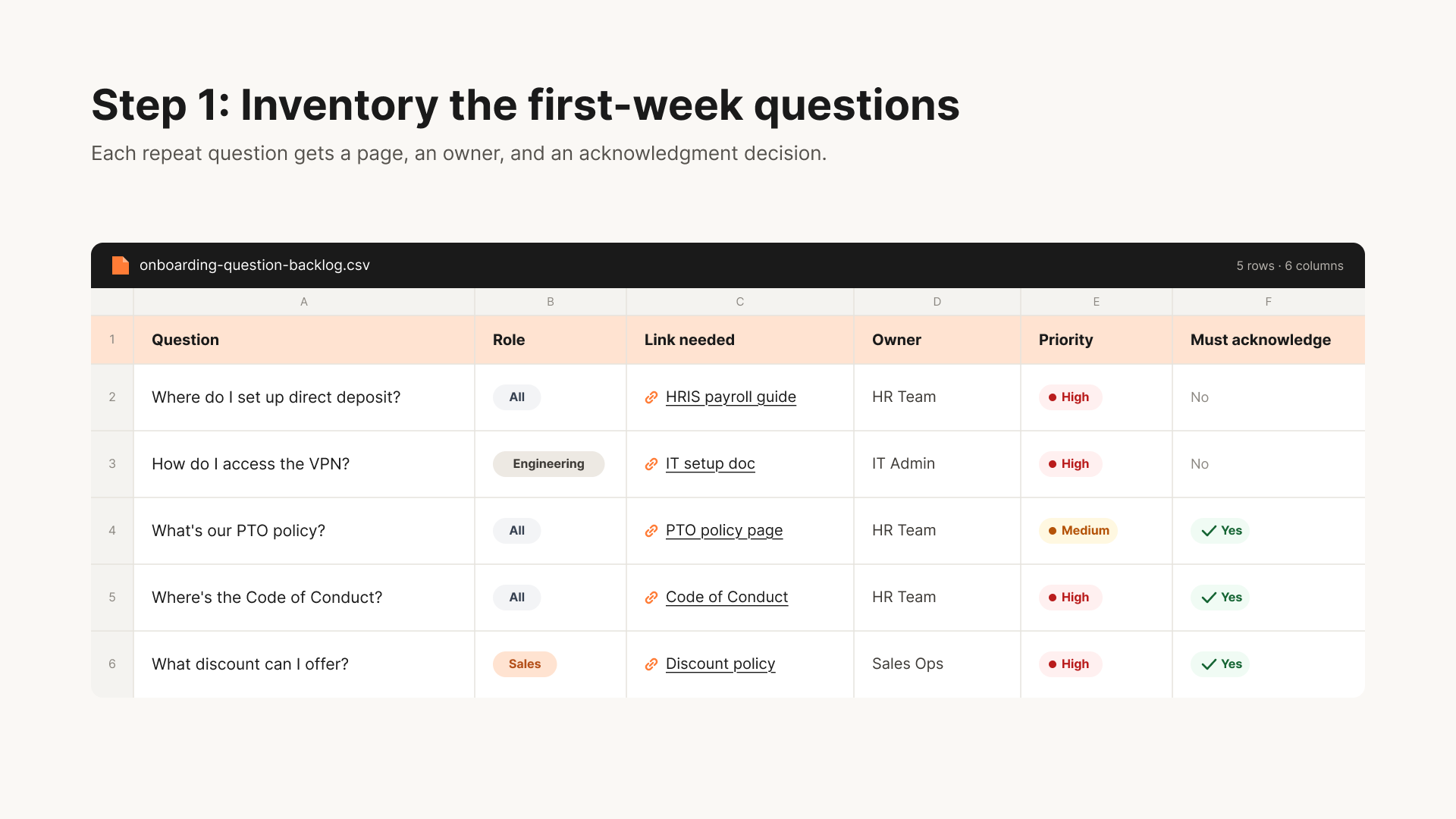
Step 1: Inventory the first-week questions
- Pull last month’s Slack/Teams #ask-hr, #ask-it, and onboarding email threads.
- List the top 25 repeat questions per role: Sales, Success, Engineering, Ops, Design, plus an “All employees” set.
- Flag anything that must be read and acknowledged on start (Code of Conduct, Anti-Harassment, Security 101).
These questions become the foundation of your onboarding knowledge base.
Step 2: Draft role-based checklists (link out; keep steps short)
Create one Welcome Kit checklist per role plus one “All employees” checklist. Use short, imperative steps that link to living docs and tools, not walls of text. Add the Editor and “Last updated” to every linked page.
Example: All Employees, Start
- Complete I-9 in HRIS (5-10 min)
- Set up Direct Deposit (HRIS → Payroll → Bank)
- Read and Acknowledge: Code of Conduct, Anti-Harassment, Security 101
- Join Slack + email groups (auto)
- Book your IT setup slot (15 min)
Example: Sales (AE), Start
- CRM access + pipeline view
- Sales enablement hub → Top 5 playbooks
- Tools: dialer, call recorder, calendaring
- “First 5 calls” checklist
- Read and Acknowledge: Pricing & Discount Policy
Step 3: Convert PDFs and emails into living, linkable pages
Turn policy PDFs and long emails into structured articles (Policy, Procedure, FAQ). Split multi-purpose docs so each page answers one intent and is easy to scan.
In AllyMatter: author in the editor, route approvals (HRBP → Legal → CHRO), publish, and keep visible approver lineage and version diffs. No one wonders which version is current.
Step 4: Wire targeting and tags (make it findable)
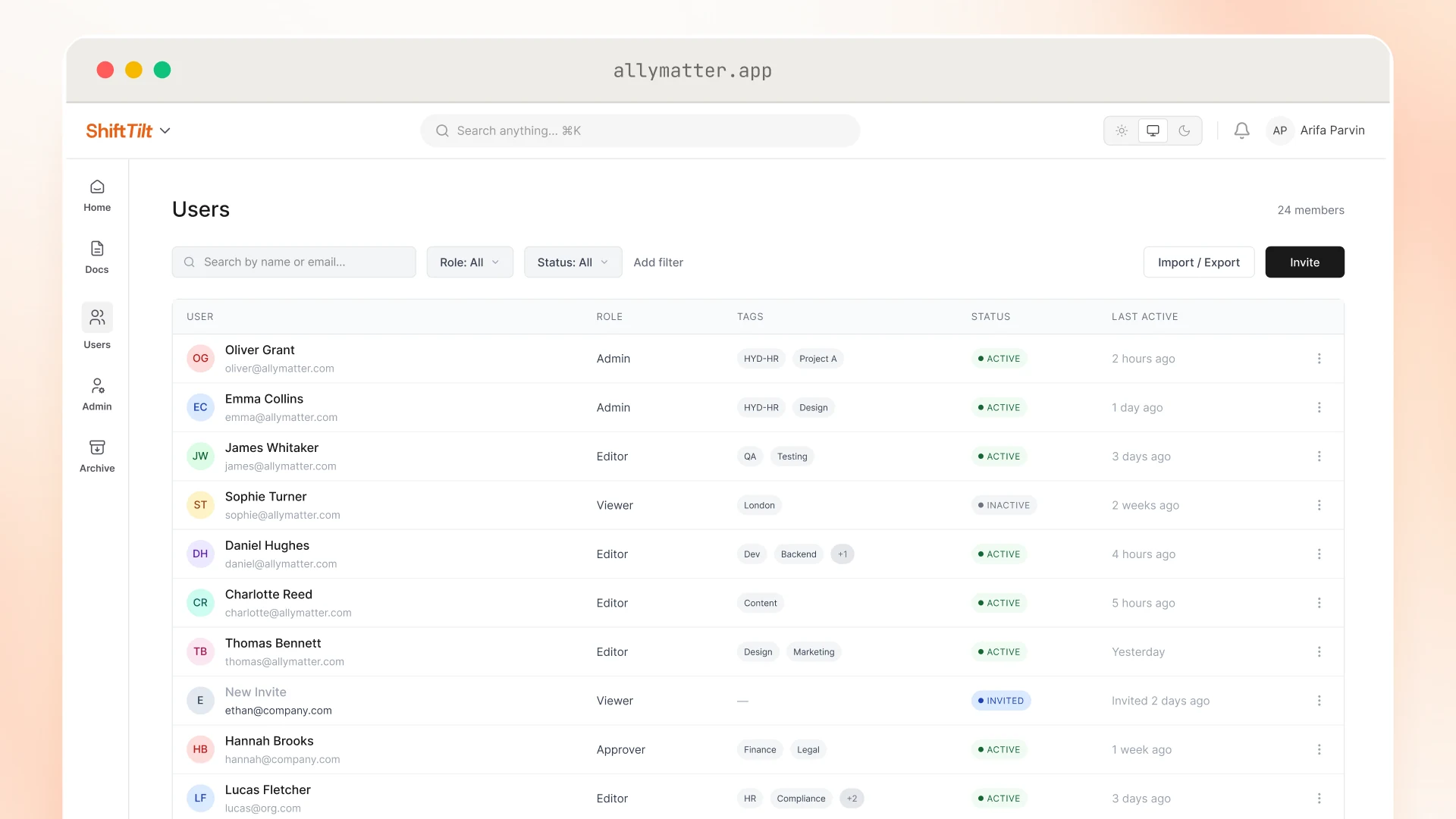
- Tag content by role, location/state, employment type
- Set targeted delivery so Sales sees sales tools, Engineering sees repos/IDEs, California employees see CA addenda
Tag your content this way:
- If it applies to all employees → tag “All”
- If role-specific → tag the role name (Sales, Engineering, Success)
- If location-dependent → add state/country tag
- If employment-type specific → tag FT/PT/Contractor
In AllyMatter: tags decide who sees each article and checklist, so a new hire sees the kit that matches their tags.
Step 5: Turn on required reads and acknowledgments
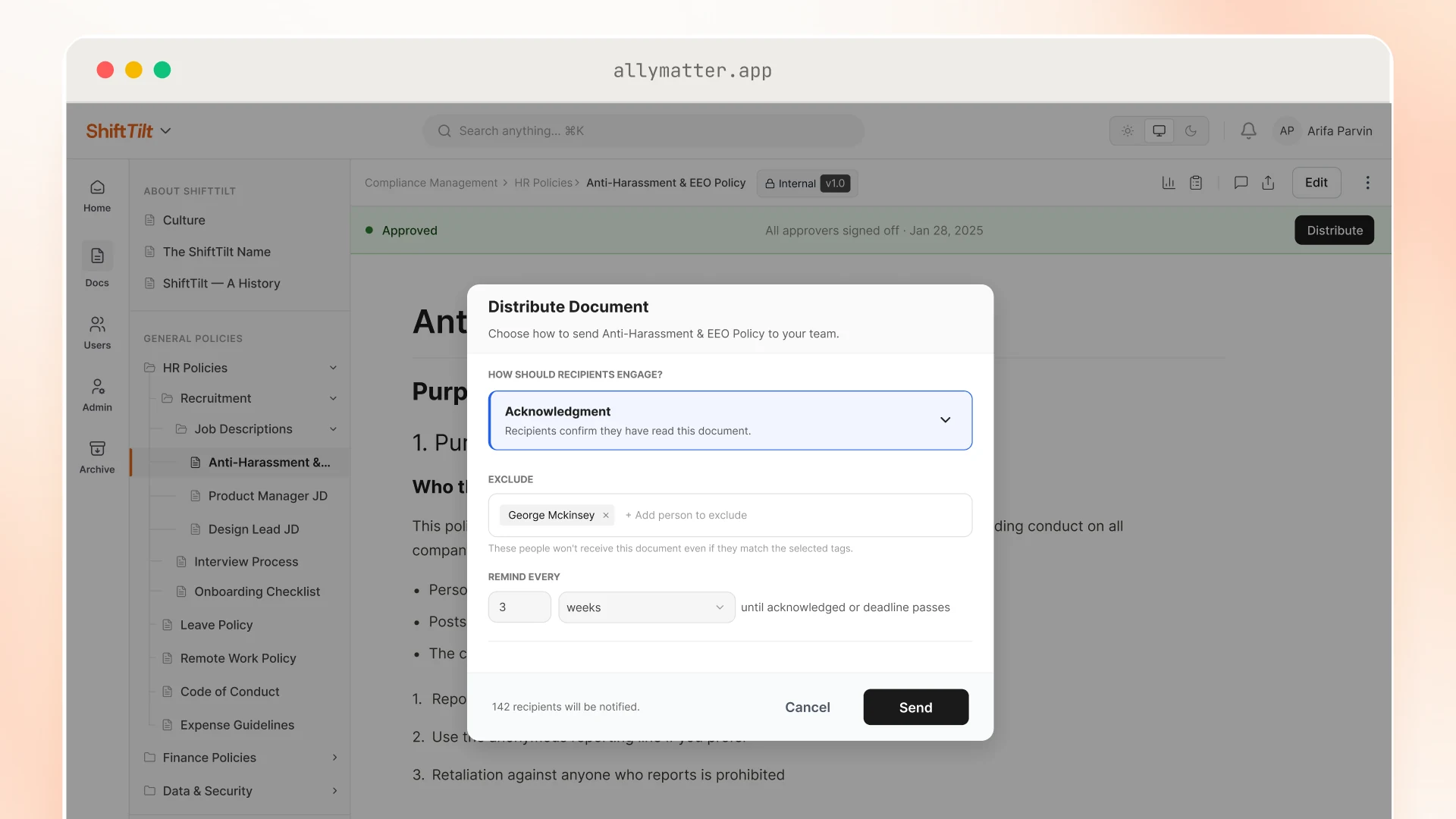
Mark must-reads: Code of Conduct, Anti-Harassment/EEO, Security 101, Timekeeping (non-exempt), Health & Safety, and Remote/Hybrid Work (if relevant). Set automatic reminders on a cadence you choose.
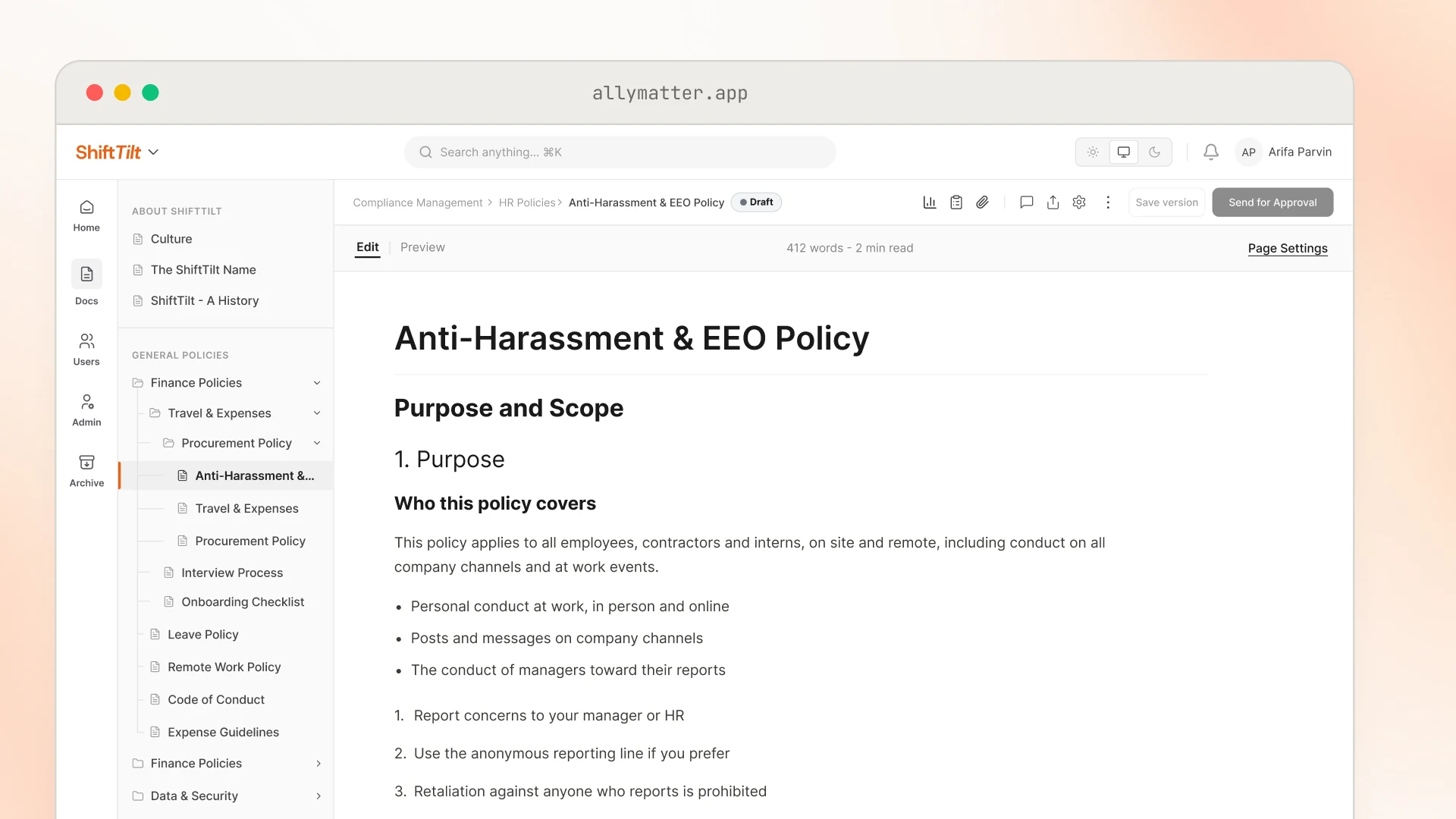
In AllyMatter: acknowledgments track who read what, and when, exportable to PDF or CSV. No more “did they actually see it?” during audits.
Step 6: Check progress policy by policy
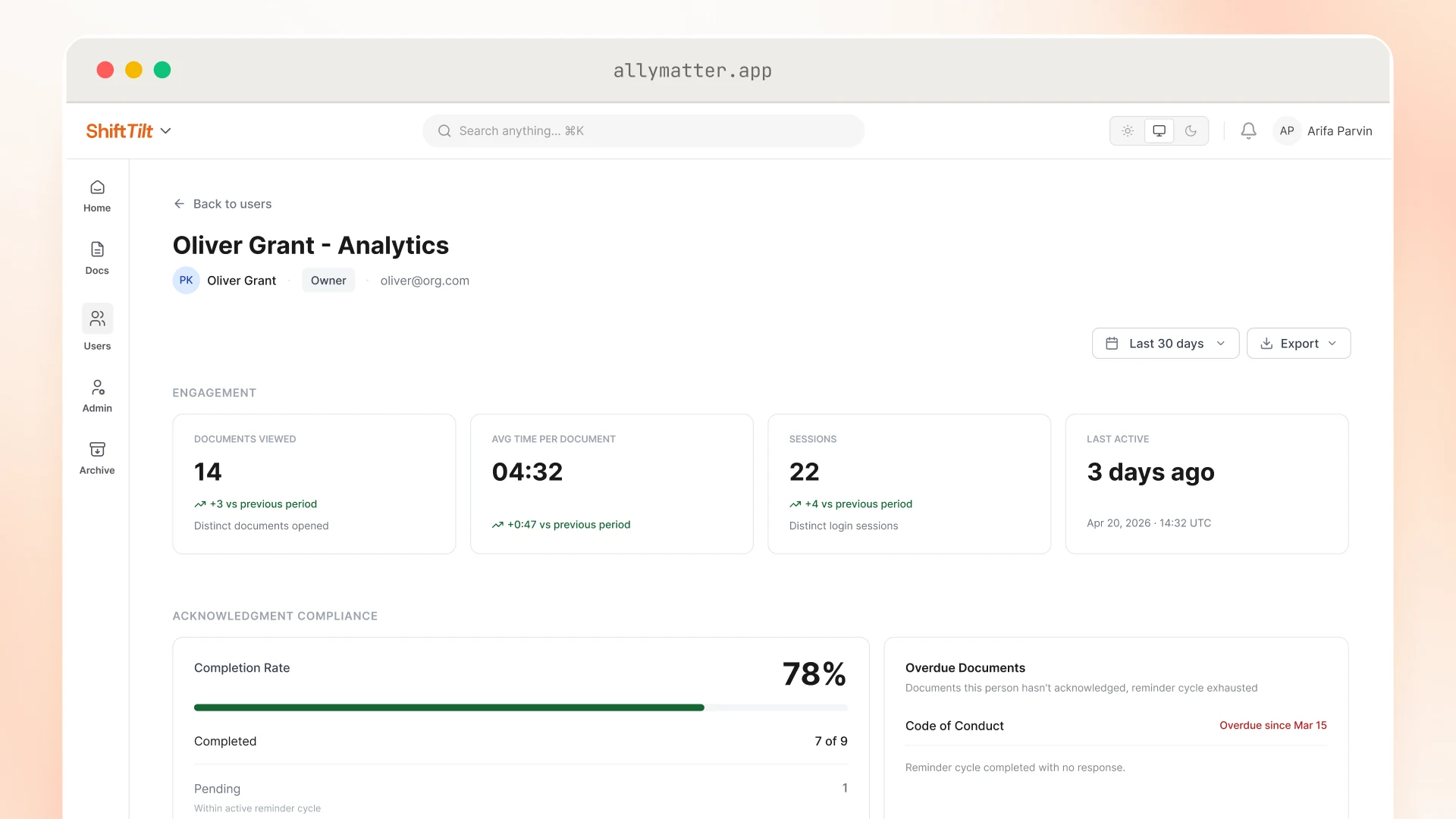
Check each required policy: who has acknowledged and who is still pending. Follow up with a teammate and send a link to the step they are stuck on.
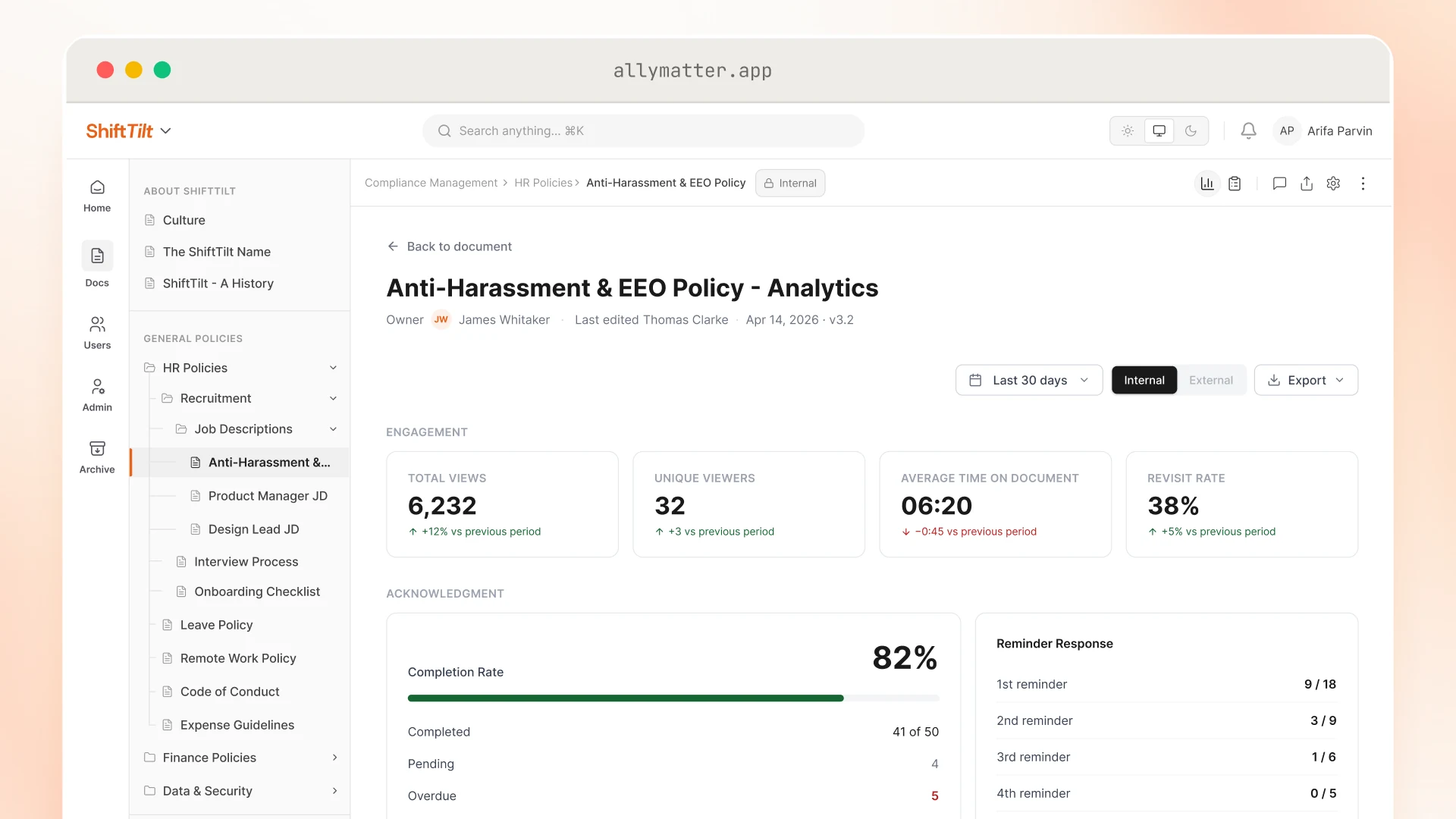
In AllyMatter: each policy shows who has viewed it, who has acknowledged it, and who is still pending, so you can remove blockers without pinging HR.
Step 7: Announce, measure, and tune weekly
Share the Welcome Kits in #all-company and each role channel. Pin them to team wikis and welcome emails. Ask managers to use the links, not paste instructions. Review metrics weekly and add two improvements based on the questions people still ask.
Launch note you can paste:
“Your role-based Welcome Kit is live. It has everything you need to get productive: tools access, top docs, and required reads. Please complete today’s steps and acknowledge the day-one policies.”
A common failure mode: teams launch Welcome Kits but don’t watch which questions still reach HR for the first month. That’s where the real gaps show up. Set a 15-minute weekly review in your calendar for the first 90 days.
Role-based views and checklists people actually use
A Welcome Kit works when it’s short, obvious, and relevant. Build one All-Employees kit plus one per role and link to living docs rather than duplicating content.
Structure to copy (per kit):
- Start (IT, HRIS, security, must-read policies with acknowledgments)
- Tools & Access (role-specific)
- Top 5 Docs (role playbooks/processes)
- People & Rituals (team channels, recurring meetings, glossary)
- First Win (one tangible task to complete now)
Example: Engineering, Top 5
- Dev environment setup
- PR & code review guidelines
- Incident response overview
- Sprint rituals (prep, stand-up, retro)
- Security 101 (acknowledge)
Example: Customer Success, Top 5
- Playbook: First 5 customer calls
- Ticket routing & escalation
- Product FAQ (link to dynamic KB)
- Renewal timeline
- Refund policy (acknowledge)
In AllyMatter, a checklist is a clean article with steps, links, an Editor, and “last updated.” It’s a living page, so the “where’s the latest PDF” problem disappears.
Day-one required reads with acknowledgments
“Did the new hire actually read the anti-harassment policy?” That’s the question every CHRO dreads during an audit. With acknowledgment tracking, you have timestamped proof, not a defensive “I think so.”
Day-one reading isn’t nice to have. It’s risk mitigation, cultural clarity, and smoother ops. Mark these as must-read with acknowledgment:
- Code of Conduct
- Anti-Harassment & EEO
- Security 101 / Acceptable Use
- Timekeeping & Overtime (non-exempt)
- Health & Safety (as applicable)
- Remote/Hybrid Work (if applicable)
Keep each policy page short. Include state addenda where needed and a two-line summary. This approach to HR policy management keeps clarity and compliance tight from day one.
In AllyMatter: the system logs who, what, and when, and the audit log exports as a PDF or CSV. That makes audits and leadership updates painless.
How to track onboarding progress (without spreadsheets)
Effective onboarding measurement focuses on time to productivity, not spreadsheet upkeep. You need proof of motion and a simple view of where to help.
Signals to watch (in AllyMatter):
- Acknowledgment completion (policies read)
- Most-viewed docs (are people using the right starters?)
- Editor reminders (which pages are due for review)
Manager moves:
- Check who is still pending on required reads; reminders keep going until they act.
- DM a link to the stuck step (“here’s the VPN setup”).
Metrics that matter
Your north star is time to first contribution: the first task a new hire completes that moves the business. Secondary metric: drop in onboarding questions.
Define “first contribution” by role:
- AE: first meeting booked
- Engineer: first PR merged
- CSM: first customer call completed
- Designer: first file delivered
- Ops: first workflow run
Effective knowledge base analytics focus on behavior, not just page views. Track continuously:
- Median time to first contribution (per role)
- Onboarding questions (Slack/help desk) vs Welcome Kit views
- Day-one acknowledgment status (who has acknowledged and who is still pending)
- Onboarding questions that still reach HR (fuel your next two fixes)
One-slide update pattern:
- What you changed, for example adding Dev Env + Security 101 to the Engineering kit.
- Which onboarding questions stopped reaching HR after you added screenshots.
- Who has acknowledged on day one and who is still pending.
Before: a new AE asks in Slack where to find the discount policy. You paste the link. The next AE asks the same question three days later.
After: the discount policy is tagged “Sales,” included in the Sales Welcome Kit, and marked required-read. New AEs acknowledge on day one.
Why AllyMatter fits this job (and generic wikis don’t)
You can duct-tape this in a wiki, but you’ll hit hard limits: no approver lineage, no acknowledgments, no audience targeting, no audit-ready exports. AllyMatter is built for the policy and process lifecycle HR and managers actually run:
- Write once, approve properly (see who approved what, when)
- Tags decide who sees each document, so every kit reaches the right people
- Acknowledge must-reads and prove they happened
- Search that speaks human (“vacation” finds PTO)
- Analytics that matter (views, who viewed what when, total acknowledgments, missing acknowledgments)
Start your 30-day free trial. No credit card to start, and a 30-day money-back guarantee if you convert and change your mind. Or try the live demo to see acknowledgments, targeting, and search with realistic onboarding content already populated.
Three scenarios
An honest read on whether this is right for your team:
If you’re under 30 employees and you onboard a few people a quarter, a Notion page with bookmarked links will hold. Manual onboarding still works at this scale.
If you’re 30 to 200 employees and the four signals at the top of this post are showing up, this is the moment. AllyMatter is what we built for this transition.
If you’re 200+ employees, multi-location, or in a regulated industry, structured onboarding with audit-ready acknowledgments and role-targeted content is not optional. AllyMatter or another purpose-built KB makes sense here. We’d start with AllyMatter.
The copy-and-ship kit
Use this to brief your team or paste straight into AllyMatter.
All Employees, Start
- HRIS: I-9 → Direct Deposit → W-4
- Read and Acknowledge: Code of Conduct, Anti-Harassment, Security 101
- Accounts: email, Slack, calendars
- IT: laptop, VPN, password manager
- Meet: manager, buddy, HR Onboarding
Sales (AE)
- CRM + sequences + calendaring
- Enablement Hub → Top 5 plays
- “First 5 calls” checklist
- Read and Acknowledge: Pricing/Discount Policy
Engineering
- Dev environment setup → repos
- PR & code review guidelines
- Incident response overview
- Read and Acknowledge: Security 101
Customer Success
- Ticketing + routing + escalation
- Product FAQ + current release notes
- Renewal timeline quick guide
- Read and Acknowledge: Refund policy
Operations
- Workflow tools access
- SOPs: reporting cadence, month-end checklist
- Vendor requests & approvals
- Read and Acknowledge: Data handling & privacy
Common pitfalls (and quick fixes)
- Wall-of-text checklists. Fix: keep steps short, link to living docs.
- No targeting. Fix: tag documents by role or location so every kit feels tailored.
- Required reads buried. Fix: mark them as required reads so they go out as acknowledgment requests.
- Outdated screenshots. Fix: prefer short clips, add “last updated” + the Editor.
- No measurement. Fix: one dashboard, four KPIs (first contribution, questions, day-one reads, repeat questions).
Moving from scattered to self-serve
Self-serve onboarding doesn’t eliminate human interaction. It eliminates the repetitive questions that slow down both managers and new hires. When your AE can find the discount policy without pinging you, when your engineer can set up VPN access from a clear checklist, when your finance hire acknowledges the expense policy on day one, that’s time redirected toward actual work.
The mechanics are straightforward: role-based kits, required reads with acknowledgments, and targeted delivery. The outcome is faster time to first contribution and fewer onboarding questions cluttering your channels.
Start with one role-based kit and three required-read policies. Ship it, measure it, add two improvements weekly based on search analytics. Within a month, you’ll have onboarding infrastructure that scales with every new hire.
Start your 30-day free trial. No credit card to start, and a 30-day money-back guarantee if you convert and change your mind.
Not ready for a trial? On yearly plans, migration from Confluence, Notion, SharePoint, or Drive is on us when you decide. We’ll move your existing onboarding docs over, usually within a week and often sooner.
Frequently asked questions
How do I track whether new hires actually read required policies?
AllyMatter’s acknowledgment feature logs exactly who read which policy and when. You’ll see completion status for each policy and who is still pending, with automatic reminders for anyone still pending. During audits, export the complete record as CSV or PDF.
Can I create different onboarding kits for different roles?
Yes. In AllyMatter, tags decide who can see each document. Your Sales team sees CRM playbooks and pricing policies, while Engineering sees development environment setup and security protocols. One knowledge base, targeted delivery based on who needs what.
What if a policy changes after someone’s already been onboarded?
AllyMatter’s audit trail tracks every edit with timestamps and approver lineage. When you update a policy, the version history shows exactly what changed and when. New hires always access the current version, and you maintain records of who viewed which version during audits.
How long does it take to set up a complete onboarding knowledge base?
Setting up AllyMatter takes about half an hour, and moving documents in yourself takes about a day. Start with the all-employees checklist and one role-specific kit, add required-read policies with acknowledgments, then refine based on analytics.
How do I track onboarding progress?
AllyMatter’s analytics show which documents get viewed most and who has viewed them, and each policy shows who has acknowledged it and who is still pending, so you do not have to dig through emails.