
HR teams field the same questions week after week. The answers exist somewhere, spread across shared drives, old emails, and folders nobody maintains. That costs time on both sides and opens the door to inconsistencies when different people get different versions of the same policy.
An HR knowledge base solves this by centralizing information, making it easily searchable, and giving employees instant access to accurate HR resources.
But it’s only effective if it’s organized, up to date, and easy to navigate.
Four signals you need this now:
- HR fields the same five questions every onboarding cycle
- Different policy versions are circulating and nobody knows which is current
- An audit lands and finding the right policy version takes a full day
- New hires can’t find basic information without pinging HR
This guide walks through what it takes to build a knowledge base that improves employee experience, HR efficiency, and compliance.
What is an HR knowledge base?
An HR knowledge base is a structured repository of HR-related information employees can access for self-service. It serves as a single source of truth, reducing reliance on HR for repetitive queries.
Without a well-structured HR knowledge management policy, companies face:
- Repeated queries: employees frequently ask the same questions, leading to inefficiencies
- Information silos: important HR information is scattered across emails, shared folders, and PDFs
- Compliance risks: outdated policies lead to misunderstandings and potential legal issues
- Poor employee experience: employees get frustrated when they can’t find information easily
A well-built knowledge base resolves these by offering structured, self-service access to HR-related documents, policies, and FAQs.For comprehensive guidance on building effective internal knowledge bases, see internal knowledge base best practices.
Key elements of an effective HR knowledge base
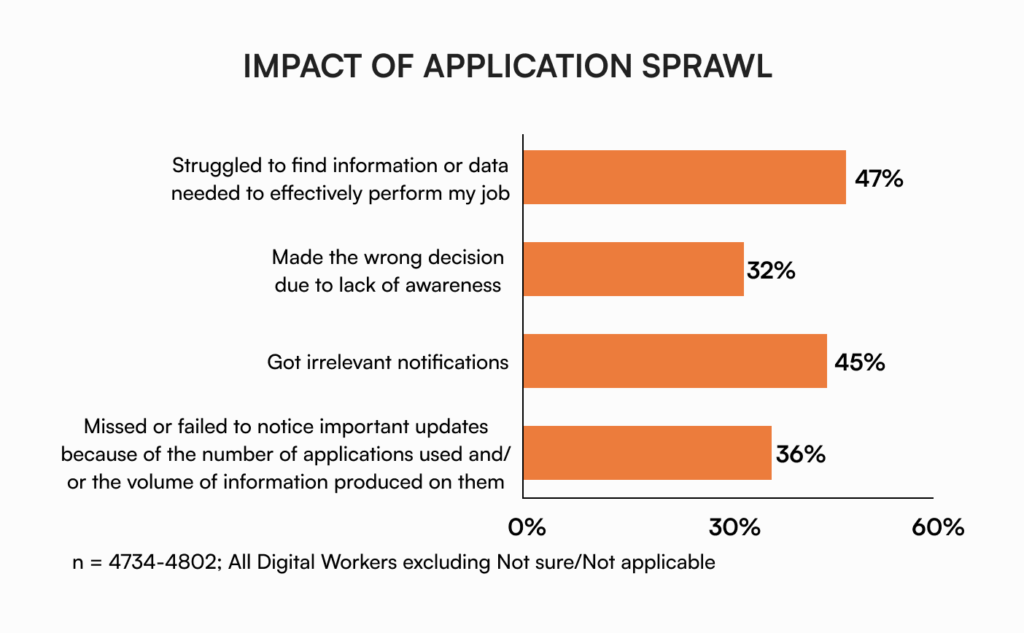
Without an effective HR knowledge base, employees waste valuable hours searching for information, time that could go to productive work. According to the 2022 Gartner Digital Worker survey, 47% of digital workers struggle to find the information they need.
A 2021 report from Wakefield Research and Elastic makes the point sharper. 54% of US office professionals admit they spend more time searching for information than sending emails. 57% rank it a top-3 problem to solve.
An HR knowledge management program earns its place only when it’s organized, up to date, and easy to search.
Organizing information for easy access
A well-structured HR knowledge management strategy lets employees locate critical HR information within seconds.
- Create a logical hierarchy. Start with broad categories like “Company Policies,” “Benefits & Payroll,” and “Onboarding.” Under each, implement targeted subcategories. “Benefits & Payroll” branches into health insurance, retirement, compensation.
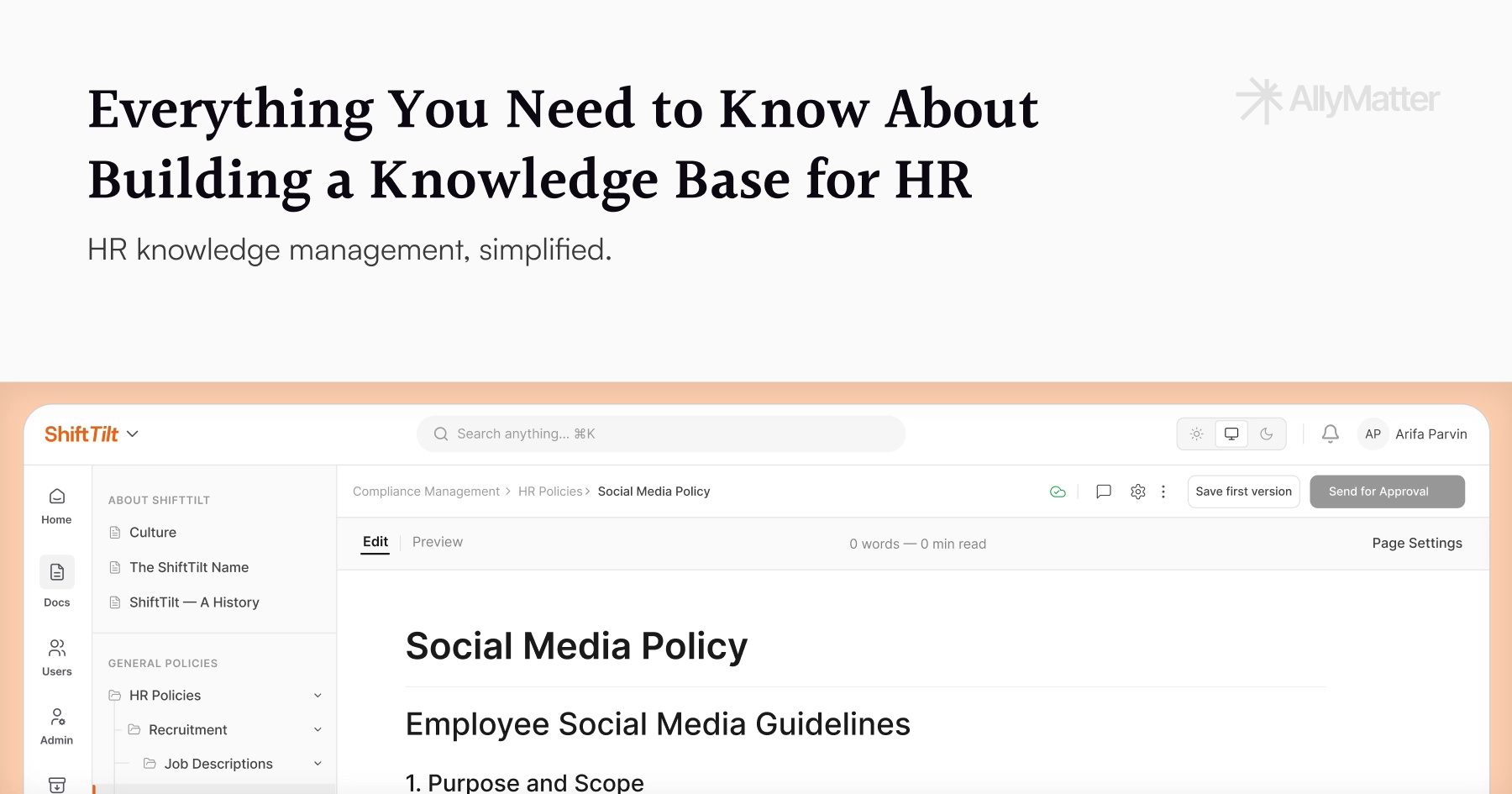
- Implement smart navigation. Comprehensive tagging system (e.g., “Parental Leave,” “Remote Work Policy”). Prominent search bar with filtering. Breadcrumb navigation. Dynamic table of contents.
- Maintain consistent structure. Each document follows a standard template with clear headings, bullet points, and a summary. Most frequently accessed information at the top level.
The organization makes the HR knowledge base an efficient self-service tool rather than another obstacle.
Keeping information up to date and accurate
Maintaining current, reliable content is crucial for effectiveness and compliance.
- Regular content reviews. Schedule quarterly audits of all HR documentation. Focus on time-sensitive content like benefits, compliance, and policy updates. Archive outdated materials while preserving historical records where needed.
Schedule content maintenance if:
- Policy documents haven’t been reviewed in 6+ months
- Benefits information shows outdated enrollment periods
- Compliance guidelines reference superseded regulations
- Employee feedback indicates confusion about specific procedures
- Clear ownership structure. Establish a matrix showing which HR team members own specific content areas. Define update schedules and accountability measures for each section. Set up automated reminders for content reviews.
- Compliance verification process. Partner with legal teams on a verification workflow for policy updates. Document review dates and approvals. Set up alerts for upcoming regulatory changes.
Include version history and last-updated timestamps on all documents.
Making it easy to search and navigate
- Smart search infrastructure: search with auto-suggestions and typo correction, filtering by date, content type, and department, natural language processing to understand contextual queries, search analytics to optimize results.
- Strategic content connections: internal links between related policies, “see also” sections highlighting connected topics, quick links to frequently accessed documents, breadcrumb navigation showing content hierarchy.
Monitor search analytics to identify common queries and adjust content organization accordingly.
Building and enhancing your HR knowledge base
A strategic HR knowledge management framework turns scattered information into an organized, accessible resource that reduces operational friction and supports compliance.
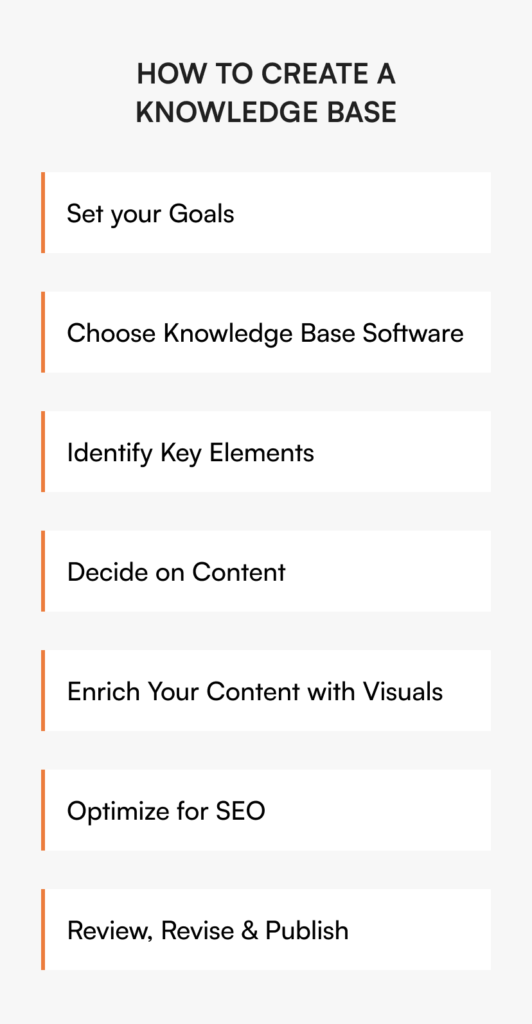
Define goals and strategy
Establish clear objectives:
- Automate responses to routine HR inquiries
- Enable employee self-service for common needs
- Maintain regulatory compliance through documentation control
Structure content around:
- Core company policies and handbooks
- Comprehensive benefits information
- Performance management guidelines
- Frequently asked questions from employee communications
Create content that directly addresses documented employee pain points and common queries from HR interactions. This aligns with proven internal knowledge base maturity frameworks that growing companies use to scale documentation.
Build a cross-functional knowledge network
HR teams don’t always have all the answers. Collaborate with subject matter experts (SMEs) and stakeholders:
- IT teams for security and software documentation
- Legal department for compliance verification
- Department heads for role-specific content
- External specialists for regulatory and industry standards
Establish quarterly review cycles with each expert group. Create automated reminders for scheduled reviews and updates.
Make it engaging and interactive
The best knowledge bases get used because finding information in them takes less effort than asking someone.
- Use explainer videos. Break down complex HR policies into short, digestible videos. Employees are more likely to watch a quick explainer than read through pages of policy documents.
- Provide step-by-step guides. For processes like payroll setup or leave requests, use screenshots or GIFs to walk employees through each step.
- Format FAQs smartly. Instead of long, static lists, use collapsible sections or chatbot-style Q&As to help employees find answers quickly.
Encourage employee feedback and contributions
Employees are the primary users of the knowledge base, so their feedback is crucial.
- Enable a feedback mechanism. Thumbs-up/down ratings, comments, or quick surveys.
- Encourage employee contributions. Allow employees to suggest new FAQs based on common workplace queries.
- Empower HR teams with edit access. HR teams should be able to quickly update or refine information.
- Review and update regularly. Schedule monthly reviews of employee feedback to refine content.
Promote and drive adoption
A well-structured HR knowledge base is only valuable if employees use it.
- Introduce it during onboarding. New hires should be familiar with the KB from day one.
- Use internal communication channels. Share key articles in company newsletters, Slack, or HR emails.
- Integrate it into daily workflows. Whenever employees ask HR-related questions, provide direct links to the KB.
Choosing the right HR knowledge base software
Not all knowledge base solutions are built for HR’s unique needs.
- User-friendly interface. Employees should navigate the KB effortlessly without special training.
- Customization options. Categories, access controls, branding, and layouts should align with your company’s structure.
- Advanced search. Employees should find information quickly through intuitive filters, keyword tagging, and related-content surfacing.
- Seamless integration with HR and IT systems. The platform should work with payroll, compliance tools, HRIS, IT service desks, and enterprise applications.
- Content management. Version control, approval workflows, and role-based editing to keep HR policies and FAQs accurate.
- Multi-channel accessibility. Desktop, mobile, and collaboration tools like Slack or Microsoft Teams.
- Security and compliance. Encryption, role-based permissions, compliance with data protection regulations.
- Analytics and feedback mechanisms. Search trends, article performance, and employee feedback help refine content.
Why AllyMatter for HR knowledge management
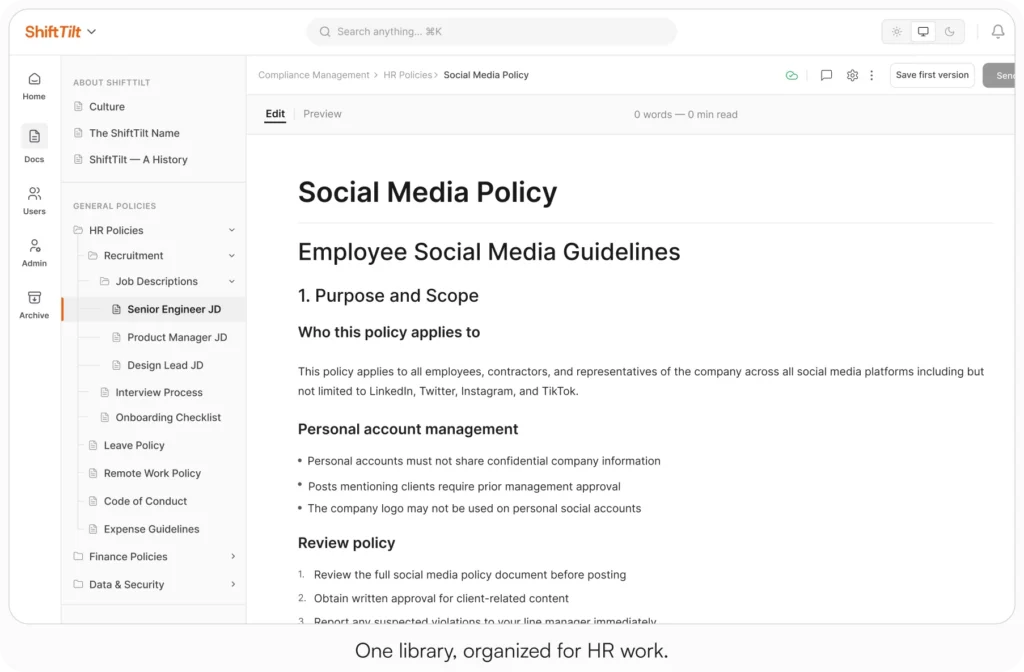
AllyMatter addresses HR teams’ specific challenges through organization and search capabilities built for the work. Granular access control keeps sensitive HR information secure while enabling employee self-service for routine inquiries.
Approval workflows take your HR policies through proper review cycles before publication. Acknowledgment tracking confirms employees have read each policy, with PDF records per person. Version control and comprehensive audit trails support compliance requirements while maintaining complete transparency. The platform grows with your organization, adapting to evolving HR needs without complex migrations.
For comparisons with general tools, see Notion vs AllyMatter for HR Policy Management, Confluence vs AllyMatter for HR Operations, and Why HR Teams Can’t Track Policy Acknowledgments in SharePoint.
Three scenarios
An honest read on whether you’re ready:
If you’re under 30 employees and one person can hold the policies in their head, a Drive folder with strict naming will hold. The full HR KB build pays off when the team grows past that size.
If you’re 30 to 200 employees and the four signals at the top of this post are showing up, this is the moment. AllyMatter is what we built for this transition.
If you’re 200+ employees, multi-location, or in a regulated industry, a structured HR KB is not optional. AllyMatter or another dedicated KB makes sense here. We’d start with AllyMatter.
Building sustainable HR knowledge management
A well-structured HR knowledge base pays for itself through reduced load on HR, better employee experience, and cleaner compliance. It enhances employee experience, improves HR efficiency, and supports compliance. By prioritizing organization, searchability, content accuracy, and engagement, growing companies build sustainable knowledge programs that earn their cost.
Start your 30-day free trial. No credit card to start, and a 30-day money-back guarantee if you convert and change your mind. Or try the live demo to see how AllyMatter handles HR knowledge management for growing teams.
Not ready for a trial? Migration from Confluence, Notion, SharePoint, or Drive is on us when you decide.
Frequently asked questions
What’s the difference between an HR knowledge base and a company intranet?
An HR knowledge base focuses specifically on HR-related information like policies, benefits, and procedures. A company intranet typically covers broader organizational content. Knowledge bases offer advanced search, better content organization, and self-service functionality specifically designed for HR workflows.
How do you measure the success of an HR knowledge base?
Track metrics like search query resolution rates, reduction in repetitive HR tickets, time-to-find information, and employee satisfaction scores. Monitor which articles receive the most views and lowest ratings to identify content gaps or improvement opportunities.
What HR content should be prioritized when building a knowledge base?
Start with frequently requested information: company policies, benefits enrollment guides, leave procedures, and onboarding documentation. Focus on content that generates the most employee questions and consumes the most HR time.
How often should HR knowledge base content be updated?
Review time-sensitive content like benefits and policies quarterly. Evergreen content like company culture information can be reviewed annually. Set up automated reminders for policy expiration dates and regulatory compliance updates.
Related reading
- HR Knowledge Base: Complete Guide for Scale-Ups
- How to Build a Knowledge Base for HR Teams
- Notion vs AllyMatter for HR Policy Management
- Confluence vs AllyMatter for HR Operations
- Why HR Teams Can’t Track Policy Acknowledgments in SharePoint

Founder of AllyMatter I’m founder of AllyMatter, an operations-first knowledge base for growing companies. Before AllyMatter, I co-founded Syren Cloud and helped scale it into a 300-person organization across two countries, leading marketing, operations, and HR. We moved fast, served demanding customers, and learned the hard way that internal knowledge systems built for help docs or IT don’t solve day-to-day operations. AllyMatter is my answer—tools that turn tribal knowledge into trusted, searchable processes. This blog shares the playbooks, checklists, and lessons I wish I’d had while scaling.