
Most company policies are born in a Google Doc, and that is not a criticism. Docs is where drafting happens: fast, collaborative, free with the Workspace you already pay for. The trouble starts quietly, usually years later, when someone realizes the company’s entire policy program still lives where it was born, and asks it a grown-up question. Who approved this handbook? Which version did the warehouse team confirm? Can we show the auditor?
I have watched that moment arrive at companies I ran: the policy Doc with a trail of unresolved suggestions, shared “anyone with the link,” last meaningfully edited by someone who left. Nothing about it means Google built a bad product. It means Docs and Drive were built for collaboration, and policy management is the opposite of collaboration: it is control, evidence, and obligation. This is the honest map of managing policies in Google Docs and Drive: what works, the setup that holds for a while, and the specific places it breaks down.
Key takeaways
- Docs and Drive are excellent at the drafting half of policy work and structurally wrong for the governed half: approval, distribution, acknowledgment, proof.
- The core defect is that the document people read is the document being edited. Suggestion mode blurs draft and in-force, and the PDF-export workaround decays on the first revision under deadline.
- Forms plus a Sheet is the standard acknowledgment hack, and it produces rows, not records: no attestation text, no version binding, manual roster reconciliation.
- You do not have to leave Google Workspace. Companies that outgrow it move the governed documents and keep Drive for everything else.
How do you manage policies in Google Drive, and when does it break?
The standard setup: a shared drive called Policies, folders by department, naming conventions carrying version numbers, edit rights restricted to HR or ops, a Google Form collecting “I have read the handbook” with a Sheet behind it, and calendar reminders for annual reviews. Built with discipline, that genuinely works while policies are documents people just need to find and the company is small enough to chase by hand.
It breaks when policies become obligations. Four signals you have crossed the line:
- The acknowledgment Sheet gets reconciled against the staff roster by hand, and someone dreads it.
- A policy changed this quarter, and the people who confirmed the old version were never re-asked.
- “Who approved this?” is answered by scrolling comments or asking someone’s memory.
- An audit, client questionnaire, or dispute wants proof, and assembling it means screenshots of a spreadsheet.
If none of those are happening, stay put; a good part of this page is about the companies that should. If two or more are, the rest is the map of why.
What Google Docs and Drive genuinely do well
Credit first, because it is real. Drafting in Docs is the best in the business: live co-editing, comments in the margin, and suggestion mode is the right tool while a policy is being written and argued about. Storage in Drive is cheap and effectively unlimited at business tiers. Sharing is one click. Version history is automatic on every Doc, with named versions if someone remembers to name them. Search is Google search. And the whole company already knows how to use everything, which is worth more than any feature.
For a policy program, that covers the creation half well: drafting, internal debate, and the raw storage of files. The failure is everything after the moment a draft becomes a rule.
Where managing policies in Google Drive breaks down
The in-force document is editable. This is the structural one. The Doc people read is the same Doc that gets edited, so the live policy drifts: a suggestion accepted here, a quiet fix there, and what an employee read in March no longer exists anywhere. The disciplined workaround is exporting an approved PDF into a read-only folder, and it decays exactly once: the first urgent revision that ships as a Doc edit because the PDF step was friction. Suggestion mode, the drafting hero, makes it worse on a live policy, because a document wearing tracked suggestions is visibly neither draft nor rule.
Approval is a vibe, not a record. Docs has no approval mechanism, so approval happens as a comment (“approved, thanks”), a Slack message, or a meeting memory. When the auditor asks who approved version 3 and when, a resolved comment thread is what you have, if nobody deleted it. There is no structural guarantee the version people are reading is the version anyone approved.
Forms-and-Sheet acknowledgment produces rows, not records. The Form timestamp says someone submitted; it does not bind them to the exact text they confirmed or the version they read, and the Sheet it feeds is editable by whoever owns it, which an opposing lawyer will notice. Coverage is manual: the Form goes to a list, the list drifts from the roster, and the new hire from May is covered only if someone remembered. We wrote up the honest version of running acknowledgment tracking without software, and its ceiling, linked below.
Change does not re-open obligations. Version history can show what changed, but nothing re-asks the audience. The company updates the handbook, and 140 acknowledgments of the old version keep looking like coverage on the Sheet. This is the quietest failure and the one auditors find by sampling.
Sharing is not scoping. “Everyone in the company can view” is access, not obligation. Drive cannot express “the warehouse team must confirm this by the 15th, new joiners inherit it automatically,” so scope lives in someone’s head, and link sprawl (“anyone with the link”) gradually makes access itself unauditable.
Proof is an assembly project. There is no exportable trail that says: this version, approved by her, on this date, confirmed by these 87 people, these 6 outstanding. Producing that from Drive, Forms, and Sheets is an afternoon per policy, which is how audit week becomes audit fortnight.
Who should stay on Google Drive anyway
Honesty about the other side of the line. Under about 30 people, with no external proof demands, the disciplined version (Policies shared drive, PDF-as-published, one Form per policy, an owner who runs it) holds, and the price is right. Companies with a fastidious ops person can stretch it further. And every company should keep using Docs for drafting and Drive for general files regardless of what runs the governed layer; the point of switching is narrower than vendors pretend.
The line is proof. The first auditor, certification, enterprise client questionnaire, or employment dispute converts the whole setup from “works fine” to “cannot answer the question,” and it happens on a date you do not choose.
Moving the governed layer without leaving Google
We built AllyMatter to sit exactly where the Drive setup breaks, and to coexist with the parts that work.
Draft wherever you like; the rule lives here. The governed document has one current version, and only approved versions can be distributed. Draft and in-force cannot blur, structurally.
Approval is a workflow with a record. Steps, named approvers, dates, all on the document’s log. “Who approved this” becomes a lookup.
Acknowledgment is a record, not a row. Identity by email, the exact attestation text shown, the version bound, the timestamp logged, surviving staff turnover. The roster problem disappears because audiences are tags and new hires inherit obligations the day they are tagged in.
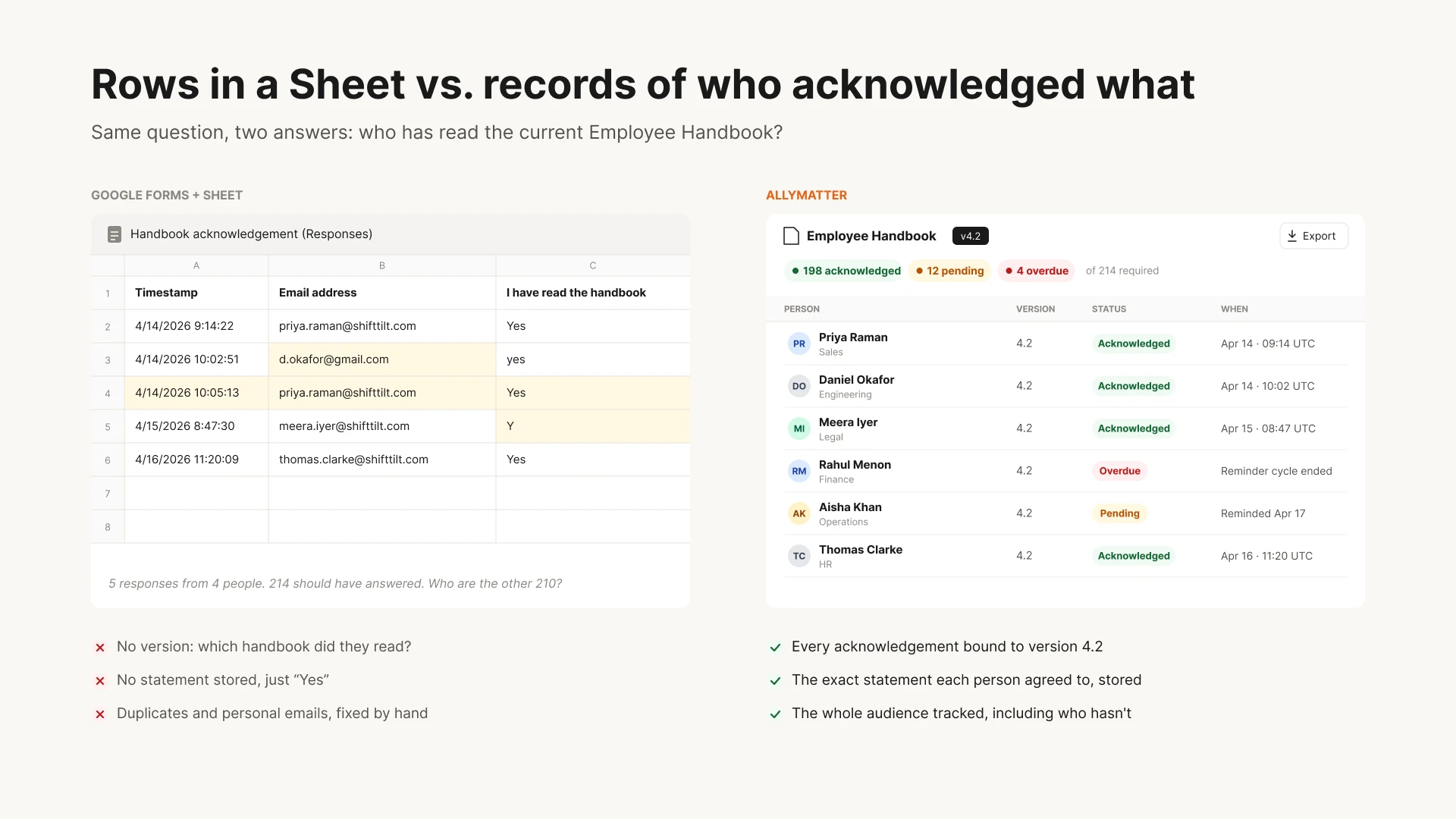
Policy acknowledgment tracking that replaces the Google Forms and Sheets hack: per-person, per-version, exportable
Change re-opens obligations automatically. Every revision re-runs approval and re-collects acknowledgment from the whole audience, and Version Compare shows each person exactly what changed so the re-read is minutes, not resentment.
Proof is an export. Tamper-evident PDF or CSV per policy: versions, approvals, acknowledgments, dates. The audit answer is a file, produced while the question is still being asked.
And Google stays your front door. Sign-in is your existing Google Workspace SSO, notifications reach people in email or Slack or Teams, and Drive keeps every file that is not a governed policy. On annual plans, migration is on us, and most of what we migrate comes straight out of Drive.
Start your 30-day free trial. No credit card to start, and a 30-day money-back guarantee if you convert and change your mind.
Three scenarios
If you are under about 30 people and nobody external asks for proof, run the disciplined Drive setup from this page and spend nothing. It holds at that size.
If you are 30 to 500 with the four signals arriving (the Sheet reconciliation, the un-re-asked audience, the approvals-by-comment, the assembly-project audit), this is the moment. We built AllyMatter for exactly this company, and it keeps Docs and Drive doing what they are great at.
If you are regulated or client-audited, the governed layer is already table stakes, and the only question is whether its records assemble themselves or get rebuilt each time. We’d start with AllyMatter.
Questions people ask about policies in Google Drive
Can you manage policies in Google Docs and Drive?
Yes, up to a point: a restricted shared drive, PDF exports of approved versions, a Form per policy, and discipline. It works while the company is small and nobody demands proof. It breaks at approvals, acknowledgment evidence, re-collection on change, and audit exports.
Is a Google Form acknowledgment legally solid?
It is evidence of a submission, and weaker than it looks: no stored attestation text, no version binding, and a spreadsheet anyone with access can edit. A dedicated record that binds identity, text, version, and timestamp is materially stronger. See our full piece on tracking acknowledgments without HR software.
Does Google Docs have an approval workflow?
Not a structural one for this job: approvals live as comments or external messages, and nothing prevents distributing an unapproved version. Workarounds exist; records of them are what auditors decline.
Do we have to migrate everything out of Drive?
No. Companies that switch move the governed documents (policies, procedures, the handbook) and keep Drive for everything else. Drafting can stay in Docs; the approved rule lives in the system of record.
What breaks first at scale?
Acknowledgment reconciliation. The Form-to-Sheet-to-roster ritual is the first thing owners refuse to do twice a year, and it is also the first place an auditor’s sample lands.
Google gave every small company a free, excellent drafting room, and the drafting room quietly became the filing cabinet, the approval chain, and the evidence locker. It was never built for those jobs. Keep the drafting room. Move the rules.
Start your 30-day free trial. No credit card to start, and a 30-day money-back guarantee if you convert and change your mind.
Not ready for a trial? On annual plans, migration is on us: we’ll move your docs from SharePoint, Google Drive, Confluence, or Notion and have you running in about a week.
Related reading
- How Do Small Companies Track Policy Acknowledgments Without HR Software?
- Prove Every Employee Saw The Policy
- Policy Management Software: The Complete Guide
- The Audit That Turns Into A Two-Week Project

Founder of AllyMatter I’m founder of AllyMatter, an operations-first knowledge base for growing companies. Before AllyMatter, I co-founded Syren Cloud and helped scale it into a 300-person organization across two countries, leading marketing, operations, and HR. We moved fast, served demanding customers, and learned the hard way that internal knowledge systems built for help docs or IT don’t solve day-to-day operations. AllyMatter is my answer—tools that turn tribal knowledge into trusted, searchable processes. This blog shares the playbooks, checklists, and lessons I wish I’d had while scaling.