Your finance team spent three hours hunting for the updated expense policy. HR can’t locate the latest employee handbook version. Your product team works off outdated technical specs from six months ago.
Growing companies don’t lack documentation. They lack systems built to manage knowledge at scale. Google Docs, Confluence, and Slack all help in small bursts, but they don’t stay organized as the company grows.
AllyMatter provides enterprise-grade knowledge management without enterprise complexity. Every feature addresses specific pain points that emerge as organizations scale from 50 to 500 employees.
Central knowledge hub
Most organizations scatter documentation across multiple tools. Google Drive for some files, Notion for others, SharePoint for compliance documents, Slack for quick references. Nobody knows where critical information lives.
AllyMatter consolidates everything into one searchable repository. HR policies, technical documentation, standard operating procedures, and training materials exist in the same place. Your team structures knowledge based on how they think about it, using smart categorization, custom tags, and powerful metadata.
Finance documents stay separate from engineering specs, yet both remain accessible when someone needs cross-functional information. The system eliminates tool-switching and reduces the cognitive load of remembering which platform holds which document type.
Learn more about the central knowledge hub →
Approval workflows
Manual approval processes turn simple updates into week-long email chains. Someone forgets to respond, documents sit in limbo, and teams continue operating with outdated information.
AllyMatter’s approval workflows automate the entire process. Define who approves what and in what order. The system handles sequential approvals where each person reviews in turn, or parallel approvals where multiple stakeholders sign off simultaneously.

The platform tracks every approval request, sends automated reminders to pending reviewers, and maintains complete records of who approved what and when. Critical documents no longer get stuck waiting for someone who’s on vacation.
Explore approval workflows in detail →
E-signature tools*
Built-in signature capabilities will allow documents requiring acknowledgment or approval to be signed directly within the platform. No switching between tools, no forwarding PDFs, no wondering whether someone actually signed.
The signature system will maintain legal compliance, provide timestamped records, and integrate directly with your audit trail. When someone signs a document, that action becomes part of the permanent record.
(*This feature is under development.)
Learn about accelerating document approval →
Advanced search functionality
Your sales team remembers creating a pitch deck about manufacturing clients last quarter. They know it exists but can’t find it. After 20 minutes of searching, they recreate it from scratch.
AllyMatter’s search goes beyond basic keyword matching. The system searches through document content, metadata, tags, comments, and version history. Search for “manufacturing,” “pitch,” “Q3,” or the colleague who created it. The system finds it regardless of which term you remember.
Smart filters narrow results by document type, department, date range, or author. The search system learns from usage patterns, prioritizing frequently accessed documents while deprioritizing files that haven’t been opened in months.
See how intelligent search works →
Audit trail recording
Compliance audits require proof that employees acknowledged policy changes. Without proper documentation, you’re scrambling through email archives hoping you kept records.
AllyMatter automatically records every action on every document. Who created it, who edited it, who viewed it, who approved it. The system timestamps each action and maintains this record permanently.
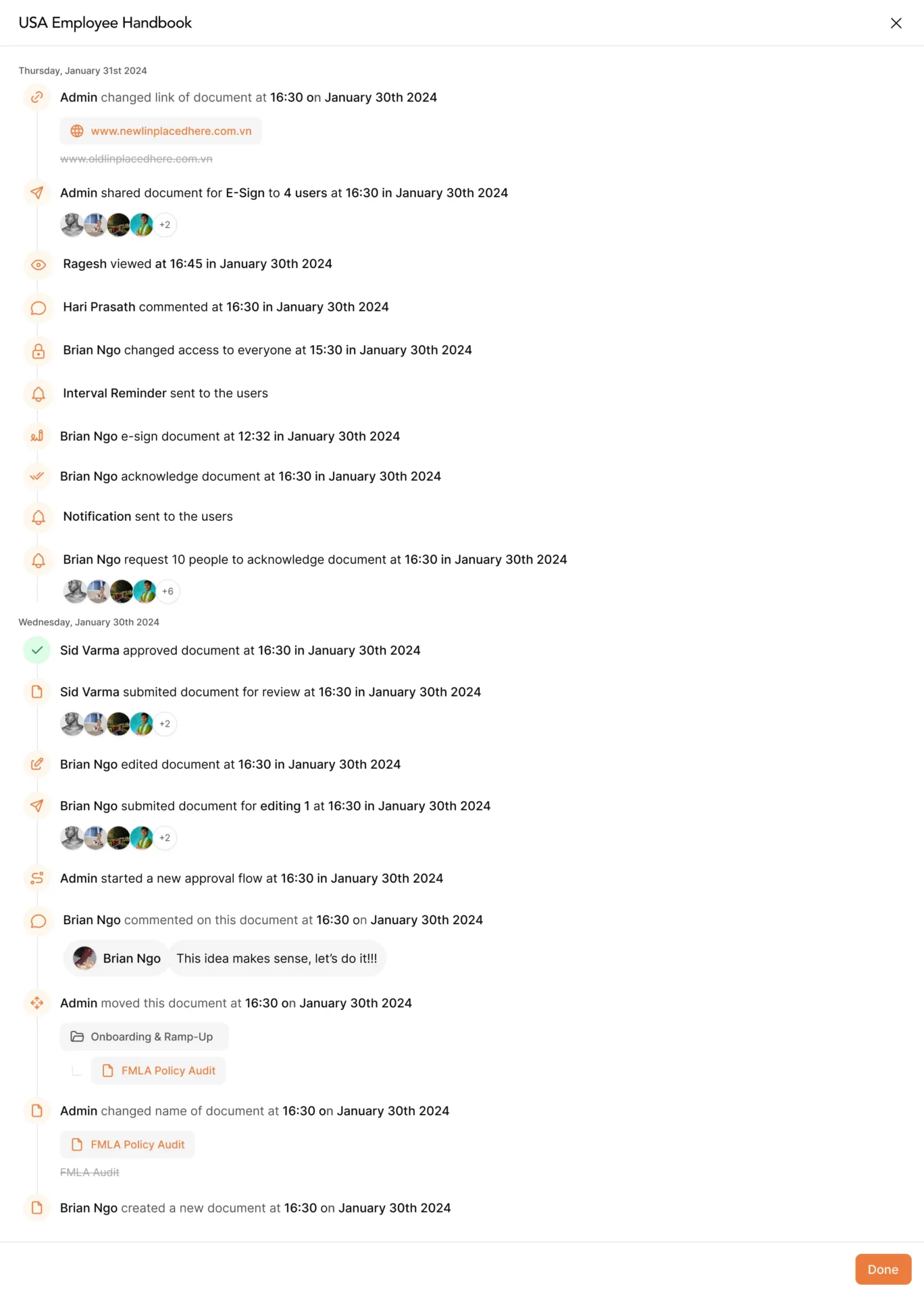
When someone updates a document, the audit trail shows exactly what changed, who changed it, and when. When a policy requires acknowledgment, the system records who acknowledged it and at what time. This creates organizational memory that extends beyond compliance requirements.
Discover audit trail capabilities →
Version control system
Five people have been editing the new customer onboarding procedure for three weeks. Someone accidentally overwrote another person’s changes. Nobody knows which version is current.
Version control treats every edit as a new version while preserving all previous versions. See exactly what changed between any two versions, compare them side by side, and restore previous versions when needed.
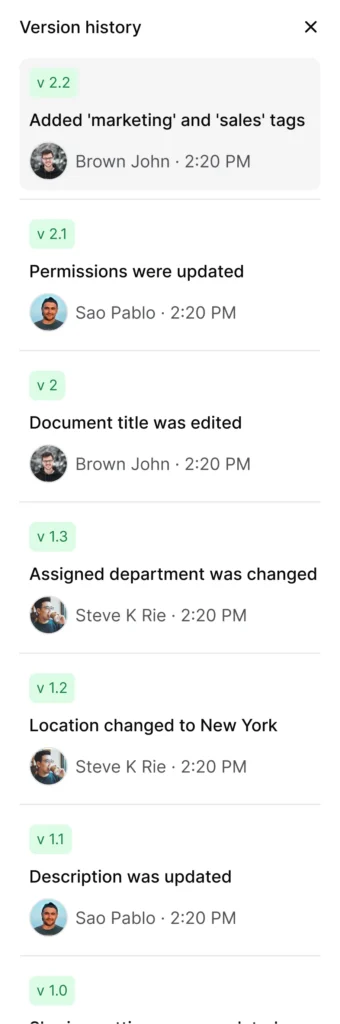
Multiple people can work on the same living document without creating different files or overwriting each other’s work. The system tracks who changed what and allows you to accept, modify, or revert any changes. Version control provides insurance against mistakes while maintaining complete document evolution history.
SSO ready
Your team manages too many passwords. Separate login credentials for every tool create friction and security vulnerabilities.
AllyMatter integrates with your existing single sign-on system. If your team uses Google Workspace, Microsoft 365, Okta, or another SSO provider, they use those same credentials to access AllyMatter. One login for everything means fewer passwords, faster access, and stronger security.
SSO integration simplifies administration. When someone joins your company, their SSO credentials automatically grant AllyMatter access. When someone leaves, revoking their SSO access immediately removes their AllyMatter access. No separate password management, no orphaned accounts, no security gaps.
Role-based access control
Not everyone should see everything. Finance needs expense policies but shouldn’t view engineering specifications. Contractors need training documentation but shouldn’t access confidential strategic plans. Interns need onboarding materials but shouldn’t see sensitive HR records.
Role-based access control defines exactly who can view, edit, or manage each type of content. Create roles for departments, teams, or projects that match how your organization works. Assign permissions to roles instead of individuals, making access management scalable.
When someone joins marketing, assign them the marketing role and they automatically access all marketing documentation. When they move to product management, change their role and their access updates accordingly. The system also supports document-specific permissions for sensitive content that requires additional restrictions.
See how access control works →
Acknowledgment tracking
You’ve updated your security policy. Every employee needs to read and acknowledge it. Previously, this meant sending emails, tracking responses in spreadsheets, and chasing down non-responders. Weeks later, you still lack complete confirmation.
AllyMatter’s acknowledgment tracking automates the entire process. Mark a document as requiring acknowledgment, specify who needs to acknowledge it, and the system handles the rest. It notifies people automatically, tracks who has and hasn’t acknowledged, and sends reminders to non-responders.
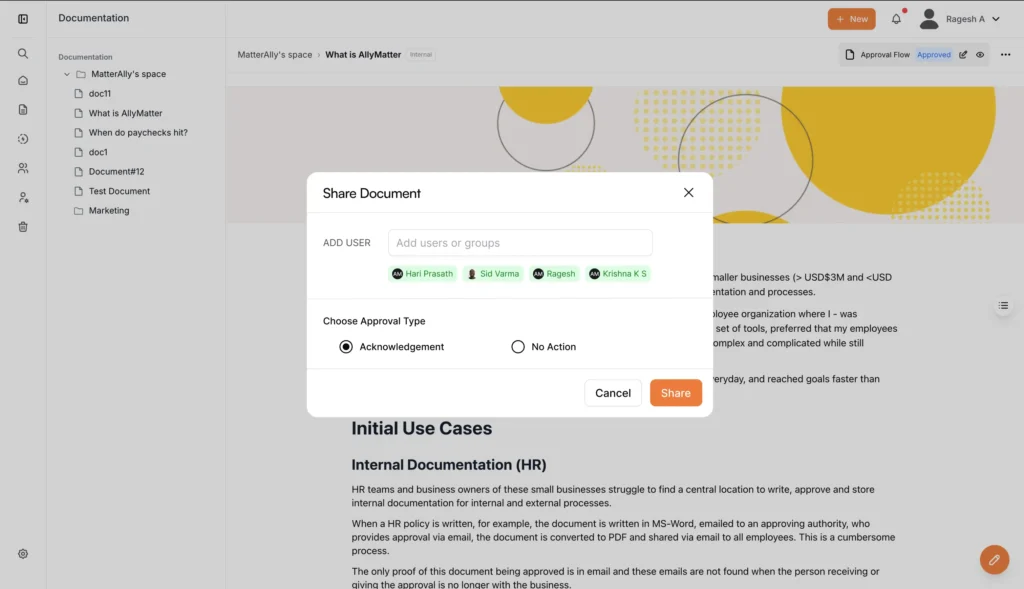
The system handles conditional acknowledgments. Require acknowledgment only from specific departments, only from people hired after a certain date, or only from people in particular locations. The audit trail shows exactly when each person acknowledged each document, creating the compliance paper trail regulations require.
Learn about acknowledgment tracking →
Document distribution tools
Your HR team finalized the new benefits guide. It needs to reach all employees immediately, but contractors shouldn’t see it, and international team members need a different version. Some people should just read it while others need to provide feedback.
Document distribution in AllyMatter controls exactly who receives what, how they receive it, and what they can do with it. Send documents directly to specific people or groups, share them with everyone in a department, or publish them to your entire organization.
The distribution system integrates with notification preferences. Some people want immediate alerts for new documents. Others prefer daily digests. Some want notifications only for urgent documents. You can also set expiration dates on shared documents or links, providing both immediate sharing and long-term access management.
User management console
As your team grows from 20 to 100 to 500 people, user management can become a part-time job. Navigating complicated admin panels and switching between multiple screens to adjust permissions creates unnecessary overhead.
AllyMatter’s user management console centralizes everything. See your entire user list, their roles, their permissions, and their activity. Add new users individually or import them in bulk. Update roles and permissions across multiple people simultaneously. Deactivate departing employees with a single click.
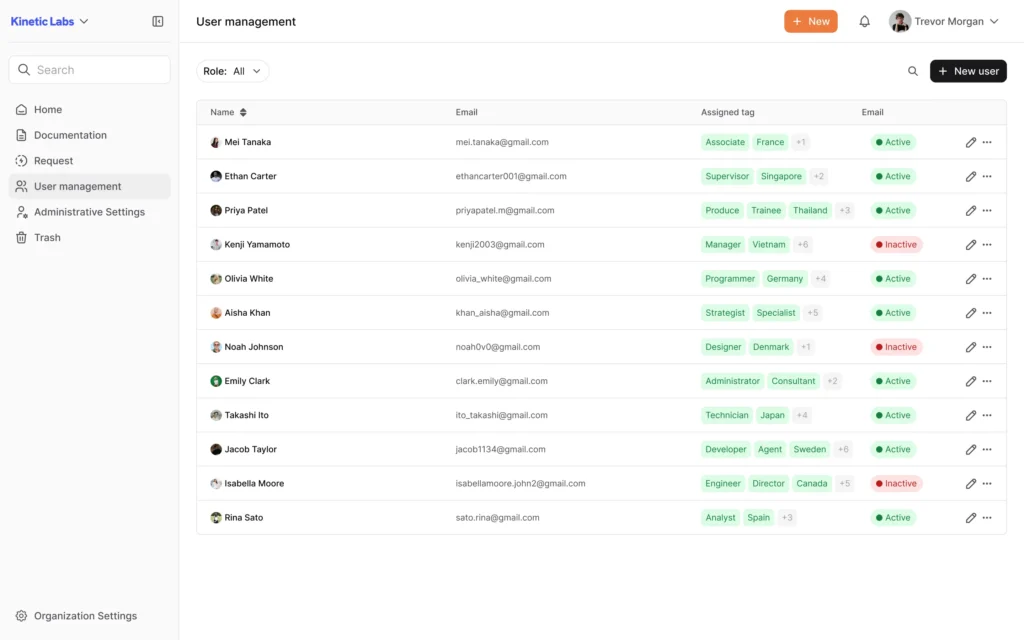
The console provides visibility into platform usage. Which documents does each team access most frequently? Who hasn’t logged in recently? Which departments show the most engagement? For larger organizations, the console supports delegated administration, allowing your HR team to manage HR users without accessing engineering user management.
See user management capabilities →
Notification system
Perfect documentation becomes useless if people don’t know it exists or has been updated. Teams continue working with outdated information when they lack awareness of changes.
AllyMatter’s notification system keeps everyone informed without overwhelming them. When documents change, when approvals are needed, when someone mentions them in a comment, or when content they’re following updates, people receive notifications through their preferred channels.
The system balances immediacy with usability. Critical updates trigger instant notifications. Routine changes batch into daily or weekly digests. People customize notification preferences by document type, department, or priority level. Every notification includes direct links to the action they need to take.
Mobile-responsive interface
Your warehouse supervisor needs to check safety procedures while on the factory floor. Field sales reps review pricing guides between client meetings. A remote team member traveling abroad needs to approve a document from their phone.
AllyMatter’s interface adapts to whatever device someone uses. The same functionality available on desktop computers works on tablets or smartphones. Documents remain readable, search stays functional, and workflows continue working regardless of screen size.
For teams working in the field, on factory floors, or in client locations, mobile might be their primary way of accessing documentation. The platform works where they work, providing the flexibility modern teams require.
Discover mobile capabilities →
Comment and feedback system
Your team creates a new customer onboarding procedure. It looks complete, but you need input from customer success, sales, and operations before finalizing it. Copying the document and consolidating feedback from three different sources creates unnecessary work.
AllyMatter’s comment system keeps all feedback in context. People comment directly on specific sections of documents, tag colleagues for input, and discuss changes without leaving the platform. Comments attach to the exact part of the document being discussed, eliminating confusion about references.
The system tracks comment threads over time. When someone suggests a change three months ago and you implement it now, the comment history shows the complete discussion that led to that decision. Draft new policies and invite stakeholders to provide feedback before finalizing them.
Analytics dashboard
You’ve invested time building comprehensive documentation. But which documents get accessed most frequently? Which ones sit untouched? Where do people get stuck searching? What content needs updating?
AllyMatter’s analytics dashboard shows exactly how your knowledge base performs. Track document views, search patterns, common queries, and user engagement across your entire organization.
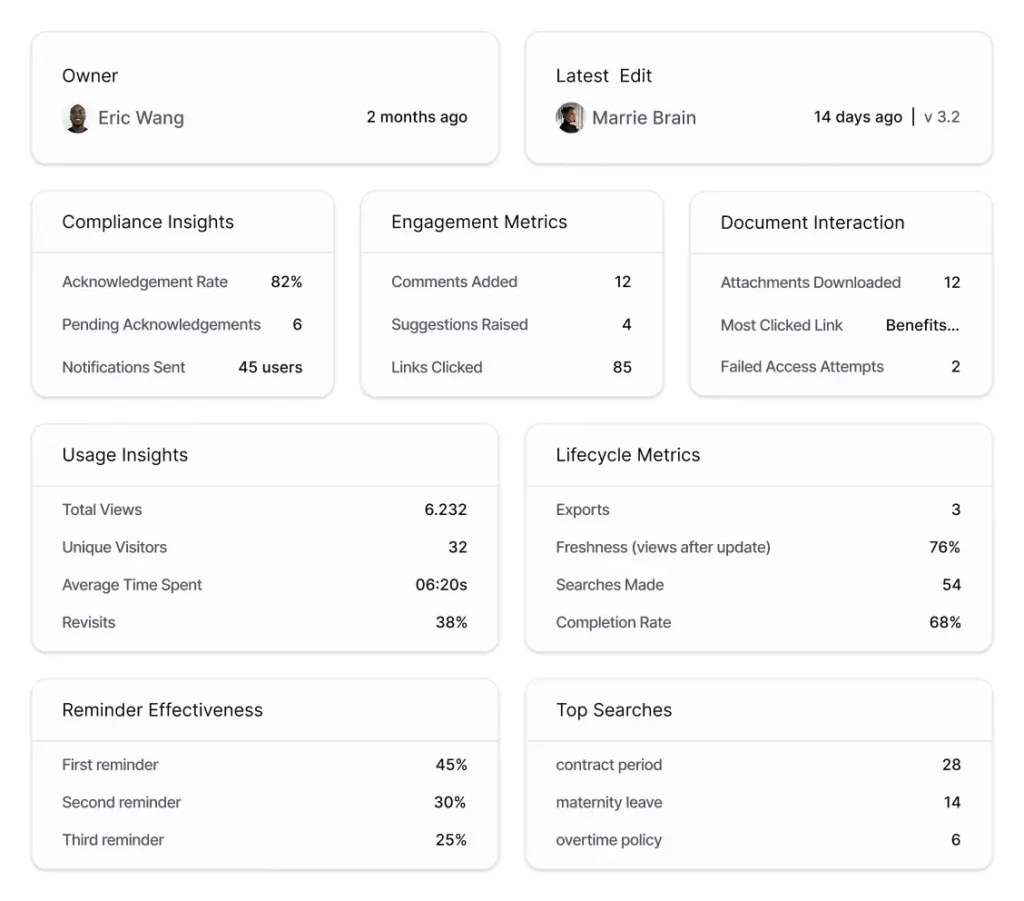
The dashboard reveals which content works and which doesn’t. If nobody accesses a particular procedure, it might need better discoverability. If search queries often include the same terms with poor results, you might need to improve tagging or create new content. Analytics help you measure adoption across departments and identify teams that need additional support.
Explore analytics capabilities →
Public link management
External people sometimes need access to specific documents. Your freelance designer needs brand guidelines. A potential partner wants to review your security documentation. A client needs project specifications. But you don’t want to give external people full access to your knowledge base.
Public link management lets you share specific documents with people outside your organization. Create a secure, shareable link to any document. The recipient gets access to just that document without needing an account or seeing anything else in your knowledge base.
You control exactly what these links can do. Some might be view-only, while others allow commenting or downloading. Set expiration dates so links automatically stop working after a specified time. Require passwords for extra security. Track who accesses shared documents and when.
Making knowledge work at scale
Growing organizations face a consistent challenge. The informal knowledge sharing that worked with 20 people breaks completely at 100 people. The documentation approaches that sufficed at 100 people become inadequate at 500 people.
AllyMatter’s feature set provides enterprise-grade capabilities without enterprise complexity. The same platform that helps a 50-person startup organize their documentation supports a 500-person scale-up managing thousands of documents across multiple departments.
Every feature connects to specific pain points that compound as organizations grow. Scattered documentation, inefficient approvals, unclear access controls, missing audit trails, and inadequate search all worsen with scale. Addressing these problems individually through different tools creates new problems. Addressing them through one integrated platform creates the foundation for sustainable growth.

Vikas is a B2B marketing professional with over 14 years of experience in content strategy, messaging, and demand generation. He specializes in turning complex business challenges into clear, actionable stories to connect meaningfully with audiences.