
An internal knowledge base is a centralized, cloud-based repository of information that lets employees and stakeholders seamlessly access essential resources. As the single source of truth, it reduces time employees spend searching for answers, which 54% of U.S. professionals admit costs them more than handling important emails.
Most growing companies have plenty of information sitting somewhere. Finding the right piece of it, securely, without pinging three people first, is the actual problem.
An internal knowledge base software gives you a place to store, categorize, and surface that knowledge base. From human resources to software engineering, every department in your company stands to gain.
Advantages of having a well-structured internal knowledge base
Quicker onboarding and training
Even more time-consuming than hiring employees is training them for their roles. Studies show it can take up to six months or more for a company to break even on its investment in a new hire as they gradually get up to speed.
An internal KB optimizes training and onboarding by bringing scattered learning and development modules into one database, which shows up directly in how long new hires stick around.
Process standardization
Research shows that organizations standardizing their business processes avoid redundancies, reduce costs, and redeploy the time saved into other value-adding efforts. It also helps teams coordinate activities consistently across internal task handover points.
Standards are uniform processes, established and approved by consensus, for consistently achieving the optimum degree of order. An internal knowledge base ensures these best practices and documents don’t get lost in a sea of information.
Employee productivity
Inefficient workflows are a leading cause of employee downtime. An internal knowledge base cuts the time spent searching for SOPs and removes friction from everyday procedures.
The ability to quickly look up required information also improves the efficiency of individual employees. A company with a strong documentation culture fosters better communication, collaboration, and satisfaction.
Effortless collaboration
Information silos and stunted innovation often go hand in hand. No matter the size of your company, effective communication and collaboration are key to growth. An easy-to-access internal knowledge base eliminates these barriers and sets the foundation for organizational agility.
Sales reps and product teams both run into the same wall: no single place to check before answering a customer or shipping a feature. A shared source of truth fixes that for both at once.
What information belongs in your internal knowledge base?
Internal knowledge bases house a wide range of key data and resources across departments.
Human resources
- Employee handbooks
- Onboarding materials (e.g., checklists, orientation presentations)
- Employee policies (leave, attendance, code of conduct)
- Compensation and benefits documentation
- Job descriptions and role expectations
- Employee performance review templates
- Training materials and development programs
- HR compliance regulations (labor laws, safety guidelines)
- Recruitment and interview guidelines
- Employee wellness and support programs
- Diversity, equity, and inclusion resources
- Employee contact lists and organizational charts
- Exit interview feedback and procedures
- Conflict resolution and grievance procedures
- Health and safety policies
Marketing & sales
- Marketing collateral (brochures, flyers, product sheets)
- Brand guidelines and style guides
- Sales scripts and templates
- Buyer personas and customer journey maps
- Case studies and testimonials
- Marketing campaigns and performance metrics
- Competitor research and analysis
- Lead generation strategies and tactics
- Content calendars and blog post plans
- Sales training materials
- Product demos and video resources
- Pricing guides and discount structures
- Email templates for outreach and follow-ups
- Market research reports and insights
- Social media strategies and content
Support teams
- Knowledge base articles (FAQs, troubleshooting guides)
- Customer support scripts and templates
- Product manuals and user guides
- Service level agreements (SLAs)
- Common customer issues and resolutions
- Helpdesk ticketing systems and procedures
- Troubleshooting checklists and diagnostics
- Contact lists of key team members for escalation
- Product release notes and updates
- Support team training materials
- Customer feedback and surveys
- Product and service knowledge updates
- Incident response and escalation protocols
- Refund, warranty, and return policies
Operations
- Standard Operating Procedures (SOPs)
- Workflow diagrams and process maps
- Inventory management and logistics guidelines
- Vendor management documentation
- Supply chain procedures and guidelines
- Operational efficiency reports and analytics
- Compliance documentation (health and safety regulations)
- Incident response protocols and emergency procedures
- Resource allocation and scheduling documents
- Risk management strategies and frameworks
- Operational performance metrics (KPIs, benchmarks)
- Maintenance and repair logs (equipment and facilities)
- Employee shift schedules and task assignments
- Change management documentation
- Operational budgets and forecasting
Legal
- Company contracts and agreements (client, vendor, employee)
- Non-disclosure agreements (NDAs)
- Corporate governance documents (board meeting minutes, resolutions)
- Intellectual property documentation (patents, trademarks, copyrights)
- Compliance documentation (industry regulations, laws)
- Privacy policies and terms of service
- Legal templates (letters, forms, contracts)
- Litigation documents and case summaries
- Employee legal policies (harassment, discrimination)
- Legal precedents and research
- Risk management and liability forms
- Data protection and security guidelines
- Regulatory filings and reports
- Legal opinions and memos
Finance & accounting
- Financial statements (balance sheets, income statements)
- Budgeting and forecasting documents
- Accounting policies and procedures
- Payroll and compensation guidelines
- Tax filings and documentation
- Accounts payable and receivable records
- Expense tracking and reporting templates
- Financial forecasting reports
- Audit trails and financial audits
- Banking and loan agreements
- Investment portfolios and reports
- Profit and loss analysis
- Capital budgeting and funding strategies
- Cost management and reduction strategies
- Debt and credit management procedures
Product development teams
- Product roadmaps and timelines
- Product specifications and requirements
- Feature request logs and prioritization
- User stories and acceptance criteria
- Product release notes and changelogs
- Wireframes and prototypes
- Customer feedback and surveys
- Market research and competitor analysis
- Product vision and mission statements
- Product performance metrics (user adoption, NPS)
- User personas and use cases
- Cross-functional collaboration notes (marketing, sales, support)
- Testing and quality assurance documentation
- Beta testing reports and feedback
- Product training materials
Software engineering teams
- Technical documentation (APIs, architecture diagrams)
- Code repositories and version control guidelines
- Development workflows and best practices
- Technical specs and user stories
- System design and architecture documents
- Bug and issue tracking reports
- Deployment guides and checklists
- Build and release notes
- Testing protocols and procedures (unit, integration, user testing)
- Security and compliance documentation
- Incident management and troubleshooting guides
- Change management logs
- Integration and third-party software documentation
- Developer onboarding materials
- Sprint and release planning documents
- System performance reports and monitoring dashboards
Senior management
- Strategic plans and objectives
- Organizational charts and reporting structures
- Budgeting and financial reports
- Company policies and procedures
- Meeting notes and action items
- Project management documentation (timelines, roadmaps)
- Departmental goals and KPIs
- Risk management frameworks
- Business continuity and crisis management plans
- Leadership development resources
- Performance metrics and reviews
- Executive communications and announcements
- Cross-functional collaboration guidelines
- Change management plans
- Vendor and partnership agreements
For sensitive data that needs to remain confidential, internal knowledge base software provides role-based access, ensuring only authorized individuals view restricted content.
External knowledge bases, by contrast, are public-facing platforms where customers and potential clients access information about your company’s products and services. These often include help articles, FAQs, how-to guides, and user manuals.
How to choose the right internal knowledge base software for your business
An internal knowledge base software enhances organizational efficiency by helping teams overcome information overload and inconsistent procedures. A 3-step guide to picking the right internal KB.
Step 1: Evaluate your current situation
Determine whether you need an internal knowledge base by auditing your current workflows. Questions that draw a clear picture of your current knowledge management:
- How is your organization’s knowledge being managed today? Is documentation dispersed across shared drives, emails, physical folders, and more?
- How do employees access this information? Is the data easily accessible, or do employees have to look in multiple locations? Is there a system that lets employees know where to find what they need?
- Does your organization have a culture of knowledge documentation? How much is documented so far? Tens, hundreds, or thousands of documents? How much knowledge resides only in the minds of a few employees?
- Who can access your knowledge? Do all departments have access? Is sensitive information protected from unauthorized employees?
- How often is your knowledge base updated? Do employees find the data relevant and helpful? Are there checks in place for accuracy? How often is content reviewed? Is there a clear editorial process? How are employees alerted to critical updates?
Step 2: Create a list of requirements based on your goals
Clearly defining the outcomes you want to achieve with an internal knowledge base is crucial for communicating your needs to prospective vendors. Make sure these outcomes address all stakeholder needs.
Common goals:
Faster onboarding, less time spent searching for resources, a centralized hub instead of scattered files, and (if you run a support team) fewer call transfers and a higher first-call resolution rate.
Step 3: Questions to ask internal knowledge base software vendors
When evaluating potential vendors, consider the logistics of implementing such a system:
- What does the implementation process actually look like, step by step?
- What does my IT team need to prepare beforehand?
- What support is available during and after rollout?
- Are licenses role-based, so I’m not paying full price for someone who only needs to read?
How AllyMatter supports your internal knowledge base strategy
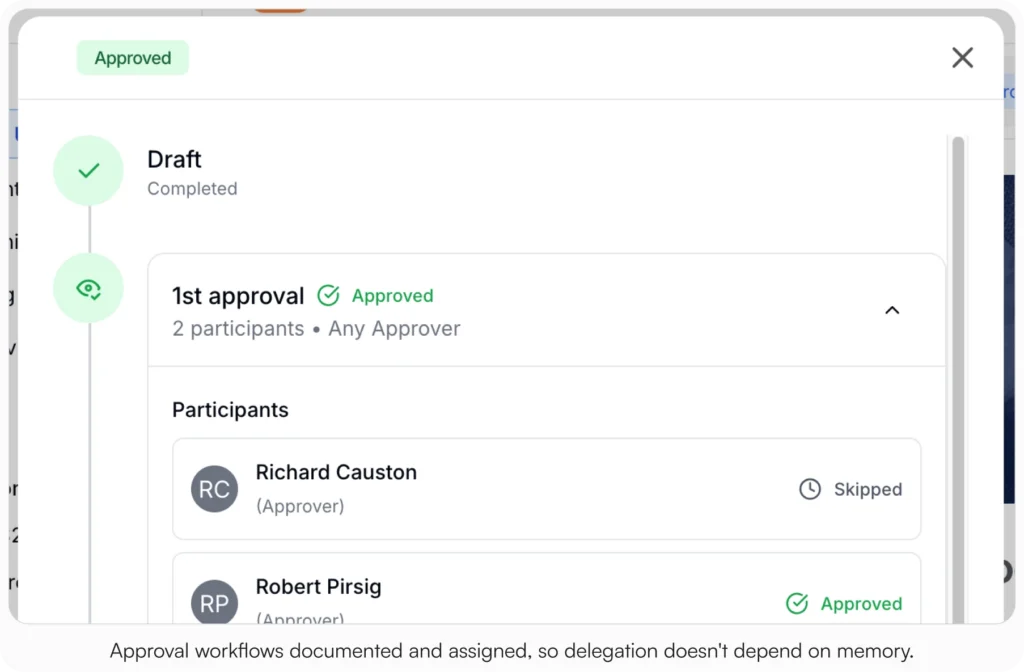
Here’s where AllyMatter fits into everything above. Approval workflows ensure critical documents move through proper channels without bottlenecks. Granular access control keeps sensitive information protected while keeping essential resources accessible to the right team members. Complete audit trails maintain visibility into document changes while supporting compliance requirements.
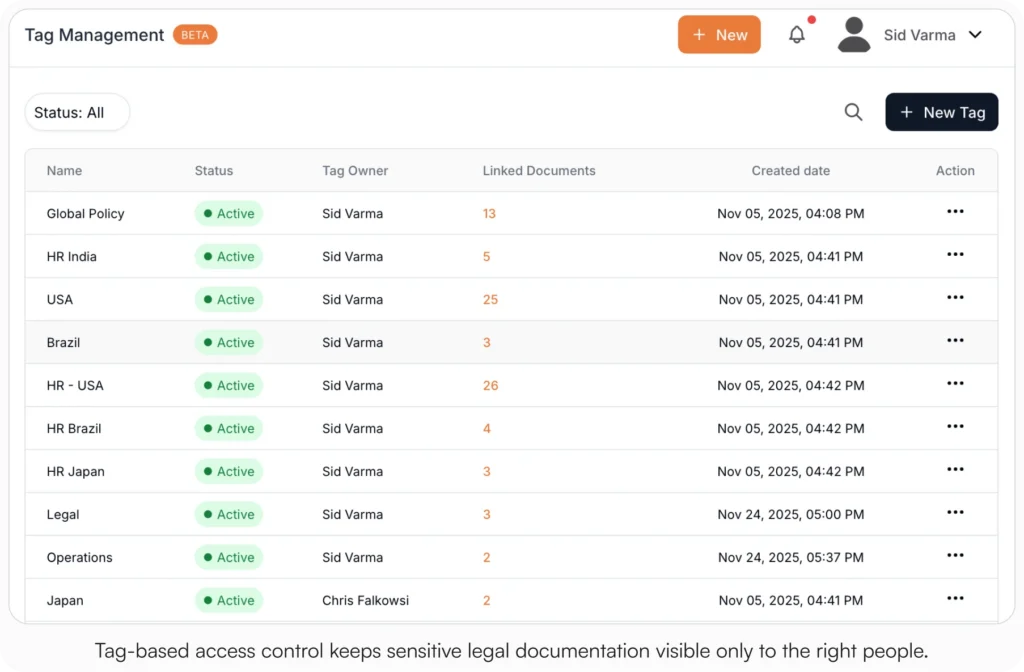
Tag-based organization and powerful search help teams find information quickly. Version control ensures everyone works with current information. Acknowledgment tracking confirms team members have read critical updates, with PDF records per person.
Making the right choice for your team
The next step is comparing purpose-built knowledge bases against the general-purpose tools your team is probably using today:
- Notion vs AllyMatter for HR Policy Management – for teams currently on Notion
- Confluence vs AllyMatter for HR Operations – for teams on Atlassian
- Why HR Teams Can’t Track Policy Acknowledgments in SharePoint – for teams on Microsoft 365
- Top 8 HR Knowledge Base Solutions – for a broader landscape view
- HR Knowledge Base: Complete Guide for Scale-Ups – for the cornerstone HR-focused build
Start your 30-day free trial. No credit card to start, and a 30-day money-back guarantee if you convert and change your mind. Or try the live demo to see search, tag-based access, approval workflows, and acknowledgment tracking with realistic content already populated.
Not ready for a trial? Migration from Confluence, Notion, SharePoint, or Drive is on us when you decide.
Frequently asked questions
What’s the difference between an internal knowledge base and a shared drive?
An internal knowledge base offers structured organization, search capabilities, and access controls that shared drives lack. Shared drives store files. Knowledge bases provide categorization, version control, and user permissions that make information truly accessible and secure.
How do we ensure employees actually use our internal knowledge base?
Success depends on making the knowledge base the easiest way to find information. Logical structure, reliable search, and current content. When finding answers becomes faster than asking colleagues, adoption follows naturally.
What’s the best way to migrate existing documentation to a knowledge base?
Start with your most frequently accessed documents and organize them by department or process type. Audit existing content for accuracy and relevance before migration. Establish clear ownership for different content areas to ensure ongoing maintenance.
How often should we update our internal knowledge base content?
Review and update content based on usage frequency and change rates. High-traffic documents may need monthly reviews, while stable policies might only require quarterly updates. Establish regular review cycles and clear ownership for each content area.
Can we control who sees what information in our internal knowledge base?
Yes. Modern knowledge base platforms offer role-based access controls that let you set permissions by department, team, or individual user. Sensitive information stays secure while general company resources remain accessible.
Related reading
- How to Structure an Internal Knowledge Base
- Internal Knowledge Base Best Practices
- Internal Knowledge Base Maturity: A Strategic Framework for Growing Companies
- HR Knowledge Base: Complete Guide for Scale-Ups
- How Knowledge Bases Can Help Deflect Tickets

Founder of AllyMatter I’m founder of AllyMatter, an operations-first knowledge base for growing companies. Before AllyMatter, I co-founded Syren Cloud and helped scale it into a 300-person organization across two countries, leading marketing, operations, and HR. We moved fast, served demanding customers, and learned the hard way that internal knowledge systems built for help docs or IT don’t solve day-to-day operations. AllyMatter is my answer—tools that turn tribal knowledge into trusted, searchable processes. This blog shares the playbooks, checklists, and lessons I wish I’d had while scaling.