Legal wants proof. Managers want clarity. Employees want fast answers. If your policies live in email threads and “Final-FINAL.pdf” files, you end up with signoff queues, stale content, and zero visibility into who actually read what.
The solution is an HR compliance knowledge base that bakes compliance into the authoring flow – approval workflow, version history, policy acknowledgment, and access controls – so you can move quickly and stay audit ready.
Helpful context while you build:
- HR Knowledge Bases – A Complete 2025 Guide
- Top 5 Challenges in Sustaining Your Knowledge Base Long-Term
- Everything You Need to Know About Building a Knowledge Base for HR
The Problem scene: Signoff queues, stale PDFs, no proof of read
Your company gets an audit notice. Your HR lead needs to show the anti-harassment policy that was active six months ago, prove Legal approved it, and demonstrate which employees acknowledged it. She finds three PDF versions with similar names, email approvals scattered across threads, and no acknowledgment records. What should take 10 minutes becomes a three-day excavation project.
Most HR teams don’t lack policies, they lack a reliable trail. Email approvals disappear, multiple PDF copies diverge, and you can’t prove which version was active or who acknowledged it. That’s an operational tax and a compliance risk.
- Legal reviews live in email/Slack, not on the policy itself
- “Latest version” is ambiguous (drive folders vs handbooks vs wikis)
- No policy acknowledgment record for critical reads (Code of Conduct, Anti-Harassment, Security)
- Slow turnarounds because every change restarts the scavenger hunt
The compliance pillars of an HR compliance knowledge base
These four aren’t add-ons. They need to work from day one. When your tool handles them natively, “compliance” stops being a separate project and becomes how you publish.
What changes when compliance is built in?
- Before: Email approvals disappear into threads
After: Approver names and timestamps visible on every policy
- Before: Multiple ‘Final-FINAL-v3.pdf’ files across folders
After: One current version with full history one click away
- Before: No proof anyone read the updated policy
After: Acknowledgment tracking with completion rates by department
Auditors and counsel won’t accept “we think so.” They ask who changed what, when, and why; who approved it; and who read it. Build the answers into your system.
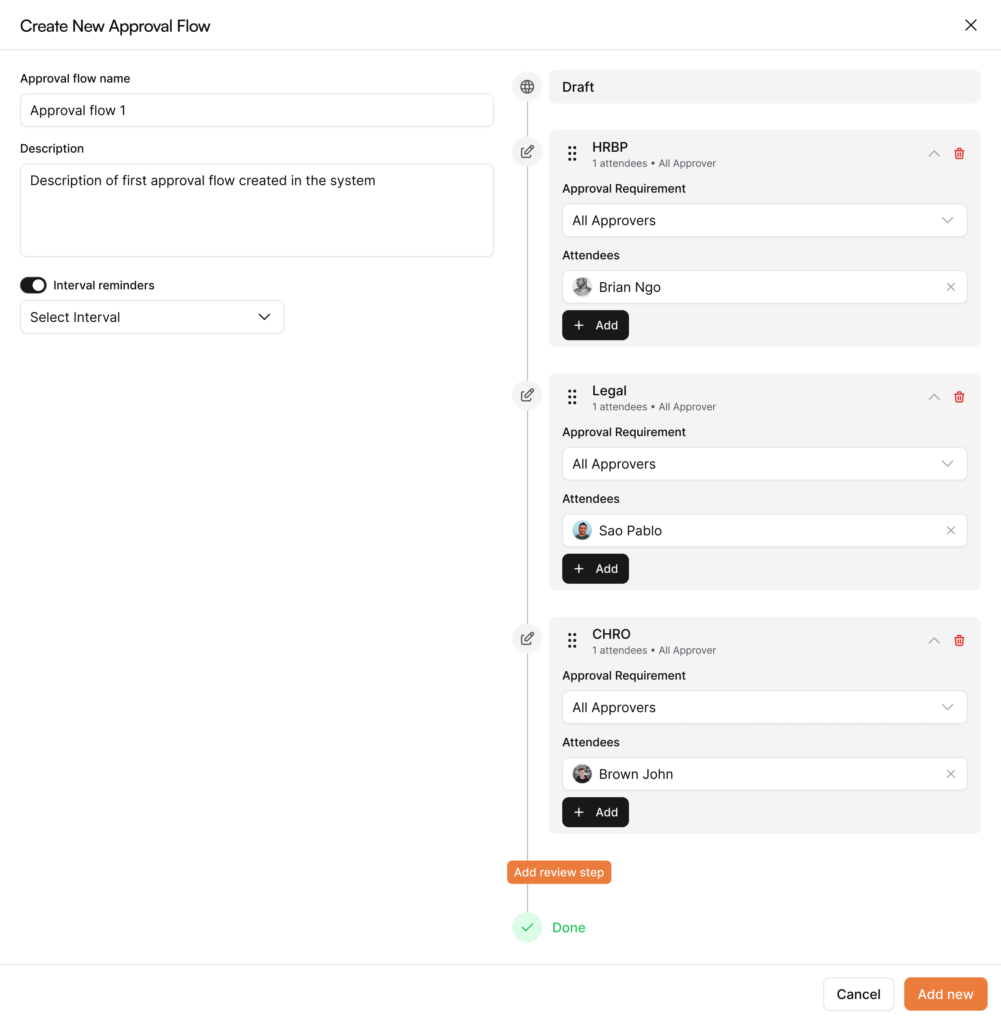
Approval workflow (with visible signoffs)
- Route policy changes HRBP → Legal (as needed) → CHRO for material updates
- Capture approver names, roles, and timestamps on the policy page
- Require a change note (“why this changed”) at publish
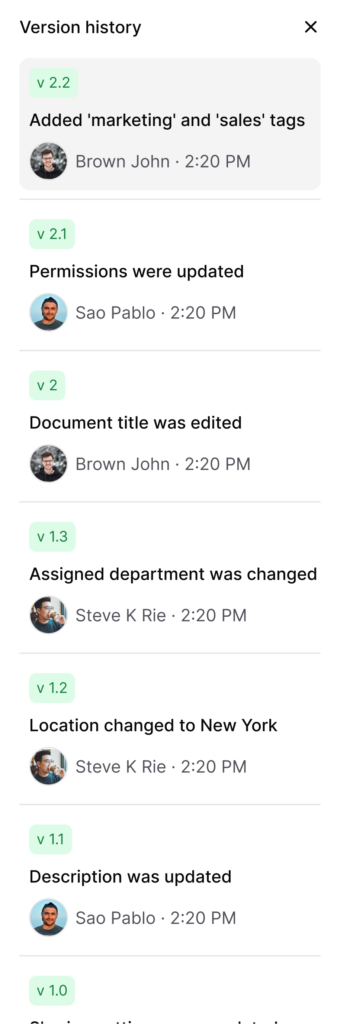
Version history (what existed, when)
- Every publish creates an immutable version (ID + timestamp)
- Open any previous version to see exactly what it said at that time
- Restore by creating a new current version (no silent overwrites)
Policy acknowledgments (read receipts at scale)
- Turn on acknowledgment required for must-reads
- Set due dates and reminders; track completion by org/role/location
- Export completion for leadership or auditors
Access controls (the right audience sees the right policy)
- Lock sensitive categories (salary bands, investigations) to HR only
- Target state addenda (e.g., CA meal/rest) to the people they apply to
- Separate exempt vs non-exempt timekeeping guidance
How AllyMatter helps: Approvals, version history, and acknowledgments are native. Approver lineage and version snapshots live with the policy, and acknowledgment results export in seconds.
The policy lifecycle: Draft → approved → acknowledged → export
Your HR compliance knowledge base should mirror how policy changes actually move. When governance lives in the same place as content, cycle time drops without sacrificing rigor.
One page, one trail, from first draft to exportable evidence.
Draft
- Author in a structured Policy template (Summary, Applicability, Details, Exceptions, Owner, Last Updated)
- Write a change note up front (“Updated PTO accrual; clarified CA sick leave language”)
Approval
- HRBP review, Legal as needed, CHRO for material changes
- Approver names and timestamps captured on the policy page
Publish
- Creates a new version (v12, v13…) and keeps earlier versions in Version History
- Titles and applicability make “what’s current” unambiguous (e.g., “PTO & Sick Leave — U.S.; CA Addendum”)
Target & Notify
- Aim updates at the correct audiences (role, org, state)
- Notify employees/managers who must read changes
Acknowledge
- Toggle Acknowledgment required; set due date and reminders
- Track completion by org/role/location
Monitor & Improve
- Watch top searches and zero-result searches; add a companion FAQ/Procedure if confusion persists
- Nudge overdue acknowledgments
Export
- Generate Audit Trail (CSV) and Acknowledgments (CSV/PDF), or a policy packet PDF (current policy + header with version, approvers, dates, change note)
How this works in AllyMatter: All seven moments live on the policy itself; no copying into spreadsheets, no chasing inboxes.
Export and evidence for audits (no scavenger hunts)
According to PwC, 35% of risk executives view compliance and regulatory risk as the top barrier to their company’s growth. Having audit evidence ready to export removes weeks from your response time.
When an auditor asks “Which version was in force on March 15, and who approved it?”, you should answer with a link and a download, not a weekend project.
Export what auditors need, in minutes:
- Audit Trail (CSV)
- version_id, edited_at_utc, editor, change_note, approver_1, approved_at_utc_1, approver_2, approved_at_utc_2, published_at_utc, policy_url, version_history_url
- Acknowledgments (CSV/PDF)
- Targeted audience, due date, completion %, overdue readers (filters for org/role/location)
- Policy Packet (PDF)
- Current policy + header showing version ID, timestamps, approvers, and the latest change note
In AllyMatter: Policy → Export → choose Audit Trail and Acknowledgments. You hand Legal an end-to-end narrative: what changed, who approved, who read, and when.
Keep content fresh with review cadences (so it stays audit-ready)
Compliance collapses when content goes stale. Light governance keeps trust high and audits boring (in a good way).
Keep content fresh with light governance:
- Owners
- One named owner per policy (not just “HR”); backups optional
- Owner is accountable for review + updates
- Cadences
- Critical policies monthly/quarterly (Anti-Harassment, Security, Safety)
- General policies quarterly/semi-annual (PTO, Remote)
- Evergreen FAQs twice a year (W-4, paystubs, 401(k) access)
- SLA & Signals
- SLA: “Policy updates publish within 5 business days of final approval”
- Signals to act: zero-result searches spike, repeat questions resurface, “Last Updated” exceeds the cadence
For sustainment pitfalls and fixes, skim Top 5 Challenges in Sustaining Your Knowledge Base Long-Term.
Implementation quick-start (copy into your project doc)
You don’t need a reorg. Building your HR compliance knowledge base starts with consistent habits and the right settings.
Centralize policies as articles
- Convert high-risk PDFs first (CA meal/rest, PTO & Sick Leave, Anti-Harassment)
- Use the Policy template and add applicability banners (e.g., “Applies to: U.S.; see CA Addendum”)
Enable approvals + required change notes
- HRBP → Legal (as needed) → CHRO for material changes
- Make change notes mandatory on publish
Turn on acknowledgments for must-reads
- Set due dates and reminders; filter reporting by org/role/location
Target delivery + lock sensitive categories
- State addenda to relevant employees/managers; salary bands/investigations to HR only
Verify version history + practice restore
- Open a prior version; perform a restore to confirm lineage is preserved
Export a sample audit packet
- Audit Trail CSV + Acknowledgments export for one policy; confirm with Legal
Schedule owner reviews
- Quarterly reminders; treat spikes in search confusion as backlog items
If you’re still planning your structure, the broader build guidance in Everything You Need to Know About Building a Knowledge Base for HR will help.
Why AllyMatter is built for HR compliance (and wikis aren’t)
General wikis store text; compliance needs evidence. AllyMatter turns the compliance must-haves into routine steps you won’t skip.
- Approvals captured on the policy (names, roles, timestamps)
- Version history by default (open prior versions; restoring creates a new one)
- Policy acknowledgment tracking with due dates, reminders, and exports
- Targeting & access by role/org/location; confidential categories locked
- Exports (Audit Trail CSV, Acknowledgments CSV/PDF, policy packet PDF)
Pitfalls and quick fixes (so you don’t invent risk)
Even good teams fall into these traps. A few small rules keep you clean.
- Email approvals → missing lineage
- Fix: Approve in the KB; approver history sticks to the policy
- Multiple “FINAL” PDFs → parallel truths
- Fix: Convert to articles; archive files; link the policy, not the file
- No acknowledgments → can’t prove who read
- Fix: Turn on Acknowledgment required for must-reads; export results
- Stale content → operational drift
- Fix: Owners + cadences + change notes + quarterly review
- Open access → oversharing sensitive info
- Fix: Lock confidential content; target state addenda to relevant audiences
Compliance shouldn’t require a scavenger hunt. See how approvals, version history, and acknowledgments come together – without clogging Legal’s inbox.
See an audit-ready policy lifecycle in AllyMatter: Book a 10-min demo
Frequently asked questions
Stakeholders will ask these. Having crisp answers keeps momentum.
Do we need Legal on every change?
Minor wording fixes don’t require Legal. Material changes go through the full chain. Every publish still has a change note and creates a version.
Can employees see old versions?
Employees see the current published policy. Prior versions live in Version History for admins/auditors.
How do acknowledgments attach to versions?
Acknowledgments tie to the current version at publish; exports show who read, when, and where they sit (org/role/location).
What about state addenda?
Keep addenda as separate linked articles and target them to the right audience (e.g., CA employees/managers).
Can we customize approval chains by policy type?
Yes. Minor wording fixes might need just HRBP review. Material changes route through Legal and CHRO. You set the workflow per policy or category, so approvals match the risk level.
Disclaimer: This article is informational only and not legal advice. Consult counsel for jurisdiction-specific requirements.

Vikas is a B2B marketing professional with over 14 years of experience in content strategy, messaging, and demand generation. He specializes in turning complex business challenges into clear, actionable stories to connect meaningfully with audiences.