An internal knowledge base is a valuable asset for any organization, acting as a central hub where employees can access crucial information. But creating a knowledge base isn’t enough. Maintaining it over time is where the value actually lives.
A well-maintained knowledge base boosts productivity, improves communication, and helps your team succeed. But with changing processes, evolving teams, and shifting priorities, keeping it updated is the hard part.
Four signals your KB is starting to decay:
- Employees keep asking HR or managers questions the KB technically answers
- “Last updated” stamps on critical docs are older than 12 months
- Multiple versions of the same policy exist and nobody knows which is current
- Zero-result searches in your KB are climbing month over month
This article walks through the five biggest maintenance challenges and the practical solutions that actually hold up over time.
The ongoing need for updates
An internal knowledge base is a living resource. What’s accurate today may not be relevant tomorrow. Information becomes outdated, and outdated documentation creates confusion, mistakes, and inefficiency.
To keep your knowledge base reliable, set up a system for regular updates. Review docs, processes, and policies on a cadence. Encourage feedback from employees who use the KB daily; they’re often the first to spot outdated or missing information. Proactive maintenance prevents critical knowledge from slipping through the cracks. (Building a future-proof internal knowledge base walks through the foundational structure that makes this work.)
1. Creating a knowledge maintenance plan
Setting a quarterly, biannual, or custom review schedule keeps your knowledge base current and effective.
Assign ownership for each document or section. Responsibility can fall to specific departments, teams, or individuals best positioned to keep the information up to date. Prioritize the most critical documents that affect daily operations and employee productivity.
An HR manager discovers the remote work policy her team is referencing is six months outdated. With clear document ownership, she knows exactly who to contact for updates, preventing confusion across multiple departments.
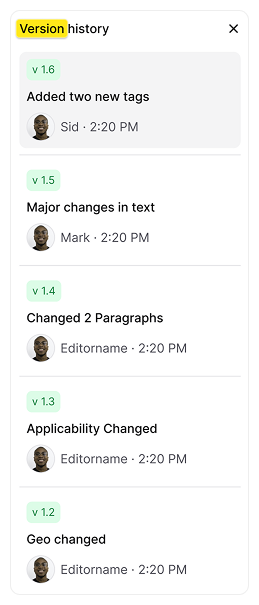
Track changes with version history and audit trails to keep the KB accurate.
Real-world solution
AllyMatter enables automatic version control on every document. Compare versions side by side to track all edits and approvals in one place, or restore previous versions in a single click.
2. Organizing and structuring knowledge for longevity
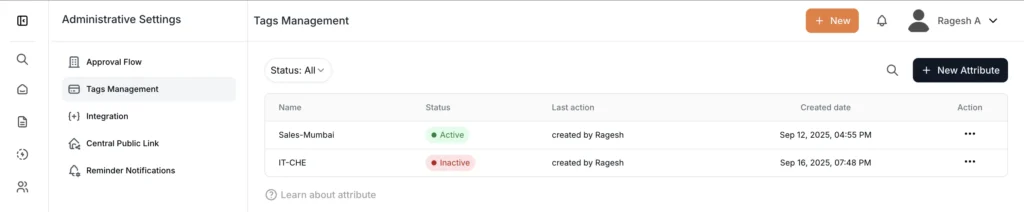
A well-organized knowledge base is easier to maintain and far more useful to the team. Categorizing and tagging documents effectively is the key to keeping information findable as the KB grows.
Rather than cramming everything into a single document, create concise pieces of information that can be expanded on when necessary. Clear, logical categories make navigation and search both work.
Real-world solution
AllyMatter enables structured organization with smart tags, customizable categories, and metadata search. No piece of information gets lost or buried under layers of folders.
3. Involving teams in the process
The responsibility of maintaining a knowledge base shouldn’t fall on a single individual or team. Input from various departments creates shared responsibility for upkeep.
Foster a culture where knowledge sharing becomes second nature:
- Establish clear ownership for each knowledge area
- Make documentation part of regular performance discussions
- Recognize team members who contribute valuable updates
- Create simple feedback loops for users to suggest improvements
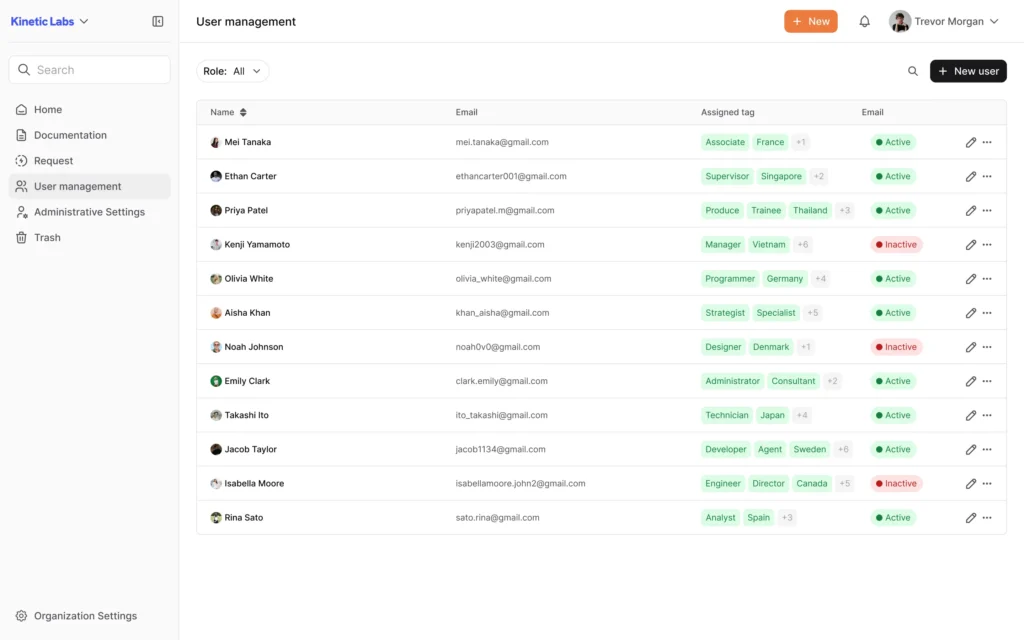
Simple user management increases ease of collaboration.
Real-world solution
With AllyMatter, you manage the entire knowledge base from one dashboard. Adding users, assigning roles, secure commenting, and access control all take minimal effort.
4. Securing access without slowing people down
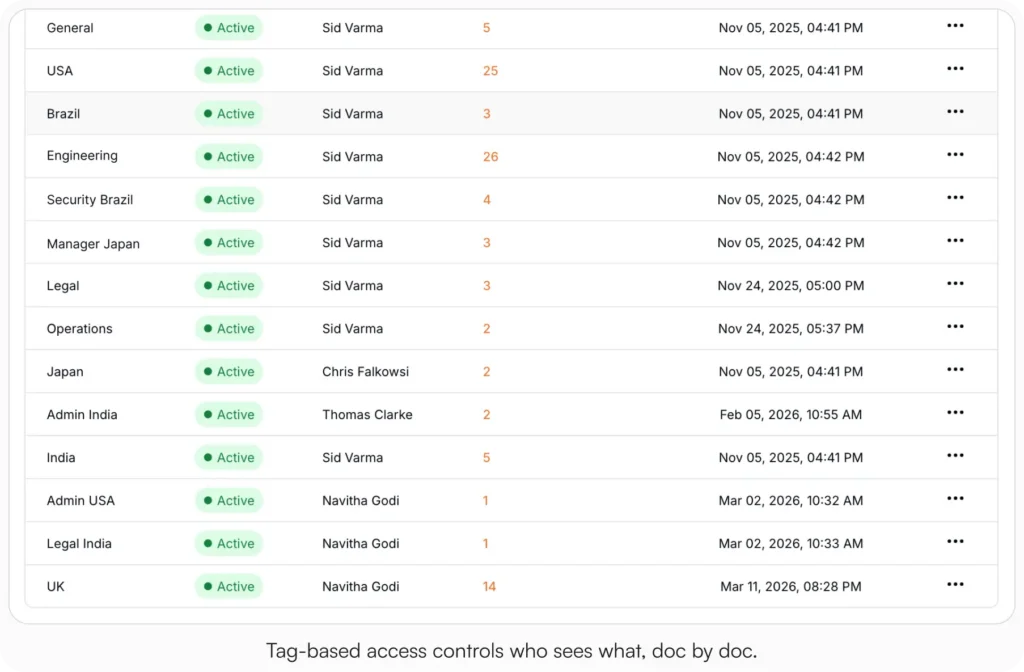
As your knowledge base becomes more valuable with sensitive company data, confidential projects, and personal information stored inside, you need to ensure only authorized people can access specific content.
Define clear permissions for who can view, edit, or share documents. Regularly review and update security protocols as the organization grows.
Establish a multi-layered security system that includes user authentication, access restrictions, and encrypted storage to protect sensitive information while maintaining easy access for authorized users.
Real-world solution
AllyMatter protects your knowledge base with enterprise-grade security features that include bank-level encryption and seamless access for authorized users. Industry-standard encryption for all your data, granular access controls, and regular security audits keep sensitive information secure.ank-level encryption and seamless access for authorized users. With industry-leading encryption for all your data, granular access controls, and regular security audits, your sensitive information stays secure.
5. Managing knowledge across multiple teams and locations
As organizations grow, information can fragment across departments, and different teams document and share knowledge in different ways.
Establish standardized documentation guidelines and encourage cross-department collaboration to keep knowledge sharing consistent. Whatever location or team an employee belongs to, they should access the same information.
Ensure all teams use the same templates, tags, and categorization methods.
Real-world solution
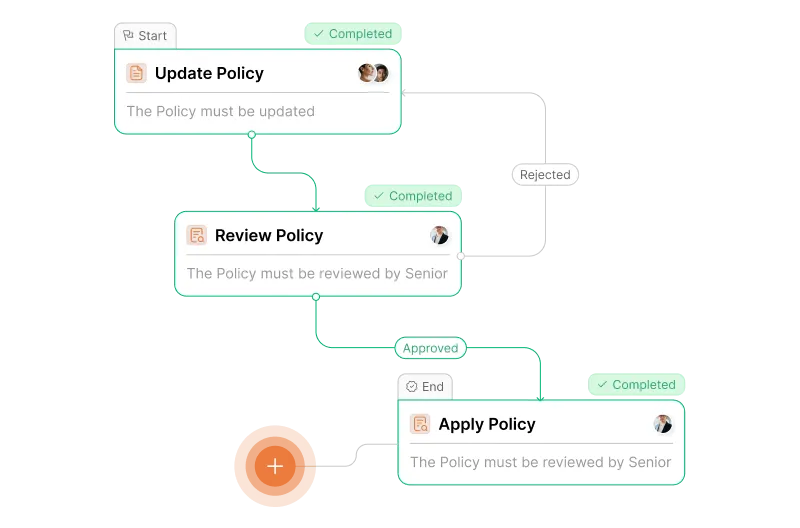
AllyMatter offers customizable templates and powerful search functions to keep consistency across teams. Whether you’re managing content from different departments or making sure information flows between them, the platform centralizes the knowledge base and standardizes documentation practices across the organization.
Three scenarios
An honest read on whether you’ve outgrown your current setup:
If you’re under 30 employees and one person can keep the KB current as part of their day-to-day, you don’t need formal maintenance infrastructure. Light reviews and the four signals above are enough.
If you’re 30 to 200 employees and the four signals at the top of this post are showing up in your week, this is the moment. Without owners, cadences, and version control, the KB slowly stops being useful. AllyMatter is what we built for this transition.
If you’re 200+ employees, multi-location, or in a regulated industry, KB maintenance without proper version control, access control, and audit trails is a compliance risk. AllyMatter or another purpose-built KB makes sense here. We’d start with AllyMatter.
Secure your knowledge base with AllyMatter
Maintaining an internal knowledge base is not a one-time task. It’s an ongoing process that requires consistent effort and attention. With a solid maintenance plan, proper organization, employee involvement, and the right tools, your knowledge base can evolve to meet the changing needs of your organization.
A well-maintained knowledge base lifts productivity and speeds up decision-making. Treat the KB as a living resource that grows and adapts, and it stays a valuable asset for both new and experienced employees.
Start your 30-day free trial. No credit card to start, and a 30-day money-back guarantee if you convert and change your mind. Or try the live demo to see version control, tags, approval workflows, and user management with realistic content already populated.
Not ready for a trial? Migration from Confluence, Notion, SharePoint, or Drive is on us when you decide. We’ll move your existing docs over and have you running in about a week.
Frequently asked questions
How often should we update our internal knowledge base?
Review critical operational documents quarterly. Less frequently used content can be assessed annually. The key is establishing ownership for each section and creating automated reminders for regular reviews.
What’s the best way to encourage team participation in knowledge base maintenance?
Make knowledge sharing part of your organizational culture by incorporating it into performance reviews and onboarding processes. Assign document ownership to subject matter experts and create simple feedback mechanisms for users to report outdated information.
How do we prevent security breaches while maintaining accessibility?
Implement role-based access controls so team members only see information relevant to their responsibilities. Use multi-factor authentication and regularly audit user permissions as the organization grows.
What happens when remote teams use different documentation standards?
Establish company-wide templates and tagging conventions from the start. Provide clear documentation guidelines and ensure all teams receive training on your chosen knowledge management approach.
Related reading
- Internal Knowledge Base Best Practices
- Building a Future-Proof Internal Knowledge Base
- HR Knowledge Base: Complete Guide for Scale-Ups
- Show Me the Trail: Audit-Ready Version Control for HR Policies
- Notion vs AllyMatter for HR Policy Management

Vikas is a B2B marketing professional with over 14 years of experience in content strategy, messaging, and demand generation. He specializes in turning complex business challenges into clear, actionable stories to connect meaningfully with audiences.