The vendor payment cycle stalls because Nadia is on leave and the SOP she last updated lives in a spreadsheet on her desktop. The three new hires starting Monday can’t access any systems because the person who handles provisioning is traveling and the process guide predates the company’s last tool migration.
None of these are catastrophes in isolation. Together, they describe a company where specific individuals carry critical operational knowledge rather than documenting it somewhere the rest of the team can find and use. When the one person who knows how something works is on leave, everything slows down.
Why single points of failure form quietly
The processes that become single points of failure rarely start that way. They start with someone reliable, competent, and trusted. The process runs well because that person runs it well, so no one pushes for documentation. Why would they? It’s working.
The gap forms through trust rather than neglect. The organization trusts the person and stops asking whether the underlying knowledge is accessible to anyone else. By the time someone asks, the person has already gone or is unavailable.
I’ve worked with teams of 80 people and teams of 400 who’ve hit this in exactly the same way. The size doesn’t change the pattern. What changes is how much it costs when something breaks.
“Didn’t we write this down somewhere?” Probably, yes. In a format from three years ago that doesn’t reflect how the process works now, stored somewhere only the original author knew to look.
What process gaps cost and where that cost lands
Process failures from knowledge silos rarely show up on a report. They show up as friction nobody tracks cleanly: a COO who has no record to show the team completed a compliance review, an HR manager spending her first weeks reconstructing an onboarding process because her predecessor left notes scattered across a personal Google Drive and an abandoned Confluence page.
The cost isn’t the occasional crisis. It’s the accumulated time spent on reconstruction, re-explanation, and improvisation that should have been eliminated by good documentation of processes the first time.
Growing companies tend to feel this sharply around 80 to 150 employees, when the team is large enough that no single person can hold the full operational picture, but not yet structured enough that process ownership is explicit. That’s the window where the documentation debt compounds fastest.
What documenting business processes actually requires at this level
There’s a version of this conversation that results in a 200-page SOP manual nobody reads. That’s not the goal.
Documenting business processes, done usefully, means capturing enough that a capable colleague can run a process without calling the person who owns it. That’s the measure. Not comprehensiveness, not perfect structure, not a documentation tool with 40 features. Can someone unfamiliar with this process follow the document and complete the task?
For growing companies, the processes worth prioritizing share a few traits. They have a single trained owner. They’re compliance-adjacent or involve financial workflows. They include cross-functional handoffs where one team waits on another to act first. Or they’re recurring tasks a new hire will need to run independently within weeks of joining.
A working format that actually gets used:
- What the process is and why it matters
- Who owns it and who else needs to be able to run it
- Step-by-step walkthrough written for someone unfamiliar with it
- Decision points and what governs them
- Links to relevant tools, templates, or required approvals
- When it was last reviewed and by whom
Short, specific, maintainable. The companies that keep documentation current don’t treat it as a separate project. When the process changes, the document changes at the same time. That habit, built early, prevents most of what this blog describes.
Diagnosing where your single points of failure sit
Before deciding what to document, it helps to know where the risk actually is. A few questions that surface it quickly:
If this person were unavailable for two weeks with no handover, what would stop? That list is the starting inventory.
Which recurring processes have only one trained owner? Where do cross-functional handoffs depend on one person initiating, and which compliance workflows have no timestamped record of completion?
The answers tend to cluster around a handful of people who’ve become operationally indispensable. That’s not a reflection on them. It’s a signal that the company has been growing faster than its documentation of processes, and those individuals have been filling the gap through competence rather than structure.
Start with the most fragile process, not the most complex one. The one that would cause the most disruption if the person running it was unavailable tomorrow.
How AllyMatter addresses this
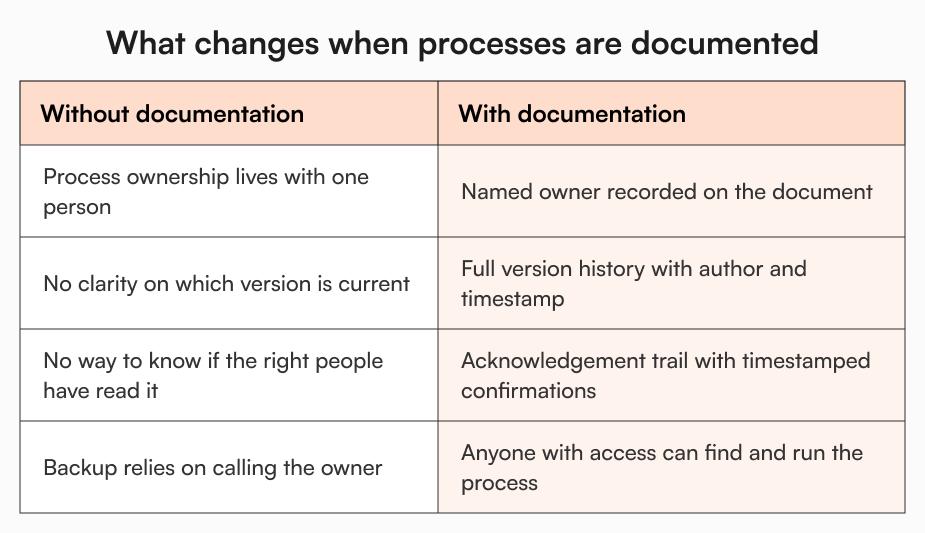
The structural problem with documenting business processes in growing companies isn’t usually motivation. It’s that the tooling doesn’t make it sustainable. Documents end up across Google Drive, Notion, or Confluence with no version tracking, no named ownership, and no way to know whether the people who need them have read the current version. Documentation exists but can’t be trusted.
When Nadia updates her vendor payment SOP in AllyMatter, the previous version is retained and the change is logged with a timestamp and author. When she goes on leave and her manager needs to find the current version, there’s no ambiguity. Anyone with access can see what changed, when, and who approved it. That’s version control working the way it needs to for process documentation: not just change tracking, but clarity about which version is authoritative right now.
The approval step matters too. A revised process document is only reliable if the update itself was reviewed. In AllyMatter, a draft SOP can be routed through a named approval workflow before it publishes. The document stays locked during review and the owner is notified at each stage. For compliance workflows especially, an unreviewed change to a process document creates as much risk as no documentation at all. Document workflows in AllyMatter goes deeper on this.

Knowing a process was updated is different from knowing the people running it have read the new version. When a process changes and affects a specific team, the document can be sent for acknowledgement. Each person gets a notification, their confirmation is timestamped, and reminders go out automatically to anyone who hasn’t responded within the configured window. For a changed vendor approval process or a revised compliance checklist, that’s the record that demonstrates adherence rather than having to explain why it can’t be demonstrated.
These three things together address the core failure mode: process knowledge tied to one person, in one location, with no verification of currency or readership.
Building continuity before the gap appears
The right moment to start documenting business processes is before the absence, the resignation, or the audit request. Exit documentation covers what happens when someone leaves and their knowledge goes with them. The stronger position is having processes documented before that conversation starts, so a handover is an update rather than a reconstruction.
The test for any critical process: could your team run it today if the person who owns it wasn’t available? If the answer is uncertain, that’s where to begin.
Getting this right at 100 employees is meaningfully easier than fixing it at 300. Dependencies are fewer, processes are less entrenched, and the habit is simpler to build while the team is still small enough to move quickly.
Operational continuity starts with one process at a time
Turning single points of failure into documented processes doesn’t require an overhaul. It requires knowing which processes are fragile, starting with the most exposed one, and building the practice of updating documentation when processes change rather than scheduling a documentation sprint six months later.
The goal isn’t a knowledge base that impresses people on a tour. It’s a team that can run its critical processes without calling the one person who usually handles them.
Want to see how process ownership, version control, and acknowledgement tracking work in practice? The sandbox has pre-loaded data so you can explore without building from scratch. Try it in the sandbox.
Frequently asked questions
What’s the quickest way to find single points of failure in your operations?
Ask this for each critical process: if the person running it were unavailable for two weeks with no handover, what would stop? Processes where the honest answer is “a lot” are where to start. Compliance workflows, vendor payments, and cross-functional handoffs tend to surface first because the cost of disruption there is highest and most visible.
How do you write a process document that gets followed rather than filed away?
Write it for the person who has never run the process, not the person who already knows it. Owners tend to document at the level they operate, skipping steps that feel self-evident to them. A useful check: give the draft to a capable colleague who doesn’t run the process and see where they get stuck. Those gaps are what to fix. Brevity matters too. A four-page document that covers everything necessary will be used. A forty-page document won’t.
Who should own process documentation in a growing company?
Ownership follows the process. The person running it owns the document, and their manager is accountable for ensuring it exists and stays current. Assigning documentation to a central function removes accountability from the people who know the process best and creates a queue where updates sit rather than getting made. Distributed ownership, with named owners on each document, is what keeps documentation accurate over time.
What happens to process documents when the owner leaves?
If ownership isn’t transferred before the departure, documentation goes stale. The process continues in some form, carried by whoever fills the gap, but the document stops reflecting current reality. Named document ownership that transfers when the role does, combined with version history showing what the process looked like at each point, is what prevents this. The fix lives in the structure before the exit, not in the offboarding checklist.
How often should process documentation be reviewed?
Reviewed whenever the process changes, not on a separate calendar. The most reliable way to keep documentation current is to treat updating the document as part of completing a process change, not a follow-up task. Periodic reviews can supplement this for processes that are stable but compliance-sensitive. For everything else, change-triggered updates work better than scheduled ones because the person updating the document still understands exactly what changed and why.

Founder of AllyMatter I’m Sid Varma, founder of AllyMatter, an operations-first knowledge base for growing companies. Before AllyMatter, I co-founded Syren Cloud and helped scale it into a 300-person organization across two countries, leading marketing, operations, and HR. We moved fast, served demanding customers, and learned the hard way that internal knowledge systems built for help docs or IT don’t solve day-to-day operations. AllyMatter is my answer—tools that turn tribal knowledge into trusted, searchable processes. This blog shares the playbooks, checklists, and lessons I wish I’d had while scaling.