
Finance won’t migrate their documents to the shared platform. Sales is sharing content with anyone who has a login. IT got tired of waiting on the admin process and quietly built their own Confluence space. HR is still emailing PDFs.
Every company I’ve worked with past 50 people has some version of this. Finance keeps their documents somewhere nobody else can reach. Sales shares everything with everyone. And IT has a wiki that only IT knows about. Nobody planned it. The tool just worked for one team and not the rest.
According to IDC research, only 45% of employees at companies that have implemented knowledge management are using it. The platform gets set up. Teams opt out.
What actually changes things is getting knowledge base access control right. Every department gets what they need, inside one system.
Finance: locking everything down until there’s a reason not to
Sarah, Head of Finance at a 130-person software company, was asked twice to move her team’s documentation to the company knowledge base. She said no both times.
Salary bands, budget forecasts, vendor payment terms, board reporting templates. If she couldn’t be certain those documents were visible only to the people who should see them, keeping them off the shared platform was the only rational call. So she kept everything in a combination of local folders and email threads.
The consequence wasn’t obvious at first. Six months later, it was showing up in the work. New finance hires had no structured place to find current SOPs. When the CFO asked for the vendor approval process, three different versions surfaced from three different inboxes. And when a finance analyst left the company, the documentation she’d been maintaining informally left with her.
The instinct to restrict is legitimate. Keeping sensitive documents out of a system with uncertain access controls isn’t stubbornness. It’s the only move that makes sense when you can’t verify who sees what. The problem is that blanket restriction creates a knowledge silo. Every new hire, every process change, and every lost document traces back to the same gap. Nothing was ever properly stored where people could reach it.
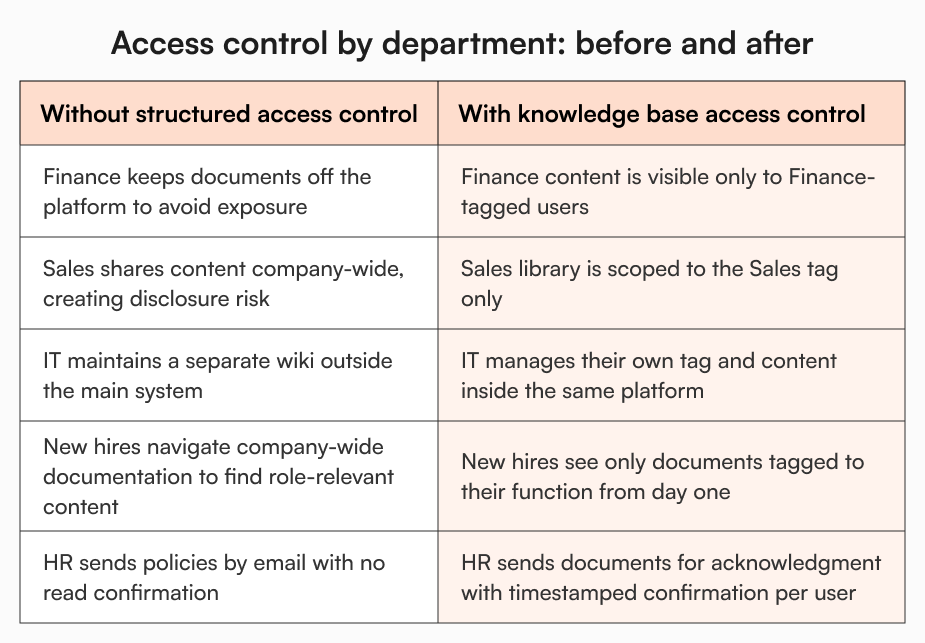
What changes with tag-based access control is that the restriction becomes structural rather than defensive. Documents in a Finance-tagged folder are only visible to users with the Finance tag assigned. Sarah can see exactly who has access. She can be made a tag owner and manage her team’s access herself, without depending on a central admin for every change. Her documents sit inside the company knowledge base, properly governed, not hidden in a personal drive because the alternative felt unsafe.
Sales: sharing too freely until it becomes someone else’s problem
Marcus, VP of Sales at a 90-person technology company, runs a team that moves fast. His reps need pricing documentation, competitive battle cards, objection-handling guides, and product positioning available the moment they need them. Friction in access translates directly to friction in deals.
So Marcus kept things open. Everything accessible to anyone with a login, easily shareable, no barriers.
The problem surfaced when a rep forwarded a detailed pricing strategy document outside the company, not realising it was sensitive. The COO noticed. Shortly after, legal flagged that partnership terms visible to junior employees created disclosure risk. The IT admin raised concerns about security. And the ops team started pushing for a blanket restriction on the sales content library.
Marcus pushed back because his team’s productivity depended on fast access. The COO pushed for control. Neither was wrong. They were both dealing with the consequence of an access model that had no middle ground.
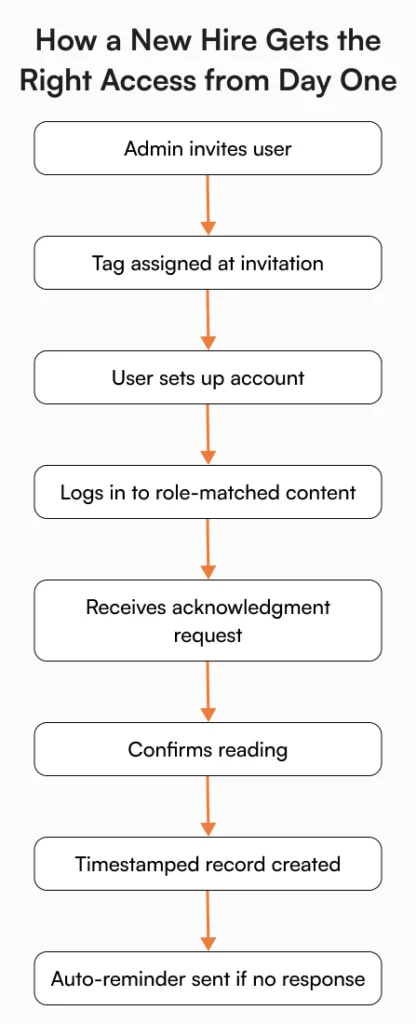
With tag-based knowledge base access control, there is a middle ground. The sales content library sits in a Sales-tagged folder, accessible to every employee with the Sales tag and nobody else. Marcus’s reps get the open, frictionless library they need. Content doesn’t bleed into the wrong hands. And when a new rep joins, they’re assigned the Sales tag at the point of invitation. They log in on day one and the right content is already there, no configuration required, no asking around for where things live.
IT: building their own wiki because the main system didn’t work for them
James, IT admin at a 110-person financial services company, had been running a separate internal wiki for almost a year before the COO asked why.
Infrastructure documentation changes fast. Security SOPs get updated. Access policies shift. Getting anything updated in the main knowledge base required submitting a request, waiting for an admin to action it, and following up when nothing happened. For documentation that his team needed current that same day, that process was unworkable. So he stopped using the system and built something he could manage himself.
IT documentation was invisible to anyone outside James’s team. New engineers didn’t have it in their onboarding. When the ops team needed the incident response process, they couldn’t find it.
He manages his team’s documentation on his own schedule, updates what needs updating without a ticket, and keeps content visible to the right people. Engineering and IT can see it. Nobody else can. And it’s part of the same system the rest of the company uses, searchable and findable, not siloed in a wiki only James knows exists.
How it works inside AllyMatter
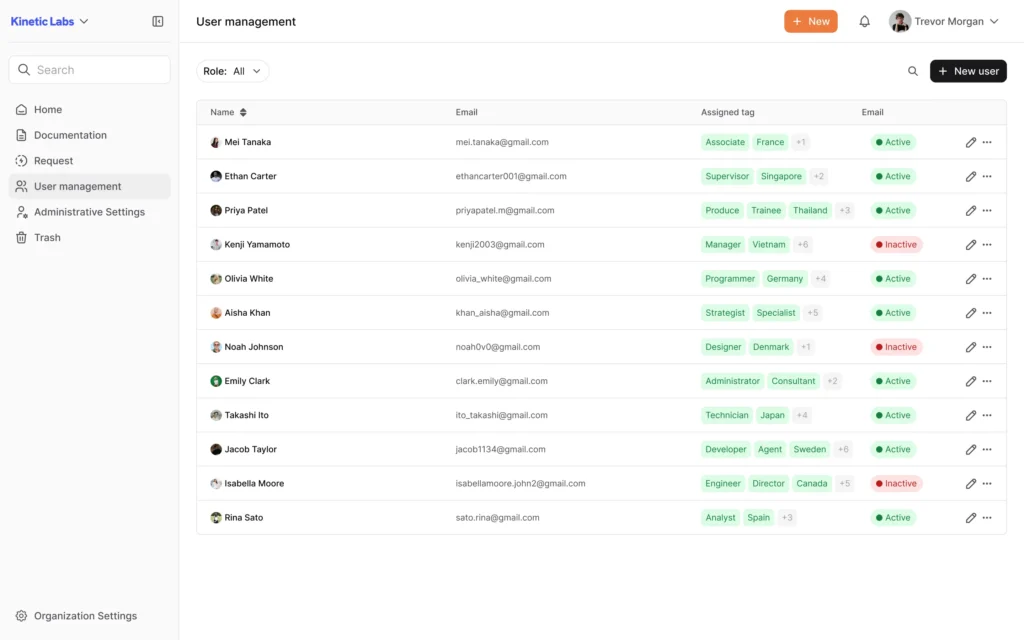
AllyMatter’s document access control is built around tags. An admin creates tags mapped to teams or functions and assigns them to users, documents, and folders. From that point, visibility is automatic. A Finance-tagged user sees only finance content. Someone without the IT tag never reaches the infrastructure runbook. The Sales library stays within the sales team.
Documents inside a tagged folder inherit the tag automatically. There’s no per-file configuration. Tag ownership can be delegated to a team lead, so each department manages their own access independently, without creating a bottleneck at the admin level.
When a policy update needs company-wide confirmation, it gets sent for acknowledgment to all users via their tags. Each person gets an in-app notification and an email. Confirmations are timestamped and tracked. If someone hasn’t responded within the configured window, reminders go out automatically. The result is a verified record of who confirmed, not just who was sent an email.
For a detailed look at how user roles and permissions are managed across the platform, the user console and advanced document management capabilities cover the full scope.
Version history captures every document edit with the author and timestamp. If a user’s role changes, updating their tag is enough. Access adjusts immediately. Someone leaving the company? Their access is revoked from user management in the same step. The whole model stays manageable as the company grows.
The knowledge base that finally serves the whole company
The parallel systems that appear in growing companies don’t happen because teams are difficult to work with. Finance had real sensitivity concerns. Sales had real access needs. IT had a real process problem. Together, they produced exactly the fragmented knowledge environment that slows companies down.
None of that requires anyone to give something up. Finance can finally put their documentation where it belongs without worrying about who sees it. Sales gets a fast, open library that doesn’t create problems elsewhere. And IT has no reason to maintain a separate system when they can manage their own corner of the main one. Every new employee gets a first day where the right content is already waiting for them, structured around their role, not a wall of undifferentiated documents they have to navigate alone.
That’s what a unified platform working for the whole company actually looks like, not one team’s tool that everyone else tolerates, but one system built to accommodate all of them.
If the scenarios above resonate, the AllyMatter sandbox is the fastest way to see how the access model holds up in practice. Department data is already loaded.
Frequently asked questions
Why do finance teams typically refuse to use shared knowledge bases?
It comes down to access confidence. When a finance head can’t verify that salary data, budget documents, or vendor contracts are only visible to their team, keeping those documents off the shared platform is the safer call. Tag-based access control resolves this by restricting visibility at the folder level. Only users with the matching tag can see the content, so the finance team can participate in the centralised knowledge base without the exposure risk they were avoiding.
What does “sharing too freely” actually cost a sales team?
When sales documentation is accessible company-wide without structure, sensitive commercial materials become visible to employees who don’t need them. This creates compliance and security risk, makes other teams uncomfortable, and often results in blanket restrictions that then slow down the sales team’s own access. Scoping the sales library to a Sales tag gives reps what they need while keeping the content contained to the right audience.
Why do IT teams build separate wikis instead of using the main knowledge base?
The most common reason is admin bottleneck. When every content update has to go through a central process, IT documentation falls behind. Security SOPs and infrastructure guides change frequently. An IT admin who can’t update them quickly stops using the system. Delegating tag ownership to the IT admin inside the main knowledge base removes that bottleneck and brings their content back into the system the rest of the company relies on.
How does role-based reading work for new hires?
When a new employee is invited to the platform, the admin assigns their tag at the point of invitation. From the moment they log in, their view is scoped to content relevant to their role. Document owners can then send approved materials to that tag group for acknowledgment. Confirmations are timestamped, tracked, and reminders go out automatically to anyone who hasn’t responded within the configured window.
Can team leads manage their own content without going through a central admin?
Yes. Tag ownership can be delegated to a department head or team lead. A finance manager, IT admin, or HR lead becomes a tag owner and controls who has access to their content area, independently. This is what typically brings teams back into the main knowledge base after they’ve been working around it.

Founder of AllyMatter I’m founder of AllyMatter, an operations-first knowledge base for growing companies. Before AllyMatter, I co-founded Syren Cloud and helped scale it into a 300-person organization across two countries, leading marketing, operations, and HR. We moved fast, served demanding customers, and learned the hard way that internal knowledge systems built for help docs or IT don’t solve day-to-day operations. AllyMatter is my answer—tools that turn tribal knowledge into trusted, searchable processes. This blog shares the playbooks, checklists, and lessons I wish I’d had while scaling.