Your first compliance audit request arrives via email. An investor wants to see your employment policies. Your insurance broker needs proof that employees acknowledged your security guidelines. HR scrambles through Slack messages, email chains, and Google Docs, trying to piece together what exists.
You find three different versions of your PTO policy. No one knows which is current. The anti-harassment policy someone drafted six months ago never got signatures. Your acceptable use policy lives in a founder’s personal Drive folder, and only two people have acknowledged it.
Organic growth creates this mess. You need a system. The fix isn’t hiring a compliance officer or implementing enterprise software. It’s packaging the minimal compliance layer your startup actually needs.
This guide covers the must-have policies for companies under 100 employees, how to set up acknowledgment and e-signature workflows, targeting documentation by location and role, maintaining version history with change notes, and generating the exports you’ll need when auditors, investors, or insurance brokers come calling.
Why startups under 100 need a different compliance approach
Enterprise compliance frameworks assume dedicated compliance teams, legal departments, and complex approval chains. Startups don’t have those resources. You need compliance that works with two constraints: limited time and limited headcount.
Companies under 100 employees face specific compliance triggers that larger organizations handled years ago. Your first remote hire in California triggers state-specific labor requirements. Series A investors want to see employment compliance documentation. Enterprise customers ask for SOC 2 evidence, which starts with documented policies.
Most startups address compliance reactively. Someone asks for a policy, so you write one. Three months later, someone else writes a similar policy for their department. Six months after that, neither policy reflects how you actually work.
The must-have policy set for companies under 100
Start with five core policies. These address the most common compliance requirements for growing companies and satisfy most insurance, investor, and customer diligence requests.
Code of conduct
This covers expected workplace behavior, conflicts of interest, and ethical standards. Keep it practical rather than legalistic. Your code of conduct should explain how team members make decisions when formal rules don’t exist.
Anti-harassment and equal employment opportunity
Required in most jurisdictions and expected by most investors. This policy should cover protected classes, reporting procedures, investigation processes, and non-retaliation protections. Include specific examples of prohibited conduct rather than abstract legal language.
Security and acceptable use
What employees can and cannot do with company systems, data, and devices. Cover password requirements, data handling, personal use boundaries, and incident reporting. This policy protects you when security incidents occur and demonstrates due diligence to customers evaluating your security posture.
Marcus, CTO of a 55-person SaaS company, learned this during a customer security review. The enterprise prospect asked for their acceptable use policy and proof that engineering had acknowledged it. Marcus had documented security practices in a Notion page, but he couldn’t prove who had read it. The deal stalled for three weeks while he manually collected email confirmations from his team. He lost the deal to a competitor who provided an acknowledgment export in 24 hours.
Timekeeping for non-exempt employees
If you have hourly employees or non-exempt salaried staff, document how they record hours, request time off, and report overtime. This prevents wage and hour violations that trigger expensive audits and penalties.
PTO and leave policies with state addenda
Your base PTO policy covers accrual, usage, and carryover. State addenda handle jurisdiction-specific requirements like California’s paid sick leave or New York’s paid family leave. Structure this as one core policy with location-specific supplements rather than separate policies for each state.
For comprehensive guidance on building your foundational HR documentation, see why your startup needs a living HR handbook.
Setting up acknowledgments with due dates and reminders
Written policies mean nothing if employees haven’t seen them. Acknowledgment tracking proves your team received, reviewed, and confirmed understanding of critical policies.
How acknowledgment flows work
When you publish or update a policy, you assign it to specific groups with a due date. Employees receive a notification with direct access to the document. They read the policy and click acknowledge. The system tracks who acknowledged, when they acknowledged, and which version they saw.
From the employee side, they receive a notification with a direct link to the policy. The notification explains what changed and why it matters. They click through, read the updated policy with the “what changed” banner at the top, and click the acknowledgment button. The whole process takes two minutes.
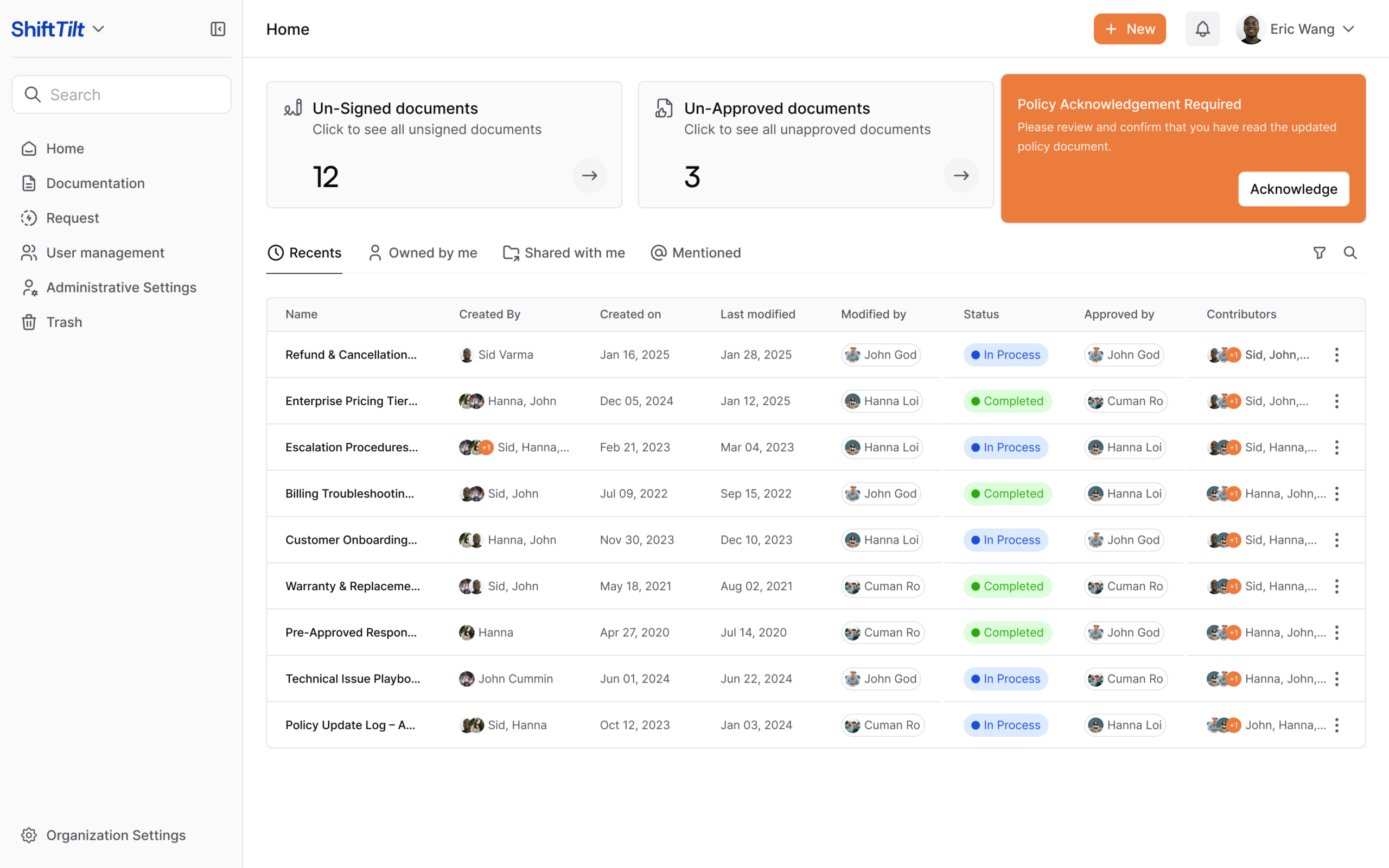
Emma runs HR for a 40-person startup. When the company updated its security policy after a phishing incident, she needed everyone to acknowledge the changes within one week. She published the updated policy, set a seven-day due date, and enabled daily reminders for anyone who hadn’t acknowledged.
Thirty-eight people acknowledged within three days. The system automatically sent reminders to the remaining two. By day six, everyone had confirmed. Emma exported an acknowledgment report showing names, timestamps, and policy version numbers. When the insurance broker requested proof of security training the following month, she had documentation ready.
Targeting by location and role
Not everyone needs every policy. Your engineering team doesn’t need the sales commission structure. Your California employees need California-specific leave policies that don’t apply to your New York team.
Role-based and location-based targeting ensures each person sees only what applies to them. This reduces notification fatigue and keeps your knowledge base focused. Granular targeting based on department, role, geography, and employment type means you create the policy once, then define who sees it. When you hire someone new in a specific location or role, they automatically receive the relevant policies without manual assignment.
For more on managing access control effectively, see document access control with tags.
Setting up reminders
Set reminders based on policy urgency. Critical security updates might need daily reminders with a 48-hour deadline. Annual policy reviews can use weekly reminders over a 30-day window.
Pick a cadence and stick to it. If you set a due date, enforce it. If you send reminders, follow up with anyone who doesn’t acknowledge. This builds the habit of treating documentation seriously rather than as optional reading.
Version history and change notes for every update
Policies evolve. Your PTO policy changes when you expand to a new state. Security policies need updates after vendor audits. Spending patterns shift your expense rules.
Version history answers four questions: what changed, when, who changed it, and why. Auditors ask all four. Without clear version history, you’ll spend hours reconstructing policy evolution from email threads and Slack messages.
For detailed guidance on approval workflows that prevent errors, see document workflows in AllyMatter.
Change notes that explain something
Generic change notes like “updated policy” or “minor revisions” waste everyone’s time. Useful change notes explain the substance of the change.
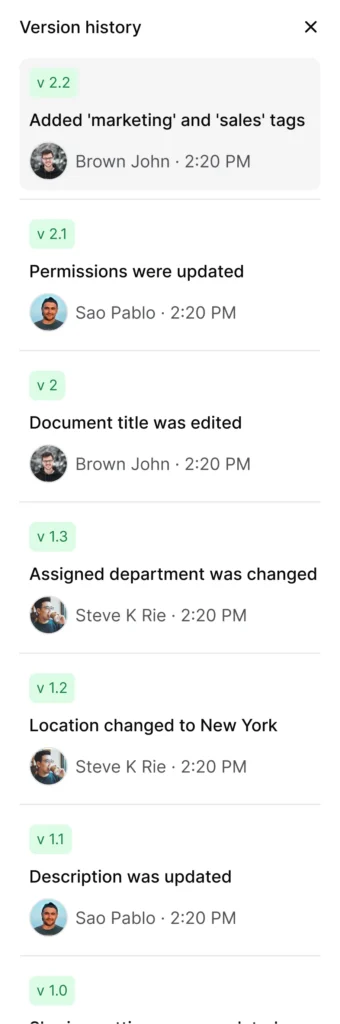
The strong version tells employees exactly what changed and whether it affects them. It also creates a clear audit trail showing why the policy evolved.
Side-by-side version comparison
When someone asks “what changed since last quarter,” you should be able to show them immediately. Side-by-side comparison views highlight additions, deletions, and modifications between any two versions.
An auditor might ask about your data retention policy from 18 months ago. With clear version history, you can show them the exact policy that was in effect during their review period, explain what changed since then, and demonstrate thoughtful evolution rather than arbitrary updates.
For more on how version control supports compliance, see track every change with AllyMatter version control.
Exports you’ll need for diligence and audits
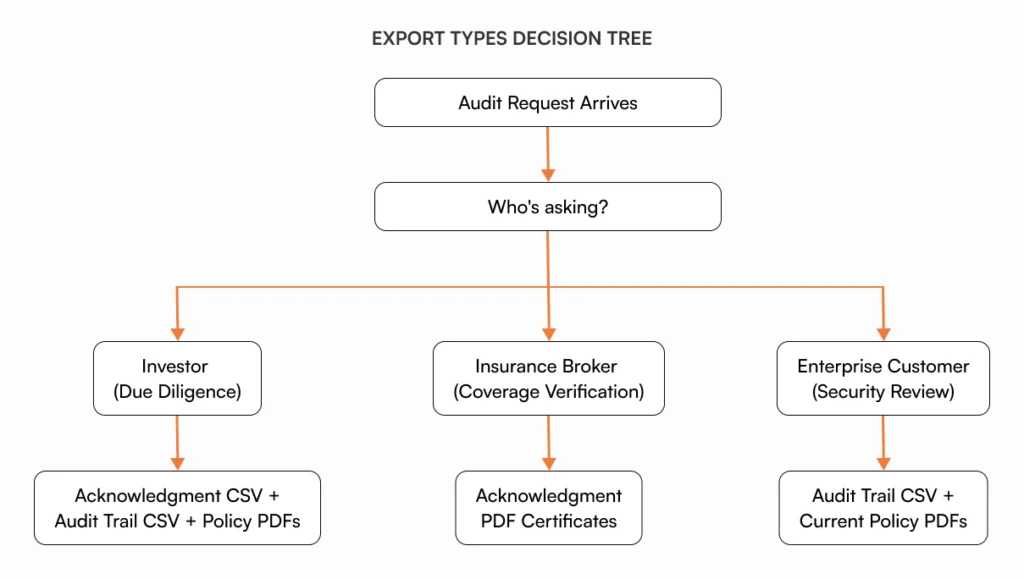
Compliance documentation isn’t complete until you can prove it exists. You’ll face three common diligence scenarios: investor due diligence before funding rounds, customer security reviews before enterprise contracts, and insurance audits for coverage verification.
Each scenario requires specific exports that prove your compliance documentation is real, current, and acknowledged.
Audit trail exports
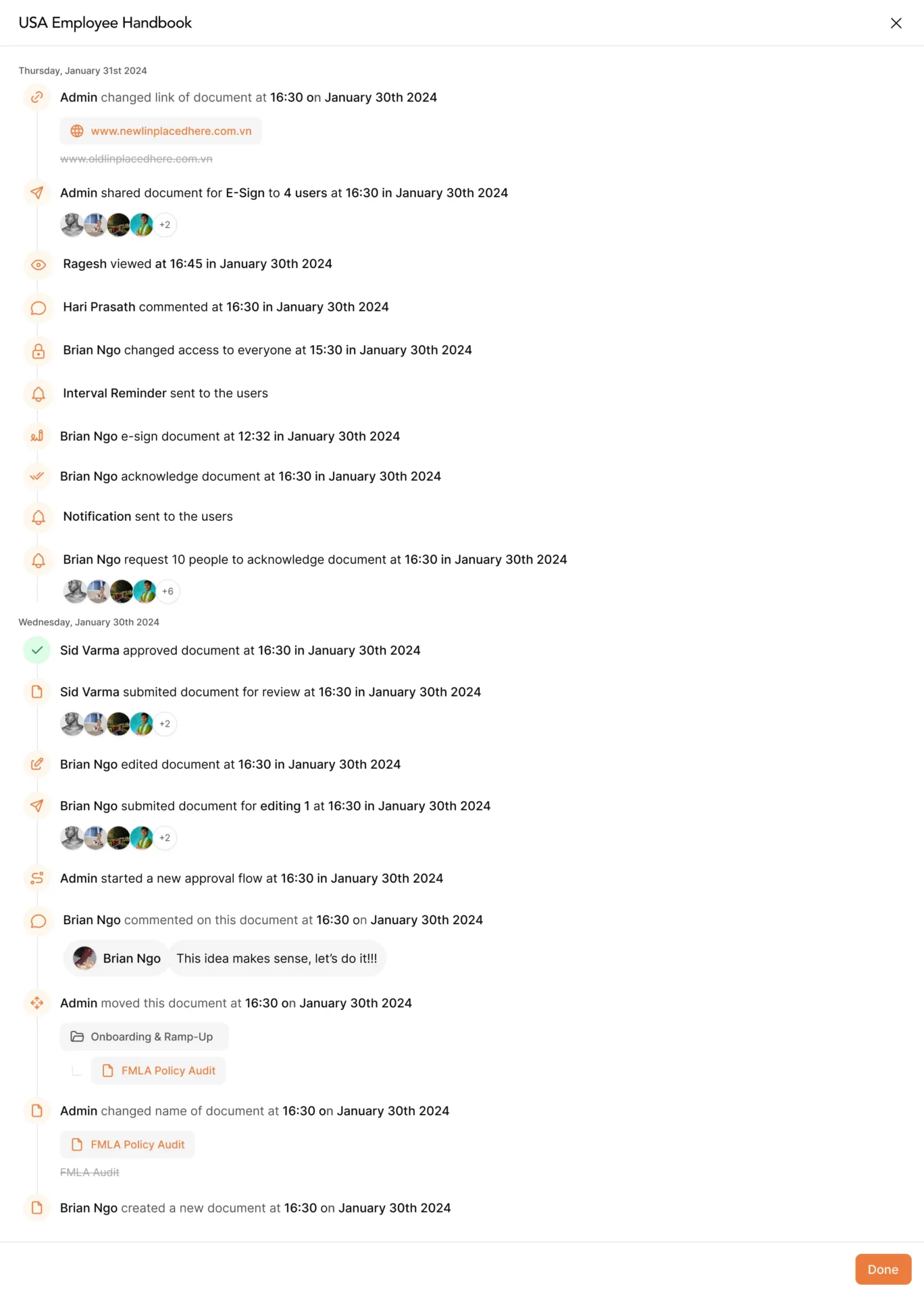
Every action in your knowledge base generates an audit event: document created, document updated, approval granted, user acknowledged, access granted, access revoked. The audit trail CSV exports all of these events with timestamps, user identities, and action details.
This export answers questions like “when was this policy created,” “who approved the last update,” “which version was active during Q2 2024,” and “who had access to this document in March.”
Sarah, finance director at a 70-person fintech startup, needed audit trail documentation when applying for D&O insurance. The broker asked when the company’s expense policy was created, who approved it, and when employees acknowledged it. Sarah exported the audit trail CSV, filtered for that policy, and sent a report showing the complete timeline. The broker approved coverage without follow-up questions.
Acknowledgment and signature exports
The acknowledgment CSV shows who acknowledged which policies, when they acknowledged them, and which version they saw. Each row contains an employee name, policy title, acknowledgment date, and version number.
During insurance audits, brokers often request proof that employees acknowledged safety policies, security guidelines, or code of conduct documents. This export provides that proof without manual tracking or email archaeology.
For stricter compliance requirements, PDF exports generate individual acknowledgment certificates showing the employee name, policy title, acknowledgment date, and a system-generated verification code. These satisfy requirements where CSV exports aren’t sufficient, particularly in regulated industries or when dealing with external auditors unfamiliar with your systems.
When Kevin’s 45-person healthcare startup prepared for their first HIPAA audit, auditors wanted individual acknowledgment certificates for their security awareness training. He exported PDF certificates for all 45 employees, each showing acknowledgment date and verification code. The auditor accepted them without question.
Learn more about how acknowledgment tracking works at AllyMatter’s acknowledgment tracking.
Rollout checklist for startup compliance documentation
Use this checklist to implement your compliance-in-a-box system without getting overwhelmed.
Week 1: Policy foundation
Draft the five core policies, identify state-specific addenda, assign policy owners, and set up categories in your knowledge base.
Week 2: Approval and review
Route policies through appropriate approvers, incorporate feedback, add effective dates, and write initial change notes.
Week 3: Targeting and distribution
Define role-based groups (full-time, contractor, exempt, non-exempt) and location-based groups (by state), assign policies to appropriate groups, and set acknowledgment due dates.
Week 4: Acknowledgment and tracking
Publish policies, enable reminder cadence, monitor completion rates, follow up with anyone who misses deadlines, and export acknowledgment reports.
Ongoing: Maintenance and updates: Set quarterly policy review reminders, update change notes with each revision, re-trigger acknowledgments when material changes occur, and maintain exports for audit readiness.
For a broader implementation guide covering all startup documentation needs, see building a startup knowledge base: the complete guide. For specific HR implementation guidance, explore HR internal knowledge base use cases.
The “what changed” banner format
When you update a policy, employees need to know immediately what’s different. A “what changed” banner appears at the top of updated documents, summarizing the changes before people read the full policy.
Use this text-based format:
Policy Updated: [Date]
What changed: [One-sentence summary of the primary change]
Why it matters: [One sentence explaining the impact or reason]
Action required: [What employees need to do, if anything]
Questions? Contact [policy owner name] or ask in [#channel-name]
Example:
Policy Updated: January 15, 2025
What changed: Remote work equipment reimbursement increased from $500 to $750 annually.
Why it matters: Covers the full cost of ergonomic setups for home offices.
Action required: Submit pending equipment requests by January 31 to use 2025 budget.
Questions? Contact Emma (HR) or ask in #people-ops
This format takes 60 seconds to write and answers the four questions employees always ask: what changed, why, does this affect me, and who can help if I’m confused.
Why AllyMatter works for startup compliance
Most knowledge bases treat compliance documentation like any other content. AllyMatter recognizes that compliance has different requirements: proving policies exist, tracking who acknowledged them, maintaining defensible version history, and generating audit-ready exports.
Approval workflows ensure policies go through appropriate review before publication. Version history captures every change with detailed notes explaining why updates occurred. Acknowledgment tracking shows exactly who has seen which version of each policy, with automated reminders until everyone confirms.
The audit trail logs every action, so you can answer “who had access to this policy in March 2024” or “when did this employee acknowledge the updated security guidelines” without digging through email or spreadsheets. Export capabilities generate the CSV and PDF files that investors, insurance brokers, and auditors request in seconds.
Without a compliance team, you need systems that generate proof automatically. That’s what separates documentation from compliance documentation.
Start with audit-ready compliance
Remember that investor email requesting your employment policies? With systematic compliance documentation, you don’t scramble. You export an acknowledgment CSV showing 98% completion, an audit trail proving version control, and PDF copies of every policy. The diligence request that would have taken three days of archaeology takes fifteen minutes.
That’s compliance-in-a-box. Five core policies, acknowledgment tracking, clean version history, and audit-ready exports. Not enterprise complexity, just the minimal layer that satisfies investors, insurance brokers, and enterprise customers while your team stays under 100 people.
Start with the five core policies. Set up acknowledgment tracking with clear due dates and location-based targeting. Maintain version history that explains what changed and why. Generate the exports you’ll need when someone inevitably asks for proof.
The companies that pass investor diligence smoothly are the ones that built compliance systematically rather than reactively. They documented policies when they created them, tracked acknowledgments from the start, and maintained clean version history as requirements evolved.
Build it systematically from the start, and compliance becomes proof of how you operate, not proof you’re scrambling to catch up.
Package your compliance documentation the right way from day one. Join the AllyMatter waitlist for early access.
Frequently asked questions
Which compliance policies need acknowledgment versus e-signature for startups under 100 employees?
Use acknowledgment for internal policies like security guidelines, code of conduct, and expense policies. These confirm employees read and understood the rules. Use e-signature for documents requiring legal enforceability: offer letters, NDAs, non-competes, and contractor agreements. The distinction matters during audits because e-signatures carry more legal weight but require more process overhead.
How do you handle policy acknowledgments for employees in multiple states with different labor requirements?
Create one base policy with state-specific addenda. Tag the base policy for all employees and tag addenda by location. California employees automatically see the California sick leave addendum when they acknowledge your PTO policy. This keeps policy management centralized while ensuring location-specific compliance. When you hire in a new state, you add that state’s addendum rather than creating separate policies.
What audit trail documentation do Series A investors typically request during compliance diligence?
Investors typically request three things: copies of your core employment policies, proof that current employees acknowledged these policies, and version history showing when policies were created and updated. Export your acknowledgment CSV showing who acknowledged what and when, your audit trail CSV showing policy creation and update dates, and PDF copies of the policies themselves. Most diligence requests can be satisfied with these three exports if your version control is clean.
Should startups export compliance documentation proactively or wait until an audit request?
Export quarterly even without an active request. This confirms your export process works and catches gaps before they matter. Store exports in a secure folder labeled by quarter. When an investor, insurance broker, or customer asks for compliance documentation, you can provide recent exports immediately rather than scrambling to generate them under deadline pressure. Proactive exports also help you spot acknowledgment gaps before they become problems.
How do you prove policy acknowledgment if an employee claims they never saw the updated policy?
Your audit trail shows the notification date, reminder dates, and whether the employee opened the document. Most acknowledgment systems log document views separately from acknowledgments, so you can prove the employee received the notification and accessed the policy even if they didn’t click acknowledge. This protects you in disputes. If someone genuinely missed notifications due to email issues or time off, you can resend the notification and extend the deadline rather than debating whether they saw it.