Most HR teams land on SharePoint for policy acknowledgments by default. It’s already licensed. IT knows it. Documents go there anyway.
The problem hits later.
Usually during an audit. Sometimes during a termination dispute. Always when someone asks the simplest question you should be able to answer: “Who acknowledged this policy, and which version did they see?”
I’ve watched HR directors spend entire weeks reconstructing acknowledgment trails from emails, folder timestamps, and Excel sheets someone started three years ago. These weren’t disorganized teams. SharePoint just wasn’t built for this kind of work.
Why the gaps don’t show up immediately
Look, on paper SharePoint checks boxes. Central document storage? Yes. Version history? Sure. Permissions? Plenty. You can even rope IT into building a Power Automate flow if you’re lucky.
The issue isn’t features. It’s what those features weren’t designed to prove.
Policy acknowledgment tracking in SharePoint means documenting that someone reviewed something. Not that they clicked a folder. Not that they opened a file. That they understood what they were agreeing to, and you can demonstrate that later.
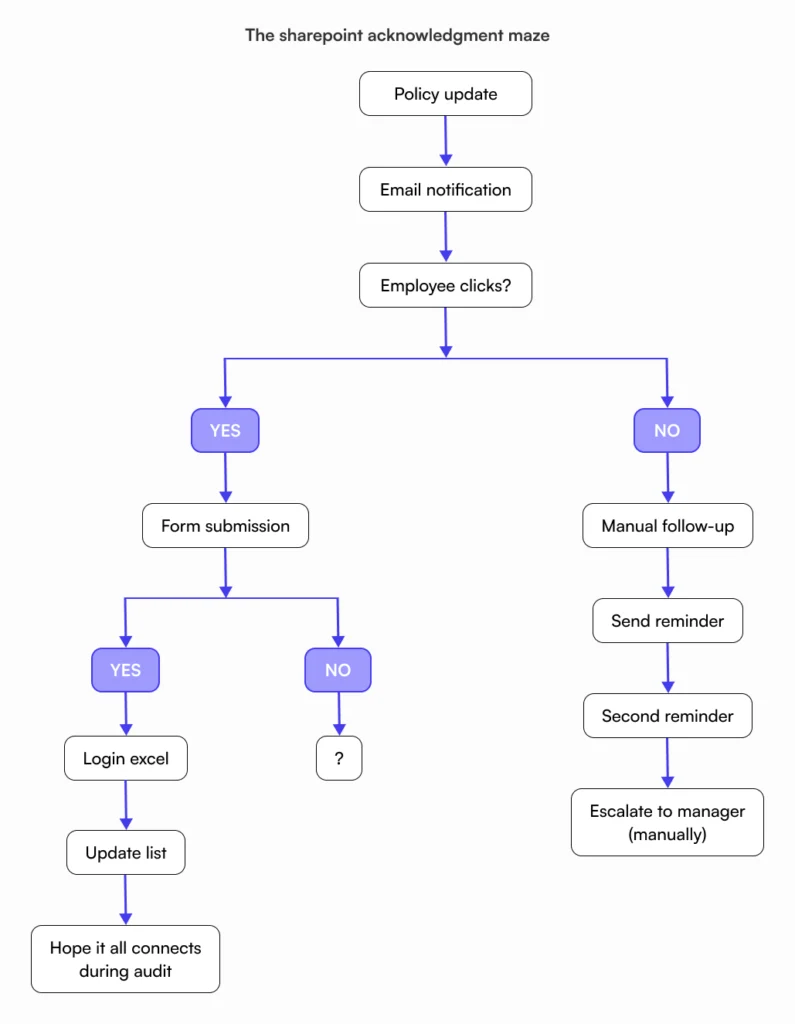
Most SharePoint setups rely on implied acknowledgment. An email gets sent. Maybe someone clicks a form link. Possibly they download a PDF. Six months later when legal asks for proof, you’re piecing together evidence from three different systems hoping it tells a coherent story.
That’s where compliance confidence falls apart.
SharePoint treats acknowledgments like an afterthought
Here’s what I see repeatedly: SharePoint has no native way to connect “Sarah Chen opened Policy_v3.docx” with “Sarah acknowledged she read and understood this exact version.”
Teams work around this. They build elaborate systems using tools adjacent to SharePoint. Forms. Lists. Email confirmations. Custom workflows someone’s nephew who knows coding set up during an internship.
When that person leaves? The whole thing breaks silently.
Clicks don’t equal understanding. Opening a document proves nothing about comprehension. SharePoint can tell you someone accessed a file, but it can’t tell you they scrolled to the bottom, processed the content, or even kept the window open longer than three seconds.
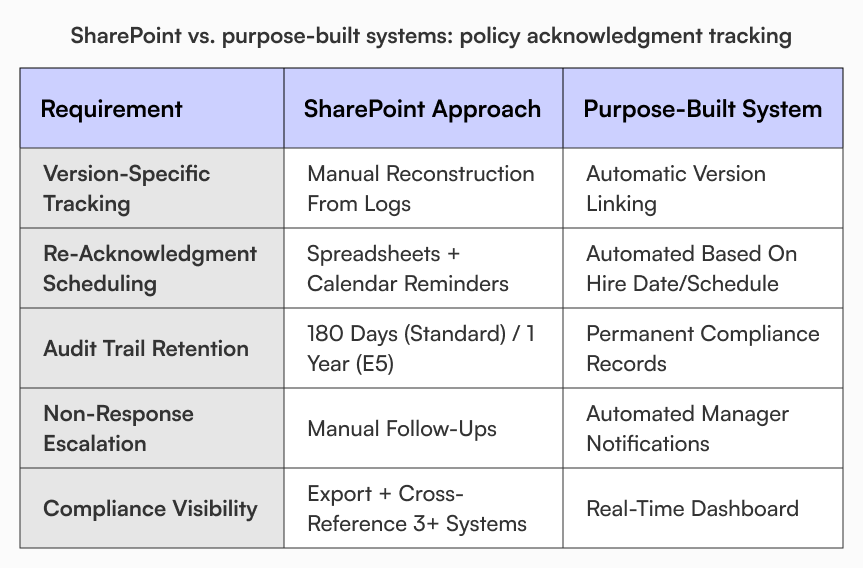
Version history creates its own nightmare. Yes, SharePoint tracks document changes. Connecting which version an employee saw when they acknowledged it? That’s manual detective work. Update a safety policy four times in six months and try proving which version each warehouse worker reviewed. Good luck.
Audit logs add another problem. According to Microsoft’s own documentation, organizations on standard licenses keep audit data for 180 days. E5 licensing extends that to one year by default. Custom retention policies cost extra and require configuration most teams skip.
Someone files a complaint eighteen months later? The evidence trail you need probably doesn’t exist anymore.
What you end up with isn’t policy acknowledgment tracking in SharePoint. It’s activity logging that might support your case if you’re lucky.
The workarounds get worse at scale
HR teams compensate by inventing processes.
The spreadsheet method is popular. Upload policy, email the team, manually log who responds. Works fine until you have 80 people and someone updates the PTO policy mid-year. Then you’re tracking two versions, three offices, and nobody can remember if the Denver team got the memo.
I worked with an HR manager at a manufacturing company who blocked two full weeks every January for policy acknowledgment tracking. Just tracking. Not reviewing policies for accuracy, not improving processes, not updating anything. Two weeks hunting down who still hadn’t clicked the acknowledgment link for mandatory safety training.
Two weeks. Every year.
Power Automate flows look better on the surface. Automatic notifications, Form responses feed into lists, everything feels systematized. Until the person who built it leaves and you realize the flow was tied to their personal account. It stops working. Nobody gets alerts. You don’t find out until the auditor asks why 40% of your team has no harassment policy acknowledgment on file.
SharePoint won’t chase people automatically in any meaningful way. It can send a notification. Once. Maybe twice if you configured reminders. But escalation to managers? Tracking who’s overdue? Connecting non-response to performance reviews? That’s all manual.
These aren’t workarounds. They’re band-aids on a tool doing something it wasn’t designed for.
Growth exposes every crack
Small teams hide SharePoint’s limitations. Twenty people? You can track acknowledgments in your head if you need to.
Fifty people across three departments with role-specific policies? Now you’re in trouble.
Safety policies apply to manufacturing but not sales. Remote work policies differ by state. Contractor onboarding needs different documentation than full-time employees. SharePoint permissions can technically handle this complexity. Managing it becomes a full-time IT project that still leaves HR without real visibility.
Re-acknowledgment breaks completely. Many compliance frameworks require annual policy re-acknowledgment even when nothing changed. SharePoint is event-driven. Update a document? It can trigger notifications. But “every employee must re-confirm this unchanged policy once per year”? You’re back to manual tracking. Effective policy management systems handle this automatically.
Ownership creates orphaned policies. Someone creates a policy document in their SharePoint site. Builds a flow tied to their account. Sets up notifications through their email. Then they leave the company.
The document still exists somewhere. The process around it died when they did. Nobody realizes until an auditor asks where the acknowledgment records are.
What actually matters for compliance
Strip away the tools and you’re left with basic requirements.
You need definitive answers to: Who saw this policy? When? Which exact version? Did they acknowledge understanding? Not “probably” or “we think” or “based on folder access logs we can infer.” Definitive answers available without forensic investigation.
You need compliance visibility that doesn’t require exporting three spreadsheets and cross-referencing them manually. Real-time status showing who’s current, who’s overdue, which policies need attention.
The system also needs to survive normal business operations. People leave. Organizations grow. Policies change. Audits happen. Your acknowledgment tracking should handle all of that without constant manual intervention.
For a deeper look at how HR teams are solving this, read our complete guide to HR knowledge bases.
Purpose-built systems work differently
What separates dedicated platforms from SharePoint workarounds? Acknowledgment is the point, not something bolted on later.
Policies become active records with their own lifecycle. Someone creates a policy requiring acknowledgment. The system automatically assigns it to relevant employees based on role, department, location. Tracks individual status. Escalates when someone doesn’t respond. Triggers new acknowledgment requirements when the policy updates.
No spreadsheets. No manual chasing. The system knows who’s compliant and who isn’t.
This changes audits completely. Instead of scrambling to assemble evidence, you have continuous documentation showing exactly who acknowledged what and when. Version-specific records tie each acknowledgment to a precise policy state.
The work shifts from proof-gathering to process management.
How AllyMatter handles acknowledgment tracking
AllyMatter builds policy acknowledgment tracking into documentation governance rather than treating it as an add-on feature.
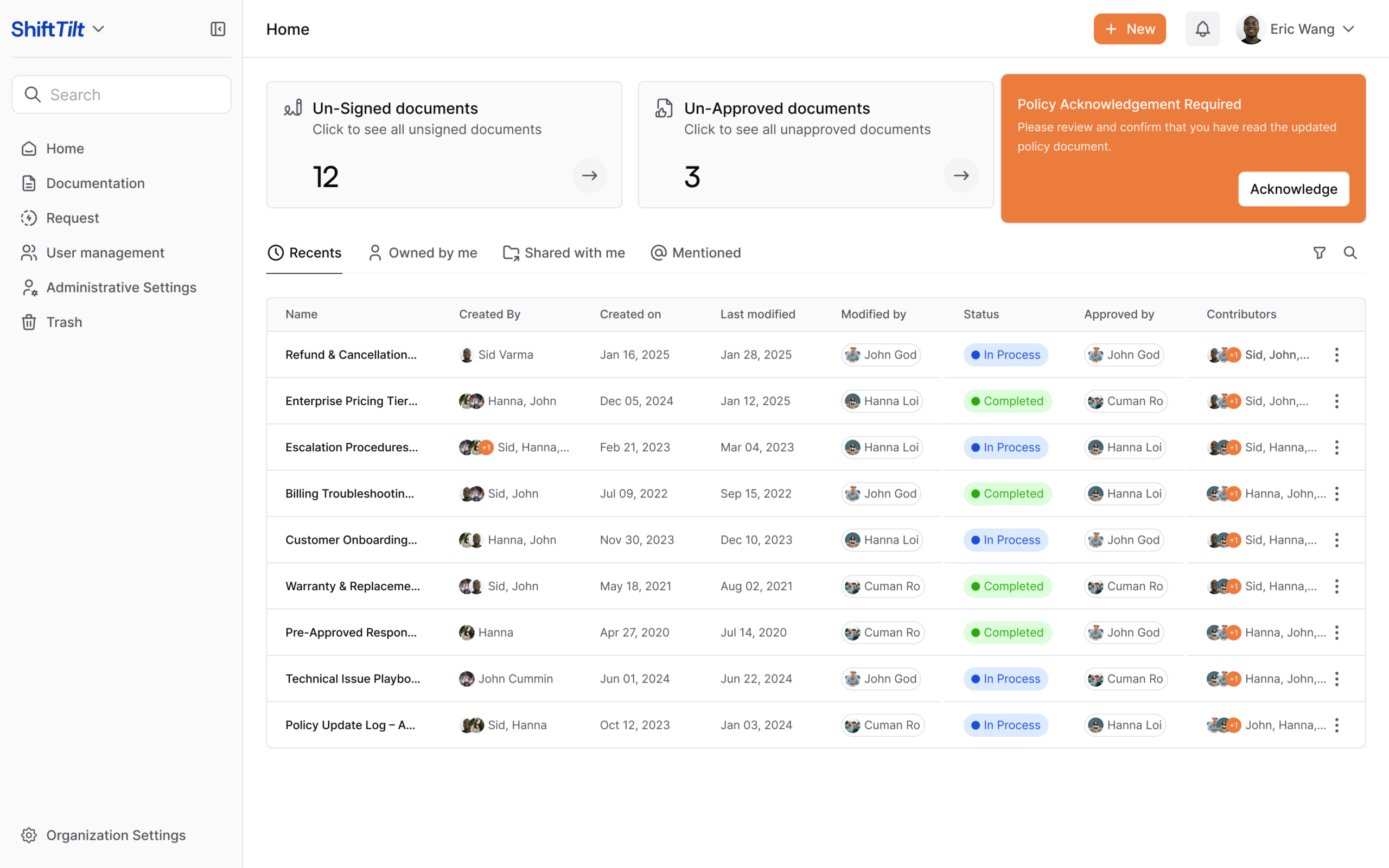
Policies live in a centralized knowledge base with built-in version control and approval workflows. Flag a document as requiring acknowledgment and the platform tracks everything automatically. Who’s seen it, who’s acknowledged, which version they agreed to, when it happened.
Acknowledgments tie directly to document versions. Update a policy three times in two months? You can see exactly which version each person acknowledged. That granularity matters during investigations or audits when version confusion can undermine your entire compliance posture.
HR gets compliance visibility without building custom reports. Acknowledgment status lives alongside the document itself, integrated with version history and approval records. One view shows everything.
This doesn’t create some elaborate legal system. It establishes a reliable operational record HR can actually use.
When storage tools become compliance risks
SharePoint is solid for document storage. Nobody’s disputing that.
But storing documents and proving policy acknowledgment tracking in SharePoint are different requirements. Teams stretch SharePoint to cover both through manual effort, custom workflows, and constant vigilance. That works until scale, audits, or legal challenges expose how fragile the setup really is.
Policy acknowledgment tracking breaks first under pressure because it demands precision. General-purpose collaboration tools optimize for ease and flexibility, not compliance documentation.
At some point the question shifts. Not “can we make SharePoint handle this” but “should we keep trying when the risk keeps growing?”
See policy acknowledgment tracking built for compliance. Try our live demo.
Frequently asked questions
Can SharePoint be used to track employee policy acknowledgments?
Technically yes, but you’ll spend more time maintaining workarounds than tracking compliance. SharePoint approximates acknowledgment tracking through Forms, Power Automate, Lists, and spreadsheets. What it can’t do is natively connect “John opened this file” with “John understood and agreed to policy version 2.3 on March 15th.” Most setups rely on implied acknowledgment – someone clicks a link, maybe downloads a PDF. That proves interaction, not comprehension. When auditors ask for proof six months later, you’re reconstructing narratives from activity logs never designed for compliance documentation.
Why do policy acknowledgments in SharePoint fail during audits?
Auditors want clear answers. SharePoint gives you scattered activity data requiring interpretation. “Show me proof every employee acknowledged the updated harassment policy” means pulling email logs, checking Forms responses, cross-referencing List items, and hoping the audit retention window hasn’t expired. Standard licenses retain audit data for 180 days. E5 extends that to one year unless you configure custom retention policies most companies skip. Version control makes this worse – SharePoint tracks document changes but doesn’t automatically connect acknowledgments to specific versions. Proving which version someone acknowledged means manual detective work.
How do HR teams handle policy re-acknowledgment at scale?
Mostly through spreadsheets and calendar reminders. Small companies track re-acknowledgment manually – you know your 25 people, send emails in December, done. Reach 100+ employees and this collapses. Different policies expire on different schedules. Some need annual re-acknowledgment regardless of changes. Contractors follow different rules than full-time staff. SharePoint handles event-driven workflows fine but can’t manage “remind Sarah to re-acknowledge this unchanged policy 12 months after her last acknowledgment based on her hire date.” Purpose-built HR knowledge bases handle recurring acknowledgments as a core feature.
What’s the risk of employees acknowledging outdated policies?
Confusion, liability, and poor governance signals. When acknowledgments aren’t tied to document versions, employees may unknowingly confirm they read policy version 3 while the system shows version 2 in their record. During disputes, you pull acknowledgment records showing they confirmed the policy – except they confirmed version 2.1 from eighteen months ago, and the disputed requirement was added in version 3.0 last quarter. Instead of demonstrating compliance, your acknowledgment record undermines your position. If you can’t demonstrate which version someone reviewed, auditors start questioning your entire compliance apparatus.
When should HR teams move beyond SharePoint for policy compliance?
When the workarounds cost more than the solution. Most teams hit breaking points during rapid growth, audit preparation, or legal disputes. The spreadsheet-and-email system that worked for 40 people doesn’t scale to 150. Auditors ask questions you can’t answer confidently. Employment lawsuits hinge on proving acknowledgment and your evidence is shaky. If you’re spending significant time monthly chasing acknowledgments, rebuilding broken workflows, or dreading audit season because documentation is fragile, that’s the signal. Moving to purpose-built tools removes manual overhead from a process directly affecting organizational risk.

Vikas is a B2B marketing professional with over 14 years of experience in content strategy, messaging, and demand generation. He specializes in turning complex business challenges into clear, actionable stories to connect meaningfully with audiences.