

Stop mistaking document storage for knowledge management, and see why SharePoint’s design keeps getting in the way.
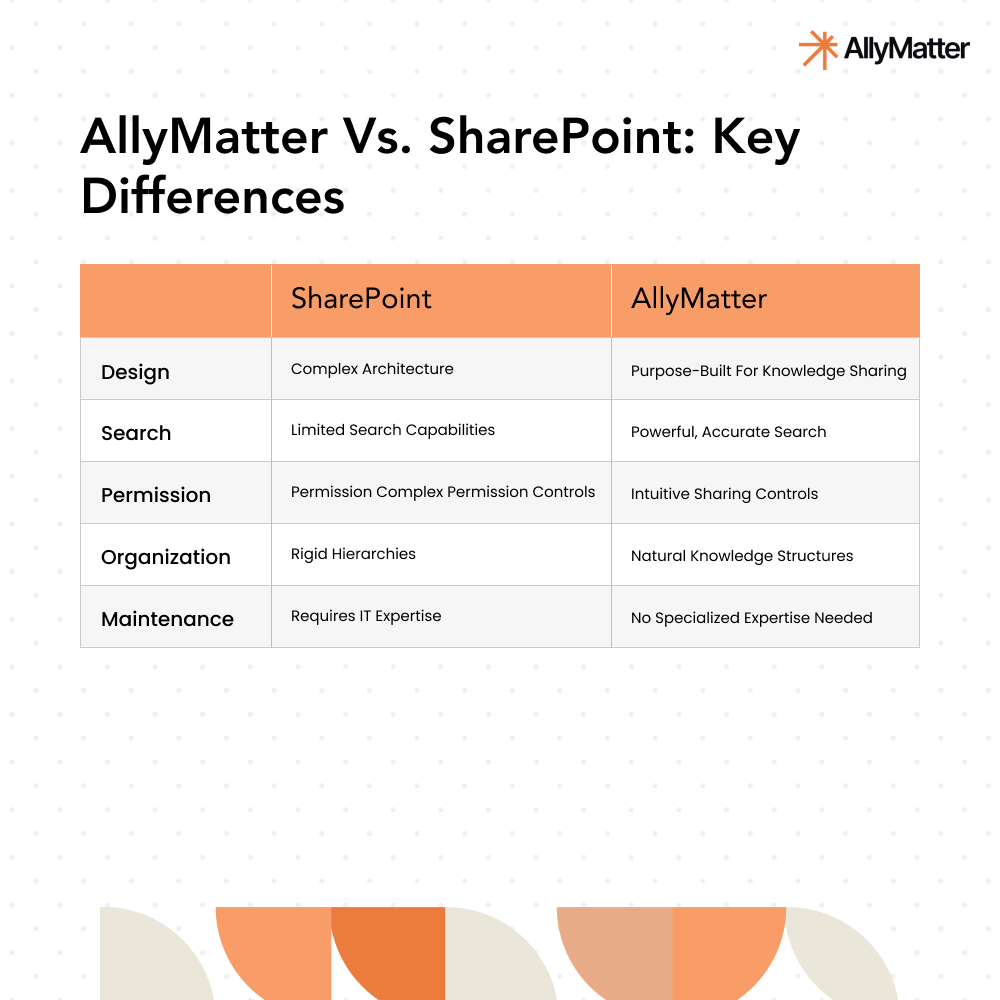
SharePoint is a capable document management and collaboration platform. The trouble starts when a team asks it to be an internal knowledge base, a place where people find the current answer fast and trust it when they do. That is a different job, and SharePoint’s design works against it in a few predictable ways. Here is where it breaks, and what to do instead.
Search is the first thing to break
A knowledge base lives or dies on search, and this is where SharePoint struggles first. It doesn’t reliably index every content type, so information inside embedded objects, some PDFs, and custom web parts can sit invisible to search. Even when content is indexed, relevance ranking is weak, so people get buried results and fall back to clicking through folders to find what they need.
That fallback is the real cost. Gartner has found that 47% of digital workers struggle to find the information they need to do their jobs. When search doesn’t work, your knowledge base quietly becomes a filing cabinet nobody opens.
Adoption stalls for non-technical teams
SharePoint reflects its enterprise IT origins. The menus, ribbons, and configuration options overwhelm casual users who just want an answer, new people need real training before they are productive, and the mobile experience covers only a slice of the desktop features. None of that matters for a power user. It matters enormously for the HR coordinator, the ops lead, and the new hire who make up most of a knowledge base’s audience. If they don’t adopt it, you don’t have a knowledge base.
Permissions become an IT project
Granting the right people access to the right documents should be simple. In SharePoint it means site collections, inheritance, and security groups, and it usually routes back through IT. As the organization grows, the permission structure grows with it, and keeping it correct becomes a standing job. The people who own the content rarely control who can see it, so updates wait on whoever administers the system.
Content goes stale with nothing to catch it
SharePoint has no built-in review cycles or expiration prompts, so sites fill up with outdated, duplicated, and sometimes contradictory documents. Version history exists, but comparing versions or seeing what actually changed is awkward, so people hit old information with no signal that something newer exists. A knowledge base that can’t tell you whether a document is current isn’t doing its main job. For more on getting this right, see our internal knowledge base best practices.
The real cost shows up later
SharePoint looks inexpensive because it rides on existing Microsoft licensing. Then the rest of the bill arrives: consultants or internal IT to set it up, ongoing maintenance, training, and premium licenses or add-ons for features that dedicated platforms include by default. The knowledge base budget often ends up double or triple what anyone planned.
It was never built for this
The root issue is fit. SharePoint was built for document management and collaboration, not knowledge management, so every knowledge base on it is a customization project fighting the platform’s defaults. External sharing is the same story: handing a few documents to a client or partner means wrestling permission settings that weren’t designed for it, which is how access mistakes happen.
Warning signs your SharePoint setup isn’t serving knowledge
- People regularly ask colleagues for information that should be documented.
- New hires take weeks to find basic operational procedures.
- Multiple versions of the same policy circulate by email.
- IT keeps fielding SharePoint training and troubleshooting requests.
If two or more of those are familiar, the tool is the problem, not your team.
How AllyMatter approaches it differently
AllyMatter was built from the start for internal documentation, so the things you fight in SharePoint are the defaults here.
Search is permission-aware and indexes your content, so people find the current document and see only what their tags allow. Access runs through tags and roles from a single dashboard, with four roles (editors, viewers, approvers, and admins) and external approvers where outside review is needed, so the content owner controls access without an IT ticket. Approvals and acknowledgment are native: route a policy through named, multi-stage approval, then send it to a tag group and see who read it, how long they spent, and who acknowledged. Version compare shows any two versions side by side with the changes highlighted, so the current version is always obvious. And initial setup takes about five minutes, not a quarter. AllyMatter is the purpose-built alternative for exactly this job.
Start your 30-day free trial. No credit card to start, and a 30-day money-back guarantee if you convert and change your mind. Start free or try the sandbox demo.
Moving beyond SharePoint
SharePoint has a real place in document management and the Microsoft stack. As the home for a knowledge base that people actually use, its architecture works against you, and the limitations don’t improve as the team grows. If the warning signs above are familiar, a tool built for this job is the fix.
Start your 30-day free trial. No credit card to start, and a 30-day money-back guarantee if you convert and change your mind. Start free.
Migration is on us. We move your existing SharePoint content across, structure and permissions included, so the switch isn’t a project you run alone. The migrations page covers how it works.
Frequently asked questions
Can we migrate our existing SharePoint content?
Yes, and you don’t have to do it alone. We move your documents across for you, structure and permissions included, as part of onboarding at no cost.
Is SharePoint really more expensive than a dedicated platform?
Often, once you count the hidden costs: setup, consultants, maintenance, training, and premium add-ons for features a purpose-built tool includes. The licensing line is only part of the picture.
How do we make the case to leadership when we already pay for Microsoft?
Put numbers on the time lost to search and the IT hours spent on SharePoint upkeep. A dedicated tool can sit alongside Microsoft for file storage while owning the knowledge base.
Will switching disrupt our workflows?
Most teams find the switch removes the workarounds SharePoint forced on them. The goal is a tool people use without training, not another system to maintain.

Founder of AllyMatter I’m founder of AllyMatter, an operations-first knowledge base for growing companies. Before AllyMatter, I co-founded Syren Cloud and helped scale it into a 300-person organization across two countries, leading marketing, operations, and HR. We moved fast, served demanding customers, and learned the hard way that internal knowledge systems built for help docs or IT don’t solve day-to-day operations. AllyMatter is my answer—tools that turn tribal knowledge into trusted, searchable processes. This blog shares the playbooks, checklists, and lessons I wish I’d had while scaling.