
A new hire joins. HR sends a welcome email with a handful of attachments. There’s a Google Drive link, a PDF of the employee handbook, maybe a Notion page someone built two years ago. The message says “read through these before your first team call.” The new hire opens one or two, skims them, and moves on. Nobody follows up. Nobody checks.
You sent attachments. You sent attachments. Nobody checked whether anyone opened them.
Weeks later, the same person asks their manager about the expense policy. Or escalates a customer situation they would have handled differently had they read the escalation playbook. Or signs off on something they had no business approving.
The reading happened on paper, not in practice.
Gallup research found that only 12% of employees strongly agree their organization does a great job onboarding them. That’s not a resourcing problem. Most companies spend real effort preparing materials. The gap is in how those materials reach the right people, and whether anyone confirms they actually read them.
The document dump isn’t onboarding
Sending files is not the same as assigning reading.
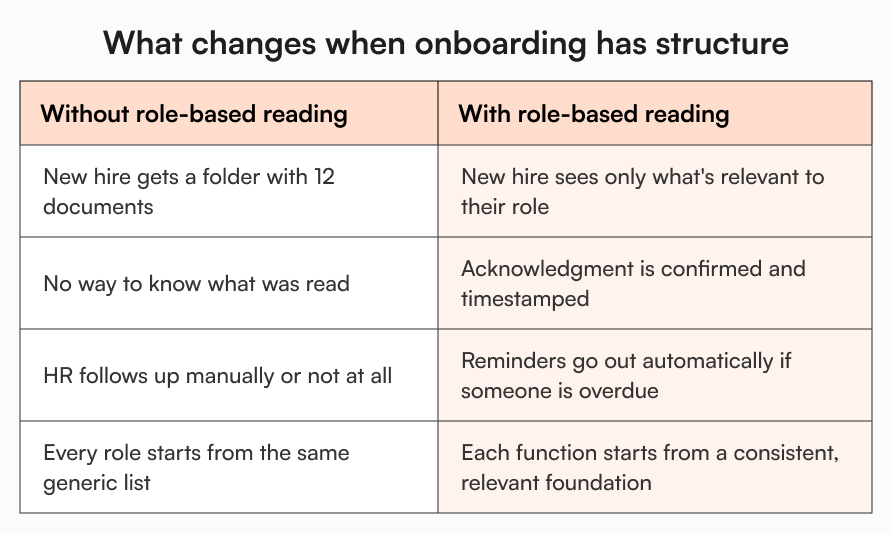
When you send 12 documents in a welcome email, you’re essentially asking a brand-new employee to figure out what’s relevant to their role, what’s urgent, what’s optional, and what order to read things in. That’s a lot to sort out on day one, when they’re also trying to remember people’s names, set up their laptop, and get through a wall of intro calls.
The problem isn’t that new hires are careless. The problem is that nobody told them what was actually meant for them.
A new engineer and a new account executive need almost nothing in common from their day-one reading list. The engineer needs the dev environment guide, the incident response overview, the security acceptable use policy. The AE needs the pricing policy, the sales playbook, the CRM setup guide. Give both of them the same 15-document folder and neither of them knows where to start.
What “role-based reading” actually means
Role-based reading is exactly what it sounds like: every new hire sees the documents that are relevant to their function, and only those documents. Not everything the company has ever produced. Not a general-purpose wiki they’re expected to navigate on their own.
This matters for a few reasons.
First, it removes the cognitive load of sorting. A new hire who logs in and sees a clearly defined reading list for their role doesn’t have to make decisions about relevance. They can focus on actually absorbing the content.
Second, it reduces the risk of new hires skipping what matters. When 20 documents compete for attention, the security policy and the code of conduct get buried alongside the team lunch schedule. When role-based reading surfaces the three things that actually matter on day one, people read them.
Third, it creates consistency. Every new engineer gets the same starting point. Every new customer success manager ramps up from the same foundation. That consistency shows up downstream in fewer errors, shorter ramp-up times, and less variation in how people handle their first real situations.
The accountability gap nobody talks about
Here’s what makes the document dump problem worse: it’s invisible.
If you send 12 attachments and the new hire reads none of them, you almost certainly won’t know. There’s no flag. No notification. No way to tell from your end whether the anti-harassment policy was opened or skipped. The same goes for the security guidelines, the expense policy, the escalation framework.
This isn’t a hypothetical risk. Research from SHRM indicates new hires can take 8 to 12 months to reach full productivity in professional roles. A meaningful portion of that delay traces back to knowledge gaps in early weeks.
The accountability gap also matters from a compliance standpoint. If an employee violates a policy they were nominally “given” during onboarding, “we emailed it to them” is not the same as confirmed they read and acknowledged it.
HR managers, compliance leads, and ops teams at growth-stage companies feel this acutely. They spend real time building documentation. They just have no visibility into whether it’s landing.
What a structured new hire onboarding knowledge base changes
A knowledge base built around role-based reading and acknowledgment tracking changes three things at once. What each hire sees, what they actually read, and whether you know it happened.
What gets seen depends on how you structure access. When you tag documents and folders by role or department, a new hire carrying the “Sales” tag only sees content relevant to sales. They don’t wade through the engineering runbook or the finance team’s expense approval matrix. They only see what actually applies to them.
What gets read becomes a deliberate act rather than a passive possibility. Instead of a folder sitting in someone’s Drive, key documents can be sent for acknowledgment directly. The new hire receives a notification, opens the document, reads it, and confirms they’ve done so. The acknowledgment is timestamped and tracked.
Whether you know it happened stops being a matter of trust or follow-up. Acknowledgment tracking gives HR managers and admins a clear view of who has completed their required reading and who hasn’t. If someone’s overdue, automated reminders go out at configured intervals. The manager doesn’t need to chase it manually, and the new hire doesn’t fall through the cracks.
A practical scenario: two different hires, same first week
Take a 120-person HR tech company that’s hiring simultaneously across two functions: a customer success manager and a backend engineer.
Without this structure in place, both get the same welcome email. Both get the same folder link. The CSM digs into the product FAQ and skips the incident response doc because it looks technical. The engineer reads the dev environment guide and doesn’t open the customer escalation playbook because it’s clearly not relevant. Neither reads the code of conduct on day one because it’s file number 11 of 12.
With role-based reading and acknowledgment tracking in place, the picture changes. On the day each hire joins the platform, they receive a tag matching their function. That tag controls what they see in the knowledge base. Both receive acknowledgment requests for the documents that matter universally: the code of conduct, the anti-harassment policy, the security guidelines. Each also receives acknowledgment requests for their role-specific materials. The CSM gets the escalation playbook and refund policy. The engineer gets the incident response doc and the PR review guidelines.
The HR manager can see, in one place, who’s completed their reading and who’s pending. Reminders go out automatically if someone hasn’t acknowledged within the set window. No spreadsheet, no Slack thread, and no assuming anyone followed through.
How AllyMatter supports this from day one
AllyMatter is built around the exact mechanics described above.
When an admin invites a new user to the platform, they assign a role at the point of invitation. That tag controls what the new hire can see. Documents and folders tagged for their function are visible to them. Everything outside their access scope isn’t. There’s no risk of a new hire landing on a sensitive finance document or an unrelated team’s internal playbook.
Once the new hire is in, admins or document owners can send approved documents for acknowledgment. The new hire receives an in-app notification and an email. They open the document, read it, and acknowledge. That action is logged with a timestamp. The owner can track responses in analytics, seeing exactly who has acknowledged and who hasn’t.
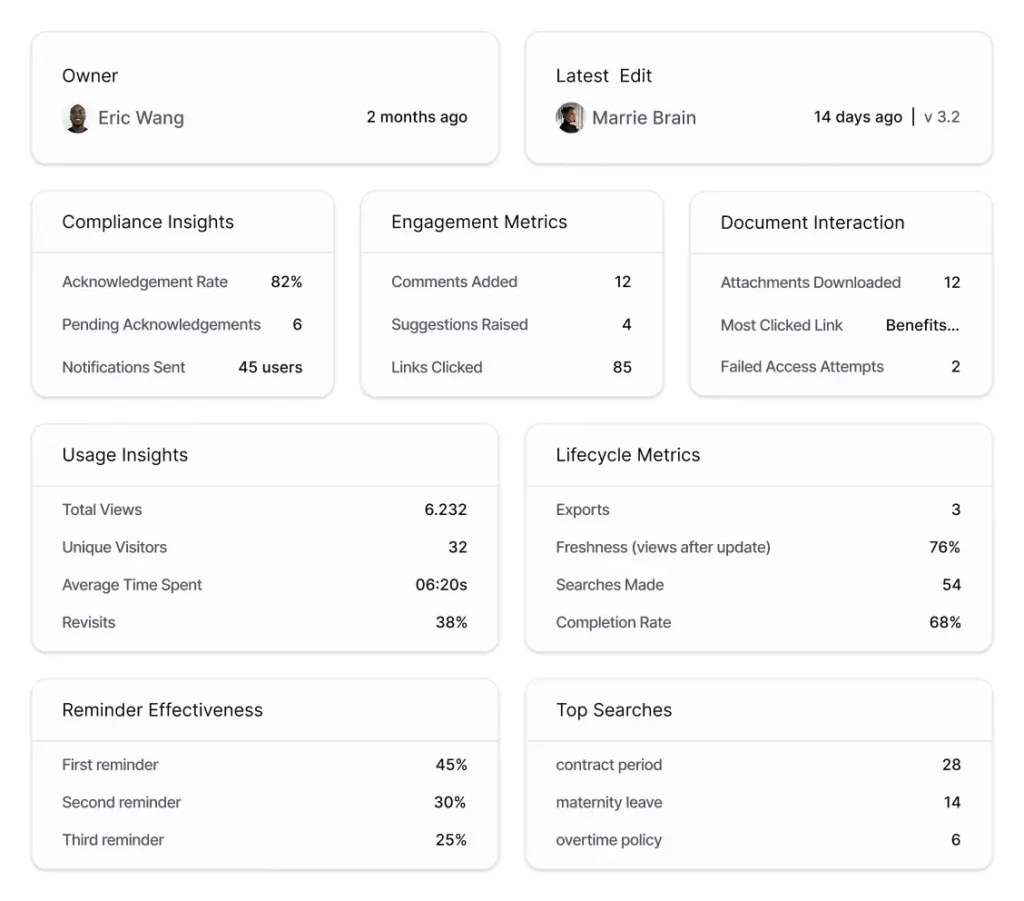
If someone misses the acknowledgment window, reminders go out automatically at intervals the admin configures. There’s no need to build a separate follow-up process or remember to check manually.
Document analytics also give admins and owners visibility into engagement at the document level: how many people have viewed it, how many have acknowledged, and when activity occurred. For an HR manager running a cohort of five new hires in the same month, that view tells them exactly where the gaps are before they become problems.
The result is a closed loop: the right documents reach the right people, confirmation is on record, and the record exists if it’s ever needed.
What to get right before you build it
A few things worth thinking through before you set this up.
The tagging structure matters more than most teams expect. If tags are too broad, role-based reading loses its precision. If they’re too granular, maintenance becomes a problem. Start with function-level tags (Sales, Engineering, Customer Success, Operations) and layer on department or location only where content genuinely differs.
Not everything needs acknowledgment. Reserve it for the documents where confirmation actually matters: policies with compliance implications, security requirements, anything that would create liability if someone later claims they didn’t know. Sending everything for acknowledgment dilutes the signal and trains people to click through without reading.
And keep the day-one reading list short. If a new hire is asked to acknowledge eight documents before lunch on their first day, the reading becomes a formality. Three to five high-priority items with a clear reason each matters is more likely to produce genuine engagement than a comprehensive list that takes a week to complete.
The gap that’s been there all along
The new hire who doesn’t know what to read isn’t a problem of motivation or attention. It’s a structural problem. They were given access to information, not a reading list. They were sent documents, not assigned them.
A new hire onboarding knowledge base that’s built around role-based visibility and acknowledgment tracking closes that gap without adding overhead to the people running the process. HR managers get confirmation rather than assumption. New hires get clarity rather than a folder to figure out. And the company has a record that reflects what actually happened, not just what was sent.
If that’s the gap you’re trying to close, AllyMatter is worth exploring. Start your 30-day trial or explore the sandbox with pre-loaded data.
Frequently asked questions
What is role-based reading in the context of new hire onboarding?
Role-based reading means structuring your knowledge base so each person sees and receives only the documents relevant to their function. A new sales hire gets the pricing policy and sales playbook. A new engineer gets the dev setup guide and incident response overview. Neither sees the other’s reading list, and neither has to sort through the full company knowledge base to find what applies to them.
How is acknowledgment tracking different from just sending a document?
Sending a document creates no record of whether it was read. Acknowledgment tracking requires the recipient to confirm they’ve read it. That confirmation is timestamped and stored, giving HR managers and admins visibility into completion status. It also supports automated reminders for people who haven’t responded by a set deadline.
What documents should actually require acknowledgment for new hires?
Focus acknowledgment on documents with real compliance or policy weight: the code of conduct, anti-harassment and EEO policies, security acceptable use guidelines, any role-specific policies that carry liability if violated. Not every document needs acknowledgment. Overusing it trains employees to click through without reading.
How do you handle new hires who join at the same time across different roles?
Tag each hire by their function when you invite them to the platform. From that point, their role determines what they can access, and acknowledgment requests go to tag groups rather than individuals. A cohort of five engineers all get the same reading list without any manual configuration per person.
Can managers see whether their new hire has completed their onboarding reading?
With document analytics and user activity tracking in place, admins and document owners can see acknowledgment status at both the document level and the individual user level. That view tells a manager or HR lead which new hires are on track and which are pending, without needing to ask or chase manually.

Founder of AllyMatter I’m founder of AllyMatter, an operations-first knowledge base for growing companies. Before AllyMatter, I co-founded Syren Cloud and helped scale it into a 300-person organization across two countries, leading marketing, operations, and HR. We moved fast, served demanding customers, and learned the hard way that internal knowledge systems built for help docs or IT don’t solve day-to-day operations. AllyMatter is my answer—tools that turn tribal knowledge into trusted, searchable processes. This blog shares the playbooks, checklists, and lessons I wish I’d had while scaling.