Your HR director needs to roll out an updated remote work policy. It requires legal review, finance approval, and departmental sign-offs. Then you need to track acknowledgments across eight locations and maintain a complete audit trail for the next compliance review.
Your platform needs to handle policy governance, not just document storage.
The platform you choose determines whether policy management stays manageable or becomes a coordination nightmare. When evaluating platforms for HR operations, focus on three capabilities.
What separates HR platforms from collaboration wikis
HR teams need different things from their knowledge platforms than product or engineering teams do. Three capabilities determine whether a platform supports HR operations or just stores documents:
- Lifecycle management means moving policies from draft through approval to acknowledgment. Version control tracks changes. Lifecycle management governs the entire process.
- Access control needs to mirror your org structure. Role-based, department-based, location-based permissions matter more than simple “can edit” or “can view” settings.
- Compliance tracking requires audit trails that prove distribution, reading, and acknowledgment. Activity logs show what happened. Compliance documentation proves it to auditors.
For a deeper understanding of what makes HR knowledge bases unique, see our complete guide to HR knowledge bases.
How search works for HR content
People don’t search for HR policies the way they search for technical documentation. They ask questions. “Can I work remotely from another state?” or “What’s our bereavement leave policy?” They don’t navigate folder hierarchies or remember exact document titles.
Confluence centers its search on full-text capabilities, labels, and page hierarchies. The platform delivers powerful search for technical documentation where users understand terminology. You can organize content with labels, create page trees, and build sophisticated structures. For teams managing technical specs or project wikis, this flexibility supports complex information needs.
For HR content, this approach creates friction. Your parental leave policy might use that exact terminology, but employees search for “maternity leave” or “paternity leave” or “family leave.” Related policies don’t surface automatically. Users either navigate manually or try multiple search terms until something works.
AllyMatter uses metadata-driven search designed for how people ask HR questions. Smart tags and custom categories help the platform understand policy relationships. Related content surfaces based on context, not just keyword matching.
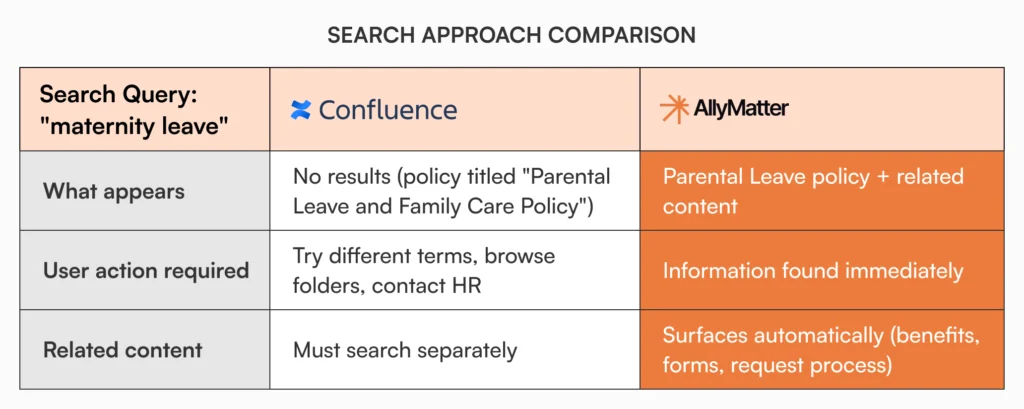
Michael in Finance needs to understand parental leave options before his partner’s due date. He searches “maternity leave” in your company wiki. Nothing appears because your policy is titled “Parental Leave and Family Care Policy.” He tries “paternity leave.” Still nothing useful. He eventually sends an email to HR asking for help.
With search built for HR scenarios, Michael’s first query surfaces the parental leave policy, related benefits information, the time-off request process, and the forms he needs. The platform understands the relationship between these terms without requiring exact title matches.
When employees can’t find information, your knowledge base becomes another source of HR support tickets instead of reducing them. Effective search directly impacts ticket deflection by helping employees find answers without contacting HR.
Policy approvals and lifecycle management
Version control tracks who changed what and when. Policy lifecycle management governs how documents move from draft to approved to acknowledged with proper audit trails at every stage.
Confluence provides strong version history and page comparison. You can see exactly who changed what, compare versions side by side, and restore previous iterations. The platform excels at collaborative content development.
For approvals, Confluence uses its collaboration features. You @mention reviewers, create approval tasks, add comments, and manage access through page restrictions. Many organizations use this approach successfully for content that doesn’t require formal compliance documentation.
AllyMatter includes structured approval workflows designed specifically for policy management. Documents move through defined stages automatically: draft, review, approval, publication. Each stage assigns roles based on rules you set once. The platform maintains a complete audit trail linking approvals to specific versions.
Acknowledgment tracking monitors who received the policy, who read it, and who acknowledged understanding, all within the same system that manages approvals.
Consider your annual benefits policy review. In a collaboration-based system, you update the document, notify stakeholders through comments or email, manually track approvals, wait for responses, publish the changes, send another email asking employees to confirm they’ve read it, and track acknowledgments in a spreadsheet.
With built-in workflows, the document routes automatically to legal, finance, and department heads. The system tracks approvals without follow-up emails. It publishes at the appropriate stage. It monitors acknowledgments without separate tools. You see everything in one dashboard.
For HR teams managing a few policies with simple approval needs, manual coordination works fine. For organizations managing dozens of policies with compliance requirements, structured workflows prevent coordination overhead from becoming a full-time job.
Access control that reflects organizational complexity
HR documentation can’t use one-size-fits-all permissions. Some policies apply company-wide. Others are location-specific, role-dependent, or restricted to certain employment types. Compensation guidelines shouldn’t be visible to all employees. Performance management processes differ by level. Benefits information varies by country.
Your knowledge platform needs to mirror these organizational realities without creating administrative nightmares.
How each platform handles permissions
Confluence uses space-level and page-level permissions with group-based access control. You create spaces like “HR Policies,” define groups like “Managers” or “US Employees,” and assign permissions at each level. The model works well for project teams and departmental wikis where access patterns are straightforward.
For small HR teams with simple access requirements, this works fine. Create a few groups, set permissions once – done.
At scale, the model requires extensive manual setup. You end up creating numerous groups for each permission combination. “US-Managers.” “UK-Employees.” “Finance-Directors.” “Executive-Compensation-Viewers.” Managing these structures across hundreds of policies becomes its own administrative project.
AllyMatter provides granular access control designed around organizational structures. You define access based on how your company works: by position, location, team, or any combination. The platform maps to your org structure rather than requiring you to build that structure through dozens of custom groups.
Document-specific permissions handle sensitive materials without complex group management. Your compensation philosophy is visible to executives and HR business partners but not all managers. Performance improvement plan templates are restricted to HR and legal. Benefits summaries vary by country without maintaining separate document sets.
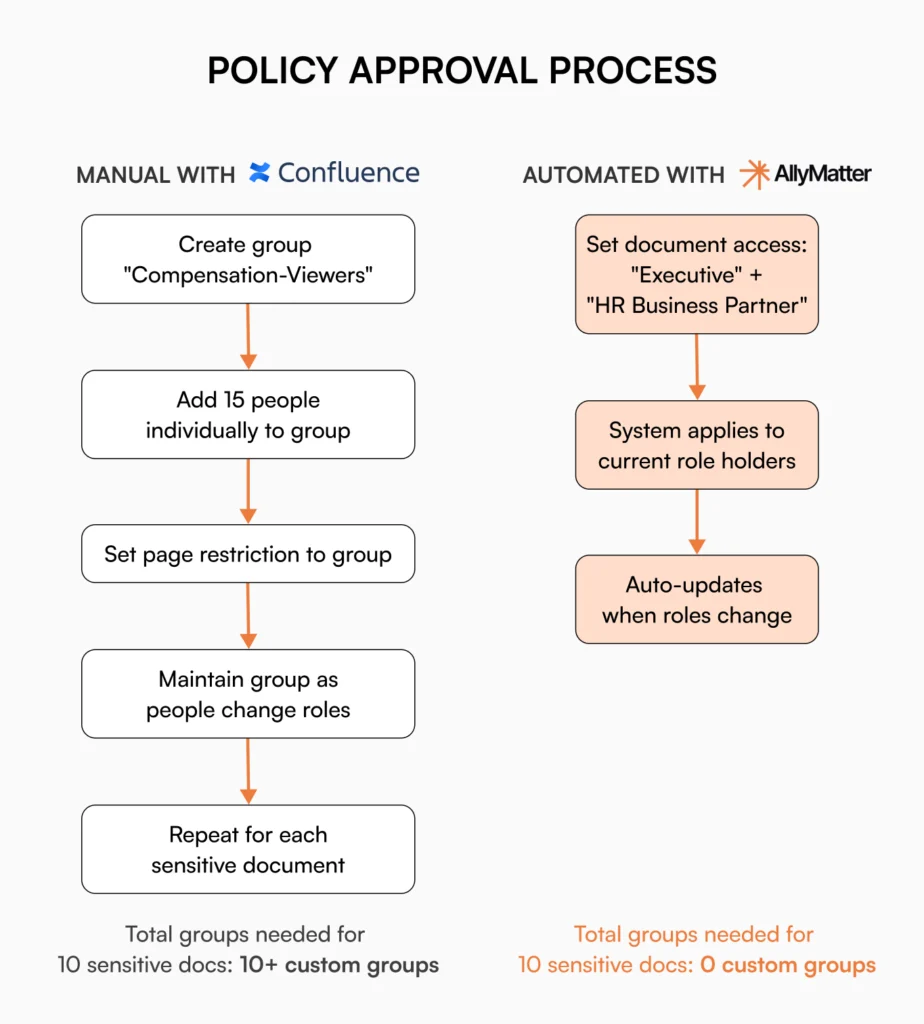
Here’s a practical example. You need to secure your compensation philosophy document so only executives and HR business partners can access it. In Confluence, you create a “Compensation-Viewers” group, add specific people to that group, set page restrictions, and maintain group membership manually as people change roles.
In AllyMatter, you set document access to “Executive” and “HR Business Partner” roles. When someone gets promoted, their role changes in one place and access updates automatically.
The difference matters most when managing permissions across many policies in organizations with frequent role changes. Small teams with stable structures can manage either approach. Growing companies with evolving org charts find one model strategic and the other overwhelming.
Compliance and audit readiness
During compliance reviews, auditors ask specific questions. Who approved this policy? When did employees acknowledge it? Can you prove this person had access to required documents on their start date?
Your knowledge platform should answer these questions directly, not require manual compilation from multiple sources.
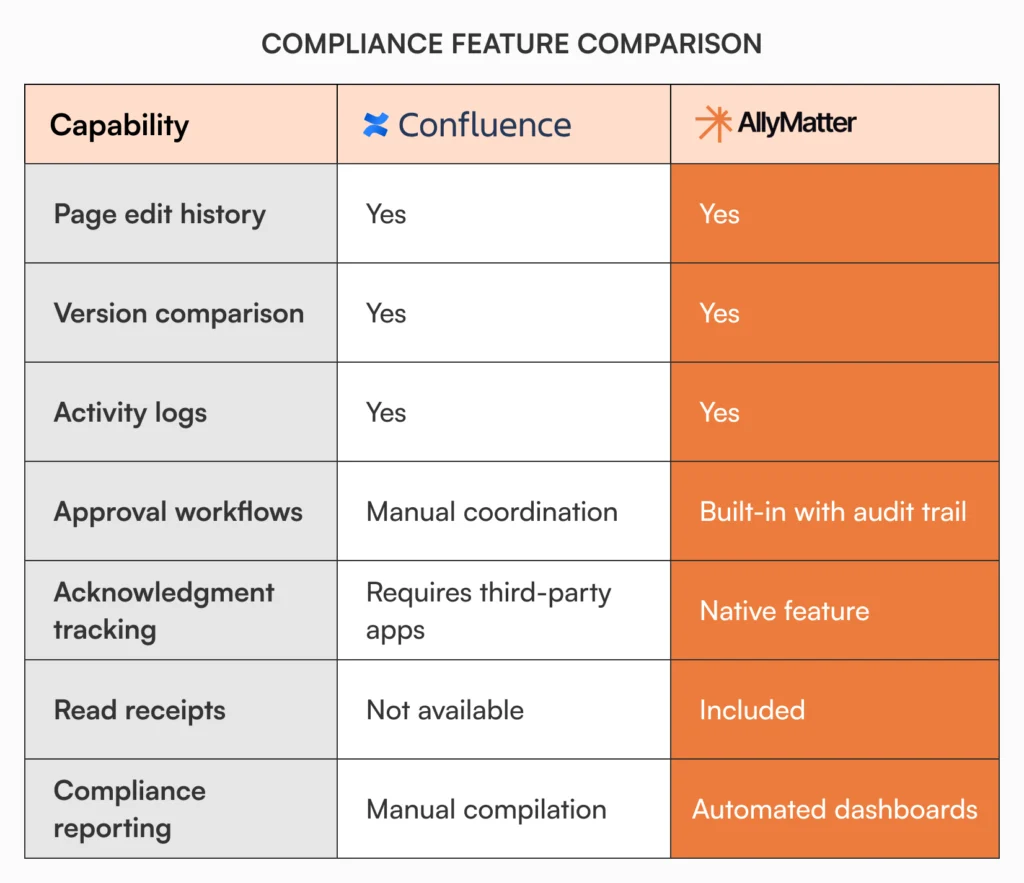
Confluence tracks page history, activity logs, and permission changes. You can see who edited pages, when they viewed content, and how permissions evolved. For understanding content evolution, this provides good visibility.
For HR compliance requirements, you’ll need to supplement this with external tracking. The platform doesn’t monitor acknowledgments because that’s not its design purpose. Proving policy distribution means correlating access logs with employee records and hoping the data tells a complete story.
Some teams build compliance tracking through third-party Confluence apps or custom development. This works but adds cost and complexity.
AllyMatter maintains a complete audit trail connecting approvals, versions, distribution, and acknowledgments in one system. When an auditor asks about your harassment prevention policy, you show who approved it, which version employees received, who read it, and who acknowledged understanding.
Learn more about how AllyMatter tracks document audit trails and history.
The acknowledgment dashboard displays policy distribution status, read rates, and pending acknowledgments by department. During audits for HIPAA, SOC 2, or ISO certifications, this documentation demonstrates your processes work as intended.
Both platforms can support compliance. Confluence requires external tools and manual compilation. AllyMatter builds compliance documentation into daily workflow.
Choosing the right platform for your HR operations
Neither platform is universally better. They’re designed for different operational needs.

When Confluence serves HR teams well
Companies deeply embedded in the Atlassian ecosystem find real value in keeping everything in one platform family. If you’re already using Jira for HR projects and have Confluence expertise on staff, staying within that ecosystem makes sense.
HR teams primarily focused on collaborative content creation rather than policy governance benefit from Confluence’s editing experience. When your priority is creating and iterating on handbooks or guides with multiple contributors, Confluence’s real-time collaboration features directly serve those needs.
For growing startups, consider how a living HR handbook can evolve with your organization.
Organizations with development resources can adapt Confluence to HR requirements. If you have technical staff available to build custom macros and integrate third-party apps, you can create HR-specific functionality.
When Confluence creates operational friction
Confluence becomes the wrong choice when your HR operational requirements exceed its design purpose as a collaboration wiki.
Managing more than 20-30 policies requiring formal approval processes creates unsustainable manual coordination. Every policy update means creating tasks, tracking approvals through comments, and maintaining documentation outside the platform. This doesn’t scale to ongoing policy management across departments.
Organizations with compliance requirements demanding acknowledgment tracking and audit-ready documentation spend more time working around limitations than using the platform productively. You build external tracking systems or purchase add-ons to create functionality that other platforms include by design.
Multi-location companies with complex permission requirements face ongoing administrative burden. Managing permissions through dozens of custom groups for each location and role combination creates work that scales poorly. Every organizational change means updating multiple group memberships.
When audit preparation requires compiling evidence from activity logs and multiple tracking systems, you’re using a wiki and building compliance processes around it. This approach works until your first serious audit reveals the gaps.
When AllyMatter is worth the investment
AllyMatter delivers value when your operational complexity exceeds what general collaboration tools handle efficiently.
Growing companies scaling from 50 to 1000 employees face expanding HR operational complexity. Policy count grows. Compliance requirements increase. Manual tracking becomes unsustainable. Platforms designed for HR operations support this growth without proportional administrative overhead.
See how AllyMatter specifically addresses HR knowledge management needs.
Organizations in healthcare, financial services, legal services, and other regulated industries carry significant compliance burdens. When audit readiness directly impacts your ability to operate, built-in compliance features aren’t optional extras.
Companies preparing for audits or certifications need documentation systems that serve dual purposes: daily operations and compliance verification. Building compliance reporting as an afterthought means scrambling during audits. Having it built into your workflow means audit preparation becomes routine reporting.
Making your evaluation decision
Platform demos should test actual HR workflows, not generic documentation scenarios. Test these specific scenarios:
Test search with real questions.
Upload three to five of your actual policies. Have HR team members search using natural questions they’d ask, not document titles. Use your terminology, your policy names, your organizational structure. The difference in findability becomes immediately apparent.
Map your org structure to permissions on paper first.
Outline how you’d secure three policies with different access requirements. Count how many groups or permission sets you need to create. Multiply that by the number of policies you manage. This reveals whether permission management is a one-time setup or ongoing administrative burden.
Run a complete approval cycle.
Upload a policy that needs legal review, finance approval, and department head sign-off, then employee acknowledgment. Time how long the setup takes. See if it’s reusable for other policies or if you’re rebuilding the process each time.
Generate an audit report showing compliance status.
Ask for a report demonstrating who approved a policy, who received it, who read it, and who acknowledged it. Compare what’s included natively versus what you’d need to compile manually.
Calculate the real administrative overhead.
Calculate the real administrative overhead. Consider who maintains permissions when people change roles, who updates workflows when processes change, and who generates compliance reports for audits. Understanding the actual time commitment required weekly and monthly reveals the true cost of each platform.
Want to see how your actual policies perform in an HR-specific search? Test your policies in our search and experience the difference in findability.
Frequently asked questions
Can Confluence handle HR policy approval workflows?
Confluence offers version control and collaborative editing through comments, @mentions, and tasks. This works well for informal review processes. For structured approval workflows with defined stages and audit-ready approval documentation, you’ll need to integrate with Jira, use third-party apps, or build custom solutions. Some organizations manage this successfully with technical resources.
Does AllyMatter integrate with HRIS systems like Workday or BambooHR?
AllyMatter focuses on policy documentation and governance, complementing your HRIS rather than replacing it. Your HRIS manages employee data, payroll, and benefits administration. AllyMatter handles the policies and processes that govern how those systems are used.
What’s the learning curve difference between these platforms?
Confluence offers extensive flexibility, which means teams need to make more decisions about content structure and permission models. Setup takes longer because you’re building HR-specific structures yourself. However, if your organization already uses Atlassian products, the interface feels familiar. AllyMatter’s design for HR operations means less customization is needed, so teams can be productive faster.
How do policy acknowledgment and tracking features differ?
Confluence doesn’t include acknowledgment tracking as a native feature because it’s designed as a collaboration wiki, not a policy management system. HR teams typically build workarounds using forms, custom macros, or third-party apps. AllyMatter includes acknowledgment tracking, read receipts, and compliance reporting as core features designed specifically for policy governance.
Which platform works better for remote or hybrid HR teams?
Both platforms support remote access through cloud deployment. The differentiator is how they handle policy distribution and verification across distributed teams. With remote work, you can’t rely on in-person confirmation that employees have received and understood policy changes. AllyMatter’s acknowledgment tracking ensures distributed employees across different locations have received and reviewed required policies. This is critical for maintaining consistent compliance across geographies.

Vikas is a B2B marketing professional with over 14 years of experience in content strategy, messaging, and demand generation. He specializes in turning complex business challenges into clear, actionable stories to connect meaningfully with audiences.