Most growing companies don’t choose SharePoint for SOP management. They inherit it. They start with SharePoint for general collaboration and assume it’ll work for everything else. Someone set up a shared library years ago. Added a few folders by department. Established a simple rule: always use the latest version.
It works until around 50 employees.
Then the questions start. “Which version is approved?” “Why does Finance have a different policy than what Legal shared?” “Did anyone actually sign off on this change?” Someone always says: ‘We approved this already, right?’ No one’s sure.
I’ve seen this in operations teams at healthcare companies, HR departments at fintech startups, and compliance groups at manufacturing firms. SharePoint handles general document storage well. SOPs require something stricter. Governance, accountability, and trust don’t emerge automatically just because files live in one place.
SharePoint stores the documents. It doesn’t govern them.
Version control becomes a trust problem
Three version control issues appear consistently once SOP libraries pass 50-100 documents.
Version history accumulates without governance
SharePoint tracks versions technically. Major versions. Minor versions. Complete history. No one sets version retention policies upfront.
SOP libraries accumulate dozens or hundreds of versions per document. Every small edit creates another iteration. Over time, teams face bloated histories with no clear signal about what matters.
I’ve seen teams spend hours before audits manually reviewing version logs, not because anything was wrong, but because no one could confidently say which versions were safe to ignore.
You get 47 versions of a procurement SOP with no way to know which five actually mattered.
Change tracking lacks business context
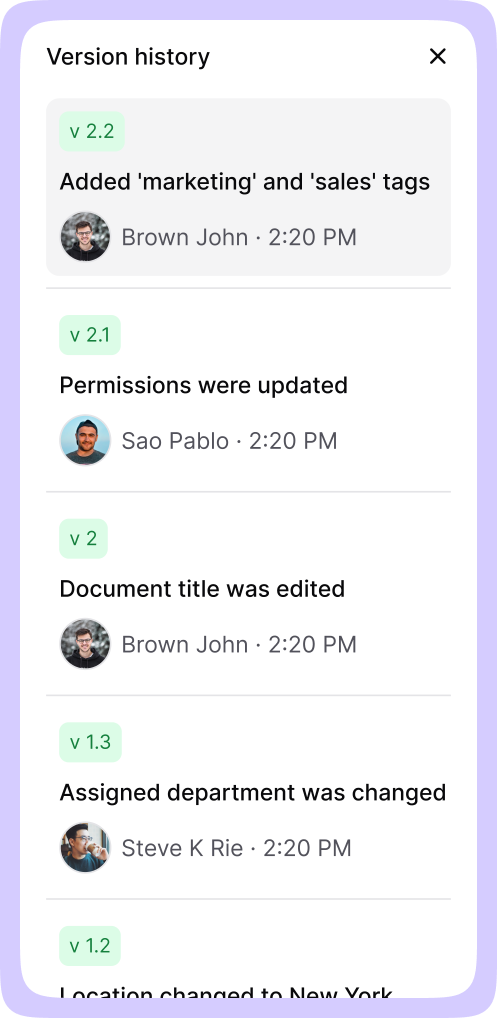
SharePoint logs who made changes and when. It doesn’t show what actually changed or why it mattered.
SharePoint shows that Jane edited the document on Tuesday. It doesn’t show that she removed the approval threshold from $5,000 to $10,000. People open two versions manually. They scroll. They guess which edits are substantive.
That’s how deleted steps, removed controls, or updated thresholds slip through unnoticed. Especially in long, process-heavy SOPs where changes blend into surrounding text.
OneDrive sync undermines version authority
OneDrive integration adds another layer of confusion. Team members sync SOP libraries locally. They edit offline. They re-upload changes that may conflict with updates made by others.
Now multiple “current” versions exist across different devices. People stop trusting the library entirely. They share PDFs over email or Slack instead, “just to be safe.” Three people now have three different ‘approved’ versions on their laptops.
Access control complexity grows faster than teams can manage
Permission problems compound as teams reorganize, people change roles, and SOPs move between folders.
Permission inheritance breaks at scale
SharePoint permissions work predictably in simple structures. Then someone moves a folder. Or copies documents across libraries.
Inheritance breaks. Unique permissions multiply. SOPs meant for specific groups become visible to the wrong people, while others who need access lose it entirely.
An operations director at a 200-person company realised that her team ran a permission audit and found 15 people who shouldn’t have had access to payroll SOPs. No one knew when or how it happened.
Role-based access requires constant maintenance
SharePoint makes it easy for business users to receive Full Control permissions, especially when speed matters more than governance.
That’s how shadow versions appear. Someone downloads an SOP, edits it locally, and re-uploads it as a new “final” version. No approval chain. No visibility into changes.
When an auditor asks who had access to version 2.3 of your quality control SOP six months ago, reconstructing that answer takes hours of permission log analysis.
Maintaining least privilege access in SharePoint means auditing permissions quarterly. Most teams audit once, find it takes eight hours, and never do it again.
External reviewer access lacks precision
When SOPs require external review, SharePoint relies on sharing links. Those links don’t carry structured context like department, geography, or specific role requirements.
For regulated teams reviewing SOPs with vendors or external auditors, this creates friction. There’s no reliable way to ensure reviewers see only what’s relevant and nothing more.
Approval workflows can’t adapt to real-world review needs
Power Automate workflows handle simple approval chains. SOP reviews are rarely simple.
Static approval groups bottleneck dynamic reviews
Power Automate flows require predefined groups. That works until review needs become dynamic.
Finance SOPs often need rotating reviewers based on document scope. Operations SOPs change approvers depending on which departments are affected. SharePoint workflows don’t adapt easily to that reality.
Instead, teams create large approval groups where everyone gets notified. No one feels individually responsible. Or they hard-code specific names, which breaks when people change roles.
Status visibility gaps create silent stalls
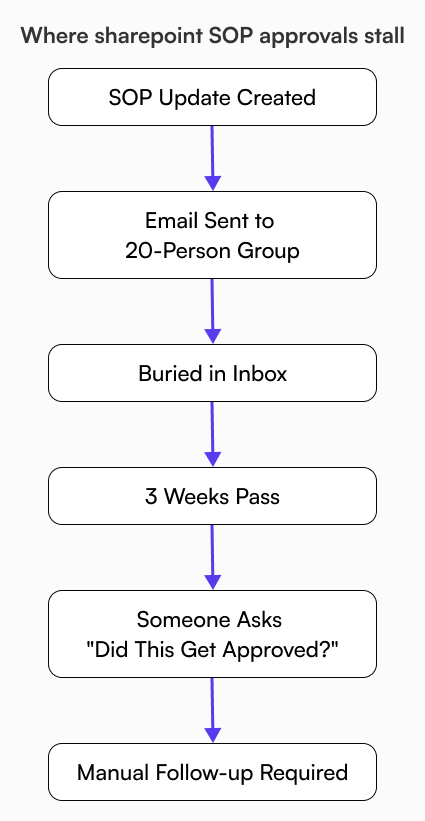
When approvals depend primarily on email notifications, progress becomes invisible.
There’s no shared dashboard showing what’s pending, who’s blocking, or how long reviews have been waiting. No automatic escalation when approvals sit untouched.
A finance team at a SaaS company had an expense policy update pending for three weeks. The CFO didn’t reject it. He didn’t see the approval request buried in 200 other emails.
Multi-stage workflows lack flexibility
Complex approval chains in SharePoint treat every reviewer as equally critical by default. One missed response can halt the entire flow, even if that reviewer’s input was optional.
Teams bypass the workflow. They send the SOP as a PDF attachment and track approvals in email.
The operational risk most teams underestimate
SOP problems don’t show up in Slack alerts. They surface during audits when no one can explain which version was active. During onboarding, new hires receive conflicting instructions from different departments. Incidents happen when teams confidently follow outdated steps.
When people don’t trust the SOP library, they ask someone instead. You can do that with 15 people. You can’t do it with 150.
What growing companies actually need from SOP management
I’ve talked to COOs, compliance directors, and operations leads at companies between 50 and 500 employees. Three requirements come up every time.
Every SOP needs a clear owner. Not a department. A person. Someone reading version 3.4 should see what changed from 3.3 in under ten seconds. Approval chains need to match how reviews actually happen, not how Power Automate wants them to happen.
SOPs need to feel authoritative. People should trust that what they’re reading is current, approved, and relevant to them specifically.
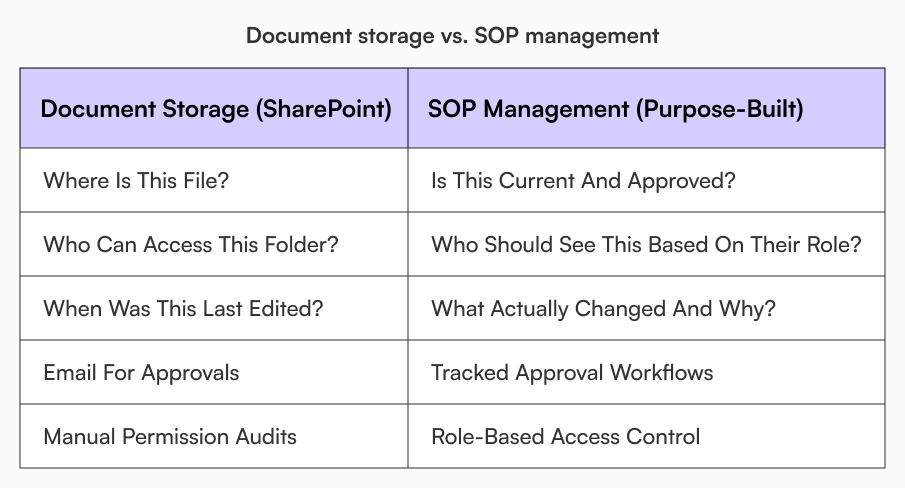
Document storage solves ‘where is it.’ Lifecycle management solves ‘is this current, approved, and relevant to me.’
When SharePoint makes sense and when it doesn’t
SharePoint works well for collaboration documents. Meeting notes, project files, shared spreadsheets. SOPs are different.
Document storage asks: where should this file live? SOP management asks: who approved this, what changed, and who should see it?
Most companies I’ve seen keep SharePoint for general files and move SOPs to purpose-built platforms. You don’t need to replace SharePoint. You need something else for SOPs.
How purpose-built SOP platforms address these gaps
Platforms built specifically for SOP management approach these three problems from a different starting point.
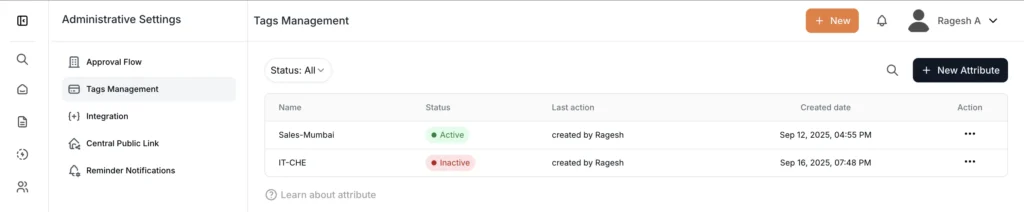
Version comparison becomes the default view, not a manual exercise. Access management maps to organizational structure through attributes like role or department. Approval progress becomes visible without email archaeology.
AllyMatter takes this approach. Version comparison views show what changed and who made the edit. Access control uses role and department tags instead of per-document permission management. Approval workflows provide status visibility and acknowledgment tracking.
These capabilities aren’t customizations on top of SharePoint. They’re the core system design.
Making the decision to move beyond document storage
If people regularly ask ‘which version is current’ or ‘did legal approve this,’ you don’t have a training problem. Your SOP requirements outgrew your document storage system. SharePoint wasn’t built for SOP lifecycle management. Recognizing that early prevents six months of workarounds. SharePoint isn’t bad. It’s just solving a different problem than SOP governance.
See how AllyMatter handles these problems. Try the live demo.
Frequently asked questions
Is SharePoint suitable for SOP management in regulated industries?
SharePoint can support basic SOP storage, but regulated teams struggle with version clarity, access consistency, and approval visibility as SOP volumes grow. Compliance requirements demand more structured governance than general document platforms provide by default.
Why does SharePoint version control create confusion for SOPs?
SharePoint tracks versions but without context. Teams see that changes occurred, but not what changed or why it mattered. Without side-by-side comparisons and business-friendly change summaries, version history becomes forensic work rather than useful governance.
How do approval workflows in SharePoint limit SOP scalability?
Approval flows rely on fixed groups and email-based notifications. When review needs change or involve rotating approvers, workflows break or need manual updates every time. Silent stalls happen when there’s no centralized status visibility or automatic escalation.
When should companies move SOPs out of SharePoint?
When teams lose confidence in version accuracy, access boundaries become unclear, or approval status requires manual tracking, it’s time to evaluate whether SharePoint fits SOP governance needs. This usually happens between 50-200 employees or when you enter regulated industries.
What distinguishes SOP management software from document management systems?
Document management stores and organizes files. SOP management governs their entire lifecycle: version control with change context, role-based access aligned to operational structure, approval workflows with status tracking, and acknowledgment records for compliance. Growing companies need the latter when SOPs become operationally critical.

Vikas is a B2B marketing professional with over 14 years of experience in content strategy, messaging, and demand generation. He specializes in turning complex business challenges into clear, actionable stories to connect meaningfully with audiences.