From a founder navigating remote chaos, just like you.
When someone on your remote team logs off for the day, what disappears with them?
- A workaround they built during a sprint?
- A clarification they gave in a Zoom call?
- A decision they made, but forgot to write down?
This is the shadow cost of async work. Without systems to capture what happens before people sign off, you’re building organizational amnesia one timezone at a time.
I’ve seen this pattern across nearly every remote team I’ve worked with. Smart people. Good tools. Great culture. But key information? Vanishes into Slack threads, video calls, or someone’s brain.
This post is a breakdown of why that happens and how building an internal knowledge base isn’t just a nice-to-have anymore. It’s survival mode for distributed teams.
The hidden leaks in async knowledge flow
Decisions that never get logged
Everyone agrees on the Zoom call. You choose Option B. Great. Three weeks later:
“Wait, why did we go with Option B again?”
“Did we ever write that down?”
“Who actually made that call?”
This happens constantly. Without a system for capturing decisions with context, teams fall into the trap of re-evaluating the same problems, over and over again.
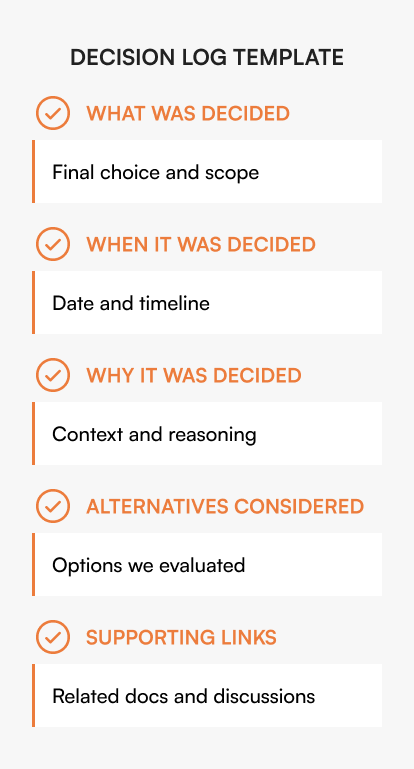
Knowledge base tip
Create a lightweight decision log template that captures:
- What was decided
- When
- Why
- Alternatives considered
- Supporting links
This doesn’t need to be a novel. It just needs to exist and be findable.
Contextual compression
Async teams need clarity, but not at the cost of readability.
We call it contextual compression: giving people just enough background, explanation, and links so they can move forward without needing a meeting.
Why this breaks down:
- People default to raw notes, half-finished docs, or Slack replies.
- Others write 1500-word novels with no structure.
- Neither one helps.
Example: Instead of ‘We updated the refund policy,’ write: ‘Refund policy now allows 60-day returns (was 30). Applies to all products except custom orders. Change effective March 1. See legal approval thread here.’
In a good internal KB, summaries come first. Then the depth. Then the links. It’s built for skimming and diving in.
The goal isn’t documentation. It’s a transfer of understanding.
Loom fatigue
“Just record a Loom” became the cornerstone of remote work. And yes, sometimes it’s the fastest way to explain something. But then what?
- You’ve got 40 videos scattered across Slack threads.
- No titles. No transcripts. No indexing.
- Outdated in two weeks. Unfindable in two months.
Videos can’t be your knowledge base. They’re support material, not the source of truth.
An advanced internal knowledge base lets you embed, summarize, version, and replace info. Not just link to an 11-minute video hoping someone watches it.
[Related: Building a Future-Proof Internal Knowledge Base]
Rituals are not knowledge
Standups. Monday morning kickoff notes. They’re part of your team’s rhythm. But too often, they live in silos.
Best case? You remember to copy-paste them somewhere.
Worst case? They’re gone by Friday.
Make rituals part of your documentation practice.
- Archive weekly check-ins with a standard format
- Store team wins in a shared log
- Turn recurring updates into a living document
The standup note becomes a running changelog. The weekly wins become a reference library. The update email becomes searchable history.
The time zone deficit
The longer your team is spread across time zones, the more you rely on memory, pings, and “can you explain this again?” cycles.
Someone’s always offline when you need them. And when you’re offline, your answer is delayed, too.
The only fix: create a system where answers live in one place, accessible any time, without pinging anyone.
That’s what internal knowledge bases do. They turn “let me ask” into “already found it.”
Tool sprawl and the ping tax
Your process doc is in Notion, your metrics live in a slide deck, and your SOPs are somewhere in a shared folder you renamed six weeks ago.
People start pinging each other just to find stuff.
“Do you have that link?”
“Where’s the latest version?”
“Can you resend the doc from last quarter?”
Many teams try to solve this with Notion, Confluence, or Google Drive. These tools work well for creation and collaboration. But they weren’t built to preserve institutional knowledge across departures, time zones, and role changes.
The difference isn’t features. It’s architecture. General-purpose tools optimize for creating new content. Knowledge management platforms optimize for finding and maintaining existing knowledge.
Every ping costs context. Every search costs time. A Qatalog study found that workers spend nearly one hour daily searching for information across apps, with 45% reporting that context-switching hampers productivity.
For a 50-person team, that’s 50 hours lost daily, over 12,000 hours annually, just searching for information that should be instantly available. At an average loaded cost of $75/hour, that’s $900,000 in wasted productivity searching for answers.
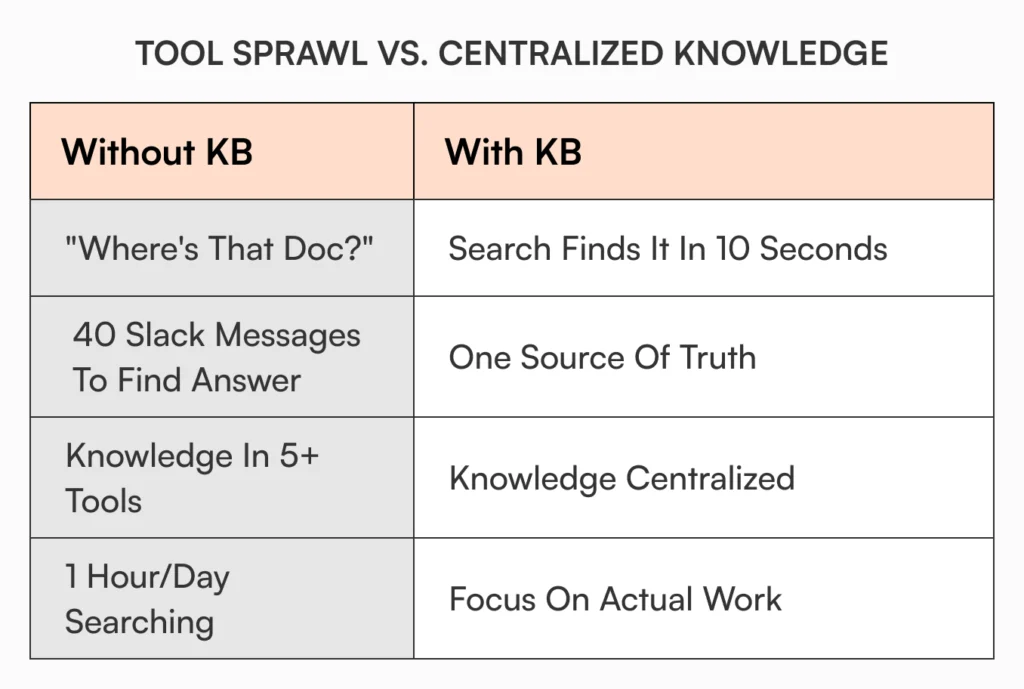
A good knowledge base reduces pings, reduces search, and lowers the cost of staying aligned.
[Read more: Why Google Docs Falls Short as an Internal Knowledge Base]
Real-world async scenarios where knowledge quietly dies
A freelancer wraps up a 3-week sprint
They worked hard, solved some edge cases, and left a couple Jira notes. The rest? Locked in Slack threads, Zoom recordings, and mental bookmarks.
When they leave, 80% of that knowledge goes with them.
[Also read: Preserving Institutional Knowledge Amid Workforce Shortages]
An engineer diagnoses a recurring bug
It’s been breaking things for months. She finds the fix. Everyone claps in standup.
Nobody writes it down. Three months later, a new hire runs into it again.
A marketing contractor builds a scoring model
The logic? In their head. Maybe one formula comment. Leadership can’t explain how it works, but it’s live.
Your ops lead rolls out a new SOP, then resigns
The plan was solid. The training was halfway done. But her notes were in Notion drafts and personal Google Docs.
The rollout stalls. Someone rebuilds it from scratch. HR transitions create particularly costly knowledge gaps.
[Related: How Fast-Scaling Teams Handle Employee Transitions: A Guide]
In every case above, a structured knowledge base would’ve saved the team days – maybe weeks – of rework, confusion, or delay.
So, what does a knowledge base actually enable?
Let’s get clear. You’re not just “writing things down.” You’re building institutional memory that enables:
- Faster onboarding for freelancers and new hires
- Fewer meetings because answers already exist
- Better decisions because context is findable
- Continuity when people leave
- Scalable operations without relying on tribal knowledge
Knowledge doesn’t have to be perfect: It just has to be captured
A lot of teams hold back on documentation because they think:
“We’ll write it later, when it’s clearer.”
“Let’s finalize the process first.”
“We don’t have time to structure this.”
But here’s the thing:
Your best documentation happens when the work is fresh. When people still remember what they tried. What failed. What they learned.
Internal knowledge bases don’t need polish. They need consistency, structure, and accessibility.
If you can capture 80% of what matters in the moment, you’re already ahead of 90% of companies.
[Learn more: Internal Knowledge Base Best Practices]
How AllyMatter helps preserve institutional knowledge
The challenge of preserving institutional knowledge isn’t solved by better note-taking habits. It requires centralized systems where information flows into structured, searchable repositories that outlive individual tenure.
AllyMatter centralizes enterprise documentation with role-based access control and comprehensive audit trails. When team members document decisions or processes, that knowledge lives in one secure location with clear ownership, version history, and controlled visibility.
Teams structure information using custom categories, tags, and metadata. The platform tracks every change with detailed audit logs showing exactly what was modified, when, and by whom. Document-specific permissions ensure sensitive information stays accessible only to appropriate roles without manual intervention.
For distributed teams, this means captured knowledge becomes instantly searchable across time zones. Smart organization and granular access controls handle the complexity while teams focus on documentation rather than information architecture.
You don’t need more tools: You need a shared brain
If there’s one thing I’ve learned building remote-first teams (and now working with dozens of others), it’s this:
The problem isn’t communication. It’s what happens after the communication.
You get alignment in Zoom.
Someone explains a process in Slack.
A contractor figures out a workaround in a doc no one else opens.
Then it all disappears. Or worse – it stays scattered, hard to find, impossible to maintain.
That’s why an internal knowledge base isn’t just another tool. It’s a shift in how your team operates.
It’s a single, shared layer of institutional memory where the right knowledge is:
- Captured when it happens
- Structured so others can use it
- Searchable without needing to interrupt someone
- Updated without reinventing it every quarter
- Accessible regardless of timezone, tenure, or title
And the ROI? You don’t see it in flashy dashboards. You see it in fewer repeat questions, faster onboarding, less rework, and more autonomy across your team.
No one logs off and takes the answers with them.
Institutional knowledge is harder to preserve when your team is distributed. Start your 30-day trial and see how AllyMatter keeps critical knowledge accessible regardless of where your team works.
Frequently asked questions
How do you get remote teams to document before they log off?
Make capture part of closing workflows, not separate tasks. Create end-of-day or end-of-sprint templates that take 3-5 minutes. When documentation becomes the last step of completing work rather than additional work, adoption improves naturally.
What’s worth capturing versus what can stay in Slack?
Capture decisions, outcomes, and context that someone else will need later. Leave procedural discussion in chat. The test: if a new hire or teammate in a different timezone would ask “why did we do this?” or “how does this work?”, it needs capturing.
How do you organize captured knowledge so people can actually find it?
Use consistent structure: decision logs, process docs, and reference materials as distinct categories. Tag by team, project, and topic. The goal isn’t perfect taxonomy but predictable organization that supports search and browsing.
How is a knowledge base different from our current documentation in Notion/Confluence/Google Drive?
General-purpose tools are built for content creation and team collaboration. Knowledge bases are built for institutional memory and information retrieval. The key differences:
- Granular access control by role and document
- Comprehensive audit trails for compliance
- Version tracking that shows decision evolution, and
- Search optimized for finding answers, not just files.
Your current tools work well for active projects. Knowledge bases work well for everything that needs to outlive those projects.

Vikas is a B2B marketing professional with over 14 years of experience in content strategy, messaging, and demand generation. He specializes in turning complex business challenges into clear, actionable stories to connect meaningfully with audiences.