
Every support query that lands in your inbox represents more than just a question. It’s time taken away from strategic work, a potential bottleneck in your workflow, and often a question someone has already answered before. For IT, HR, and support teams facing growing ticket volumes, this hits hard.
The frustration is familiar: an IT tech walks someone through VPN setup for the fourth time that week. HR re-explains parental leave to a new hire who never found the policy. A support agent resets another password. The problem compounds. Each answered question takes time away from work that actually moves things forward.
Four signals you have a ticket deflection problem:
- HR fields the same five questions every onboarding cycle
- IT walks new hires through VPN setup individually
- Support volume tracks linearly with new customer sign-ups (no deflection)
- Your team can name the top 10 repeat tickets from memory because they answer them weekly
Knowledge bases offer a strategic fix. By centralizing information in an accessible, searchable format, organizations empower employees and customers to find answers independently, reducing repetitive requests so teams can focus on higher-value work.
The high costs of recurring tickets
The impact of repetitive support tickets extends far beyond the immediate time spent answering them. Service desk ticket costs vary widely, but industry benchmarks from Gartner and Forrester consistently put the cost of a handled ticket at several times the cost of a self-served one.
The costs go deeper than dollars:
- Delayed resolution times as teams repeatedly research the same issues
- Knowledge inconsistency when different team members provide varying solutions
- Increased frustration for both support providers and those seeking help
- Critical work deprioritized as teams handle the constant influx of basic queries
A new expense reporting system rolls out across an organization. Without centralized documentation, IT and finance teams face dozens of daily tickets about submission procedures, while managers struggle to approve requests. Finance falls behind on processing, creating a ripple effect. Meanwhile, the dedicated knowledge holders become bottlenecks pulled into troubleshooting instead of advancing strategic projects.
A well-structured knowledge base directly addresses these pain points by providing a single source of truth for common questions, available whenever needed.
Key knowledge base elements that drive ticket deflection
Not all knowledge bases deliver the same results. The most effective implementations share several critical elements.
Intelligent search and organization
The foundation of effective ticket deflection is findability. Users must locate relevant information quickly using natural language searches, category browsing, or tags. According to a study by Forrester Research, 53% of adults are likely to abandon their online purchase if they can’t find quick answers. The same applies to internal knowledge bases. If employees can’t find information quickly, they’ll default to submitting a ticket.
Effective organization includes:
- Intuitive categorization by department, process, or topic
- Consistent tagging for cross-referencing related content
- Natural language search capability that understands variations in phrasing
Version control and real-time updates
Outdated information is sometimes worse than no information. When HR policies change or IT systems are updated, the knowledge base must reflect changes immediately. Proper version tracking ensures teams always access current information, eliminating tickets caused by confusion over which procedure is current.
Cross-departmental accessibility
Knowledge rarely exists in isolation. Effective knowledge bases break down information silos between departments, ensuring interconnected processes are documented end-to-end. When an employee onboarding process involves both HR and IT steps, having the information connected creates a seamless experience and prevents tickets that result from handoff confusion.
Rich media integration
Text alone isn’t sufficient for complex processes. Knowledge bases that incorporate screenshots, videos, flowcharts, and interactive elements provide clearer guidance and better accommodate different learning styles.
Consistent formatting and templates
Standardized formats for different types of articles create familiarity and improve navigation. When users know exactly where to find prerequisites, step-by-step instructions, and troubleshooting tips within any article, they extract what they need without submitting clarification tickets.
Implementing self-service in different departments
Different teams face unique support challenges, but knowledge bases can be customized to address each.
IT teams: technical documentation that empowers
IT departments handle a broad spectrum of requests, from password resets to software troubleshooting. A well-structured knowledge base reduces these tickets through:
- Step-by-step guides for common procedures (printer setup, VPN access)
- Troubleshooting decision trees for identifying and resolving common errors
- Access management documentation explaining permission levels and request processes
- System update announcements with clear timelines and impact assessments
A growing software company implements detailed setup guides for their development environment. New developer onboarding tickets drop materially.
HR departments: policy clarity and self-service
Human Resources teams often field repetitive questions about policies, benefits, and procedures. Knowledge bases streamline this through:
- Searchable policy documentation with clear version history
- Benefits explanations with interactive comparison tools
- Leave request procedures with required forms and approval workflows
- Onboarding checklists for managers and new employees
Rather than emailing HR for clarification on the updated parental leave policy, employees access the latest information themselves, with eligibility requirements and application procedures included.
Customer support: empowering users while reducing volume
For customer-facing teams, knowledge bases serve dual purposes. They help internal teams maintain consistency while giving customers direct access to information:
- Product documentation with feature explanations and use cases
- Troubleshooting guides for common issues organized by product area
- Account management procedures for billing and subscription changes
- FAQ collections addressing the most common customer inquiries
When support teams notice particular questions arising frequently, they prioritize creating or improving knowledge articles on those topics. Over time, the pattern reinforces itself.
Measuring knowledge base impact on ticket deflection
Implementing a knowledge base is the first step. Measuring effectiveness is crucial for optimization and demonstrating ROI.
Ticket volume trends
The most direct measurement is the change in ticket volume for specific categories after implementing related knowledge base content. Track both overall numbers and specific categories to identify where the KB is most effective and where gaps remain.
Self-service ratio
This metric compares how many users view knowledge base articles versus how many submit support tickets. A growing ratio indicates increasing self-service adoption.
Search analytics
User search behavior provides insight:
- Most common search terms (indicating high-demand information)
- Failed searches (revealing content gaps)
- Search-to-content ratios (showing whether users find what they’re seeking)
Feedback mechanisms
Direct feedback from users assesses quality beyond numbers:
- Article ratings (helpful or not helpful)
- Comments identifying unclear or incomplete information
- Suggestion mechanisms for new content needs
A company analyzes their top 20 searched terms and creates comprehensive guides for each, reducing related tickets significantly. The IT team can now focus on infrastructure improvements instead of repetitive support.
Overcoming common knowledge base implementation challenges
Even with clear benefits, knowledge base implementations face several common obstacles.
Content maintenance and currency
The greatest threat to knowledge base effectiveness is outdated information. Establish clear ownership and regular review cycles for all content, with automated reminders when content approaches review dates. Implement a transparent version history so users can see when information was last updated and by whom.
Balancing depth versus accessibility
Technical experts often create highly detailed documentation that overwhelms casual users. Structure content in layers, providing quick answers up front with expandable sections for those needing deeper information.
Encouraging team adoption and contribution
Knowledge bases thrive with broad contribution, but teams accustomed to answering one-off questions may resist documentation efforts. Create incentives for knowledge sharing, integrate documentation into existing workflows, and celebrate improved metrics to build momentum.
A simple process: closing a ticket includes asking “should this be added to our knowledge base?” That single question drives continuous improvement in documentation coverage.
Integrating with existing workflow tools
Knowledge bases shouldn’t exist in isolation. Look for integration opportunities with:
- Ticketing systems (to suggest relevant articles before submission)
- Communication platforms like Slack and Microsoft Teams (for easy sharing)
- Collaboration tools (to streamline contribution workflows)
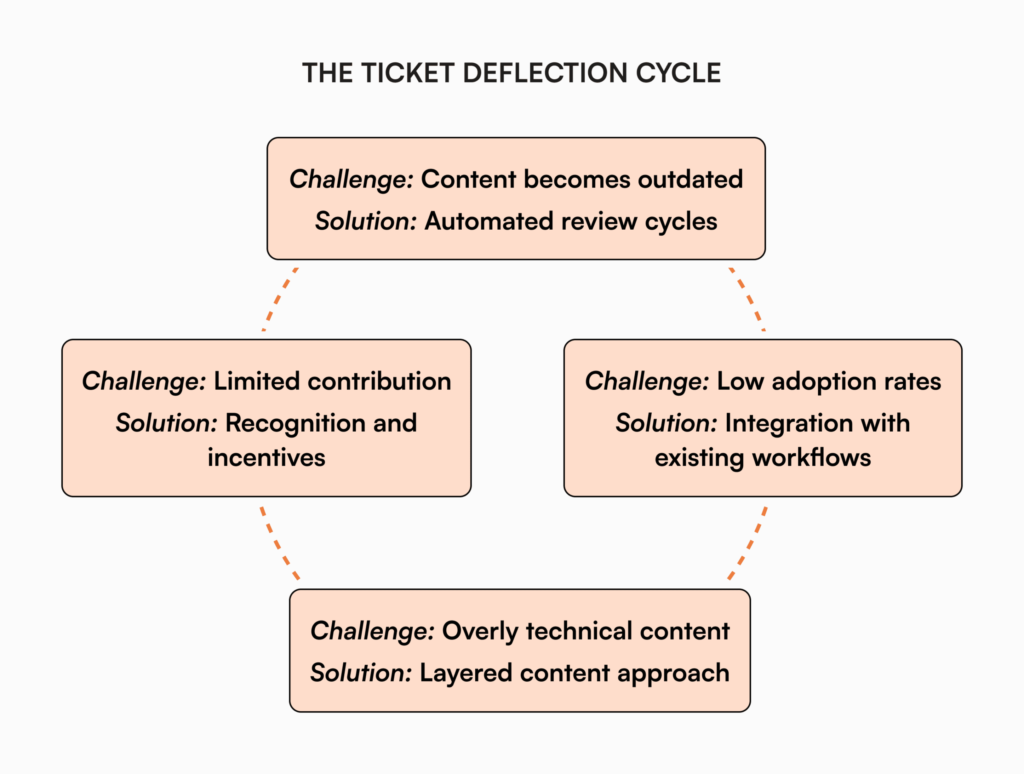
The easier it is to access and contribute to the knowledge base within existing workflows, the more effective it becomes at deflecting tickets.
Building a knowledge-centered culture
The most successful knowledge base implementations extend beyond technology to create organizational shifts.
- Support teams proactively contribute solutions as they discover them
- Subject matter experts recognize documentation as amplifying their expertise
- Managers acknowledge and reward knowledge contributions in performance reviews
- New employees are trained to check the knowledge base first before submitting tickets
That shift, from answering questions to documenting them, is what separates teams that scale from those that stay stuck. It’s also what knowledge base maturity actually looks like in practice.
Three scenarios
An honest read on whether to put a KB-driven deflection system in place:
If you’re under 30 employees and your support volume is manageable through Slack and direct messages, a wiki or shared docs will hold for a while. The structured KB pays off when ticket volume starts compounding.
If you’re 30 to 200 employees and the four signals at the top of this post are showing up, this is the moment. AllyMatter is what we built for this transition.
If you’re 200+ employees, multi-team, or running a serious support operation, deflection through a structured KB is no longer optional. AllyMatter or another dedicated KB makes sense. We’d start with AllyMatter.
How AllyMatter helps
AllyMatter is built for ticket deflection across IT, HR, and customer support. Tag-based access and search with smart synonyms let each team find answers in seconds, not minutes. Granular access control means each department sees only relevant information.
Approval workflows route policy updates through the right reviewers. Acknowledgment tracking confirms team members have read critical updates, with PDF records per person. Comprehensive analytics track which content drives the highest deflection rates.
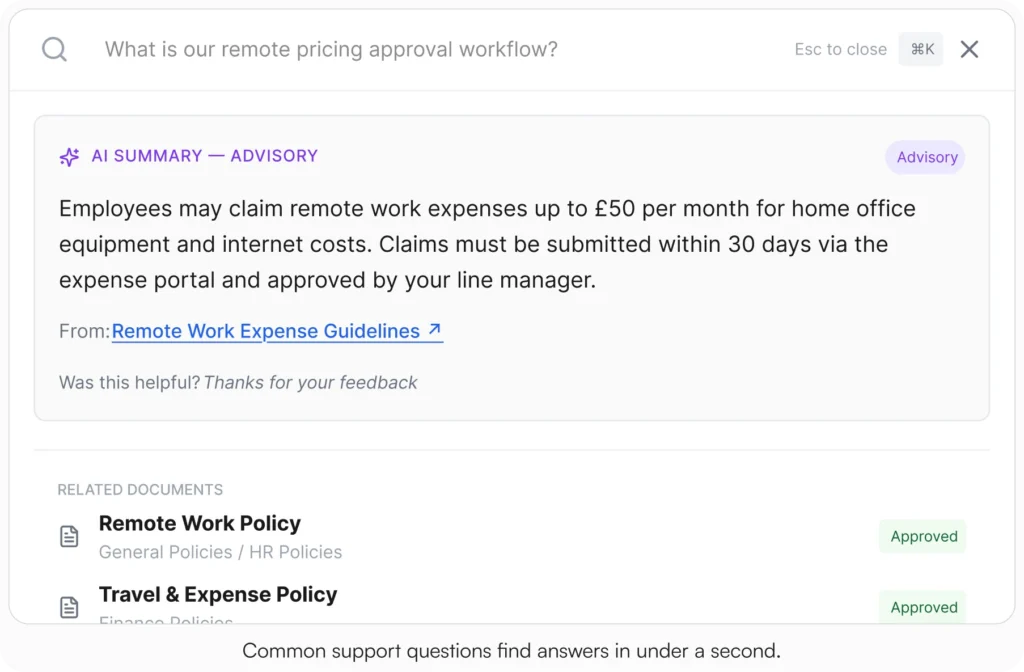
Every ticket your team deflects is time saved for work that actually matters.
Start your 30-day free trial. No credit card to start, and a 30-day money-back guarantee if you convert and change your mind. Or try the live demo to see search, tag-based access, and analytics with realistic content already populated.
Not ready for a trial? Migration from Confluence, Notion, SharePoint, or Drive is on us when you decide. We’ll move your existing docs over and have you running in about a week.
Frequently asked questions
How long does it take to see results from a new knowledge base implementation?
Initial results typically show within 30-60 days. Quick wins come from documenting answers to your most common support questions first. Significant ticket deflection (20%+ reduction) usually takes 3-6 months as content matures, teams adapt their workflows, and users become accustomed to self-service. Organizations that integrate their knowledge base with existing tools and actively promote its use tend to see faster adoption.
What types of content should be prioritized first?
Start by analyzing your ticket data to identify your highest-volume request categories. Common priorities:
- Password reset and access procedures
- New employee onboarding steps
- Common software troubleshooting guides
- Frequently asked policy questions
- Standard request processes (equipment requests, benefit changes)
Create comprehensive solutions for these top issues before expanding to less common scenarios.
How can we encourage employees to use the knowledge base instead of submitting tickets?
Success requires both technical integration and cultural change. Integrate knowledge suggestions directly into your ticket submission workflow, train department heads to reference articles in team communications, and track adoption metrics by department. Consider a “knowledge-first” policy where common issues require checking the knowledge base before ticket submission.
What’s the difference between a knowledge base and a company wiki?
Both store organizational information, but they serve different purposes. Wikis focus on collaborative editing and broad information sharing but often lack structured organization and specialized features for support contexts. Knowledge bases are purpose-built for support scenarios with robust search optimized for problem-solution matching, structured templates, version control, integration with support workflows, and analytics designed to measure deflection.
How often should knowledge base content be reviewed and updated?
The optimal review cycle depends on how frequently the underlying information changes:
- Mission-critical or frequently changing content (security procedures, active projects): monthly review
- Standard operational procedures: quarterly review
- Relatively stable policies or reference information: semi-annual review
Implement a system where major changes (software updates, policy revisions) automatically trigger content reviews.
Related reading
- Crafting HR Ticketing System Documentation
- Kill the Repeat Questions That Drain HR
- Internal Knowledge Base Best Practices
- HR Knowledge Base: Complete Guide for Scale-Ups
- Internal Knowledge Base Maturity

Founder of AllyMatter I’m founder of AllyMatter, an operations-first knowledge base for growing companies. Before AllyMatter, I co-founded Syren Cloud and helped scale it into a 300-person organization across two countries, leading marketing, operations, and HR. We moved fast, served demanding customers, and learned the hard way that internal knowledge systems built for help docs or IT don’t solve day-to-day operations. AllyMatter is my answer—tools that turn tribal knowledge into trusted, searchable processes. This blog shares the playbooks, checklists, and lessons I wish I’d had while scaling.