
Your social media lead just designed a campaign visual. The approved messaging for that campaign? Nobody can find it. Your new content writer rebuilt the brand voice doc from scratch this morning, not realizing the existing one was sitting in someone’s Drive folder.
For most marketing teams, the documentation exists. Finding it when it matters is the real problem. The brand guidelines exist. So does the campaign brief and the product positioning. They just live across Drive folders, Notion pages, Slack threads, and three former employees’ personal accounts.
A knowledge base for marketing fixes that. It’s where the written knowledge of how your marketing team works lives, gets found, and stays current as the team grows.
One quick distinction before going further. A knowledge base is for written knowledge: brand voice, messaging frameworks, campaign briefs, playbooks, vendor docs, process SOPs. Binary assets like logo files, raw photography, video files, and ad creative belong in a digital asset manager (DAM) or a clean Drive folder. This guide is about the first one. The two systems sit side by side.
Why marketing teams need a dedicated knowledge base
Marketing in particular is brutal without one.
Brand consistency. Voice, visual identity, and messaging need to look the same across every channel and every contributor. When the rules live in three places, the rules don’t get followed. Consistent brand presentation has been shown to lift revenue by up to 23%.
Campaign coordination. A modern campaign runs across five or six channels and a dozen people. Without a single doc that says what we’re saying, to whom, on what dates, the launch turns into a Slack archaeology project on launch day.
Production speed. Marketing teams ship content fast. Approval bottlenecks and quality regressions happen when there’s no documented process for who reviews what.
Cross-functional handoffs. Marketing constantly hands off to sales, product, customer success, and external agencies. A knowledge base gives every team the same source of truth instead of three different versions of it.
Knowledge that walks out the door. About 42% of institutional knowledge sits only in individual employees’ heads. When that person leaves, so does the answer to “why did we move the spring campaign launch date?” Capturing this kind of institutional knowledge is one of the core reasons to put a KB in place at all.Teams with documented marketing strategies consistently report better outcomes than teams without. A knowledge base is the infrastructure that makes the documentation actually happen.
What to include in your marketing knowledge base
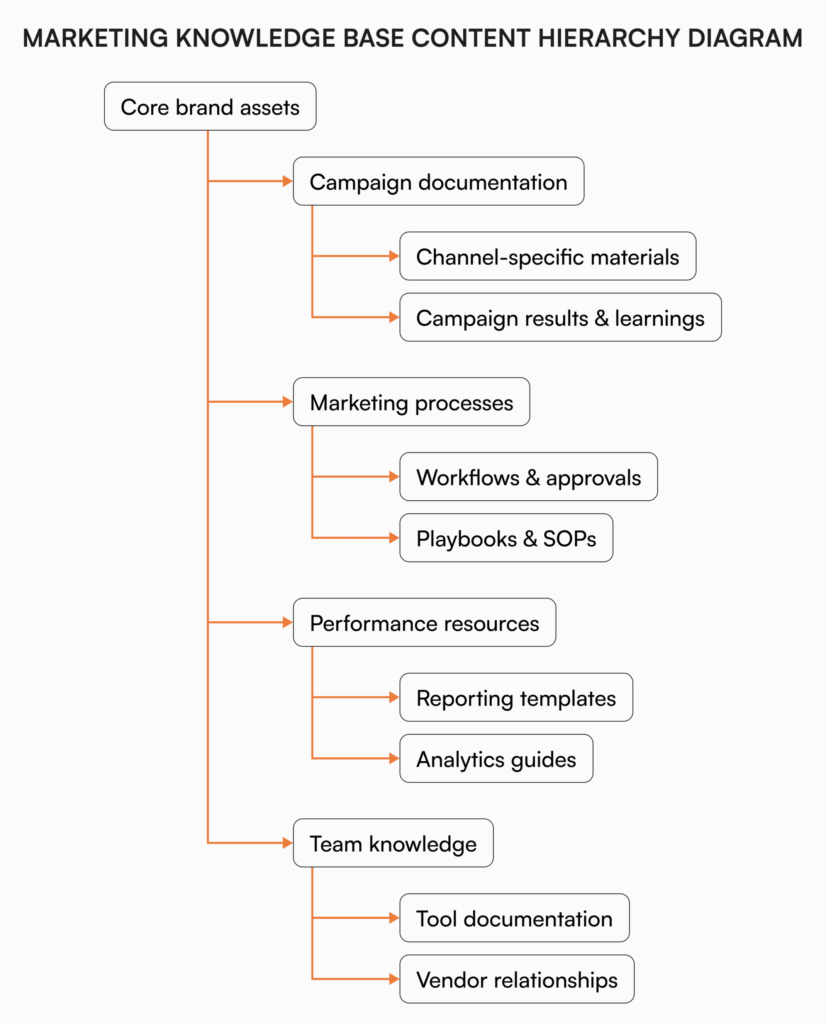
The categories below cover most teams. Adjust to what your team actually produces.
Brand assets and guidelines
- Brand voice and tone documentation
- Messaging hierarchy and approved positioning
- Visual identity standards (the written rules, not the logo files themselves)
- Typography and color specifications with hex codes
- Photography and imagery guidelines
Campaign documentation
- Campaign briefs and objectives
- Target audience profiles
- Channel strategy and approved messaging by channel
- Post-campaign results and learnings
Marketing processes and playbooks
- Content creation workflows
- Approval processes
- Campaign launch checklists
- Editorial calendar conventions
- Social media posting guidelines
Performance resources
- Reporting templates and KPI definitions
- How to access analytics dashboards
- Historical benchmarks
Team knowledge
- Team structure, responsibilities, and subject matter experts
- Tool stack documentation, access procedures, and admin contacts
- Vendor and agency contacts
- Onboarding documentation for new hires
Across all five categories, the principle is the same: write the rules, the context, and the how-to. The actual logo file or PSD lives elsewhere. The doc that says “here’s our logo, here are the lockups, never put the logotype on a dark blue background” lives in the KB.
How to structure it
The structure matters more than people think. The wrong shape kills adoption faster than missing content does.
Most marketing knowledge bases follow one or more of these structures:
Functional structure. Organized by marketing discipline (content, social, events, design). Works well for specialized teams where people stay in their lane.
Project-based structure. Organized by campaign or initiative. Works for teams where most work happens inside a campaign and people need every relevant asset in one place.Audience-based structure. Organized by target persona or segment. Works for teams marketing to clearly distinct audiences (e.g., enterprise vs. SMB).
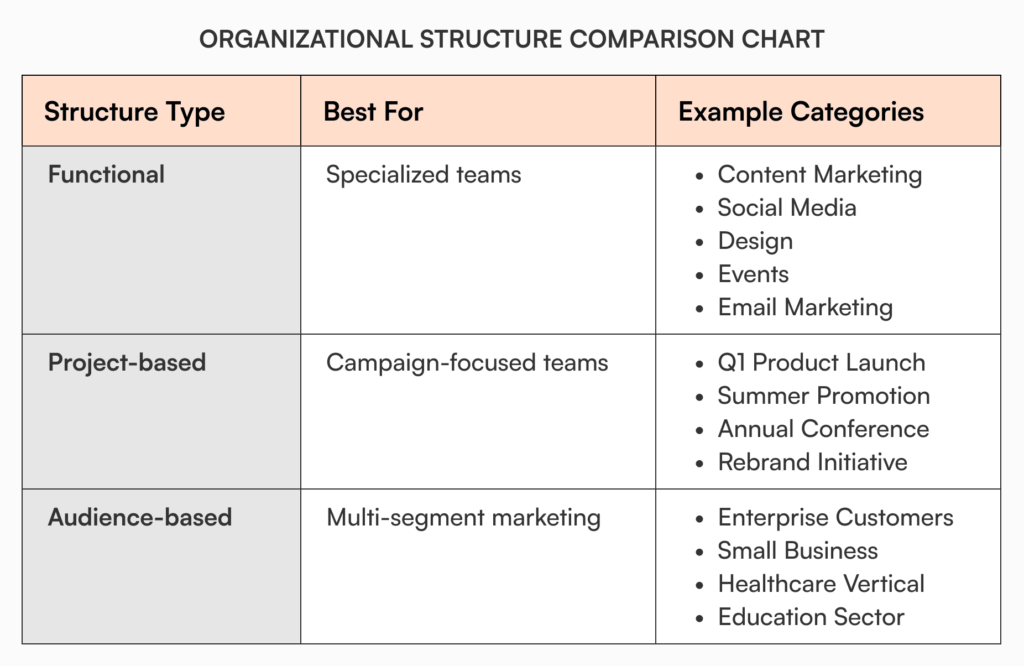
Most marketing teams land on a hybrid: foundational items (brand guidelines, messaging, playbooks) in their own permanent section, and campaign-specific work organized by project.
Whatever structure you choose, a few things stay constant:
- Pick naming conventions before anything else, and write them down where everyone can see
- Standardize the metadata you tag (campaign name, owner, status, last review date)
- Build templates for the document types you produce most often
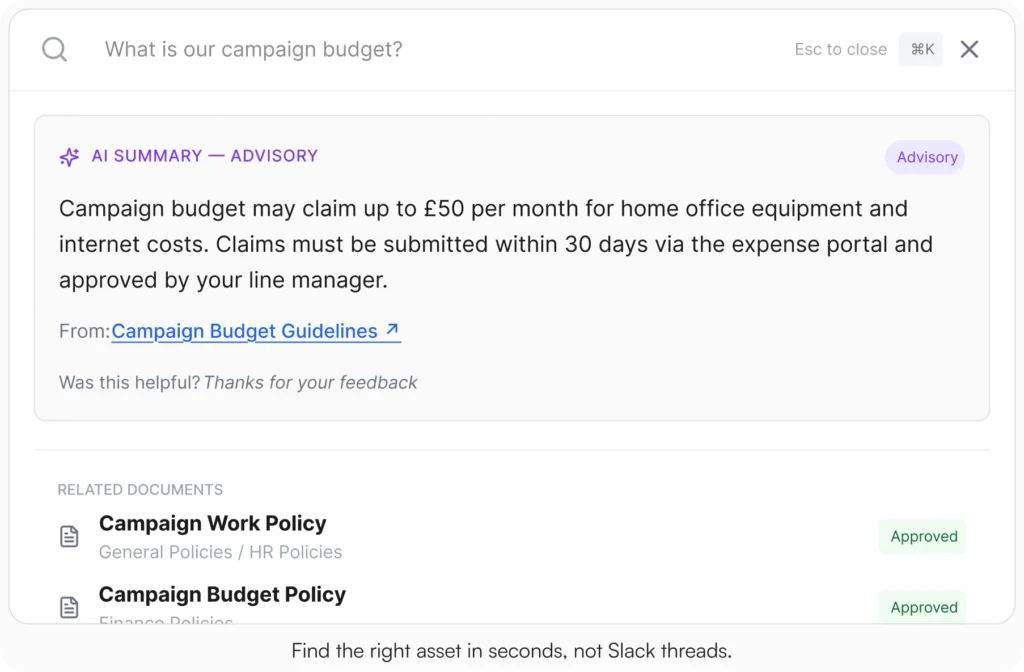
- Treat search as the primary navigation, not the folder tree
“Where is that file?” should never be a question your team asks again.
Implementing your marketing knowledge base
The implementation doesn’t have to be a big project. Start here.
Audit what’s already there
Before building anything new, find what exists. Look through shared drives, email threads, chat archives, and personal folders. You’ll be surprised how much already exists, just in fragments.
Identify the gaps
What’s only in someone’s head? What processes have never been written down? What assets are requested over and over? These are your priority items.
Pick the right platform
Whatever platform you choose, make sure it has:
- Fast search across every document
- Tag- or role-based access control
- Version history with the ability to compare versions
- A real approval workflow
- Slack or Microsoft Teams integration (because your marketing team already lives there)
- Easy inline embedding of images for things like brand guidelines
Migrate, starting with the highest-value items
Brand guidelines, messaging framework, and the campaign brief template earn the first slots. Get those right and you’ve already saved your team hours per week. Roll the rest in over the following month.
Set up governance before launch
Before launch, assign an owner to each section, set a review cadence, and define what happens when a doc goes stale. Without this, the KB is in worse shape than the Drive folders were in eighteen months..
What goes wrong (and how to avoid it)
EWhat goes wrong (and how to avoid it)
The same failure modes come up again and again:
- Adoption stalls when the KB is a side trip instead of the default workflow. Link to it everywhere. Reference it in meetings. Make it the starting point for onboarding.
- Documentation feels like a tax until people start saving time finding things. Lead with the time savings, not documentation as a virtue.
- The structure you design at month one will not survive month six. Plan one structural revision per year. That’s normal, not failure.
- Content goes stale faster than you’d think, especially campaign learnings and tool documentation. Schedule reviews, don’t rely on goodwill.
When to archive a marketing doc:
- It references an outdated campaign strategy
- No one has opened it in 90+ days
- It contradicts the current brand guidelines
- The campaign it supports has ended permanently
How AllyMatter fits
We built AllyMatter for what comes after the doc is written. Most tools (Notion, Google Docs, Confluence) are built for the creation phase, where two people draft a doc together. AllyMatter is built for the phase that matters more for marketing: making sure the brand voice doc, the campaign playbook, and the agency briefing template are findable, governed, and trusted a year from now.
A few features marketing teams use most.
Search that actually finds the doc. Type a few words and the right doc surfaces in under a second. No more sending a Slack message to ask where something lives.
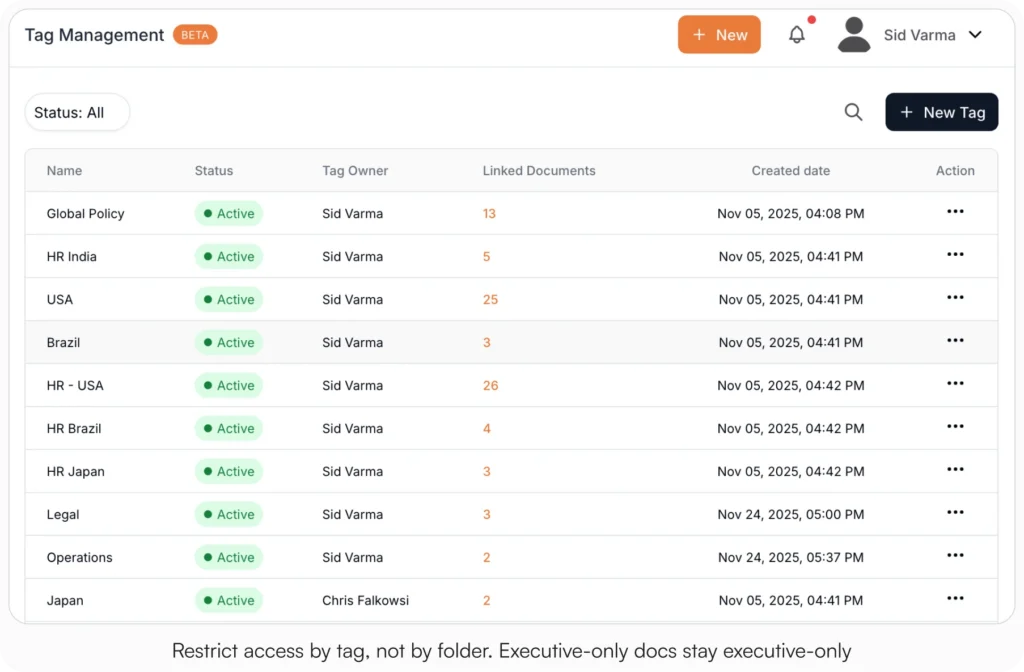
Tag-based access control. Your full brand guidelines visible to everyone in the company. Your unannounced product launch messaging visible only to people tagged on the launch team. No nested folder permissions to set up every time a doc changes hands. (Here’s how tag-based access works in detail.)
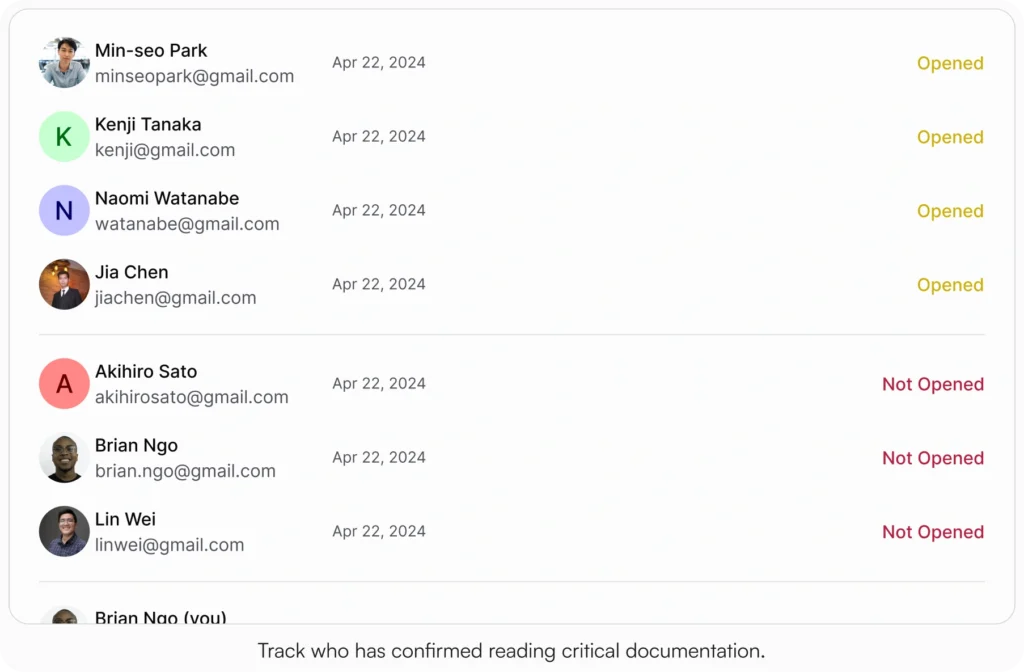
Acknowledgment tracking. When you ship a brand refresh or a new messaging framework, you can see who has read and acknowledged it, with a PDF record per person. No more wondering whether the agency actually saw the new tone guidance.
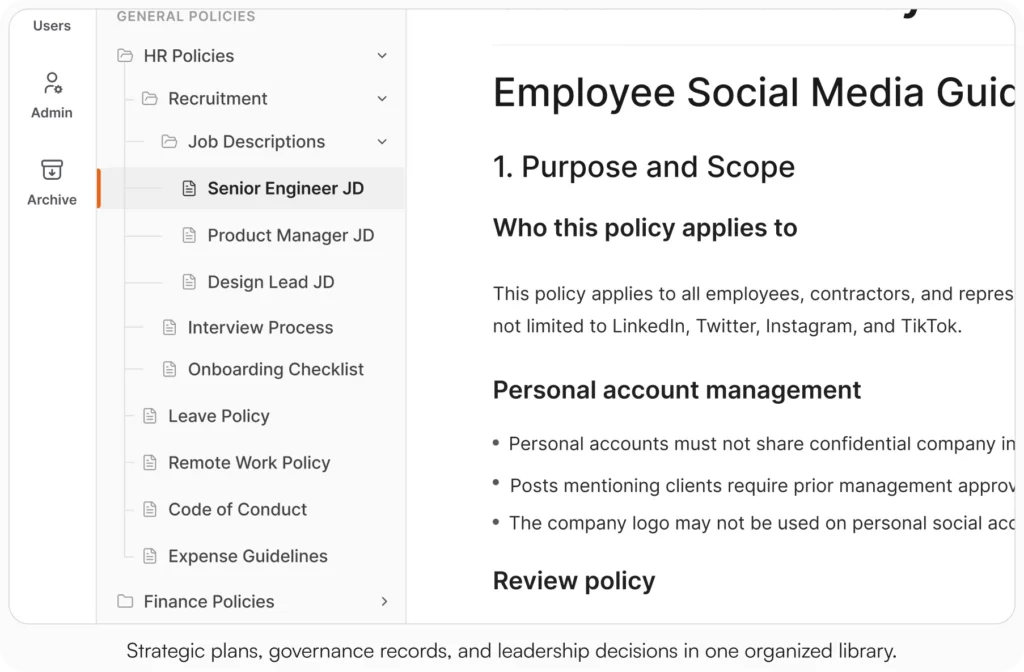
Inline images for brand guidelines. Drop logos, color swatches, type samples, and example layouts directly into the doc so the brand guidelines read the way they should, not as a wall of text that points at a separate file.
External sharing. Share a brand guidelines doc with an agency or freelancer through a link, without giving them a full seat. They get a clean read-only view without needing a seat in the platform.
Where your team already works. Native Slack and Microsoft Teams integration, so updates and reminders show up where marketers already are instead of in another tab they need to remember to open.
Version Compare. When the brand guidelines change, you can see exactly what’s different between this version and the last one. Useful when a freelancer asks “did the rules change between when we briefed this and when we delivered it?”
Start your 30-day free trial. No credit card to start, and a 30-day money-back guarantee if you convert and change your mind.
Three scenarios
An honest read on when to put a marketing KB in place:
If your marketing team is under five people inside a smaller company, you probably don’t need a dedicated KB yet. A clean Notion workspace or Drive structure with strict naming rules will hold for a while. (Our guide for solo and small marketing teams goes deeper on this.)
If your marketing team is between five and thirty inside a company that’s growing, the cracks are already showing. Brand voice drift, campaign briefs disappearing, three different people answering the same agency question. This is the moment. AllyMatter is what we built for it.
If you’re 30+ marketing people, working across regions, product lines, or a network of agency partners, a knowledge base is no longer optional. You need search, access control, governance, and acknowledgments. AllyMatter or another purpose-built KB platform makes sense here. We’d start with AllyMatter.
Start your 30-day free trial. No credit card to start, and a 30-day money-back guarantee if you convert and change your mind.
Not ready for a trial? Migration from Confluence or Notion is on us when you decide. We’ll move your existing marketing docs over and have you up and running in about a week.
Building your marketing knowledge foundation
A well-built marketing knowledge base protects brand voice from drift, shortens onboarding, keeps campaign mistakes from repeating, and holds institutional memory together as the team grows.
Start small. Get the brand voice doc, the messaging framework, and one campaign brief template in shape. Expand from there as your team starts asking, “where can I put this so it’s actually findable?”
Frequently asked questions
Can we just use our existing Notion or Google Drive instead of a dedicated knowledge base?
For a while, yes. If your marketing team is under five people and your docs are mostly informal, a tidy Notion workspace or Drive folder works. You start running into trouble once you have a brand voice that needs to be enforced across multiple contributors, campaign briefs that need formal approval, or onboarding documentation that has to survive employee turnover. That’s when a purpose-built KB starts paying for itself.
What’s the difference between a marketing knowledge base and a digital asset manager?
A digital asset manager (DAM) stores binary files: logos, raw photography, videos, ad creative. A marketing knowledge base stores the written knowledge that explains how to use those assets and how the team works. Brand voice guidelines, messaging frameworks, campaign briefs, playbooks, SOPs. Most marketing teams need both. The KB tells you what to do, the DAM holds the files you do it with.
What’s the most important section to build first?
Brand voice and core messaging. These two documents inform every other piece of marketing work, and the consistency they create shows up immediately in everything the team ships next.
How often should we update the marketing knowledge base?
Brand and messaging foundations get a full review every quarter. Campaign documentation gets updated when each campaign closes out. Process docs get updated whenever the underlying process actually changes. Don’t try to schedule everything. Make updates part of the workflow that changes the thing.
Related reading
- Internal Knowledge Base Maturity: A Strategic Framework for Growing Companies
- Internal Knowledge Base 101
- Top 10 Internal Knowledge Base Use Cases for Marketing Teams

Founder of AllyMatter I’m founder of AllyMatter, an operations-first knowledge base for growing companies. Before AllyMatter, I co-founded Syren Cloud and helped scale it into a 300-person organization across two countries, leading marketing, operations, and HR. We moved fast, served demanding customers, and learned the hard way that internal knowledge systems built for help docs or IT don’t solve day-to-day operations. AllyMatter is my answer—tools that turn tribal knowledge into trusted, searchable processes. This blog shares the playbooks, checklists, and lessons I wish I’d had while scaling.